
Client Onboarding Software
Give every client the same professional first impression. Every time.
CheckFlow gives agencies and professional services teams a structured, automated way to onboard every new client, with tasks auto-assigned to the right person, completed in the right order, and tracked in real time in one live list.
From sales handoff and contract collection through kickoff, account setup and the 30-day check-in, nothing falls through the cracks, and no client ever wonders what happens next.
14-day free trialNo credit cardUnlimited free guests
Last updated
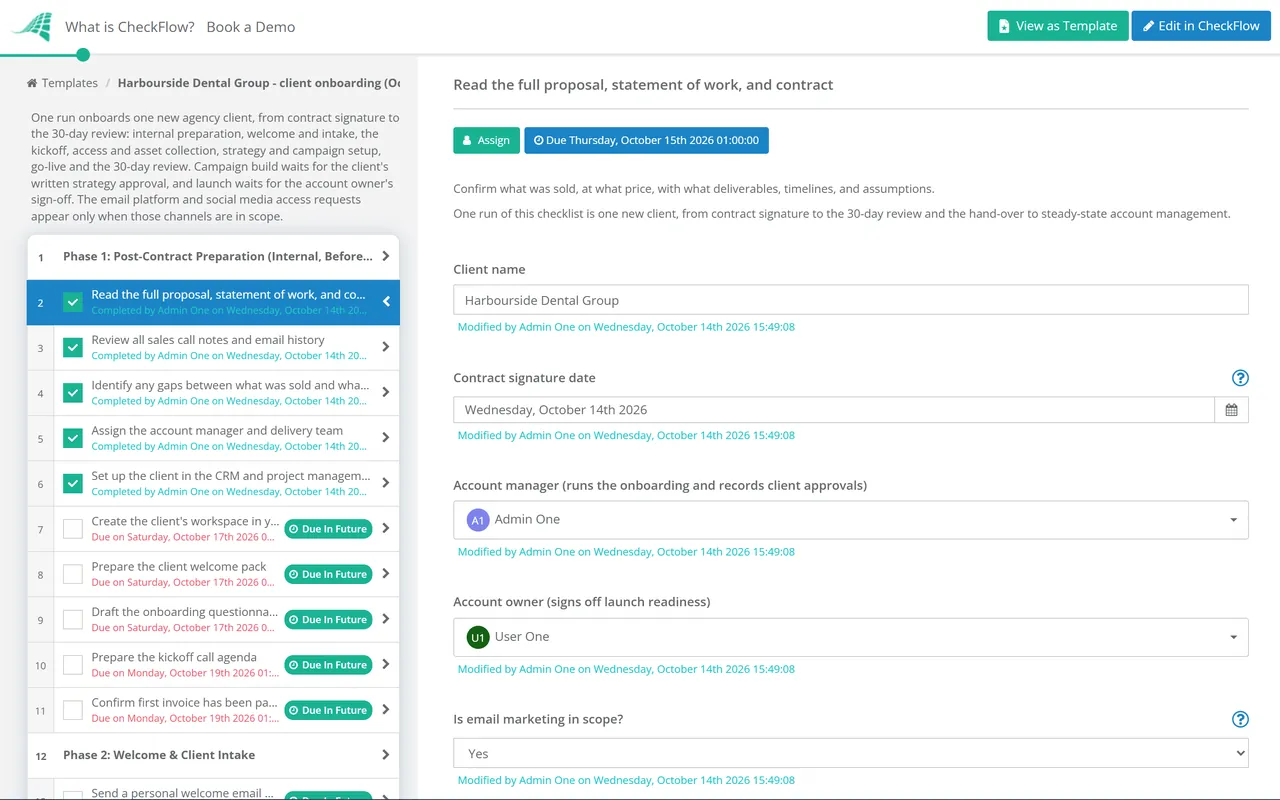
Client onboarding software runs the steps between a signed contract and a delivering account as one repeatable checklist. In CheckFlow you build the onboarding once; each new client gets a checklist with every task assigned, deadlines counted from the contract date and reminders sent. Clients complete their own steps by link, without an account, and your team sees where every client stands.
Sound familiar?
Poor client onboarding costs you clients. A chaotic first few weeks is when a new client starts to doubt the decision they just made. Without a proper system, the same problems come up again and again.
No consistency between clients
The second client gets a worse experience than the first because by then the process is being done from memory. Each account manager handles it differently. There’s no standard.
Endless email chasing
You’re emailing clients for assets. They’re emailing back asking what they need to send. You’re chasing signatures. Nobody knows the current status because it’s all buried in a thread.
Projects start late
Access credentials arrive in week two. The brief isn’t complete. The contract wasn’t signed until three days after it was sent. Work that should have started on day one doesn’t start until day eight.
No visibility for the team
Your team doesn’t know which onboarding steps have been completed, what’s outstanding, or where a client is stuck. Every status update requires someone to check by hand, or ask the client.
Steps get skipped
The intake form was never collected. The kickoff agenda wasn’t sent. The 30-day check-in was forgotten. With no system enforcing the process, individual steps quietly fall through the cracks.
Clients are left in the dark
Clients have no idea what happens next after they sign. They don’t know what’s needed from them, when to expect progress, or who to contact. Silence breeds anxiety, and cancellations.
How CheckFlow works for client onboarding
Three steps. Repeatable for every client.
Build your client onboarding template once
Use the drag-and-drop template designer to map your complete client onboarding process. Define every task, assign internal owners (account manager, operations, finance, delivery lead), set dynamic due dates relative to the contract date, and use conditional logic to show different steps for different client types or service tiers.
Run it for every new client
When a new client signs, start a checklist from your template in seconds. Enter the client name, start date and service type, and CheckFlow assigns every task to the right team member with the correct due date and notifies them straight away. No manual delegation. No missed assignments.
Track everything in real time
The Reports Grid shows the live status of every active client onboarding at a glance. See what’s completed, what’s overdue and where clients are stuck, without sending a single status-check email. Share a link so clients can see their own progress. Every checklist keeps a full activity feed.
Built for the complexity of client onboarding
Client onboarding isn’t a single person’s job. It spans your account team, operations, finance and delivery, and it involves the client themselves. CheckFlow is designed for exactly this kind of multi-team, multi-step process with an external stakeholder in the loop.
Client view
Give clients a window into their own onboarding
Share a secure checklist link directly with your client so they can see exactly where their onboarding stands, what’s been completed and what’s still outstanding, without needing a CheckFlow account. Clients stop asking “where are we up to?” because the answer is always right there.
Clients can complete their own steps on the same link (submitting intake responses, confirming approvals, giving sign-off) from any device. Tasks assigned exclusively to your team stay off the shared page.
- Protect the link with a password or an expiry date
- Show your logo on your own CheckFlow subdomain
Timing
Dynamic due dates that adjust to the start date
Set deadlines relative to the contract date: “2 days after signing”, “day one”, “end of first week”. Enter the date when the checklist starts and every deadline is worked out from it. Deadlines can also follow a date field in the checklist, the completion of another task, a parameter, or a calendar position such as “next Monday” or “the first day of next month”. Automatic email reminders go out before and after each deadline, so nothing slips without someone noticing.
Auto-assign tasks to the right team member
Define in your template who owns each step: account management collects the brief, finance sends the invoice, delivery provisions the account. When a checklist runs, every person is notified of their specific tasks. No manual coordination required.
Learn moreEnforce the order tasks must happen
Use halt tasks to stop steps being completed out of sequence. Access credentials can’t be set up until the contract is signed. The kickoff can’t be scheduled until the intake form is returned. Enforced order prevents gaps before they happen.
Learn moreCollect information from clients without friction
Clients complete their tasks on a secure link, with no account and no login: intake responses, approvals and sign-off, from any device. Prefer to assign them tasks directly? Add them as a free Guest. A custom notification can email the client a reminder when their step is due, so your team doesn’t have to chase.
Learn moreAdapt the process for different clients automatically
Use conditional logic to show or hide tasks based on the client type, service tier or any answer you collect. An enterprise client triggers a full 30-day onboarding sequence; a starter client gets a 5-day fast-track version. One template handles all variations, with no duplicate checklists to maintain.
Learn more
Ready-to-use client onboarding templates
Don’t start from a blank page. Pick a proven client onboarding template, customise it to your service and team, and run it for your next client in minutes. Each one is fully editable in the CheckFlow template designer.
SaaS Customer Onboarding Checklist

Marketing Agency Client Onboarding Checklist

Financial Planner Client Onboarding Checklist
Real Estate Client Onboarding Checklist
Simple Customer Onboarding Checklist
Customer Success Strategy Checklist
Onboarding starts before the kickoff call and ends when the customer leaves. The sales to customer success handoff checklist makes sure nothing promised in the deal is lost, the enterprise customer implementation checklist runs the security review, integrations and go-live for large accounts, and the customer offboarding checklist closes a cancelled account cleanly.
What your client onboarding checklist should cover
A complete client onboarding process spans four phases. Here’s what to include in each, and what gets skipped when there’s no system.
01Sales handoff & setup
- Schedule and complete sales-to-delivery handoff meeting
- Transfer client goals, pain points, verbal commitments and red flags
- Add client to CRM and billing system
- Create internal project workspace with task structure
- Prepare intake questionnaire and welcome email
- Confirm billing details and invoice schedule
- Assign dedicated account lead or CSM
02Discovery & intake
- Send client welcome email with next steps and what to expect
- Send intake questionnaire (brand guidelines, access credentials, key contacts, goals)
- Collect signed contract / MSA / SOW
- Collect NDA if required
- Schedule kickoff call and send the agenda 24 hours in advance
- Collect brand assets (logo, fonts, tone of voice, existing creative)
- Gain access to required accounts (ad platforms, analytics, CRM, social media)
03Kickoff & account setup
- Hold kickoff meeting: introductions, scope recap, timeline, communication cadence
- Agree on KPIs and how they will be measured
- Confirm all outstanding assets and access received
- Set up client in delivery systems (analytics dashboards, approval workflows, reporting tools)
- Send kickoff summary and agreed action plan within 24 hours
- Deliver a first-value moment within 10–14 days of contract signing (audit, draft, strategy doc)
04First 30 days
- Maintain agreed communication cadence: do not go silent after kickoff
- Deliver first scheduled report or review at end of week one
- Flag blockers or delays before the client notices them
- Hold a dedicated 30-day relationship check (not buried in a status call)
- Ask: Is the communication working? Any gaps vs. expectations? Any friction?
- Collect satisfaction score or NPS
- Act visibly on feedback received
- Mark onboarding complete and archive for audit trail
CheckFlow’s free client onboarding templates cover all of the above, ready to customise and run in minutes.
Some firms need more before the work starts. The consulting client onboarding checklist adds engagement acceptance, the statement of work and supplier set-up at the client, and the accounting firm client onboarding checklist adds AML checks, the engagement letter and the handover from the previous accountant. When a client leaves, the client offboarding checklist hands back what they own and closes the account cleanly.
Ask your AI assistant what each client still owes you.
CheckFlow works with any AI assistant. Connect it once and your account team can check every client onboarding without opening each checklist.
Ask your AI assistant
Through the CheckFlow MCP server, Claude, ChatGPT, Gemini, Grok, Copilot or any other AI assistant can start a client onboarding checklist, read what the client has filled in or uploaded, and list the steps that are overdue.
Read the MCP guideDraft the template from a sentence
Describe how you onboard a client in a sentence and the free AI checklist generator drafts the template, with phases, fields and due dates in place.
Try the AI generatorConnect your other systems
Start a client onboarding checklist when a deal is marked won in your CRM, through Zapier or the REST API, and email the client the share link.
Developer overview
Has Brightline Studio sent their brand assets yet?
checklist: "Client Onboarding – Brightline Studio"
sort:      "occurredAt:desc"
Yes. Anonymous User uploaded brand-guidelines.pdf to “Collect brand assets” at 10:21 today, through the shared link. Access to the ad accounts is still outstanding.
Used by great companies









I use their Zapier app to automate with Zoho. I’ve probably saved 5+ hours of my time every week using Checkflow.
Frequently asked questions
What is client onboarding software?
Client onboarding software is a tool that turns your client onboarding process into a structured, trackable, repeatable checklist. Instead of managing onboarding through email threads and shared documents, the software assigns tasks to the right internal team members, sends automatic reminders, enforces the correct order of completion, and gives you real-time visibility into where every client stands.
CheckFlow is designed for this use case. Agencies and professional services teams build a template once and run it consistently for every new client, with automatic task assignments, dynamic due dates and a full audit trail.
How is CheckFlow different from a CRM or project management tool?
CRMs manage relationships and pipeline; they’re not designed to run structured, repeatable operational processes. Project management tools like Asana, Monday or ClickUp are built for projects, and take configuration before they run the same fixed sequence, with the same owners and relative deadlines, for every client. CheckFlow is purpose-built for process execution: you define your client onboarding workflow once, and it runs the same way for every new client, with tasks assigned to named people, deadlines calculated from the contract date and reminders sent without any manual work.
Can clients complete tasks and submit information without a CheckFlow account?
Yes. You can share a secure checklist link directly with your client so they can complete their tasks (submitting information, confirming approvals, giving sign-off) without creating an account or logging in. This is particularly useful for collecting intake forms, signed acceptance, or any step that needs action from the client rather than your internal team. Custom notifications can email the client a reminder when their step is due or overdue.
Can I use one template for different types of clients or service tiers?
Yes. CheckFlow’s conditional logic lets you show or hide tasks based on the client type, service tier or any answer you collect when the checklist starts. An enterprise client might trigger a full 30-day high-touch onboarding sequence; a starter client might follow a 5-day fast-track version. One template handles all variations, so there’s no need to maintain separate checklists for each client segment.
Can my team see which onboarding steps are complete without asking someone?
Yes. This is one of CheckFlow’s most useful features for client onboarding. The Reports Grid gives your whole team a live view of every active client onboarding. They can see at a glance what’s been completed, what’s outstanding and whether anything is overdue, without asking the account manager. You can also set up custom notifications so key people are emailed when a specific step is completed.
Does CheckFlow work for client offboarding or contract renewals too?
Yes. CheckFlow works equally well for any structured process, including client offboarding, contract renewal workflows and regular service delivery cycles. Build a separate template for each, such as the client offboarding checklist or the monthly retainer checklist, and run them side by side in the same Reports Grid.
How much does CheckFlow cost?
CheckFlow’s Business plan is $10 per user per month, or $9 billed annually, with no minimum seat count. All features, including conditional logic, dynamic due dates, auto-assignments, client sharing via secure links, custom notifications, Zapier integration and the full REST API, are included in the Business plan. Guest users (including clients completing their own tasks) are free and unlimited. There’s a free trial with no credit card required. See the full pricing page for details.
Start running consistent client onboarding today
Free trial, no credit card required.
14-day free trial, no credit cardFull refund in your first 30 daysUS or EU hosting