
Employee Onboarding Software for IT and HR Teams
Your HR system records the hire. CheckFlow makes sure IT has their accounts ready, their laptop configured, and their first day actually works.
14-day free trialNo credit cardUnlimited free guests
Last updated
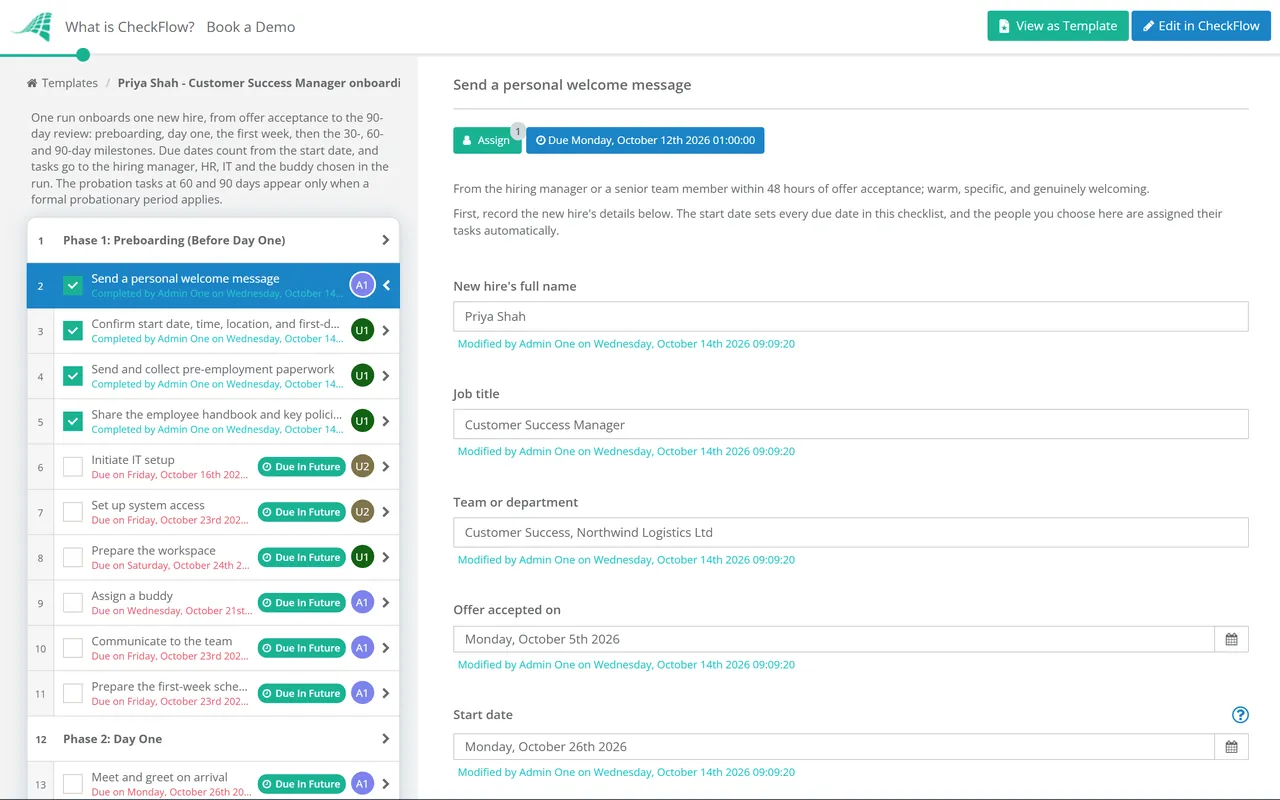
Employee onboarding software runs the onboarding workflow as one checklist that IT, HR and the hiring manager share. In CheckFlow you build the template once, with each task assigned, due dates counted from the start date and steps shown by role, department or location. Every new hire then gets the same checklist, the new hire can complete their own steps by link, and everyone sees progress live.
The Two Onboarding Processes That Matter Most
CheckFlow handles both sides of the new hire’s first days.
IT onboarding
Before a new hire arrives, IT needs to provision accounts, configure hardware, set up software access, and complete security onboarding. CheckFlow ensures every IT step is assigned, completed in the right order, and tracked, so new hires are ready to work on day one. See IT onboarding checklist software.
HR onboarding
HR’s side of onboarding (contracts, policy sign-offs, benefits setup, introductions and compliance training) runs in parallel with IT. CheckFlow coordinates both sides in one checklist, so HR and IT always know what the other has completed. The Preboarding Checklist covers HR’s steps from the accepted offer to the first morning, including the right to work and Form I-9 checks. The New Hire Payroll Setup Checklist gets the starter onto payroll before their first payday.
Client onboarding (for MSPs)
MSPs use CheckFlow to run structured client onboarding checklists, from contract signing to environment discovery, tool deployment and SLA setup. One template, run consistently for every new client, with a real-time status view across the whole portfolio. See MSP process management.
Onboarding Is a Team Effort. CheckFlow Coordinates It.
IT, HR, and the hiring manager all have steps to complete. CheckFlow assigns them, enforces the order, and tracks everything, so nobody has to chase anyone.
Automation
Tasks auto-assigned the moment a hire is confirmed
When a new hire checklist is started, CheckFlow assigns every task to the right person (IT provisions accounts, HR sends contracts, the manager sets up the desk) and notifies them straight away. No briefing required, no manual delegation, no dropped steps because someone assumed someone else was handling it.
- Assign to people or groups, or to the hiring manager picked when the checklist starts
- Only Assignees Can Complete keeps each step with its owner
Conditional logic
One template that adapts to every hire
A developer needs different system access than a finance hire. A remote worker needs different equipment steps than an office-based one. Use conditional logic to show or hide tasks based on role, department, or location: one template handles all variations without maintaining separate checklists for each scenario.
Contractors need a different start again: the Contractor Onboarding Checklist adds a classification check and access that expires on the contract end date. Some roles need a start of their own, so there are dedicated templates for new managers, interns and seasonal staff.
Reporting
A full audit trail for every new hire
Every completed task is logged with a timestamp and the name of the person who completed it. See at a glance in the Reports Grid which onboardings are on track and which have overdue steps. When something goes wrong on day one, you’ll know exactly where in the process it broke down, and who was responsible.
- Filter by template, status or assignee
- Export to CSV, Excel or PDF
Start onboarding automatically from your HR system
Connect CheckFlow to your existing HR platform via Zapier or the REST API. When a new hire is confirmed in your HRIS, an onboarding checklist starts automatically with the name, start date, and department pre-filled. IT gets notified before HR has finished the paperwork.
Learn moreHR sees what IT is doing. IT sees what HR is doing.
Checklists and the Reports Grid update in real time, giving everyone involved in onboarding a live view of progress. HR can see whether IT has provisioned accounts. The manager can see whether the new hire has completed their pre-boarding tasks. Nobody has to ask: the checklist has the answer.
Learn moreBuild your onboarding template once. Run it every time.
Use CheckFlow’s drag-and-drop designer to build your IT and HR onboarding process as a reusable template. Define every task, assign owners, set dynamic due dates relative to the start date, and configure conditional logic for different roles. Start the checklist in seconds for each new hire, consistent every time. Frontline teams can start from the restaurant, retail and warehouse onboarding templates, or the Construction Site Induction Checklist for every worker arriving on site.
Learn moreLet the new hire complete their own steps
Share a secure checklist link with the new hire so they can submit documents, read policies and confirm equipment preferences before day one, with no company email address or CheckFlow account. Tasks assigned exclusively to your team stay off their page.
Learn more
Used by IT and HR Teams to Run Consistent Onboarding
IT and HR teams use CheckFlow to manage employee onboarding and offboarding, so every new hire gets the same structured, complete experience. Here are some examples, each with a live demo.
Employee Onboarding Checklist
Preboarding Checklist
Software Developer Onboarding Checklist
New Manager Onboarding Checklist
Contractor Onboarding Checklist
Simple Employee Onboarding Checklist
Onboarding in clinical and research settings has extra steps before someone works unsupervised. The new nurse onboarding checklist adds unit orientation, competency validation and a manager’s sign-off for independent practice, and the researcher and lab onboarding checklist adds safety induction, hazard training and protocol approvals.
Ask your AI assistant where every new hire stands.
CheckFlow works with any AI assistant. Connect it once and it reads and works your onboarding checklists with the same permissions as the person whose API key it holds.
Ask your AI assistant
Through the CheckFlow MCP server, Claude, ChatGPT, Gemini, Grok, Copilot or any other AI assistant can start an onboarding checklist for a new hire, list who still has open tasks, and complete or reassign a task.
Read the MCP guideDraft the template from a sentence
Describe your onboarding in a sentence and the free AI checklist generator drafts the template, with phases, fields and due dates in place.
Try the AI generatorConnect your other systems
Start an onboarding checklist from your HRIS through the REST API or Zapier, and get a webhook when a task is completed.
Developer overview
Start onboarding for Ana Ruiz. She starts on Monday 16 November and reports to Dana K.
template:       "Employee Onboarding"
name:           "Employee Onboarding – Ana Ruiz"
Start date:     "2026-11-16"
Hiring manager: "Dana K."
Done. “Employee Onboarding – Ana Ruiz” is running. IT, HR and Dana have their tasks, with due dates counted from 16 November.
Used by great companies









I was able to understand the concept in few minutes and then try most of the options in matter of few hours. Next day I started to implement first process templates.
Onboarding guides & resources
- Employee onboarding checklist templateEvery phase from offer to day 90
- 90-day onboarding planStructuring the 30/60/90 milestones
- Remote employee onboarding checklistWhat changes when nobody is in the office
- MSP technician onboarding checklistTool access, shadowing and a ticket ladder for new technicians
- HR offboarding checklistClosing the employee lifecycle properly
- Onboarding vs offboardingWhat IT and HR each own
For the technical side of a new starter, see IT onboarding checklist software.
Frequently asked questions
How is CheckFlow different from an HRIS or ATS?
HR information systems (HRIS) and applicant tracking systems (ATS) record employee data and manage the employment lifecycle. CheckFlow manages the onboarding process: the structured checklist of tasks that IT, HR, and the hiring manager need to complete when a new hire joins. The two tools work alongside each other: your HRIS confirms the hire, and CheckFlow makes sure the laptop is ready, the accounts are provisioned, and the security training is booked before they walk in the door.
Can CheckFlow coordinate tasks across IT, HR, and the manager simultaneously?
Yes, this is one of CheckFlow’s core strengths for employee onboarding. When a checklist starts, tasks are automatically assigned to the right team or individual and each person is notified immediately. IT handles provisioning tasks, HR handles paperwork and compliance, the manager handles introductions and equipment, all visible in one shared checklist and the Reports Grid, without anyone needing to coordinate manually.
Can the new hire complete tasks before their first day?
Yes. CheckFlow lets you share a secure checklist link directly with the new hire so they can complete pre-boarding tasks (submitting documents, reading policies, confirming equipment preferences) without needing a company email address or a CheckFlow account. Everything they submit is captured in the checklist and visible to HR and IT in real time. People on a shared link are free.
Can I use one onboarding template for different roles or departments?
Yes. CheckFlow’s conditional logic lets you show or hide tasks based on the hire’s role, department, location, or any other answer you collect. One template covers all variations: a developer hire shows different access provisioning steps than a finance hire, automatically. No need to maintain separate templates for each role.
Can CheckFlow trigger an onboarding checklist automatically from our HR system?
Yes, via Zapier or the REST API. When a new hire is confirmed in your HRIS (BambooHR, Workday, HiBob, or similar), you can start a CheckFlow onboarding checklist automatically with the relevant details pre-filled. IT gets notified before HR has finished the paperwork.
Does CheckFlow work for client onboarding as well as employee onboarding?
Yes. Teams such as MSPs and agencies use the same platform to manage client onboarding alongside employee onboarding. The template structure, auto-assignment, and real-time Reports Grid work equally well for both use cases.
How much does CheckFlow cost?
CheckFlow’s Business plan is $10 per user per month, or $9 billed annually, with no minimum seat count. All features are included: conditional logic, dynamic due dates, auto-assignments, custom notifications, secure sharing for external users, Zapier integration, and the REST API. Free trial, no credit card required. Full details at checkflow.io/pricing.
Start running consistent employee onboarding today
Free trial, no credit card required.
14-day free trial, no credit cardFull refund in your first 30 daysUS or EU hosting