
Change Management Checklist Software
Most outages trace back to a process that wasn’t followed. Run every change from a checklist.
Uptime Institute’s 2022 outage analysis found that 85% of outages caused by human error stem from staff failing to follow procedures, or from flaws in the procedures themselves. A missed rollback plan, a change applied without CAB approval, a post-implementation review that never happened. The change was known. The process just wasn’t followed.
CheckFlow gives every IT change a structured, pre-built checklist: RFC documentation before it starts, risk assessment and rollback plan required before approval, step-by-step implementation checklist during execution, and a mandatory post-implementation review when it’s done. Every step timestamped, every approver named, every change documented, for SOX audit trails, ISO 27001 Annex A controls, and DORA requirements.
14-day free trialNo credit cardUnlimited free guests
Last updated
Change management checklist software runs every IT change through the same steps. In CheckFlow each change type (standard, normal, emergency) is a template: RFC, risk assessment and rollback plan first, a CAB or approver sign-off that halts implementation until it is given, a sequenced implementation with go/no-go points, then a post-implementation review. Every step is recorded with who did it and when, for SOX, ISO 27001 and DORA.
Sound Familiar?
Most change-related outages don’t happen because the engineer didn’t know how to make the change. They happen because one step was skipped, one assumption wasn’t verified, one approval was bypassed “just this once.” The rollback plan wasn’t written down. The testing environment wasn’t equivalent to production. The post-implementation review got skipped because the change “went fine.” The record says it was approved. It doesn’t say when, or by whom. These aren’t competence failures. They’re process failures, and they’re preventable.
No rollback plan at 2am
The change started at midnight. An hour in, something isn’t right. The engineer starts improvising a rollback. The plan existed in someone’s head, or didn’t exist at all. Requiring a documented rollback plan before a change is approved, not during the incident, is one of the single highest-value steps in any change management process.
CAB approval bypassed “just this once”
The change looked low-risk. The CAB wasn’t meeting until next week. The business needed it done today. So it happened without approval. The change went fine, this time. The problem is that “it looks low-risk” is exactly what engineers say about the changes that cause outages. Enforcement requires a system, not trust.
Post-implementation reviews don’t happen
The change went live. It worked. The ticket was closed. Nobody reviewed whether the documentation needed updating, whether monitoring was correct, whether the CMDB reflected the new state. Six months later the same change is applied in a different context and fails, because the lessons from the first time were never captured.
Different engineers follow different procedures
Senior engineers do thorough pre-implementation reviews. Junior engineers follow whatever they saw someone else do. Emergency changes skip all documentation. The process exists in a wiki page nobody reads. Consistent execution requires a checklist that runs for every change, regardless of who’s doing it.
Half the organisation isn’t ready for the organisational change
The system goes live on Monday. Half the managers weren’t briefed. Training wasn’t confirmed completed before go-live. Adoption support wasn’t in place. The technology worked. The change management failed. Sustainable adoption requires the same structured process discipline on the people side as on the technical side.
No audit trail for SOX, ISO 27001, or DORA
SOX auditors test change management as an IT general control over financial systems, and expect approval evidence for every change in the audit period. ISO 27001 Annex A 8.32 requires changes to be subject to change management procedures, with records to show it. DORA requires evidence of change risk assessment and approval for ICT systems. “We have a change management process” isn’t evidence. Timestamped, named records are.
How CheckFlow Works for Change Management
One checklist per change type. Pre-implementation, implementation, and post-implementation, all documented automatically.
Build your change management checklist template
Define the steps for each change type: standard, major, emergency. Pre-implementation: RFC documentation, risk assessment, rollback plan, CAB review, notifications. Implementation: step-by-step execution with go/no-go checkpoints. Post-implementation: service verification, incident monitoring, CMDB update, PIR. Build once; run for every change.
Run the checklist for each change
When a change is proposed, start the checklist. Halt tasks make sure each pre-implementation step is completed before implementation can begin, including the rollback plan and approvals. During implementation, the engineer works through the sequenced steps. Every completed step is timestamped. Custom notifications escalate a step that runs overdue. The change proceeds by procedure, not by memory.
Get the audit trail and the PIR automatically
When the change is complete, the record is already there: who proposed it, who approved it, when each step was completed, and the post-implementation review. SOX, ISO 27001, and DORA audit evidence is generated as a natural output of running the process correctly. No retrospective documentation. No scrambling before the audit.
Built for IT Change Management That Needs to Be Auditable
CheckFlow isn’t an ITSM platform. It doesn’t replace ServiceNow or Jira Service Management. It’s the structured checklist execution layer for teams that need disciplined, documented change management without the complexity and cost of enterprise ITSM. Build your change checklists in CheckFlow, run them alongside your existing incident and ticketing tools, and keep a timestamped record for every change that touches your infrastructure.
Before the change
Pre-implementation change checklist
Before any change touches production: RFC documented (change description, scope, affected systems, business justification), risk assessment completed (probability, impact, blast radius), rollback plan written and reviewed, implementation steps documented in full, CAB or approver sign-off obtained, change window confirmed with operations, pre-implementation checks completed. Every step required. Every step timestamped.
- The approval step can be completed only by its assignees, with a required Approved / Not approved answer
- A halt keeps implementation locked until approval is given
Evidence
Audit trail for SOX, ISO 27001, and DORA
Every change run in CheckFlow produces a timestamped record: who proposed the change, who approved it, when each implementation step was completed, and the post-implementation review outcome. SOX auditors expect approval evidence for every change to financial systems in the audit period. ISO 27001 Annex A 8.32 requires change management procedures and records. DORA requires evidence of ICT change risk assessment and approval. CheckFlow generates this evidence as the natural output of following the process.
- Print any change record, or save it as a PDF
- Export the Reports Grid to CSV, Excel or PDF
Step-by-step implementation checklist
The implementation checklist is the engineer’s guide during the change window: each step in sequence, communication checkpoints built in, go/no-go decision points before proceeding, rollback trigger condition defined. Engineers don’t work from memory: they work through the checklist. Steps are completed in order. Deviations are documented in real time, not reconstructed afterward.
Learn morePost-implementation review (PIR)
The PIR doesn’t get skipped because CheckFlow requires it as the final step: service verification completed, monitoring confirmed normal, CMDB updated to reflect the change, any incidents or anomalies during the window documented, lessons learned captured, record archived. Every change has an end state, not just a start state. The PIR is the documentation your SOX auditor, your ISO 27001 auditor, and your DORA supervisor will ask for.
Learn moreEmergency change procedure
Emergencies require faster execution, but faster doesn’t mean undocumented. CheckFlow’s emergency change checklist captures the minimal but essential steps: the problem justifying emergency action, verbal approval obtained from the CAB chair or on-call manager, the change made, the service confirmed restored, and a retrospective review scheduled within 24 hours. Faster than the standard process, still documented, still auditable.
Learn moreOrganisational change readiness checklist
For software deployments, process changes, and business transformation programmes: stakeholder mapping completed, executive sponsor confirmed, manager briefing delivered, training completed for all affected staff, helpdesk briefed and ready, go-live readiness confirmed by each team lead, post-go-live hypercare schedule in place, 30-day adoption check scheduled. The technical change is only half the work. The people side needs the same structured discipline.
Learn more
Ready-to-Use IT Change Templates
Don’t start from a blank page. Pick a proven IT change management template, customise it to your environment, change types, and approval process, and run it for your next change in minutes. Each one is fully editable in the CheckFlow template designer.
IT Change Management Process Checklist
IT Incident Management Process Checklist
Disaster Recovery Audit Checklist
Problem Management Checklist
Incident Postmortem Template: Blameless Post-Incident Review
Server Decommissioning Checklist
New Software Implementation Checklist
Operating System Upgrade Rollout Checklist
Patch Management Checklist
Network Upgrade & Cutover Checklist
DNS Change & Domain Renewal Checklist
Production Deployment & Rollback Checklist
Replacing a finance system? The ERP & accounting software implementation checklist runs the data migration, the go/no-go and the first close as one controlled change.
Moving workloads, networks or code? The cloud migration, network upgrade and cutover and production deployment and rollback checklists put a go/no-go approval and a time-boxed rollback in front of every cutover.
Moving a single database? The database migration checklist adds a timed rehearsal, row-count and checksum validation and a rollback trigger to the same change.
What Your Change Management Checklists Should Cover
The four phases of a complete IT change management process, and the steps that get skipped when speed beats process.
01Pre-Implementation
- RFC (Request for Change) documented: change description, scope, affected systems and services, business justification, proposed change window
- Risk assessment completed: probability of failure, impact if it fails, blast radius, dependency map
- Rollback plan written and reviewed: specific steps to undo the change, rollback trigger conditions defined, rollback time estimated
- Implementation steps documented: step-by-step, in sequence, with expected outcomes at each step
- Testing completed: change tested in non-production environment equivalent to production
- CAB review completed (for major and significant standard changes): change presented, questions addressed, approval obtained
- Stakeholder notifications sent: operations team, helpdesk, business stakeholders affected by any service window
- Pre-implementation checks completed: backups verified current, monitoring baselines captured, on-call resource confirmed available during change window
02Implementation
- Change window start confirmed and logged
- Pre-implementation checklist confirmed complete before first implementation step begins
- Step 1 of implementation plan executed: outcome confirmed before proceeding to Step 2
- Each step executed in sequence: deviations from plan documented in real time if they occur
- Go/no-go checkpoint reached: continue if service health checks pass; initiate rollback if trigger condition is met
- Rollback executed if triggered: documented in real time, rollback completion confirmed
- Change window end logged
- Immediate post-change health check: critical services confirmed operational, no alerts firing
- Stakeholders notified of completion or rollback outcome
03Post-Implementation
- 1-hour service health verification: all affected services confirmed stable
- 24-hour monitoring review: no anomalous incidents or alerts in the period following the change
- CMDB (Configuration Management Database) updated to reflect the new state
- Documentation updated: runbooks, architecture diagrams, operational procedures updated if changed
- Any incidents or anomalies during or after the change window documented and linked to the change record
- Post-Implementation Review (PIR) completed: what worked, what didn’t, what to do differently next time
- Lessons learned captured and shared with the team
- Change record archived with all steps completed and all attachments filed
- SOX, ISO 27001, or DORA audit trail confirmed complete and stored
04Org Change
- Stakeholder analysis completed: roles affected, resistance anticipated, champions identified
- Executive sponsor confirmed and briefed: business case understood, communication plan approved
- Manager briefing completed: all people managers briefed before their teams are informed
- Training completed for all affected staff: completion tracked per person before go-live gate
- Helpdesk briefed and equipped: scripts updated, FAQ prepared, escalation path defined
- Go-live readiness confirmed: each team lead signs off that their team is ready
- Day-one hypercare in place: support resource available, escalation path shortened, check-in calls scheduled
- 30-day adoption check: usage metrics reviewed, adoption barriers identified, additional support deployed if needed
CheckFlow’s free change management templates cover IT pre-implementation, implementation, post-implementation, and organisational change, ready to run for your next deployment in minutes.
Raise the change from your AI assistant.
CheckFlow works with any AI assistant. Connect it once and it reads and works your change checklists with the same permissions as the person whose API key it holds.
Ask your AI assistant
Through the CheckFlow MCP server, Claude, ChatGPT, Gemini, Grok, Copilot or any other AI assistant can start a change checklist with the system and change window filled in, list the approvals still waiting, and read a change’s activity for the audit file.
Read the MCP guideDraft the template from a sentence
Paste your change procedure or describe it in a sentence and the free AI checklist generator drafts the template, with phases, fields and due dates in place.
Try the AI generatorConnect your other systems
Start a change checklist when a change ticket is approved in your ITSM tool, through Zapier or the REST API, and send a webhook back when the PIR is complete.
Developer overview
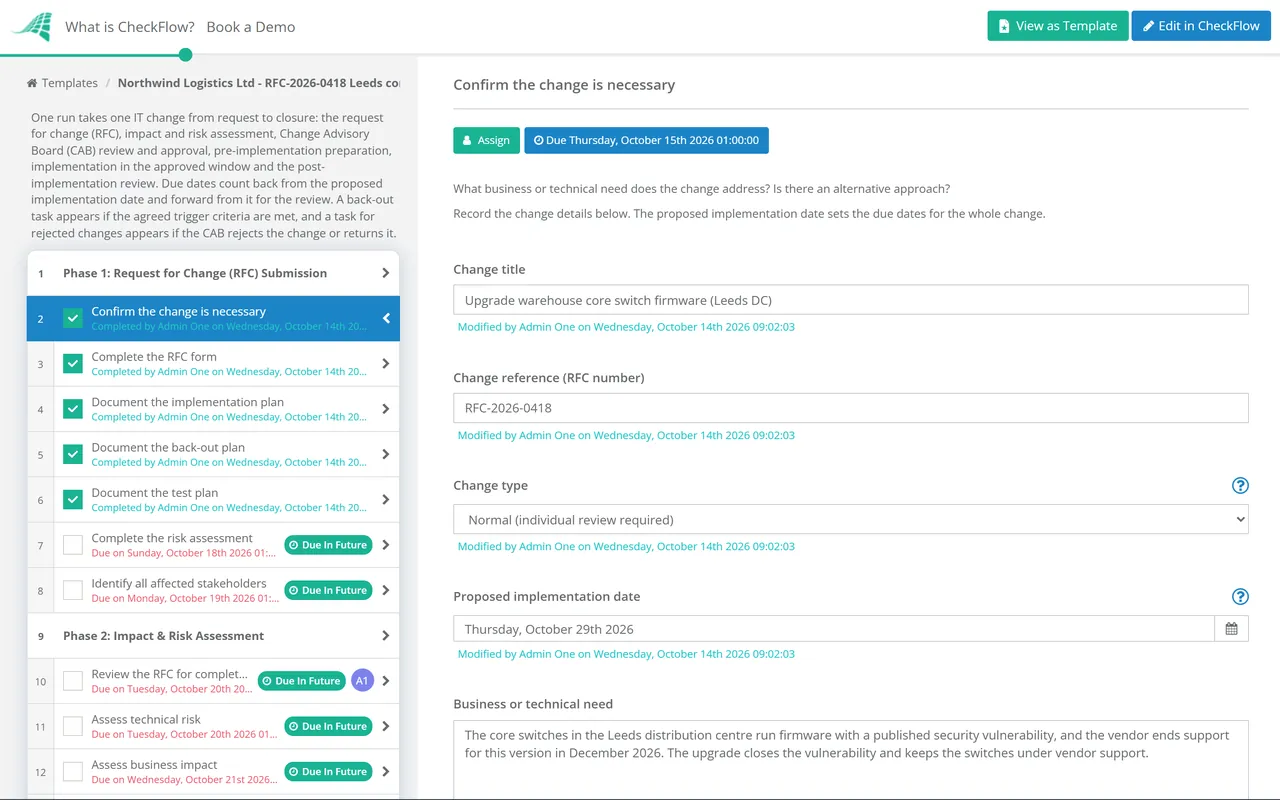
Raise a normal change for the core switch firmware update, window Saturday 22:00.
template:      "IT Change Management"
name:          "Normal Change – Core switch firmware"
Change window: "2026-11-14 22:00"
Change type:   "Normal"
Done. The change checklist is running. The RFC, risk assessment and rollback plan are with you, and the CAB approval step will lock implementation until it is given.
Used by great companies









Easy and intuitive creation of parameterized, rule-based workflows. It can be used across the company to automate any process.
Frequently asked questions
How is CheckFlow different from ServiceNow or Jira Service Management?
ServiceNow and Jira Service Management are ITSM platforms: they manage the full IT service management lifecycle including incident management, problem management, change management, and asset management, and they are priced and configured for that breadth. CheckFlow is the structured checklist execution layer for teams that need disciplined change management documentation without the complexity of an enterprise ITSM platform. Teams can use CheckFlow alongside an existing ITSM tool: the ITSM tracks the change ticket; CheckFlow runs the structured pre-implementation, implementation, and post-implementation checklist and creates the audit record.
Does CheckFlow cover both IT change management and organisational change management?
Yes. IT change management (managing changes to infrastructure, software, and services) and organisational change management (managing the people side of technology or process adoption) are different disciplines but both benefit from structured checklists. CheckFlow is used for both. IT teams use it for RFC documentation, CAB approval tracking, implementation checklists, and post-implementation reviews. Operations and HR teams use it for organisational change readiness checklists, training completion tracking, manager briefing gates, and go-live readiness sign-offs.
How does CheckFlow create the SOX audit trail for IT change management?
Under SOX Section 404, auditors test change management as an IT general control over financial systems, and expect evidence that every change went through formal controls: request, risk assessment, approval and documentation. Every change managed in CheckFlow creates a timestamped, named record: who submitted the RFC, who approved it at CAB, when each implementation step was completed, and the post-implementation review. The complete change record is stored, can be printed or saved as a PDF, appears in the Reports Grid (filter by template, status or assignee), and can be found through the API and MCP server by the values filled in on it, such as the system or the approver. This is the audit evidence SOX auditors ask for, generated as the natural output of following the process, not reconstructed after the fact.
Can I build different checklists for standard, major, and emergency changes?
Yes. ITIL distinguishes standard changes (pre-authorised, low-risk, routine), normal changes (assessed and authorised before they go ahead, with the major ones going to a full CAB review), and emergency changes (urgent, requiring streamlined but documented approval). CheckFlow lets you build separate templates for each category. Standard changes get a lighter pre-implementation checklist with a single approver. Major changes get the full CAB review and documentation workflow. Emergency changes get a minimal but documented approval and a mandatory retrospective within 24 hours. Each change uses the appropriate template; all produce a complete audit record.
Does CheckFlow integrate with our ITSM or ticketing system?
CheckFlow doesn’t have native integrations with ServiceNow, Jira, or Freshservice. Teams run CheckFlow in parallel with their ticketing system: the ticket tracks the change request and incident management; CheckFlow runs the structured pre-implementation checklist, the step-by-step implementation guide, and the post-implementation review. The CheckFlow record is linked to the ticket in the relevant field. To connect the two, use Zapier or the REST API to start the change checklist when a ticket is approved (if your ITSM tool has a Zapier app or webhooks), and a CheckFlow webhook to report back when the checklist completes. This gives you the structured execution discipline and audit trail of CheckFlow alongside the workflow management of your existing ITSM tool.
Can CheckFlow help with DORA (Digital Operational Resilience Act) compliance?
Yes. DORA, which has applied since 17 January 2025, requires EU financial entities to demonstrate operational resilience in their ICT change management processes: specifically, evidence of risk assessment and approval for changes to ICT systems, and documentation of the change management lifecycle. CheckFlow’s change management checklists create the RFC documentation, risk assessment, approval record, implementation log, and post-implementation review that DORA supervisors look for. The timestamped record per change supports the documentation DORA requires.
What does CheckFlow cost for an IT team running change management?
CheckFlow’s Business plan is $10 per user per month, or $9 billed annually, with no minimum seat count. Seats are counted for the engineers, managers, and approvers who work in CheckFlow to manage and execute changes. A 10-person engineering team running change management through CheckFlow pays $100 per month on monthly billing. CheckFlow is designed for the teams that need structured, auditable change management but don’t need (or can’t afford) a full ITSM platform. See the full pricing page for details.
Your next change shouldn’t be planned in someone’s head
Free trial, no credit card required. Build the change management checklists that ensure every IT change has a documented rollback plan, a confirmed approver, a step-by-step implementation guide, and a post-implementation review, with an audit trail for SOX, ISO 27001, and DORA.
14-day free trial, no credit cardFull refund in your first 30 daysUS or EU hosting