
Remote Employee Onboarding Software
Give every remote hire a first day worth staying for.
Remote onboarding usually fails not because HR didn’t care, but because there was no system coordinating the process. Laptop not shipped. Logins not ready. No one told them what to do at 9am. CheckFlow fixes this with a structured, automated onboarding process that assigns tasks to IT, HR, and the hiring manager before the new hire’s first day, and gives the new hire a clear, step-by-step plan the moment they start.
From pre-boarding to the 30-day check-in, every task is automatically assigned, every deadline is tracked, and every team member knows exactly what they need to do. Without CheckFlow needing to integrate with a single existing system.
14-day free trialNo credit cardUnlimited free guests
Last updated
Remote employee onboarding software coordinates everything a distributed new hire needs before and after day one. In CheckFlow one template assigns IT, HR and the hiring manager their tasks, with deadlines counted back from the start date, while the new hire completes their own steps on a secure link with no account. Everyone sees progress live, across time zones, from pre-boarding to the 30-day check-in.
Sound Familiar?
Remote onboarding fails differently from in-person onboarding. There’s no colleague to notice the new hire is sitting at home with nothing to do. No one sees that the laptop hasn’t arrived. No manager walks past to introduce them. The same problems come up again and again, not because of carelessness, but because the process depends on memory and email instead of a system.
The laptop doesn’t arrive until week two
IT wasn’t notified until the day before the start date. Nobody confirmed the shipping address. The device arrived without being configured. The new hire’s first week is spent waiting.
Instructions scattered across a dozen messages
The welcome email. The Slack DM with the login links. The Google Drive folder with the handbook. The IT ticket to request access. The calendar invite that didn’t include a dial-in link. Information scattered everywhere makes onboarding confusing.
No one knows which tasks are complete
Did IT set up the accounts? Did HR collect the tax forms? Did the hiring manager schedule the first 1:1? Without one shared, live view, every status update requires someone to ask someone else, which doesn’t work across time zones.
Pre-boarding gets left to the last minute
When pre-boarding doesn’t happen, Day 1 is chaos instead of a structured welcome, and the new hire arrives with no equipment, no accounts, and no schedule.
The new hire has to create yet another account
Asking a new hire to sign up for your onboarding platform, before they have company email, company credentials, or any idea what tools you use, creates friction at the worst possible moment. A link they can open directly, without signing up, removes this barrier entirely.
A disorganised first week costs you the hire
Remote employees who experience a disorganised, isolated first week are already looking for the door. A structured, intentional onboarding process is the difference between a hire and a retained employee.
How CheckFlow Works for Remote Onboarding
Every task assigned. Every person notified. Every step tracked.
Build your remote onboarding template once
Map your complete remote onboarding process into a CheckFlow template. Define every task across all four phases: pre-start, Day 1, Week 1, and Month 1. Assign IT tasks to IT, HR tasks to HR and manager tasks to the hiring manager, and leave the new hire’s own steps for them to complete on a secure link. Set dynamic due dates anchored to the start date (e.g. “5 days before start”, “Day 1 morning”, “End of Week 1”). Use conditional logic to show different steps for different roles or seniority levels.
Run it for every new hire in seconds
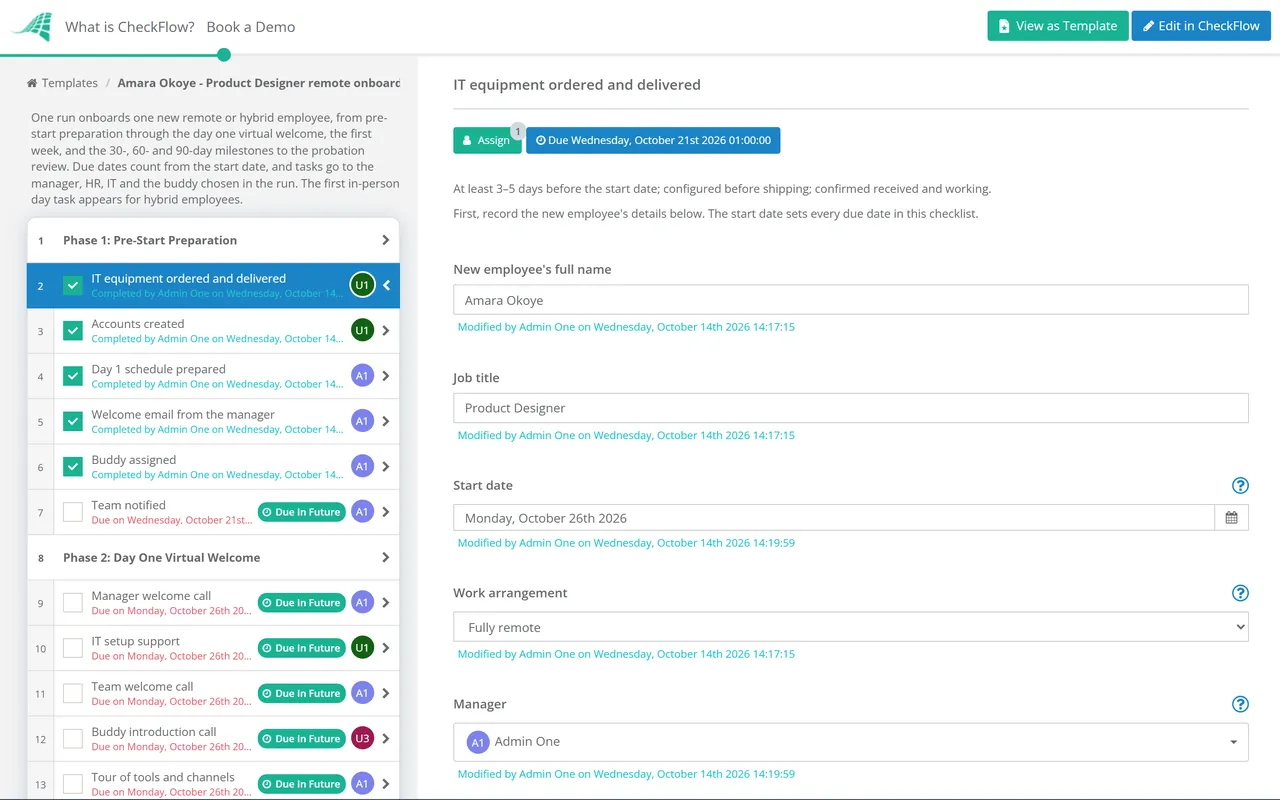
When a new hire is confirmed, start their onboarding checklist from your template in seconds. Enter the name, role, start date, and hiring manager, and CheckFlow assigns every task to the right person, notifies them instantly, and sets each deadline relative to the start date. IT’s provisioning tasks fall due two weeks before Day 1. HR receives their admin tasks in the right order. Send the new hire a secure link to their onboarding checklist, with no account required.
Track every hire in real time, from pre-boarding to 30 days
The Reports Grid shows every active remote onboarding at a glance: who’s on track, who’s overdue, and which department is the blocker. No manual status checks. No chasing IT to confirm the laptop was shipped. When the new hire completes a task, it’s logged instantly. The full audit trail is there for compliance if you need it.
Built for the Complexity of Remote Onboarding
Remote onboarding isn’t one person’s job. It spans IT (provisioning), HR (admin and compliance), the hiring manager (role context and integration), an onboarding buddy (culture and connection), and the new hire themselves, all at a distance, often across time zones. CheckFlow is designed to coordinate this kind of distributed, multi-stakeholder process.
Pre-boarding
Pre-boarding tasks before Day 1
Assign tasks to IT, HR, and the hiring manager that must be completed before the new hire starts. Laptop ordered and shipped. Accounts created. Welcome email sent. First-week schedule shared. Buddy assigned and introduced. When Day 1 arrives, the new hire can actually start working, because the preparation happened on time.
New hire link
Secure onboarding link for the new hire, no account required
Send the new hire a unique, secure link to their onboarding checklist. They open it directly from a browser: no account, no sign-up, no company credentials required before they have them. They complete their pre-boarding tasks, submit documents, confirm acknowledgments, and track their own progress.
Tasks assigned exclusively to your team stay off their page. Prefer them to have their own login? Add them as a free Guest and assign their steps to them, and overdue alerts reach them like any other assignee.
- Protect the link with a password or an expiry date
- Show your logo on your own CheckFlow subdomain
Dynamic due dates anchored to start date
Set every task deadline relative to the start date: “5 business days before start”, “Day 1 by 9am”, “end of Week 1”, “30-day check-in”. Every deadline is worked out from the start date you enter. Deadlines can also follow a date field in the checklist, the completion of another task, a parameter, or a calendar position such as “next Monday” or “the first day of next month”. Automatic reminders fire at the right moment without any manual management.
Learn moreReal-time view of all active onboardings
See the live status of every active remote onboarding in the Reports Grid. Know at a glance which hires are on track, which tasks are overdue, and which department is blocking progress, without emailing IT for an update or checking in with the hiring manager. HR teams running multiple hires at once can manage all of them without losing track of any.
Learn moreConditional logic for different roles, seniority, and locations
Use conditional logic to adapt the onboarding template automatically. A senior hire triggers a 60-day executive integration track. A US-based hire triggers additional I-9 verification steps. A manager-level hire adds a leadership tools and team introduction sequence. One template handles all scenarios, with no duplicate checklists to maintain. For senior leaders, the Executive Onboarding Checklist covers the board and stakeholder plan, and home-based contact-centre teams can start from the Call Centre Agent Onboarding Checklist.
Learn moreWorks alongside your HRIS, not instead of it
CheckFlow doesn’t replace BambooHR, Rippling, or Workday. It adds the execution layer those systems don’t provide: structured task assignment across IT, HR, and the hiring manager, enforced step order, a new hire link that works without company credentials, and a Reports Grid that shows real-time completion status. Use CheckFlow as the process engine that runs on top of whatever HR systems you already have.
Learn more
Ready-to-Use Remote Work Templates
Don’t start from a blank page. Pick a proven remote work template, customise it to your distributed team, tools, and onboarding process, and run it in minutes. Each one is fully editable in the CheckFlow template designer.
Remote Employee Onboarding Checklist
Home Office Setup Checklist
IT Equipment Request Process Checklist

Remote Performance Review Checklist
Remote Team Engagement Activities Checklist
Virtual Meeting Best Practices Checklist
Securing the setup, and the exit: the remote work security checklist covers the device, sign-in and home network controls with a yearly attestation, and the remote employee offboarding checklist gets equipment back by courier and cuts access off at the leaver’s local time.
What Your Remote Onboarding Checklist Should Cover
A complete remote onboarding process runs across four phases. Here’s what belongs in each, and what gets missed when there’s no system coordinating it.
01Pre-Start (Before Day 1)
IT tasks (start 2 weeks before)
- Order and ship pre-configured laptop, confirm delivery address, track shipment
- Create identity provider (SSO) account and provision role-based access
- Set up all required SaaS tools (email, calendar, Slack/Teams, project management tools)
- Configure device with required software, security agent, VPN, and MFA
- Send setup instructions to new hire’s personal email in advance of Day 1
HR tasks
- Confirm start date, working hours, and first-day schedule with hiring manager
- Send offer letter and contract for e-signature
- Collect completed W-4, direct deposit, and tax documentation
- Complete remote I-9 verification with authorised representative
- Enrol in benefits or schedule benefits selection call
- Send personal welcome email with Day 1 logistics (start time, first meeting link)
- Assign onboarding buddy and make email introduction
Hiring manager tasks
- Share first-week schedule and recurring meeting cadence
- Brief team on new hire’s role and start date
- Prepare first project or first-week objectives with clear scope
- Schedule Day 1 video welcome session
02Day One
- Confirm laptop received and set up correctly, VPN connected, MFA enrolled
- Video welcome session with hiring manager (30–60 min)
- Virtual tour of digital workplace: shared drives, documentation wiki, intranet
- System walkthroughs: email, Slack/Teams, project management, video conferencing
- Team introduction call or video
- Signed Acceptable Use Policy and any required HR policies
- Onboarding buddy check-in call
- First-day personal check-in from HR (30-min video call)
- Confirm all access rights working and any gaps flagged to IT
03Week One
- Daily 15-minute check-in with hiring manager (async options for different time zones)
- Tools training for each major platform used in the role
- Communication norms session: async expectations, response times, meeting culture, documentation standards
- First project or task assigned with clear deliverables and timelines
- Access rights confirmed complete for all required tools
- Team meeting schedule set: recurring 1:1s, team standups, all-hands
- Introduction to key cross-functional colleagues (virtual coffee chats scheduled)
- Review of role expectations, first 30-day goals, and how performance is assessed
04First 30 Days
- 30-day check-in meeting with manager (structured, not buried inside a status call)
- Structured feedback collected from new hire: communication, onboarding quality, any gaps vs expectations
- Role expectations formally confirmed and 30-60-90 day objectives agreed in writing
- Probation goals or OKRs documented for reference
- Benefits confirmed working correctly
- Compliance training completed (mandatory security awareness, data privacy)
- Buddy relationship assessment: is the buddy relationship working? Any adjustments?
- NPS or satisfaction score collected and acted on visibly
- Onboarding marked complete and archived with full audit trail
CheckFlow’s free remote onboarding template covers these phases and carries on to the 60- and 90-day milestones, ready to assign to IT, HR, the hiring manager and the new hire and run for your first hire in minutes.
Ask your AI assistant who is ready for Monday.
CheckFlow works with any AI assistant. Connect it once and it reads and works your onboarding checklists with the same permissions as the person whose API key it holds.
Ask your AI assistant
Through the CheckFlow MCP server, Claude, ChatGPT, Gemini, Grok, Copilot or any other AI assistant can start a remote onboarding checklist, share it with the new hire with a password, and list what is still open before day one.
Read the MCP guideDraft the template from a sentence
Describe your remote onboarding in a sentence and the free AI checklist generator drafts the template, with phases, fields and due dates in place.
Try the AI generatorConnect your other systems
Start an onboarding checklist from your HRIS through the REST API or Zapier, and get a webhook when the new hire completes a step.
Developer overview
Is everything ready for Ana Ruiz before she starts on Monday?
checklist: "Remote Onboarding – Ana Ruiz"
status:    "Incomplete"
Nearly. The laptop has shipped. Of the pre-start tasks still open, “Create SSO account and role-based access” (IT) is due today and “Assign an onboarding buddy” (Dana K.) is due Wednesday.
Used by great companies









I was able to understand the concept in few minutes and then try most of the options in matter of few hours. Next day I started to implement first process templates.
Frequently asked questions
What is remote employee onboarding software?
Remote employee onboarding software is a tool that structures and automates the process of bringing a new hire into your organisation when they work remotely. Instead of managing onboarding through email chains and Slack messages, the software assigns tasks to every stakeholder (IT for provisioning, HR for admin, the hiring manager for integration, and the new hire themselves), tracks completion in real time, sends automatic reminders, and creates an audit trail.
CheckFlow is designed for this kind of multi-stakeholder, distributed onboarding process, where tasks span multiple departments and the new hire needs their own access without requiring company credentials first.
How is CheckFlow different from BambooHR, Rippling, or Enboarder?
BambooHR and Rippling are HRIS platforms: they store HR data, run payroll, and manage employee information, and their onboarding features are built around their own employee records. Enboarder is a dedicated onboarding engagement platform aimed at larger onboarding programmes.
CheckFlow is a lightweight, purpose-built process execution tool that sits on top of whatever HRIS you already have. At $10/user/month, it’s accessible to teams of any size, and you don’t need to switch your payroll system to use it.
Can a new hire access their onboarding tasks before they have company credentials?
Yes, this is one of CheckFlow’s most important features for remote onboarding. Send new hires a unique, secure link to their onboarding checklist before Day 1. They open it directly in a browser, with no company email, no account creation, no login required. This is how pre-boarding happens: the new hire can complete their tasks in the days before they start, without needing any IT setup first. If you want reminders to reach them, add them as a free Guest instead and assign their steps to them.
Can I assign onboarding tasks to IT, HR, and the hiring manager from one checklist?
Yes. When you build your remote onboarding template, you define which tasks belong to IT (provisioning), which to HR (admin and compliance), which to the hiring manager (integration and 1:1s), and which the new hire completes (their own pre-boarding steps). When the checklist runs, each person is notified of their own tasks and deadlines and sees them in their Tasks Grid. HR sees the complete picture. Mark internal tasks as exclusive and they stay off the new hire’s shared page. Nobody needs to manually delegate anything.
Can I use the same template for different roles, seniority levels, or locations?
Yes. CheckFlow’s conditional logic adapts the template automatically based on the answers given when the checklist starts. A manager-level hire gets a leadership integration track. A US-based hire gets remote I-9 verification steps. A technical role gets a longer IT provisioning sequence. A senior hire gets a 90-day executive onboarding plan. One template covers all scenarios, with no duplicate checklists to maintain.
Does CheckFlow create an audit trail for new hire documentation?
Yes. Every task completion is logged with a timestamp and who completed it (steps done on a shared link show as Anonymous User; a Guest’s show their name). This provides a documented record of when each step happened: when I-9 verification was completed, when policies were acknowledged, when benefits were enrolled. This audit trail is particularly valuable if there are ever compliance questions about the onboarding process or an early termination dispute.
How much does CheckFlow cost?
CheckFlow’s Business plan is $10 per user per month, or $9 billed annually, with no minimum seat count. All features, including pre-boarding tasks before Day 1, secure new hire links with no login required, dynamic due dates anchored to start date, the real-time Reports Grid, conditional logic, auto-assignments, the full audit trail, and custom notifications, are included. Guest users and people completing tasks on a shared link are always free and unlimited. There’s a free trial with no credit card required. See the full pricing page for details.
Give every remote hire the start they deserve
Free trial, no credit card required.
14-day free trial, no credit cardFull refund in your first 30 daysUS or EU hosting