
IT Offboarding Checklist Software
When someone leaves, every account needs to go with them.
A poor IT offboarding process isn’t just inconvenient. It’s a security risk. Former employees with active credentials, unrecovered devices, and uncancelled licences cost organisations money and expose them to data breaches. CheckFlow gives IT managers a structured, trackable way to handle every departure, so nothing is missed and everything is documented.
14-day free trialNo credit cardUnlimited free guests
Last updated
IT offboarding checklist software makes every leaver go through the same revocation sequence. In CheckFlow you build the offboarding template once: access revocation, device return, licence cancellation, password rotation and data transfer, each with an owner and a due date counted from the last day. Start it when notice arrives, halt tasks keep the order, and every step is recorded for audit.
The Cost of Getting Offboarding Wrong
Unlike onboarding, a missed step in offboarding isn’t just an embarrassment. It’s a liability.
Active credentials after departure
A leaver still has VPN access, email access, or admin rights weeks after their last day. Without a formal revocation checklist, it’s easy for this to slip through, especially when IT is busy.
Unrecovered devices
The laptop went home with the employee and nobody followed up. Now there’s a company device with company data sitting outside your control, and no record of a return having been requested.
Licences still billing
SaaS subscriptions keep running on departed employees’ seats. Every tool bills per seat, so a handful of missed cancellations adds up fast across a year.
Shared passwords not rotated
The leaver knew the shared admin credentials. If they’re not rotated on or before the last day, your organisation has a security exposure that’s invisible until something goes wrong.
No audit trail for compliance
When a compliance review or security incident asks what was done during offboarding, the answer is a spreadsheet that was last updated three months ago, or nothing at all.
HR and IT working from different information
HR has processed the leaver in their system. IT wasn’t notified in time. The last day passed before access was revoked. Coordination failures are a common cause of offboarding gaps.
How CheckFlow Handles IT Offboarding
Build your process once. Run it every time someone leaves.
Build your offboarding template once
Design your complete IT offboarding checklist in CheckFlow’s drag-and-drop template editor. Define every task (access revocation, device return, licence cancellation, password rotation, data transfer), assign task owners, set due date rules relative to the leaver’s last day, and add any conditional logic for different departments or seniority levels.
Start it the moment you receive notice
When a leaver is confirmed, start the offboarding checklist in seconds. Enter the employee’s name and last day, and CheckFlow assigns every task to the right person with the correct due date and notifies them immediately. Nothing waits for a manual handoff.
Track every step to completion
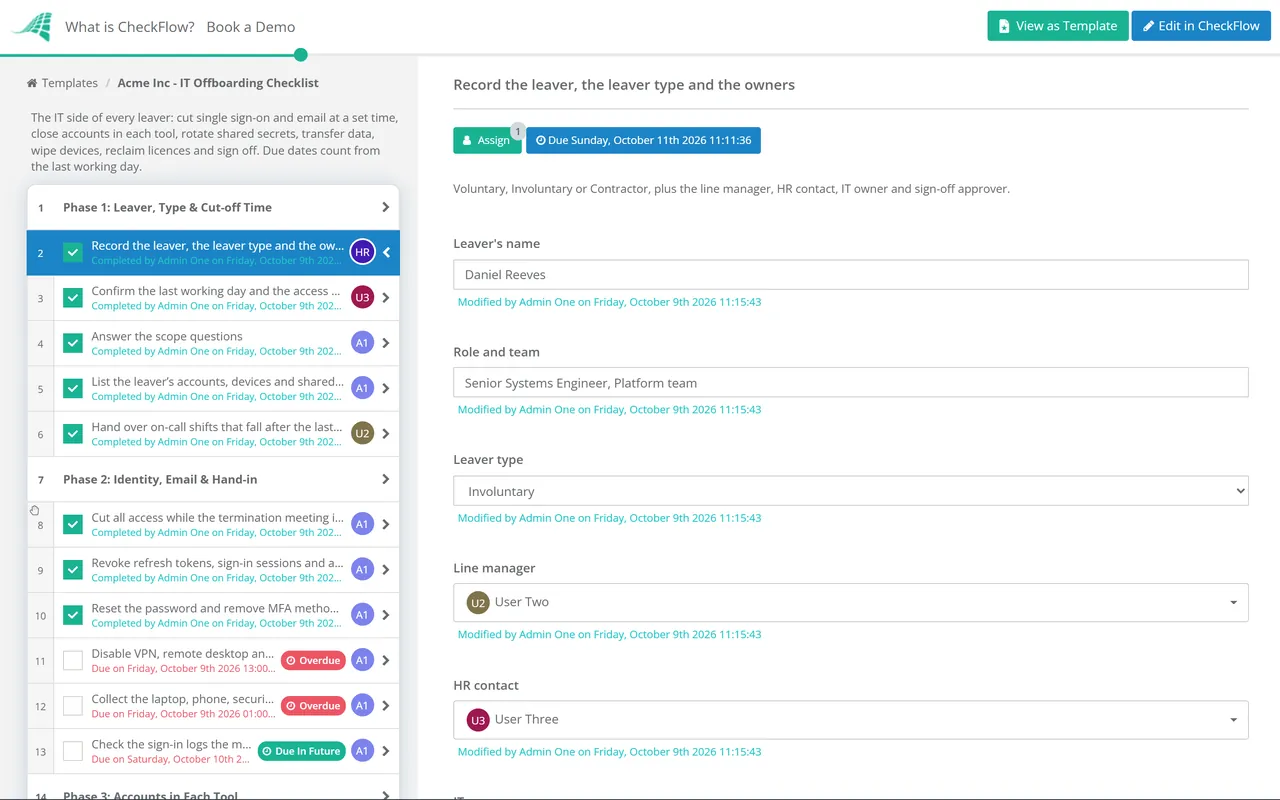
The Reports Grid shows the live status of every active offboarding in progress. See what’s been completed, what’s overdue, and who’s responsible, with a full activity feed of every action taken. Compliance documentation, built in.
Built for the Specific Demands of IT Offboarding
Order
Enforce the order that matters
Use halt tasks to ensure critical steps happen in the correct sequence. Data must be transferred before accounts are deleted. Access must be revoked before the exit interview. Shared passwords should be rotated on the last day. CheckFlow enforces the order, not individual memory.
Timing
Due dates anchored to the last day
Set dynamic due dates relative to the leaver’s last day: “3 days before last day”, “on last day”, “within 48 hours of departure”. Deadlines can also follow a date field in the checklist, the completion of another task, a parameter, or a calendar position such as “next Monday” or “the first day of next month”. Automatic email reminders go out before and after each deadline, so nothing slips past without someone being notified.
- Overdue alerts go to every assignee, or to Administrators when a task is unassigned
- Custom notifications can email a manager when a revocation step is overdue
Coordinate IT, HR, Finance, and the manager
Offboarding involves multiple departments. CheckFlow assigns the right tasks to the right teams (IT revokes access, HR processes paperwork, Finance cancels subscriptions, the manager collects the device) with everyone notified automatically and nothing waiting for a manual handoff.
Learn moreFull audit trail for every departure
Every completed task is logged with a timestamp and the name of the person who completed it. When your compliance team, security team, or management asks what was done during an offboarding, you have a complete, timestamped record, not a best-effort reconstruction.
Learn moreHandle sensitive departures carefully
Mark a task as exclusive and only its assignees can open, change or reassign it; others working on the checklist see it greyed out, and Guests see only their own tasks. HR-related tasks can stay with HR, while IT access revocation tasks stay with IT. For sensitive leavers, set the template’s permission to Run and View Assigned To or View Assigned To But Not Run, so people see only the checklists they are assigned to.
Learn moreRun onboarding and offboarding from one place
CheckFlow handles both sides of the employee lifecycle. IT and HR teams manage onboarding checklists and offboarding checklists in the same Reports Grid, with the same templates and the same real-time visibility, so there’s no need to switch between tools.
See IT onboarding
Ready-to-use offboarding templates
Start from a template, change the steps to match your systems, and run it for your next leaver.
IT Offboarding Checklist
SaaS Access Offboarding Checklist

Employee Offboarding Checklist
Remote Employee Offboarding Checklist
Active Directory & Entra ID Account Cleanup Checklist
IT Asset Disposal (ITAD) Checklist
What Your IT Offboarding Checklist Should Cover
A thorough IT offboarding process spans three stages. Here’s what to include in each.
01When notice is received (immediate actions)
- Notify IT of leaver name, role, and last day
- Begin access audit: list all systems and accounts
- Identify any shared accounts or admin credentials the leaver holds
- Notify Finance of subscriptions to cancel
- Arrange device return date and method (in-office or courier)
- Identify any data that needs to be transferred or archived
- Confirm who will take ownership of the leaver’s files and email
02On the last day
- Revoke SSO and directory account access
- Disable VPN credentials
- Remove from all SaaS platforms (email, Slack, project tools, etc.)
- Collect company device(s) and accessories
- Rotate any shared admin passwords the leaver had access to
- Forward or archive email account per company policy
- Confirm data transfer is complete
- Revoke physical access (ID badge, building access)
- Conduct exit checklist sign-off with leaver if applicable
03Post-departure (within 1 week)
- Confirm all SaaS licences have been cancelled or reassigned
- Remove from payroll and benefits systems (coordinate with HR)
- Check for any remaining active sessions or API tokens
- Update IT asset register to reflect returned equipment
- Archive offboarding checklist as compliance record
- Document any exceptions or access that was intentionally retained
- Review access rights for any systems the leaver managed or owned
CheckFlow’s free IT offboarding checklist template includes all of the above, ready to run immediately. Devices that will not be reissued then go through the IT asset disposal checklist, which covers sanitisation, certificates and the asset register. Accounts that slip through anyway are caught by the quarterly Active Directory and Entra ID account cleanup checklist. Apps outside single sign-on, OAuth tokens, file ownership and licences are handled app by app in the SaaS access offboarding checklist.
Ask your AI assistant which leavers still have access.
CheckFlow works with any AI assistant. Connect it once and it reads and works your offboarding checklists with the same permissions as the person whose API key it holds.
Ask your AI assistant
Through the CheckFlow MCP server, Claude, ChatGPT, Gemini, Grok, Copilot or any other AI assistant can start an offboarding checklist when notice arrives, list the revocation tasks still open, and complete or reassign a task.
Read the MCP guideDraft the template from a sentence
Describe your offboarding in a sentence and the free AI checklist generator drafts the template, with phases, fields and due dates in place.
Try the AI generatorConnect your other systems
Start an offboarding checklist when HR marks a leaver in your HRIS, through Zapier or the REST API, and get a webhook when it completes.
Developer overview
Which IT offboarding tasks are overdue?
assignee: "Group: IT"
status:   "Overdue"
Two, both with the IT group: “Rotate shared admin passwords” for Alex M. was due on Friday, and “Revoke API tokens” for Sam O. was due yesterday.
Used by great companies









Easy and intuitive creation of parameterized, rule-based workflows. It can be used across the company to automate any process.
IT offboarding guides & resources
- IT offboarding security checklistThe seven-phase revocation sequence
- Onboarding vs offboarding for ITWhy offboarding is a security operation
- HR offboarding checklistCoordinating HR and IT on a departure
- Redundancy and layoff checklistRemoving access for many leavers on one agreed date
- Remote employee offboarding checklistCourier returns, remote wipe and a cut-off in the leaver’s time zone
- SOC 2 compliance checklistProving access was revoked on time
Frequently asked questions
Why is IT offboarding so important?
IT offboarding is a critical security and compliance process. When an employee leaves, every access point they held (email, VPN, SaaS tools, admin accounts, shared credentials) becomes a potential vulnerability if not revoked promptly and completely. A structured IT offboarding checklist ensures access is revoked systematically, devices are recovered, and every action is documented.
What’s the biggest risk of a poor IT offboarding process?
The most common risks are active credentials (former employees who can still log in to company systems), unrecovered devices (company data on hardware outside your control), and uncancelled licences (paying for SaaS seats for people who no longer work for you). A structured offboarding checklist with enforced order and automatic reminders guards against all three by ensuring no step is skipped and every task has a named owner and a deadline.
How quickly can I set up an IT offboarding checklist in CheckFlow?
You can have a working offboarding checklist running within a few hours. CheckFlow’s drag-and-drop template designer doesn’t require any technical knowledge: you build the list of tasks, assign owners, and set due date rules relative to the leaver’s last day. When a leaver is confirmed, you start the checklist in seconds by entering their name and last day. CheckFlow handles the rest.
Can the offboarding process be triggered automatically when HR processes a leaver?
Yes, via CheckFlow’s Zapier integration or REST API. You can connect CheckFlow to your HR system so that when an employee is marked as leaving in your HRIS, a CheckFlow offboarding checklist is started automatically with the correct name and last day pre-filled. This removes the risk of IT not being notified in time.
Does CheckFlow keep a record of completed offboarding for compliance?
Yes. Every completed task is logged with a timestamp and the name of the person who completed it, and kept in the checklist’s activity feed. This gives you a complete, structured record of every offboarding action taken: which team completed it, when, and in what order. Completed checklists stay in the Reports Grid, and you can print any checklist or save it as a PDF for your compliance records.
Can I manage both onboarding and offboarding in CheckFlow?
Yes. CheckFlow handles the full employee lifecycle. IT and HR teams can manage onboarding checklists and offboarding checklists in the same Reports Grid, using separate templates for each. The same features (auto-assignment, dynamic due dates, real-time visibility and the activity feed) apply to both.
How much does CheckFlow cost?
CheckFlow’s Business plan is $10 per user per month, or $9 billed annually, with no minimum seat count. All features (conditional logic, dynamic due dates, auto-assignments, custom notifications, Zapier integration and the REST API) are included. Free trial, no credit card required. See the full pricing page at checkflow.io/pricing.
Start running consistent IT offboarding today
Free trial, no credit card required.
14-day free trial, no credit cardFull refund in your first 30 daysUS hosting, EU on request