
IT Onboarding Checklist Software
Every new hire set up correctly. Every time. No chasing, no dropped steps.
CheckFlow gives IT managers a structured, automated way to run the same onboarding checklist for every new hire, with tasks auto-assigned to the right person, completed in the right order, and tracked in real time in one live list.
From hardware provisioning before day one to account setup, security training and first-week follow-ups, nothing falls through the cracks.
14-day free trialNo credit cardUnlimited free guests
Last updated
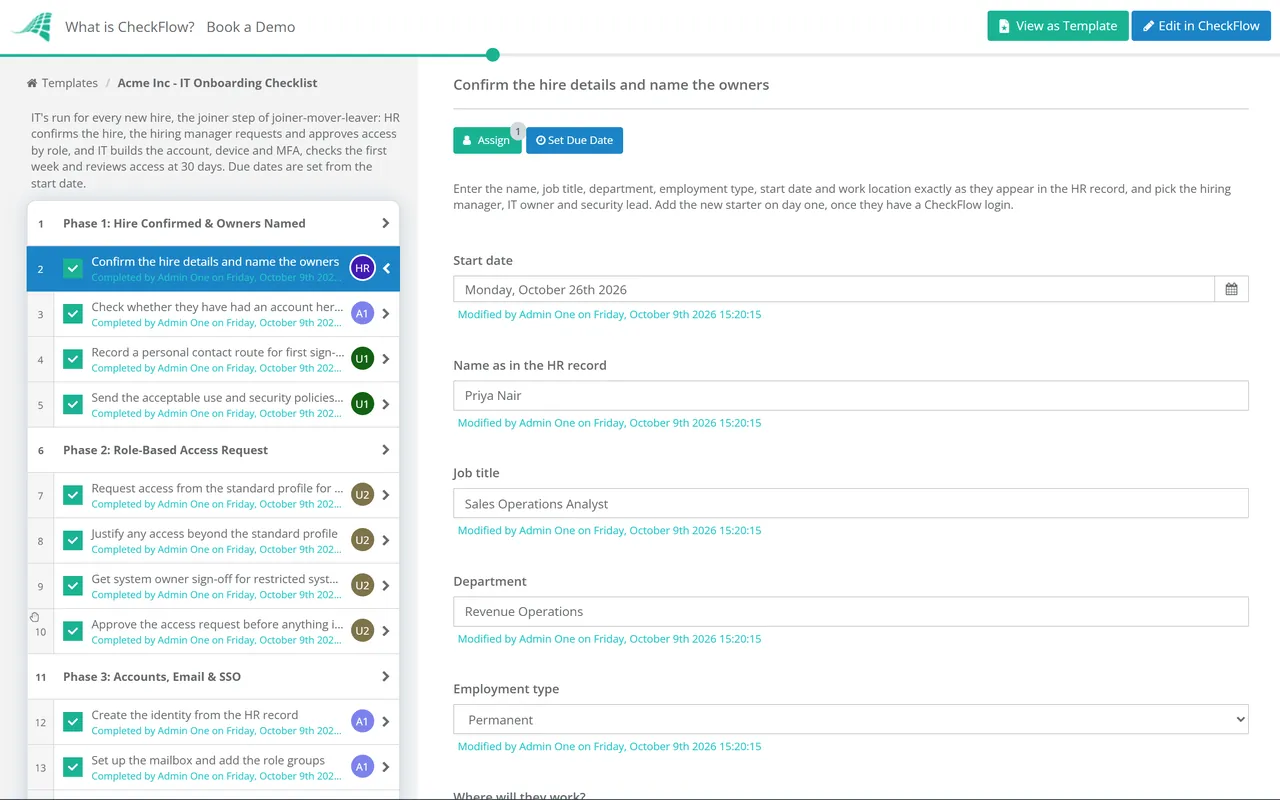
IT onboarding checklist software turns new-hire setup into one repeatable checklist. In CheckFlow you build the template once: accounts, hardware, MFA, policy sign-off and first-week checks, each owned by IT, HR or the manager, with due dates counted from the start date and steps shown by role. Every hire then gets the same checklist, tracked live, with a record of who did what.
Sound familiar?
IT onboarding involves multiple teams, dozens of steps and zero margin for error. Without a proper system, the same problems come up again and again.
New hires arrive without access
Accounts weren’t set up in time. The laptop isn’t ready. Day one becomes an embarrassing scramble because nobody confirmed who was doing what and when.
No visibility for HR or managers
HR has no idea where IT is up to. Managers have to chase IT for status updates. There’s no live view, just a spreadsheet that nobody keeps current.
Security steps get skipped
MFA setup, acceptable use policy sign-off, least-privilege access review: they’re on the list but easy to miss when IT is busy and onboarding is informal.
Inconsistency between hires
The fifth new starter gets a worse experience than the first because by then the process is being done from memory. Different people do it differently every time.
Too much manual chasing
IT emails HR. HR emails the manager. The manager doesn’t reply. IT has to follow up. Reminders are sent by hand because there’s no automated notification system.
No audit trail
When something goes wrong, or during a compliance review, there’s no record of who completed what and when. The spreadsheet was overwritten weeks ago.
How CheckFlow works for IT onboarding
Three steps. Repeatable every time.
Build your IT onboarding template once
Use the drag-and-drop designer to create your complete IT onboarding checklist. Define tasks, assign owners (IT, HR, manager), set due date rules relative to the start date, and add conditional logic for different roles or departments.
Run it for every new hire
When a new hire joins, start a checklist from your template in seconds. Enter the hire’s name, start date and department, and CheckFlow assigns every task to the right person with the correct due date and notifies them straight away.
Track everything in real time
The Reports Grid shows the live status of every active onboarding checklist at a glance. See who’s completed their tasks and what’s overdue, without sending a single status-check email. Every checklist keeps a full activity feed.
Built for the complexity of IT onboarding
IT onboarding isn’t a single person’s job. It spans IT, HR, the hiring manager, and sometimes finance or facilities. CheckFlow is designed for exactly this kind of multi-department, multi-step process.
Ownership
Auto-assign tasks to the right person
Define in your template who owns each task: IT provisions accounts, HR sends contracts, the manager sets up the desk. When a checklist runs, every person is notified of their tasks automatically. No manual delegation required.
- Assign to people or groups, or to the line manager picked when the checklist starts
- Only Assignees Can Complete keeps an IT step with IT
Conditional logic
Adapt for different roles automatically
Use conditional logic to show or hide tasks based on the hire’s role, department or location. A developer needs different software access than a finance hire. One template handles all variations, so there are no extra versions to maintain.
Engineers need more than accounts on day one: the Software Developer Onboarding Checklist takes them from repository access to their first pull request in production.
Enforce the order tasks must happen
Use halt tasks to make sure steps are completed in the right sequence. Hardware can’t be set up before accounts are created. Security training can’t be signed off before policies are issued. Enforced order prevents gaps before they happen.
Learn moreDue dates that adjust to the start date
Set dynamic due dates relative to the hire’s start date: “3 days before start”, “day one”, “end of first week”. Every deadline is worked out from the date you enter. Deadlines can also follow a date field in the checklist, the completion of another task, a parameter, or a calendar position such as “next Monday” or “the first day of next month”. Automatic email reminders go out before and after each deadline.
Learn moreReal-time visibility for everyone
The Reports Grid shows the live status of every active onboarding checklist in one view. HR can see whether IT has provisioned accounts. The manager can see if the laptop has been set up. No one needs to ask: the answer is always right there.
Learn moreLet new hires complete their own tasks
Share a secure checklist link directly with the new hire so they can complete their steps (signing policies, submitting information, confirming equipment) without needing a CheckFlow account. Perfect for pre-boarding tasks before day one.
Learn more
Ready-to-use IT onboarding templates
Start from a template, change the steps to match your stack, and run it for your next hire.
IT Onboarding Checklist

Software Developer Onboarding Checklist
Laptop Provisioning & Imaging Checklist
Mobile Device Management (MDM) Enrollment Checklist
Contractor Onboarding Checklist
Preboarding Checklist
What your IT onboarding checklist should cover
A well-structured IT onboarding checklist spans three phases. Here’s what to include in each.
01Pre-boarding (before day one)
- Confirm hardware requirements with hiring manager
- Order and prepare laptop / equipment
- Create corporate email address
- Provision accounts: SSO, VPN, password manager
- Set up role-based software access
- Configure MFA on all accounts
- Prepare security policy documents for sign-off
- Send new hire welcome email with day one instructions
- Share pre-boarding tasks via secure checklist link
02Day one
- Deliver and configure laptop
- Walk through login and SSO setup
- Confirm VPN access is working
- Enrol in MFA and verify it works
- Complete acceptable use policy sign-off
- Complete data protection / security awareness training
- Confirm access to all required systems
- Set up email signature and out-of-office
- Issue ID / building access if required
03First week & beyond
- Confirm all software is installed and working
- Review access rights against role profile
- Remove any temporary or excess permissions
- Check in with new hire on any IT issues
- Schedule routine security training enrolment
- Add to IT asset register
- Document any exceptions or additional access granted
- Mark checklist complete and archive for audit trail
CheckFlow’s free IT onboarding checklist template includes all of the above, ready to run in minutes.
Ask your AI assistant where every onboarding stands.
CheckFlow works with any AI assistant. Connect it once and it reads and works your onboarding checklists with the same permissions as the person whose API key it holds.
Ask your AI assistant
Through the CheckFlow MCP server, Claude, ChatGPT, Gemini, Grok, Copilot or any other AI assistant can start an onboarding checklist for a new hire, list the IT tasks that are overdue, and complete or reassign a task.
Read the MCP guideDraft the template from a sentence
Describe your onboarding in a sentence and the free AI checklist generator drafts the template, with phases, fields and due dates in place.
Try the AI generatorConnect your other systems
Start an onboarding checklist from your HR system through the REST API or Zapier, and get a webhook when a task is completed.
Developer overview
Which IT onboarding tasks are overdue?
assignee: "Group: IT"
status:   "Overdue"
Two, both with the IT group: “Enrol in MFA” for Sam Lee was due yesterday, and “Prepare and image the laptop” for Ana Ruiz was due on Friday.
Used by great companies









Easy and intuitive creation of parameterized, rule-based workflows. It can be used across the company to automate any process.
IT onboarding guides & resources
- Free IT onboarding checklist templateThe full phase-by-phase checklist
- New hire IT setup checklistEverything IT needs ready on day one
- MDM enrollment checklistGetting Windows, Apple and Android devices under management
- Laptop provisioning and imaging checklistThe standard build every new laptop gets
- Onboarding vs offboarding for ITHow the two processes differ
- Internal transfer (mover) checklistChanging access when someone moves role
- Conditional logic in checklistsBranching setup by role, device and location
- SOC 2 compliance checklistEvidencing access provisioning controls
Frequently asked questions
What is IT onboarding checklist software?
IT onboarding checklist software is a tool that turns your IT onboarding process into a structured, trackable, repeatable checklist. Instead of managing onboarding through spreadsheets or email, the software assigns tasks to the right people, sends automatic reminders, enforces the correct order of completion, and gives IT managers real-time visibility into every active onboarding in progress.
CheckFlow is designed for this use case. IT teams build a template once and run it consistently for every new hire, with automatic task assignments, dynamic due dates and a full audit trail.
How is CheckFlow different from a spreadsheet or shared document?
Spreadsheets and shared documents are passive: they tell people what to do but have no way to enforce it, notify anyone, or track whether it’s actually been done. CheckFlow is active. It assigns tasks to named people and groups, sends email reminders before and after deadlines, stops steps being completed out of order, and gives you a live Reports Grid showing exactly where every onboarding stands.
Every checklist also keeps an activity feed of who completed each task and when, something a spreadsheet can never reliably provide.
Can I use one template for different types of hires?
Yes. CheckFlow’s conditional logic lets you show or hide tasks based on the hire’s role, department or any other answer you collect. A developer hire might trigger additional steps for code repository access; a remote hire might show different hardware shipping tasks; a manager hire might include additional permissions review steps. One template handles all variations without separate checklists for each scenario. For contractors, the Contractor Onboarding Checklist grants only the access the statement of work needs and sets every account to expire on the contract end date.
Do new hires need a CheckFlow account?
No. You can share a secure checklist link directly with new hires so they can complete their tasks (signing documents, submitting information, confirming receipt of equipment) without creating an account or logging in. This is particularly useful for pre-boarding tasks that you want completed before the hire’s first day, when they don’t yet have corporate credentials. People on a shared link are free.
Can HR and managers see the onboarding status without IT telling them?
Yes. This is one of CheckFlow’s most useful features for IT onboarding. The Reports Grid gives HR and managers a live view of every active checklist. They can see at a glance whether IT has provisioned accounts, whether the hire has completed their pre-boarding tasks, and whether anything is overdue, without asking IT. You can also set up custom notifications so HR is emailed when a specific task is completed.
Does CheckFlow handle IT offboarding too?
Yes. CheckFlow works equally well for IT offboarding, which is, if anything, even more important to get right. You can build a separate offboarding template covering account deactivation, device retrieval, licence revocation, access removal and data transfer, with the same enforced order and auto-assignment as your onboarding template, and track both processes side by side in the same Reports Grid. Many CheckFlow customers run both that way.
How much does CheckFlow cost?
CheckFlow’s Business plan is $10 per user per month, or $9 billed annually, with no minimum seat count. All features, including conditional logic, dynamic due dates, auto-assignments, custom notifications, Zapier integration and the full REST API, are included in the Business plan. There’s a free trial with no credit card required. See the full pricing page for details.
Start running consistent IT onboarding today
Free trial, no credit card required.
14-day free trial, no credit cardFull refund in your first 30 daysUS hosting, EU on request