SaaS Customer Onboarding Checklist Template

60–70% of SaaS churn happens in the first 90 days. A structured onboarding process is how you stop it.

The difference between a customer who churns at month three and one who expands at month six is almost always onboarding. When customers reach their first meaningful value quickly — with clear goals, a structured setup process, and a CSM who knows exactly what needs to happen and when — they stay, grow, and refer. When they don’t, they leave quietly and you wonder why. This free SaaS customer onboarding checklist template gives Customer Success Managers and onboarding teams a structured, repeatable framework for every new customer — covering pre-kickoff preparation, kickoff and goal alignment, technical setup, training and adoption, go-live confirmation, and the post-onboarding handoff to long-term success.

Use This Template Free See Live Example
No Credit Card Required

Why SaaS Customer Onboarding Is Your Highest-Leverage Activity

Onboarding is not a support function — it is a revenue function. Research consistently shows that 60–70% of all SaaS churn occurs within the first 90 days, before customers have fully adopted the product or realised its value. Customers who complete a structured onboarding programme churn at approximately 8% at 90 days; those who don’t complete onboarding churn at 25% — a three-fold difference driven almost entirely by whether someone guided them to their first meaningful win.

The obstacle is not motivation — most customers want to succeed with your product. The obstacle is consistency. Without a structured checklist, every onboarding is slightly different: some customers get a thorough kickoff, others a quick setup call. Some CSMs are meticulous, others rely on memory. Some customers get a follow-up at week two, others don’t hear from you until they’re already disengaged. A repeatable onboarding checklist — one that runs the same structured process for every customer — eliminates that inconsistency and gives every new customer the same quality of start.

What the SaaS Customer Onboarding Checklist Covers

This checklist is structured across six phases that take a new customer from deal close to confirmed first value — and from first value to the ongoing success relationship.

Phase 1

Pre-Kickoff Preparation (Internal)

The kickoff call is too late to start preparing. Everything the customer experiences in week one depends on what your team does before they arrive.

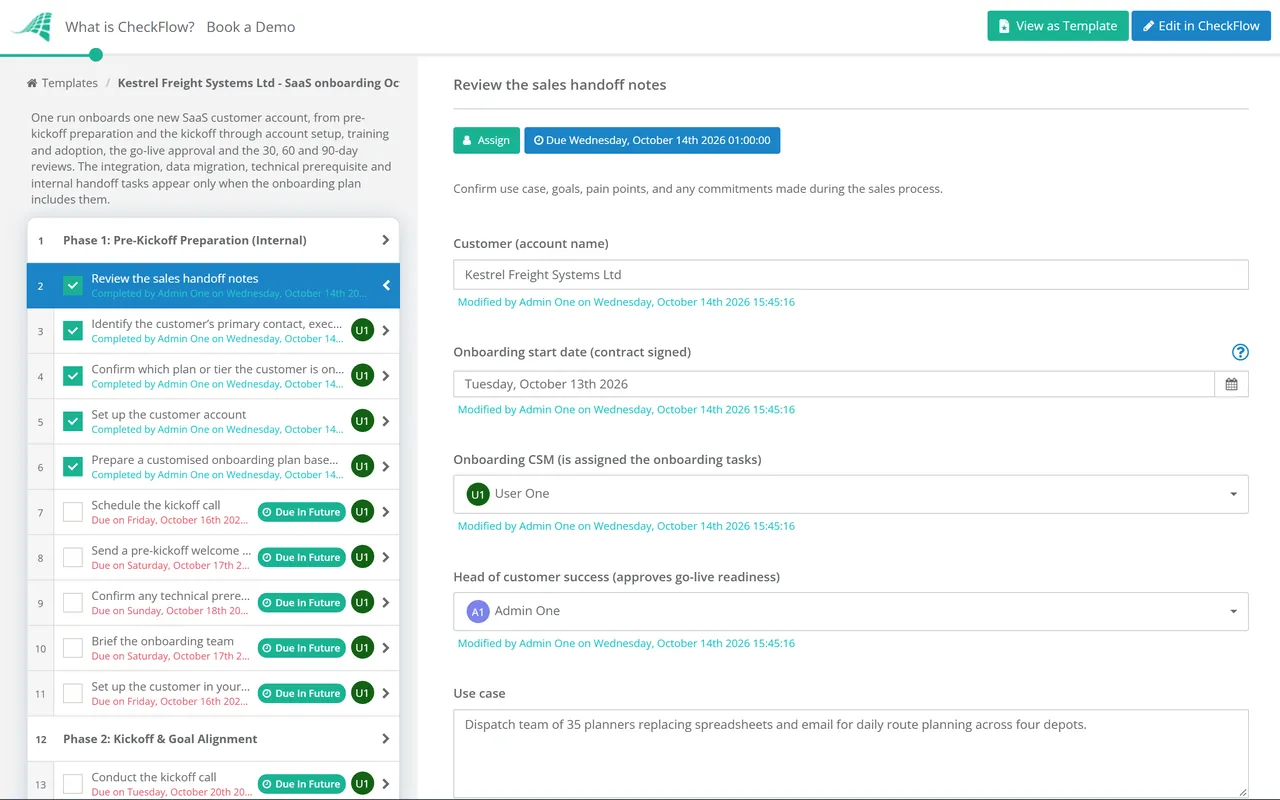
  • Review the sales handoff notes — confirm use case, goals, pain points, and any commitments made during the sales process
  • Identify the customer’s primary contact, executive sponsor, and technical administrator
  • Confirm which plan or tier the customer is on and what features are available to them
  • Set up the customer account — workspace, initial settings, and any standard configuration for their industry or use case
  • Prepare a customised onboarding plan based on the customer’s stated goals and use case
  • Schedule the kickoff call — confirm attendees on both sides, including executive sponsor where possible
  • Send a pre-kickoff welcome email with agenda, what to prepare, and access instructions
  • Confirm any technical prerequisites the customer needs to complete before the kickoff
  • Brief the onboarding team — confirm roles and responsibilities for the onboarding programme
  • Set up the customer in your CRM and onboarding tracking system — confirm health score baseline is established
Phase 2

Kickoff & Goal Alignment

  • Conduct the kickoff call — confirm all key stakeholders are present
  • Confirm the customer’s primary goal — the single outcome they most need to achieve in the first 90 days
  • Define success metrics — agree on how both sides will measure whether onboarding has been successful
  • Review and confirm the onboarding plan — phases, milestones, and timelines
  • Identify potential risks — internal blockers, resource constraints, or competing priorities on the customer side
  • Confirm the customer’s team roles — who is responsible for technical setup, who drives adoption, who signs off on go-live
  • Set up a shared onboarding tracker or shared checklist — give the customer visibility into their own onboarding progress and their outstanding tasks
  • Agree on a communication cadence — frequency of check-in calls, preferred channels, and escalation path
  • Send a kickoff summary — document agreed goals, success metrics, responsibilities, and timeline
  • Confirm the next milestone and the date by which it should be reached
Phase 3

Account Setup & Technical Configuration

  • Complete account configuration — workspace settings, branding, and any standard customisations for the customer’s use case
  • Set up user accounts and access levels — confirm admin, manager, and standard user roles are correctly assigned
  • Configure integrations — connect the product to the customer’s existing tools (CRM, HRIS, project management, SSO) as agreed
  • Import or migrate existing data — confirm data import process, format requirements, and validation steps
  • Configure notifications and alerts — set up the right communication settings for the customer’s workflow
  • Complete any customer-side technical prerequisites — confirm SSO setup, IP allowlisting, or API configuration where required
  • Test the configured environment — confirm the setup works as expected before training begins
  • Document the customer’s configuration — create a configuration record for future reference and support
  • Confirm the customer’s admin understands how to manage users and settings going forward
  • Sign off on setup completion — confirm with the customer that the environment is ready for training
Phase 4

Training & Adoption

  • Deliver the initial product training — focus on the specific features and workflows relevant to the customer’s stated use case, not a generic product demo
  • Confirm all relevant users have completed training — track attendance and completion
  • Provide access to self-serve training resources — knowledge base articles, video walkthroughs, and help documentation
  • Set up the customer’s first real process or workflow in the product — do it with them, not for them
  • Confirm the customer’s team can operate independently — test that key users can complete core workflows without assistance
  • Monitor early usage data — confirm the right users are logging in and engaging with the product
  • Identify at-risk users — users who have not logged in or engaged within the first week need proactive outreach
  • Deliver role-specific training where needed — admin users, managers, and frontline users often need different training content
  • Gather early feedback — understand any friction points before they become churn signals
  • Confirm the customer has achieved their first meaningful value milestone — document what it was and when it happened
Phase 5

Go-Live & First Value Confirmation

  • Confirm go-live readiness — all users trained, environment configured, and the customer is confident to operate independently
  • Conduct a go-live check-in call — confirm everything is working as expected and address any outstanding issues
  • Document the customer’s first meaningful value achievement — what outcome did they reach and how long did it take?
  • Confirm go-live with the customer in writing — send a go-live confirmation with a summary of what was set up, what was achieved, and what comes next
  • Update CRM and onboarding records — mark the customer as live and update health score
  • Celebrate the milestone — acknowledge the achievement with the customer; a brief congratulatory note goes a long way
  • Identify any outstanding items or open questions — confirm they are tracked and owned
  • Brief the ongoing success team — if the onboarding CSM and ongoing CSM are different people, conduct a formal internal handoff
  • Confirm the renewal date and set a reminder for the first renewal conversation
  • Set up the 30-day post-go-live check-in — schedule the first ongoing success touchpoint
Phase 6

Post-Onboarding Success & Expansion

  • Conduct the 30-day post-go-live check-in — confirm adoption is on track, address any issues, and reinforce the value delivered
  • Review usage data at 30 days — confirm the right users are active and core workflows are being used consistently
  • Identify expansion opportunities — additional use cases, departments, or features the customer is not yet using
  • Schedule the 60-day business review — a structured conversation reviewing progress against the goals set at kickoff
  • Gather a formal NPS or CSAT score at 60 days — use the result to identify advocates and at-risk accounts
  • Conduct the 90-day executive business review — demonstrate ROI to the executive sponsor using the success metrics agreed at kickoff
  • Document expansion opportunities identified — pass to the account management team with context from the onboarding experience
  • Solicit a customer testimonial or case study if the customer is happy and results are strong
  • Archive the onboarding record — document the full onboarding journey for reference by support and account management
  • Run a retrospective on the onboarding process — identify what worked, what didn’t, and how to improve the next onboarding

This checklist is available as a free, runnable template in CheckFlow — with tasks assigned to CSMs and customers, customer-facing tasks shareable via a secure link without requiring a CheckFlow account, and real-time progress visible to everyone involved.

Use This Template Free

High-Touch vs Low-Touch SaaS Onboarding — Which Model Fits Your Business?

Most SaaS businesses operate some version of both models depending on customer tier. Understanding which tasks require a CSM and which can be automated is the key to scaling onboarding without sacrificing quality.

High-Touch Onboarding

Enterprise & Mid-Market

Best for higher ACV, longer implementation, and multiple stakeholders. A CSM-led, structured programme with regular calls and milestones.

  • Custom onboarding plan based on specific customer goals
  • Dedicated onboarding timeline of 30–90 days
  • Joint tracking — CSM and customer both visible to the same checklist
  • Executive sponsor engagement and business reviews
  • Regular check-in calls and milestone sign-offs

CheckFlow fit: CheckFlow is ideal for high-touch onboarding — each customer gets their own checklist instance, tasks are assigned to the right CSM and customer contacts, and both sides see progress in real time.

Low-Touch / Product-Led Onboarding

SMB & Self-Serve

Best for lower ACV, faster implementation, and single-user or small teams. Scaled through automation, not CSM time.

  • Automated email sequences and in-app guidance
  • Product-led activation — customers reach first value through the product itself
  • Minimal or no CSM involvement until a specific trigger
  • Scaled through templates and automation, not CSM time

CheckFlow fit: CheckFlow supports the CSM-side of low-touch onboarding — the internal checklist of tasks that still need to happen for SMB customers, even when the customer journey is largely automated.

Most growing SaaS businesses use both models simultaneously — high-touch for enterprise accounts, low-touch for self-serve. CheckFlow lets you run both from the same platform with different templates for different customer tiers.

Why Run Customer Onboarding in CheckFlow?

1

The same quality onboarding for every customer

Without a structured checklist, onboarding quality depends on which CSM is assigned and how thorough they are that week. CheckFlow gives every customer the same structured process — same phases, same milestones, same follow-ups — regardless of who runs the onboarding. When you hire a new CSM, they don’t need to learn your onboarding process from a colleague. They run the checklist.

2

Give customers their own tasks to complete

The most common onboarding blocker is waiting for the customer. CheckFlow’s secure sharing feature lets you assign tasks directly to customer contacts via a shared checklist link — no account or login required on their side. Customers complete their setup steps, upload documents, or confirm configuration directly in the checklist, and your CSM sees it update in real time.

3

See every onboarding at a glance

When you’re managing ten onboardings simultaneously, the question is always the same: which ones are on track and which ones are at risk? CheckFlow’s grid-based dashboard shows you the live status of every active onboarding in one view — which phase each customer is in, what’s overdue, and where your CSMs need to focus today.

CheckFlow’s white-label sharing feature lets you share an onboarding checklist directly with your customer under your own branding — with your company name, logo, and subdomain. Customers see a professional, branded experience; your CSM sees their progress in real time. No CheckFlow branding visible to the customer. Learn more about white-label sharing →

Frequently Asked Questions

What should a SaaS customer onboarding checklist include?

+

A comprehensive SaaS customer onboarding checklist should cover six phases: pre-kickoff preparation (internal tasks before the customer arrives), kickoff and goal alignment (agreeing on success metrics and timeline), account setup and technical configuration (getting the product ready for the customer’s use case), training and adoption (building competence and early habits), go-live and first value confirmation (confirming the customer has achieved a meaningful outcome), and the post-onboarding handoff to ongoing success. The most important thing a checklist must do is ensure the customer reaches their first meaningful value as quickly as possible — that single milestone is the strongest predictor of long-term retention.

How long should SaaS customer onboarding take?

+

Most SaaS onboarding programmes run between 30 and 90 days depending on product complexity, the number of users being onboarded, and the extent of technical integration required. The more important measure is time to first value — how quickly the customer achieves their first meaningful outcome with the product. This varies by product and customer segment: a simple self-serve tool might deliver first value in minutes; an enterprise implementation with data migration and SSO configuration might take several weeks. A structured checklist with clear milestones and assigned owners is the most reliable way to compress the timeline without sacrificing quality.

Who owns the SaaS customer onboarding process?

+

Onboarding is typically owned by the Customer Success team, with contributions from Sales (handoff notes and context), Product (technical setup and integrations), and Support (issue resolution during setup). For enterprise accounts, the CSM is the primary owner and runs the structured onboarding programme. For self-serve accounts, onboarding is largely automated with CSM involvement triggered by specific signals (inactivity, upgrade intent, or specific feature usage). Clear ownership — one named CSM who is accountable for each customer’s onboarding outcome — is the single most important structural decision in building a high-performing onboarding programme.

How does CheckFlow help with customer onboarding specifically?

+

CheckFlow is particularly well suited to the process side of customer onboarding — the multi-party checklist of tasks that need to happen across the CSM, the product team, and the customer themselves before the customer is live and deriving value. CheckFlow’s secure sharing feature lets you assign customer-facing tasks directly to the customer via a shared checklist link — no account needed on their side. Your CSM sees completion in real time. The grid-based dashboard shows every active onboarding simultaneously. And because each onboarding runs from the same template, quality is consistent regardless of which CSM is managing the account.

What is the difference between CheckFlow and an in-app onboarding tool like Appcues or Pendo?

+

In-app onboarding tools (Appcues, Pendo, Userflow) guide users through your product interface using tooltips, product tours, and in-app checklists. They operate inside your product. CheckFlow manages the external onboarding process — the structured programme of tasks across your CSM, your internal teams, and the customer that happens alongside and around the product experience. Examples include kickoff preparation, integration setup, data migration, training delivery, and go-live confirmation. The two tools are complementary: in-app tools guide the user’s product experience; CheckFlow manages the onboarding programme that surrounds it.

How do I make onboarding consistent across multiple CSMs?

+

The most reliable way to make onboarding consistent is to run every onboarding from the same structured checklist template. When the process is documented in a template — phases, tasks, owners, and milestones all defined — every CSM follows the same programme regardless of their experience level or personal style. CheckFlow lets you build that template once and run it for every customer, with automatic task assignments to the right CSM and the right customer contact, and a dashboard that gives team managers visibility into every active onboarding simultaneously.

Is CheckFlow free to use for this template?

+

You can start a free 14-day trial with no credit card required, giving you full access to all features including this template. The Business plan is $10 per user per month after the trial. Full details at checkflow.io/pricing.

Start Running Consistent Customer Onboarding Today

Free trial — no credit card required.