
HR Checklist Software
Run every HR process consistently, with the audit trail to prove it.
CheckFlow gives HR teams a structured, automated way to run every employee lifecycle process, from onboarding and offboarding to compliance checks and performance review cycles. Tasks are auto-assigned to the right person in HR, IT, Finance or the hiring manager, completed in the enforced order, and tracked in real time in one live list.
Whether you’re onboarding a new hire, coordinating a secure exit or running quarterly compliance workflows, CheckFlow makes sure every step happens correctly, on time, and with a timestamped record that holds up when auditors ask questions.
14-day free trialNo credit cardUnlimited free guests
Last updated
HR checklist software runs each employee lifecycle process as a repeatable checklist. In CheckFlow, HR builds a template once for onboarding, offboarding, compliance or reviews; each run assigns every step to HR, IT, Finance or the manager, keeps steps in order, sends reminders and records who did what and when. Recurring cycles start on a schedule, and new hires can complete their part by link.
Sound familiar?
HR processes touch every department, and that’s exactly what makes them hard to run consistently. When onboarding spans HR, IT, Finance and the hiring manager, and offboarding needs IT to revoke access, HR to process paperwork and Finance to cut a final payment, the process breaks down.
Every manager does it differently
Some managers send a comprehensive first-week plan. Others send nothing. New hires in different departments get wildly different experiences, not because of intent but because there’s no enforced standard. Gallup found only 12% of employees strongly agree their organisation does a great job of onboarding.
You’re the human reminder system
IT hasn’t set up the laptop. Finance hasn’t created the payroll record. The hiring manager hasn’t scheduled the first 1:1. Without automated reminders, HR spends more time chasing other departments than running the actual process.
Ex-employees still have system access
In one widely cited survey, 89% of former employees could still reach at least one corporate application after they left. Without a structured offboarding checklist that tracks account deactivation, hardware retrieval and licence recycling, your security team can’t see what’s been done, and what hasn’t.
No audit trail for compliance
When an I-9 auditor or employment lawyer asks for documentation, you shouldn’t be reconstructing a paper trail from email threads. Every step of every HR process needs a timestamped record of who did what and when, before you need it, not after.
Recurring processes fall off the calendar
Performance review cycles start too late. Benefits open enrollment reminders go out to the wrong people. I-9 reverification for expiring work authorisation is forgotten until someone flags it. Without recurring scheduled checklists, time-sensitive HR processes depend entirely on someone’s memory.
Steps get skipped when it’s busy
The intake form wasn’t collected. The background check clearance wasn’t confirmed before system access was granted. The exit interview wasn’t done. With no system enforcing the order of steps, individual tasks quietly disappear in a busy week.
How CheckFlow works for HR teams
One template per process. Runs the same way for every employee.
Build your HR process templates once
Use CheckFlow’s template designer to map each HR workflow: employee onboarding, secure offboarding, performance review cycles, compliance checklists. For each template, define every task, assign it to the right role (HR, IT, Finance or hiring manager), set dynamic due dates relative to the start date or trigger event, and use conditional logic to show different steps for different roles, locations or employment types.
Start it for each employee event
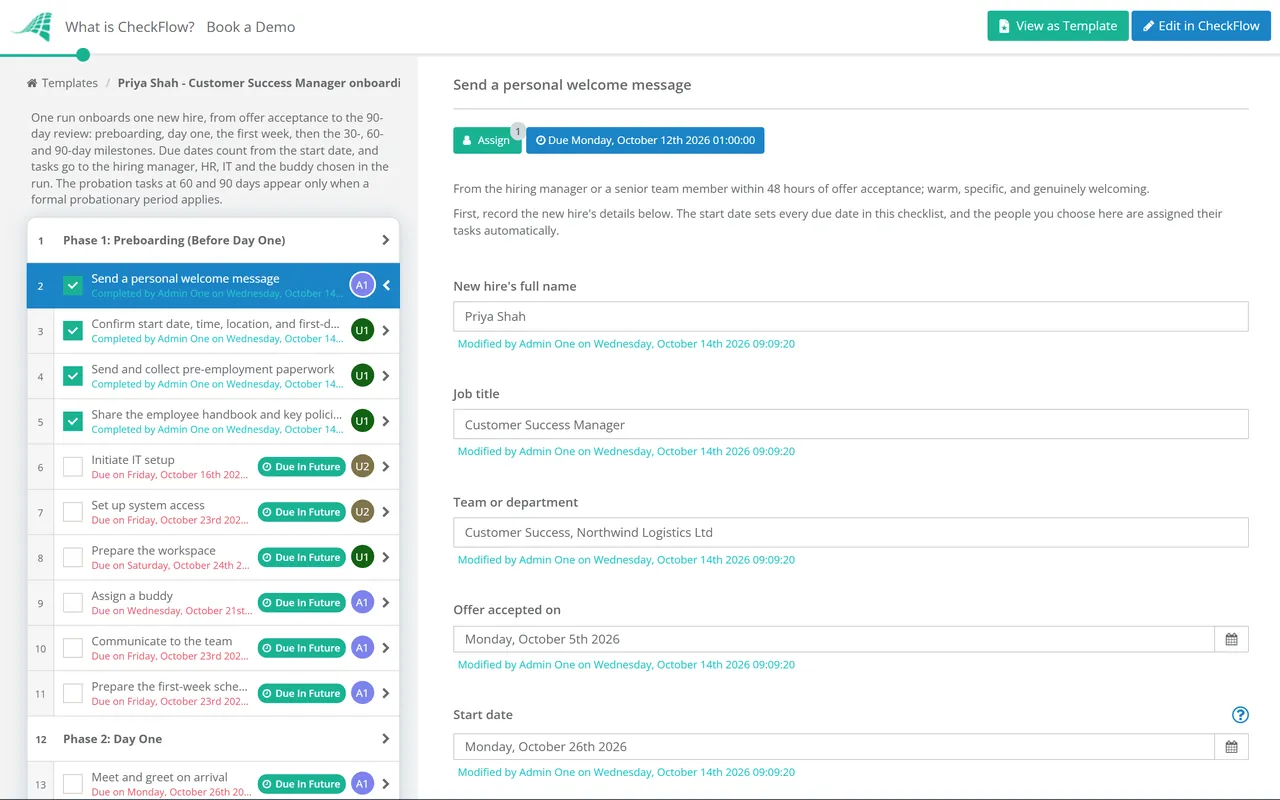
When a new hire starts, a departure is confirmed or a review cycle opens, start the checklist in seconds. Enter the employee name and start date and CheckFlow assigns every task to the right team member with the correct deadline, and notifies them straight away. No manual delegation. IT knows to provision accounts. Finance knows to set up payroll. The hiring manager knows to schedule the 30-60-90 plan meeting.
Track everything in one place, with a full audit trail
The Reports Grid shows every active HR process at a glance. See what’s complete, what’s overdue and which department is blocking progress, without sending a single chasing email. Every step is logged with a timestamp, the name of the person who completed it and any evidence attached, so the record is there when compliance or legal needs it.
Built for how HR processes actually work
HR processes don’t belong to HR alone. Employee onboarding involves IT, Finance and the hiring manager. Offboarding needs coordination with Legal, Payroll and IT Security. Compliance workflows span every team and every location. CheckFlow is designed for exactly this kind of cross-functional, multi-step process, with accountability at every stage.
Ownership
Auto-assign tasks across every department
Define who owns each step in your HR template: HR handles benefits enrolment, IT provisions accounts, Finance sets up payroll, the hiring manager schedules the first 1:1. When a checklist runs, every person is notified of their specific tasks. No manual delegation, no dropped handoffs between departments.
- Assign to groups such as IT or Finance, so cover is automatic
- Pick the line manager when the checklist starts and their tasks follow
Schedules
Recurring checklists on a schedule
Set HR compliance workflows to start on a schedule: quarterly performance review reminders, benefits open enrollment prep, annual policy acknowledgement collection, a monthly check for work authorisations nearing expiry. Set it once and it runs every time, with tasks assigned to the right person at the right moment.
Enforce the correct step order
Use halt tasks to stop later steps being completed before earlier ones. System access can’t be granted until the background check clears. The final paycheck can’t be processed until equipment is confirmed returned. Offboarding access can’t be marked complete until every system has been individually deactivated. Enforced order prevents gaps before they happen.
Learn moreA full audit trail for every step
Every task completion is logged with a timestamp, the person who completed it and any evidence attached. When an I-9 auditor, employment lawyer or HR director asks what happened and when, the answer is the checklist’s activity feed, not a reconstructed email thread.
Learn moreConditional logic for complex employee scenarios
Use conditional logic to adapt your template automatically. California-based employees trigger additional state compliance steps. Manager-level hires trigger a leadership onboarding track. International employees get a different set of right-to-work and tax documentation tasks. One template covers every variation, with no duplicate checklists to maintain.
Learn moreReal-time visibility across all active processes
See every active onboarding, offboarding and compliance workflow in the Reports Grid. Know at a glance which processes are on track, which are overdue and which department is the blocker, without checking in with each team. HR Business Partners and HR Directors can see the status of every open process at once.
Learn more
Ready-to-use HR templates
Don’t start from a blank page. Pick a proven HR template, customise it to your policies, roles and approval process, and run it in minutes. Each one is fully editable in the CheckFlow template designer.
Employee Performance Review Checklist
HR Recruitment Process Checklist
HR Interview Process Checklist
Human Resources Management Plan Checklist
Human Resources Strategy Process Checklist
HR Capacity Management Process Checklist
Payroll is where HR records turn into money. The Payroll Audit Checklist tests the master file against HR records each quarter, from leavers still being paid to unverified bank detail changes.
Leave and departures follow set legal steps too. The Parental Leave Checklist covers maternity, paternity, adoption and shared parental leave in the UK and FMLA in the US, the Return-to-Work Checklist brings people back after sickness or leave, and the Redundancy & Layoff Process Checklist runs consultation, notices and final pay.
Hiring has two approval gates before anyone starts. The Job Requisition Approval Checklist approves the post and its budget, the Job Offer Approval Checklist approves the package for the chosen candidate, and the Right to Work Check Checklist (UK) records the check that must be done before the first day.
Employee relations need a fair, recorded process. The Grievance Procedure Checklist takes a complaint from receipt to appeal, the Workplace Investigation Checklist establishes the facts for a grievance or disciplinary case, and the Workers’ Compensation Claim Checklist handles a US workplace injury from first aid to the closed file.
Some HR cycles come round once a year. The Annual Compensation Review Checklist runs the pay review from budget to payroll, the Employee Engagement Survey Process Checklist runs the survey from design to action plans, the Succession Planning Checklist keeps cover in place for critical roles, and the Employee Relocation Checklist moves a person and their family to a new location.
Two compliance processes usually sit with HR too. The Whistleblowing Report Handling Checklist takes a report from acknowledgement to closure while protecting the person who raised it, and the Conflict of Interest Declaration Checklist runs the annual declaration campaign.
What your HR checklists should cover
The four core HR process categories that benefit most from structured checklists, and what gets missed when there’s no system enforcing them.
01Employee onboarding
- Pre-start: contract sent for e-signature, offer letter confirmed, background check initiated
- IT provisioning: laptop ordered, accounts created, software licences assigned, email configured
- Payroll setup: bank details collected, tax forms completed, payroll system record created
- Benefits enrolment: options presented, elections confirmed, enrolment deadline met
- First day: accounts working, workspace ready, team introduction completed, agenda sent
- First week: first 1:1 with manager, role expectations confirmed, tools training delivered
- 30-day milestone: check-in meeting completed, 30-60-90 plan agreed, feedback collected
- I-9 verification: Section 2 completed within three business days of the first day of work
02Secure offboarding
- HR: resignation accepted, final pay date confirmed, COBRA or benefits termination notice sent
- IT: all system access deactivated (email, Slack, CRM, payroll, cloud storage, GitHub)
- Hardware: laptop, access card and all company equipment retrieved and confirmed
- Payroll: final paycheck calculated, PTO payout confirmed, expense claims settled
- Legal: NDA reminder confirmed, IP assignment acknowledged, reference policy shared
- Exit interview: scheduled and completed, feedback recorded and stored
- Knowledge transfer: documentation of key projects and contacts completed
- Alumni: company alumni network invitation sent, LinkedIn recommendation offered
03Compliance workflows
- I-9 reverification: tracked for employees with expiring work authorisation
- Annual policy acknowledgement: all staff confirm reading updated policies before deadline
- Benefits open enrollment: all eligible employees notified, elections confirmed before close
- Performance improvement plans: verbal warning, written warning, final warning, each stage documented and timestamped
- FMLA administration: eligibility verified (12 months, 1,250 hours), notices issued on time, medical certification requested (the employee has 15 calendar days to return it)
- Disciplinary processes: each stage documented and signed off, every step ordered and locked
- Background check renewals: started on a schedule for roles that require periodic re-screening
04Performance & development
- Quarterly check-ins: manager self-assessment sent, direct report self-assessment sent, 1:1 scheduled
- Annual review cycles: calibration materials prepared, calibration session scheduled, review documentation completed before HR deadline
- Promotion and internal move checklists: new role confirmed, compensation change processed, system access updated, new team introduction completed
- New manager onboarding: management training enrolled, direct reports introduced, performance management tool access granted, first team meeting scheduled
- Probation sign-off: 90-day objectives reviewed, probation confirmed or extended in writing, decision documented
CheckFlow’s free HR checklist templates cover all of the above, ready to customise and run for your first employee event in minutes.
Start and check HR processes from your AI assistant.
CheckFlow works with any AI assistant. Connect it once and it works your HR checklists with the same permissions as the person whose API key it holds.
Ask your AI assistant
Through the CheckFlow MCP server, Claude, ChatGPT, Gemini, Grok, Copilot or any other AI assistant can start an onboarding or offboarding checklist with the employee’s details, list what is outstanding, and add a comment or complete a task.
Read the MCP guideDraft the template from a sentence
Describe the HR process in a sentence and the free AI checklist generator drafts the template, with phases, fields and due dates in place.
Try the AI generatorConnect your other systems
Start a checklist when your HRIS records a new hire or a leaver, through the REST API or Zapier, and get a webhook when it completes.
Developer overview
Start onboarding for Ana Ruiz. She joins Finance on Monday 2 November.
template:   "Employee Onboarding"
name:       "Employee Onboarding – Ana Ruiz"
Start date: "2026-11-02"
Done. “Employee Onboarding – Ana Ruiz” has started, and the preboarding tasks are with HR, IT and her manager. Want me to list what is due before Monday?
Used by great companies









I was able to understand the concept in few minutes and then try most of the options in matter of few hours. Next day I started to implement first process templates.
Frequently asked questions
What is HR checklist software?
HR checklist software is a tool that turns HR processes into structured, trackable, repeatable workflows. Instead of managing employee onboarding, offboarding and compliance through email threads and spreadsheets, the software auto-assigns tasks to the right person in each department, sends automatic reminders, enforces the correct completion order, and creates a timestamped audit trail for every step.
CheckFlow is designed for exactly this kind of cross-functional HR process, where a single employee lifecycle event involves HR, IT, Finance and the hiring manager at once.
How is CheckFlow different from BambooHR, Rippling, or other HRIS platforms?
BambooHR and Rippling are systems of record: they store employee data, run payroll and manage HR information. Their built-in workflow features are tied to their own data models and are not built to run a multi-step process across IT, Finance and managers the way a dedicated process tool is.
CheckFlow is a system of execution. It runs the actual steps of each HR process, assigns them to the right person in any department, enforces the order and keeps the audit trail. Most CheckFlow customers use it alongside their HRIS, not instead of it.
Can I assign onboarding tasks to IT and Finance, not just HR?
Yes. Cross-department task assignment is one of CheckFlow’s core features for HR processes. When you build your onboarding template, you decide which steps belong to HR, which to IT, which to Finance and which to the hiring manager. When the checklist runs, each person is notified of their own tasks, with their own deadlines, and sees them in their Tasks Grid. HR sees the complete picture.
Does CheckFlow create a compliance audit trail for I-9 and employment law purposes?
Yes. Every step completion is logged with a timestamp, the name of the person who completed it, and any evidence or attachments added. That dated audit trail supports your I-9 records, helps you respond to EEOC enquiries and shows a process was followed during an HR audit. It records the process around the forms; it does not replace the forms themselves or legal advice. The Form I-9 and E-Verify checklist is a good place to start.
Can I set up recurring HR checklists — for performance reviews, open enrollment, or annual compliance tasks?
Yes. CheckFlow’s recurring checklist feature lets you schedule any checklist to start daily, weekly, monthly, quarterly or yearly. Performance review prep checklists start before your review cycle opens. A monthly check can catch work authorisations that expire in the next 90 days, ready for I-9 reverification. Benefits open enrollment prep checklists start at the beginning of the enrollment window. Set it once and it runs every time without anyone having to remember.
Can I use one HR template for different roles, locations, or employment types?
Yes. CheckFlow’s conditional logic adapts any template automatically based on the answers given at the start of the checklist. An employee in California triggers additional state-specific compliance steps. A manager-level hire triggers a leadership onboarding track. A contractor triggers a different set of documentation tasks. One template handles all variations, so you’re not maintaining separate checklists for every scenario.
How much does CheckFlow cost?
CheckFlow’s Business plan is $10 per user per month, or $9 billed annually, with no minimum seat count. All features, including conditional logic, dynamic due dates, auto-assignments, recurring scheduled checklists, the full audit trail, custom notifications, Zapier integration and the REST API, are included. Guest users (including external reviewers or candidates completing tasks via shared links) are free and unlimited. There’s a free trial with no credit card required. See the full pricing page for details.
Start running consistent HR processes today
Free trial, no credit card required.
14-day free trial, no credit cardFull refund in your first 30 daysUS or EU hosting