
White Label Checklist Software
Run checklists under your brand. Clients see your logo, not ours.
CheckFlow’s white-label features let agencies, MSPs, consultants, and franchise operators deliver branded checklists to clients and locations under their own identity. Custom logo. Custom browser icon. Your own checkflow.io subdomain. No CheckFlow navigation on the page your clients see.
Share a branded checklist link with a client and they see your company name and your logo on your own subdomain, and complete their steps without creating an account. It looks like your tool. See the sharing and white-label features in detail.
14-day free trialNo credit cardUnlimited free guests
Last updated
White label checklist software lets you deliver a repeatable process to clients under your own name. In CheckFlow every shared checklist shows your logo, browser icon and company name on your own checkflow.io subdomain, clients complete their steps by link with no account, and pricing counts only your team. It suits agencies, MSPs, consultants, franchisors and training firms reselling a service.
Sound Familiar?
When you deliver a client-facing process using a generic third-party tool, your client sees their tool, not yours. They know which software you’re using. They can price-compare. And every touchpoint reinforces a vendor brand instead of yours. For agencies, MSPs, consultants, and franchise operators, that matters.
Third-party branding is visible to your clients
Your client logs into a checklist and sees someone else’s logo at the top. That undermines your position as the expert delivering the service, and tells them exactly which tool they could buy directly to cut you out.
Building your own tool isn’t realistic
A branded checklist tool that feels like proprietary software takes months to build and an engineering team to maintain. For most agencies and service firms, that’s not a realistic option, and they’re left choosing between exposing a vendor or running processes manually.
Per-seat pricing destroys resale margins
Tools that charge per client seat make the economics of resale unworkable. The moment you add a new client, your cost scales linearly. Predictable, flat-rate pricing is what makes white-label resale economically viable.
Incomplete white-labelling leaks your vendor
Some tools offer a logo upload and call it white-label; others keep branding for their top plan. Tallyfy’s own help article says complete white-labelling is not possible, citing security and domain limits tied to its own domain. Check what a tool actually changes before you put your name on it. In CheckFlow, your logo, browser icon and company name replace CheckFlow’s on the shared page, served from your own checkflow.io subdomain.
Clients have to create an account just to complete a task
Asking a client to sign up for a third-party account, just to complete an intake form or confirm an approval, creates friction, exposes the underlying vendor, and degrades the professional experience you’re trying to deliver.
Inconsistency across franchise locations
Franchise operations without a standardised, branded process tool rely on inconsistent local implementations. A branded checklist system that every location uses the same way is the mechanism that maintains the standard.
How CheckFlow’s White-Label Features Work
Your brand. One link. No vendor navigation.
Set up your branded workspace
Upload your logo and browser icon, add your company name and website, and ask CheckFlow to set up your custom subdomain (e.g. youragency.checkflow.io). These settings apply across every checklist you share with clients, so from the moment a client opens their link, they see your identity.
Build your client-facing checklists
Build your client onboarding, approval, or review checklists in CheckFlow’s template designer. Keep internal tasks exclusive to your team and leave client-facing tasks for your clients to complete on the link, or add clients as free Guests and assign them their steps. Set up conditional logic, due dates, and automated reminders. The workflow is yours; CheckFlow runs the infrastructure behind it.
Share a branded link: clients complete their tasks without signing up
Switch on sharing for any checklist and CheckFlow generates a unique, branded link. Send it to your client and they open a checklist with your logo, your subdomain, and your company name at the top. They complete their tasks, upload documents, confirm approvals, without creating an account or logging in. You monitor progress in real time from the CheckFlow Reports Grid.
Everything You Need to Deliver Under Your Brand
CheckFlow’s white-label features go beyond a logo upload. The shared checklist page carries your logo, your browser icon and your company name on your own subdomain, with no CheckFlow navigation. And the economics work: flat-rate per-user pricing means your resale margin stays predictable no matter how many clients you serve.
Branding
Custom logo and browser icon
Your logo appears in the top banner of every shared checklist, linked back to your website. Your browser icon, a 192 × 192 PNG, displays in the browser tab and bookmarks, and screen readers read your company name in place of the logo. No CheckFlow navigation appears in the client-facing page.
- Set once by an Administrator, applied to every shared checklist
- Turn branding off at any time and your settings are kept
Visibility
Real-time completion tracking for all clients
Monitor the live status of every active client checklist in the CheckFlow Reports Grid. See at a glance which clients have completed their tasks, which are outstanding, and which are overdue, without chasing anyone by email. Add clients as free Guests and assign them their steps, and overdue alerts reach them like any other assignee.
Custom subdomain
Every shared checklist you send to clients uses your branded subdomain, e.g. youragency.checkflow.io, so the address your clients see in their browser, their bookmarks, and their email links carries your name. CheckFlow sets it up for you on request, and the custom subdomain is included in the Business plan, not locked behind an enterprise add-on.
Learn moreEmbed checklists in your own site
Embed a shared checklist in your own website or client portal. With embedding switched on, the checklist shows without CheckFlow’s frame: no menu and no icon, just your checklist on your page.
Learn moreNo-login access for clients
Clients access their branded checklist via a unique secure link: no account, no sign-up, no login required. They arrive at a checklist page that looks like your tool, complete their tasks, and submit. The barrier of “create an account first” is eliminated entirely. Password protection and access expiry are also available for checklists that need them.
Learn moreFlat-rate pricing that makes resale work
At $10/user/month, CheckFlow’s pricing is based on your internal team seats, not per client, per location, or per checklist run. The economics of resale are predictable: your cost stays flat while your client base grows. Guests and clients completing tasks on shared links are always free and unlimited.
Learn moreHow Process Street and Tallyfy handle white-label
Process Street’s help centre lists custom branding and a custom subdomain as Enterprise plan features, switched on through your account manager or support. Tallyfy’s own help article says complete white-labelling is not feasible, because of security and domain constraints tied to its own domain. CheckFlow’s white-label features are included in the standard Business plan.
Learn more
Client Templates to Brand as Your Own
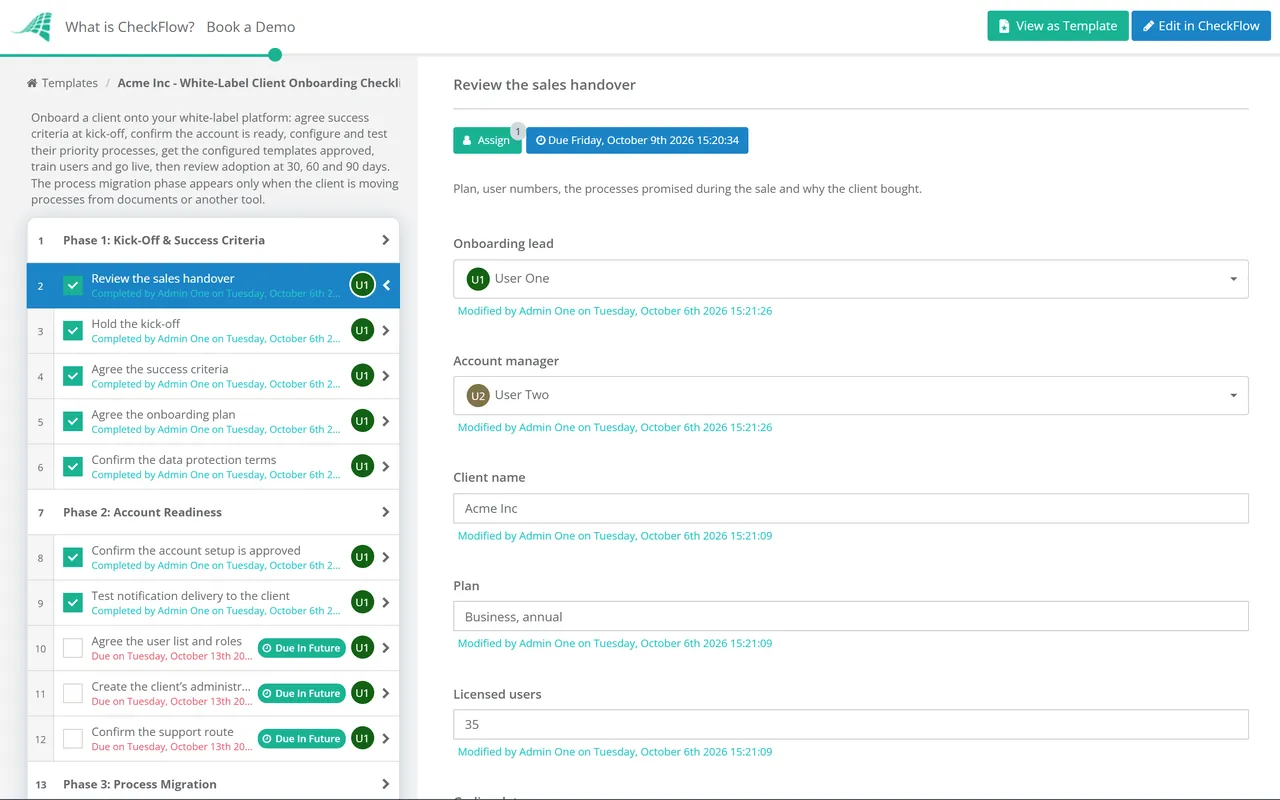
Don’t start from a blank page. Pick a proven client-facing template, customise it to your service, and deliver it to clients under your own brand: your logo, your subdomain, no CheckFlow navigation. Each one is fully editable in the CheckFlow template designer.
White-Label Client Onboarding Checklist
SaaS Customer Onboarding Checklist

Marketing Agency Client Onboarding Checklist

Financial Planner Client Onboarding Checklist
Simple Customer Onboarding Checklist
White-Label Reseller Account Setup Checklist
Franchisors can run the Franchise Brand Standards Audit Checklist under their own brand, so every field visit, score and corrective action plan reaches franchisees on the franchisor’s subdomain.
Resellers can start from two templates written for the job: the White-Label Reseller Account Setup Checklist for provisioning each client account, and the White-Label Client Onboarding Checklist for bringing that client into real use under your brand. Real estate and customer success teams have the real estate client onboarding and customer success strategy templates.
Who Uses CheckFlow’s White-Label Features
Four types of business that use white-label checklist software, and what they deliver under their own brand.
01Agencies & Consultants
- Client onboarding checklists delivered under the agency’s brand: clients see the agency’s logo and subdomain, not CheckFlow’s
- Asset collection checklists: clients upload brand assets, access credentials, and approvals via a branded link with no account required
- Campaign approval workflows: client review and sign-off processes run as branded checklists
- Project kickoff checklists: intake questionnaires and pre-launch confirmations sent to clients under agency branding
- Monthly reporting and review checklists: recurring client-facing processes delivered consistently under one brand, such as the agency monthly client reporting checklist
- Consulting methodologies: the consulting engagement delivery checklist turns a firm’s delivery method into a repeatable, shareable process for every engagement
- Accountants and bookkeepers: branded client onboarding checklists collect information, documents and sign-offs under the firm’s own identity, starting from the accounting firm client onboarding checklist
02MSPs & IT Service Providers
- New client IT onboarding checklists: device provisioning, account setup, security tool deployment, and access configuration, all run under the MSP’s brand
- Client offboarding checklists: account deactivation, hardware retrieval, licence recycling, run as branded client-facing workflows
- Security compliance checklists shared with clients: monthly patch confirmations, access review sign-offs, policy acknowledgments
- Incident response checklists run under the MSP’s brand, with client-facing confirmation tasks
- Quarterly service review checklists: standardised review process delivered under the MSP’s identity
- New staff IT setup checklists shared with client HR teams: clients follow the MSP’s branded process for new hire requests
03Franchise Operators
- Daily operations checklists: every franchise location runs the same opening and closing procedure, under the franchisor’s brand
- Quality control audit checklists: standardised inspection process delivered consistently across all locations by field auditors
- New location onboarding: structured checklist covering equipment setup, staff training, compliance documentation, and grand opening readiness
- Compliance monitoring: recurring safety, food hygiene, or brand standards checklists that every location runs on the same schedule
- Staff induction checklists: new franchisee staff follow the same structured induction regardless of location or local manager
- Training verification: franchisee staff complete and sign off training modules through a branded checklist interface
04Training & L&D Companies
- Onboarding programme delivery: structured onboarding checklists delivered to client companies under the training firm’s brand
- Learning pathway checklists: step-by-step completion trackers for training programmes that feel like a proprietary client platform
- Post-training action checklists: follow-through tasks delivered to learners as a branded process tool after in-person training
- Competency verification checklists: managers confirm and sign off competency milestones through a branded interface
- Annual reaccreditation checklists: recurring compliance training completion cycles delivered under the L&D provider’s identity
Set up your branded workspace in minutes: add your logo and browser icon, request your subdomain, and start sharing branded checklists with clients today.
Send the client their link from your AI assistant.
CheckFlow works with any AI assistant. Connect it once and it reads and works your client checklists with the same permissions as the person whose API key it holds.
Ask your AI assistant
Through the CheckFlow MCP server, Claude, ChatGPT, Gemini, Grok, Copilot or any other AI assistant can start a client checklist, share it with a password, an expiry or expiry on completion, and tell you which clients still have steps open.
Read the MCP guideDraft the template from a sentence
Describe your client process in a sentence and the free AI checklist generator drafts the template, with phases, fields and due dates in place.
Try the AI generatorConnect your other systems
Start and share a branded checklist for every new client from your CRM, through Zapier or the REST API, and get a webhook when the client finishes.
Developer overview
Share the Northwind Traders onboarding with their team. Put a password on it and close the link once it is complete.
checklist:          "Client Onboarding – Northwind Traders"
password:           "generated"
expireOnceComplete: "true"
Here is the branded link on your subdomain. The password is in my next message so you can send it separately. The link closes as soon as the last task is done.
Used by great companies









We also sometimes share checklists with third parties and CheckFlow allows you to set passwords and add branding to shared checklists.
Frequently asked questions
What is white label checklist software?
White label checklist software is a checklist and workflow tool that can be branded with your own logo, company name, and web address, so clients and end-users see your identity instead of the underlying software vendor’s. With CheckFlow, agencies, MSPs, consultants, and franchise operators can share checklists with clients via a branded link that shows their logo on their own checkflow.io subdomain, with no CheckFlow navigation in the client-facing page.
What white-label features does CheckFlow include?
CheckFlow’s white-label features include: a custom logo displayed in the header of all shared checklists and linked to your website, a custom browser icon that appears in browser tabs and bookmarks, your company name, read by screen readers in place of the logo, a custom subdomain (e.g. yourcompany.checkflow.io) for shared checklist links, no-login access for clients and external users via unique shareable links, password protection for sensitive checklists, and access expiry settings. These features are included in the standard Business plan, not locked behind an enterprise tier or priced as an add-on. On Enterprise, emails sent by Mail-To controls can also come from your own verified domain.
How is CheckFlow’s white-label different from Process Street or Tallyfy?
Process Street’s help centre lists custom branding and a custom subdomain as Enterprise plan features, activated through your account manager or support team. Tallyfy’s own help article says complete white-labelling is not feasible: security protections, its user manual and parts of its platform are tied to the tallyfy.com domain. CheckFlow’s logo, browser icon and subdomain branding is available in the standard Business plan at $10/user/month, with no enterprise negotiation. Shared checklists are served from a subdomain of checkflow.io rather than your own domain.
Do clients need to create a CheckFlow account to complete their tasks?
No. Clients access their tasks via a unique, secure shared link: no account, no sign-up, no login. They open the link, see your branded checklist, complete their tasks, and submit. This eliminates the friction of asking clients to create a third-party account and removes any risk of the underlying vendor being visible during a sign-up flow. Unlimited guest users are always free on all CheckFlow plans.
Can CheckFlow be used by franchise operators to standardise procedures across locations?
Yes. Franchise operators use CheckFlow to build and distribute standardised operational checklists to all franchise locations: daily opening and closing procedures, quality control audits, staff training verification, compliance monitoring. Each location follows the same checklist in the same order, under the franchisor’s brand. The franchisor can monitor compliance status across all locations in the Reports Grid in real time.
Does CheckFlow’s white-label pricing scale per client?
No. CheckFlow’s pricing is based on the number of internal team members using the platform, not per client, per location, or per checklist run. At $10/user/month, your cost stays flat regardless of how many clients or franchisees access shared checklists. Guests and clients completing tasks on shared links are always free and unlimited. This makes CheckFlow’s economics predictable and resale-friendly.
How much does CheckFlow cost?
CheckFlow’s Business plan is $10 per user per month, or $9 billed annually, with no minimum seat count. All white-label features (custom logo, browser icon, subdomain, no-login client access, password protection, access expiry) are included. Guest users are always free. There’s a free trial with no credit card required. See the full pricing page for details.
Start delivering checklists under your brand today
Free trial, no credit card required.
14-day free trial, no credit cardFull refund in your first 30 daysUS or EU hosting