
Process Management Software for MSPs
Your runbooks, running. Consistently. Across every client.
Your senior technicians have built great processes. The problem is getting every technician to follow them, every time, across every client environment, without constant supervision.
CheckFlow turns your MSP runbooks and SOPs into structured, trackable checklists that any technician can run without asking questions. Client onboarding, offboarding, device setup, security audits, patch verification, monthly maintenance: built once, repeatable for good, visible in real time.
14-day free trialNo credit cardUnlimited free guests
Last updated
MSP process management software turns runbooks into checklists technicians actually follow. In CheckFlow each runbook becomes a template; start it for any client with the client, service tier and technician filled in, schedule the recurring ones, and share a branded checklist with the client. Every step is assigned, ordered and recorded, so quality no longer depends on who picks up the job.
The problem with MSP processes living in documents
SOPs are only useful if people actually follow them. Most don’t, because documents are passive and checklists are active.
Your SOPs sit in a wiki nobody opens
You spent hours writing the perfect onboarding SOP. It lives in a shared drive or documentation platform. Your techs know it exists. They don’t look at it. Experienced techs work from memory; junior techs ask questions. The SOP may as well not exist.
Junior techs don’t follow senior runbooks
When a senior technician runs client onboarding, nothing gets missed. When a junior tech runs it, three things do. Without a structured, enforced checklist, quality depends entirely on who happens to be assigned the job.
No visibility across clients
You have 20 clients. Three have active onboardings in progress. Two have leavers being offboarded. Where are they all up to right now? Without one live view, the answer is “ask the tech”, which means pulling them off the job to find out.
Recurring tasks done differently every time
Monthly maintenance, patch verification, security reviews: they happen on a schedule, but the way they’re carried out varies by technician. Without a running checklist, there’s no consistent standard and no record that every step was completed.
Proving compliance is painful
A client asks for evidence that their monthly security review was completed. Or an internal audit needs to confirm that a leaver’s access was fully revoked. Without a structured audit trail, the answer involves digging through emails and hoping someone documented what they did.
Hard to scale when processes live in people’s heads
When your best technician leaves or goes on holiday, the quality of your service drops, because the process lived with them, not in a system. Scaling an MSP needs processes that any technician can pick up and run without institutional knowledge.
From SOP to running checklist in minutes
CheckFlow bridges the gap between a process that exists on paper and one that actually gets followed in practice.
Turn your runbooks into reusable templates
Use CheckFlow’s drag-and-drop designer to build your MSP processes as templates: client onboarding, offboarding, device provisioning, security audits, monthly checks. Define tasks, assign them to groups or named technicians, set due date rules, and add conditional logic for different client types or service tiers.
Run them instantly for any client
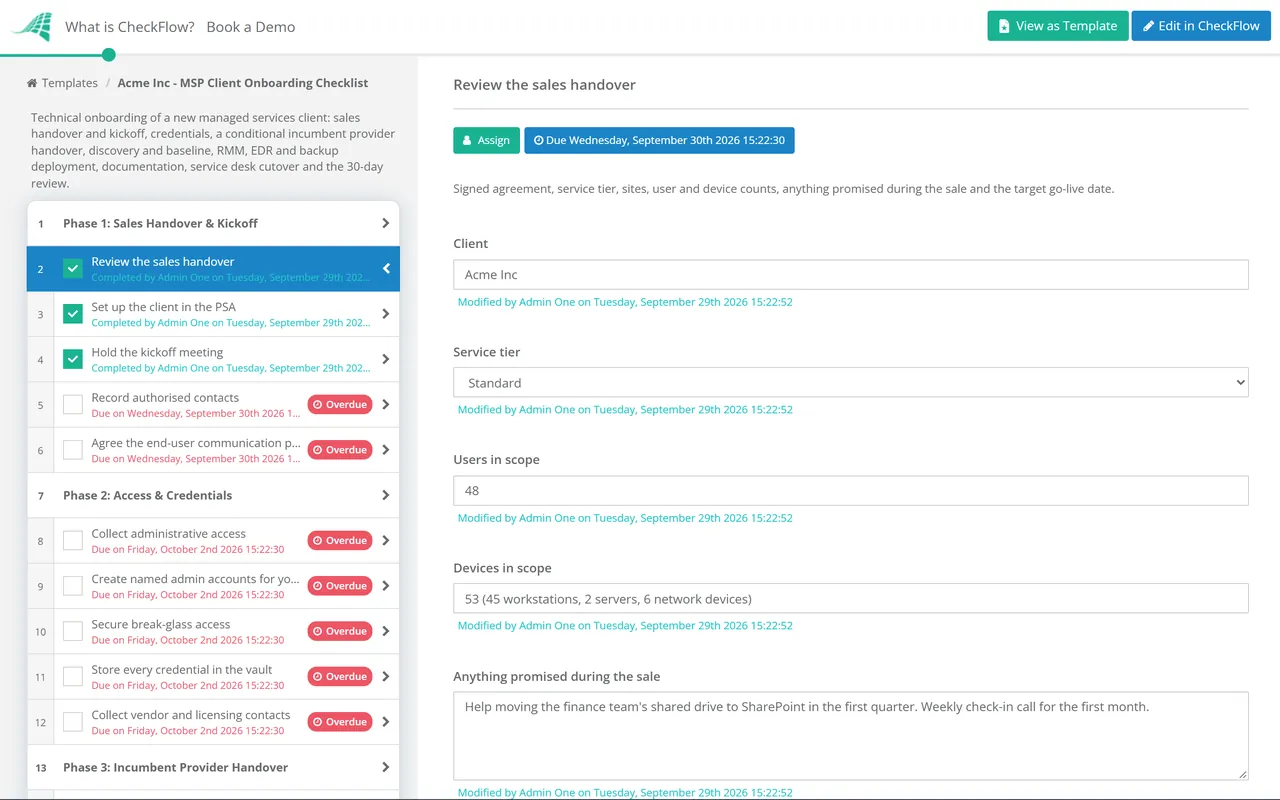
When a process needs to happen, start a checklist from your template in seconds. Enter the client name, the technician and the relevant date, and CheckFlow assigns every task and notifies the right people straight away. No briefing required. Halt tasks stop steps being skipped or done in the wrong order.
See every process across every client in one view
The Reports Grid shows the live status of every active checklist across all your clients at once. See what’s in progress, what’s overdue and what’s been completed, without interrupting your technicians to ask. Every completed checklist keeps its full activity feed.
Built for how MSPs actually work
Templates
One template, every client
Build your client onboarding process once and run it for every new client, with the client name, service tier and assigned technician filled in when it starts. Use conditional logic to show different tasks for different client types or contract levels. One template handles all variations without maintaining separate versions.
Sharing
Share checklists directly with clients
Use CheckFlow’s secure sharing to give clients a real-time view of their own onboarding or project progress, without giving them access to your internal platform. Add your logo and your own CheckFlow subdomain for a white-label experience. A clean, professional touch that improves the client relationship.
- Clients complete their own steps by link, with no account
- Tasks assigned exclusively to your team stay off the shared page
Any technician can run any process
CheckFlow checklists are self-contained: every step carries the instructions, links and fields it needs, so any technician can follow them without asking questions. Senior techs build the runbook once; junior techs follow it consistently. Quality stops depending on who happens to be assigned.
Learn moreSee all clients at a glance
The Reports Grid suits MSPs managing processes across many clients at once. See the status of every active checklist, across every client, in a single live list. Tag each checklist with its client and filter by client, template, status or assignee, so every client’s runs sit together.
Learn moreScheduled recurring processes
Monthly maintenance reviews, quarterly security audits, annual compliance checks such as Cyber Essentials renewal: set them up once in CheckFlow and they run on schedule. The right technician is assigned and notified each time, with the same structured checklist, without anyone having to remember to kick it off. A quarterly Microsoft 365 security baseline review for each client tenant is a typical example, and the MFA rollout checklist runs the project that gets a client there.
Learn moreA full audit trail for every client, every time
Every completed checklist is stored with a timestamped log of who completed each task and when. When a client asks for evidence of completed work, or an internal review needs to confirm a process was followed, the record is already there: structured, searchable and exportable.
Learn more
Ready-to-use MSP templates
Start from a managed services template, change the steps to match your stack, and run it for your next client.
MSP Client Onboarding Checklist

MSP Client Offboarding Checklist
Patch Tuesday Checklist
MSP Daily Backup Monitoring Checklist

MSP Quarterly Business Review (QBR) Checklist
Microsoft 365 Tenant Onboarding Checklist
The MSP processes CheckFlow handles
Any recurring process your team runs for clients can be turned into a CheckFlow template. Here are the most common ones.
- New client onboarding
- Client offboarding
- New user / employee onboarding (for client)
- User offboarding (for client)
- New device provisioning
- Device decommission
- Monthly maintenance review
- Quarterly security audit
- Patch verification checklist
- Incident response runbook
- SLA review and reporting
- New service deployment
Start from a free template in our managed services template library: client onboarding, RMM, EDR and BDR rollouts, the daily backup check, Patch Tuesday, the monthly service report, SLA reviews and billing reconciliation, QBRs and the vCIO roadmap, security and email authentication, client offboarding and white-label setup.
For client projects, the email migration checklist moves mail between Google Workspace and Microsoft 365, and the network upgrade and cutover checklist runs firewall and switch replacements in a planned window.
Around the agreement itself, the sales-to-onboarding handoff passes a signed deal to delivery with every promise recorded, the co-managed IT onboarding checklist agrees who does what with a client’s own IT team, the Microsoft 365 tenant onboarding checklist takes over the tenant safely, the NOC shift checklist runs every staffed shift the same way, the monthly client health check flags at-risk clients early, and the agreement renewal checklist renews each contract before its notice date.
Don’t see your process? CheckFlow’s template designer handles any recurring process your MSP runs. Start with a free trial and build your first template in under an hour.
Ask your AI assistant where every client stands.
CheckFlow works with any AI assistant. Connect it once and your technicians can check and work client checklists from the assistant they already use.
Ask your AI assistant
Through the CheckFlow MCP server, Claude, ChatGPT, Gemini, Grok, Copilot or any other AI assistant can find a client’s checklist by what was filled in on it, list the open tasks, and start an offboarding checklist for a leaver.
Read the MCP guideDraft the template from a sentence
Paste a runbook or describe it in a sentence and the free AI checklist generator drafts the template, with phases, fields and due dates in place.
Try the AI generatorConnect your other systems
Start a checklist when a new client or a leaver is logged in your PSA, through Zapier or the REST API, and get a webhook when it completes.
Developer overview
Where is the Northwind Traders onboarding up to?
template: "MSP Client Onboarding"
Client:   "Northwind Traders"
status:   "InProgress"
There is one in progress: “Onboarding – Northwind Traders”, started on 2 November. Shall I list its open tasks and who has them?
Used by great companies









Easy and intuitive creation of parameterized, rule-based workflows. It can be used across the company to automate any process.
MSP guides & resources
- MSP process management: the complete guideWhich processes cost most when inconsistent
- Managed services (MSP) templates27 templates from prospect assessment to offboarding
- IT runbook templateRunbooks technicians actually follow
- Disaster recovery checklistDR readiness tested before you need it
- Recurring compliance checklists for ITContinuous controls across every client
- Vendor onboarding checklistDue diligence and access provisioning
- IT change management checklistITIL 4 change enablement in practice
Much of MSP delivery repeats on a schedule: see recurring checklist software.
Frequently asked questions
How is CheckFlow different from our PSA or RMM tool?
Your PSA and RMM handle ticketing, monitoring and remote management, the technical side of your MSP operation. CheckFlow handles the human process side: the structured checklists your technicians follow when onboarding a client, offboarding a user, provisioning a device or running a monthly security review. PSA and RMM tools are not built to manage and track these multi-step human processes, especially ones that span several people or departments. CheckFlow fills that gap, and connects to your existing stack through Zapier or the REST API.
Can I use CheckFlow for processes that involve the client?
Yes. CheckFlow’s secure sharing feature lets you share a checklist directly with a client, so they can see progress, complete their own tasks (signing documents, submitting information, granting access) and confirm completion. No account or login is needed on their end. You can add your own logo and a CheckFlow subdomain for a white-label experience, giving clients a polished view of their onboarding or project status without exposing your internal tools.
Can junior technicians use CheckFlow without training?
Yes, that’s one of the core use cases. CheckFlow checklists are self-contained: every task includes whatever instructions, guidance or reference links your senior techs choose to include. Junior technicians follow the checklist step by step without needing to ask questions or refer to a separate SOP document. Enforced task order with halt tasks means they can’t skip ahead past a required step. The result is consistent service quality regardless of who runs the process.
Can CheckFlow handle recurring monthly or quarterly processes?
Yes. CheckFlow’s recurring checklists feature lets you schedule any template to run automatically: daily, weekly, monthly, quarterly, or on fixed points such as the first weekday of the month. The assigned technician is notified automatically each time. Monthly maintenance reviews, quarterly security audits and annual compliance checks all run on schedule without anyone having to remember to start them.
How does CheckFlow handle processes across multiple clients?
Each checklist run belongs to a specific client: enter the client name when you start it, using a parameter or the checklist name. The Reports Grid then shows all active checklists across all clients at once, filterable by template, status, assignee or tag (tag each run with its client to see just that client’s work), and the API and MCP server can find a client’s checklists by the values filled in on them. This live list suits MSPs running many processes at once across a portfolio of clients.
Does CheckFlow integrate with our existing MSP tools?
Yes, through Zapier and the REST API. Common integrations include starting a CheckFlow onboarding checklist automatically when a new client is added to your PSA, or starting an offboarding checklist when a leaver is logged in your system. The REST API allows custom integrations with any tool in your stack. Full Zapier and API documentation is available at docs.checkflow.io.
How much does CheckFlow cost?
CheckFlow’s Business plan is $10 per user per month, or $9 billed annually, with no minimum seat count. All features, including conditional logic, recurring checklists, dynamic due dates, auto-assignments, custom notifications, white-label sharing, Zapier integration and the REST API, are included. There is no per-client charge, and clients completing tasks through a shared link are free. Free trial, no credit card required. See the full pricing page at checkflow.io/pricing.
Start standardising your MSP processes today
Free trial, no credit card required. Build your first template in under an hour.
14-day free trial, no credit cardFull refund in your first 30 daysUS hosting, EU on request