
One team, first value
Kickoff, configuration, training and a first real workflow, usually led by one CSM. Use the SaaS Customer Onboarding Checklist.
Last reviewed: October 2026
No Credit Card Required
Printed from checkflow.io/templates/customer-management/enterprise-customer-implementation-checklist
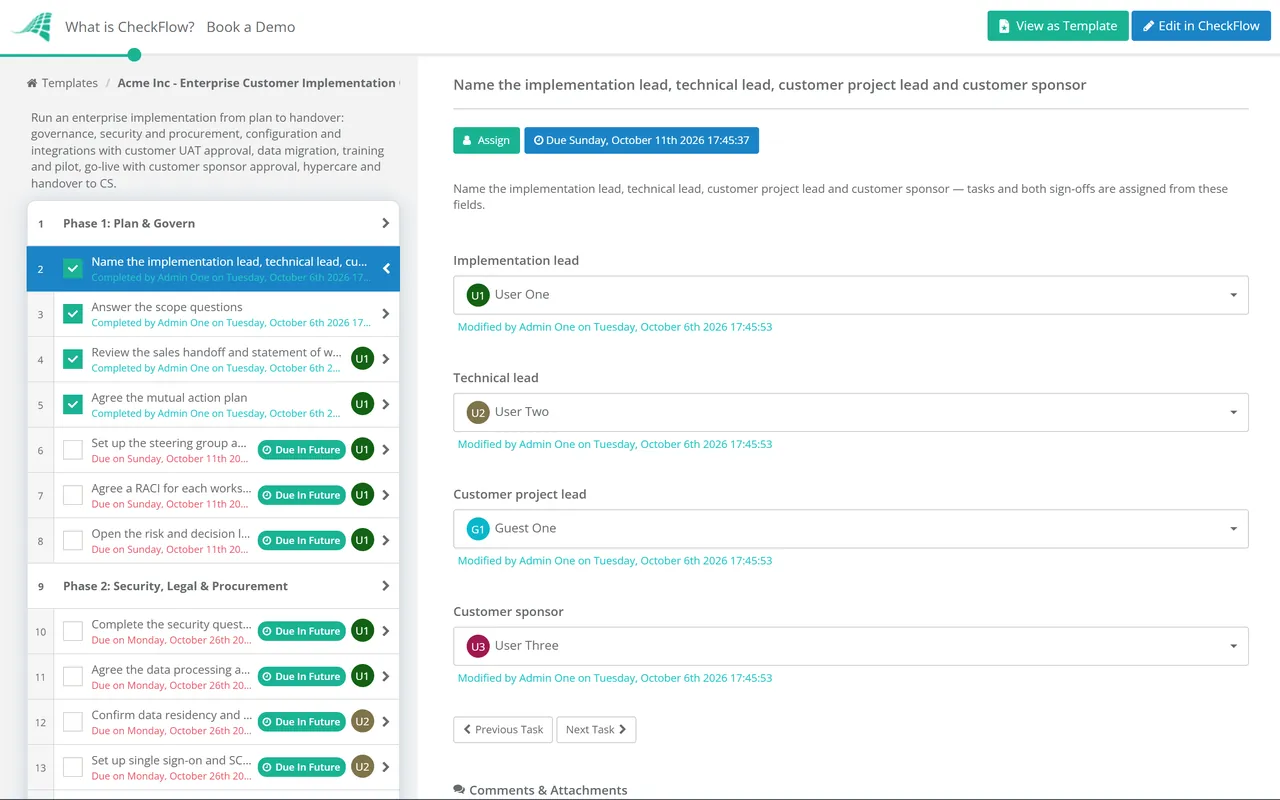
This free template is for implementation managers, solutions engineers and professional services teams at software vendors taking a large customer from signed contract to business as usual. It covers the governance both companies agree at the start, the security, legal and procurement work that gates everything else, configuration and integrations, testing, training and change, go-live and cutover, hypercare and the handover to customer success. Three scope questions tailor each run: data migration shows a whole migration phase, single sign-on or SCIM provisioning shows the identity task, and a pilot before full rollout shows the pilot task.
A self-serve or mid-market customer is onboarded: one admin, a kickoff, some configuration and training, and the customer is live within weeks. An enterprise customer is implemented. Before anyone configures anything, the security team wants a questionnaire answered and a data processing agreement signed, procurement wants a supplier record and a purchase order, and IT wants single sign-on and automated user provisioning. After that come several workstreams running in parallel, each with an owner on both sides, and a go-live date the sponsor will be asked about by their own leadership.
The difference is governance. Onboarding needs a plan. Implementation needs a plan both companies have agreed, a steering group that can make decisions, and a record of every decision and risk. This template runs the vendor’s side of that project. The customer’s IT team, running its own internal rollout, can use the New Software Implementation Checklist for their side.
Run one checklist per customer, started when the sales handoff is accepted. Every workstream sits in the same place, so the steering group reviews one list of overdue tasks instead of five status reports, and the history shows who signed off what when someone asks six months later.
Kickoff, configuration, training and a first real workflow, usually led by one CSM. Use the SaaS Customer Onboarding Checklist.
Security and procurement, identity, integrations, data migration, training and cutover, with a steering group and formal sign-offs. This checklist.
Owners, pilot, communications and retiring the old tool inside the customer’s organisation. Use the New Software Implementation Checklist.
Seven phases run from the implementation plan to the handover to customer success. Phase 4 appears only when data is being migrated from another system. In Phase 2 the single sign-on and provisioning task appears only when SSO or SCIM is in scope, and in Phase 5 the pilot task appears only when a pilot comes before full rollout.
Answer the scope questions at the planning meeting. They decide whether the migration phase, the identity task and the pilot task appear.
Shown only when data is being migrated from another system.
A RACI names who is Responsible for doing the work, who is Accountable for the result, who is Consulted and who is Informed. The table is a starting point for the vendor and customer columns; adjust the names to your own teams and copy it into the mutual action plan in the first week.
| Workstream | Responsible (vendor) | Responsible (customer) | Accountable |
|---|---|---|---|
| Plan and governance | Implementation lead | Customer project lead | Customer sponsor |
| Security, legal and procurement | Security and legal teams | IT security, legal and procurement | Customer’s risk or security owner |
| Identity (SSO and SCIM) | Technical lead | Identity or IT admin team | Customer IT owner |
| Integrations | Technical lead | Owners of each connected system | Customer project lead |
| Data migration | Technical lead | Data owner for each source system | Customer data owner |
| Training and change | Implementation lead | Champions and internal communications | Customer project lead |
| Go-live and cutover | Implementation lead | Customer project lead | Customer sponsor |
| Hypercare and handover | Implementation lead, then CSM | Customer project lead | Customer sponsor |
Most stalls are on the customer side. A security review with no owner, an integration whose system owner was never asked, a data owner who thinks migration is the vendor’s job. Naming a customer person against every row in week one finds those gaps while there is still time, and gives the steering group something specific to chase.
Go-live readiness, in one list. The sponsor should approve a date against evidence, not a feeling. Put these in front of them at the readiness review:
Identity is worth getting right early. Single sign-on usually runs on SAML 2.0 or OpenID Connect. Automated provisioning usually runs on SCIM 2.0, defined in IETF RFCs 7643 and 7644, which creates, updates and deactivates users from the customer’s identity provider. Test deactivation hardest: it is the part the customer’s security team will ask about, and the part most often left until after go-live.
Every workstream task carries an owner from the role fields and a due date offset from the project start, so the plan is dated the moment the checklist starts. Start it from your CRM or professional services tool through the API.
UAT results and the go-live date each stop at an approval step, so nothing moves to cutover until the customer has said yes. Approvals, comments and attached test evidence stay in the checklist history.
Conditional logic shows the migration phase, the identity task and the pilot only where they apply, so one template covers every enterprise deal. Reports show which implementations have overdue tasks.
Before the project starts, the Sales to Customer Success Handoff Checklist gets the deal facts and promises on file. The kickoff meeting can run from the Project Kickoff Checklist, and the customer’s security team often works from something like the Vendor Risk Assessment Checklist, so it helps to know what they will ask. After hypercare, the Customer Success Strategy Checklist sets how the account is managed.
Implementing for several enterprise customers at once? CheckFlow for client onboarding runs every implementation, handoff and onboarding from the same templates, so each customer gets the same governance whoever leads the project.
SaaS Customer Onboarding Checklist
Sales to Customer Success Handoff Checklist

Quarterly Business Review (QBR) Checklist
New Software Implementation Checklist
Training Program Rollout Checklist
Describe the process in a sentence and the AI checklist generator drafts the phases and tasks for you.
It is the project that takes a large customer from signed contract to using the product as part of normal work. Unlike standard onboarding, it usually includes a security review and data processing agreement, single sign-on and user provisioning, integrations with the customer’s systems, often a data migration, formal acceptance testing, a go-live sign-off and a period of hypercare, with a steering group and owners on both sides.
It depends on which workstreams are in scope, and the customer’s security review and data migration usually set the pace rather than configuration. A deal with no migration and standard single sign-on moves much faster than one with several integrations and years of records to move. Agree the dates in the mutual action plan, start the security work on day one, and treat any date that depends on an unnamed customer owner as a risk.
A mutual action plan is a dated list of the steps both companies will take to reach a shared goal, with an owner on each side for every step. Sales teams often use one to reach signature; in implementation it carries on to go-live. Its value is that the customer agreed it, so a missed customer task is a fact in the plan rather than the vendor’s complaint.
Hypercare is a fixed period straight after go-live when the implementation team stays on with faster response times and a daily review of issues, before the customer moves to standard support. Its length is agreed in the statement of work. It ends with open issues closed or handed to support with an owner, and the account handed to the customer success manager with the agreed success metrics.
Usually a completed security questionnaire, a data processing agreement, a sub-processor list and evidence of your controls. Questionnaires are often the customer’s own or a standard one such as the Shared Assessments SIG or the Cloud Security Alliance CAIQ. Evidence typically means a SOC 2 report or ISO 27001 certificate where you have one, plus answers on data residency, encryption, access control and incident response.
The customer’s sponsor, after the customer’s project lead has signed off acceptance testing. The vendor recommends a date and shows the readiness evidence; the sponsor decides, because it is their organisation that changes the way it works on that day. Recording the approval with the date and the evidence it was based on avoids a later argument about who agreed to go live with known issues.
14-day free trial, no card required. The Business plan is $10 per user per month after the trial. Full details at checkflow.io/pricing.
14-day free trial, no credit cardFull refund in your first 30 daysUS hosting, EU on request