
SOC 2 Compliance Software
SOC 2 Type 2 doesn’t care that you did 3 out of 4 quarterly access reviews.
You’ve invested in Vanta or Drata to automate the infrastructure side of SOC 2. That’s the right call. But many SOC 2 controls require a human to actually do something: a quarterly access review, an annual security training completion for every employee, a vendor security assessment, a tabletop exercise, a new hire background check before system access. Your GRC platform tells you when they’re due. It doesn’t do them for you.
CheckFlow is the execution layer for the human side of SOC 2. Build recurring task checklists for every control that needs a person to complete it, assign named owners, enforce deadlines, and capture timestamped evidence of completion automatically. When your auditor samples your Type 2 observation period, every month shows consistent execution. Because it was.
14-day free trialNo credit cardUnlimited free guests
Last updated
SOC 2 compliance software, in CheckFlow’s sense, runs the controls a person has to carry out: quarterly access reviews, annual training, vendor assessments, new-hire checks and incident records. Each control becomes a scheduled checklist with a named owner, deadlines and fields for evidence, so every cycle leaves a dated record for a Type 2 period. It works alongside a GRC platform; your auditor still decides what is sufficient.
Sound Familiar?
SOC 2 Type 2 audits don’t grade on intent. They grade on evidence. A quarterly access review that was “nearly done” is a gap. An employee who was “going to complete” their annual training is a gap. A vendor assessment that lives in a Slack thread instead of a timestamped record is a gap. And each gap is potentially an exception, on an audit report you’ve paid to produce.
A missed quarterly task becomes an exception
SOC 2 Type 2 auditors sample across your entire observation period. Miss your Q3 access review and you can have a documented exception, even if Q1, Q2, and Q4 were completed perfectly. A single missed cycle in a 12-month period is all it takes.
GRC platforms automate the infrastructure, not the humans
GRC platforms connect to your AWS, Okta, and GitHub and collect evidence automatically. Some help organise reviews, but a person still has to conduct the quarterly access review, assess the vendor and finish the annual training, and document it.
Controls fall off when people leave
The engineer who owned your quarterly access reviews left. They took their calendar reminders and their institutional knowledge with them. Nobody knows the task exists until the auditor finds the gap six months later and the observation period has already captured the miss.
Compliance theatre: on paper, not in practice
The policy says quarterly access reviews happen. The reality is they happen when someone remembers, or they don’t happen at all. Type 2 auditors don’t grade on your policy documentation. They grade on timestamped evidence that each control was executed consistently across the full observation period.
No named owner for manual controls
“Someone in IT handles that.” Without a named assignee and a deadline, controls that require human action get deprioritised when the team is busy shipping product. Then they don’t happen. Then they show up as exceptions in your audit report.
You’ve already paid for the audit
A single missed training completion, one undocumented emergency change, or one quarterly access review that slipped can produce an audit exception. Exceptions are listed in the report your customers read, and a qualified opinion can stall the enterprise deal that depends on a clean SOC 2 report.
How CheckFlow Works for SOC 2 Teams
Map your recurring controls once. They start on schedule every quarter, every year, with a full evidence trail for every cycle.
Map your recurring SOC 2 controls
List every control that requires a human to execute it: quarterly access reviews, monthly vulnerability scan documentation, annual security training, vendor assessments, policy reviews, new hire background checks. Build a CheckFlow checklist for each. Takes an afternoon to set up.
Assign owners and schedule the cycles
Set each checklist to recur on the right cadence: quarterly for access reviews, annually for risk assessments and training, and started for each new hire for new employee controls. CheckFlow assigns the right team member and sends reminders before deadlines. Assign to a group and the cycle keeps running through personnel changes.
Build the evidence trail automatically
Every completed task creates a timestamped record with the assignee’s name, completion date, and any attached evidence: screenshots, reports, certificates. When your auditor samples your observation period, you have complete, dated records for every control, every cycle, every month.
Built for the Human Side of SOC 2
SOC 2 has two layers: the infrastructure layer that GRC platforms automate, and the human execution layer that someone on your team has to actually do. Quarterly access reviews. Annual training completions. Vendor assessments. New hire background checks. Incident response documentation. CheckFlow is designed for exactly this layer: recurring tasks, named owners, documented completion, and an evidence trail that survives team changes, audit cycles, and Type 2 renewals year after year.
CC6.2 · CC6.3
Quarterly access review checklists
A common source of SOC 2 exceptions. CheckFlow starts your quarterly access review every quarter, assigned to the right owner, with a structured checklist: pull the active user list, verify each access level is appropriate to the current role, document any changes made, record reviewer name and completion date. Timestamped evidence for every quarter, with no more gaps.
- Fixed points such as the last weekday of the quarter
- Every schedule runs in its own time zone
CC1.4 · CC6.1 · CC6.2
New hire compliance controls
Background check before system access. Security policy acknowledgment before tools are provisioned. Security training completed within 30 days. Halt tasks keep each step in the correct sequence, assigned to the right person, with a completion record. The access controls are executed the same way for every new hire, every time.
Annual security training completion tracking
Every employee, every year. Run a yearly training checklist with a task per employee, or one checklist per person, so each completion is recorded with a name and a date. CheckFlow shows who’s done and who hasn’t. When your auditor asks for proof that every employee completed security awareness training this year, you have it, instantly.
Learn moreVendor security assessment checklists
SOC 2 CC9.2 asks you to assess and manage the risks from vendors and business partners. CheckFlow assigns a structured vendor assessment checklist per vendor per cycle: review their SOC 2 report or ISO 27001 certificate, complete the security questionnaire, assign a risk rating, record reviewer and completion date. A timestamped record per vendor, per annual cycle: the evidence your auditor asks for under CC9.2.
Learn moreIncident response documentation
When an incident occurs, the documentation checklist opens: detection, containment, scope assessment, stakeholder notification, timeline documentation, post-mortem. Every incident response produces a complete, timestamped record, which is the evidence your Type 2 period needs for the incident management criteria (CC7.3 to CC7.5).
Learn morePolicy review and employee attestation cycles
Annual policy review is a known gap. CheckFlow schedules your policy review cycle, assigns each step to the right owner, and tracks employee attestation: individual acknowledgment that each policy has been read and understood. For Type 2 renewals, this cycle is already documented. Year after year.
Learn more
Ready-to-Use Compliance Templates
Don’t start from a blank page. Pick a proven compliance template, customise it to your framework, controls, and audit scope, and run it for your next assessment in minutes. Each one is fully editable in the CheckFlow template designer.
SOC 2 Readiness Checklist
ISO 27001 Compliance Checklist
ISO Compliance Checklist
FedRAMP Compliance Checklist
Segregation of Duties Review Checklist
HIPAA Compliance Audit Checklist
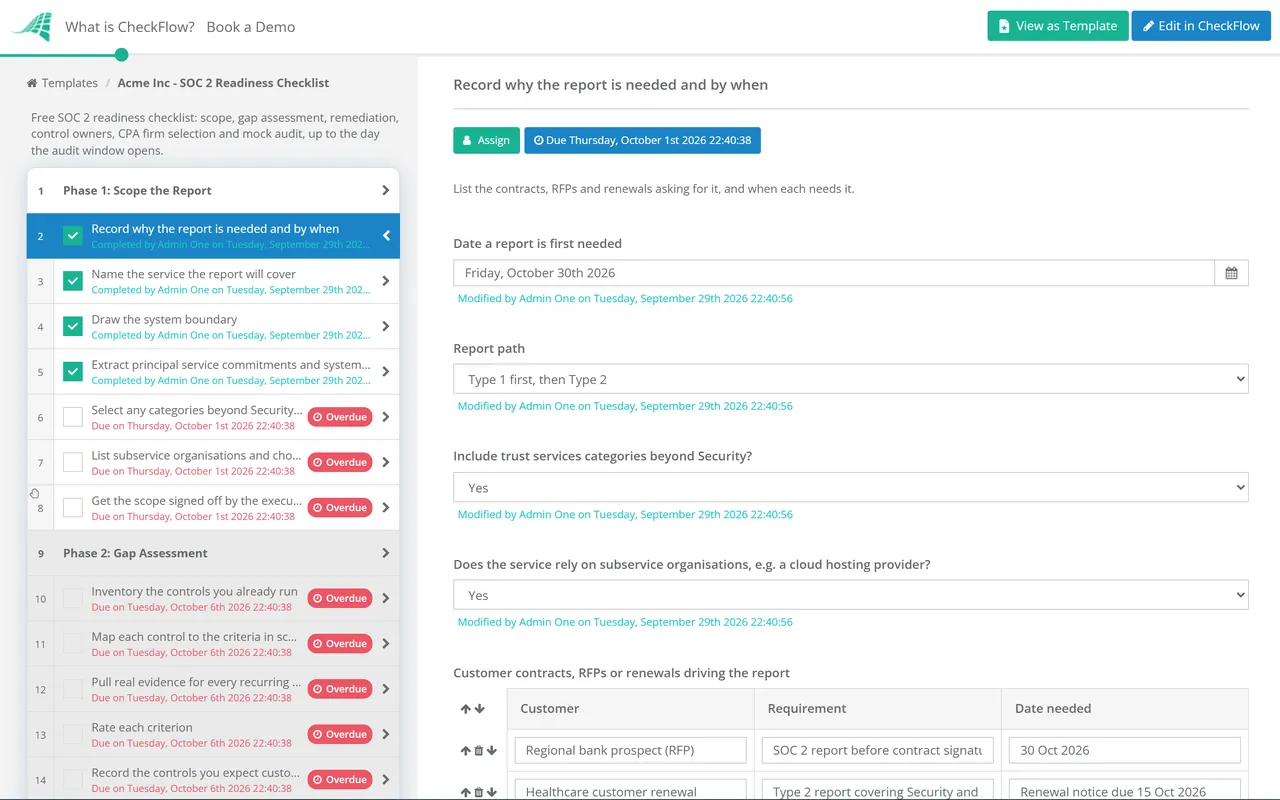
Before the first report, the SOC 2 readiness assessment checklist scopes the report, runs the gap assessment against the Trust Services Criteria and rehearses the audit before the observation window opens.
Between attestations, the IT Security Audit Checklist runs an internal audit of the whole security programme, so the findings your SOC 2 auditor would raise are fixed and retested first. Audit management software shows how to schedule those internal audits and track each finding to a close.
SOC 1 and SOX work rests on the same IT controls. The IT General Controls (ITGC) Review Checklist tests the access, change, development and operations controls behind financial reporting, and if you also hold ISO 27001 the ISO 27001 Internal Audit Checklist runs the clause 9.2 audit those controls feed into.
SOC 2 auditors sample the recurring security reviews behind your controls as well as the policies. Our cybersecurity templates cover the ones they ask about most: the quarterly user access review for CC6, the cloud security review, penetration test preparation and remediation, and the incident response tabletop exercise that tests your response plan. For administrator and service accounts, the privileged access review goes further than the user review, down to break-glass accounts, vault check-outs and session evidence.
The SOC 2 Controls That Require Human Execution
These are the recurring tasks your GRC platform tells you about but doesn’t do for you, and the ones most likely to generate exceptions in a Type 2 audit.
01Quarterly Controls
- User access review: pull active user list from all in-scope systems (Okta, AWS, GitHub, production databases, SaaS tools)
- For each user: verify access is appropriate to their current role and employment status
- Document any accounts requiring removal, downgrade, or role change
- Confirm all changes actioned and verified in each system
- MFA enforcement verified across all in-scope systems
- Inactive accounts (90+ days) flagged and deprovisioned
- Record reviewer’s name and exact completion date
- Vulnerability scan run (or results reviewed if automated) and tracked against SLA
02Annual Controls
- Security awareness training: every employee assigned, completion tracked per person, per cycle
- Annual risk assessment: threat landscape reviewed, asset inventory updated, risk ratings assigned, treatment decisions documented, executive sign-off obtained
- Penetration test: external provider engaged, report received and filed, remediation tracked with SLA
- All security policies reviewed for currency and accuracy, updates approved by owner
- Policy acknowledgment: every employee confirms in writing that they have read current policies
- Business continuity and disaster recovery plan reviewed and tested
- Incident response tabletop exercise conducted and results documented
- Annual vendor security review cycle initiated (see Vendor Management phase)
03Vendor Management
- Vendor inventory maintained and reviewed: all third parties with access to in-scope systems listed
- For each relevant vendor: SOC 2 Type 2 report or ISO 27001 certificate reviewed and confirmed current
- Security questionnaire or SIG Lite completed and filed
- Risk rating assigned per vendor (high / medium / low) based on data access and criticality
- Data Processing Agreement (DPA) confirmed signed and current
- Sub-processor list reviewed for any changes
- High-risk vendor re-assessments flagged for follow-up
- Annual vendor review cycle completion confirmed and documented
04Per-Hire Controls
- Background check completed before system access is provisioned, with no exceptions
- Signed offer letter and NDA on file before first day
- Security policy acknowledgment signed before any tool access
- Role-appropriate system access provisioned: least-privilege principle applied, access list documented
- MFA enrolled on day one
- Security awareness training completed within first 30 days
- Manager sign-off confirming all provisioning steps complete
- At departure: accounts deprovisioned within 24–48 hours, checklist completed and timestamped
CheckFlow’s free templates cover quarterly, annual, vendor, and per-hire requirements, from the SOC 2 Readiness Checklist to the security awareness training programme, ready to run for your next access review cycle in minutes.
Ask your AI assistant whether a control was missed.
CheckFlow works with any AI assistant. Connect it once and it reads and works your control checklists with the same permissions as the person it acts for.
Ask your AI assistant
Through the CheckFlow MCP server, Claude, ChatGPT, Gemini, Grok, Copilot or any other AI assistant can list a schedule’s missed runs, read a checklist’s activity for the evidence pack, and list the control tasks that are overdue.
Read the MCP guideDraft the template from a sentence
Paste a control description or describe it in a sentence and the free AI checklist generator drafts the template, with phases, fields and due dates in place.
Try the AI generatorConnect your other systems
Start a new-hire controls checklist from your HRIS through Zapier or the REST API, and get a webhook when each control completes.
Developer overview
Did any quarterly access reviews get missed this year?
schedule: "Quarterly access review"
status:   "missed"
None. No run of the quarterly access review schedule was missed this year. Shall I list the checklists it created, with their completion dates, for the evidence pack?
Used by great companies









This is a great app for documenting and managing your processes. … It is particularly good for time sensitive processes as you can set up a sequence of task due reminder emails at whatever time frames you want.
Frequently asked questions
How is CheckFlow different from Vanta, Drata, or Secureframe?
Vanta, Drata, and Secureframe automate the infrastructure evidence collection layer, connecting to your AWS, Okta, GitHub, and other tools via API to continuously monitor configurations and collect automated evidence. They’re excellent for that. CheckFlow handles the part they can’t do for you: the human-executed controls that require a person to conduct a review, complete training, or perform a task and document it. Many SOC 2 controls depend on human processes that no automation platform can carry out for you. CheckFlow and your GRC platform are complementary, not competing, and teams can use both.
Is CheckFlow more valuable for SOC 2 Type 1 or Type 2?
CheckFlow adds the most value for Type 2. SOC 2 is an attestation report issued by an independent CPA firm against the AICPA’s Trust Services Criteria (2017, with revised points of focus published in 2022). Security, the common criteria, is always in scope; Availability, Processing Integrity, Confidentiality and Privacy are added as needed. A Type 1 report covers the design of your controls at a point in time. A Type 2 report covers their design and operating effectiveness over a period, often six to twelve months, agreed with your auditor. That consistent execution over time is exactly what CheckFlow helps with: recurring checklists start on schedule, are completed by named individuals, and produce a timestamped evidence trail across the full observation period. For Type 1, you might get by with a one-time checklist run. For Type 2, you need a system that runs every quarter, every year, without gaps.
How does CheckFlow create evidence that SOC 2 auditors accept?
Every completed checklist task produces a timestamped record: who completed it, when, and what the outcome was. Reviewers can attach evidence (screenshots, reports, signed documents, certificates) directly to checklist items. Completed checklists stay in the Reports Grid, and you can print any of them or save it as a PDF. When your auditor requests evidence of your Q2 access review, your annual security training completion, or your vendor assessment for a specific supplier, you pull it from CheckFlow and export it immediately. The record shows the reviewer’s name, the completion date, and any attached documentation. Your auditor decides what evidence is sufficient: using CheckFlow does not make you SOC 2 compliant, it makes the work and its record consistent.
Can I assign different SOC 2 control tasks to different team members?
Yes. Each checklist can have steps assigned to different roles: security team, IT, HR, management. A new hire onboarding checklist might have steps for IT (provision access), HR (background check confirmation), and the manager (security policy briefing). Each person receives their assigned steps and automatic reminders. The compliance owner sees full completion status across all steps. Ownership is explicit and documented, which matters for Type 2 audits that assess whether controls have clear owners.
What are the most common SOC 2 controls CheckFlow helps with?
Quarterly user access reviews (CC6.2, CC6.3), annual security awareness training completion tracking (CC1.4), vendor security assessments (CC9.2), new hire background checks (CC1.4) and access provisioning workflows (CC6.1, CC6.2), incident response documentation (CC7.3 to CC7.5), and annual policy review and attestation cycles. All of them depend on people, and all of them need documented evidence.
Does CheckFlow work for ISO 27001 as well as SOC 2?
Yes. ISO 27001 has closely overlapping recurring operational controls: access reviews, risk assessments, security training, vendor security assessments, and policy reviews. If you’re pursuing SOC 2 and ISO 27001 at the same time, which is common for SaaS companies selling internationally, the same CheckFlow templates can cover both frameworks. Build the checklist once; it generates the evidence for multiple audits. The two frameworks overlap significantly on the human execution side.
What does CheckFlow cost compared to Vanta or Drata?
CheckFlow’s Business plan is $10 per user per month, or $9 billed annually, with no minimum seat count. A 10-person team managing SOC 2 compliance tasks pays $100 per month, or $1200 per year on monthly billing. GRC platforms are priced separately and quoted by their vendors. CheckFlow doesn’t replace your GRC platform if you have one: it fills the execution gap those platforms leave open on the human control side. See the full pricing page for details.
Stop explaining to auditors. Show them.
Free trial, no credit card required. Build the recurring control checklists your SOC 2 Type 2 programme needs (quarterly access reviews, annual training, vendor assessments, new hire controls) and keep the timestamped evidence trail your next audit asks for.
14-day free trial, no credit cardFull refund in your first 30 daysUS hosting, EU on request