
Compliance Checklist Software
Make sure every compliance task gets done: in the right order, by the right person, with proof.
CheckFlow gives compliance managers, IT teams and operations directors a structured, automated way to run recurring compliance workflows, with tasks auto-assigned to the right person, completed in the enforced order, and backed by a timestamped audit trail that holds up when auditors ask questions.
From daily security log reviews and quarterly access audits to annual penetration tests and policy acknowledgement cycles, CheckFlow makes sure every compliance obligation is tracked, assigned, completed on time and documented. Without the cost or complexity of a dedicated GRC platform.
14-day free trialNo credit cardUnlimited free guests
Last updated
Compliance checklist software turns recurring obligations into checklists that start on schedule, go to named owners, run in order and leave evidence. In CheckFlow each control or review becomes a template; schedules start it daily, quarterly or yearly, halt tasks stop steps being skipped, and every completion is logged with a name and time. It suits SOC 2, ISO 27001, PCI DSS, GDPR and HIPAA work.
Sound familiar?
Most compliance teams run their recurring obligations on a combination of spreadsheets, calendar reminders and institutional knowledge. That works until it doesn’t, and when it fails, the cost is high.
Compliance tasks tracked in spreadsheets
Spreadsheets don’t enforce step order. They don’t send reminders. They don’t auto-assign tasks or escalate overdue items. And when someone leaves the company, the spreadsheet goes dark, along with everything they were responsible for.
No audit trail when the auditor asks
When an auditor asks for proof that a quarterly access review was completed in March, the answer shouldn’t be a memory, an email thread or a guessed date in a spreadsheet.
Recurring tasks fall through when someone leaves
Compliance obligations don’t stop when a team member moves on. Without a system that owns the process rather than the person, recurring tasks (quarterly vulnerability scans, monthly anti-malware checks, annual policy reviews) disappear when the person responsible does.
Nobody is clear on what they’re responsible for
Compliance tasks cross departments: IT, Legal, HR, Finance, Engineering. Without clear, auto-assigned responsibilities, tasks fall into gaps between teams. Everyone assumes someone else is handling it.
Steps get skipped under pressure
Uptime Institute’s 2022 outage analysis found that 85% of human-error outages stem from staff failing to follow procedures or from flaws in the procedures themselves. When compliance tasks are optional, unordered and unmonitored, skipping an inconvenient step is easy. The consequences usually appear months later.
GRC platforms are priced for enterprises
Enterprise compliance platforms like Vanta, Hyperproof and LogicGate are built for large security organisations, typically on annual contracts with an implementation project. If what you need is structured, repeatable compliance checklists with an audit trail, you may not need a GRC platform at all.
How CheckFlow works for compliance teams
One checklist per control. Runs automatically. Proves it happened.
Build your compliance workflow templates once
Map each compliance obligation into a CheckFlow template: SOC 2 quarterly access reviews, PCI DSS daily log reviews, ISO 27001 annual risk assessments, GDPR breach response workflows. Define every task, assign it to the right person or team, set dynamic due dates, and enforce the order steps must happen. Conditional logic lets one template handle multiple frameworks or business units.
Schedule it to run automatically
Set recurring checklists to start daily, weekly, monthly, quarterly or annually, whichever the framework requires. CheckFlow assigns every task, notifies the responsible person and sends reminders if tasks aren’t completed before their deadline. No one has to remember. The process runs whether or not the person who set it up is still on the team.
Produce the audit trail automatically
Every step completion is logged with a timestamp and the name of the person who completed it. When an auditor, external assessor or board member asks for evidence that a control was carried out, the answer is a complete, filterable record of who did what and when, across every compliance cycle. No reconstruction required.
Built for recurring compliance obligations
Compliance isn’t a project you finish. It’s a set of recurring obligations that need to be carried out consistently, documented completely and evidenced clearly. CheckFlow is designed for this kind of time-sensitive, recurring, cross-team process.
Schedules
Recurring checklists on any schedule
Set any compliance checklist to start daily, weekly, monthly, quarterly, every six months or yearly. PCI DSS quarterly vulnerability scans. ISO 27001 annual internal audits. Monthly patch reviews. Each cycle starts on time, tasks are assigned and reminders go out without anyone starting it by hand.
- Fixed points such as the last weekday or last day of the quarter
- Every schedule runs in its own time zone
Evidence
A timestamped audit trail for every step
Every step completion is logged with who did it, when, and what evidence was attached. When an assessor conducting your SOC 2 audit or PCI DSS assessment asks for proof that quarterly access reviews were completed on time, the answer is a complete, exportable record, not a reconstructed email thread or a guessed spreadsheet entry.
- Export the Reports Grid to CSV, Excel or PDF
- Print any checklist, or save it as a PDF, for the evidence pack
Enforce step order: no skipping allowed
Use halt tasks to stop later steps being completed before earlier ones are done. A vulnerability scan can’t be signed off until remediation actions are confirmed closed. An annual policy review can’t be completed until every policy section has been reviewed and signed. Enforced order is the difference between a compliance process and compliance theatre.
Learn moreAuto-assign tasks to the right person or team
Decide which steps belong to IT Security, which to Legal, which to the CISO and which to HR. When a compliance checklist runs, every team member is notified of their specific tasks and deadlines. No manual delegation. No confusion about who owns which control.
Learn moreAutomated reminders and escalation
Overdue compliance tasks don’t go unnoticed. CheckFlow emails task owners before and after deadlines, and custom notifications can alert the relevant manager when a task is overdue by a set time. No compliance obligation disappears quietly into a missed calendar reminder.
Learn moreOne template for multiple frameworks
Use conditional logic to show different compliance steps based on the framework, business unit or system in scope. A PCI DSS checklist can run different steps for card-present and card-not-present environments. A SOC 2 checklist can adapt to the Trust Services Criteria in scope. One template, no duplicate maintenance.
Learn more
Ready-to-use compliance templates
Don’t start from a blank page. Pick a proven compliance template, customise it to your framework, controls and audit scope, and run it for your next assessment in minutes. Each one is fully editable in the CheckFlow template designer.
ISO Compliance Checklist
ISO 27001 Compliance Checklist
GDPR Compliance Audit Checklist
PCI DSS 4.0 Compliance Checklist
HIPAA Compliance Audit Checklist
FedRAMP Compliance Checklist
Audit work follows the same pattern. The External Audit Preparation Checklist organises your side of the year-end financial audit, the IT Security Audit Checklist tests the whole security programme, and the Payroll Audit Checklist checks every payee is real and correctly paid.
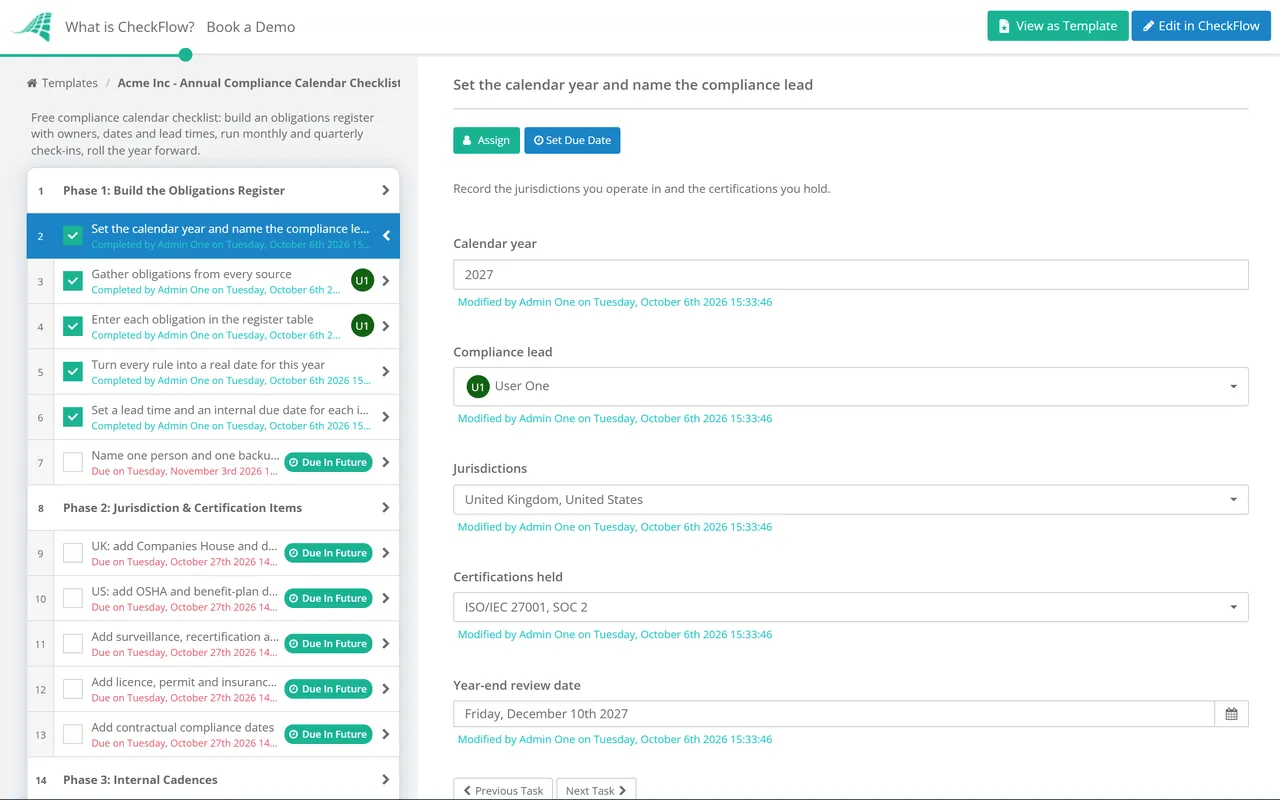
Newer obligations have their own templates. The EU AI Act Compliance Checklist works through the Act as amended by the Digital Omnibus, and the ISO 42001 checklist runs AI governance as a management system. Privacy work that arrives one request or one project at a time is covered by the DSAR Response Checklist and the DPIA Checklist, while the website privacy and cookie review and the WCAG 2.2 accessibility audit keep a public site in line. To see every deadline in one place, start with the Annual Compliance Calendar Checklist.
Quality and food safety systems run the same way. The CAPA Checklist takes each nonconformity through the corrective action loop that ISO 9001 asks for, and the HACCP Food Safety Checklist builds or reviews a HACCP plan against the Codex principles and the US, UK and EU rules.
Frameworks ask for evidence that security operations run on schedule, not just that a policy exists. The cybersecurity templates cover that work: the monthly vulnerability management cycle, the annual network security audit, cybersecurity incident response and the yearly security awareness training programme. When something does go wrong, the phishing incident response and data breach response checklists keep the deadlines and decisions on record, and the annual data classification review checks that sensitive data is labelled and handled as your policy says.
What your compliance checklists should cover
The recurring compliance tasks that must happen, and what gets missed when there’s no system enforcing them. PCI DSS references are to v4.0.1.
01Daily & weekly controls
- Security log review (PCI DSS 10.4.1): review audit logs for in-scope systems at least daily
- Critical file integrity comparison (PCI DSS 11.5.2): detect unauthorised changes to critical files at least weekly
- Security alert monitoring and response: triage and document any triggered alerts
- CCTV and physical security checks: confirm recording systems operational, storage within retention limits
- Backup verification: confirm backups completed successfully and spot-test restore capability
02Monthly & quarterly reviews
- Critical security patch installation (PCI DSS 6.3.3): patches for critical vulnerabilities installed within one month of release
- Anti-malware checks (PCI DSS 5.2, 5.3): confirm it is active, kept current and scanning on all applicable systems
- Inactive user account review: disable or remove accounts not used within 90 days (PCI DSS 8.2.6)
- Cardholder data retention review (PCI DSS 3.2.1): identify and securely delete stored data past its retention period, at least every three months
- Internal and external vulnerability scans (PCI DSS 11.3.1, 11.3.2): quarterly, with passing ASV scans for external scans
- Wireless access point testing (PCI DSS 11.2.1): detect any unauthorised wireless access points at least every three months
- Quarterly access review: audit who has access to which systems and revoke any unnecessary permissions
- Third-party service provider compliance status review (PCI DSS 12.8.4)
03Annual compliance audits
- Annual risk assessment: identify, score and treat information security risks (ISO 27001, SOC 2)
- Internal audit: assess controls against framework requirements, document findings and corrective actions
- Management review: board-level review of ISMS performance, risk posture and audit findings
- Penetration testing: internal and external (PCI DSS 11.4, ISO 27001 A.8.8)
- Security policy review and update: all policies reviewed, updated where required, re-approved
- Annual policy acknowledgement: all staff confirm they have read and understood updated policies
- Security awareness training: all personnel trained and completion records stored
- Firewall and router rule set review (PCI DSS 1.2.7, at least every six months)
- Service provider attestation review: all third-party providers confirm compliance status annually
- Incident response plan testing: tabletop exercise or simulation completed and documented
- ISO 27001 Statement of Applicability review: all controls reviewed, applicability decisions documented
04Framework workflows
- SOC 2: access review evidence collection, change management documentation, security training records, vendor due diligence, availability monitoring reports
- ISO 27001: surveillance audit prep, corrective action register, risk treatment plan updates, training competency records
- GDPR: data subject request handling log, records of processing review, privacy impact assessment schedule, consent records audit, breach notification response drill
- HIPAA: security risk assessment, PHI access review, employee training completion records, business associate agreement renewals, incident response testing
- PCI DSS: scope validation and network diagram update, QSA documentation pack, compensating control reviews, cardholder data environment mapping
CheckFlow’s free compliance checklist templates are mapped to PCI DSS, ISO 27001, SOC 2, GDPR and HIPAA cycles, ready to customise and schedule in minutes.
Ask your AI assistant whether every control ran.
CheckFlow works with any AI assistant. Connect it once and it can check schedules and evidence with the same permissions as the person whose API key it holds.
Ask your AI assistant
Through the CheckFlow MCP server, Claude, ChatGPT, Gemini, Grok, Copilot or any other AI assistant can list a schedule’s past and upcoming runs, spot a run that was missed, and read a checklist’s activity before an audit.
Read the MCP guideDraft the template from a sentence
Describe a control or a review in a sentence and the free AI checklist generator drafts the template, ready to schedule.
Try the AI generatorConnect your other systems
Pull checklist status and answers into your own reporting through the REST API, and get a webhook when a review completes.
Developer overview
Has the quarterly access review missed any runs this year?
schedule: "Quarterly access review"
from:     "2026-01-01T00:00:00"
status:   "missed"
None. Q1, Q2 and Q3 each have a checklist, and the Q4 review is due on Thursday 31 December.
Used by great companies









This is a great app for documenting and managing your processes. … It is particularly good for time sensitive processes as you can set up a sequence of task due reminder emails at whatever time frames you want.
Frequently asked questions
What is compliance checklist software?
Compliance checklist software is a tool that turns recurring compliance obligations into structured, automated, trackable workflows. Instead of managing compliance tasks in spreadsheets and calendar reminders, the software auto-assigns tasks to the right person, enforces the correct completion order, sends automatic reminders, and creates a timestamped audit trail for every step.
CheckFlow is designed for compliance teams that need to carry out recurring controls consistently, for frameworks like SOC 2, ISO 27001, PCI DSS, GDPR and HIPAA, without the cost and complexity of a dedicated GRC platform.
How is CheckFlow different from GRC platforms like Vanta or Hyperproof?
GRC platforms like Vanta and Hyperproof are designed for organisations automating continuous evidence collection through integrations with cloud services, and are usually bought on annual contracts. CheckFlow is designed for teams that need structured, human-run compliance checklists with enforced step order, auto-assigned responsibilities and a clean audit trail, without a large annual contract or a months-long implementation project.
It suits teams that have real compliance obligations and need them to run reliably, rather than enterprises running many certification programmes at once. Some teams use both: the GRC platform for automated evidence, CheckFlow for the recurring work people do by hand.
Can CheckFlow handle recurring compliance tasks that run on different schedules?
Yes. CheckFlow’s recurring checklist feature lets you schedule any compliance workflow to start daily, weekly, monthly, quarterly, every six months or yearly. PCI DSS v4.0.1 asks for daily log reviews (Requirement 10.4.1), weekly file integrity checks (11.5.2), critical security patches within one month of release (6.3.3), quarterly vulnerability scans (11.3), network security control reviews at least every six months (1.2.7), and annual penetration tests (11.4). CheckFlow can run all of these on their own schedules, assigning tasks each cycle without anyone having to start the process by hand.
Does CheckFlow create an audit trail that satisfies compliance assessors?
Yes. Every step completion is logged with a timestamp, the identity of the person who completed it, and any evidence or attachments added. That gives compliance assessors, external auditors and certification bodies a dated, filterable record to review. When an auditor asks for evidence that your quarterly access review was completed on time, the answer is a clean, exportable record (CSV, Excel or PDF), not a reconstructed email chain.
Can I assign compliance tasks to people in different teams — IT, Legal, HR?
Yes. Cross-department task assignment is central to how CheckFlow works. When you build your compliance template, you decide which steps belong to IT Security, which to Legal, which to HR and which to the CISO. When the checklist runs, each person is notified of their own tasks and deadlines. No manual delegation is needed, and the compliance lead sees the full picture while each team sees what’s relevant to them.
Which compliance frameworks does CheckFlow support?
CheckFlow is framework-agnostic: you can build checklists for any compliance framework that involves recurring tasks, documented evidence and assigned responsibilities. Customers use CheckFlow for SOC 2, ISO 27001, PCI DSS, GDPR, HIPAA, Cyber Essentials, NIST CSF and internal corporate compliance programmes. CheckFlow provides free templates for the most common frameworks, which you can customise to your exact scope and requirements.
How much does CheckFlow cost?
CheckFlow’s Business plan is $10 per user per month, or $9 billed annually, with no minimum seat count. All features, including recurring scheduled checklists, enforced step order, auto-assignments, the full audit trail, custom notifications, Zapier integration and the REST API, are included. There’s a free trial with no credit card required. See the full pricing page for details.
Start running compliance checklists that actually get done
Free trial, no credit card required.
14-day free trial, no credit cardFull refund in your first 30 daysUS or EU hosting