Clients do not renew because of a pretty dashboard. They renew when the report tells them what happened, why, and what you will do next, and when the numbers in it turn out to be right.
This free agency monthly client reporting checklist is for marketing, SEO, PPC, social and digital agencies that send each client a performance report every month. It runs once per client per month: set up against the KPIs the client agreed to, collect the data from GA4, Search Console, the ad platforms, social and the client’s CRM, check it for tracking breaks and consent effects, analyse it against targets, last month and last year, write a narrative with recommendations, get the account director’s approval, then send it, hold the meeting and log the decisions. A data incident phase appears only in a month when tracking broke.
Pulling the numbers used to be the easy part of a marketing report. It is now where most of the errors start. The tools changed under agencies in the last few years, and each change affects whether this month’s figure can fairly be compared with last month’s or last year’s. None of this is a reason to report less. It is a reason to check the data before anyone writes a sentence about it, which is what Phase 3 of the checklist is for.
Since July 2023
GA4 is the only Google Analytics
Standard Universal Analytics properties stopped processing data on 1 July 2023. GA4 measures events rather than sessions, so its figures do not line up with old Universal Analytics reports.
For the report: compare GA4 with GA4, and label any older comparison clearly.
Since March 2024
Consent decides what is measured
Google requires consent signals, including the newer ad_user_data and ad_personalization parameters, to keep measurement, personalisation and remarketing working for users in the EEA. Its consent policy also covers the UK and Switzerland.
For the report: a banner or consent change can move the numbers without any change in performance.
Retention limits
History does not keep itself
A standard GA4 property keeps event-level data for 2 or 14 months, which limits explorations but not the standard reports. Search Console keeps 16 months of performance data.
For the report: export each month’s data and keep it with the report.
Live dashboards, often built in Looker Studio (the tool Google called Data Studio until October 2022), are useful for day-to-day monitoring, but they repeat whatever the source says, broken tracking included. The monthly report is the reviewed version: checked, explained and signed off. If you run an MSP rather than a marketing agency, the Monthly Managed Services Report Checklist covers the IT service equivalent, with tickets, patching and backups in place of traffic and conversions.
What the Agency Monthly Client Reporting Checklist Covers
Seven phases take one client’s report from set-up to logged actions. Paid media tasks appear only when paid media is in scope, meeting tasks only when there is a monthly client meeting, and the data incident phase only when tracking broke. Nothing reaches the client until the account director approves it.
Setup
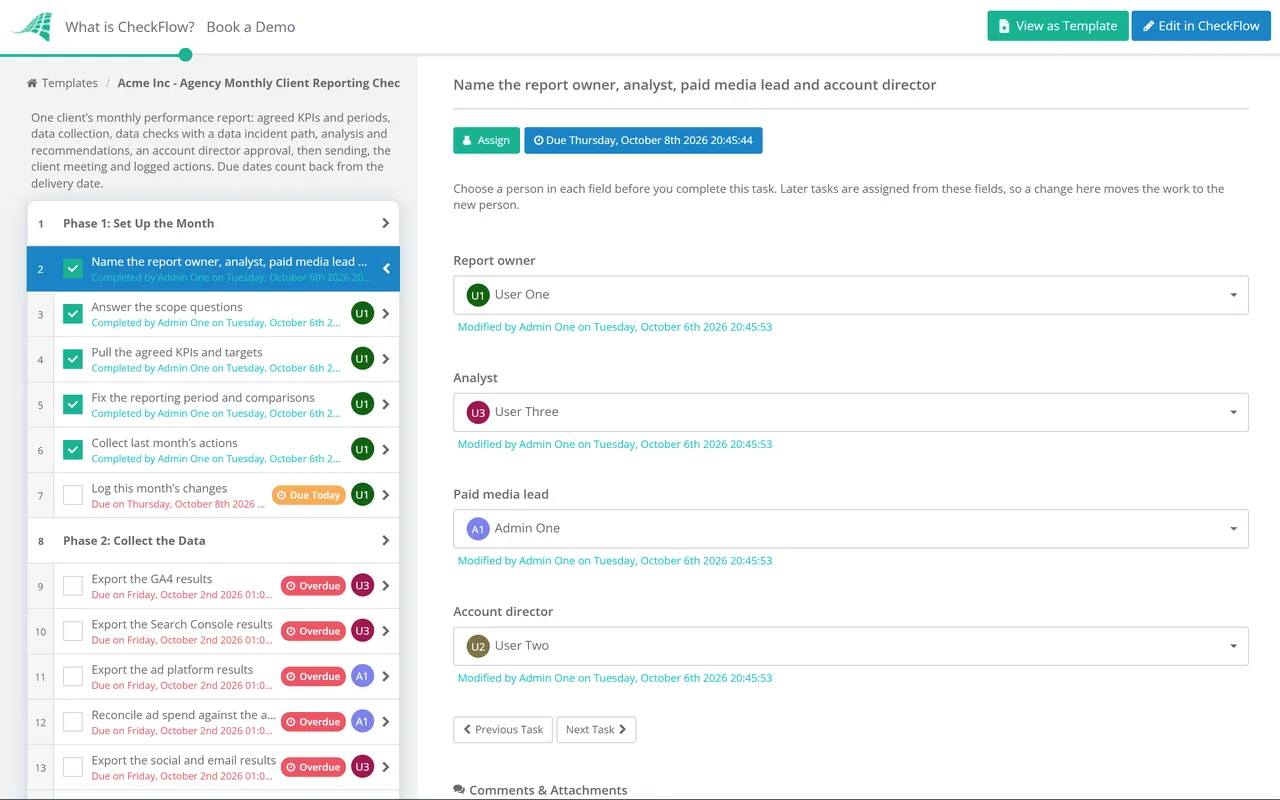
Phase 1: Set Up the Month
Owned by the report owner. Answer two scope questions here: is paid media in scope, and is there a monthly client meeting.
Name the report owner, analyst, paid media lead and account director — later tasks are assigned from these fields
Answer the scope questions — whether paid media is in scope and whether there is a monthly client meeting
Pull the agreed KPIs and targets — the measures in the plan or contract, not whatever the dashboard happens to show
Fix the reporting period and comparisons — the calendar month against last month and the same month last year, with identical dates in every source
Collect last month’s actions — what was recommended, what was done and what the client decided
Log this month’s changes — site releases, campaign launches, budget shifts and tracking changes, with dates
Collect
Phase 2: Collect the Data
The ad platform and ad spend tasks are shown only when paid media is in scope, and are assigned to the paid media lead.
Export the GA4 results — sessions and users by channel, key events, conversions and revenue where tracked, for both comparison periods
Export the Search Console results — clicks, impressions, click-through rate and average position, saved because the console keeps only 16 months
Export the ad platform results — spend, impressions, clicks, conversions and cost per result by platform and campaign
Reconcile ad spend against the agreed budget — by platform, with any overspend or underspend explained
Export the social and email results — reach, engagement, clicks and list growth for the channels in scope
Get lead and sales outcomes from the client — leads, qualified leads and revenue from their CRM, where they share them
QA
Phase 3: Check the Data
Assigned to the analyst. The last task asks “Did any tracking or data issue occur this month?” and a Yes shows the Phase 4 tasks.
Look for tracking breaks — days with zero conversions, sudden spikes, missing pages or duplicated transactions
Check for consent effects — changes to the cookie banner or consent settings that alter how much is measured, especially for EEA and UK visitors
Compare conversions across sources — GA4, ad platforms and the CRM will not match; record the gap and the reason, such as attribution model or window
Check settings match last month — attribution model, key event definitions, filters, currency and time zone
Annotate the month — releases, campaigns and outages added as GA4 annotations or report notes
Record whether a tracking or data issue occurred — answer the data issue question before analysis starts
Incident
Phase 4: Data Incident
Shown only when a tracking or data issue occurred this month.
Describe the issue — what broke, the dates affected and which metrics are wrong or missing
Fix the cause and record the date — tag, consent banner, site release or platform change
Estimate what can be recovered — from the ad platforms, the CRM or other sources, and what is lost for good
Brief the client before the report lands — a short call or email from the report owner, so the gap is not news on the day
Add a data note to the report — so a gap in tracking is not read as a fall in performance
Analyse
Phase 5: Analyse & Write
Compare each KPI with its target, last month and last year — in a table attached to this task
Explain the biggest movements — the cause and the evidence, separating seasonality, market changes and the agency’s own work
Write the summary first — three to five sentences a director can read in a minute
Turn findings into recommendations — each with the expected effect, an owner and what it needs from the client
Draft next month’s plan — tests, campaigns and fixes that follow from the recommendations
Move charts nobody uses to an appendix — every chart in the body supports a point in the summary
Review
Phase 6: Review & Approve
The account director’s approval halts the checklist. The report is not sent until it is Approved.
Check the figures against the source exports — a second person spot-checks the headline numbers
Check comparisons and date ranges — same periods, same definitions, and year-on-year figures from like-for-like sources
Check the language — the client’s terms, no unexplained acronyms, and no internal notes or other clients’ data
Check every recommendation is specific — an action, an owner and an expected effect, never just “continue to optimise”
Account director approval of the report — numbers, narrative and recommendations approved before the report goes to the client
Deliver
Phase 7: Send, Meet & Log Actions
The agenda and meeting tasks are shown only when there is a monthly client meeting.
Send the report by the agreed date — to the named contacts, as a file or a read-only link
Send the meeting agenda ahead — decisions needed first, then results
Run the meeting around decisions — walk through the summary and recommendations, not every chart
Log the client’s decisions and actions — each with an owner and a date, ready for next month’s first phase
File the report and exports with this run — so next year’s comparison has its source data
Put the answers first and the evidence after. Most clients read the first page and skim the rest, so the summary and the decisions they need to make belong at the top. The table shows each section, what goes in it and the mistake that most often spoils it.
Section
What goes in
Common mistake
Summary
Three to five sentences: how the month went against the goals, the main reason, and the one thing to do next
A list of metrics instead of a judgement
KPIs against target
The measures agreed in the plan, against target, last month and last year
Swapping in a flattering metric when the agreed one fell
Channel results
Organic, paid, social, email and referral, each with a line on why it moved
Screenshots of platform dashboards with no explanation
Paid media and spend
Spend against budget, results and cost per result by platform
Platform-reported conversions presented as if they were the client’s sales
Work delivered
What the team shipped this month and what it was meant to achieve
Activity lists with no link to results
Data notes
Tracking gaps, consent changes and definition changes that affect comparisons
Leaving them out, so the client finds the gap first
Recommendations and next month
Specific actions with expected effect, owner and what the client must provide
“Continue to optimise” as the only recommendation
Decisions needed
The approvals or inputs required from the client, with dates
Burying them on the last page
Keep the report to the length the client will actually read. For most retained clients that is a short narrative plus an appendix of charts, rather than thirty slides. The appendix is where completeness lives; the body is where the thinking lives.
Why Run Client Reporting in CheckFlow?
1
Every client, every month, on time
Schedule a run per client at the start of each month, with the report owner, analyst and paid media lead assigned from the role fields and due dates counting back from the delivery date. Reporting week stops depending on memory.
2
No report leaves unreviewed
The account director’s approval halts the checklist, so a report with broken numbers cannot be sent by accident. Conditional logic adds the data incident tasks only in the month tracking broke, and the audit trail records who checked what.
3
Show the client the process, not just the PDF
Share a read-only link to the month’s run under your own brand, so the client can see that the data was checked and the actions from last month were followed up.
CheckFlow is not a reporting or dashboard tool, and it does not pull data from your analytics platforms. It runs the human process around them: the checks, the narrative, the review and the follow-up. Recurring checklists explain how monthly runs are scheduled, and white-label checklists show how client-facing share links carry your brand.
What should a monthly marketing report for a client include?
+
A short summary of how the month went against the agreed goals, the KPIs against target, last month and last year, results by channel with a reason for each movement, paid media spend against budget where relevant, the work delivered, notes on any data problems, specific recommendations and the decisions you need from the client. Put the summary and decisions first and the supporting charts in an appendix.
Why do GA4 and the ad platforms report different conversions?
+
They count differently. Each ad platform tends to credit itself for conversions it can link to its own ads, including some after a view rather than a click, using its own attribution window. GA4 shares credit across channels by its own attribution model, and the client’s CRM counts actual leads or sales. Consent choices and ad blockers also hide some conversions from each tool in different ways. Do not force the numbers to match; record the gap and the reason, and use the same source for the same metric every month.
How does consent mode affect the numbers in a client report?
+
When visitors decline cookies, Google tags adjust what they collect, so fewer visits and conversions are directly observed. Since March 2024, Google has required consent signals for users in the EEA to keep measurement, personalisation and remarketing features working. In practice, a change to the cookie banner, the consent platform or the consent settings can move reported figures with no change in real performance. Log any such change in Phase 1, check for it in Phase 3 and explain it in the report.
Should agencies send a live dashboard instead of a monthly report?
+
Send both if the client wants a dashboard, but do not let it replace the report. A dashboard shows what the data says, including when tracking is broken. A report says what the numbers mean, what you did and what you recommend next, and someone has checked it. The report and the conversation around it are what a client remembers at renewal.
What should we do when tracking breaks during the month?
+
Fix it first, then be open about it. Record what broke and for which dates, fix the cause, recover what you can from other sources such as the ad platforms or the CRM, and tell the client before the report arrives. In the report, add a clear data note so the gap is not read as a drop in performance. Then add the check that would have caught it to next month’s run, such as a daily alert on key events or a test after every site release.
How long should an agency monthly report take to produce?
+
It depends on the number of channels and how much is automated, but the time should go into checking and thinking, not copying numbers. If data collection takes most of the time, automate the exports into a dashboard and spend the saved hours on the narrative and recommendations. Set a delivery date per client in the agreement, then work back from it so data collection starts as soon as the month closes.
Is CheckFlow free for this template?
+
14-day free trial, no card required. The Business plan is $10 per user per month after the trial. Full details at checkflow.io/pricing.
Send Client Reports That Are Right and Worth Reading
Free trial — no credit card required.
Do you like cookies? 🍪 We use cookies to ensure you get the best experience on our website. Learn more