
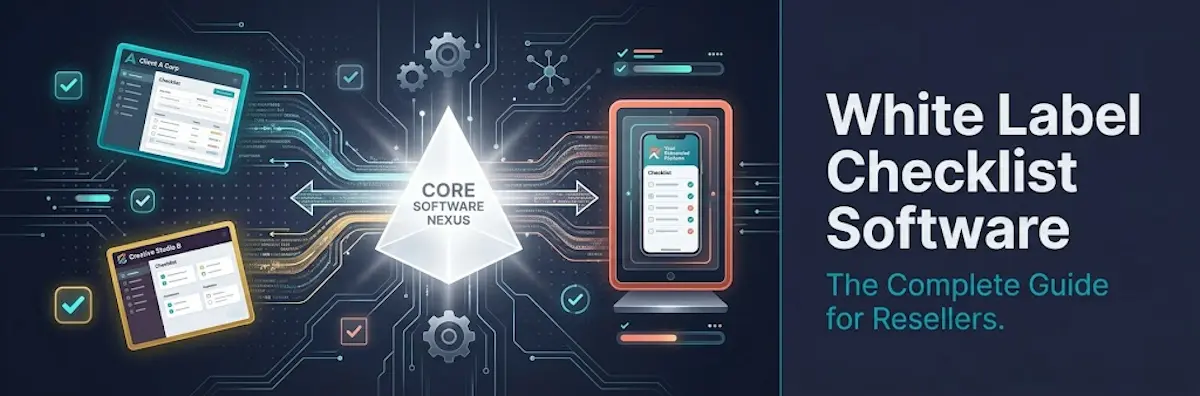
Building checklist and process management software from scratch costs $50,000–$250,000 and takes 6–24 months. White label deployment takes 4–8 weeks at a fraction of the cost. For MSPs, consultancies, franchisors, and SaaS companies that need branded process tools for their clients — but not the risk and cost of custom development — white label is the obvious path.
There's a market gap worth understanding. Most checklist and process management tools are designed to be sold direct to end businesses — not white labelled to resellers. The white label reseller programme is relatively rare in this software category compared to CRM, marketing automation, or LMS tools, where reselling is mature and crowded. That scarcity creates an opportunity: resellers who find a genuine white label checklist platform gain a first-mover advantage in their market, offering a branded operational product that their competitors simply can't match.
The business case is straightforward. Resellers who deliver operational process management under their own brand create a revenue stream with 40–80% gross margins, significantly lower churn than standalone consulting services, and genuine switching costs that lock clients in for years. An MSP with 20 clients generating $97/month each earns approximately $15,000/year in gross margin from their branded checklist platform — recurring, predictable, and growing with each new client added.
This guide delivers a complete evaluation framework: the white label features that actually matter, the technical requirements behind custom domains and email, the pricing models you'll encounter, the reseller economics that determine profitability, and the specific questions to ask before signing with any vendor. CheckFlow offers a genuine white label programme for checklist and process management — covered in detail at the end — but the framework here applies to evaluating any vendor in the category.
What Is White Label Checklist Software?
White label checklist software is a checklist and process management platform that you license from a vendor and re-present entirely under your own brand, so your clients experience your branded product rather than the underlying vendor's. The distinction that matters is between genuine white label and what's commonly mislabelled as white label — and clients notice the difference.
True white label means the vendor is completely invisible to your end clients. Every touchpoint the client sees — the platform URL, the browser tab title, the email notifications, the logo, the colour scheme, the mobile experience — reflects your brand, not the vendor's. There are four elements that define it:
Custom domain
Your clients access the platform at app.yourbrand.com, not app.vendorname.com. The address bar carries your brand on every page load.
White label email
Task notifications, assignments, and reminders arrive from notifications@yourbrand.com, not noreply@vendor.com. Email is the touchpoint resellers most often forget — and the one that most reliably exposes the vendor.
Complete UI branding
Your logo, your colours, and no "Powered by [Vendor]" anywhere in the interface — not in the footer, not in the browser tab, not in the help links.
Brand-neutral support path
When clients have questions, they contact you — not the vendor. The vendor supports you behind the scenes; the client relationship is entirely yours.
What is commonly mislabelled as white label
The most common imposter is the "logo swap" — your logo placed on a platform that still says "Powered by [Vendor]" in the footer, sends emails from the vendor's domain, and lives at the vendor's URL. This is co-branding, not white label. Your clients see the vendor name, look it up, discover the direct price, and start to wonder why they're paying you a markup. Genuine white label removes that exposure entirely.
Why white label checklist software specifically
Checklist and process management software has a distinctive white label value proposition: the platform carries the reseller's intellectual property, not the vendor's. A management consultant's methodology, an MSP's managed services playbook, a franchisor's brand standards — these are embedded in the checklists and workflows themselves. When those workflows are delivered through a branded platform, the client is experiencing the reseller's proprietary process delivered through software. The vendor is infrastructure. The IP is yours.
This is categorically different from white labelling a CRM or project management tool, where the tool itself is the value and the client is buying generic capabilities. With process software, the reseller's knowledge is the product — the software is just the delivery mechanism. That's what makes the category uniquely suited to white label resale.
Who uses white label checklist software
- MSPs and IT managed service providers
- Franchisors and franchise management consultants
- Operations and management consulting firms
- HR tech platforms adding onboarding workflow capabilities
- SaaS companies building adjacent process features
- Property management companies standardising operational workflows
- Compliance and audit firms packaging their frameworks as software
Build vs. Buy vs. White Label
Before evaluating vendors, it's worth being clear about why white label beats the alternatives for most reseller scenarios. There are three options, each with very different costs, timelines, and risks.
Option 1: Build from scratch
Building your own checklist platform means an MVP development cost of $50,000–$250,000 (a figure confirmed across multiple independent developer cost guides), rising to $500,000+ for genuinely complex platforms. Time to market runs 6–24 months. Annual maintenance typically runs 50–60% of the initial development cost — a $150,000 build costs $75,000–$90,000/year just to maintain. The risk profile is significant: budget overrun, developer attrition, technical debt baked in by early decisions, and market-timing risk. Building from scratch is the right call only when you have a genuinely unique technical requirement no vendor can solve, and the engineering capacity and financial runway to see it through.
Option 2: Subscribe and use direct (no reselling)
A direct SaaS subscription costs $50–$500/month and deploys in days to weeks. The limitation is fundamental: you're using the vendor's brand. When clients see the vendor name, they can find the vendor — and potentially leave your service for a direct subscription at a lower cost. There's no recurring software revenue for you: you pay the vendor, and clients pay you for services, not for software.
Option 3: White label (resell with your branding)
White label reseller access costs $300–$2,000/month depending on platform and client volume, with a production-ready branded environment live in 4–8 weeks. You charge clients $49–$497/month and keep the margin above your wholesale cost. The risk profile is moderate: vendor dependency and the constraint of the vendor's feature roadmap. It's the right model when you want a branded software product for clients without the risk, cost, or timeline of custom development.
| Dimension | Build From Scratch | Direct SaaS Subscription | White Label |
|---|---|---|---|
| Initial cost | $50,000–$250,000+ | $0 | $0 setup; $300–$2,000/month |
| Time to market | 6–24 months | Days | 4–8 weeks |
| Annual maintenance | 50–60% of build cost | Included in subscription | Included in vendor fee |
| Your brand on client experience | Yes | No | Yes |
| IP ownership | Full | None | Process IP yours; platform IP is vendor's |
| Recurring revenue | Yes | No | Yes |
| Feature roadmap control | Full | None | Limited to vendor roadmap |
| Risk | High (build, funding, talent) | None (but no brand control) | Medium (vendor dependency) |
The hybrid strategy: white label first, custom build once validated. Launch with white label to prove the market, build the client base, and generate revenue. Invest in custom development only once you have proof-of-concept and the revenue to fund it. This sequences your risk correctly — you validate demand before committing capital to engineering.
The most common strategic mistake is spending 18 months building what could have been white labelled in 4 weeks. White label generates revenue while you validate. Building from scratch generates burn while you hope.
Use Cases by Industry
White label checklist software earns its keep differently in each industry. Five use cases cover the overwhelming majority of reseller demand.
MSPs and IT Service Providers
The MSP's fundamental problem: clients cannot see the work being done. Servers get patched, backups get verified, security scans run — all invisibly. When renewal season arrives and clients ask "what am I getting for this?", the MSP's answer is typically a generic summary email. That is not a compelling retention argument.
A branded operational portal changes the dynamic. Clients log into operations.yourmsp.com each month and see exactly what was done, by whom, when, and with what result — all under the MSP's brand. The specific workflows that suit white label delivery include:
- Monthly managed services reporting checklist (patch status, backup verification, security scan results, disk health, service ticket summary)
- New client onboarding checklist (the 40–60 step process of getting a client onto managed services — shared with the client for transparency and sign-off)
- HIPAA or SOC 2 readiness audit checklists (healthcare or compliance MSPs delivering branded compliance frameworks)
- Patch management change approval workflows (change management for clients requiring sign-off before infrastructure changes)
- Annual IT security review (branded assessment delivered as a client-facing checklist with remediation tracking)
The stickiness argument is decisive. A client whose managed services relationship includes a branded operational portal — where monthly reports are delivered, where their compliance documentation lives, where their approved change history is recorded — faces significantly higher switching costs than a client receiving a PDF email and a phone call. The branded platform is an anchor.
Franchisors
Franchise operations depend on brand standard consistency. A franchise with 50 locations has 50 operators, each with varying degrees of adherence to brand requirements. The franchisor's traditional tools — paper audit forms, spreadsheet tracking, periodic field visits — provide no real-time operational visibility. A branded checklist platform gives the franchisor:
- Daily operational checklists: opening/closing procedures, temperature logs, cleaning verification — completed by location managers with timestamps and photo evidence
- Brand standards audit: quarterly or annual inspection against brand standards — scored, photographed, with corrective action assignments and escalation to area managers
- New location launch checklist: the 100+ step process of opening a new franchise location from lease signing to first customer
- Staff certification workflows: training completion confirmed in the system before staff are cleared for certain roles
- Corrective action tracking: non-conformances identified in audits automatically generate follow-up tasks with deadlines
The white label element matters here for a self-reinforcing reason: brand consistency should extend to the compliance tool itself. A franchisor enforcing brand standards through a visibly third-party tool undercuts its own message. A branded portal does not.
Consulting and Professional Services Firms
The value proposition shift is from "we deliver a methodology" to "we deliver a methodology as a software product." A management consultant charging £5,000/day for an engagement gets paid once. The same consultant who packages that methodology as a branded digital checklist tool charges clients £500–£1,000/month to run it — indefinitely. The one-time engagement becomes an evergreen revenue relationship. Specific examples:
- An operations consultant packages their manufacturing operational readiness audit framework as
audit.consultingfirm.com— clients run the audit monthly and get auto-generated reports - An HR consultancy delivers their new hire onboarding framework as a branded tool the client's HR team uses for every hire —
onboard.hrconsultancy.com - A compliance consultancy packages their ISO 27001 or HIPAA audit framework as a client-branded inspection tool — delivering recurring "compliance-as-a-service"
The switching cost of a consulting SaaS relationship is far higher than a consulting retainer. Cancelling the tool means losing historical audit records, retraining staff on a new platform, and explaining the transition to the board. The consultancy is embedded in the client's operational infrastructure, not just on its vendor list.
HR Tech Vendors and SaaS Platforms
Many HR platforms, project management tools, and operations platforms lack native recurring checklist or SOP functionality. Rather than building this from scratch (6–18 months, $100,000+), they embed or white label a checklist engine. HiringThing is the published model: HR platforms white label HiringThing's onboarding workflow engine, presenting it as native functionality to their end clients. The client never knows HiringThing exists — they experience it as a feature of the HR platform they're already paying for.
Property Management Companies
Property managers run recurring operational workflows perfectly suited to checklist automation: move-in inspections, move-out inspections, preventive maintenance, tenant onboarding, safety compliance audits. A white label checklist platform delivering these workflows under the property management company's brand — rather than a visible SaaS vendor — reinforces the company's operational professionalism.
There's a legal dimension too. Move-in and move-out condition checklists completed in a branded digital platform with photo evidence and timestamped tenant/manager sign-offs are a materially stronger defence in deposit dispute proceedings than a paper form.
White Label vs. Embedded vs. OEM vs. API
"White label" is one of four integration models, each offering progressively deeper technical integration at progressively higher implementation cost. Choosing the wrong one wastes either money or capability.
Model 1: White Label (Full Rebrand)
You license an existing product and re-present its UI entirely under your brand. The vendor is invisible to your end clients. It requires a custom domain, logo/colour customisation, a white label email sender, and removal of all vendor branding. Best for agencies, MSPs, and consultants who want to offer the product to clients as their own — the entire client relationship (onboarding, support, billing) belongs to the reseller. Time to deploy: 4–8 weeks. Implementation cost: low (configuration and setup, not development). Ongoing maintenance: handled by the vendor.
Model 2: Embedded / iframe
The vendor's UI is embedded within your platform via an iframe or JavaScript widget. Vendor branding is often still partially visible. Best for quick feature addition where seamless branding is not critical — adding a simple checklist widget to an existing dashboard. Time to deploy: days to weeks; the fastest implementation. The trade-off: the embedded UI typically doesn't match your platform's design language, and the mobile experience with iframes is notoriously poor.
Model 3: OEM Licensing
You license the underlying technology and build (or configure) your own UI on top. The vendor's technology runs beneath your product; you own the user-facing layer. Best for software companies with development resources who need full UI control but don't want to build the core technology — the workflow engine, template storage, completion logic — from scratch. Time to deploy: weeks to months, with developer engagement required. Zoho's OEM programme is a published example of this model.
Model 4: API / Headless
You use the vendor's API to build a completely custom UI. The vendor provides the data layer and logic; you build everything the user sees. Best for larger SaaS companies who need a specific UX a white label product can't provide, with the resources to build and maintain a custom front-end. Time to deploy: months, with significant engineering investment and ongoing maintenance of the custom UI as the vendor's API evolves.
| Scenario | Best Model |
|---|---|
| Agency/MSP selling to clients as own product | White Label |
| SaaS platform needing quick feature addition | Embedded |
| SaaS company with dev resources, full UI control needed | OEM or API |
| Consultancy packaging methodology as branded tool | White Label |
| Platform adding a single small feature widget | Embedded |
| Enterprise building deeply integrated custom solution | API/Headless |
The key decision is simple: if you're an agency, MSP, or consultant selling the tool to clients, white label is the right model. If you're a SaaS company adding checklist functionality to your existing platform, OEM or API gives you better UI control at the cost of higher implementation effort.
Core Features to Evaluate
Seven features are non-negotiable for a genuine white label programme. If a vendor is missing any of them, you don't have white label — you have co-branding with extra steps.
Custom domain with automated SSL
Your clients access app.yourbrand.com, not the vendor's domain. The platform must automatically provision SSL/TLS certificates for custom domains without manual intervention — this cannot scale manually if you have dozens of clients. Ask: "Is custom domain provisioning automated, or does it require manual SSL configuration by your team for each client?"
White label email sender
Task assignments, completion notifications, and reminders must arrive from notifications@yourbrand.com — not the vendor's email domain. This requires custom SPF, DKIM, and DMARC records in your DNS, plus either a dedicated sending IP pool or bring-your-own-SMTP support. Ask: "Do you use shared or dedicated sending IPs? Can I bring my own SMTP provider?"
Complete branding removal
Your logo, your colours, no "Powered by [Vendor]" in the footer, no vendor name in browser tab titles, favicon, or help links. Ask: "Is your name or logo visible anywhere in the client-facing interface, including the footer, emails, browser tab, or mobile app?"
Multi-tenant admin console
A master admin view across all your client accounts, with per-tenant data isolation and independent customisation. You should be able to provision and deprovision client accounts, view usage metrics, and customise each tenant without contacting the vendor. Ask: "Can I provision and manage client accounts myself, or do I need to submit requests to your support team?"
Data export
All client data must be fully exportable in a standard format (CSV, JSON, PDF) at any time — without needing to contact the vendor. Ask: "Can I export all historical completion data for a client account programmatically via API, or only through the UI?"
API access
Programmatic access to create templates, trigger checklists, retrieve completion records, and push completion data to your other systems. Ask for the API documentation URL before committing to anything — a real API has real docs.
Reseller-tier support
The vendor supports you; you support your clients. Your clients must never need to contact the vendor directly. Ask: "Do you have a reseller-specific support channel? What is your SLA for reseller support tickets? Do you ever communicate directly with my end clients?"
Differentiating features worth asking about
- Branded mobile app (very rare): your app name and icon in the App Store/Google Play. Most "white label mobile" means your logo on an app still named after the vendor.
- SSO/SAML per tenant: enterprise clients requiring single sign-on through Okta, Azure AD, or Google Workspace. Must support per-tenant IdP configuration with proper isolation.
- White label help documentation: the vendor provides help content you can host under your own domain and branding.
- Per-tenant usage reporting: monthly usage reports per client account for billing validation.
- Template library control: create a proprietary template library visible only to your clients, locked so clients cannot edit the master templates.
Custom Domain and Email Setup
The technical side of white label is less daunting than it sounds. You don't need to be a developer — but you do need to understand what's involved so you can ask the right questions and set realistic expectations.
Custom domain setup (CNAME method)
The mechanism is straightforward: you create a DNS record pointing your chosen subdomain to the vendor's infrastructure.
Decide on your URL: checklist.yourbrand.com, app.yourbrand.com, or operations.yourmsp.com.
Log into your DNS provider (GoDaddy, Cloudflare, Route53, etc.).
Add a CNAME record: checklist.yourbrand.com → custom-domains.vendorplatform.com (the vendor provides their specific endpoint).
DNS propagates — typically within 1–60 minutes for most registrars; maximum 48 hours.
The vendor's platform detects the CNAME and automatically provisions an SSL/TLS certificate.
Your branded URL is live with HTTPS enabled.
The wildcard SSL requirement for MSPs managing multiple client subdomains: if each of your clients gets their own subdomain (clienta.yourmsp.com, clientb.yourmsp.com), the vendor must support wildcard certificate provisioning — issuing a single certificate for *.yourmsp.com or automatically issuing individual certificates per subdomain. Modern platforms handle this automatically; ask explicitly.
Apex domain limitation: yourbrand.com (without a subdomain) cannot technically use a CNAME record — DNS standards require an A record for apex domains. Most registrars now support ALIAS or ANAME records as workarounds, but subdomain usage (app.yourbrand.com) avoids this complexity entirely.
White label email setup
The goal: task notifications sent from notifications@yourbrand.com, not from the vendor's sending domain. Three DNS records are required:
- SPF record: tells receiving mail servers which IPs are authorised to send on behalf of your domain. Format:
v=spf1 include:sendingdomain.vendor.com ~all - DKIM record: a cryptographic signature verifying the email's integrity. The vendor provides a public key; you add it as a TXT record in your DNS.
- DMARC record: defines what happens to emails that fail SPF/DKIM checks. Recommended:
p=quarantineorp=rejectfor maximum deliverability protection.
The shared IP deliverability risk: many white label platforms use shared sending IP pools — one pool serves all resellers on the platform. If one reseller's client receives spam complaints, the shared pool's reputation degrades, affecting deliverability for every reseller using that pool. Ask explicitly whether you're on a shared or dedicated IP pool, and whether you can bring your own SMTP provider. Using Postmark, SendGrid, or AWS SES for sending ensures your sending reputation is entirely within your control.
Implementation timeline: DNS changes take 0–48 hours (typically under 1 hour); SSL auto-provisioning takes minutes once DNS propagates; email DNS records take 0–48 hours to propagate. Total setup time for custom domain plus white label email is typically within 24 hours of configuration.
Multi-Tenant Architecture
You don't need a technical background to evaluate multi-tenancy — but you do need to understand what it means for your clients' data and your own operational control.
In a properly architected multi-tenant platform, every client (tenant) you manage has a completely isolated data environment. Client A's checklists, completion records, users, and templates are entirely separate from Client B's — not just hidden by permissions, but isolated at the infrastructure level. This matters for three reasons:
- Privacy: a misconfiguration cannot accidentally expose one client's operational data to another.
- Compliance: healthcare, financial, and compliance-sensitive clients require demonstrable data segregation (HIPAA, SOC 2, GDPR).
- Branding: each tenant can have independent sub-configurations — their own logo variant, their own user roles, their own template visibility settings.
What the reseller admin console should show
- All client accounts in one view with health status
- User count, checklist activity, and last-active date per tenant
- Ability to provision new client accounts and deprovision cancelled clients independently, without contacting the vendor
- Usage metrics per tenant for billing validation
- Ability to customise individual tenant settings without affecting other tenants
The "fat header" performance problem: a poorly architected multi-tenant system adds significant overhead for each request to identify which tenant's data to retrieve. Well-built platforms pre-compute tenant context at authentication time, keeping per-request overhead minimal. The practical implication: ask for uptime history and performance data under load — cheap multi-tenant implementations show performance degradation as tenant count grows, and you'll feel it as your client base scales.
Deliver Branded Process Management to Your Clients
CheckFlow's white label programme gives MSPs, consultancies, and franchisors a fully branded checklist and process management platform — custom domain, your logo, white label email, and a reseller admin console for managing all your client accounts from one place.
Learn About White LabelPricing Models for Resellers
White label pricing comes in four shapes. The model you sign determines whether your cost base aligns with your revenue — or works against it.
Model 1: Flat monthly platform fee
You pay a fixed monthly fee for reseller access, with unlimited sub-accounts included. GoHighLevel's SaaSpreneur ($497/month) is the published example.
- Advantage: predictable cost; no per-seat costs that scale with client count.
- Risk: a fixed floor cost regardless of client count. At $497/month, you need roughly 5 clients at $97/month just to break even on platform fees. Acquiring clients before your floor is met is pure burn.
- Best for: resellers who already have a client base to transfer to the new platform immediately.
Model 2: Wholesale per-tenant pricing
You pay a fixed amount per client account per month. SuiteDash's SU1TE programme is the published example: $14/$34/$69 per account depending on tier.
- Advantage: pay only for active clients. Margin is clear and predictable, with no minimum client commitment floor.
- Risk: as client count grows, wholesale fees scale proportionally. A large client base makes this potentially more expensive than a flat-fee model.
- Best for: resellers starting out or growing gradually — the cost aligns with revenue.
Model 3: Revenue share
The vendor takes 20–40% of your client revenue.
- Advantage: no fixed cost; you only pay when you earn.
- Risk: the vendor has a perpetual claim on your revenue growth. As you raise prices or add value, the vendor's cut scales with your success — introducing the vendor into your pricing decisions permanently.
- Best for: almost never — prefer wholesale or flat-fee if either is available.
Model 4: Per-seat pass-through
You pay the vendor per user per month and mark up the per-seat cost.
- Advantage: directly tied to client usage — you can see exactly what margin each user generates.
- Risk: clients who expand user count increase your costs; you must pass through price increases promptly to protect margin. Bundling with services complicates the per-seat calculation.
- Best for: pure software resale without services bundling.
| Pricing model | Cost behaviour | Best for |
|---|---|---|
| Flat monthly platform fee | Fixed floor, scales free | Existing client base to transfer |
| Wholesale per-tenant | Scales with active clients | Starting out / gradual growth |
| Revenue share | Scales with your pricing | Avoid where possible |
| Per-seat pass-through | Scales with user count | Pure software resale |
Reseller Economics and Margins
The business case for white label is concrete, and the numbers are worth running before you commit. Gross margin ranges, confirmed from reseller programme analysis, fall into three tiers:
- Low-margin tier (20–40% gross): competitive niches, volume plays. Wholesale ~$20/month, retail ~$39/month.
- Mid-margin tier (40–60% gross): agency/service bundles. Wholesale ~$50/month, retail ~$129/month.
- High-margin tier (60–80%+ gross): premium expert positioning. Wholesale ~$100/month, retail ~$297/month with 24+ month average client retention.
Two worked examples
Scenario A: MSP with 20 clients
- Monthly fee charged per client: $97
- Wholesale cost per account: $34 (SuiteDash SU1TE mid-tier example)
- Gross margin per account: $63/month (65%)
- Monthly gross margin: $1,260
- Annual gross margin: $15,120
Scenario B: Operations consultancy with 30 clients
- Monthly fee charged per client: $197 (software + monthly check-in call)
- Wholesale cost per account: $50
- Gross margin per account: $147/month (75%)
- Monthly gross margin: $4,410
- Annual gross margin: $52,920
Client retention and switching costs
The key driver of actual profitability is retention, not gross margin percentage. A client at 40% gross margin retained for 36 months is worth $1,440 (at $97/month). A client at 70% gross margin who churns after 4 months is worth $271. Retention beats margin percentage every time.
Branded operational tools create switching costs in several ways:
- Historical completion records and compliance documentation live in your platform — losing them creates operational and compliance risk for the client.
- Staff have been trained on your branded platform — retraining on a new tool takes time and creates resistance.
- The psychological dimension: clients who interact with
operations.yourbrand.comdaily experience your brand, not a generic tool. - The compliance audit argument: two years of monthly maintenance checklists with timestamps is a compliance asset; migrating mid-audit creates gaps.
Research from the agency reporting space finds that agencies using branded client reporting tools reduce client churn by approximately 40% compared to informal reporting. While this is from a single source and refers to reporting tools specifically, the mechanism transfers: branded operational tools embed you in the client's infrastructure in a way that makes switching inconvenient. Recurring checklists that auto-launch on a schedule deepen this further — every cycle adds another timestamped record to the archive the client can't easily walk away from.
The upsell ladder
Every client relationship has adjacent revenue opportunities:
- More users or locations within the same account (natural growth billing)
- Additional premium template libraries (your proprietary methodologies, sold separately)
- Integration setup fees (connecting the checklist platform to their CRM, HRIS, or ERP)
- Reporting and analytics services (value-add above the platform subscription)
- Training and onboarding (initial setup and staff training, charged separately)
Common White Label Pitfalls
The economics only work if you avoid the traps. Eight pitfalls account for most reseller disappointment with white label programmes.
Pitfall 1: Choosing "logo swap" instead of genuine white label. The most common mistake is selecting a vendor that adds your logo to their interface but still prominently shows their brand in the footer, sends emails from their domain, and hosts the platform at their URL. Clients will find the vendor, research their pricing, and consider going direct — eliminating your role in the relationship. True white label means no vendor brand visibility anywhere.
Pitfall 2: Shared email IP pools destroying deliverability. Many platforms use shared sending IP pools for transactional email. One bad actor's spam campaigns can get the entire pool blacklisted, causing your clients' task notifications to land in spam. This is a documented, ongoing problem with platforms that don't offer dedicated IP options. Ask specifically about IP pool type before signing; prefer bring-your-own-SMTP if available.
Pitfall 3: No data export on contract exit. Signing a vendor contract without explicit data portability provisions is operationally dangerous. If the vendor raises prices unacceptably, gets acquired by a competitor, or simply degrades in service quality, your exit depends on being able to export all client data in a usable format. Require explicit contractual data export rights with a defined format, timeline, and post-termination deletion certification.
Pitfall 4: Revenue share models at scale. Revenue share sounds attractive early (no fixed cost) but becomes punishing as your client base and pricing mature. A vendor taking 30% of your revenue when you're charging $29/month is $8.70 — manageable. When you raise prices to $197/month after establishing market position, the same 30% is $59.10 per client per month — the vendor's cut is now larger than your entire original revenue. Wholesale pricing avoids this entirely.
Pitfall 5: Flat-fee platforms before client base is established. Signing a $497/month flat-fee platform access agreement before you have clients means paying $497/month (nearly $6,000/year) while building. Many resellers do this, anticipating quick client acquisition, and find themselves burning months of platform fees before the first paying client. Match your cost model to your current client count: wholesale per-tenant when building, flat-fee only once volume makes it economical.
Pitfall 6: Vendor communicates directly with your clients. Some platforms build direct client relationships — sending upsell emails to users, displaying upgrade prompts within the platform, or following up on support tickets by communicating with the end user rather than the reseller. This undermines your brand and potentially your client relationship. Ask explicitly about vendor communication policies; require a contract clause preventing direct client contact.
Pitfall 7: Feature roadmap dependency without visibility. White labelling means living with the vendor's feature roadmap. If your clients need a capability the vendor hasn't built and won't prioritise, you're stuck. Ask: how often do you release new features? Do resellers get input into the roadmap? What is your policy when a reseller needs a capability that's not on your roadmap?
Pitfall 8: Neglecting the support model. The worst white label experience: your client has a problem with the platform; you contact vendor support; vendor responds in 48 hours via a general support ticket; you relay the answer to the client. You look slow and disorganised through no fault of your own. Establish before signing: what is the reseller-specific support channel and SLA? Is there a dedicated Slack or priority queue for reseller partners? Will you receive faster support than end users?
Vendor Evaluation Checklist
Use this as a practical due diligence checklist. Take the specific questions below into every vendor conversation — the answers separate genuine white label programmes from co-branding dressed up as white label.
Branding and white label completeness
Is your brand name visible anywhere in the client-facing interface (footer, emails, browser tab, favicon, mobile app, help links)? Can clients access the platform at my custom domain with automatic SSL provisioning? Do transactional emails come from my domain, or yours? Do you use shared or dedicated sending IPs, and can I bring my own SMTP provider?
Multi-tenant and reseller controls
Can I provision and deprovision client accounts myself without contacting your support? Is each client's data completely isolated at the infrastructure level? Do I have a master admin console showing all my client accounts and their usage? Can I customise each tenant independently (branding, templates, user roles)?
Data ownership and portability
Who owns the data my clients generate on your platform? Can I export all data for a client account at any time without your assistance? What formats is the export available in (CSV, JSON, PDF)? Is historical completion data exportable, or only current templates? What happens to my clients' data 30/60/90 days after contract termination?
Commercial and contract terms
What is the pricing model (flat fee / wholesale per tenant / revenue share / per seat)? What are your minimum commitments or minimum monthly floors? Can I set my own end-client pricing, or does your agreement restrict this? What is the notice period for price increases? If you are acquired by a competitor, do I have the right to exit without penalty? What are your remedies or service credits for SLA breaches?
Technical capabilities
Do you have a REST API with full CRUD access to templates, checklists, and completion records? Do you have webhooks for real-time event notifications? Do you support SSO/SAML per tenant? What is your API documentation URL? Do you have a sandbox/test environment?
Support model
What is your reseller-specific support channel? What is your SLA for reseller support tickets versus standard support? Do you ever communicate directly with my end clients? Do you provide white-label help documentation I can host under my brand?
White Label Checklist Templates
The fastest way to launch a white label offering is to start from proven process templates and rebrand them as your own. Franchisors usually start with the field audit: the Franchise Brand Standards Audit Checklist scores each location against the operations manual, records the franchisee’s acknowledgement and opens a corrective action plan when a site fails, all under the franchisor’s brand. MSPs send the Monthly Managed Services Report Checklist to clients as a branded deliverable, and consultancies package their method as the Consulting Engagement Delivery Checklist, with quality review and partner sign-off built in. MSPs and consultancies reselling a white-label platform can start from the White-Label Reseller Account Setup Checklist, which provisions each client account, and the White-Label Client Onboarding Checklist, which brings that client into real use under your brand. All five are live below.
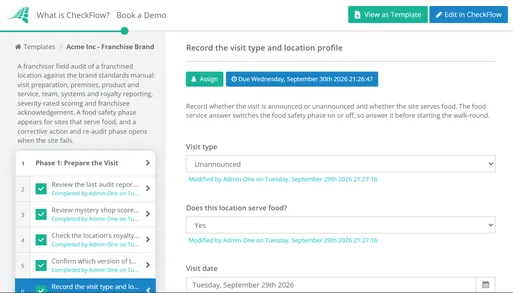
Quarterly brand standards audit checklist for franchise networks — covering interior and exterior compliance, brand standard adherence, food safety, staff presentation, and corrective action tracking across multiple locations.
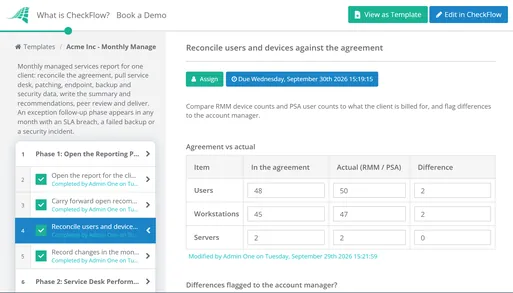
Monthly client-facing managed services delivery checklist — covering patch management, backup verification, security monitoring, performance metrics, and service summary — delivered as a branded report from your operational portal.
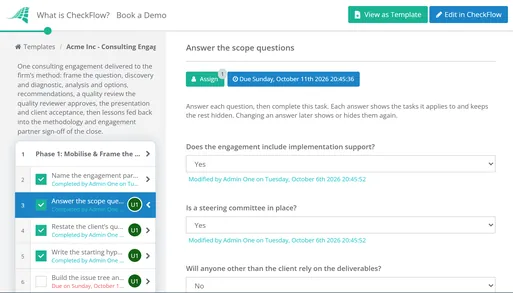
Package your consulting methodology as a branded, recurring checklist workflow — covering assessment phases, documentation requirements, client sign-offs, and deliverable milestones — delivered through your branded platform as a recurring software service.
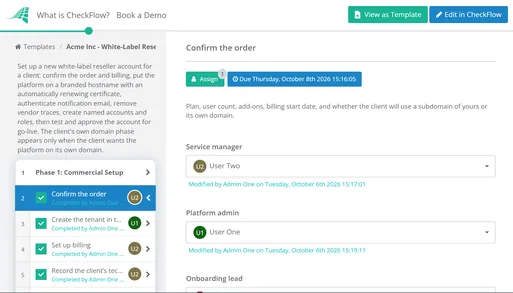
Internal setup checklist for each new client account on the platform you resell — hostname and certificate, the client's own domain, white-label email with SPF, DKIM and DMARC, branding, roles and a go-live sign-off.
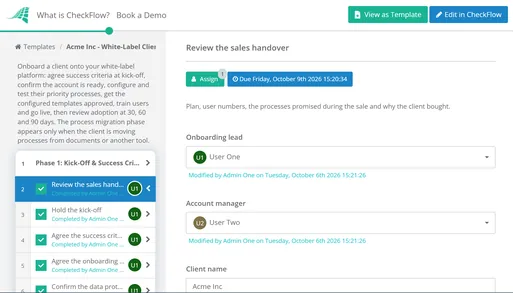
Onboard a customer onto your branded platform under your own brand — kick-off and success criteria, template configuration and client sign-off, training with branded help, go-live and 30/60/90-day adoption reviews.
CheckFlow's White Label Programme
CheckFlow is a checklist and process management platform built for operations professionals. The white label programme gives MSPs, consultancies, franchisors, and SaaS companies a fully branded version of CheckFlow to deliver to their clients under their own brand — in a category where most direct competitors don't offer reselling at all.
Core programme features
- Custom domain support with automatic SSL provisioning (
app.yourbrand.com) - Complete branding: your logo, your colour scheme, no CheckFlow branding visible anywhere
- White label email notifications from your sender domain
- Multi-tenant reseller console: manage all your client accounts from a single admin view
- Per-tenant customisation: each client account independently configured
- Full REST API and webhook support for integration with your existing systems
- Zapier and Make (Integromat) connectors for no-code integrations
- Template library: create and publish your proprietary process templates to your client accounts
The operational use cases CheckFlow serves particularly well
- Recurring scheduled checklists: monthly client reports, quarterly reviews, annual audits — triggered automatically on schedule. See recurring checklists for how this works.
- Conditional branching: if a step fails or a specific answer is given, the checklist routes to a different path automatically.
- Approval workflows: certain steps require sign-off from a named reviewer before the checklist can proceed.
- Evidence attachment: photos, documents, and completion notes attached directly to checklist steps — the audit trail is the checklist completion record.
Who CheckFlow's white label programme is right for
It's particularly well suited for MSPs who want to deliver visible, branded operational reporting to clients; consulting firms who want to package their methodology as a recurring software product; franchisors who want brand-consistent operational checklists across locations; and SaaS platforms that want to add checklist functionality without building it from scratch. If that's you, get in touch to talk through a branded deployment.
Frequently Asked Questions
What is white label checklist software?
White label checklist software is a checklist and process management platform that you license from a vendor and re-present entirely under your own brand — with your logo, your colours, your custom domain, and your email sender — so that your clients interact with your branded product, not the underlying vendor's. The vendor is invisible to your end clients. True white label means your client accesses the platform at app.yourbrand.com (not the vendor's domain), receives task notifications from notifications@yourbrand.com (not the vendor's email), and sees no vendor branding anywhere in the interface. It differs from simply using a checklist tool internally: white label is specifically for reselling the functionality to clients or franchisees under your own brand. The business rationale is straightforward — your proprietary processes, methodologies, and operational workflows are embedded in the checklists. The white label layer lets you deliver those processes as a branded product rather than as templates inside someone else's tool. Common users include MSPs (delivering branded managed services reporting), franchisors (standardising brand operations across locations), consulting firms (packaging their methodology as a recurring software product), and HR tech vendors (adding onboarding checklist functionality to existing platforms).
How much does white label checklist software cost?
White label checklist software pricing varies significantly by model and vendor. The main pricing structures are: (1) Flat monthly platform fee — you pay a fixed amount (typically $297–$997/month) for access to a reseller account with no per-seat limit. GoHighLevel's SaaSpreneur programme is a published example at $497/month. The risk: a fixed floor cost regardless of client count. (2) Wholesale per-tenant pricing — you pay a fixed amount per client account (typically $14–$69/month per account depending on tier), then charge your clients whatever you want. SuiteDash's SU1TE programme uses this model. (3) Revenue share — the vendor takes 20–40% of your client revenue. This is the least favourable model for resellers as client revenue scales. In terms of reseller economics, realistic gross margins range from 40–80% depending on your positioning and value-added services. A boutique MSP with 20 clients at $97/month generates approximately $15,000/year in gross margin from branded checklist software. At premium consulting firm pricing ($197–$297/month), 30 clients generates $53,000+/year in gross margin. Building comparable checklist software from scratch would cost $50,000–$250,000 in development costs plus $25,000–$150,000/year in maintenance — making white label strongly economically superior for most reseller scenarios.
What is the difference between white label, embedded, OEM, and API integration?
These four models offer progressively deeper technical integration at progressively higher implementation cost. White label: you license an existing product and re-present its UI entirely under your brand. Fast (4–8 weeks), minimal technical requirements, vendor handles all infrastructure. Best for agencies, MSPs, and consultancies selling the tool directly to clients. Embedded/iframe: the vendor's interface is embedded within your platform via an iframe or JavaScript widget. Vendor branding often still visible; limited UI customisation. Best for quick feature addition where perfect branding is not critical; fastest implementation (days to weeks). OEM licensing: you license the underlying technology and integrate it into your product at a deeper level, building (or configuring) your own UI on top. Full UI control but significant implementation work. Best for SaaS companies with development resources needing deep integration. API/headless: you use the vendor's API to build a completely custom UI. Complete design freedom but months of engineering investment. Best for large SaaS companies who need the functionality to feel completely native. The key decision: if you are an agency, MSP, or consultant selling the tool to clients, white label is the right model. If you are a SaaS company adding checklist functionality to your existing platform, OEM or API gives you better UI control at the cost of higher implementation effort.
What features should I look for in white label checklist software?
Seven features are non-negotiable for a genuine white label programme: (1) Custom domain with automated SSL — clients access app.yourbrand.com, not the vendor's domain. The platform must automatically provision SSL certificates for your custom domain without manual intervention. (2) White label email sender — task notifications must arrive from notifications@yourbrand.com, not the vendor's domain. Requires custom SPF/DKIM/DMARC configuration and ideally a dedicated (not shared) sending IP pool. (3) Complete branding removal — your logo, your colours, no "Powered by [Vendor]" footer, no vendor branding in browser tabs or help links. (4) Multi-tenant admin console — a master view across all your client accounts, with per-tenant isolation and independent customisation. (5) Data export — all client data must be fully exportable in a standard format at any time, without needing vendor assistance. (6) API access — programmatic access to create/manage templates, trigger checklists, and retrieve completion data for integration with your other systems. (7) Reseller-tier support — the vendor supports you; you support your clients. Your clients should never need to contact the vendor directly. Additional differentiators worth asking about: SSO/SAML support for enterprise clients, branded mobile app (genuinely rare), white label help documentation, and per-tenant usage reporting.
Which industries use white label checklist software?
Four industries are the primary adopters: (1) MSPs and IT service providers — use branded checklist software to deliver visible monthly managed services reporting to clients, and to run new client onboarding under their brand. The branded operational portal transforms invisible IT work into a tangible, recurring client deliverable. (2) Franchisors and franchise consultants — use branded checklist platforms to standardise and verify brand standards, daily operations, food safety compliance, and new location launches across franchise networks. The brand consistency argument is self-reinforcing: the compliance tool itself should reflect the franchisor's brand, not a third-party vendor. (3) Consulting and professional services firms — use white label checklist software to package their proprietary methodologies as branded recurring software products. An operations consultant with a manufacturing audit methodology converts a one-time engagement into a monthly SaaS subscription when clients log into audit.consultingfirm.com to run the methodology digitally. (4) HR tech vendors and SaaS platforms — use white label or OEM licensing to add onboarding checklist and process workflow functionality to their existing platforms without building it from scratch. HiringThing's white label ATS/onboarding is a published example of this model. Property management companies, healthcare operations teams, and compliance management firms are additional users, particularly where branded audit and inspection records are required for regulatory purposes.
Related Articles


Build Your Branded Checklist Product in CheckFlow
Custom domain, white label email, a multi-tenant reseller console, and full API access — everything you need to deliver branded process management to your clients. Free trial, no credit card required.
Start free trial Learn About White Label