Software Selection Checklist Template

Choosing a business application? Write down the problem and the must-haves before the first demo, score every shortlisted product the same way, check the security, references and three-year cost, and sign only after the approver decides.

Last reviewed: November 2026

Printed from checkflow.io/templates/information-technology/software-selection-checklist

This free software selection checklist is for IT leads, project sponsors and business teams choosing one business application: a warehouse system, a CRM, an accounting package, a help desk tool or any other software the organisation will rely on. One run takes one choice from the problem to the hand-off to the people who will set it up. It names no product and works in any country.

The first task records the target decision date, which sets every due date, what the software will replace and whether your procurement rules require a formal tender. The requirements, weights and pass mark are fixed before the first demo, so every shortlisted product is judged the same way. Weighted scores, the must-haves a product does not meet, the budget and the three-year total cost are entered as numbers, and the answers add the tasks that follow: a product below the pass mark, a security review that is not passed, a cost over the budget, or a gap that needs the approver’s exception approval.

The approver’s decision is the gate. Nothing after it can be completed until it is made, and the contract and hand-off tasks appear only when the selection is approved. The security review is linked to the SaaS Procurement Security Review Checklist and the rollout to the New Software Implementation Checklist, rather than repeated here.

Software Selection, Security Review or Implementation?

Software selection, in this template, is the choice itself: the problem and budget, requirements split into must-haves and nice-to-haves with weights, a long list cut to a shortlist, the same questionnaire to every supplier, scripted demos and a trial, independent scoring, references, the security and data protection review, the three-year total cost, the contract and exit terms, and the approver’s decision. It ends when the selection is handed to the people who will implement it.

Choosing a managed IT provider rather than an application is the MSP Selection Checklist. Where your procurement rules require a formal tender, this checklist shows a task to run it beside the selection with the Supplier Sourcing & Tender Checklist, which covers any goods or services. Suppliers you already use are reviewed with the Supplier Performance Evaluation Checklist and the Vendor Risk Assessment Checklist.

This checklist

Choosing one application

Covers: the problem and budget, requirements and weights, the long list and shortlist, scripted demos and a trial, scoring, references, the security and data protection review, the three-year total cost, contract and exit terms, the decision and the hand-off.

Planned around: the target decision date.

Output: an approved choice with its scores, costs and contract terms on record, handed to the implementation team.
Part of the choice

SaaS security review

Covers: the security part only: the request and risk tier, SOC 2 and ISO evidence, single sign-on and provisioning, data protection and AI terms, logging and exit.

Planned around: the review deadline agreed with the requester.

Output: a security decision with conditions, in the SaaS Procurement Security Review Checklist.

After the choice

Implementation

Covers: setting the software up: configuration, single sign-on, data migration, a pilot, the go-live approval, hypercare and retiring the old tool.

Planned around: the go-live date.

Output: software in use and the old tool switched off, in the New Software Implementation Checklist.

What the Software Selection Checklist Covers

Eight phases take one selection from the problem to the hand-off to implementation. The first task records the target decision date, which sets every due date, what the software will replace and whether a formal tender is required; a product under contract adds a task to read its notice terms, and a tender adds a task to run it. A product below the pass mark or a security review that is not passed adds a task to decide what happens next, a three-year cost over the budget adds a task to close the gap, and must-haves the preferred product does not meet add the approver’s exception approval. The approver’s decision is the gate: nothing after it can be completed until it is made, Not approved adds a task to rework the selection, and the contract and hand-off tasks appear only when the selection is approved.

  1. Phase 1

    Phase 1: Set Up the Selection

    5 tasks

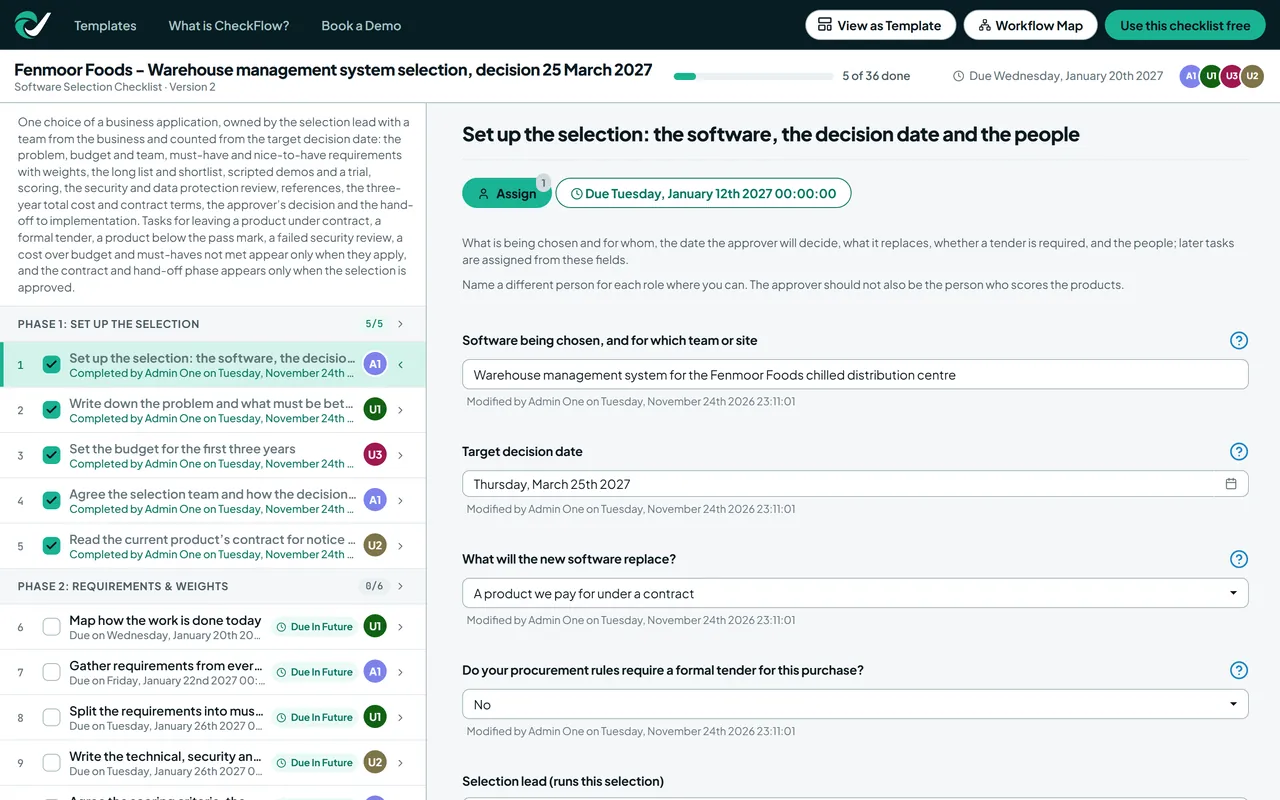
    Owned by the selection lead. Enter the target decision date on the first task: every due date counts back from it in working days. Say what the software will replace and whether a formal tender is required, and the tasks for those cases appear. Write down the problem, the budget and who decides before anyone looks at a product.

    • Set up the selection: the software, the decision date and the people — what is being chosen and for whom, the date the approver will decide, what it replaces, whether a tender is required, and the people; later tasks are assigned from these fields
    • Write down the problem and what must be better afterwards — what is not working today, who it affects, and three to five outcomes the new software must deliver, with today’s figure for each where you have one; the requirements and the scoring start from this
    • Set the budget for the first three years — one figure for all costs over three years (subscriptions or licences, implementation, data migration, integrations, training, support and your own staff time), and who holds it; Phase 6 compares the preferred product’s three-year total cost with this figure
    • Agree the selection team and how the decision is made — who gives requirements (each team that will use or support the software, finance, and whoever looks after personal data), who scores the products, who reviews security and the contract, and who approves; agree that scores are given independently and that conflicts of interest are declared
    • Read the current product’s contract for notice and exit terms — the renewal date, the notice period and how notice must be given, the latest date to give it, any exit fees, and how your data is returned at the end; if that latest date falls before the contract is due to be signed (about a week after the decision date), bring the decision date forward on the first task or ask the supplier in writing to accept notice later
  2. Phase 2

    Phase 2: Requirements & Weights

    6 tasks

    Owned by the business owner with the selection lead. Write the requirements before talking to suppliers, so the products are judged against your needs rather than their demos. Split them into must-haves, which a product has to meet, and nice-to-haves, which are scored. Fix the weights and the pass mark now, before any score is given.

    • Map how the work is done today — the steps, the people and teams involved, the volumes, the systems and spreadsheets used, and where time is lost; requirements written from the real process are easier to test in a demo
    • Gather requirements from every team that will use or support it — workshops or short interviews with each team that will use the software, IT, finance and whoever looks after personal data; write each requirement as something a product can be tested against
    • Split the requirements into must-haves and nice-to-haves — a must-have is something the business cannot work without, so a product that fails one is out unless the approver accepts the gap; keep the must-haves short, and score the nice-to-haves
    • Write the technical, security and data requirements — single sign-on, the systems it must connect to, where data may be stored, availability and support hours, how you get your data out, and what personal data it will hold; these become must-haves or scored criteria
    • Agree the scoring criteria, the weights and the pass mark — five or six criteria that add up to 100, a 0 to 5 scale with what each score means, and the weighted score (out of 100) a product must reach to be chosen; fixing these before the demos stops the weights being bent to fit a favourite
    • Sign off the requirements, weights and pass mark — the business owner confirms the requirements, the must-haves, the weights and the pass mark; any later change is recorded here with the reason, so the scoring stays fair
  3. Phase 3

    Phase 3: Long List & Shortlist

    6 tasks

    Find products that could meet the must-haves, screen them, send the remaining suppliers the same questionnaire and cut the list to a shortlist of about three. Record why each product was cut, so the choice can be explained later.

    • Build the long list — products from peers, review sites, analysts, your current suppliers and the teams who will use it, including the option of staying with what you have; record where each one came from
    • Screen the long list against the must-haves — a desk check of each product against the must-haves, the budget range and where it can host your data, from public information and a short call where needed; cut the ones that clearly fail and say why
    • Run the formal tender beside this selection — where your procurement rules require a tender, run it with procurement, using the requirements, weights and pass mark from Phase 2 as the evaluation criteria; the demos, scoring and decision in this checklist follow the tender’s timetable
    • Send the same questionnaire to the remaining suppliers — a request for information with your must-haves, the main nice-to-haves, the security and data questions, pricing for your user numbers over three years, and a reply date; every supplier gets the same questions
    • Review the replies and choose the shortlist — read every reply against the requirements, follow up anything unclear in writing, and choose about three products for demos; record why each of the others was cut
    • Tell the suppliers who were not shortlisted — a short, polite note to each supplier cut at this stage, with feedback if your policy allows it
  4. Phase 4

    Phase 4: Scripted Demos & Trial

    6 tasks

    Each shortlisted supplier shows the same scenarios, with your own sample data (no live personal data), to the same people. Evaluators score each demo on their own straight after it. A hands-on trial with real users then tests what a demo cannot.

    • Write the demo script from your own scenarios — three to six everyday scenarios and one difficult one, taken from the process map, with sample data; each supplier must show these, in this order, before anything else
    • Hold the scripted demos — the same people at every demo, the script followed, and questions about anything the supplier skipped or showed from slides rather than the product
    • Score each demo straight after it — each evaluator scores against the criteria on their own before any discussion, so one strong voice does not set everyone’s scores
    • Run a hands-on trial with real users — a trial or proof of concept of the leading one or two products, with real users doing real tasks on test data; agree in advance what a successful trial looks like, and do not load live personal data until the security review has passed
    • Test the integrations and the data you depend on — the connections to the systems named in the technical requirements, single sign-on, an import of sample data and an export of it back out, using test systems and accounts until the security review has passed; note anything that needs custom work
    • Record the open questions and gaps for each supplier — everything a demo or trial did not settle, sent to each supplier in writing with a reply date, so the answers can be scored
  5. Phase 5

    Phase 5: Scoring, References & Security

    9 tasks

    Bring every evaluator’s scores together, work out each product’s weighted score and check the preferred product against the pass mark and the must-haves. Then check it with references, its supplier’s health and the security and data protection review.

    • Collect every evaluator’s scores — the demo, trial and questionnaire scores from each evaluator, criterion by criterion; ask about any score far from the others rather than averaging it away
    • Work out each shortlisted product’s weighted score — each criterion’s average score times its weight, added up to a score out of 100, then compared with the pass mark agreed in Phase 2
    • List the must-haves the preferred product does not meet — each must-have the demos, trial or replies showed it does not meet, with any workaround the supplier or your team offers
    • Decide what to do when the preferred product misses the pass mark — go back to the long list for products not yet tried, check with the business owner whether a requirement was unrealistic, or take the gap to the approver with the reasons; do not lower the pass mark after the scores are in without the business owner’s sign-off recorded in Phase 2
    • Call at least two references for the preferred product — organisations of a similar size and sector, ideally ones you find yourself as well as ones the supplier names; ask how implementation went, how support responds and what they would do differently
    • Check the supplier’s financial health and product plans — published accounts or a credit check, how long the product has been sold, who owns the supplier, and what the supplier says about the product’s plans for the next few years; record anything that adds risk
    • Run the security and data protection review of the preferred product — the review your organisation uses for new software, finished before the contract is signed and before live data goes in; record the outcome and any conditions for the contract or the setup
    • Check the data processing terms and where the data is held — where the supplier will handle personal data for you, a data processing agreement or contract terms that meet the law that applies to you, the list of subcontractors who handle it, and the countries where it is stored and supported from
    • Decide what to do when the preferred product fails the security review — move to the runner-up and review it, ask the supplier to fix the findings and review again, or take the failure to the approver as a reason not to approve; record which, and do not sign a contract for a product whose review was not passed
  6. Phase 6

    Phase 6: Total Cost & Contract Terms

    6 tasks

    Price the preferred product for the full term, not the first year, and compare its three-year total cost with the budget. Then read the contract for the terms that cost money later: renewals, price rises, service levels and how you leave.

    • Get the full price for your user numbers and term — a written quote for the preferred product and the runner-up covering subscriptions or licences, implementation, data migration, integrations, training, support, any add-ons you will need, and the price rise allowed at each renewal
    • Work out the three-year total cost of ownership — every cost over three years, including your own staff time and any hosting, set against the budget from Phase 1
    • Close the gap between the total cost and the budget — negotiate the price or the term, cut modules or users from the first phase, or ask the budget holder for more, and record which; the approver sees the result in the recommendation
    • Review the contract terms — the term and automatic renewal, the notice period, price rises at renewal, service levels and credits, support hours, liability, where data is held, who owns what you configure, and the conditions from the security review
    • Agree the exit terms: data return, export and deletion — how and in what format you can export all your data, how long the supplier keeps it after the end, confirmation of deletion, help with moving to another product and what it costs
    • Negotiate and record the final offer — the final price, term, discounts and their conditions, and any changes to the contract terms, in writing from the supplier
  7. Phase 7

    Phase 7: Recommendation & Decision

    4 tasks

    The approver decides, and the checklist halts at the decision: nothing in Phase 8 can be completed until it is made. Must-haves the preferred product does not meet need the approver’s exception approval first. Not approved shows a task to rework the selection, and Phase 8 appears only when the selection is approved.

    • Approve or refuse each must-have the preferred product does not meet — the approver reads each unmet must-have and its workaround and accepts or refuses the gap; a refused gap means the runner-up, another product or a Not approved decision
    • Write the recommendation for the approver — the preferred product and the runner-up, their weighted scores against the pass mark, the must-haves and any exceptions, the security review outcome, the references, the three-year total cost against the budget and the main contract terms
    • Rework the selection and bring it back to the decision — do what the approver asked (another look at the runner-up, more negotiation, a fix to a requirement, a new shortlist) and write an updated recommendation
    • Approve the selection — the approver chooses Approved, Approved with conditions or Not approved, and completes this task; nothing in Phase 8 can be completed until it is done
  8. Phase 8

    Phase 8: Contract & Hand-Off to Implementation

    5 tasks

    Applies only when the selection is approved. Meet any conditions, sign the contract, tell the suppliers who were not chosen, and hand everything the implementation team needs to the people who will set the software up.

    • Meet the approver’s conditions before signing — each condition from the decision done and recorded before the contract is signed
    • Sign the contract — the contract and data processing terms signed by someone with authority, matching the final offer and the terms reviewed in Phase 6; if the new software replaces a product under contract, give notice on the old one by the latest date recorded in Phase 1, once the new contract is signed
    • Tell the suppliers who were not chosen — a short note to each shortlisted supplier, with feedback if your policy allows it; ask them to delete any of your data used in demos or trials
    • Hand the selection to the implementation team — the requirements, the outcomes and today’s figures, the security review conditions, the signed contract and the supplier contacts handed over; the implementation starts from here
    • File the selection record — the requirements, scores, references, security review, cost comparison, decision and contract kept together, so the choice can be explained at renewal or audit; set a reminder to review the product before the first renewal

Scoring Weights and the Costs to Count

Example scoring criteria and weights

A starting point for the weights agreed in Phase 2, not a standard: change them to fit what matters to you, and fix them before the first demo. Must-haves and the security review are pass or fail, so they are not weighted.

Criterion Example weight What a high score looks like
Fit with the must-haves and your processes35%Your demo scenarios done in the product as it is, with little custom work
Ease of use20%Users in the trial finish everyday tasks without help
Integrations and data15%Connects to your systems and single sign-on, and exports all your data in a usable format
The supplier’s strength and support15%Good references, sound finances, support hours that match yours
Three-year cost15%The lowest three-year total cost for the same scope, within the budget

Costs to count in the three-year total cost

The first-year subscription is only part of the cost. Phase 6 adds these up for the preferred product and the runner-up and compares the total with the budget from Phase 1.

Cost What to include Where to find it
Subscription or licencesEvery user, module and add-on you need, and the price rise allowed at each renewalThe quote and the contract’s renewal terms
ImplementationConfiguration, the supplier’s or a partner’s services, project managementThe statement of work
Data migration and integrationsCleaning and moving data, building and running each connectionThe quote, the integration tests in Phase 4
TrainingCourses, materials and time away from workThe quote and your own estimate
Support and maintenanceSupport plans, extra hours of cover, upgradesThe quote and the service levels
Hosting or hardwareServers, storage and backup for software you host yourselfYour IT team
Internal staff timeYour people running the project and looking after the software afterwardsYour own estimate
LeavingExporting your data and any help or fees at the end of the contractThe exit terms in Phase 6

The weights and cost lines are this template’s examples. The data processing task in Phase 5 quotes UK GDPR Article 28 and, for businesses the California Consumer Privacy Act applies to, 11 CCR § 7051 (both read on 24 November 2026). They are not legal advice.

Why Run Your Software Selection in CheckFlow?

1

No contract before the approver decides

The decision is assigned to the approver alone, and the checklist halts there: the contract, the notes to the other suppliers and the hand-off cannot be completed until it is made. Not approved adds the task to rework the selection and keeps those tasks hidden; Approved with conditions adds the task to meet them before signing. See how approvals that halt a checklist work.

2

Scores, costs and gaps in figures

The pass mark, each product’s weighted score, the budget and the three-year total cost are numbers, not notes. A must-have the preferred product does not meet adds the approver’s exception approval, a product below the pass mark or a failed security review adds a task to decide what happens next, and a cost over the budget adds a task to close the gap.

3

Every step has an owner and a date

Name the selection lead, the business owner, the security reviewer, finance, the contract reviewer and the approver on the first task, and every task is assigned from those fields. Due dates count back from the target decision date, so moving it moves the plan. The Reports Grid lists every run with its answers, while Analytics shows where tasks are waiting.

CheckFlow does not find, score or recommend software, and this template names no product: the choice stays with your people. CheckFlow makes sure every selection gets the same steps in the same order, with an owner and a due date for each, a decision before anything is signed, and a record of who did what and when. See how a checklist runs.

Check a supplier’s data processing agreement with the Data Processing Agreement (DPA) Review Checklist, plan the cost into next year’s budget with the IT Budget Planning Checklist, and set the new supplier up with the Vendor Onboarding Process Checklist. Once it is in use, the Software License Audit Checklist keeps the licences in line with what you bought.

AI generator

Didn’t find what you need? Describe it.

Describe the process in a sentence and the AI checklist generator drafts the phases and tasks for you.

Frequently Asked Questions

What should a software selection checklist include?

The problem the software must solve and the outcomes you expect, a three-year budget, the selection team and who approves, requirements split into must-haves and nice-to-haves with weights and a pass mark, a long list cut to a shortlist, the same questionnaire to every supplier, scripted demos and a trial, independent scoring, references, a security and data protection review, the three-year total cost, the contract and exit terms, the decision, and the hand-off to implementation.

How do you build a weighted scoring matrix for software?

Choose five or six criteria, such as fit with your processes, ease of use, integrations, the supplier’s support and cost, and give them weights that add up to 100. Agree a 0 to 5 scale and what each score means. Each evaluator scores on their own; multiply each criterion’s average score by its weight and add them up. Fix the weights and the pass mark before the first demo, so they cannot be bent to fit a favourite.

What is the difference between must-have and nice-to-have requirements?

A must-have is something the business cannot work without, so a product that fails one is out unless the approver accepts the gap. A nice-to-have adds value and is scored. In this template, the number of must-haves the preferred product does not meet is entered as a figure, and anything above 0 adds the approver’s exception approval before the decision.

What should a scripted software demo include?

Three to six everyday scenarios from your own process and one difficult one, with sample data, shown in your order before anything else. The same people attend every demo, ask about anything shown from slides rather than the product, and score straight after it on their own. A hands-on trial with real users then tests what a demo cannot.

How do you calculate the total cost of ownership of software?

Add every cost over the term you compare, three years in this template: subscriptions or licences with the price rise allowed at renewal, implementation, data migration, integrations, training, support, any hosting for software you run yourself, your own staff time, and the cost of leaving. Compare the preferred product with the runner-up on the same scope, and set the total against the budget.

Do you need a data processing agreement with a software supplier?

Under UK GDPR, yes, if the supplier will process personal data on your behalf: Article 28 says processing by a processor shall be governed by a contract or other legal act, and lists what it must stipulate. In the US, the California Consumer Privacy Act’s regulations list terms the contract with a service provider must contain where the Act applies to your business. This template’s Phase 5 task quotes both; it is not legal advice.

What contract terms should you check before buying software?

The term and automatic renewal, the notice period, price rises at renewal, service levels and credits, support hours, liability, where your data is held, who owns your configuration and data, and the exit terms: how you export all your data, how long the supplier keeps it, confirmation of deletion and what help with leaving costs. Agree these before the decision, while you can still choose the runner-up.

Can I use this as an ERP or CRM evaluation checklist?

Yes. It works for any business application, and the requirements, demo scenarios and weights are yours to write. After the choice, the ERP & Accounting Software Implementation Checklist and the CRM Implementation Checklist cover setting those systems up. Choosing a managed IT provider rather than software is the MSP Selection Checklist.

How long does a software selection take with this template?

The due dates count back from the target decision date in working days, with the first task about 52 working days, ten and a half weeks, before it and the contract and hand-off within two weeks after. That is this template’s plan, not a rule. The dates do not shrink for a smaller choice, so pick a decision date that gives your team enough time, and move it on the first task if the selection needs longer.

Is CheckFlow free for this template?

14-day free trial, no card required. The Business plan is $10 per user per month after the trial. Full details at checkflow.io/pricing.

Choose Software on the Evidence, Not the Best Demo

Free trial — no credit card required.

14-day free trial, no credit cardFull refund in your first 30 daysUS hosting, EU on request