IT Service Transition Checklist Template

A project can go live on time and still leave the service desk unable to help the first caller: no runbooks, no knowledge articles, alerts going to someone on the project, and nobody who agreed to own the service.

Last reviewed: November 2026

Printed from checkflow.io/templates/information-technology/it-service-transition-checklist

This free IT service transition checklist hands one finished IT project or new system to the people who will run and support it. It is for project managers, service owners, service desk leads and IT operations teams, in-house or at a managed service provider. One run covers the acceptance criteria, the support model and service levels, documents, runbooks and known errors, knowledge transfer and service desk training, monitoring, the service catalogue and access, a review of the open defects, the service owner’s acceptance, early life support (hypercare) with an exit review, and the formal handover. Go-live, early life support and the handover appear only once the service owner accepts the service, so a refused acceptance cannot close the project. Rolling an application out to its users is the job of the New Software Implementation Checklist, and closing the whole project the Project Closeout Checklist.

Service Transition, Software Implementation or Project Closeout?

A service transition, in this template, is the handover itself: the project that built a service passes it to the service desk and operations teams who will support it, and the service owner accepts it against criteria agreed at the start. It sits between delivering the project and closing it, and works for any IT service: a business application, an infrastructure platform or an internal tool.

Configuring an application, migrating its data and bringing users on board is the New Software Implementation Checklist; this template takes over when the support teams need to be ready. Closing the whole project, its suppliers and its budget is the Project Closeout Checklist, and running the project from the start is the IT Project Management Checklist. An engineering review of whether a service will run reliably in production, with its SLOs, load tests and failure tests, is the Production Readiness Review Checklist.

This checklist

One service, handed to operations

Hands over: one finished project or new system to the service desk and operations teams.

Covers: the support model and service levels, runbooks and known errors, knowledge transfer and training, monitoring, the catalogue and access, the defect review, early life support and the formal handover.

Gate: the service owner accepts the service two working days before go-live.
Users

Rolling software out to users

Configuration, integrations, data migration, a pilot, training for users and adoption after go-live.

Use the New Software Implementation Checklist, and run this one for the support teams’ side of the same go-live.

The project

Closing the whole project

Accepting the deliverables, closing supplier contracts and the budget, releasing people and the formal closure.

Use the Project Closeout Checklist; this template’s last task hands over to it.

What the IT Service Transition Checklist Covers

Eight phases take one service from the start of its handover to the day support moves fully to operations. Every due date counts in working days from the go-live date on the first task: back from it for the plan, support model, documents, training, monitoring and the acceptance, and forward from it for early life support and the handover. A service that replaces an existing system adds a plan to retire it, open P1 or P2 defects add the service owner’s exception approval, and an exit review that is not met adds a task to extend early life support. The service owner’s acceptance is the gate before go-live, and Phases 7 and 8 appear only when the service is accepted.

  1. Phase 1

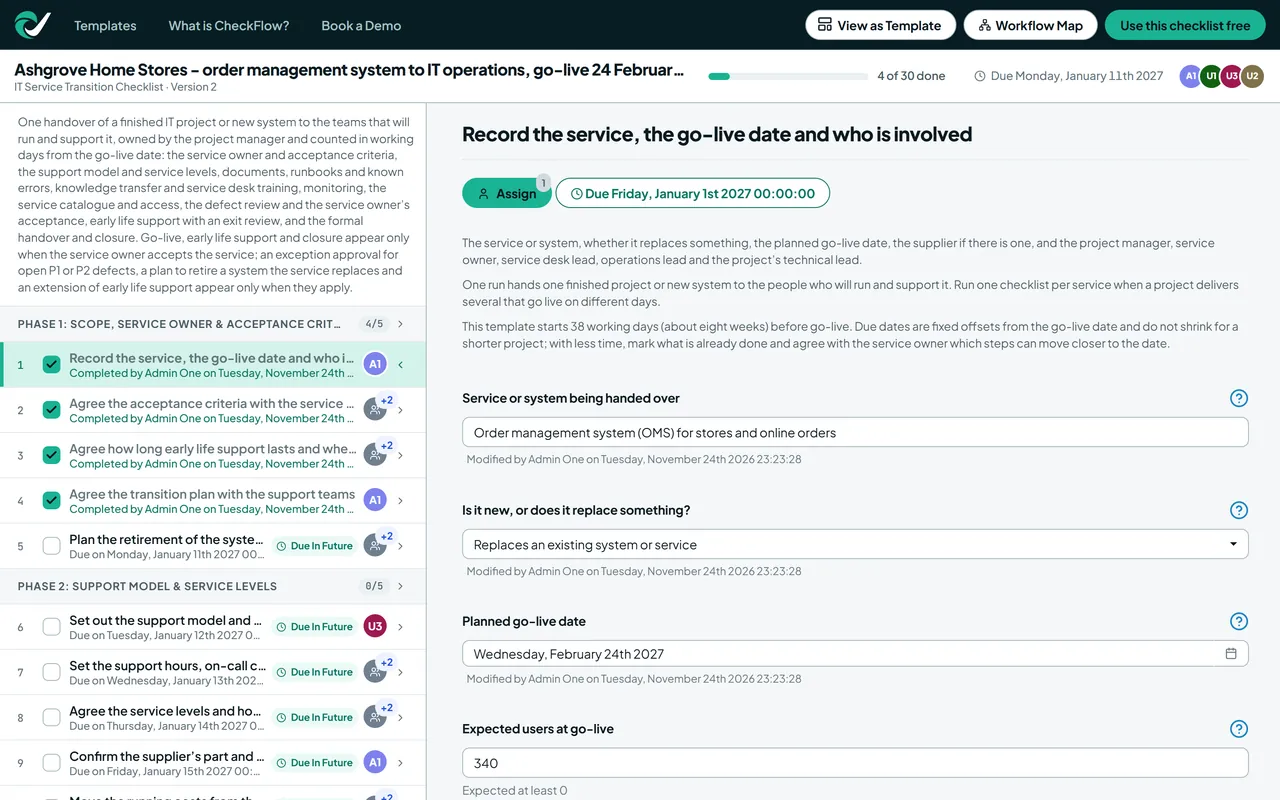
    Phase 1: Scope, Service Owner & Acceptance Criteria

    5 tasks

    Name the service, the go-live date and the people on both sides of the handover. Before the work starts, the service owner agrees what they need to see to accept the service and when early life support ends. Every due date counts in working days from the go-live date.

    • Record the service, the go-live date and who is involved — the service or system, whether it replaces something, the planned go-live date, the supplier if there is one, and the project manager, service owner, service desk lead, operations lead and the project’s technical lead
    • Agree the acceptance criteria with the service owner — what must be true before the service owner accepts the service into operations: documents and runbooks reviewed, the service desk trained, monitoring and alerts working, support contracts in place, and no open P1 or P2 defect without an agreed exception
    • Agree how long early life support lasts and when it ends — the working days the project team stays on hand after go-live, who from the project joins the support rota, and the exit criteria, such as the level of incidents, no open P1 or P2 incidents and the support teams handling calls without the project
    • Agree the transition plan with the support teams — the dates for the documents, the knowledge transfer sessions, service desk training, the acceptance meeting and go-live, agreed with the service desk and operations leads and the supplier
    • Plan the retirement of the system this replaces — the date the old system is switched off after early life support ends, its contracts and notice periods, the data and records to keep, and its users, knowledge articles and support arrangements moved to the new service
  2. Phase 2

    Phase 2: Support Model & Service Levels

    5 tasks

    Decide who supports the service at each level, in which hours and to what targets, before anyone is trained. The supplier’s part and the running costs are settled here too, so nothing is left with the project when it closes.

    • Set out the support model and who handles what — first line at the service desk, second line in application or infrastructure support, the supplier or development team as third line, and the project team’s part during early life support, with an assignment group for each in the service management tool
    • Set the support hours, on-call cover and escalation path — the hours each level covers, the out-of-hours on-call rota, who to escalate to at each level, and how a major incident is declared and run
    • Agree the service levels and how they are reported — the priority definitions from P1 to P4, response and resolution targets for each, the availability target, and who reports against them, how often
    • Confirm the supplier’s part and the support contract — the supplier’s support hours and how to log a call with them, who may log calls, the contract or service level reference, its start and renewal dates, and the supplier’s escalation contacts
    • Move the running costs from the project to the operations budget — the licences, hosting, support contract and any other cost that continues after go-live, with who pays for each and from when
  3. Phase 3

    Phase 3: Documentation, Runbooks & Known Errors

    6 tasks

    Give the support teams what they need to run the service without the project team: how it is built, how to operate it, what is known to go wrong and how to work around it. The operations lead reviews it all before the knowledge transfer starts.

    • Collect the design and configuration documents — the architecture, integrations and interfaces, environments, hosting, key configuration settings and where each document is kept
    • Write the runbooks for routine operations — starting and stopping the service, health checks, scheduled jobs and what to do when one fails, backups, patching and certificate renewal
    • Record the known errors and their workarounds — each fault found in testing and not yet fixed, with its symptoms, workaround and the defect it belongs to, in the known error records the service desk searches
    • Write the service desk knowledge articles — how to recognise, log, categorise and fix the common requests and incidents, and when to escalate, written with the service desk lead
    • Confirm backup, restore and disaster recovery for the service — what is backed up and how often, a restore tested from a real backup, the recovery time and recovery point the service owner agreed, and how the service is recovered if its site or hosting fails
    • Review the documents with the operations lead — the operations lead checks that their team could run the service from the documents alone, and any gaps go back to the project with dates
  4. Phase 4

    Phase 4: Knowledge Transfer & Training

    4 tasks

    Move what the project team knows into the support teams while the project team is still on hand. The service desk is trained on real examples, and support staff work test tickets before go-live.

    • Run the knowledge transfer sessions for the support teams — walkthroughs of the architecture, the runbooks and the known errors by the project’s technical lead, recorded where the teams can watch them again
    • Train the service desk on the new service — what the service does and who uses it, how to log and categorise calls, the knowledge articles and known errors, and when and where to escalate
    • Let support staff work test tickets with the project team — the service desk and second line handle test tickets while the project team watches, then work them alone with the project team on hand
    • Confirm the support teams are ready to take calls — the service desk and operations leads confirm their people are trained and know the escalation path, or say what is missing and when it will be done
  5. Phase 5

    Phase 5: Monitoring, Service Catalogue & Access

    6 tasks

    Make sure alerts reach the team that will act on them, users can find and request the service, and the accounts, licences and keys belong to operations rather than to people on the project.

    • Set up monitoring and alerts for the service — what is checked and how often, the thresholds, and alerts routed to the operations team’s queue and on-call rota rather than to project members
    • Test that alerts reach the right team — a test alert for each kind of failure, checked to reach the on-call person and to raise a ticket in the right queue
    • Add the service to the service catalogue and request forms — the catalogue entry users see, the request forms and categories, and the assignment groups the service desk routes calls to
    • Record the service and its components in the configuration records — the servers, applications, integrations and dependencies, each with its owner, so incidents and changes can be linked to them
    • Move admin access and licences from the project team to operations — admin and service accounts, licences, the supplier portal login and any shared mailbox owned by the operations team, and a list of the project team’s elevated access to remove after early life support
    • Move passwords, keys and certificates into the operations vault — service account passwords, API keys and certificates stored where operations can reach them, with each certificate’s expiry date in the renewal calendar
  6. Phase 6

    Phase 6: Defect Review & Service Acceptance

    6 tasks

    Check the service against the acceptance criteria agreed in Phase 1. Open P1 or P2 defects need the service owner’s exception before acceptance. The service owner decides two working days before go-live; nothing after that can be completed until they do, and go-live, early life support and closure show only when the service is accepted.

    • Review the open defects with the service owner — every defect still open, with its priority, workaround, owner and fix date, counted as P1 and P2 or P3 and P4
    • Approve an exception for each open P1 or P2 defect — the service owner’s decision on each P1 or P2 defect still open: accepted into operations with its workaround, owner and fix date, or fixed before the acceptance
    • Check the service against the acceptance criteria — each criterion from Phase 1 marked met or not met, with the evidence: documents, training records, alert tests, contracts and the defect review
    • Confirm the go-live change and the early life support rota — the approved change record for the go-live, the rollback plan, and who from the project and operations is on hand each day of early life support
    • Fix what stopped the acceptance and come back to the service owner — the criteria not met put right, or a new go-live date agreed and changed on the first task, then the service owner decides again
    • Accept the service into operations — the service owner checks the criteria, the defect review and any exceptions, and accepts the service, accepts it with conditions, or does not accept it
  7. Phase 7

    Phase 7: Go-Live & Early Life Support

    7 tasks

    Applies only when the service owner accepts the service, with or without conditions. The project team stays on hand while the support teams take the first real calls and fixes what was carried over, and the service owner holds the exit review before support moves fully to operations.

    • Confirm the go-live and start early life support — the date the service went live, users told how to get help, and the early life support rota started
    • Hold a daily check with the support teams — each day’s incidents and requests, anything the service desk could not fix, and fixes the project team owes, kept as a short log
    • Update the knowledge articles and known errors from real calls — articles changed or added for the questions users really ask, and known errors updated as fixes arrive
    • Fix the defects and conditions carried into early life support — each open defect and each condition of acceptance tracked to its fix date, with the service owner told when each is done
    • Check the first weeks against the service levels — response and resolution times by priority against the targets, availability, and any target missed with its reason
    • Hold the early life support exit review — the service owner, operations lead and project manager compare the incidents, any open P1 or P2 incidents and how the support teams are coping with the exit criteria from Phase 1
    • Extend early life support and set a new exit date — what is not met, the actions and their owners, the project team kept on the rota, and a date to hold the exit review again
  8. Phase 8

    Phase 8: Handover & Project Closure

    6 tasks

    Applies only when the service owner accepts the service, with or without conditions. Support moves fully to operations, the project team’s extra access is removed, open work moves to the operations backlog, and the transition closes.

    • Hand the service over formally to operations — the service owner and operations lead confirm that support has moved fully to operations and the project team has left the support rota
    • Remove the project team’s elevated access — the access listed in Phase 5 removed, or cut back to what each person still needs, and project test accounts closed
    • Update the records, and retire any system the service replaces — the configuration records, service catalogue and support contacts brought up to date, and any system the service replaces switched off on the date planned in Phase 1
    • Move the open defects and changes to the operations backlog — each defect, condition or improvement still open, recorded as a problem, change or backlog item with an owner in operations
    • Record the lessons for the next transition — what helped the support teams, what came too late, and what to change in this checklist for the next service
    • Close the transition and hand the rest to the project’s own close — the transition records kept with the service, the service owner told the transition is closed, and the rest of the project closed under your own process

Who Does What in a Service Transition

The five roles

The first task names one person for each role, and every task is assigned from those answers. One person can hold several roles in a small team. These are this template’s choices, not a standard’s.

Role Before acceptance At acceptance After go-live
Project managerRuns the transition plan, the defect review and the check against the criteriaBrings the evidence to the service ownerRuns the daily checks, the backlog hand-off and the closure
Service ownerAgrees the acceptance criteria, service levels and exit criteriaApproves any exception for open P1 or P2 defects, then accepts or does not accept the serviceHolds the exit review and confirms the formal handover
Service desk leadWrites the knowledge articles with the project and trains the deskConfirms the desk is ready to take callsUpdates the articles from real calls and checks the service levels
Operations leadSets the support model, reviews the documents, sets up monitoring and takes over accessConfirms second line is readyRemoves the project team’s access and updates the records
Project technical leadWrites the design documents, runbooks and known errors and runs the knowledge transferAnswers questions on open defectsFixes what was carried into early life support

Example acceptance criteria and their evidence

Phase 1 agrees the criteria with the service owner and Phase 6 checks each one. These examples are a starting point; your service owner sets the list.

Criterion Evidence Where in this template
The support teams can run the service from the documentsThe operations lead’s review, with gaps closedPhase 3
The service desk is trainedStaff trained against staff to train, and test tickets workedPhase 4
Alerts reach the team that acts on themTest alerts sent and arrivedPhase 5
Operations holds the access, licences and keysThe access list and the vaultPhase 5
A restore has been testedThe date of the test restore and the recovery time and point agreedPhase 3
No open P1 or P2 defect without an exceptionThe defect review and the service owner’s exception approvalPhase 6
Support and supplier contracts are in placeThe contract reference and renewal datePhase 2

Why Run Service Transitions in CheckFlow?

1

Acceptance against agreed criteria

The service owner agrees the criteria in Phase 1 and the project checks each one with evidence in Phase 6. Open P1 or P2 defects show a task for the service owner’s exception approval, and only the service owner can complete the acceptance.

2

A refused handover cannot close the project

Go-live, early life support and the formal handover appear only when the service owner accepts the service. Not accepted shows a task to fix what stopped it, and the project cannot be closed from this checklist until the decision changes.

3

One date moves the whole plan

Every due date counts in working days from the go-live date. If go-live moves, one change on the first task moves every step, overdue alerts go to the people assigned, and the Reports Grid shows each service’s progress when several projects hand over at once.

CheckFlow does not replace your service management tool, monitor the service or write the runbooks; your teams do that. CheckFlow runs the work around them: who does each step by when, what each check found and who accepted the service. See how checklists run. ITIL, the paid service management framework from PeopleCert (ITIL 4, and ITIL (Version 5), which PeopleCert is releasing in phases), covers this ground in practices such as change enablement, release management, deployment management and service level management; this template is not drawn from it.

Write the support agreement with the IT Support Agreement Checklist, set up alerts with the Monitoring & Alerting Setup Checklist, raise the go-live under the IT Change Management Process Checklist, and hand over each on-call shift with the On-Call Handover Checklist.

AI generator

Didn’t find what you need? Describe it.

Describe the process in a sentence and the AI checklist generator drafts the phases and tasks for you.

Frequently Asked Questions

What is service transition in IT?

Service transition is the move of a new or changed service from the project that built it to the people who will run and support it. In this template that means the support model, documents, knowledge transfer, monitoring, access, the service owner’s acceptance and a period of early life support. ITIL, PeopleCert’s paid framework, covers this ground across several practices; this template is not drawn from it.

What should a service transition checklist include?

The acceptance criteria and who accepts, the support model with its hours, escalation path and service levels, design documents, runbooks and known errors, knowledge transfer and service desk training, monitoring and alerts, the service catalogue entry, access and licences moved to operations, a review of open defects, early life support with exit criteria, and the formal handover. This template runs them in that order over eight phases.

Who should accept a new service into operations?

The service owner: the person accountable for the service once the project has gone. This template names one service owner on the first task, and only they can complete the acceptance and the exception approval for open P1 or P2 defects. The service desk and operations leads confirm their teams are ready first, so the service owner decides with their view in hand.

What are service acceptance criteria?

They are the conditions the service owner agrees, before the work starts, that the service must meet before support takes it on: documents reviewed, the service desk trained, alerts tested, a restore tested, contracts in place and no serious defect left open without an exception. This template records them in Phase 1 and checks each one with its evidence in Phase 6.

Can a service go live with open defects?

It can, if the service owner agrees. In this template, more than 0 open P1 or P2 defects shows a task for the service owner to approve an exception for each one, with its workaround, owner and fix date, or have it fixed first. The service owner then chooses Accepted with conditions. P3 and P4 defects still open after early life support move to the operations backlog.

What are early life support exit criteria?

The conditions the service owner agrees in advance for ending early life support (often called hypercare): for example no open P1 or P2 incidents, a steady level of new incidents and the support teams handling calls without the project. This template holds the exit review 15 working days after go-live and compares the incidents with those criteria. If they are not met, a task appears to extend early life support and set a new review date.

What happens if the service owner does not accept the handover?

They choose Not accepted and leave the acceptance task open. A task appears before it for the project manager to fix what stopped the acceptance, or agree a new go-live date and change it on the first task. Go-live, early life support and the handover stay hidden until the service owner changes the decision, so the project cannot be closed on a refused handover.

Is a service transition the same as closing the project?

No. The transition hands the service to the people who support it; closing the project also covers supplier contracts, the final cost, releasing people and the formal sign-off. This template ends by handing those to the project’s own close, for example with the Project Closeout Checklist. The two can overlap in the last weeks.

Is CheckFlow free for this template?

14-day free trial, no card required. The Business plan is $10 per user per month after the trial. Full details at checkflow.io/pricing.

Hand Over Services Your Support Teams Can Run

Free trial — no credit card required.

14-day free trial, no credit cardFull refund in your first 30 daysUS hosting, EU on request