MSP Selection Checklist Template

Choosing a managed IT provider? Write down what you need and who owns what, ask every shortlisted MSP the same questions, check the security evidence and references, agree the SLA and exit terms, and sign only after the approver says yes.

Last reviewed: November 2026

Printed from checkflow.io/templates/managed-services/msp-selection-checklist

This free MSP selection checklist is for owners, directors, operations managers and IT leads at businesses choosing a managed service provider, whether they are leaving another provider, moving work from their own IT staff or outsourcing IT for the first time. One run covers one selection, planned back from the date the new MSP starts. It records why you are changing, lists what the MSP will support and who owns and controls each account, decides what stays in-house, and sets the security requirements, service levels and budget. It builds a long list, cuts it to three to five, sends each the same questionnaire, and scores the responses and prices like for like. The finalists’ certificates, insurance, own security, access, backups, logging, subcontractors and data handling are checked, then references, demos and an optional trial. The SLA, the security measures, the data processing terms and the exit terms go into the contract before the approver decides. After signing it plans the transition with the outgoing provider or your own staff, and ends at the kick-off of the new MSP’s onboarding. Answers on the first task add the tasks for leaving another provider and for your own IT staff, and a Cyber Essentials check for UK businesses.

The Client’s Side of Choosing an MSP

This checklist is for the business choosing a managed service provider (MSP), not for the MSP. One run takes one selection from the reasons for the change to the kick-off of the new MSP’s onboarding: the needs, which accounts you own and control, what stays in-house and the budget, a long list cut to three to five, the questionnaire, the security evidence, references and demos, the SLA, contract and exit terms, the approver’s decision, and the transition plan with the outgoing provider or your own IT staff. It names no provider, so an MSP can also share it with a prospect who is comparing providers.

The other managed services templates are the MSP’s own processes. Once the contract is signed, the MSP runs the MSP Client Onboarding Checklist, which includes its handover from the incumbent provider, after its MSP Sales-to-Onboarding Handoff Checklist has passed the deal to delivery. Keeping your own IT team alongside the MSP is the Co-Managed IT Onboarding Checklist, and the MSP’s side of a renewal is the Managed Services Agreement Renewal Checklist. Reviewing the provider during the contract is the Vendor Oversight Checklist, and a formal public tender is the Supplier Sourcing & Tender Checklist.

This checklist

Choosing an MSP

Covers: needs, account ownership, scope and budget, the shortlist and questionnaire, security evidence, references, demos, the SLA, contract and exit terms, the decision and the transition plan.

Planned around: the target start date for the new MSP.

Output: a signed contract with exit terms, a business that owns and controls its accounts, and a transition plan handed to the new MSP.

The MSP’s side

MSP client onboarding

Covers: the MSP taking on a new client: access and credentials, the incumbent provider handover, discovery, agents, documentation and go-live.

Planned around: the onboarding kick-off.

Output: a client the MSP can support, in the MSP Client Onboarding Checklist.

During the contract

Vendor oversight

Covers: reviewing the vendors you already depend on: tiers, SLAs, issues, certificates, insurance and exit plans.

Planned around: the review cycle.

Output: findings and a report, in the Vendor Oversight Checklist.

What the MSP Selection Checklist Covers

Nine phases take one selection from the reasons for the change to the new MSP’s onboarding kick-off. The first task records the target start date, which sets every due date, who supports your IT now (another provider, your own staff, both or nobody) and where the business is based. Those answers add the tasks for leaving another provider and for your own IT staff and, in the UK, a Cyber Essentials check. An account your business does not own or control adds the task to put it right, and choosing a trial adds its own task. The approver’s decision is the gate: nothing after it can be completed until it is recorded, Approved with conditions adds the task that follows, and Not approved keeps the checklist halted and adds a task to go back to the shortlist.

  1. Phase 1

    Phase 1: Set Up the Selection

    5 tasks

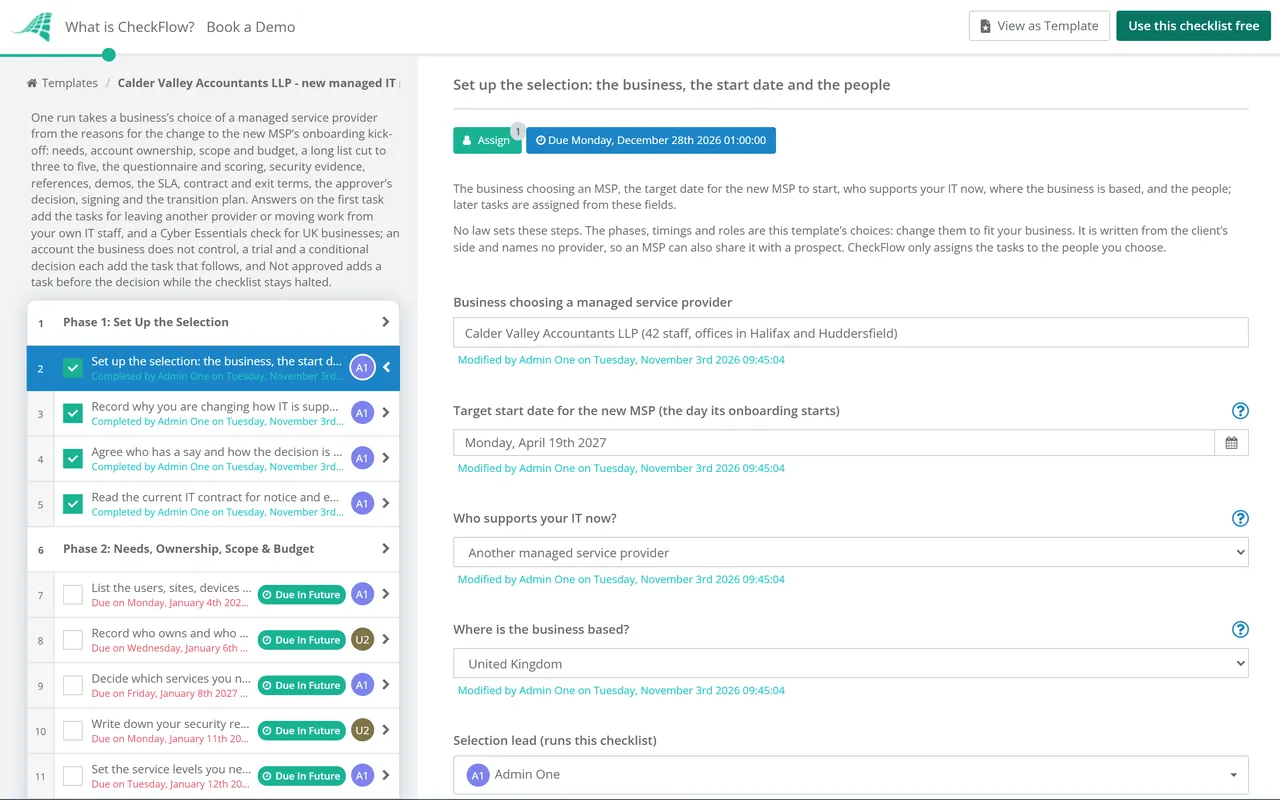
    Owned by the selection lead. Enter the target start date for the new MSP on the first task: every due date counts back from it in working days. Say who supports your IT now, and the tasks for leaving another provider or for your own IT staff appear. Say where the business is based for the Cyber Essentials check and the data protection notes.

    • Set up the selection: the business, the start date and the people — the business choosing an MSP, the target date for the new MSP to start, who supports your IT now, where the business is based, and the people; later tasks are assigned from these fields
    • Record why you are changing how IT is supported — what has prompted the change (a contract ending, problems with the service, growth, someone leaving, a security incident, or an insurer, customer or regulator asking for more) and what must be better afterwards; the requirements and the scoring start from this
    • Agree who has a say and how the decision is made — who gives requirements (each team that relies on IT, finance, and whoever looks after personal data), who scores the responses, who checks the security evidence and the contract, and who approves; CISA’s guidance for MSP customers says every business unit should give input on its IT requirements
    • Read the current IT contract for notice and exit terms — if another provider supports you now: the notice period and how notice must be given, the minimum term and any automatic renewal, the latest date to give notice so the contract ends when you want (and before any automatic renewal), what the provider must hand back or help with when you leave, any exit fees, and what the contract says about who owns the accounts, licences and equipment; if that date falls before the decision in Phase 8 (13 working days before the target start date), bring the start date forward on the first task, or ask the outgoing provider in writing to accept notice later
    • Plan what changes for your own IT staff — if your own staff support IT now: which of their work moves to the MSP and which stays, what that means for each person, and who will tell them and when
  2. Phase 2

    Phase 2: Needs, Ownership, Scope & Budget

    7 tasks

    Write down what the MSP will look after, which accounts your business owns and who controls them, what stays in-house, the security and service levels you need, and what you can spend. Together they become the requirements list every MSP is scored against.

    • List the users, sites, devices and systems the MSP will support — the number of users and devices, each site and who works remotely, the main systems (email and files, line-of-business software, phones, network, backups and security tools), and anything that needs support out of hours
    • Record who owns and who controls each account — for the email and file tenant, the domain names and DNS, software licences, backups, security tools and line-of-business systems: whose name each is registered in, who holds its top-level admin account, and who pays for it; owning an account and having admin access to it are different things, and the exit terms depend on both
    • Decide which services you need and what stays in-house — the services to buy and, for each area, what the MSP does, what you keep and what is shared; the NCSC’s guide calls a matrix of responsibilities, showing what the MSP does and what you do, good practice
    • Write down your security requirements — what you need the MSP to do and show: security updates (the NCSC recommends patching within 14 days of an update being released where it fixes a critical or high-risk vulnerability), tested backups, 2-step verification, security logs you can see, incident notification times, and least-privilege access for the MSP itself, plus anything your insurer, customers or regulator require
    • Set the service levels you need — support hours, response and resolution times by priority, on-site visits, and the reports you want each month; the NCSC’s guide gives starting points (a response within 1 business day for minor issues and under 1 hour for urgent ones, and 2 to 3 business days to resolve routine medium-priority issues) and notes that quicker times are likely to cost more
    • Set the budget and the pricing you can accept — what IT support costs now, the budget for the new contract, the pricing model you prefer (per user, per device or a fixed fee), one-off onboarding fees, and the cost of paying two providers while one hands over to the other
    • Agree the requirements list and the scoring weights — one list of must-haves and nice-to-haves drawn from this phase, with a weight for each area, agreed before any MSP is contacted; CISA’s guidance for MSP customers suggests keeping a master list of requirements as the baseline for the choice
  3. Phase 3

    Phase 3: Long List & Shortlist

    4 tasks

    Find MSPs that could meet the must-haves, screen them, and cut the list to three to five that will receive the questionnaire. Record why each one was cut, so the choice can be explained later.

    • Build a long list of MSPs — names from people you trust in similar businesses, your industry body, your software suppliers’ partner lists and your own search, with each one’s location, size and the services it says it offers
    • Screen the long list against the must-haves — each MSP checked against the must-haves: the services you need, on-site cover if you need it, experience with businesses of your size and sector, the systems you use, and the certifications you require; a short call can settle what a website does not
    • Cut the list to three to five MSPs — the shortlist that will receive the questionnaire, with the reason each other MSP was cut
    • Tell the shortlist the timetable and sign NDAs where needed — one contact on your side, the dates for questions, responses, demos and the decision, how questions are answered (to every MSP at once), and a non-disclosure agreement before you share network details or documents
  4. Phase 4

    Phase 4: The Questionnaire (RFP)

    6 tasks

    Send every shortlisted MSP the same questionnaire, answer their questions fairly, then score the responses against the weights agreed in Phase 2 and compare the prices like for like. The first task of this phase lists the questions to ask.

    • Write the questionnaire — the same questions for every MSP, grouped by area: the company and its stability, the services and what is excluded, the team and how escalation works, security and its own tools, service levels and reporting, the onboarding and transition plan, exit terms, pricing, subcontractors and references
    • Send the questionnaire to the shortlist — the same questionnaire, requirements summary and timetable sent to every MSP on the same day, through the one contact
    • Answer questions and share the answers with every MSP — each question logged, answered once, and the answer sent to every MSP without saying who asked, so all of them respond to the same information
    • Score each response against the weights — each response checked for completeness, then scored area by area by the people agreed in Phase 1, each on their own first, with the scores compared and the reasons recorded
    • Compare the prices like for like — each MSP’s price over the full term for the same users, devices and services: monthly fees, onboarding fees, anything charged outside the fixed fee, price rises during the term, and fees on exit
    • Choose the finalists — the two or three MSPs that go on to the security review, references and demos, with the reasons, and a short note to the others
  5. Phase 5

    Phase 5: Security Evidence

    7 tasks

    An MSP holds privileged access to your systems and data, so check what each finalist says against evidence: its certificates, reports and insurance, how it secures its own tools and remote access, how it will reach your systems, its backups, logging and incident response, its subcontractors, and how it will handle personal data.

    • Collect each finalist’s certificates, reports and insurance details — the certifications the questionnaire asked about (for example Cyber Essentials Plus, an ISO/IEC 27001 certificate or a SOC 2 report), with the scope written on each and its date, and the MSP’s insurance cover; check that each scope includes the services you are buying
    • Check each finalist’s Cyber Essentials certificate — for a business in the UK: each finalist looked up on the Cyber Essentials website, as the NCSC’s guide suggests, with the level (Cyber Essentials or Cyber Essentials Plus) and the organisation named on the certificate; Cyber Essentials Plus adds independent testing of the same five technical controls
    • Ask how each finalist secures its own tools and remote access — how its remote management and remote access tools are protected, whether 2-step verification is on every account that can reach customers, whether admin credentials are ever reused across customers, how a technician’s access is removed when they leave, and how it watches its own systems; the joint advisory from CISA, the NCSC and their partners says contracts should require MFA on all MSP accounts used to access customer environments, tells MSPs not to reuse admin credentials across customers, and says customers should make sure their contracts specify that the MSP implements these measures
    • Agree how the MSP will reach your systems — a named account for each technician rather than a shared one, only the permissions the work needs, MSP accounts kept out of your own administrator groups, a secured connection, and a log of the MSP’s access that you can see
    • Check backups, logging and incident response — how often backups run and are test-restored, where they are stored and who can reach them, which security logs are kept, for how long and whether you can see them, and how and how fast the MSP will tell you about an incident, including one on its own systems; the joint advisory recommends keeping the most important logs for at least six months
    • List the subcontractors and suppliers that could reach your data — each finalist’s subcontractors, any outsourced help desk or monitoring, and the software suppliers whose tools would run on your systems, and how the MSP answers for them; the NCSC and CISA both ask customers to look at the MSP’s own supply chain
    • Check how the MSP will handle personal data — what personal data the MSP will be able to reach (about staff, customers, patients or clients), where it will be held and from where it will be reached, and the data protection terms each finalist offers
  6. Phase 6

    Phase 6: References, Demos & Trial

    5 tasks

    Hear from current clients, see how each finalist works day to day, and check that it is likely to be there for the length of the contract. A trial, where you chose one when picking the finalists, runs alongside the security review and the references and ends before the preferred MSP is chosen.

    • Speak to at least two references for each finalist — current clients of a similar size and sector, asked how support works day to day, how an incident was handled, how onboarding went and whether promises were kept; the NCSC’s guide suggests asking for references from other clients, particularly SMEs
    • Hold a demo with each finalist — the people who would support you, the help desk and how a ticket is raised and followed, a sample monthly report and health report, and a walk-through of the onboarding plan for a business like yours
    • Run the trial or proof of concept — only where you chose one when picking the finalists: started then and run alongside the security review and the references, with a limited scope agreed in writing, the success criteria set before it starts, the MSP’s access kept to what the trial needs and removed afterwards, and the result recorded
    • Check each finalist’s financial health and track record — the latest accounts on the company register where it is registered, how long it has traded, who owns it, any legal disputes it discloses, and how it would tell you about a change of ownership; CISA’s guidance suggests asking for documentation of the MSP’s financial health, its performance record for other clients and any previous legal issues
    • Choose the preferred MSP and a reserve — the preferred MSP and a reserve, with the scores, references, security review and prices behind the choice; contract talks start with the preferred MSP, and the reserve is kept informed until the contract is signed
  7. Phase 7

    Phase 7: SLA, Contract & Exit Terms

    8 tasks

    Agree the terms with the preferred MSP before anyone approves the choice: the SLA, what is included, the security measures, the data processing terms, the exit terms and the price. Where your business does not yet own or control every account, this phase puts that right first.

    • Agree the SLA — response and resolution times for each priority, the hours they apply, how they are measured and reported, and what happens when they are missed (service credits or another remedy)
    • Check the contract says what is and is not included — the services, users, devices and sites covered, the responsibilities matrix from Phase 2, what costs extra and at what rate, and who tracks end-of-life systems and advises on replacements; the NCSC’s guide says the contract should clearly specify what is and what is not included
    • Put the security measures in the contract — the measures from Phase 5 written in: 2-step verification on every MSP account, least-privilege access, no admin credentials reused across customers, logging you can see, backup and restore testing, incident notification times, regular health reports, and liability for incidents; the joint advisory says customers should make sure their contracts specify that their MSP implements its baseline security measures
    • Agree the data processing terms — the terms for the personal data the MSP will reach: processing only on your instructions, confidentiality, security, subcontractors, help with requests and breaches, audits, and deletion or return at the end; check them against the note on the Phase 5 data protection task
    • Agree the exit terms — the notice period, the minimum term and any automatic renewal, help with the handover to the next provider, your data returned in a usable format and then deleted, the documentation and admin credentials handed back, the tenant, domains and licences confirmed as your business’s, any exit fees, and the dates for each
    • Put every account in your business’s name, with its top-level admin account — only where Phase 2 found an account your business does not own or control: each registration moved into your business’s name and its top-level admin account held by someone in the business, leaving the current provider’s own access as it is until the handover; finish this before you sign or give notice
    • Have the contract reviewed — the whole contract, the SLA, the data processing terms and the exit terms read by the contract reviewer, with the changes you asked for and the MSP’s answers; CISA’s guidance suggests a legal review of MSP contracts
    • Agree the final price and the dates — the final price for the term, any onboarding fee, when billing starts, and the start date and transition dates the MSP has agreed; if the start date moves, change it on the first task
  8. Phase 8

    Phase 8: Decision & Approval

    6 tasks

    The approver reads the recommendation and approves, approves with conditions or does not approve the choice and the contract. Nothing after the decision can be completed until it is recorded. Not approved leaves the decision open and adds a task, before it, to go back to the reserve or the shortlist. Then the contract is signed and the other MSPs are told.

    • Prepare the recommendation for the approver — the preferred MSP, its scores and price against the others, the security review, the references, the contract and exit terms, the risks that remain and the budget
    • Go back to the reserve or the shortlist — after Not approved only: what the approver objected to, then talks with the reserve MSP or a return to the shortlist, a new recommendation, and the start date moved on the first task if it has to. The approval task below stays open, so nothing after it can be completed; when the new recommendation is ready, the approver changes the decision and completes the approval task. If the approval task was completed with Not approved, un-complete it first
    • Approve the choice of MSP and the contract — Approved, Approved with conditions or Not approved for signing with the preferred MSP on the terms agreed, with the reasons, recorded by the decision approver alone. Complete this task for Approved or Approved with conditions. For Not approved, record the decision and the reasons and leave this task open: the task above it to go back to the reserve or the shortlist appears, and signing, notice and the transition plan stay locked until a new decision is recorded and this task is completed
    • Meet the conditions before signing — after Approved with conditions only: each condition the approver set, met and recorded, or the approver told in writing that it is not
    • Sign the contract — the final contract, SLA and data processing terms signed by both sides, with the signed copies kept where your business can always reach them
    • Tell the MSPs that were not chosen — each finalist and shortlisted MSP told, with brief feedback if they ask, and any of your documents they hold returned or deleted as the NDA says
  9. Phase 9

    Phase 9: Transition Plan & Handover to Onboarding

    5 tasks

    Give notice to the outgoing provider or plan the handover from your own IT staff, agree the transition plan with the new MSP, and hold the kick-off. The new MSP’s own onboarding starts there.

    • Give notice to the outgoing provider — if another provider supports you now: notice given in the way its contract requires, by the latest date from Phase 1, asking for the exit help the contract provides and confirming the date its service ends
    • Agree the exit plan with the outgoing provider — if another provider supports you now: the documentation, network diagrams and admin credentials it hands over and how, your data and backups returned, licences bought through it moved to you or the new MSP, and the date its access ends; set that date only once your business holds the top-level admin account for every system, and pass the plan to the new MSP
    • Plan the handover from your own IT staff — if your own staff support IT now: the documentation, passwords and admin accounts they hold, the open issues and known problems, and the time they will spend with the new MSP during onboarding
    • Agree the transition plan with the new MSP — the dates for discovery, installing the MSP’s tools and the switch of support, any downtime at a time you choose, who does what on each side, and what your staff will be told and when; CISA’s guidance suggests asking for a transition plan before the contract is signed, and says any downtime should ideally be at a time of the customer’s choosing
    • Hold the onboarding kick-off with the new MSP — the requirements list, the accounts table, the responsibilities matrix, the exit plan with any outgoing provider and the contacts on both sides handed to the new MSP, and the date of the first service review set; the new MSP’s own onboarding starts here

Questions to Ask an MSP, and What to Settle Before You Sign

Questions to ask a managed service provider

Send the same questions to every shortlisted MSP in Phase 4, then check the answers against evidence in Phase 5 and the references in Phase 6.

Area Questions to ask Evidence to ask for
Services and scopeWhich services are included, which cost extra, and what is excluded? Who tracks end-of-life systems?A service description and a matrix of who does what
People and supportWho will support us day to day? How do we raise a ticket, and how does escalation work out of hours?The escalation route and a sample ticket report
Service levelsWhat response and resolution times do you offer for each priority, how are they measured, and what happens when they are missed?A draft SLA and a sample monthly report
CertificationsWhich certifications do you hold, and what does the scope of each one cover?For example Cyber Essentials Plus, an ISO/IEC 27001 certificate or a SOC 2 report, with dates
The MSP’s own securityHow do you protect your remote management and remote access tools? Is 2-step verification on every account that can reach our systems? Are admin credentials ever reused across customers?Written answers and the policies behind them
Access to our systemsWill each technician have a named account with only the permissions the work needs? Can we see a log of your access?A description of how you would reach our systems
Backups, logs and incidentsHow often are backups test-restored, and where are they kept? Which logs do you keep, for how long, and can we see them? How fast will you tell us about an incident, including one on your own systems?Restore test records, log retention periods and the incident response plan
SubcontractorsWhich subcontractors or suppliers could reach our data, and how do you answer for them?A list of subcontractors and what each does
Personal dataWhat personal data will you reach, where will it be held, and what data processing terms do you offer?Your data processing terms
StabilityHow long have you traded, who owns the company, and will you tell us if that changes?Latest accounts and insurance certificates
Onboarding and exitWhat is your transition plan, and what do you need from us and our current provider? When the contract ends, how do you return our data, hand back admin access and help the next provider?An outline transition plan and your exit terms

Who owns it, and who controls it

Owning an account and holding its top-level admin access are different things. Phase 2 records both for each account, and the exit terms in Phase 7 settle what happens to each when a contract ends.

Account or asset Owner: whose name it is in Control: who holds the top-level admin account Settle in the exit terms
Email and file tenant (for example Microsoft 365 or Google Workspace)Your businessSomeone in your business, with the MSP given its own named accessAdmin access handed back and the MSP’s accounts removed at the end
Domain names and DNSYour business, with the registrarYour business holds the registrar loginDNS records and any changes documented and handed over
Software licencesYour business, or bought through the MSP: record whichWhoever manages the licence accountHow and when licences bought through the MSP move to you or the next provider
BackupsYour data, wherever it is storedWho can restore and delete itData returned in a usable format, then deleted
Security and management toolsYour business or the MSP: record whichWhoever holds the consoleHow they are removed and replaced without leaving a gap
Documentation and passwordsYour businessKept where your business can reach themHanded over before the MSP’s access ends
Devices and network equipmentWhoever bought or leases themAdmin logins held by your businessLogins handed over and any leased equipment returned

Where this comes from. The questions draw on the NCSC’s Choosing a managed service provider (MSP) (published 24 November 2025), CISA’s Risk Considerations for Managed Service Provider Customers (September 2021) and the joint advisory Protecting Against Cyber Threats to Managed Service Providers and their Customers (AA22-131A, May 2022) from the UK, Australian, Canadian, New Zealand and US cyber security authorities, all read on 3 November 2026. The NCSC’s guide calls Cyber Essentials Plus “the UK government’s minimum baseline standard for cyber security” and names ISO 27001 and SOC 2 as other certifications; see Cyber Essentials, ISO/IEC 27001:2022 (amended in 2024) and the AICPA’s SOC 2 pages, where proposed 2027 SOC 2 criteria were published as exposure drafts on 26 October 2026. No provider is named or ranked. The ownership table is this template’s choice; no law sets it.

Why Run Your MSP Selection in CheckFlow?

1

No contract before the approver says yes

The decision is assigned to the approver alone, and the checklist halts there: signing, notice to the outgoing provider and the transition plan cannot be completed until a decision is recorded. Not approved keeps the checklist halted and adds the task to go back to the reserve or the shortlist; Approved with conditions adds the task to meet them before signing. See how approvals that halt a checklist work.

2

Only the tasks your change needs

Leaving another provider adds its contract check, the notice and the exit plan; moving work from your own IT staff adds the plan for them and their handover, each with a note on TUPE in Great Britain. UK businesses get a Cyber Essentials check. An account your business does not own or control adds the task to put it right before you sign, and a trial adds its own task.

3

Every step has an owner and a date

Name the selection lead, the security reviewer, finance, the contract reviewer and the approver on the first task, and every task is assigned from those fields. Due dates count back from the target start date, so moving it moves the whole plan. The scoring, price, reference and accounts tables stay on the tasks they came from, and the Reports Grid lists every run with its answers, while Analytics shows where tasks are waiting.

CheckFlow does not score MSPs, check certificates or review contracts for you: those stay with your people and your advisers. CheckFlow makes sure every selection gets the same steps in the same order, with an owner and a due date for each, a decision before anything is signed, and a record of who did what and when. See how a checklist runs.

Check the data processing terms with the Data Processing Agreement (DPA) Review Checklist, leave the outgoing provider with the Vendor Offboarding Checklist, and review the MSP’s access each year with the Third-Party Remote Access Review Checklist. If your insurer asks about your IT provider, the Cyber Insurance Readiness Checklist gathers the evidence.

AI generator

Didn’t find what you need? Describe it.

Describe the process in a sentence and the AI checklist generator drafts the phases and tasks for you.

Frequently Asked Questions

What should an MSP evaluation checklist include?

For a business choosing a managed service provider: why you are changing, what the MSP will support, which accounts you own and control, what stays in-house, your security requirements, service levels and budget, a long list cut to a shortlist, the same questionnaire for each, security evidence, references, demos, the SLA, contract and exit terms, an approved decision, and a transition plan. This template covers each in that order and ends at the new MSP’s onboarding kick-off.

What questions should you ask a managed service provider?

Ask what is included and what costs extra, who supports you and how escalation works, the response and resolution times, which certifications it holds and what they cover, how it secures its own tools and remote access, how it will reach your systems, how backups, logs and incidents are handled, which subcontractors could reach your data, how it handles personal data, and what happens when the contract ends. The table above groups them with the evidence to ask for.

Which certifications should an MSP have?

The NCSC’s guide for small and medium-sized businesses says to use MSPs with recognised certifications such as Cyber Essentials Plus, and names ISO 27001 and SOC 2 as others. Check what the scope of each one covers and that it includes the services you are buying, and still check how the MSP secures its own tools. This template collects them in Phase 5 and, for UK businesses, adds a check on the Cyber Essentials website.

What response times should an MSP offer?

The NCSC’s guide calls a response within 1 business day standard for general requests and minor issues, and under 1 hour standard for urgent ones. It suggests 2 to 3 business days to resolve routine medium-priority issues as a starting point, and notes that quicker times are likely to cost more. Set the levels you need in Phase 2 and agree them, with what happens when they are missed, in the SLA in Phase 7.

Who should own the admin accounts when you use an MSP?

This template’s view is that your business should own its email and file tenant, domain names, backups and documentation, and someone inside the business should hold each top-level admin account, with the MSP given its own named access. Owning an account and controlling it are different things. This template records both in Phase 2, adds a task to put any gap right before you sign, and writes the hand-back into the exit terms.

What exit terms should you agree before signing with an MSP?

The notice period, the minimum term and any automatic renewal, help with the handover to the next provider, your data returned in a usable format and then deleted, documentation and admin credentials handed back, licences bought through the MSP moved on, and any exit fees. In the UK, a processor contract must also provide for deleting or returning personal data at the end, at your choice, under Article 28(3) of the UK GDPR.

How many MSPs should be on the shortlist?

This template cuts the long list to three to five MSPs for the questionnaire, then to two or three finalists for the security review, references and demos. That keeps the comparison fair without asking more providers to respond than you can score properly. The numbers are this template’s choice: change them to fit your business and how much you are buying.

How long does it take to choose an MSP?

It depends on how much IT the MSP will take on, the notice period in any current contract and how quickly people can give answers. This template plans the selection over 80 working days, counted back from the target start date for the new MSP, with the decision 13 working days before it. Those timings are its own choice: change the start date and every due date moves.

Can an MSP share this checklist with a prospect?

Yes. It is written from the client’s side and names no provider, so an MSP can send a prospect this page or a fresh copy of the template as a fair way to compare providers, itself included. The prospect should run it in their own CheckFlow account, on the free trial, so their scores and the other providers’ prices stay with them. If they want the MSP’s help with a step, they can add the MSP’s contact as a Guest, who sees and completes only the tasks assigned to them.

Is CheckFlow free for this template?

14-day free trial, no card required. The Business plan is $10 per user per month after the trial. Full details at checkflow.io/pricing.

Choose Your Next MSP With the Evidence in Front of You

Free trial — no credit card required.

14-day free trial, no credit cardFull refund in your first 30 daysUS hosting, EU on request