
How the numbers get agreed
Owner: finance.
Sets: the calendar, assumptions, template and approval chain.
Template: Annual Budget Planning Checklist.
Last reviewed: October 2026
No Credit Card Required
Printed from checkflow.io/templates/information-technology/it-budget-planning-checklist
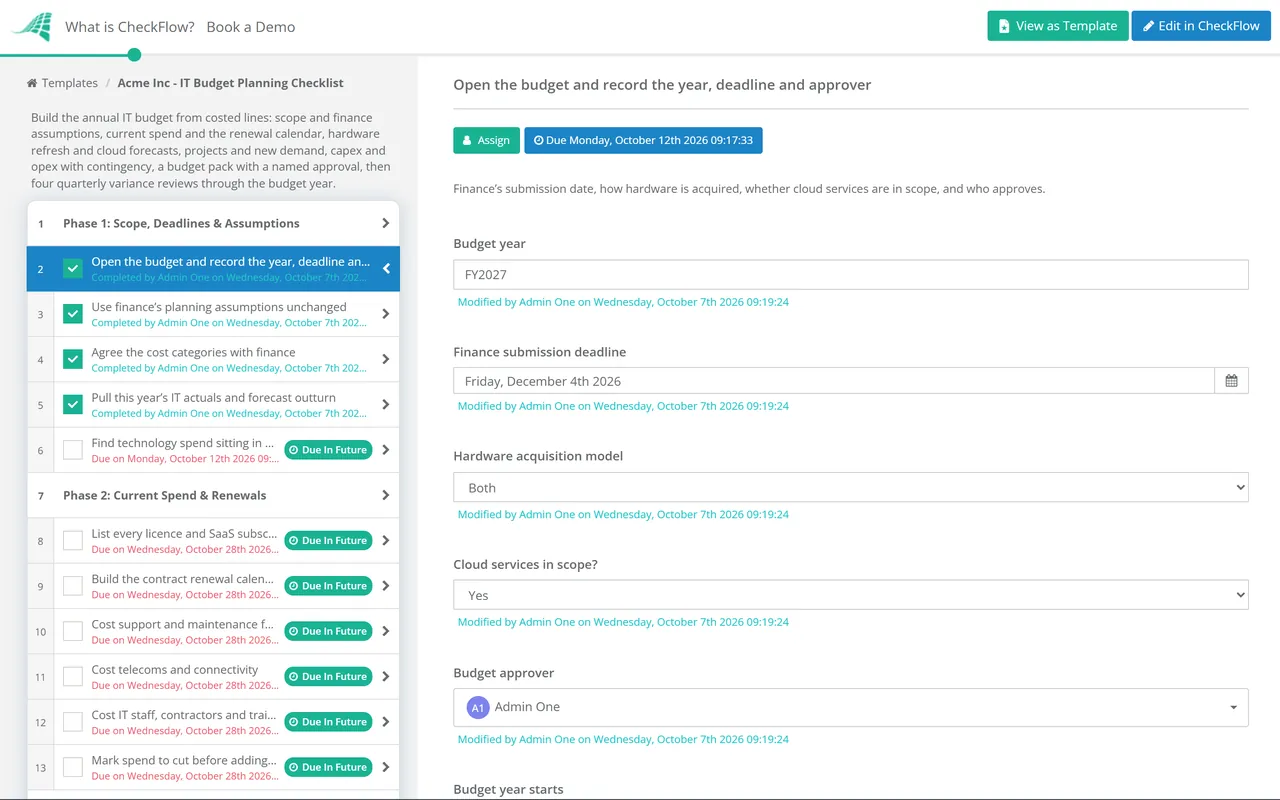
This free IT budget planning checklist is for heads of IT, IT managers and MSPs preparing a client’s technology budget. It builds IT’s part of the annual budget from the lines up: current spend, the contract renewal calendar, hardware refresh by age, cloud forecasts, the project pipeline, a capex and opex split and a contingency line. It ends with a pack finance can challenge, an approved budget, and quarterly variance reviews that keep it honest through the year.
Finance runs the company budget: the calendar, the planning assumptions, the submission template and the approval chain up to the board. IT is one of the departments that submits into it. The trouble is that an IT submission is unusually hard to build well. It mixes multi-year contracts, assets that age on a schedule, consumption costs that move every month and projects other departments asked for.
This checklist is the work IT does before its numbers reach finance, and the follow-up afterwards. It uses finance’s assumptions and deadlines rather than inventing its own, and it draws on the capacity plan for infrastructure growth rather than guessing.
Owner: finance.
Sets: the calendar, assumptions, template and approval chain.
Template: Annual Budget Planning Checklist.
Owner: the head of IT, or the MSP for a client.
Builds: costed lines for run costs, refresh, renewals and projects.
Then: tracks the approved budget quarter by quarter.
Owner: infrastructure or platform team.
Feeds: hardware, cloud and licence growth into the IT budget.
Template: IT Capacity Planning Checklist.
Seven phases take IT from finance’s kick-off to an approved budget and four quarterly reviews. It runs annually, started about twelve weeks before finance’s submission deadline. Answers on the first task decide which hardware and cloud tasks appear, and a named approver signs off before anything new is committed.
The hardware acquisition model and the cloud answer recorded on the first task decide which Phase 3 tasks appear.
The depreciation task appears when hardware is bought, the lease task when it is leased, both for a mix. The two cloud tasks appear only when cloud services are in scope.
The approver named on the first task records a decision, and the checklist halts until they do.
Each review falls due at the end of its quarter of the budget year, so the checklist stays open until the year closes.
The split matters because finance treats the two differently: capital spend is spread over years through depreciation or amortisation, operating spend hits this year’s profit. This table is a guide to the questions to ask in Phase 5. Your accounting policy and your finance team decide.
| IT line | Usual treatment | What to check |
|---|---|---|
| Laptops, servers, network kit bought outright | Capex above the capitalisation threshold, depreciated over its useful life | The threshold, and whether cheap items are expensed |
| Leased devices | Under IFRS 16 most leases over 12 months go on the balance sheet | Whether the short-term or low-value exemptions apply |
| SaaS subscriptions | Opex, spread over the subscription term | Annual prepayments and when they invoice |
| Configuring or customising SaaS | IFRS: usually an expense, per the 2021 IFRIC agenda decision. US GAAP: eligible costs capitalised and amortised over the contract term | Which framework you report under |
| Software built in-house | Capitalised once the recognition criteria are met | US GAAP rules change for years beginning after 15 December 2027 |
| Cloud infrastructure usage | Opex | How upfront commitment payments are spread |
| Staff and contractors | Opex | Time spent building capitalised software |
Two rows trip IT teams up most. The first is SaaS implementation. Under IFRS, the IFRS Interpretations Committee concluded in 2021 that a SaaS contract usually gives a right to receive a service, not a software asset, so configuration costs are generally expensed. Under US GAAP, ASU 2018-15 lets eligible implementation costs for a hosted service be capitalised and amortised over the contract term. A project pitched as capital spend can turn out to be largely operating spend.
The second is staying on old platforms. Microsoft’s paid Extended Security Updates for Windows 10 cost organisations $61 per device for the first year, doubling each year for up to three years, and joining late means paying for the years missed. Set that against the refresh in Phase 3 rather than discovering it as an unbudgeted renewal.
Keep contracts, renewal dates and notice periods in a data set. The renewal table in Phase 2 fills from it, so each year starts from the same list rather than a spreadsheet someone last opened twelve months ago.
An annual recurring schedule opens the checklist in time for finance’s deadline, and dynamic due dates set the four variance reviews at each quarter end. Conditional logic shows only the hardware and cloud tasks that fit how you buy.
The approval goes to the person picked on the first task and halts the checklist until they decide. Quotes and the pack attach to their tasks, cuts are recorded with an owner, and the activity trail shows who agreed what.
This checklist produces IT’s submission to the company process in the Annual Budget Planning Checklist, so start it when finance issues its calendar and assumptions. Infrastructure growth comes from the IT Capacity Planning Checklist, licence counts from the Software License Audit Checklist, and device ages from the IT Asset Management Checklist.
MSPs building budgets for clients can run this alongside the vCIO Technology Roadmap Review Checklist. The quarterly variance reviews are a natural fit for recurring checklists if you prefer them as separate runs.
Annual Budget Planning Checklist
IT Capacity Planning Checklist
Software License Audit Checklist

IT Asset Management Checklist

vCIO Technology Roadmap Review Checklist
Describe the process in a sentence and the AI checklist generator drafts the phases and tasks for you.
Every recurring cost IT is responsible for, plus the changes planned for the year. That means software licences and SaaS, cloud services, hardware refresh, support and maintenance contracts, telecoms, IT staff and contractors, and training, then projects and the running costs they add. Split each line into capital and operating spend, phase it by month, and hold a contingency line with a clear rule for releasing it.
A three- to five-year cycle is common practice, not a rule. Heavier users and devices that travel tend toward the shorter end, desk-based machines toward the longer. Write the cycle into a policy, check it against warranty terms and operating system support, and budget a fixed share of the fleet each year so refresh does not arrive as one large spike.
It depends on the accounting framework. Under IFRS, configuring or customising a supplier’s SaaS is usually an expense, because the contract gives access to a service rather than a software asset. Under US GAAP, eligible implementation costs for a hosted service can be capitalised and spread over the contract term, shown alongside the subscription cost. Confirm with finance before a project is approved as capital spend.
Combine the trend with what you know will change. The FinOps Foundation’s framework describes trend-based forecasting from historical spend, driver-based forecasting from business volumes and planned changes, and a hybrid of the two. Start from at least a few months of actuals, add new workloads, migrations and growth, subtract anything being switched off, and agree a variance threshold that triggers a reforecast.
There is no standard figure. Many teams start at around 5–10% of discretionary spend, more when cloud usage is volatile or a large migration is under way. What matters more is the rule: contingency should sit on its own line, be released by a named approver for a stated reason, and never be quietly absorbed into running costs.
Work back from finance’s submission deadline, not from the start of the financial year. Twelve weeks before that deadline is a sensible default, because the renewal calendar and vendor quotes take longest. Some contracts have notice periods that end before the new budget is approved, which is why the Q3 review settles early renewals.
14-day free trial, no card required. The Business plan is $10 per user per month after the trial. Full details at checkflow.io/pricing.
14-day free trial, no credit cardFull refund in your first 30 daysUS hosting, EU on request