
This checklist
Trigger: a team asks to buy or expand a SaaS tool.
Depth: set by the data the tool will hold; low-risk tools take a light path.
Output: a recorded decision with conditions, and an inventory entry.
No Credit Card Required
Printed from checkflow.io/templates/cybersecurity/saas-procurement-security-review-checklist
This free SaaS procurement security review checklist is for IT, security and procurement teams asked to approve a new software-as-a-service tool before anyone signs the order form. An intake records who wants the tool and what data will go into it, then a risk tier decides how deep the review goes. Low-risk tools take a light path and get an answer in days. Tools that will hold confidential or personal data get evidence requests, identity checks, data protection and AI training terms, logging and exit, then a recorded decision and an inventory entry with an owner and renewal date.
A vendor risk assessment manages a supplier for the whole relationship: criticality tiering, inherent and residual risk, contract clauses, risk acceptance and an annual reassessment. That is the job of the Vendor Risk Assessment Checklist. This review is narrower and earlier. It answers one question for one request: is this product, used the way this team plans to use it, safe enough to buy, and on what conditions? The few tools that will hold restricted data or become business-critical are passed to the full process rather than reviewed twice.
The pre-purchase moment is also where the leverage sits. Once data has been loaded, nobody switches tools because single sign-on costs extra or the vendor trains its models on customer content. Before signing, both are negotiable or a reason to choose another product. The review also catches what a trial has already done: clicking Allow on a “Sign in with Google” or Microsoft consent screen can give an app read access to a mailbox, calendar or files before any contract exists.
Trigger: a team asks to buy or expand a SaaS tool.
Depth: set by the data the tool will hold; low-risk tools take a light path.
Output: a recorded decision with conditions, and an inventory entry.
Trigger: a high-tier supplier, before contract and then annually.
Depth: inherent and residual risk across security, privacy, resilience and finance.
Output: a residual risk rating and a signed risk acceptance.
Trigger: a signed contract.
Depth: configuration, integrations, migration, training and go-live.
Output: a tool in use with the review’s conditions applied.
Tier by data, not by price: a free browser extension that reads every page an employee opens can carry more risk than an expensive analytics platform. When the answer is yes, conditions such as enforcing SSO or opting out of AI training go to the New Software Implementation Checklist, so they are checked in the live tenant rather than lost between teams.
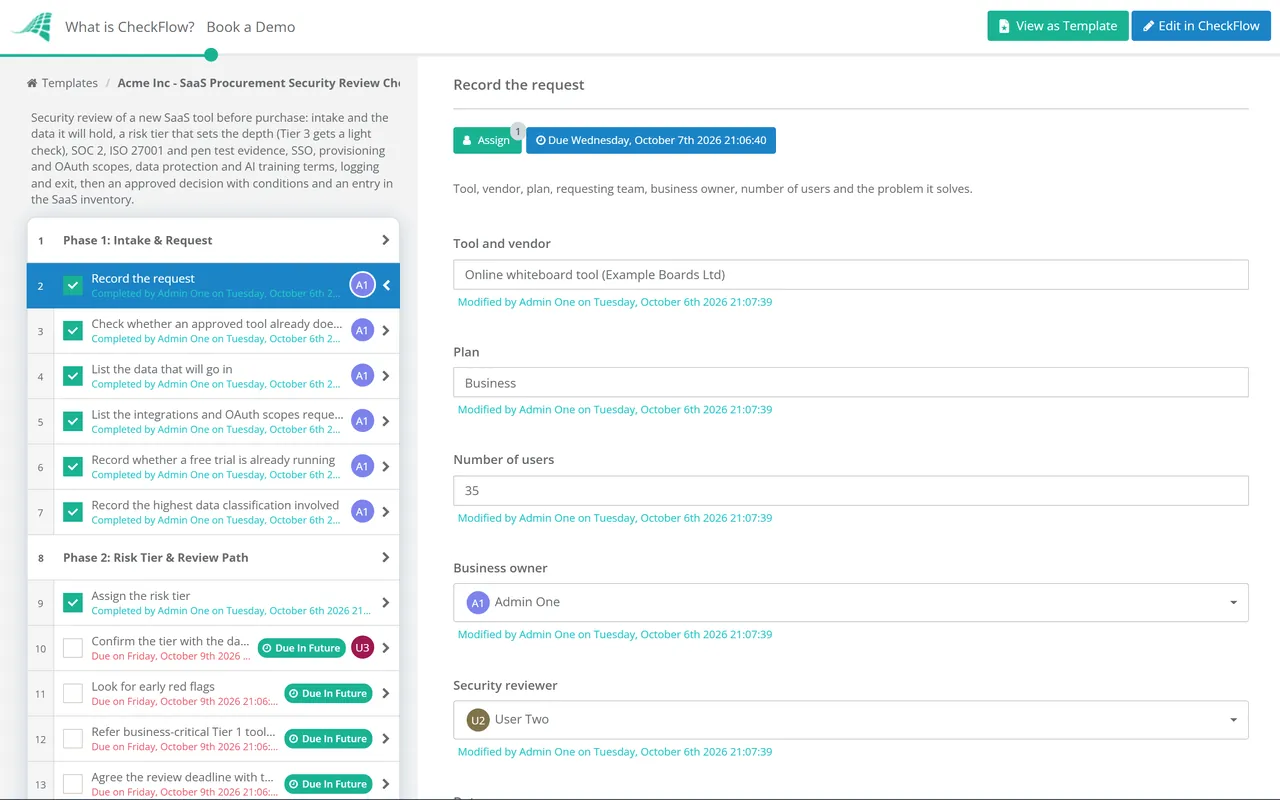
Seven phases take a SaaS request from intake to a recorded decision and an inventory entry. The risk tier set in Phase 2 decides whether the evidence, data protection and exit phases appear.
Completed by the requester and checked by the IT or security reviewer. The last answer sets the risk tier.
The tier is a required DropDown. Tier 3 shows the light-check task and skips Phases 3, 5 and 6; Tiers 1 and 2 run every phase.
Appears for Tier 1 and Tier 2 tools. Attach each document to its task.
Runs for every tier. A tool without SSO or enforced MFA needs an explicit exception in Phase 7.
Appears for Tier 1 and Tier 2 tools. Contract tasks are assigned to legal counsel or the privacy lead.
Appears for Tier 1 and Tier 2 tools.
The decision is an approval: the security lead for Tiers 2 and 3, the CISO and data owner for Tier 1. The checklist halts until it is recorded.
A single review path fails both ways. Full treatment for everything teaches requesters to buy on a card; a light look for everything lets the CRM go live on the strength of a marketing page. The table shows a typical split; adjust it to your own classification scheme.
| Tier | Typical tools | Evidence asked for | Approver |
|---|---|---|---|
| Tier 3: low | Diagramming, scheduling and design tools holding public or internal data, no sensitive integrations | Light check: breach history, SSO or MFA, business terms, data deletion | IT or security lead |
| Tier 2: moderate | Project, survey and marketing tools holding personal or confidential data, or asking for mailbox and drive scopes | SOC 2 Type 2 or ISO/IEC 27001, pen test summary, identity checks, DPA, AI training terms, logging and exit | Security lead |
| Tier 1: high | CRM, HR, finance, support desk and code hosting tools, or anything with admin access to core systems | Everything in Tier 2, plus questionnaire follow-up; business-critical tools also get the full vendor risk assessment | CISO and data owner |
Several frameworks expect this step before a contract. ISO/IEC 27001:2022 added control A.5.23, which asks for processes covering the acquisition, use, management and exit of cloud services, alongside the supplier controls in A.5.19 and A.5.20. NIST CSF 2.0 subcategory GV.SC-06 calls for planning and due diligence before entering formal supplier relationships, and SOC 2 criterion CC9.2 covers assessing and managing vendor risk. CISA and the FBI’s Secure by Demand Guide (August 2024) adds questions for buyers to put to software manufacturers. Your auditor decides what evidence is enough, so treat this as a starting point, not legal or audit advice.
Check the evidence as well as its existence. ISO/IEC 27001:2013 certificates expired on 31 October 2025 at the end of the transition period, so a 2013 certificate is no longer valid. The CSA released CAIQ v4.1 with Cloud Controls Matrix v4.1 in January 2026; as of October 2026 many vendors still publish v4.0 answers, so record which version you received.
The tier DropDown hides the evidence, data protection and exit phases for Tier 3 tools, so a scheduling app is reviewed in a handful of tasks.
Findings and conditions are recorded on the decision task, then become tasks in the implementation checklist. Later you can show who confirmed SSO was switched on.
The last phase adds the tool to the SaaS inventory with an owner, tier and renewal review date. The audit trail records who approved each tool, on what evidence and when.
CheckFlow is not a SaaS management platform or a security rating service; it runs the human side of the review: who asked, what was checked, who decided and on what conditions. To run supplier setup end to end, from NDA and data processing agreement to security review and provisioning, see vendor onboarding software. For suppliers you depend on heavily, carry this evidence into the Vendor Risk Assessment Checklist rather than starting again.
Approval is the start of the tool’s life, not the end of the review. The Software License Audit Checklist finds tools bought outside the process and seats nobody uses, and if the vendor will also support your systems remotely, add its access to the Third-Party Remote Access Review Checklist.
Vendor Risk Assessment Checklist
New Software Implementation Checklist
AI Tool Rollout & Governance Checklist
Cloud Security Review Checklist
Data Processing Agreement (DPA) Review Checklist
Describe the process in a sentence and the AI checklist generator drafts the phases and tasks for you.
It is the check an organisation runs before buying a new cloud application, to decide whether it is safe to put the intended data into it. A practical review records the request and data, sets a risk tier, collects independent evidence such as a SOC 2 Type 2 report for higher-risk tools, checks single sign-on, reviews the data processing agreement and AI training terms, and confirms you can get your data out. It ends with a recorded decision and any conditions attached to it.
Start with the ones that change the decision. Does the plan we are buying include SSO and SCIM? Can you share a current SOC 2 Type 2 report or ISO/IEC 27001 certificate covering this product? Where is our data stored, and who are your subprocessors? Is our data used to train AI models, and how do we opt out? How quickly will you tell us about a breach? Can we export all our data and have it deleted when we leave?
A Type 1 report gives an auditor’s opinion on whether controls were suitably designed at a single date. A Type 2 report also tests whether they operated effectively over a period, commonly six to twelve months, so it carries more weight. Because reports cover a past period, vendors issue a bridge letter, sometimes called a gap letter, in which their management states that controls have continued to operate since. It is not audited, so treat a long gap as a reason to ask when the next report is due.
Often neither, if the vendor already has independent evidence. Many cloud vendors publish a completed Cloud Security Alliance CAIQ in the CSA STAR registry, and Shared Assessments’ SIG Lite is a shorter version of its Standardized Information Gathering questionnaire for lower-risk vendors or first screening. Accept a recent published one, note its version and date, and ask follow-up questions only where the independent evidence leaves a gap.
Read the terms of service, the data processing agreement and any AI or privacy principles page, then ask in writing if they are unclear. Look for whether customer data is used for training at all, whether that is on by default, who can opt out and how, and whether the answer differs between generative features and other machine learning. Terms do change: several widely used SaaS vendors rewrote their AI training wording in 2023 and 2024 after customers objected, and some offered only an opt-out by email. Record the answer and the date, and confirm the contractual position with counsel.
Make the approved route quicker than the workaround. A light path for low-risk tools, a clear deadline for the rest and a published list of approved tools remove most of the reason to use a company card. Then restrict which third-party apps users can consent to in your identity provider, and send tools found already connected to your tenant through the intake phase.
14-day free trial, no card required. The Business plan is $10 per user per month after the trial. Full details at checkflow.io/pricing.
14-day free trial, no credit cardFull refund in your first 30 daysUS hosting, EU on request