Software License Audit Checklist Template

An audit letter gives you a few weeks to prove a licence position that took years to drift. Teams that already know their numbers answer it from a folder. Everyone else answers it from the vendor’s spreadsheet.

This free software license audit checklist gives software asset managers, IT managers, procurement leads and MSPs a repeatable audit for one vendor or product family at a time. It gathers proof of entitlement, counts installations and SaaS assignments under the licence metric that actually applies, and calculates an effective licence position for each product: surplus, compliant or short, with a price against every shortfall. The result feeds the next true-up or renewal. When a vendor has sent an audit notice, a seventh phase appears for the formal response: the audit clause, scope and NDA, what data leaves the building, and a line-by-line review of the auditor’s findings.

Use This Template Free See Live Example
No Credit Card Required

Entitlement vs Deployment: The Two Halves of a Licence Position

Every licence audit, yours or a vendor’s, compares two lists. The first is entitlement: what you can prove you bought, in which edition, under which metric and with which use rights. The second is deployment: what is installed, assigned or running, counted the way the licence terms count it. The difference, product by product, is the effective licence position, and it is the only number an auditor cares about.

Most disputed positions go wrong on the counting rule rather than the count. Software licensed per processor core is measured by the hardware it can run on, not by the number of copies installed. A per-user subscription is measured by assignment, whether or not the person ever signs in. A disaster recovery copy may be covered under one agreement and chargeable under another. That is why the checklist records the metric and use rights for each product before any comparison is made.

Entitlement

What you can prove you own

Sources: contracts, order confirmations, reseller invoices and the vendor’s licence portal.

Records: product, edition, metric, quantity, agreement number and maintenance status.

Weak spot: purchases with no paperwork, bought on a card or inherited through an acquisition.

Deployment and use

What is running and assigned

Sources: endpoint management, discovery tools, SaaS admin consoles and the virtualisation platform.

Records: installs, assigned seats, last use, and host and core counts.

Weak spot: machines the tools cannot see, and duplicates that inflate the count.

This is a deeper, periodic exercise than the monthly licence check in the IT Asset Management Checklist, which keeps seats reclaimed and the register current across key products. The audit takes one vendor at a time, proves every entitlement, applies the licence terms and produces a position you would be willing to show the vendor. ISO/IEC 19770-1:2017, the IT asset management system standard that ISO last reviewed and confirmed in 2024, lists controls over under-licensing, over-licensing and compliance with licence terms among the requirements that set IT assets apart from other assets. It asks for a licence management process. This checklist is one way to run it.

What the Software License Audit Checklist Covers

Six phases run on every audit. Phase 7 appears only when a vendor audit notice has been received, and runs alongside Phases 2 to 5.

Phase 1

Phase 1: Scope & Trigger

The answers on the first task decide whether the true-up tasks and the vendor audit phase appear.

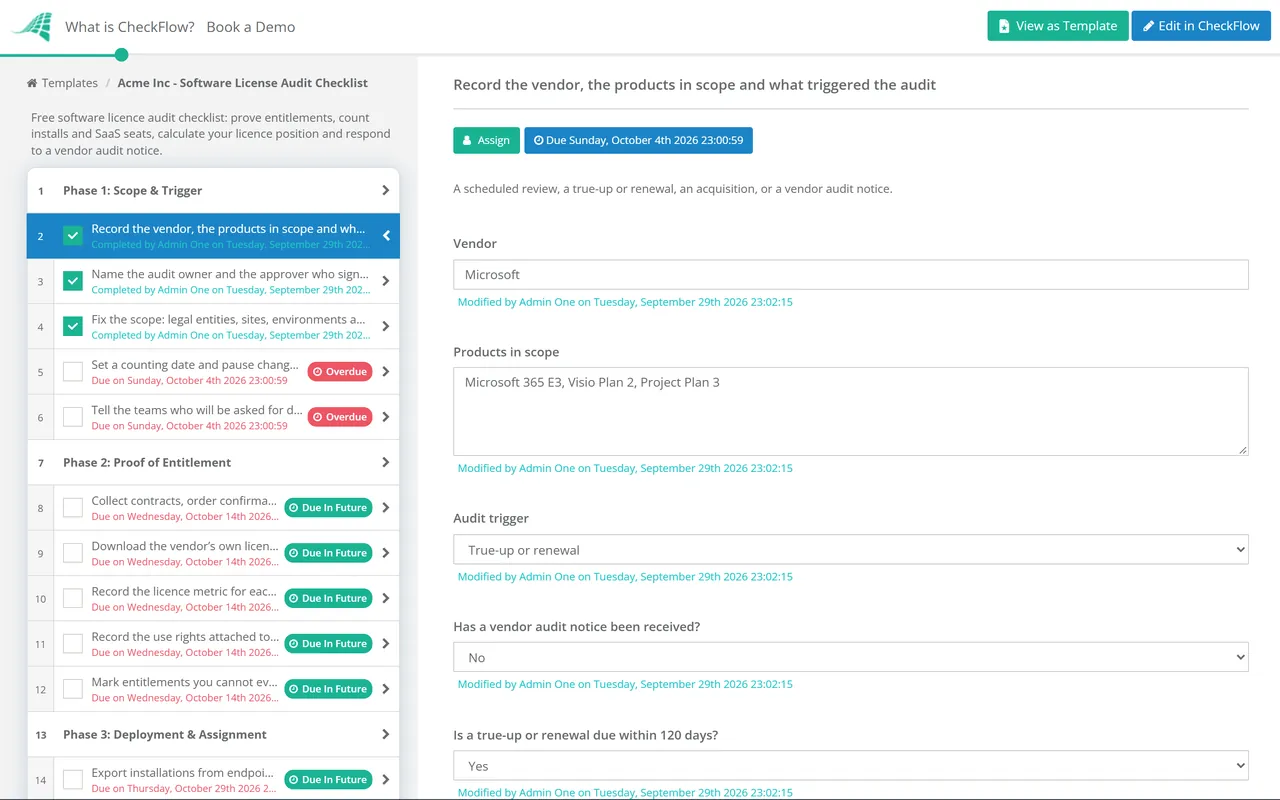
  • Record the vendor, the products in scope and what triggered the audit — a scheduled review, a true-up or renewal, an acquisition, or a vendor audit notice
  • Name the audit owner and the approver who signs off the position — usually the software asset manager and the budget holder for this vendor
  • Fix the scope: legal entities, sites, environments and cloud tenants — licence terms often treat subsidiaries, test systems and disaster recovery differently
  • Set a counting date and pause changes that would move it — a count taken halfway through a migration satisfies nobody
  • Tell the teams who will be asked for data — server, desktop, cloud and procurement, with the date you need it by
Phase 2

Phase 2: Proof of Entitlement

  • Collect contracts, order confirmations and invoices for every product in scope — an invoice alone rarely proves the edition or the licence terms
  • Download the vendor’s own licence statement from its portal — and reconcile it line by line with your purchase records
  • Record the licence metric for each product — per user, per device, per core or processor, concurrent, subscription or perpetual
  • Record the use rights attached to each entitlement — maintenance status, downgrade and secondary-use rights, virtualisation and cloud terms
  • Mark entitlements you cannot evidence as unproven — they count as zero until the paperwork turns up
Phase 3

Phase 3: Deployment & Assignment

  • Export installations from endpoint management and discovery tools — with the scan date and the share of devices each tool covers
  • Export SaaS and subscription assignments from each admin console — assigned seats, active users and last sign-in date
  • Map hosts and clusters for products licensed by core or processor — where the software can run decides the count, not how many copies exist
  • Find the machines the tools cannot see — offline laptops, isolated networks, disaster recovery sites and devices outside the domain
  • Remove duplicates and retired machines from the raw data — a rebuilt laptop can appear twice and invent a shortfall
  • Write down the counting rules you applied — so a colleague could reproduce the result and the vendor can follow it
Phase 4

Phase 4: Effective Licence Position

  • Compare entitlement with deployment for each product and metric — record each as surplus, compliant or short, with the quantity
  • Apply use rights before calling anything a shortfall — downgrade rights, secondary-use rights and cover for test or standby copies
  • Separate installed from used — software not launched for 90 days is a removal candidate, not a licence you need to buy
  • Price every shortfall at your agreement price — the budget holder needs a figure, not just a count
  • Have a second person check the position — mistakes hide in metrics and editions more often than in arithmetic
Phase 5

Phase 5: Close the Gaps

The last task is an approval. The named budget holder decides, and nothing is ordered until they do.

  • Cover shortfalls from surplus before buying — move unused licences between teams or entities where the agreement allows transfer
  • Uninstall software that has no entitlement and no business owner — record the removal date as evidence of when the exposure ended
  • Downgrade users who do not use the higher edition’s features — the saving can outweigh the shortfall
  • Fix the configuration that created the exposure — for example, keep core-licensed software on the hosts that are licensed for it
  • Approve the purchase or the accepted risk for what remains — the named approver records the decision before any order is placed
Phase 6

Phase 6: True-Up, Renewal & Sign-Off

Tasks 1 and 2 appear only when a true-up or renewal is due within 120 days.

  • Build the true-up or renewal order from the effective licence position — not from last year’s order plus a guess
  • Reduce subscription quantities where the agreement allows it — many can only shrink at the anniversary, so the date matters as much as the count
  • Attach the evidence pack and record the final position — entitlement register, discovery exports, calculations and approvals
  • Update the asset register and the licence pool — so the next monthly reconciliation starts from audited numbers
  • Set the date of the next audit for this vendor — sooner for high-spend or complex vendors, or after any merger or data centre move
Phase 7 — Audit Notice Only

Phase 7: Vendor Audit Response

Appears only when a vendor audit notice has been received. Run it alongside Phases 2 to 5: your own effective licence position is what you check the auditor’s findings against.

  • Log the notice and confirm it is genuine — check the sender against your account contacts before sharing anything
  • Read the audit clause in your agreement — notice period, who may audit, how often, what may be requested and who pays
  • Agree scope, timetable, an NDA and a single point of contact — limit scope to the products, entities and period the clause covers
  • Review every data request and collection script before it runs — know what it gathers, and share only what the scope requires
  • Reconcile the auditor’s draft findings with your own position — challenge each difference with your evidence, line by line
  • Approve the settlement before anyone signs it — the named approver decides; keep the closure letter for the audited period

Licence Metrics and Where the Count Usually Goes Wrong

The metric decides what you count, and each metric has its own blind spot. Check your agreement for the exact definition, because two vendors can use the same word for different things.

Licence metric What is counted Where the gap usually hides
Named userPeople with access, whether or not they use itLeavers and disabled accounts still assigned a licence
DeviceMachines with the software installed or able to use itRebuilt devices counted twice; virtual desktops and shared machines
Core or processorPhysical cores on every host where the software can runVirtual machines that can move to unlicensed hosts in the cluster
Concurrent userPeak simultaneous useNo usage log to prove the peak you claim
SaaS subscriptionAssigned seats for the billing termSeats bought mid-term that cannot be reduced until renewal
Organisation-wideAll qualifying users or devices across the organisationAcquired companies and contractors widening the qualifying count

Timing matters as much as the count. In a Microsoft Enterprise Agreement, the annual true-up order must reach Microsoft between 60 and 30 days before the enrolment anniversary, and an update statement is still required when nothing has changed. Starting the audit about 120 days out leaves time to remove, reallocate and approve before the order is placed. Under a subscription enrolment, Microsoft allows subscription counts to go up or down once a year, so a reduction that misses the anniversary is paid for another twelve months.

Why Run Software Licence Audits in CheckFlow?

1

The audit path appears only when there is an audit

Two dropdowns on the first task drive conditional logic. One shows the vendor audit response phase when a notice has arrived, the other shows the true-up tasks when an order is due within 120 days. A quiet internal review stays short.

2

Positions in tables, not emailed spreadsheets

The entitlement register and the effective licence position live in tables inside their tasks, so the second checker reviews rows, not attachments. A data set can hold each vendor’s products, metrics and agreement numbers and fill every new audit.

3

Evidence that stands up to the vendor

Contracts, discovery exports and removal records attach to the task they prove, and the activity trail shows who did each step and when. The purchase and settlement decisions are tasks assigned to the budget holder, so each approval sits beside its numbers.

CheckFlow’s recurring checklist software can start a yearly audit for each vendor on its own date, a few months before its true-up, and assign it to the software asset manager. Between audits, the monthly reclaim in the IT Asset Management Checklist and the renewal checks in the Monthly IT Maintenance Checklist keep the position from drifting.

Many per-user shortfalls begin as accounts nobody switched off. Leavers’ licences should come back on their last day through the Employee Offboarding Checklist, and disabled accounts that still hold a licence are caught by the Active Directory & Entra ID Account Cleanup Checklist. New applications enter the count through the New Software Implementation Checklist, which should record the contract and licence metric at go-live.

Frequently Asked Questions

What is a software license audit?

+

It is a comparison of what an organisation is entitled to use with what it has actually deployed, usually for one vendor or product family at a time. You can run it yourself, as a self-audit before a renewal or true-up, or the vendor or a firm acting for it can run it under the audit clause in your agreement. Either way the output is an effective licence position for each product: surplus, compliant or short.

What is an effective licence position (ELP)?

+

It is the reconciled result of entitlement against deployment for each product, counted under that product’s licence metric and after its use rights are applied. A good ELP shows the quantity and value of every surplus and shortfall, the counting rules used and the evidence behind each entitlement, so someone else could reproduce it.

What should you do when you receive a software audit letter?

+

Do not ignore it, and do not send data straight away. Confirm the letter is genuine, read the audit clause to see what the vendor is actually entitled to, and name one point of contact. Agree scope, timetable and confidentiality in writing before any collection tool runs. Then build your own effective licence position in parallel, so you can test the auditor’s findings line by line instead of accepting them as given.

What is a true-up?

+

A true-up is a periodic order that brings a volume licence agreement into line with what you have added since the last count. In a Microsoft Enterprise Agreement it happens every year: the order is due between 60 and 30 days before the enrolment anniversary, and an update statement is required even if nothing has changed. A self-audit a few months earlier turns the true-up into a confirmation rather than a surprise.

How often should software licences be audited?

+

A common pattern is once a year for the largest or most complex vendors, timed ahead of the true-up or renewal, and every two or three years for smaller ones. Audit sooner when something changes the count: an acquisition, a data centre move, a shift to cloud or a new virtualisation platform. Monthly reclaim and register checks keep the position close between audits.

Does ISO/IEC 19770-1 tell you how to count licences?

+

No. ISO/IEC 19770-1:2017 specifies requirements for an IT asset management system: leadership and policy, core data management, licence management, internal audit and management review. It requires a licence management process but sets no counting rules for any vendor. Those come from your agreements and the vendor’s product terms, which is why this checklist records the metric and use rights for each product before comparing any numbers.

Is CheckFlow free for this template?

+

14-day free trial, no card required. The Business plan is $10 per user per month after the trial. Full details at checkflow.io/pricing.

Know Your Licence Position Before the Vendor Tells You

Free trial — no credit card required.