
IT due diligence
Covers: the target’s systems, security, licences, contracts, IT team and the integration cost, in the IT Due Diligence Checklist.
Ends: with the decision maker’s view of the IT findings and the protections in the deal.
Last reviewed: November 2026
No Credit Card Required
Printed from checkflow.io/templates/information-technology/post-merger-it-integration-checklist
This free M&A IT integration checklist takes one acquired company’s IT from the signed deal to the 100-day review. It is for the IT integration lead and the team around them: the security lead, the acquired company’s IT lead, the service desk and the data protection lead. One run decides what happens to each system (keep, integrate, replace or retire), gets email, access and support ready for Day 1, maps both companies’ directories, tenants and domains, and brings the acquired estate up to your security baseline before anything connects. The approver’s go-ahead is the gate before the networks connect and the migrations start; then come mail, files, applications and data, contracts and licences, the service desk, decommissioning and the 100-day review. A transitional services agreement with the seller adds its tasks, an acquirer that reports to the US SEC gets a SOX task, and every due date counts from the completion date.
A post-merger IT integration is the work of bringing an acquired company’s systems, accounts, data and contracts into the buyer’s IT, or of deciding to keep them apart, after the deal is signed. It starts with planning while the companies are still separate, keeps Day 1 small, and connects nothing until the acquired estate meets the buyer’s security baseline.
The Post-Merger Integration Checklist runs the whole integration (the integration office, people, customers, finance and synergies) and gives IT one task at each stage; this checklist is that IT work in full. The IT Due Diligence Checklist is the review of the target’s IT before signing, and its findings are this checklist’s starting point. Single moves have their own checklists: mail and domains in the Email Migration Checklist, files and sites in the SharePoint Migration Checklist. The Microsoft 365 Tenant Onboarding Checklist is a managed service provider taking on a client’s tenant, not an acquisition, and the staff transfer in a UK business sale runs in the TUPE Transfer Checklist.
Covers: the target’s systems, security, licences, contracts, IT team and the integration cost, in the IT Due Diligence Checklist.
Ends: with the decision maker’s view of the IT findings and the protections in the deal.
Covers: the approach per system, Day 1 access and email, the identity and tenant plan, the security baseline, the network connection, migrations, contracts and licences, the service desk and decommissioning.
Gate: the approver’s go-ahead to connect the networks and start migrating.
Covers: the integration office, Day 1, people, customers, finance and synergies to the 100-day review, in the Post-Merger Integration Checklist.
Use it: alongside this checklist, which runs the IT workstream it names.
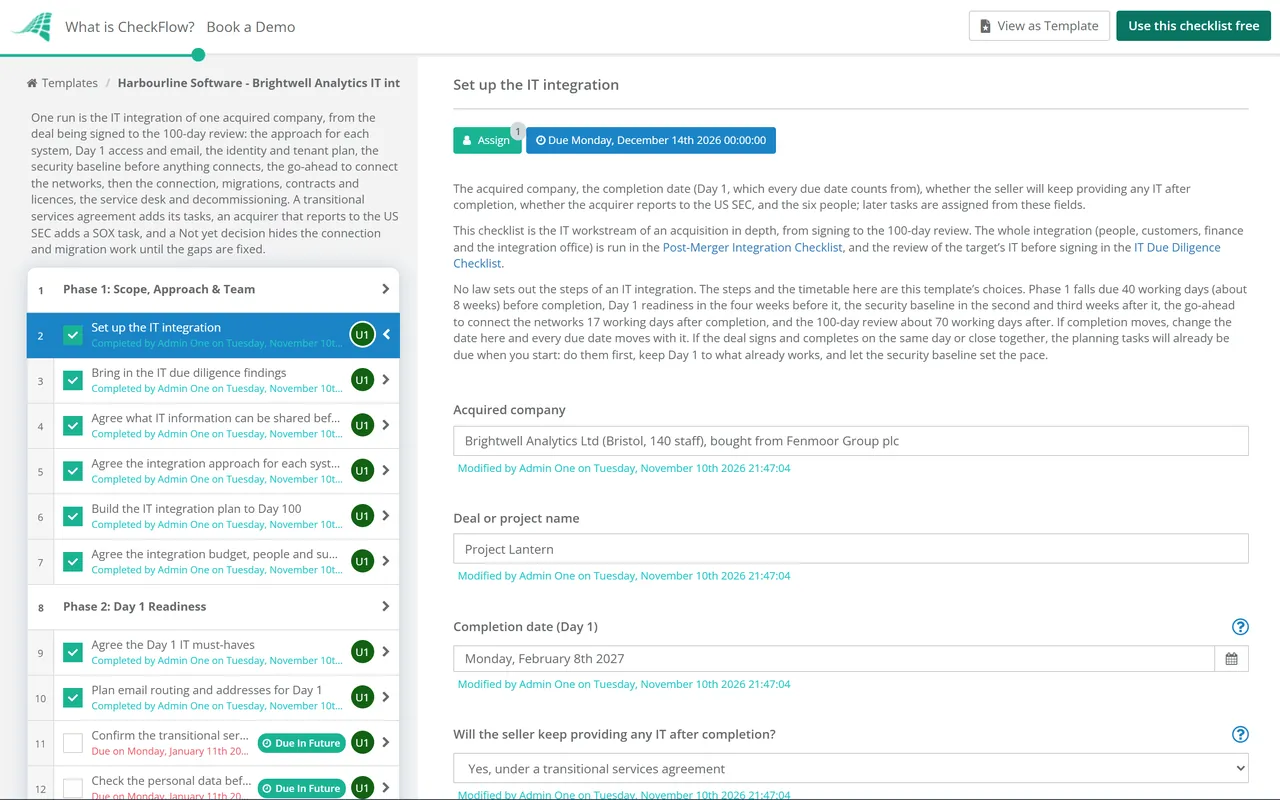
Nine phases take one acquired company’s IT from planning, about eight weeks before completion, to the 100-day review. Every due date counts in working days from the completion date on the first task. The checklist halts at the approver’s go-ahead in Phase 5; a Not yet decision hides the connection and migration phases and shows a task to fix the gaps. A transitional services agreement adds three tasks and an acquirer that reports to the US SEC gets a SOX task.
Start when the deal is signed. Name the acquired company, the completion date and the six people, bring in what IT due diligence found, and decide what happens to each system. Until completion the two companies are separate businesses, so this phase is planning only. Every due date counts from the completion date, in working days.
Decide early what must work on Day 1, then make it ready in the four weeks before completion. Keep Day 1 small: email that keeps flowing, the access the integration needs, and a support route. The personal data check and the contract consents come before the Day 1 access is set up, and the first review of any transitional services follows two weeks after completion. Larger changes wait for the security baseline and the go-ahead.
Map both companies’ directories, tenants and domains, then choose how identity will work: one directory, two that trust each other, or a move between platforms. This is a plan: nothing connects until the security baseline is met and the approver says go.
Before anything connects, bring the acquired estate up to your security baseline or record what is still open. This phase applies whatever the approver decides later: the gaps are found and worked on before any network, directory or data is joined to yours. The personal data check was done before Day 1 in Phase 2; the baseline report confirms it still covers what the migrations will move.
Write down how the networks will connect, report the security baseline to the approver, and get the go-ahead. The go-ahead is the gate: nothing after it can be completed until the approver completes it. A Not yet decision hides the connection and migration work and shows a task to fix the gaps.
Applies only when the go-ahead is Go or Go with conditions: a Not yet decision hides this phase. Connect in stages, apply any conditions the approver set, and remove temporary access once the connection is proved.
Applies only when the go-ahead is Go or Go with conditions: a Not yet decision hides this phase. Move mail, files and users in the order the plan sets, migrate the data from the systems being replaced, and check each one with its owner.
This phase goes ahead once the approver has completed the go-ahead, whatever the decision. Move, assign or end each IT contract and licence after completion, bring acquired staff onto your service desk, and, where the seller still provides IT, exit the transitional services.
Retire the systems the plan replaced or retired, then review the integration at Day 100 and hand what is still open to its business-as-usual owner. The decommissioning task hides on a Not yet decision, because nothing has moved off those systems.
Every system in the register on the first phase gets one of four approaches. They are this template’s words for common choices, not a standard; use your own if your company has them.
| Approach | What happens | Fits when | Watch for |
|---|---|---|---|
| Keep | The system stays as it is, run by the acquired company | It serves a part of the business you do not run yourself, or its contract has time left | It still has to meet your security baseline, and someone has to own it |
| Integrate | The system stays but is connected to yours: data feeds, reports or sign-in | Both companies need the same data, such as finance figures for the group accounts | Each interface needs an owner and a test, and moves only after the go-ahead |
| Replace | Users and data move to your system, then the old one is retired | You already run a system that does the same job | Data that must be kept, the old contract’s notice period, and training |
| Retire | The system is switched off without a replacement | Nobody needs what it does any more | Records the law or the business still needs, archived before it goes |
The identity and tenant choice on Phase 3 adds a short note to the task. Microsoft’s own pages describe these points for Microsoft 365 and Microsoft Entra ID, as read on 10 November 2026; other platforms have their own rules.
| Route | What it means | Points from Microsoft Learn |
|---|---|---|
| Move into one tenant | Mailboxes, OneDrive files and accounts move into the buyer’s tenant | Cross-tenant migrations need a per-user Cross Tenant User Data Migration licence (a one-time fee covering mailbox and OneDrive moves); after a successful move the source mailbox is deleted; a domain name can be verified in only one directory |
| Keep both tenants and connect them | Each company keeps its tenant; staff get access to the other’s applications | Cross-tenant synchronization creates, updates and removes B2B collaboration users; each synchronised user needs a Microsoft Entra ID P1 licence in their own tenant |
| Move between platforms | For example Google Workspace to Microsoft 365, or the reverse | Mail, files, calendars and sign-in change together; the Email Migration Checklist covers both directions |
| Keep them separate | No shared identity for now | Still record the decision and the date to review it |
Sources, read on 10 November 2026: Microsoft Learn, Cross-tenant mailbox migration (updated March 2026), Cross-tenant OneDrive migration, What is cross-tenant synchronization? (updated November 2026) and Add your custom domain name; the ICO’s guidance on data sharing in mergers and acquisitions. Microsoft changes its licensing and migration tools often: check the pages on the day you plan the move.
Phase 2 agrees the Day 1 must-haves early, then makes them ready in the four weeks before completion: the personal data check, the contract consents, email routing, the named people’s access, the support route and the messages to acquired staff. The readiness check reports each one as ready or not, with a workaround.
Phase 4 checks admin accounts, multi-factor authentication, patching, endpoints, backups and signs of compromise before any network or directory is joined to yours. The approver’s go-ahead is the gate, and Not yet hides the connection and migration work until the gaps are fixed.
The first task asks whether the seller keeps providing IT and whether the acquirer reports to the US SEC. A transitional services agreement adds its set-up, monthly review and exit tasks; an SEC reporting acquirer gets the SOX IT general controls task. The identity choice adds a note for the route you pick.
Tables on the tasks hold the system register with its approach per system, Day 1 access, the security gaps, the contracts and the systems decommissioned. Each task is assigned to the person named on the first task, and the Reports Grid shows every integration in progress.
Due dates count in working days from the completion date: back from it for planning and Day 1, forward from it for the baseline, the go-ahead, the migrations and the 100-day review. If completion moves, change one date and the whole plan moves with it.
CheckFlow does not migrate mailboxes, connect networks or change DNS records; your tools and engineers do that. CheckFlow runs the work around them: who does each step by when, what the baseline found, which systems were kept, replaced or retired, and who approved the connection. See how checklists run.
Run the whole integration with the Post-Merger Integration Checklist and the review before signing with the IT Due Diligence Checklist. Move mail with the Email Migration Checklist, files with the SharePoint Migration Checklist and system data with the Data Migration Checklist. Review a Microsoft 365 tenant with the Microsoft 365 Security Baseline Review Checklist, raise the network connection with the IT Change Management Checklist, count licences with the Software License Audit Checklist and retire servers with the Server Decommissioning Checklist.
Email Migration Checklist
SharePoint Migration Checklist
IT Due Diligence Checklist

Microsoft 365 Security Baseline Review Checklist
Microsoft 365 Tenant Onboarding Checklist
Describe the process in a sentence and the AI checklist generator drafts the phases and tasks for you.
It should cover the approach for each system (keep, integrate, replace or retire), Day 1 email, access and support, the identity and tenant plan, a security baseline on the acquired estate before anything connects, the decision to connect the networks, the migrations, contracts and licences, the service desk, decommissioning and a review at about Day 100. This template adds transitional services where the seller still provides IT, and a SOX task for an acquirer that reports to the US SEC.
As little as the business needs. This template keeps Day 1 to email that keeps flowing between the two companies, the access the integration needs for named people, a support route and a short message to acquired staff about what changes and how genuine IT requests will reach them. Mailbox moves, domain changes and network connections wait for the security baseline and the approver’s go-ahead.
Once the acquired estate meets your security baseline, or the approver has accepted what is still open. This template checks admin accounts, multi-factor authentication, patching, endpoint protection, backups and signs of compromise first, then asks the approver for a Go, Go with conditions or Not yet, 17 working days after completion. That timing is the template’s choice: move it to suit your deal.
Look at what the system does that yours does not, the contract and its end date, the data in it and what must be kept, the users who rely on it and the cost of moving them. Record the decision for every system in the register, with an owner and a target date. A system kept separate for now is still a decision, so write down why and when to look at it again.
It is an agreement for the seller to keep running some services for the company after completion, often when the company is bought out of a larger group and shares its systems. The agreement sets each service, its service level, charge and end date. This template confirms the services before Day 1, reviews them each month, and plans the exit from each one, including removing the seller’s access.
Microsoft Learn describes cross-tenant mailbox and OneDrive migration for mergers and divestitures. Its pages say these moves need a per-user Cross Tenant User Data Migration licence, and that the source mailbox is deleted after a successful move. A domain name can be verified in only one directory, so it moves once the old tenant releases it. Some companies keep both tenants for a while and connect them instead.
The ICO’s data sharing code says that where a merger or acquisition means data moves to a different or additional controller, you must consider the sharing as part of your due diligence, establish the purposes and your lawful basis, follow the data protection principles and document it. It also says to consider when and how to tell the people concerned. The ICO says this guidance is under review after the Data (Use and Access) Act.
IT can plan, but until completion the two companies are separate businesses. Take legal advice on what system details, security reports and user lists may be shared before completion, and do not take control of the target’s systems or direct its staff before your lawyers say you may. This template’s first two phases are planning and Day 1 preparation for that reason. If the deal signs and completes on the same day, do the planning tasks first and keep Day 1 to what already works.
14-day free trial, no card required. The Business plan is $10 per user per month after the trial. Full details at checkflow.io/pricing.
14-day free trial, no credit cardFull refund in your first 30 daysUS hosting, EU on request