Data Migration Checklist Template

Moving the data is the quick part. The weeks often go on finding out what the old system really holds, deciding what to leave behind, cleaning it, mapping every field and proving that every record arrived.

Last reviewed: October 2026

Printed from checkflow.io/templates/information-technology/data-migration-checklist

This free data migration checklist moves one application’s business data to a new system, from the first inventory to the day the old system is switched off. It is for IT teams, implementation consultants and business owners replacing a legacy CRM, ERP, finance or line-of-business system. It covers the data owners, an inventory of the source, what moves and what is archived, retention, cleansing and de-duplication, field mapping and transformation rules, the reconciliation checks, trial loads and a timed dress rehearsal. The business data owner signs off the final reconciliation and gives the go; then come the freeze, the production load, post-migration checks, acceptance and retiring the old system. A database moving to a new version or engine under the same application is the job of the Database Migration Checklist.

Data Migration, Database Migration or Software Implementation?

A data migration moves a business’s records from one application to another: customers and contacts from an old CRM to a new one, items and open orders from one ERP to the next, case files from a line-of-business system to its replacement. The new application has its own fields, codes and rules, so the work is deciding what moves, cleaning it, mapping every field and proving with a reconciliation that every record arrived, which is what a migration validation checklist checks.

Several checklists cover the jobs around it. Move servers with the Server Migration Checklist, whole workloads to the cloud with the Cloud Migration Checklist, mailboxes with the Email Migration Checklist and file shares and sites with the SharePoint Migration Checklist. Two more are easy to confuse with this one:

This checklist

One application's business data to another

Moves: the records of one or more data objects, such as customers, products or open orders, from the old application to the new one.

Covers: the inventory and data owners, what to archive, cleansing, field mapping, trial loads, reconciliation, the cutover, post-migration checks and retiring the old system.

Gate: the business data owner signs off the final reconciliation and gives the go.
Same application, new database

The Database Migration Checklist

Moves: one production database to a new version, a managed cloud database or a different engine, with its schema, code and replication.

Use it: when the application stays the same and the database underneath it moves. Database Migration Checklist.

What the Data Migration Checklist Covers

Nine phases take one data migration from the first inventory to the day the old system is switched off. Every due date counts in business days from the planned cutover date on the first task: back from it for the inventory, the decisions on what moves, the cleansing, the mapping and the trial loads, and forward from it for the checks, the acceptance and retiring the old system. Personal data adds six data protection tasks based on the ICO’s guidance, and a phased cutover adds a wave plan and a task for the later waves. The business data owner’s go/no-go is the gate before the cutover, and a failed trial reconciliation, a no-go or differences in the production load each add the task that follows.

  1. Phase 1

    Phase 1: Scope, Systems & People

    5 tasks

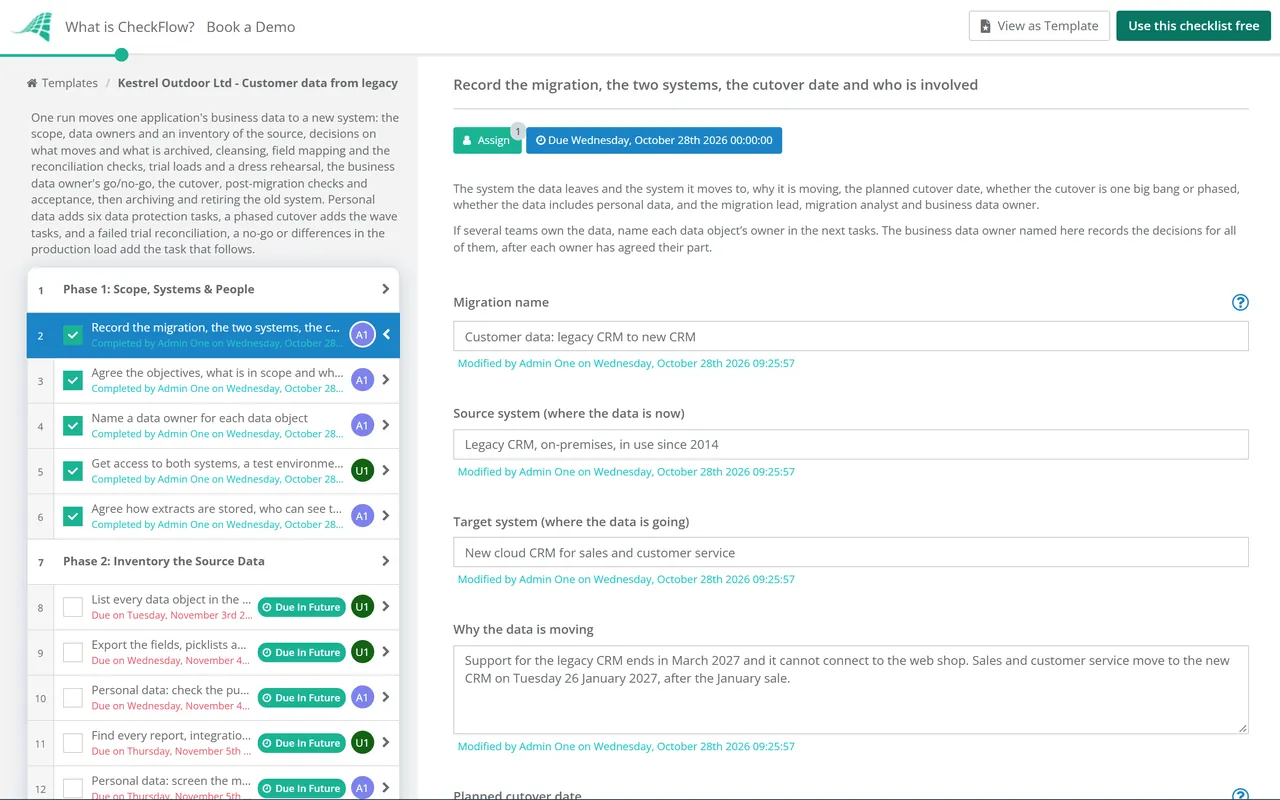
    Record what is moving, from which system to which, and who does each step. Enter the planned cutover date on the first task: every task before it counts back from that date in business days and every task after it counts forward, so changing the date moves the whole plan.

    • Record the migration, the two systems, the cutover date and who is involved — the system the data leaves and the system it moves to, why it is moving, the planned cutover date, whether the cutover is one big bang or phased, whether the data includes personal data, and the migration lead, migration analyst and business data owner
    • Agree the objectives, what is in scope and what success looks like — why the business is changing systems, the data in scope and out of scope, and how everyone will know the migration worked, such as every record accounted for and the totals agreed with the data owner
    • Name a data owner for each data object — a person in the business for each set of data, such as customers, contacts, products, open orders or invoices, who works with it every day and will decide what moves, check the trial loads and agree the reconciliation; the owner is someone who uses the data, not the person who moves it
    • Get access to both systems, a test environment and vendor support — a way to export everything from the source, such as an export tool, the API, a database copy or an extract from the vendor, a route to import into the target, a test environment or sandbox of the target to load into before production, and support contacts for both vendors
    • Agree how extracts are stored, who can see them and when they are deleted — where exported files and staging copies are kept, who can open them, how they are protected in transit and at rest, whether trial loads use real or masked data, and the date the copies are deleted after the migration
  2. Phase 2

    Phase 2: Inventory the Source Data

    6 tasks

    List what the source system holds and everything that depends on it before deciding what moves. The record counts and quality figures taken here show how big the job is and what the cleansing has to fix. When the data includes personal data, two tasks check the purposes and screen for a DPIA.

    • List every data object in the source, with its record count — each kind of record the source holds, such as accounts, contacts, activities, products, open orders, invoices, notes and attachments, with the number of records of each and its owner from Phase 1
    • Export the fields, picklists and relationships for each object — the field list for every object, custom fields included, the values allowed in each picklist, the links between objects such as contacts to accounts, and the fields nobody uses, so the mapping starts from what is really there
    • Personal data: check the purposes and lawful basis stay the same — what personal data the source holds and about whom, what it is used for and the lawful basis in your records of processing, and whether the new system will use it for anything new, checked with your data protection officer or privacy lead
    • Find every report, integration and spreadsheet that reads or writes the data — interfaces from other systems, scheduled imports and exports, reports, and the spreadsheets or mail merges people run from the source, each with its owner, because each one has to be moved to the target, rebuilt or switched off at the cutover
    • Personal data: screen the migration for a DPIA — whether the migration, or what the new system will do with the data, is likely to result in a high risk to individuals, using the ICO’s screening criteria, with the decision and the reasons recorded
    • Profile the data quality in each object — counts of duplicates, blank required fields, values in the wrong format, records linked to nothing, out-of-date records and free text where a list should be, so the cleansing in Phase 4 has a size and a target
  3. Phase 3

    Phase 3: Decide What Moves & What Is Archived

    6 tasks

    Not everything in the old system belongs in the new one. Each data owner decides how much history moves, what goes to an archive and what is left for deletion under the retention schedule, and the business data owner approves the scope at the end of the phase.

    • Check the retention period for each kind of record — the retention schedule entry, any legal or contractual period and any legal hold for each data object, so records past their period are not carried into the new system and records still needed are not lost
    • Agree with each owner how much history moves — for each object, whether every record moves, only open and active ones or a set number of years, and what happens to closed records, notes and attachments that stay behind
    • Personal data: leave out what you no longer need — personal data past its retention period, the records of people who asked for erasure, and fields the new system has no use for, left out of the migration rather than carried across
    • Decide where archived data goes and how it will be found — the place for records that are not migrated, such as the old system kept read-only for a period or an export to a document store or reporting database, who can search it, and how long it is kept
    • Personal data: check the new supplier’s contract before any data is loaded — a written contract with the target system’s supplier that covers what UK GDPR Article 28 requires, where the data will be stored, and any transfer outside the UK, in place before personal data goes into the test environment
    • Business data owner approves the migration scope — the decisions in this phase on what moves, what is archived and what is left for deletion, approved by the business data owner before the cleansing and mapping start
  4. Phase 4

    Phase 4: Cleanse & De-duplicate

    4 tasks

    Clean the data before it moves, in the source where you can, so every trial load starts from better data. Keep a log of every merge: the reconciliation uses it to explain why the target has fewer records than the source.

    • Agree the cleansing rules with each data owner — what counts as a duplicate, which record survives a merge and which fields it keeps, the formats for names, addresses, phone numbers and dates, and what to do with records missing a value the target requires
    • Fix errors and fill gaps in the source where you can — corrections made in the source system by the people who know the data, so the old and new systems agree and every trial load starts cleaner, with values only the owners know, such as a missing account manager, filled in or given an agreed default
    • Merge or remove duplicates and keep a log of every merge — duplicates merged under the agreed rule, with each merged record’s old ID and the ID that survived kept in a log, so the reconciliation can explain why the target has fewer records than the source
    • Record the cleansing results and what is left — the quality figures from Phase 2 measured again, the issues fixed, and any that remain, each accepted by its data owner or handed to a transformation rule in Phase 5
  5. Phase 5

    Phase 5: Field Mapping & Transformation Rules

    5 tasks

    Write down where every field goes and how it changes on the way, and agree how the result will be checked. The reconciliation checks and their tolerances are agreed here, before the first trial load, so every load is judged against rules set in advance.

    • Map every source field to a target field — a mapping for each object from each source field to its target field, with every field that is not moving marked as archived or dropped on purpose, so nothing is left out by accident
    • Map picklist values, codes and record owners — each old status, category, country, currency and owner value matched to its new value, including people who have left but still own records, so no record loads with a value the target rejects or with a blank owner
    • Write the transformation rules, the ID carry-over and the load order — how each field is converted, split or combined, how dates, time zones and currencies are handled, the target field that keeps each record’s old ID so it can be traced, and the order objects load in so parent records exist before the records that link to them
    • Agree the reconciliation checks and their tolerances — the checks every load must pass: record counts per object from extract to load, with rejected, merged and excluded records explained, control totals such as balances or open order values, a sample of records compared field by field, and the links between records, with a tolerance for each agreed by the data owner
    • Business data owner checks the mapping and the rules — the business data owner, with each object’s owner, reviews the field mapping, the value mapping, the transformation rules and the reconciliation checks, and confirms they match how the business uses the data
  6. Phase 6

    Phase 6: Trial Loads & Reconciliation

    7 tasks

    Load into a test environment, reconcile, fix and load again until the checks pass, then rehearse the whole cutover at full volume and time it. The dress rehearsal’s reconciliation is the one the business data owner signs off at the go/no-go.

    • Build the extract, transform and load jobs so they can be rerun — scripts or migration tool jobs that run the same way every time, log every record read, transformed, loaded and rejected, and can clear the test environment for a fresh run
    • Run a trial load into the test environment — a full extract loaded into the test environment, never into production, with the time each step took and every rejected record and error message kept
    • Reconcile the trial load against the source — the checks agreed in Phase 5, with record counts from extract to load and every difference explained, control totals, the sample of records compared field by field and the links between records, and the result recorded
    • Failed reconciliation: fix the cause and run another trial load — the cause of each unexplained difference, such as a mapping error, a rejected value or a missing parent record, fixed in the rules, the cleansing or the source, then the test environment cleared and the trial load and its reconciliation run again
    • Data owners test the migrated data in the new system — each owner works through real tasks in the test environment, such as finding a customer, opening an order, running a report and checking an old record’s history, and records what is wrong or missing
    • Run a dress rehearsal of the cutover at full volume and time it — the final jobs run in order on a fresh full extract, as they will be on the day, with each step timed against the cutover window
    • Reconcile the dress rehearsal and write up the result — every agreed check run on the dress rehearsal and the results written up for the business data owner, with each difference explained and each open issue listed with its fix; this is the final reconciliation the go/no-go relies on
  7. Phase 7

    Phase 7: Go/No-Go & Cutover

    11 tasks

    Write the runbook, agree the freeze and get the go. The go/no-go is the gate: nothing after it can be completed until the business data owner records a decision. On the cutover date, freeze the source, take the final extract, load, reconcile and open the new system.

    • Write the cutover runbook, with the freeze and the rollback plan — every step in order with its owner and the time it took in the dress rehearsal, when the source is frozen, the last point at which a rollback can be decided, what would trigger one, and how users would return to the old system
    • Phased: plan the waves and how both systems run side by side — which objects, sites or teams move in each wave and when, which system holds the master copy of each object until the last wave, how changes made in one system reach the other, and what users are told about which system to use
    • Agree the freeze and tell users what to do during it — when the source becomes read-only, what users do while neither system can be updated, such as keeping a list of changes to enter afterwards, and when they can start in the new system, sent to every user and to the owners of the integrations from Phase 2
    • Go/no-go: the business data owner signs off the final reconciliation and the cutover — the business data owner’s decision, after each object’s owner has agreed their part, based on the dress rehearsal reconciliation, the open issues, the owners’ tests and the runbook; a no-go adds a task to record why and set a new date
    • No-go: record why and set a new cutover date — what was not ready, the work needed and who does it, then a new planned cutover date on the first task, which moves every due date
    • Back up the source and the target before the cutover — a full backup or export of the source and a backup or snapshot of the target, each checked to open, so either system can be put back if the cutover is rolled back
    • Freeze the source and take the final extract — the source set to read-only or users locked out at the agreed time, integrations into it stopped, and the final extract taken with its record counts and control totals
    • Run the production load in the agreed order — the jobs from the dress rehearsal run into the production target in order, with each step’s start and end times and every rejected record kept against the runbook
    • Reconcile the production load and record the result — the same checks as the dress rehearsal run on the production data, with record counts, control totals, the field-by-field sample and the links between records, and every difference explained to the data owner
    • Differences found: fix them in the target or roll back — the data owner’s decision, before the rollback point in the runbook, to correct the records in the target and reconcile again, or to roll back, with users returned to the old system, the source unfrozen and the integrations switched back
    • Switch the integrations over and open the new system to users — each interface, report and file from Phase 2 repointed to the target, rebuilt or retired as planned, users given access, and the source left read-only
  8. Phase 8

    Phase 8: Post-Migration Checks & Acceptance

    5 tasks

    Check the data in daily use as well as in the reconciliation. The data owners log what they find, the analyst fixes it, and the business data owner accepts the migration once the first weeks of real work and the period-end checks show the data is right.

    • Data owners check their data in daily use and log what is wrong — each owner checks the records their team uses in the first days, and every data problem users report is logged with its fix, so a pattern points back to a rule that needs correcting
    • Phased: migrate and reconcile each later wave — each wave in the plan run like the first, with a freeze for the data moving, the final extract, the load, the reconciliation and the data owner’s agreement, until the last wave moves and the old system is no longer the master for anything
    • Check reports, integrations and period-end jobs on the migrated data — the reports and interfaces from Phase 2 run on real data in the new system and compared with the old system’s figures for the same period, and the first period-end or billing run checked when it comes
    • Personal data: update your records of processing and privacy information — the record of processing activities updated for the new system, where the data is now held, the retention periods and the security measures, the privacy information changed if anything people were told has changed, and the DPIA updated if there is one
    • Business data owner accepts the migrated data — the business data owner’s acceptance once the reconciliation, the first weeks of use and the period-end checks show the data is right, with any follow-ups listed with their owners
  9. Phase 9

    Phase 9: Archive & Retire the Old System

    5 tasks

    Keep what the business still needs from the old system, in a form people can search, for as long as the retention schedule says, then switch it off. Switch it off only after the business data owner has accepted the migration, and after the last wave of a phased cutover.

    • Set up the archive and check a record can be found in it — the data agreed in Phase 3 exported to the archive or kept read-only in the old system, a test search by someone who will use it, such as finding a closed customer’s history, and the archive’s location and access recorded
    • Switch the old system off or set it read-only, and remove access — the old system switched off or set read-only on the date agreed in Phase 3, and for a phased cutover not before the last wave has moved, with user and integration accounts removed and scheduled jobs on it stopped
    • Personal data: get the old supplier to return or delete the data — a request to the old system’s supplier, if it held the data for you, to return or delete the personal data under the contract once the archive is safe, with its confirmation kept
    • Cancel the old system’s licences and hand it to decommissioning — licences, support and hosting for the old system cancelled from the right date, and any server, database or storage it used handed to your decommissioning process
    • Close the migration and record what to change next time — the final figures, the open follow-ups handed to their owners, extracts and staging copies deleted as agreed in Phase 1, and what the team would do differently

Reconciliation Checks, and Personal Data in a Migration

Reconciliation checks for a data migration

The checks this template agrees with the data owner in Phase 5 and runs on every trial load, the dress rehearsal and the production load. They are this template’s practice, not a standard; the tolerances are the business’s decision.

Check What it compares What a pass looks like
Record countsRecords in the source extract against records loaded, for each data objectLoaded, rejected, merged and deliberately excluded records add up to the extract, and each group is explained
Control totalsSums that matter to the business, such as account balances, open order values or invoice totals, in both systemsThe totals agree, or the difference is explained and the data owner accepts it
Field-by-field sampleA sample of records chosen by the data owner, including the oldest, the newest and the most complexEvery field matches, or differs only as the transformation rule says
RelationshipsLinks between records, such as contacts to accounts and orders to customersNo record has lost its parent or been linked to the wrong one
Rejected recordsThe load’s error logEvery rejected record fixed and reloaded, or left out with the data owner’s agreement
Merged duplicatesThe merge log from the cleansingEach merged record can be traced from its old ID to the record that survived
Values and formatsPicklists, dates, time zones and currencies after transformationEvery value is one the target allows and means what it meant in the source
Use in the new systemData owners doing real tasks with the migrated dataOwners can find and use what they need, as they could in the old system

When the data includes personal data (UK GDPR)

Answering Yes or Not sure yet to personal data on the first task adds a task for each point below except accuracy and security, which every run covers. From the ICO’s guidance as it stood on 27 October 2026. The ICO marks several of these pages as under review after the Data (Use and Access) Act, and updated its purpose limitation page for it on 23 March 2026, so check them again when you plan. Outside the UK, follow your own data protection law.

Point What the ICO's guidance says Where this template asks it
Purposes and lawful basisOnly reuse personal information for a new purpose if it is compatible with the original purpose, and have a lawful basis for any new purposePhase 2
DPIARequired where processing is likely to result in a high risk to individuals (Article 35(1)); the ICO’s list includes data matching from multiple sources; if you decide against one, document your reasonsPhase 2
Retention and minimisationDo not keep personal data for longer than you need it; the UK GDPR sets no time limits for types of data; hold the minimum you need for your purposePhase 3
The new supplierA written contract whenever a controller uses a processor, with the terms Article 28 requires; restricted transfers outside the UK need a transfer mechanismPhase 3
AccuracyTake all reasonable steps to ensure personal data is not incorrect or misleading as to any matter of factPhase 4, every run
Security during the moveAppropriate technical and organisational measures, with pseudonymisation and encryption where appropriatePhase 1, every run
Records of processingKept up to date to reflect current processing, including where personal data is heldPhase 8
The old supplierA processor must delete or return all personal data, at the controller’s choice, at the end of the contractPhase 9

Sources, read 27 October 2026. The ICO’s UK GDPR guidance: Principle (b): Purpose limitation, When do we need to do a DPIA?, Principle (e): Storage limitation, Principle (c): Data minimisation, Principle (d): Accuracy, A guide to data security, Contracts, Documentation and A brief guide to international transfers.

Why Run Data Migrations in CheckFlow?

1

Every record accounted for

The reconciliation checks are agreed with the data owner before the first trial load and run on every load after it: record counts, control totals, a field-by-field sample and the links between records. A failed trial adds a task to fix the cause and load again, and differences on the cutover day add a decision to fix them or roll back.

2

No cutover without the data owner

The business data owner approves the scope and the mapping, has the data tested in the new system and signs off the final reconciliation. Nothing in the cutover or after it can be ticked off until the go is recorded, and a no-go adds the task to set a new date. See how approval steps work.

3

Only the steps this migration needs

Personal data adds six data protection tasks, from a DPIA screening to the old supplier’s copy of the data, and a phased cutover adds the wave tasks. Due dates count back from and forward from the planned cutover date, so moving the date moves the plan. The Reports Grid lists every migration with its answers, and Analytics shows completion rates and overdue work.

CheckFlow does not extract, transform or load data; your migration tool, scripts or vendor do that. CheckFlow runs the work around them: who does each step by when, what the inventory and the reconciliations found, and who approved the cutover. See how checklists run.

Run the whole system change with the New Software Implementation Checklist or the ERP & Accounting Software Implementation Checklist, and test the new system’s processes with the User Acceptance Testing (UAT) Checklist. Move a database to a new engine with the Database Migration Checklist, run a DPIA with the Data Protection Impact Assessment (DPIA) Checklist, set retention periods with the Data Retention & Disposal Review Checklist and retire the old servers with the Server Decommissioning Checklist.

AI generator

Didn’t find what you need? Describe it.

Describe the process in a sentence and the AI checklist generator drafts the phases and tasks for you.

Frequently Asked Questions

What should a data migration checklist include?

An inventory of the data with an owner for each object, decisions on what moves and what is archived, retention checks, cleansing and de-duplication, a field mapping with transformation rules, agreed reconciliation checks, trial loads, a dress rehearsal, a go/no-go, the cutover with a freeze, post-migration checks and retiring the old system. This template covers each of those, adds six data protection tasks when the data includes personal data, and adds wave tasks for a phased cutover.

What is the difference between data migration and database migration?

A data migration moves a business’s records from one application to another, such as an old CRM to a new one, so the work is cleaning the data, mapping its fields and reconciling what arrived. A database migration moves one database to a new version, platform or engine while the application stays the same, so the work is the schema, the code, replication and the engine cutover. That has its own Database Migration Checklist.

What goes on a migration validation checklist?

Record counts for each object, with every rejected, merged or excluded record explained, control totals such as balances or open order values, a sample of records compared field by field, the links between records, picklist values, dates and currencies after transformation, and data owners using the data for real tasks. This template agrees those checks and their tolerances before the first trial load and runs them on every load, including the production load on the cutover day.

Who should sign off a data migration?

The people who use the data, not the people who move it. This template names an owner for each data object and one business data owner, who approves the scope and the mapping, signs off the final reconciliation and gives the go for the cutover. The go/no-go is a gate: nothing after it can be completed until a decision is recorded. The same person accepts the migrated data once the first weeks of use and the period-end checks show it is right.

Should you clean data before or after migrating it?

Before, where you can. This template profiles the data in Phase 2, agrees cleansing rules with each owner, fixes errors in the source, merges duplicates with a log and measures the result again before the mapping starts, so every trial load starts from cleaner data. What cannot be fixed in the source is handled by a transformation rule during the load, and anything left is listed and accepted by its owner.

Big bang or phased data migration: which should you choose?

A big bang moves all the data in one cutover, so there is one freeze and no period with two systems in use. A phased migration moves it in waves, by data object, site or business unit, which keeps each cutover smaller but means deciding which system holds the master copy until the last wave and how changes reach the other one. Choose Phased on the first task and the template adds a wave plan and a task for the later waves.

Do you need a DPIA for a data migration?

Not always. The ICO says a DPIA is required where processing is likely to result in a high risk to individuals, and its list of processing that needs one includes data matching: combining, comparing or matching personal data from multiple sources. A migration that merges several systems, or a new system that uses the data in a new way, may meet that test. If you decide no DPIA is needed, the ICO says to document your reasons. The Data Protection Impact Assessment (DPIA) Checklist runs one.

What should happen to the old system after a data migration?

Keep what the business still needs, in a form people can search, for the period your retention schedule sets, then switch the old system off. This template decides in Phase 3 whether the old system stays read-only or its data goes to an archive, tests a search of the archive, and then switches the old system off and cancels its licences. If a supplier held personal data for you, the ICO says the contract must require it to delete or return the data at the end.

Can I use this as a data migration plan template?

Yes. Enter the planned cutover date on the first task and every task gets a due date: the inventory, scope decisions, cleansing, mapping, trial loads and dress rehearsal count back from it in business days, and the checks, acceptance and archiving count forward. The go/no-go falls three business days before the cutover. Change the date and the whole plan moves with it, and the Reports Grid lists every migration you run.

Is CheckFlow free for this template?

14-day free trial, no card required. The Business plan is $10 per user per month after the trial. Full details at checkflow.io/pricing.

Move the Data and Prove Every Record Arrived

Free trial — no credit card required.

14-day free trial, no credit cardFull refund in your first 30 daysUS hosting, EU on request