M&A due diligence
Covers: strategy, finance, legal, tax, operations, technology, people and ESG, with operations and technology in one phase.
Ends: with the investment decision on the whole deal and integration planning.
Last reviewed: November 2026
No Credit Card Required
Printed from checkflow.io/templates/due-diligence/it-due-diligence-checklist
This free IT due diligence checklist is for buyers, investors and their IT advisers on one acquisition or investment. One run covers one target, with every due date counted back from the target signing date. It agrees the scope, sends the IT request list, sets up the data room and the sessions with the target’s IT leaders, then reviews systems and data, infrastructure and cloud contracts, security and past incidents, software licences and IT contracts with change-of-control terms, the IT team, technical debt and the roadmap. It ends with the integration cost, a red-flag report, a decision on the findings before signing, and the IT terms that go into the deal. A software target and a carve-out from the seller’s group add the tasks they need, and so do a red flag and the decision.
The M&A Due Diligence Checklist runs the whole deal and gives operations and technology one phase. This checklist is the technology half of that phase run in full, for an M&A deal or an investment: the IT request list, the review area by area, a cost for every finding, a red-flag report, a decision before signing and the IT terms in the deal. Run it beside the other workstreams and feed its findings into the same decision.
Three things it leaves to its neighbours. What the contracts and licences mean in law, and who owns the code and other IP, is for the Legal Due Diligence Checklist: this checklist finds the IT contracts that matter and sends them there. The leaders themselves are for the Management Due Diligence Checklist. Everything after completion is for the Post-Merger Integration Checklist, which picks up the issues list and the integration estimate.
Covers: strategy, finance, legal, tax, operations, technology, people and ESG, with operations and technology in one phase.
Ends: with the investment decision on the whole deal and integration planning.
Covers: systems and data, infrastructure and cloud contracts, security and past incidents, licences and IT contracts, the IT team, technical debt, separation for a carve-out and the integration cost.
Ends: with a decision on the IT findings before signing, and the IT protections and conditions in the deal.
Covers: contract law and IP ownership in the Legal Due Diligence Checklist, the leadership team in the Management Due Diligence Checklist, and the work after completion in the Post-Merger Integration Checklist.
Ends: with findings that join the IT ones in one issues list and one decision, then one integration plan.
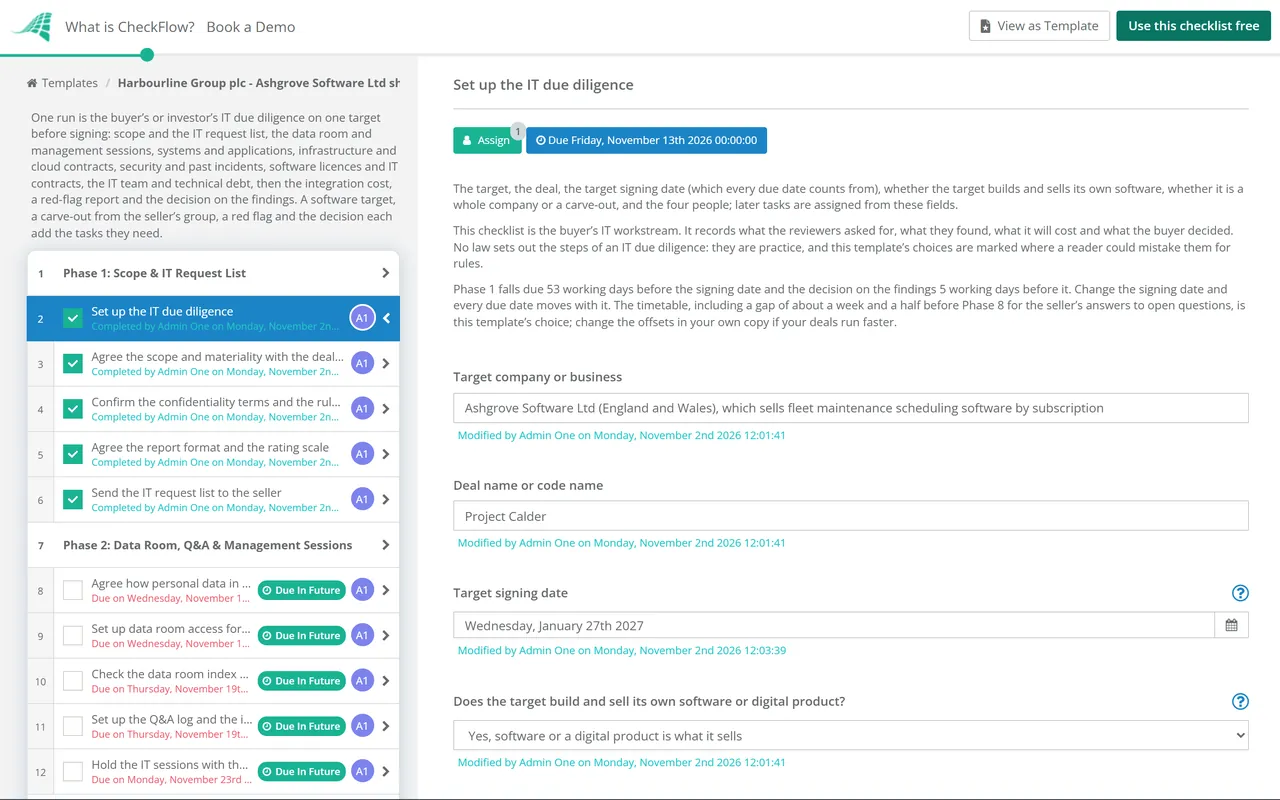
Nine phases take one target from scope, about ten weeks before signing, to the IT terms in the deal. The checklist halts at the decision in Phase 9. The first task’s answers add tasks for a software target and for a carve-out, and a red flag and the decision add their own.
Start about ten weeks before the target signing date. The first task names the four people and asks two questions: does the target build and sell its own software, and is it a whole company or a carve-out from the seller’s group. Every due date counts back from the signing date, in working days.
Agree how personal data is handled before anyone opens the room, get the reviewers in, see what is missing, keep one Q&A log and one issues list, and meet the target’s IT leaders. Answer the red-flag question on the issues list as soon as a red flag is found.
Find out what the business runs on and what depends on what. A target that builds and sells its own software adds two tasks on the product itself.
Find where everything runs, what the hosting and cloud contracts commit the target to, and whether the business could recover from an outage.
Find how well the target protects its systems and data, and what has already gone wrong. The security reviewer named on the first task leads this phase.
Find what the target pays for, whether it is licensed for what it uses, and which IT contracts the deal affects. The lawyers read the terms; this phase records which contracts matter and what they mean for running the business.
Find who runs IT and what they know that nobody else does, what is old and must be replaced, and what is already planned. The leaders’ own contracts and retention belong to management due diligence.
Work out what the deal will cost in IT after completion. A carve-out adds four tasks on separating the target from the seller’s group; every run estimates the integration cost. This template leaves about a week and a half after Phase 7 for the seller’s answers to open questions.
Bring the findings together, agree what each red flag means for the deal, get the decision before signing, and make sure the deal documents carry what was agreed. Nothing after the decision task can be completed until it is done.
The request list and the review follow the same areas. The table gives, for each one, the documents this template asks the seller for and examples of what it treats as a red flag. They are this template’s examples, not a standard: no law sets out the steps of an IT due diligence, and your deal decides what matters.
| Area | What to ask for | Red flag examples (this template’s) | Phase |
|---|---|---|---|
| Systems and applications | The system list, the architecture diagram, vendor support end dates | A system the business cannot run without that its vendor no longer supports, or that only one person understands | Phase 3 |
| The product (software targets) | Architecture documents, a code review or code access, the list of open-source components | A product that cannot grow without a rebuild, or code that only its original authors can change | Phase 3 |
| Data | Where the main data is held, how long it is kept, data quality reports | Customer or financial data that cannot be moved or merged without a large clean-up | Phase 3 |
| Infrastructure and hosting | The infrastructure list, hosting and cloud contracts, a year of cloud bills | Committed spend that runs well beyond the integration plan, or data held where the buyer cannot keep it | Phase 4 |
| Resilience | Backup and recovery plans, the latest recovery test and its results | No tested recovery for the systems the business cannot run without | Phase 4 |
| Security | Policies, certifications and assurance reports, the latest penetration test, the administrator list | Serious test findings left open, or administrator access nobody controls | Phase 5 |
| Incidents and breaches | The incident list, the record of personal data breaches, correspondence with regulators | An incident that is not closed, or a breach the seller has not explained | Phase 5 |
| Licences and IT contracts | The licence list, vendor audit letters, IT contracts with change-of-control or assignment terms | A licence shortfall, or a contract the business depends on that a supplier could end because of the deal | Phase 6 |
| IT team | The IT organisation chart, the contractor and agency list | Knowledge held by one person who may leave because of the deal | Phase 7 |
| Technical debt | End-of-support dates, the roadmap, projects in flight and their contracts | Systems past the end of vendor support with no budget or plan to replace them | Phase 7 |
| Carve-outs | Every system, licence, contract and service shared with the seller’s group | A service the target cannot run without the seller and no transitional service to cover it | Phase 8 |
Where the template cites a source. Three UK points, read on the official sites on 2 November 2026. The ICO’s data sharing code says that when a merger or acquisition means data goes to a different or additional controller, data sharing must be considered as part of the due diligence, and to seek technical advice before sharing data where different systems are involved; the ICO says that guidance is under review after the Data (Use and Access) Act. The ICO’s guide to personal data breaches says a notifiable breach must be reported to it without undue delay and not later than 72 hours after becoming aware of it, and that every breach must be recorded. Section 1 of the Computer Misuse Act 1990 makes unauthorised access to computer material an offence, so the buyer agrees any testing in writing first with the seller and the target (section 17 says who can authorise access). Elsewhere, ask your advisers.
Whole company or carve-out? When the target runs its own IT, the review is about what it has and what it will cost to integrate. A carve-out may share systems, licences and people with the seller’s group, so the review also works out how each is separated, which services the seller provides for a period after completion, and what the target will cost to run on its own. The first task’s answer adds the tasks for a carve-out.
The decision maker named on the first task is the only person who can complete the decision, and the checklist halts there: nothing after it can be completed until they record proceed, proceed with specific protections or stop. Specific protections add a task to agree them, and a stop adds a task to close the review. See how approvals that halt a checklist work.
A target that builds its own software adds the product and code reviews; a carve-out adds the separation, the transitional services and the stand-alone cost; a red flag adds the escalation. Conditional logic keeps the rest out of the way.
Enter the signing date and every task falls due a set number of working days before or after it. Tasks go to the IT lead, the security reviewer and the deal lead named on the first task, and each sees their work in the Tasks Grid. Every review sits in the Reports Grid with its progress.
CheckFlow runs the review: who does what and by when, the request list, the findings, the costs and the decision. It does not scan or test systems itself. Your reviewers and advisers do that, and the checklist records what they found.
The M&A Due Diligence Checklist, the Private Equity Due Diligence Checklist and the Venture Capital Due Diligence Checklist run the whole deal; this checklist is their IT workstream in full, beside the Legal Due Diligence Checklist, the Financial Due Diligence Checklist and the Management Due Diligence Checklist. After completion, the Post-Merger Integration Checklist picks up the issues list, and the Data Migration Checklist can run each data move. A target’s own checks can follow the IT Security Audit Checklist, the Penetration Test Checklist and the Software License Audit Checklist.
Describe the process in a sentence and the AI checklist generator drafts the phases and tasks for you.
It is the buyer’s or investor’s review of a target’s technology before a deal: the systems and data the business runs on, where they are hosted, how well they are secured, what has gone wrong before, the licences and IT contracts, the people who run it and what is out of date. The aim is to find what could change the price or stop the deal, and to know what the IT will cost after completion.
This template has nine stages: scope and the IT request list, the data room and sessions with the target’s IT leaders, systems and data, infrastructure and cloud contracts, security and past incidents, licences, IT contracts and spend, the IT team and technical debt, separation and the integration cost, then the red-flag report, the decision and the deal terms. Answers on the first task add tasks for a software target and a carve-out.
M&A due diligence covers the whole deal: strategy, finance, legal, tax, operations, technology and people. IT due diligence is one workstream within it, led in this template by the buyer’s IT due diligence lead. The M&A Due Diligence Checklist gives operations and technology one phase; this checklist runs the technology side in full, from the request list to the IT terms in the deal, and its findings feed the same decision.
This template treats them as one review and covers both sides: the IT a business runs on (systems, infrastructure, security, licences and the team) and, when the target builds and sells its own software, the product itself, with tasks on its architecture, how it scales, its code and its open-source use. The first task’s answer adds the product tasks.
This template’s examples include a system the business cannot run without that its vendor no longer supports, serious security findings left open, an incident or breach the seller has not explained, a licence shortfall, a key IT contract a supplier could end because of the deal, and knowledge held by one person who may leave. A red flag on the issues list adds an escalation to the deal lead.
It depends on the size of the target, how many systems and sites it has, and how quickly the seller answers. This template allows about ten and a half working weeks, including a pause of a week and a half before Phase 8 for the seller’s answers, with Phase 1 due 53 working days before the target signing date and the decision 5 working days before it. That timetable is the template’s choice: change the signing date and every due date moves.
A carve-out is part of the seller’s group, so it may share systems, licences, contracts and IT staff with it. Besides the usual review, the buyer maps what is shared, decides how each service is separated, agrees the transitional services the seller provides after completion, and estimates the one-off separation cost and the cost of running on its own. This template adds those four tasks for a carve-out.
Only with written agreement from the seller and the target. In the UK, section 1 of the Computer Misuse Act 1990 makes it an offence to cause a computer to perform a function intending to secure access to a program or data, knowing the access is unauthorised. This template asks for that agreement, and a hosting provider’s where its terms require it, naming the systems, the dates and who does the work, before any scan or test. Without it, the review relies on documents, reports and interviews.
Each finding carries a rating and a cost. Costs go into the integration estimate and the financial model; red flags can lead to a price change, a specific indemnity, money held back or a fix the seller makes before completion. In this template the decision maker chooses before signing, and Phase 9 agrees the protections and checks the IT conditions are in the final documents.
14-day free trial, no card required. The Business plan is $10 per user per month after the trial. Full details at checkflow.io/pricing.
14-day free trial, no credit cardFull refund in your first 30 daysUS hosting, EU on request