Unmanaged IT changes are the leading cause of self-inflicted service incidents. A structured change management process is the single most effective intervention for reducing IT downtime that was not caused by hardware or external factors.
Every IT environment has a version of this story: someone pushed a change to the production environment on a Friday afternoon without testing, without a rollback plan, and without telling anyone. By Monday morning, the business was dealing with a system failure that took three days to diagnose and resolve — because the connection between the change and the failure was not immediately obvious. ITIL research consistently shows that 60–80% of unplanned IT service incidents are directly caused by unmanaged or poorly managed changes. Organizations following ITIL change management practices report 67% fewer service incidents and 45% faster implementation times. A structured change management process does not prevent change — it controls it: ensuring every change is assessed for risk, reviewed by the right people, scheduled for minimum disruption, and paired with a back-out plan that makes reversal possible if something goes wrong. This free checklist gives IT managers, change managers, and IT service management teams a structured framework for the full ITIL-aligned change management cycle.
Standard, Normal, and Emergency Changes — and Why Each Requires a Different Process
Standard Change
Pre-approved, low-risk
Definition: A pre-approved, low-risk change that follows a documented, repeatable procedure — and where the risk is well-understood and the same steps are followed every time.
Examples: Password resets, adding a user to a standard security group, deploying a pre-tested patch via the standard patching schedule.
Process: Pre-approved; no individual CAB review required; documented procedure followed; recorded for audit.
Risk of skipping the process: Low — but only if the procedure is followed exactly and the change genuinely matches the standard template.
Normal Change
Individual review required
Definition: A planned change that requires individual risk assessment and CAB (Change Advisory Board) review before approval.
Examples: Firewall rule modifications, application version upgrades, server migrations, new integrations.
Risk of skipping the process: High — normal changes that bypass review are the primary cause of change-induced service incidents.
Emergency Change
Urgent, expedited process
Definition: A change that must be implemented urgently to restore service, address a critical security vulnerability, or prevent imminent business impact.
Examples: Applying an emergency security patch; implementing a fix for a critical service outage; rolling back a failed deployment.
Process: Expedited — abbreviated risk assessment, emergency CAB or senior approver, rapid implementation, full documentation retrospectively.
Risk of skipping the process: Moderate — emergency changes need speed, but even expedited reviews prevent compounding the original problem.
What the IT Change Management Checklist Covers
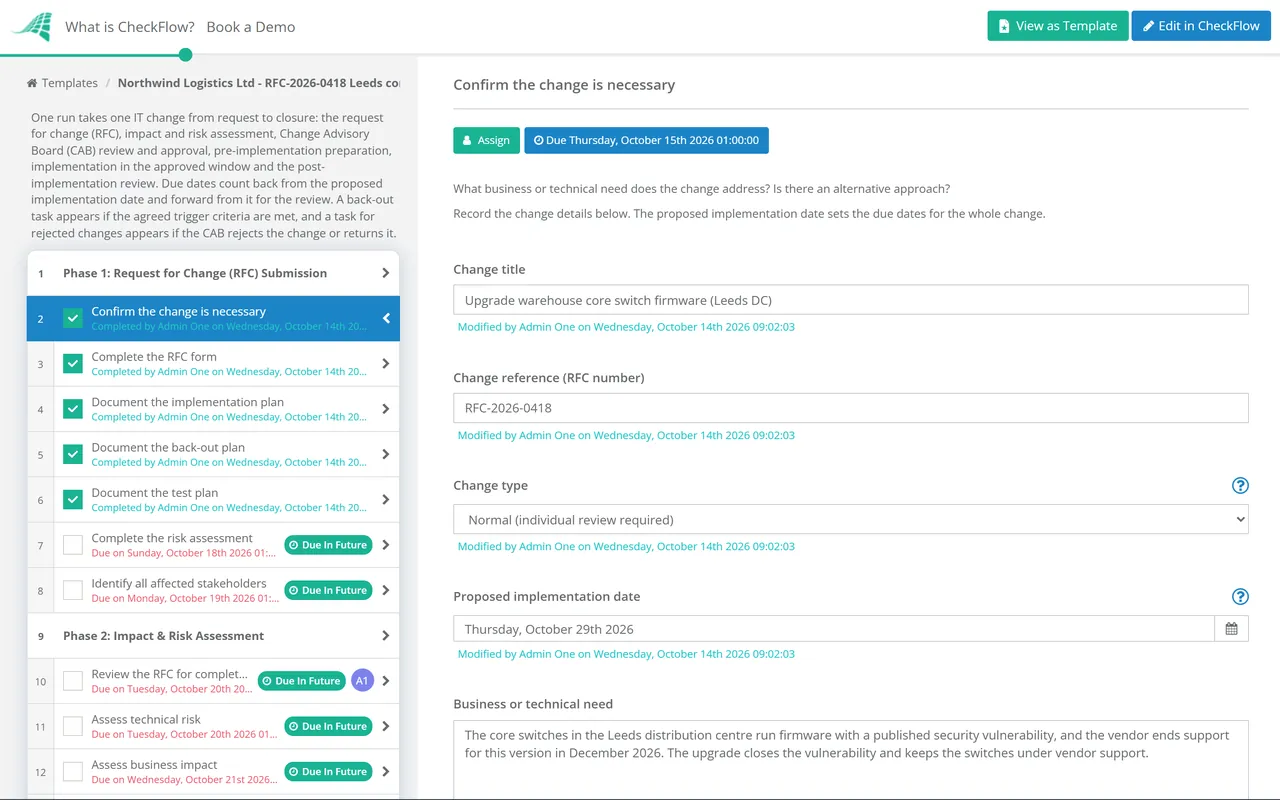
This checklist covers the full ITIL-aligned change lifecycle in six phases — from RFC submission through to post-implementation review and close.
Phase 1
Phase 1: Request for Change (RFC) Submission
The quality of the RFC determines the quality of the review. An RFC without a defined back-out plan, without an impact assessment, and without a test plan should not proceed to CAB review.
Confirm the change is necessary — what business or technical need does the change address? Is there an alternative approach?
Complete the RFC form — change title and description, requester and change owner, change type, affected systems and services, and proposed implementation window
Document the implementation plan — step-by-step actions specific enough that another engineer could follow it
Document the back-out plan — step-by-step actions to reverse the change if it fails; THIS STEP IS MANDATORY
Document the test plan — how will success be verified after implementation? What specific tests confirm the change achieved its intended outcome?
Complete the risk assessment — probability of failure, impact if the change fails, risk rating (high/medium/low)
Identify all affected stakeholders — systems, services, users, and teams that will be affected by or need to be aware of the change
Phase 2
Phase 2: Impact & Risk Assessment
Review the RFC for completeness — all required fields completed; back-out plan and test plan present; return to submitter if incomplete
Assess technical risk — probability of failure; complexity of the change; experience of the implementation team with this type of change
Assess business impact — which business services are affected; during what hours; what is the cost of a failed change?
Assess interdependencies — are there other changes scheduled in the same window that could conflict?
Assign a risk rating — high (CAB review required), medium (CAB review recommended), low (may proceed with standard approval)
Confirm the proposed change window is appropriate — outside peak business hours where possible; avoiding change freezes or critical periods
Present the change to the CAB — summary of the RFC, risk assessment, implementation and back-out plan, and proposed window
Confirm the CAB has adequate representation — technical (IT team), business (affected service owners), and security (where the change has security implications)
Record the CAB discussion — including any concerns raised and how they were addressed
Approve, reject, or return for clarification — with documented rationale for the decision
For rejected changes — document the reason clearly; the submitter should understand what must be addressed before resubmission
Update the forward schedule of changes — add approved change to the change calendar; confirm no conflicts with other scheduled changes
Phase 4
Phase 4: Pre-Implementation Preparation
Confirm the implementation team is briefed — the engineer(s) implementing the change have read the full RFC, implementation plan, and back-out plan
Confirm a test environment has been used — for changes that can be pre-tested; do not implement untested changes in production without strong justification
Communicate to affected users and stakeholders — change notification sent in advance; includes what is changing, when, and what impact to expect
Confirm monitoring is in place — enhanced monitoring for affected systems during and immediately after the change window
Confirm the back-out trigger — at what point does the team initiate the back-out? Define the decision criteria before the change window begins
Phase 5
Phase 5: Change Implementation
Begin only within the approved change window — never start outside the window; if delayed, seek approval for a new window
Follow the implementation plan step by step — no improvisation; document any deviations in real time
Run the test plan after each implementation step — confirm success at each stage before proceeding
Monitor system behaviour during and after implementation — enhanced monitoring active; any anomaly investigated before the change window closes
Initiate back-out if required — if the agreed trigger criteria are met; execute the back-out plan; do not improvise the rollback
Declare the change complete or failed — with documentation of what happened; notify stakeholders and the change manager
Phase 6
Phase 6: Post-Implementation Review (PIR)
Conduct the PIR within 24–48 hours — did the change achieve its intended outcome? Did anything unexpected occur?
Review monitoring data — are the affected systems performing as expected? Any unexpected impacts?
Document the PIR findings — in the original RFC; success, issues encountered, deviations from the plan, and lessons learned
Close the change record — with all fields complete; PIR documented; change status set to closed
Update the standard change library — if this change type should become a standard change for future occurrences
Feed findings into problem management — if the change revealed underlying issues that need further investigation
What a Change Advisory Board Is — and Why It Matters
A Change Advisory Board (CAB) is a group of stakeholders convened to review and approve Normal (non-standard) IT changes. Effective CABs include technical representatives (who assess feasibility and risk), business service owners (who represent the impact on business operations), and security representatives (for changes with security implications). The CAB meets on a regular schedule — weekly is typical — to review upcoming changes, ensure they are adequately planned, and approve or return them for further work.
The CAB’s value is not the approval itself — it is the multi-stakeholder review. A change submitted by a technical team that looks straightforward may reveal a business impact the service owner had not anticipated; a security implication the implementation engineer had not considered; a scheduling conflict with another planned change. The CAB creates the forum where these perspectives are brought together before implementation, rather than discovered as consequences after it.
Why Use CheckFlow for IT Change Management?
1
A structured RFC-to-PIR process for every change
IT changes managed informally — via email, Slack, or verbal discussion — have no structured risk assessment, no back-out plan requirement, and no post-implementation accountability. CheckFlow’s change management checklist requires every normal change to complete the full RFC-to-PIR sequence before it can be marked closed — including the back-out plan that is most commonly skipped under time pressure.
2
Change calendar visibility for conflict prevention
Change conflicts — where two changes scheduled in the same window affect the same systems — are one of the most preventable causes of complex failures. CheckFlow’s change management checklist includes a scheduling conflict check as a required step before the change is added to the calendar. The forward schedule of changes is visible to everyone managing changes.
3
A complete change audit trail for incident diagnosis
When a service incident occurs, the first investigation question is always “what changed?” Every change managed through CheckFlow is timestamped with the implementation details, the risk assessment, and the PIR findings. The connection between a change and a subsequent incident is immediately traceable — dramatically reducing diagnosis time.
Failed changes that cause service outages become incidents requiring the incident management process. CheckFlow’s Incident Management Process Template covers the structured incident response that follows a change-induced outage. See the Incident Management Process Template →
Change management is a recurring governance process — the CAB meets weekly, PIRs happen after every change, and the forward schedule requires ongoing maintenance. CheckFlow’s recurring checklist feature automates the weekly CAB preparation cycle. Learn more about recurring checklists →
ITIL (Information Technology Infrastructure Library) change management is a framework for controlling and coordinating changes to IT services and infrastructure. Its primary goal is to minimise the risk of change-induced service disruptions while enabling beneficial changes to be made efficiently. The process covers three change types: standard (pre-approved, low-risk, follows documented procedures), normal (requires individual risk assessment and CAB review), and emergency (urgent, expedited process). Key elements are the Request for Change (RFC), impact and risk assessment, Change Advisory Board review, back-out planning, scheduled implementation, and post-implementation review. Research consistently shows that organisations following ITIL change management principles experience significantly fewer change-induced service incidents.
What is a Request for Change (RFC) and what should it include?
+
A Request for Change (RFC) is the formal submission that initiates the change management process. It should include: change title and description (what is being changed and why), change type (standard, normal, or emergency), affected systems, services, and users, proposed implementation window, step-by-step implementation plan, back-out plan (step-by-step reversal procedure if the change fails), test plan (how success will be verified), risk assessment (probability of failure, business impact if it fails, risk rating), and the requester and change owner. The back-out plan is the most commonly missing element — and the most important safety mechanism in the process.
What is a change freeze and when should it be applied?
+
A change freeze is a period during which no non-emergency IT changes are permitted — typically applied during peak business periods (financial year-end, major product launches, holiday trading periods) when the cost of a change-induced outage would be disproportionately high. Change freezes should be planned and communicated well in advance, with the dates published on the forward schedule of changes. Emergency changes during a freeze period should require sign-off at a higher authority level than normal emergency changes.
What should a back-out plan include?
+
A back-out plan (also called a rollback plan) is a documented set of steps to reverse a change if it fails or causes unexpected issues. It should include: the specific trigger criteria for initiating the back-out (what conditions indicate the change has failed and back-out should begin), the specific steps to reverse the change in the correct sequence, the estimated time required to complete the back-out (this determines whether the change window is long enough), the testing steps to confirm the system is restored to its previous state, and the person responsible for authorising the back-out decision. A back-out plan that simply says “revert to previous version” is not sufficient.
Is CheckFlow free for this template?
+
14-day free trial, no card required. The Business plan is $10 per user per month after the trial. Full details at checkflow.io/pricing.
Control Every IT Change From RFC to Post-Implementation Review
Free trial — no credit card required.
Do you like cookies? 🍪 We use cookies to ensure you get the best experience on our website. Learn more