PPAP Submission Checklist Template

A PPAP can be rejected for something small: a layout measured against the wrong drawing revision, a gauge nobody studied, samples picked from a good afternoon instead of a production run, or a warrant signed before anyone checked the package.

Last reviewed: October 2026

This free PPAP submission checklist is for supplier quality engineers, launch and APQP teams and quality managers at automotive suppliers and their sub-suppliers. One run is one Production Part Approval Process submission for one part number, from the trigger to the customer’s decision: a new part, an engineering change, new tooling, a process, material or sub-supplier change, or a requalification. It records the submission level the customer requires and plans an owner and a date for each of the 18 elements. Then it prepares the design record, the FMEAs and the control plan, proves the gauges, runs the significant production run and measures and tests the parts from it. The quality manager signs the Part Submission Warrant before anything is submitted, and the customer’s disposition, approved, interim approval or rejected, adds the follow-up tasks.

PPAP, First Article Inspection or a Change Order?

The Production Part Approval Process (PPAP) is how a supplier shows its customer two things before production shipments start: that it understands every requirement on the design record, and that its production process, run at the quoted rate with production tooling, people and materials, can make parts that meet them consistently. The method is set out in the AIAG Production Part Approval Process manual, fourth edition. Automotive manufacturers require it of their suppliers through their customer-specific requirements for IATF 16949, and suppliers pass it down to their own sub-suppliers. Other industries borrow it too.

One PPAP covers one part number and one reason for submission. It sits between two other pieces of work, and each answers a different question.

This checklist

Approval of the production process

Asks: can this supplier’s production process make this part to every requirement, consistently, at the production rate?

When: for a new part, an engineering change, new or moved tooling, a process, material or sub-supplier change, or when the customer asks for requalification.

Output: up to 18 elements, a Part Submission Warrant signed by the supplier and the customer’s disposition: approved, interim approval or rejected.

One part measured

First article inspection

Asks: does the first part made from a new or changed process meet every characteristic on the drawing?

When: on the first part or first few parts, often inside your own quality system, in the Product Inspection Workflow or the Manufacturing Quality Control Checklist.

Output: a full inspection record of the first article. A PPAP goes further: a significant production run, gauge studies, capability and the customer’s approval.

The change itself

A change order

Asks: should we make this change to the product, and what does it affect?

When: before the change, in the Manufacturing Change Order Process Checklist. An approved change to a supplied part often triggers a new PPAP.

Output: an approved change, updated documents and dispositioned stock. Changes to a hazardous process go through Management of Change (MOC).

What the PPAP Submission Checklist Covers

Eight phases follow one PPAP submission for one part number, from the trigger to close-out. The first task records the reason, the submission level and who runs each part. Level 4 adds a task to agree the customer’s requirements and Level 5 a task to host the review at your site; a process, material, sub-supplier, tooling or site change adds the customer notification; supplier design responsibility adds the design FMEA; an appearance item adds the appearance approval report and a bulk material its requirements checklist. The quality manager signs the Part Submission Warrant before anything is submitted. An interim approval or a rejection adds the tasks in Phase 7, and a rejection also hides the release and briefing tasks in Phase 8.

  1. Phase 1

    Phase 1: Trigger, Submission Level & Plan

    6 tasks

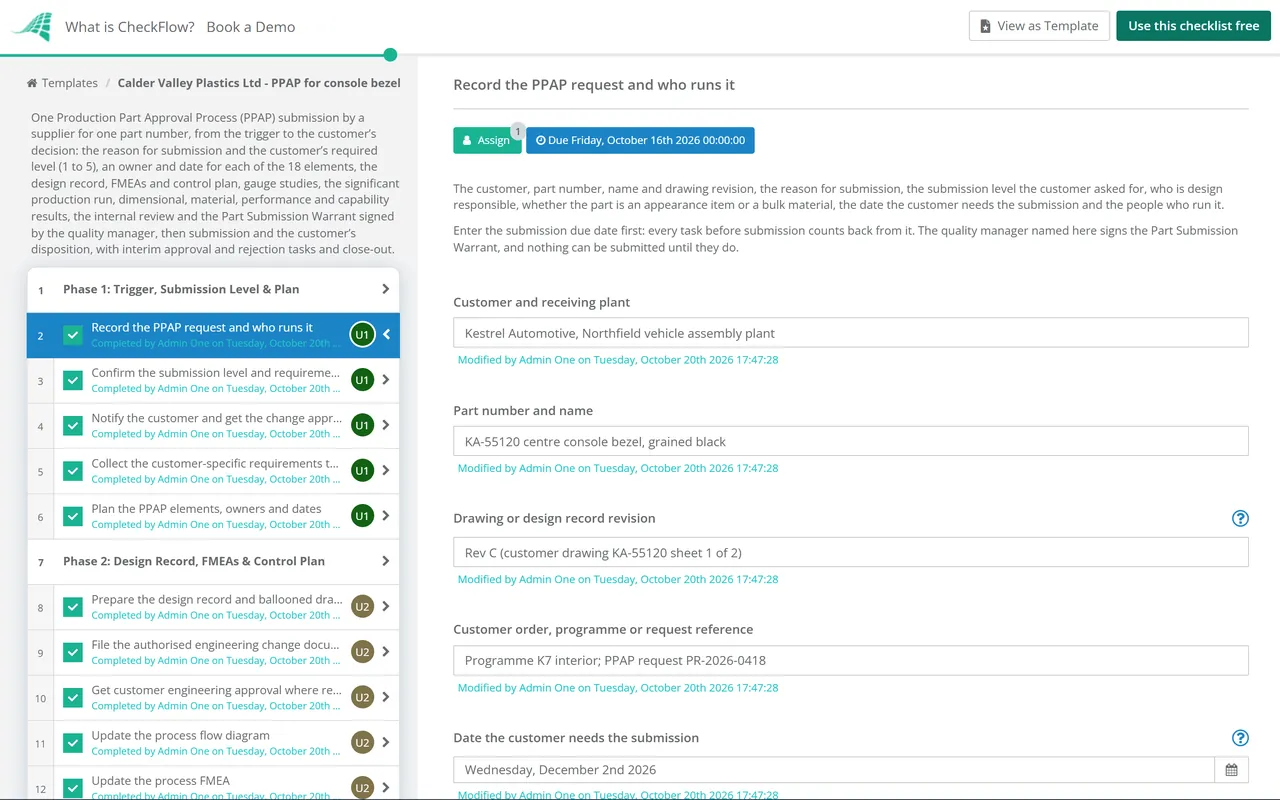
    The PPAP lead records why a submission is needed and what the customer asked for. Enter the date the customer needs the submission first: every due date before submission counts back from it. The submission level, design responsibility, appearance and bulk material answers add the tasks this part needs.

    • Record the PPAP request and who runs it — the customer, part number, name and drawing revision, the reason for submission, the submission level the customer asked for, who is design responsible, whether the part is an appearance item or a bulk material, the date the customer needs the submission and the people who run it
    • Confirm the submission level and requirements with the customer — the level in writing, the due date, the customer’s PPAP requirements and their edition, how to submit (portal, email or on paper), how many sample parts to send and who approves the submission on the customer’s side
    • Notify the customer and get the change approved before it is made — appears for a process, material, sub-supplier, tooling or site change: raise the customer’s change request, describe the change and its risk, and wait for written approval before the change reaches production
    • Agree the Level 4 requirements in writing — appears for Level 4: the list of elements and any other evidence the customer wants with the warrant, confirmed in writing before the work is planned
    • Collect the customer-specific requirements that apply — the customer’s current supplier quality and PPAP requirements, special process assessments, material reporting, part marking, labelling and packaging rules, and any sub-supplier approvals they expect to see
    • Plan the PPAP elements, owners and dates — each of the 18 elements with an owner, a due date and whether it is submitted or retained at this level, so nothing is left until the week of submission
  2. Phase 2

    Phase 2: Design Record, FMEAs & Control Plan

    7 tasks

    The documents that define the part and the process come first. The process flow, the process FMEA and the control plan must describe the same steps, in the same order, for the process that will run in production.

    • Prepare the design record and ballooned drawing — element 1: the design record at the revision on the order, with every dimension, note and requirement numbered on a ballooned drawing so each one can be matched to a measurement or test result
    • File the authorised engineering change documents — element 2: the customer’s authorised change documents for any change built into the part or tooling but not yet shown on the design record, or a note that there are none
    • Get customer engineering approval where required — element 3: the customer’s engineering approval of the design verification or test results where they require it, such as approval of test plans and reports on initial parts
    • Review the design FMEA — element 4, for a supplier design-responsible part: the design FMEA released, covering the special characteristics, with its recommended actions closed or owned, and its results carried into the process FMEA
    • Update the process flow diagram — element 5: every step from receiving to shipping, including inspection, rework, repair and outside operations, numbered to match the process FMEA and the control plan
    • Update the process FMEA — element 6: the failure modes, effects, causes and controls for each step of the process flow, including the change that triggered this submission, with actions on the highest risks
    • Update the production control plan — element 7: each operation and characteristic with its specification, special characteristic marking, measurement method, sample size and frequency, control method and reaction plan
  3. Phase 3

    Phase 3: Gauges & the Significant Production Run

    6 tasks

    Prove the gauges before you trust their readings, then run the part the way it will be made in production. The dimensional, material, performance and capability results all come from this run.

    • Validate the checking aids — element 16: each fixture, gauge, model or template used to check the part, with its drawing, a check that it conforms to that drawing, its calibration and its measurement system study
    • Complete the measurement system analysis studies — element 8: gauge repeatability and reproducibility studies for variable gauges and attribute agreement studies for pass or fail checks, for the measuring equipment named in the control plan, judged against the customer’s acceptance criteria
    • Confirm the line is ready for the production run — production tooling, equipment, gauges, trained operators, materials from approved sources and the production control plan all in place, so the run represents normal production
    • Run the significant production run — parts made at the production site with production tooling, gauges, process, materials and operators at the production rate, from each cavity, tool or line that will make the part; customer handbooks commonly ask for at least 300 consecutive parts unless the customer agrees otherwise
    • Select and label the sample production parts — element 14: the quantity the customer asked for, taken from the run, from each cavity or stream where required, the same parts that are measured, each labelled with the part number, revision and supplier as PPAP samples
    • Retain and label the master sample — element 15: a part from the run kept as the reference for this approval, labelled with its approval date once approved, and kept where inspectors and operators can use it
  4. Phase 4

    Phase 4: Results from the Production Run

    7 tasks

    Measure and test the parts from the significant production run against every requirement on the design record. Raise any result outside the specification with the customer before submission, not in it.

    • Record the dimensional results — element 9: every ballooned characteristic measured on the sample parts from each cavity or stream, with the specification, the result and whether it conforms
    • Complete the material test results — element 10: tests of the materials named on the design record, with test results or certificates of analysis against each specification, and the customer’s material reporting where they require it
    • Complete the performance test results — element 10: the functional, durability or performance tests the design record or the customer’s test plan requires, with each result against its requirement
    • Complete the initial process studies — element 11: capability or performance indices for the special characteristics, from the significant production run and each cavity or stream, judged against the customer’s acceptance criteria, with an action plan for any that fall short
    • Attach the qualified laboratory documentation — element 12: the scope of each laboratory that did the inspection or testing, with evidence that an internal laboratory is competent for those tests and the accreditation of an external one
    • Complete the appearance approval report — element 13, for a designated appearance item: colour, grain, gloss and texture checked against the customer’s master or requirements, and the report signed off as the customer specifies
    • Complete the bulk material requirements — for a bulk material: the customer’s bulk material requirements checklist, which says which elements apply to this material and when, completed and agreed with the customer
  5. Phase 5

    Phase 5: Internal Review & Part Submission Warrant

    7 tasks

    Review the whole package before anyone signs. The quality manager signs the Part Submission Warrant last, and nothing after that task can be completed until they do.

    • Record compliance with the customer-specific requirements — element 17: evidence for each requirement collected in Phase 1, such as special process assessments, material reporting, part marking, labels and packaging approvals
    • Collect the sub-supplier approvals — part approvals from your own suppliers of components and materials in the part, approved by you before you submit, where the customer expects them in the package
    • Check every element against the submission level — each element in the plan complete, marked submitted or retained for this level, and the retained ones filed where they can be produced when the customer asks
    • Hold the internal PPAP review — quality, engineering, production and the laboratory review the package together: one part number and revision throughout, every result conforms or has the customer’s agreement, and the documents agree with each other
    • Close the gaps found in the review — appears when the review finds gaps: each gap fixed and re-checked by the person who found it, or agreed with the customer in writing, before the warrant is signed
    • Complete the Part Submission Warrant — element 18: part number and revision, the reason for submission, the submission level, the part weight, a summary of the results and any deviation noted on the warrant; one warrant per part number unless the customer agrees otherwise
    • Quality manager signs the Part Submission Warrant — the supplier’s authorised person confirms the results show conformance, the samples were made on the production process at the production rate, and every required document is submitted or retained
  6. Phase 6

    Phase 6: Submission & Customer Disposition

    4 tasks

    Submit what the level requires, in the customer’s format, and record the customer’s decision. An interim approval or a rejection adds the tasks in Phase 7.

    • Submit the PPAP to the customer — the signed warrant, the elements this level requires and the labelled sample parts, sent the way the customer asked, with the submission reference recorded
    • Host the customer’s review at your site — appears for Level 5: the complete package, the sample parts and the production line ready for the customer’s review, with the people who prepared each element available
    • Answer the customer’s questions on the submission — each question or request for more evidence logged, answered by the owner of the element and sent back by the date the customer set
    • Record the customer’s disposition — approved, interim approval or rejected, with the date, the customer’s signed warrant or approval record, and any conditions or reasons the customer gave
  7. Phase 7

    Phase 7: Interim Approval or Rejection

    4 tasks

    Applies only when the customer grants interim approval or rejects the submission. Hidden once the disposition is Approved.

    • Record the interim conditions and the approved deviation — appears for interim approval: the time or quantity limit, the deviation or authorisation the customer issued, how interim shipments are identified and what must be fixed before full approval
    • Close the interim actions and resubmit before expiry — appears for interim approval: each open item closed, the affected elements repeated, a new warrant signed by the quality manager and the submission made before the interim approval expires
    • Contain stock and investigate the rejection — appears for a rejection: parts made for the part number held, the customer told what is held, and the cause found and corrected with a structured root cause analysis
    • Correct and resubmit the PPAP — appears for a rejection: the elements affected by the correction repeated, a new warrant signed by the quality manager, the corrected submission sent and the customer’s new decision recorded
  8. Phase 8

    Phase 8: Release & Close-Out

    4 tasks

    Ship production quantities only once the customer has approved the part, or within the limits of an interim approval. A rejection hides the release and briefing tasks, because nothing ships until a corrected submission is approved. Keep the full PPAP file for as long as the part is active and the customer’s retention period.

    • Release the part for production shipments — the part released in your systems only after full approval, or within the interim limits, together with any other approval the customer needs before production shipments
    • Brief production on the approved process — the approved control plan, special characteristics, reaction plans and master sample explained to each shift, with a reminder that any change to the approved process needs the customer’s approval first
    • Retain the PPAP records — the full file, submitted and retained elements together, stored for as long as the part is active plus the customer’s retention period, with the records from any superseded part number carried forward or referenced
    • Close the PPAP — every task complete or marked not applicable with a reason, the disposition filed, and lessons for the next submission recorded

What Each PPAP Submission Level Sends to the Customer

The submission level decides what goes to the customer, not what the supplier prepares: every element is kept on file at every level. The table below is the common reading of the five levels, as customer supplier handbooks publish it. “Submit” means send it to the customer and keep a copy; “Retain” means keep it and make it available on request; “On request” means the customer defines it for Level 4. At Level 5 the customer reviews the complete package at your site. Your customer’s own requirements decide, so check them before you plan.

Element Level 1 Level 2 Level 3 Level 4 Level 5
1. Design recordRetainSubmitSubmitOn requestRetain
2. Authorised engineering change documentsRetainSubmitSubmitOn requestRetain
3. Customer engineering approvalRetainRetainSubmitOn requestRetain
4. Design FMEARetainRetainSubmitOn requestRetain
5. Process flow diagramRetainRetainSubmitOn requestRetain
6. Process FMEARetainRetainSubmitOn requestRetain
7. Control planRetainRetainSubmitOn requestRetain
8. Measurement system analysis studiesRetainRetainSubmitOn requestRetain
9. Dimensional resultsRetainSubmitSubmitOn requestRetain
10. Material and performance test resultsRetainSubmitSubmitOn requestRetain
11. Initial process studiesRetainRetainSubmitOn requestRetain
12. Qualified laboratory documentationRetainSubmitSubmitOn requestRetain
13. Appearance approval report (if applicable)SubmitSubmitSubmitOn requestRetain
14. Sample production partsRetainSubmitSubmitOn requestRetain
15. Master sampleRetainRetainRetainOn requestRetain
16. Checking aidsRetainRetainRetainOn requestRetain
17. Customer-specific requirements recordsRetainRetainSubmitOn requestRetain
18. Part Submission WarrantSubmitSubmitSubmitSubmitRetain

The five levels. Level 1 is the warrant only, plus an appearance approval report for a designated appearance item. Level 2 is the warrant with product samples and limited supporting data. Level 3 is the warrant with product samples and complete supporting data, and is the default in many customers’ requirements. Level 4 is the warrant and whatever else the customer defines. Level 5 is the warrant with product samples and complete supporting data, reviewed at the supplier’s manufacturing site.

The significant production run. The dimensional, material, performance and capability results come from parts made at the production site with production tooling, gauges, process, materials and operators at the production rate. Customer handbooks commonly ask for at least 300 consecutive parts unless the customer agrees another quantity.

The customer’s decision. Approved means production shipments can start once any other customer approvals are in place. Interim approval allows shipments for a limited time or quantity, usually against a deviation the customer authorises, while open items are closed. Rejected means the submission must be corrected and made again. Not every customer grants interim approval.

The standards. The PPAP manual is published by AIAG and IATF 16949:2016 by the International Automotive Task Force; both are paid documents, and the IATF has announced a second edition of IATF 16949 for 2027. This checklist follows common practice and published customer requirements and does not reproduce either one.

Why Run PPAP Submissions in CheckFlow?

1

Nothing goes to the customer unsigned

The PPAP lead, quality manager, engineering lead, production manager and laboratory lead are chosen on the first task, and each element is assigned to the person who owns it. Signing the Part Submission Warrant is assigned to the quality manager alone, and nothing after that approval step can be completed until they sign.

2

Only the tasks this part needs

The submission level shows what goes to the customer and adds the Level 4 or Level 5 task. A process, tooling or site change adds the customer notification, supplier design responsibility adds the design FMEA, and an appearance item or a bulk material adds its own task. An interim approval or a rejection adds its follow-up. Rules show and hide each one from the answers given.

3

Every open PPAP on one screen

Due dates count back from the date the customer needs the submission, and overdue alerts go to the task’s assignees. The Reports Grid lists every submission in progress and the element each one has reached, with the ballooned drawing, gauge studies, results and the signed warrant on the tasks that produced them.

CheckFlow does not run your gauge studies or calculate capability. Do those in your statistics or measurement software and attach the output to the task that asked for it. CheckFlow runs the submission around them: who prepares each element, by when, with what evidence, and who signed the warrant. CheckFlow’s manufacturing checklist software shows how plants run their other quality routines the same way.

Build the design and process FMEAs with the FMEA Checklist, keep the gauges in calibration with the Calibration Management Checklist and run the line’s day-to-day checks with the Manufacturing Quality Control Checklist. Approve your own sub-suppliers with the Supplier Audit Checklist, investigate a rejection with the Root Cause Analysis (8D) Checklist, and run the engineering change that triggers a new PPAP with the Manufacturing Change Order Process Checklist.

AI generator

Didn’t find what you need? Describe it.

Describe the process in a sentence and the AI checklist generator drafts the phases and tasks for you.

Frequently Asked Questions

What is PPAP?

PPAP stands for Production Part Approval Process. It is the method automotive manufacturers and their suppliers use to approve a supplied part before production shipments: the supplier shows that it understands every requirement on the design record and that its production process, run at the production rate, makes parts that meet them. The method is defined in the AIAG PPAP manual, fourth edition, and each customer adds its own requirements. The supplier submits a Part Submission Warrant with the evidence its customer asks for, and the customer approves, grants interim approval or rejects it.

What are the 18 elements of PPAP?

Design record; authorised engineering change documents; customer engineering approval; design FMEA; process flow diagram; process FMEA; control plan; measurement system analysis studies; dimensional results; material and performance test results; initial process studies; qualified laboratory documentation; appearance approval report; sample production parts; master sample; checking aids; records of compliance with customer-specific requirements; and the Part Submission Warrant. Some apply only in certain cases: the design FMEA when the supplier is design responsible, and the appearance approval report for appearance items.

What are the five PPAP submission levels?

Level 1 is the warrant only, plus an appearance approval report for an appearance item. Level 2 adds product samples and limited supporting data. Level 3 adds product samples and complete supporting data. Level 4 is the warrant and whatever else the customer defines. Level 5 is complete data reviewed at the supplier’s site. The customer chooses the level, and many make Level 3 the default. At every level the supplier still prepares and keeps all the elements; the level only decides what is sent.

What is a Part Submission Warrant and who signs it?

The Part Submission Warrant (PSW) is the form that summarises the submission: the part number and revision, the reason for submission, the level and the supplier’s declaration that the results conform and the samples came from the production process at the production rate. It is signed by the supplier’s authorised representative responsible for the part, usually the quality manager, and the customer records its decision on it or in its own system. Customers usually want one warrant per part number unless they agree otherwise.

When is a PPAP submission required?

Customers list their own triggers, but they commonly include a new part, an engineering change to the design record, new, additional or modified tooling, a change to the process, material or method, a new sub-supplier or material source, production moved to another site, and tooling that has been inactive for 12 months or more. A supplier-initiated change usually needs the customer’s approval before it is made, and then a PPAP. If you are not sure, ask your customer’s supplier quality engineer before you change anything.

What is a significant production run?

The run that the PPAP samples and data come from. It is made at the production site, with production tooling, gauges, process, materials and operators, at the production rate, and includes every cavity, tool or line that will make the part. Customer handbooks commonly ask for at least 300 consecutive parts unless the customer agrees another quantity. Parts hand-picked from several runs, or made on prototype tooling, do not show what normal production will deliver.

What is the difference between interim approval and a rejection?

Interim approval lets the supplier ship for a limited time or quantity while open items are fixed, usually against a deviation the customer authorises; the supplier then resubmits for full approval before it expires. A rejection means the submission does not meet the customer’s requirements and must be corrected and made again; parts are not shipped for production meanwhile. Some customers do not grant interim approval at all. This checklist adds the matching tasks when you record the decision.

What is the difference between PPAP and first article inspection?

A first article inspection measures the first part or parts made by a new or changed process against every characteristic on the drawing. A PPAP includes that kind of full dimensional check, but on parts from a significant production run, and adds the process documents, gauge studies, capability, test results, the signed warrant and the customer’s formal approval. In short, a first article shows the process can make a good part; a PPAP shows it can keep doing so at the production rate.

Is CheckFlow free for this template?

14-day free trial, no card required. The Business plan is $10 per user per month after the trial. Full details at checkflow.io/pricing.

Get Every PPAP Signed Off Before It Ships

Free trial — no credit card required.

14-day free trial, no credit cardFull refund in your first 30 daysUS hosting, EU on request