The virtual meeting without an agenda, attended by people who are not required for the outcome, lasting longer than it should, and ending without documented actions, is the most common waste of productive time in distributed organisations.
The shift to remote and hybrid work has not reduced the number of meetings — it has increased them. Research from Microsoft’s Work Trend Index shows that the time people spend in meetings has more than doubled since 2020. A significant proportion of this meeting time is unproductive: meetings that could have been an email, meetings that end without clear decisions or actions, meetings where half the participants are passive observers rather than necessary contributors, and hybrid meetings where the room dynamic systematically disadvantages remote participants. The virtual meeting that runs well — that has a clear purpose, an agenda circulated in advance, only the right people invited, active facilitation that includes everyone, and documented outcomes agreed before the call ends — is a high-value use of distributed team time. The virtual meeting that does none of this is one of the most expensive recurring costs in any remote organisation. A structured virtual meeting best practices checklist makes the difference between these two outcomes a process question rather than a facilitator quality question. This free checklist gives remote and hybrid team managers, meeting facilitators, and anyone who runs frequent virtual meetings a structured framework for effective virtual meeting practice.
Before Scheduling a Meeting, Ask: Does This Need to Be a Meeting?
The most impactful virtual meeting habit is not about how to run meetings — it is about which meetings not to have. An async-first culture asks, before scheduling any meeting: can the information be shared in a written update? Can the feedback be collected in a structured document? Can the decision be made through a documented decision process without synchronous discussion? If yes, the meeting should not be scheduled. A document written once and read by ten people is more efficient than a meeting attended by ten people where the document is read aloud.
Meetings are justified when synchronous interaction adds value that async cannot provide: complex problem-solving that benefits from real-time back-and-forth, sensitive conversations that require tone and nuance, relationship-building that needs human connection, and decisions that require live negotiation or consensus among multiple stakeholders. Everything else should be async by default.
Hold a Meeting For
Real-time problem-solving where the answer depends on the interaction; sensitive feedback or performance conversations; creative workshops where building on each other’s ideas generates the output; decisions that require live negotiation.
Send a Document For
Information sharing that does not require input (status updates, announcements); feedback on a document or proposal (asynchronous comments are clearer and more considered); decisions on well-defined options where the decision-maker does not need discussion.
Use Async Tools For
Quick questions with a clear answer; approval requests; check-ins; updates that do not require acknowledgement or discussion.
What the Virtual Meeting Best Practices Checklist Covers
This checklist covers the full virtual meeting lifecycle in six phases — from the decision to schedule a meeting through to action follow-up. Phase 5 specifically addresses the hybrid meeting challenge.
Phase 1
Phase 1: Before Scheduling — Meeting Design
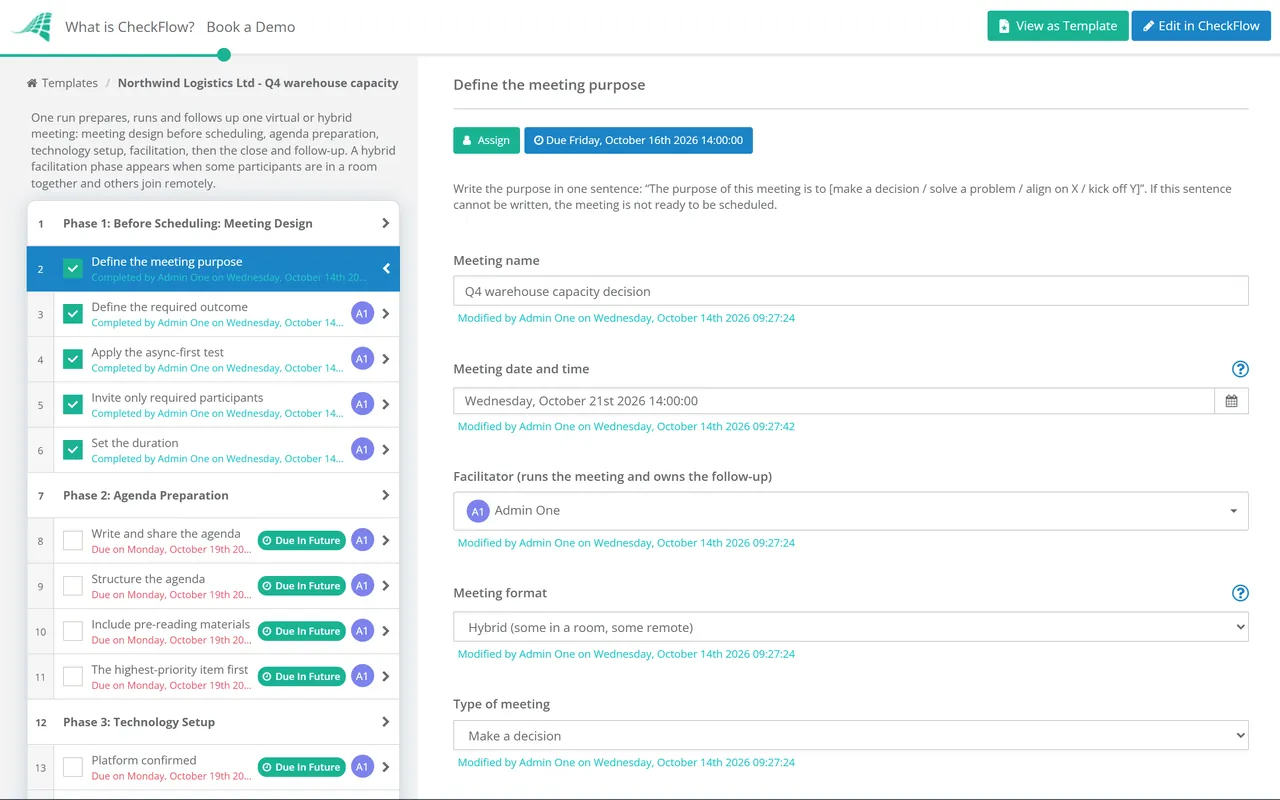
Define the meeting purpose — in one sentence: “The purpose of this meeting is to [make a decision / solve a problem / align on X / kick off Y]”; if this sentence cannot be written, the meeting is not ready to be scheduled
Define the required outcome — what will be different after this meeting? A decision? An action plan? A document reviewed and approved? Shared understanding of X?
Apply the async-first test — could this purpose and outcome be achieved without a synchronous meeting?
Invite only required participants — who is a decision-maker for the outcome? Who has essential information? “For awareness” attendees receive the meeting notes after; they do not attend
Set the duration — the minimum time needed to achieve the outcome; schedule 25 and 50 minutes instead of 30 and 60 to preserve transition time
Phase 2
Phase 2: Agenda Preparation
Write and share the agenda — at least 24 hours before the meeting; a meeting without an agenda shared in advance is a meeting that participants cannot prepare for
Structure the agenda — each item has: a title, a time allocation, a named owner, and what type of item it is (inform, discuss, decide); this tells participants whether they need to contribute or just absorb
Include pre-reading materials — any documents, proposals, or data that participants need to have reviewed before the meeting; meetings where participants are reading the document during the call are meetings with unprepared participants
The highest-priority item first — not last; if the meeting overruns or ends early, the most important item has been covered
Phase 3
Phase 3: Technology Setup
Platform confirmed — all participants know which video conferencing platform is being used; link in the calendar invite
Host confirms technology working — camera, microphone, and screen share tested before the meeting; not during
Backup plan for technology failure — dial-in phone number in the calendar invite as a fallback; participants know what to do if the video platform fails
Recording permission — if the meeting is to be recorded, participants are notified in advance and consent is confirmed; not started without notification
Phase 4
Phase 4: Meeting Facilitation
Virtual facilitation requires more active management than in-person facilitation. The natural turn-taking cues of physical presence — eye contact, body language, leaning forward — are absent or reduced. The facilitator must work harder to include everyone and prevent domination by the loudest voice.
Start on time — always; starting late rewards lateness and disrespects participants who arrived on time
Brief social opening — 1–2 minutes; a quick personal check-in; reminds participants there are humans on each screen
State the purpose and outcome — at the start; “We are here to [purpose]; we’ll know we’ve succeeded when [outcome]”
Include everyone actively — directly invite quieter participants by name; prevent one or two people from dominating
Manage time actively — timekeeper role assigned; each agenda item has a stated time; warn when approaching the item’s end; ruthlessly move items to the parking lot if time runs short
Document decisions and actions in real time — a shared document visible to all participants; decisions named explicitly (“we have decided that…”); actions with owner and deadline
Close at the scheduled time — or confirm extended time with participants’ agreement; ending on time respects everyone’s schedule
Phase 5
Phase 5: Hybrid Meeting Facilitation (Some In-Room, Some Remote)
The hybrid meeting — where some participants are in a physical room together and others are remote — is the hardest meeting format to run well. The room naturally dominates: side conversations, non-verbal cues, and physical energy create a parallel track that remote participants cannot access. Active facilitation is the only countermeasure.
Everyone joins on their own device — even in-room participants; the single-room camera pointed at the whiteboard creates a second-class experience for remote participants; every participant has an equal camera frame
Facilitator actively checks in with remote participants — explicitly and frequently; “Does anyone on the call want to add anything before we move on?”
Capture room whiteboard digitally — any whiteboard work visible on screen for remote participants in real time; or use a digital whiteboard tool (Miro, FigJam) that all participants access equally
No side conversations — in the room during the meeting; conversations not in the microphone are exclusionary for remote participants
Phase 6
Phase 6: Meeting Close & Follow-Up
Confirm all decisions — before closing: “Before we close, let me confirm the decisions we’ve made and the actions each person is taking”
Assign all actions with owner and deadline — before the meeting ends; an action without an owner is a wish
Circulate meeting notes within 24 hours — to all participants and relevant non-participants; decisions and actions prominently listed; not buried in a transcript
Track actions to completion — actions from the meeting are on someone’s task list; followed up at the next relevant meeting or asynchronously
The Six Rules for a Hybrid Meeting That Doesn’t Disadvantage Remote Participants
Rule 1
Every person on their own camera
No room camera pointed at the table. Every voice has a face, every face has a square.
Rule 2
All material is on screen
Whiteboard, sticky notes, shared document — visible on screen, not only in the room.
Rule 3
The facilitator is remote-first
Actively pulls in remote voices. Prevents the room from having private conversations.
Rule 4
Chat is the equaliser
All questions and comments through the chat if someone is talking; no talking over muted remote participants.
Rule 5
The room waits for connectivity
If remote participants lose connection, the room pauses. The room’s convenience does not override the meeting’s inclusivity.
Rule 6
Same preparation, same participation
Remote participants receive the agenda, pre-reading, and outcome definition at the same time as in-room participants. No in-room pre-meeting conversations about meeting content.
Why Run Virtual Meetings in CheckFlow?
1
Meeting preparation that happens before every meeting
The agenda not shared in advance, the pre-reading not distributed, the technology not tested before the meeting starts — all of these are preparation failures that make the meeting worse for everyone. CheckFlow’s meeting preparation checklist runs automatically for every scheduled meeting type, ensuring the facilitator completes each step before the attendees join.
2
Actions captured during the meeting and tracked to completion
The meeting that ends without written decisions and named action owners is a meeting that produces ambiguity rather than progress. CheckFlow’s meeting facilitation phase requires decisions and actions to be documented before the meeting can be closed — and generates action follow-up tasks automatically.
3
A meeting quality record that identifies improvement opportunities
Organisations that run consistent virtual meeting practices produce better outcomes from their meetings than those where meeting quality varies by facilitator. CheckFlow records completion of each best practice step for every meeting — enabling managers to identify which meetings consistently lack preparation or fail to produce documented actions.
Team engagement rhythms require effective virtual meetings. CheckFlow’s Remote Team Engagement Activities Checklist covers the structured programme for maintaining connection and culture in distributed teams. See the Remote Team Engagement Activities →
Specific agile meeting types — sprint planning and sprint reviews — have their own structured templates. CheckFlow’s Sprint Planning Checklist in the Project Management series covers these specific ceremonies. See the Sprint Planning Checklist →
What should a virtual meeting best practices checklist include?
+
A virtual meeting best practices checklist covers six phases: meeting design before scheduling (purpose statement, required outcome, async-first test, invited participants, duration), agenda preparation (written and shared 24+ hours before, structured with owner and type per item, pre-reading materials, most important item first), technology setup (platform confirmed, facilitator technology tested, backup plan), meeting facilitation (start on time, brief social opening, purpose stated, active inclusion of all participants, time managed, real-time decisions and actions documented), hybrid meeting management (everyone on their own camera, all material on screen, facilitator remote-first, no side conversations), and meeting close and follow-up (decisions confirmed, all actions with owner and deadline, notes within 24 hours, actions tracked).
How long should virtual meetings be?
+
Virtual meetings should be the minimum duration needed to achieve the defined outcome. Research on cognitive fatigue in video calls shows that sustained video attention requires significantly more mental effort than in-person interaction. Practical guidance: schedule 25-minute meetings instead of 30-minute and 50-minute meetings instead of 60-minute to build in transition time between calls. For working sessions requiring sustained collaboration, build in a 5-minute break every 45–50 minutes. Standups should be hard-capped at 15 minutes; decision meetings typically need 30–60 minutes; workshops should not exceed 90–120 minutes without a break.
How do you manage a hybrid meeting where some people are in a room and others are remote?
+
The most important principle for hybrid meetings is that in-room participants should each join on their own device and appear as individual squares on screen, rather than having a single room camera. This gives remote participants an equal visual presence for each person. Additional practices: the facilitator should actively check in with remote participants by name before moving to each agenda item; all shared materials (whiteboard, documents, slides) must be on screen and readable remotely; side conversations in the room are avoided as they exclude remote participants who cannot hear them.
What makes virtual meetings feel exhausting (“Zoom fatigue”)?
+
Research from Stanford, published in the journal Technology, Mind and Behavior, identified four causes of video call fatigue: excessive close-up eye contact (on video, all participants are at close face-to-face distance simultaneously — cognitively similar to a large group all making intense eye contact); cognitive load of constantly monitoring your own video image; reduced mobility (on video, people tend to stay in a fixed position); and non-verbal overload (the extra effort required to read non-verbal signals through a compressed video feed). Practical countermeasures: use speaker view rather than gallery view, hide your own video, allow movement breaks, and turn off the camera for portions of longer sessions when active discussion is not happening.
Is CheckFlow free for this template?
+
14-day free trial, no card required. The Business plan is $10 per user per month after the trial. Full details at checkflow.io/pricing.
Run Every Virtual Meeting With a Clear Purpose, the Right People, and Actions That Actually Happen
Free trial — no credit card required.
Do you like cookies? 🍪 We use cookies to ensure you get the best experience on our website. Learn more