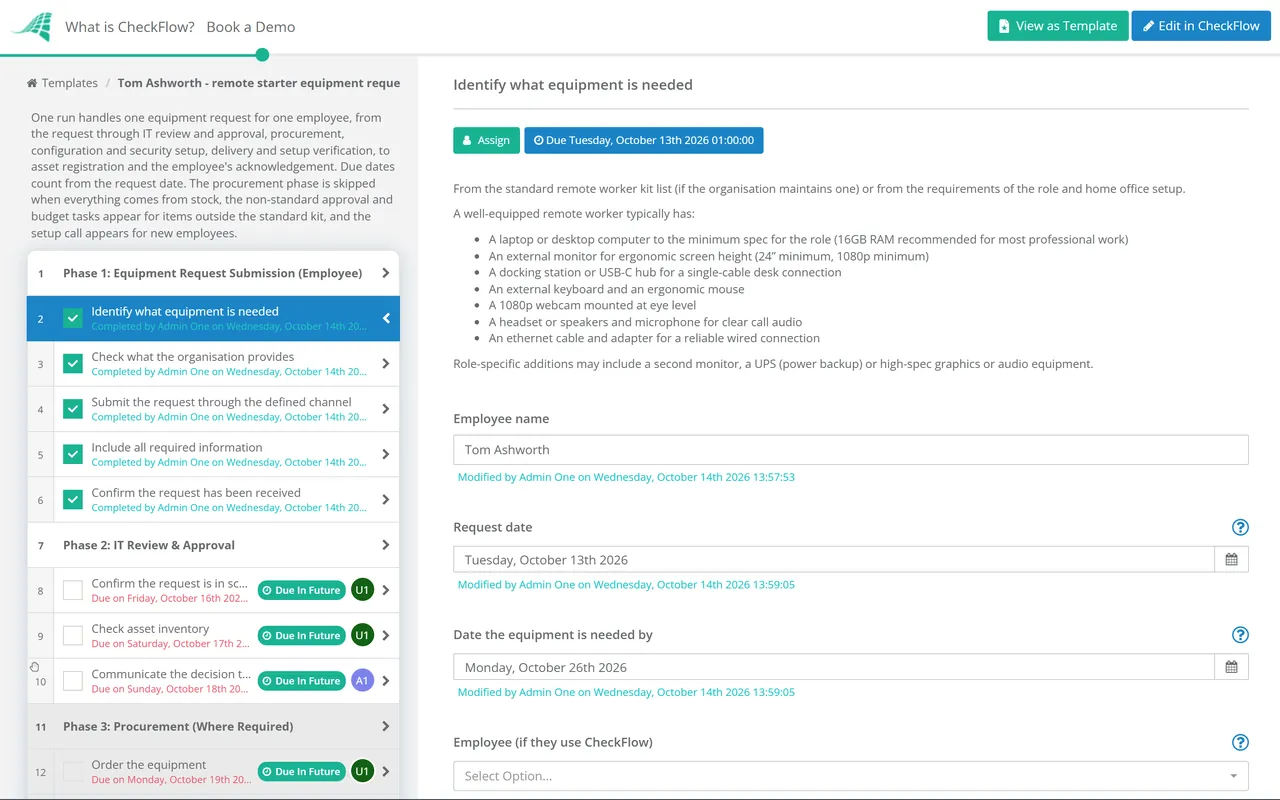
IT equipment provisioning for remote and hybrid employees is the operational backbone of distributed work. When it runs well, new employees have everything they need on their first day — laptop configured, accounts set up, peripherals ready, and access confirmed. When it runs badly — and the process of requesting equipment, getting it approved, ordered, configured, and delivered is ad hoc rather than structured — the consequences compound: the employee is unproductive, IT is responding reactively, assets are unregistered, and the employee who leaves in six months has equipment that was never tracked and is never recovered. A structured IT equipment request process gives both the employee and the IT team a clear, consistent workflow: the employee knows exactly what to request, how to request it, and when to expect it; the IT team manages a prioritised queue, configures equipment to the corporate standard, registers every asset, and maintains the audit trail that hardware lifecycle management requires. This free checklist gives IT managers, IT support teams, and remote employees a structured framework for the full equipment request lifecycle.
What a Well-Equipped Remote Worker Needs in 2026
What the IT Equipment Request Process Checklist Covers
This checklist covers the full equipment request lifecycle in six phases — from the employee’s initial request through to asset registration. Both the employee and the IT team have clearly defined roles at each stage.
- 1
Phase 1
Phase 1: Equipment Request Submission (Employee)
5 tasks
- Identify what equipment is needed — from the standard remote worker kit list (if the organisation maintains one) or from the requirements of the role and home office setup
- Check what the organisation provides — is this a new employee request (covered by the standard onboarding kit) or an additional/replacement request?
- Submit the request through the defined channel — IT helpdesk, service management portal, or defined request form; not informally by email or Slack
- Include all required information — equipment needed, justification for any non-standard items, required date, delivery address, line manager for approval
- Confirm the request has been received — IT acknowledges within 1 business day; if no acknowledgement received, chase
- 2
Phase 2
Phase 2: IT Review & Approval
5 tasks
- Confirm the request is in scope — is the requested equipment covered by the standard kit or an approved standard? Is it within the employee’s entitlement?
- For non-standard items: obtain line manager and IT manager approval — any equipment outside the standard kit requires justification and approval before procurement
- Check asset inventory — is there a suitable item in stock that meets the requirement? IT should not procure new items when refurbished or available stock exists
- Confirm budget — for non-standard or high-value items; cost centre confirmed and budget available
- Communicate the decision to the employee — approved (with expected delivery timeline) or declined (with reasons and alternatives)
- 3
Phase 3
Phase 3: Procurement (Where Required)
3 tasks
- Order the equipment — from the approved supplier list; at contracted rates where applicable; with the required delivery date confirmed
- Use a PO or approved ordering process — not a personal purchasing card without approval; consistent with the organisation’s procurement policy
- Track the order — expected delivery date logged; escalate if delivery is delayed and the employee has a start date
- 4
Phase 4
Phase 4: Equipment Configuration & Security Setup
5 tasksA laptop shipped to a remote employee without configuration is a laptop that will take the employee hours to set up and will probably not meet the organisation’s security standards. Configuration before delivery is the IT team’s most important contribution to employee productivity on day one.
- Configure the device — operating system installed and updated; corporate image applied if in use; device enrolled in MDM (Mobile Device Management)
- Install required software — productivity suite, communication tools, VPN client, antivirus/EDR, required business applications
- Security configuration — disk encryption enabled; screen lock configured; automatic OS and software updates enabled; firewall active
- User account configured — or instructions for first-time setup provided; 2FA pre-enrolled where supported
- Test the device — all applications launch; VPN connects; video conferencing works; printer/shared drives accessible
- 5
Phase 5
Phase 5: Delivery & Employee Setup Verification
4 tasks
- Ship or deliver the equipment — with appropriate packing; tracked shipping; delivery to the confirmed address; employee notified of expected delivery date
- Provide setup documentation — quick start guide, IT contact details, VPN setup instructions, first-login instructions, and security policy summary
- Employee confirms receipt — and that the equipment is working correctly; IT support available for setup issues on day of delivery
- Schedule a setup call for new employees — 30-minute IT orientation for all new starters; VPN, security, key applications, and IT support process explained
- 6
Phase 6
Phase 6: Asset Registration & Record-Keeping
4 tasks
- Register the equipment in the asset register — make, model, serial number, purchase date, warranty expiry, cost, assigned employee, and delivery date
- Assign to the employee in the HR/IT system — linked to the employee record; visible at offboarding so equipment can be recovered
- Employee signs an asset acknowledgement — confirming receipt; that they understand the acceptable use policy; and that equipment must be returned on departure
- Set warranty and review date alerts — warranty expiry and scheduled equipment refresh date (typically 3–4 years for laptops)
Why Run IT Equipment Requests in CheckFlow?
1A consistent, trackable equipment request queue
IT equipment requests managed by email — where each request is handled differently depending on who receives it — produce inconsistent outcomes and no visibility of queue status or backlog. CheckFlow’s equipment request process gives every request the same structured workflow, makes the queue visible to the IT team, and keeps the requesting employee updated on status.
Configuration checklist that ensures every device meets the security standard
A device shipped without disk encryption, without MDM enrolment, and without VPN configured is a security liability — not a productivity enabler. CheckFlow’s configuration phase is a required step before delivery can be confirmed, ensuring every device leaving IT is security-hardened to the organisation’s standard.
Asset registration that survives staff turnover
The IT asset that is assigned to an employee who left 18 months ago and was never recovered is found when the next hardware audit happens — too late to do anything about it. CheckFlow connects the asset registration step to the employee record at onboarding and ensures it appears on the offboarding checklist automatically.
Receiving the right IT equipment is only half the home office setup. CheckFlow’s Home Office Setup Checklist covers the ergonomic and physical workspace configuration. See the Home Office Setup Checklist →