Is the workspace fit to work in?
Covers: chair, screen height, lighting, connection speed.
Owner: the employee, with HR.
Output: a workstation assessment.
Last reviewed: October 2026
No Credit Card Required
Printed from checkflow.io/templates/remote-work-hybrid-teams/remote-work-security-checklist
This free remote work security checklist is for IT and security teams and the managers of remote and hybrid staff. It runs when someone starts working away from the office, then yearly as an attestation. It covers the managed, encrypted device, MFA and conditional access, the home router and public Wi-Fi, private screens and paper, and how to report a phishing email or a lost laptop. The output is a signed attestation per employee, with every exception approved and dated.
NIST’s telework guide, SP 800-46 Rev. 2, starts from two assumptions worth borrowing: networks outside the office contain hostile threats, and remote devices will be lost or stolen. Its answer is encryption, strong authentication and the least access for the least-controlled devices. The UK National Cyber Security Centre’s home working guidance adds the human side: staff must know who to call the moment a device goes missing.
A fully compliant laptop still leaks data if its owner prints customer files on a family printer or joins hotel Wi-Fi without the VPN. This checklist covers the person’s side and records that they understood it.
Covers: chair, screen height, lighting, connection speed.
Owner: the employee, with HR.
Output: a workstation assessment.
Covers: enrolment profiles, compliance policies, ownership type.
Owner: IT.
Output: a managed, compliant device.
Covers: sign-in, home network, privacy, paper, travel, reporting.
Owner: IT security, with the employee.
Output: a yearly attestation per person.
Ergonomics and equipment stay in the Home Office Setup Checklist, and getting a device enrolled in the first place belongs to the MDM Enrollment Checklist. If MFA is not yet enforced across the organisation, run the MFA Rollout Checklist first; this page only confirms each person is covered.
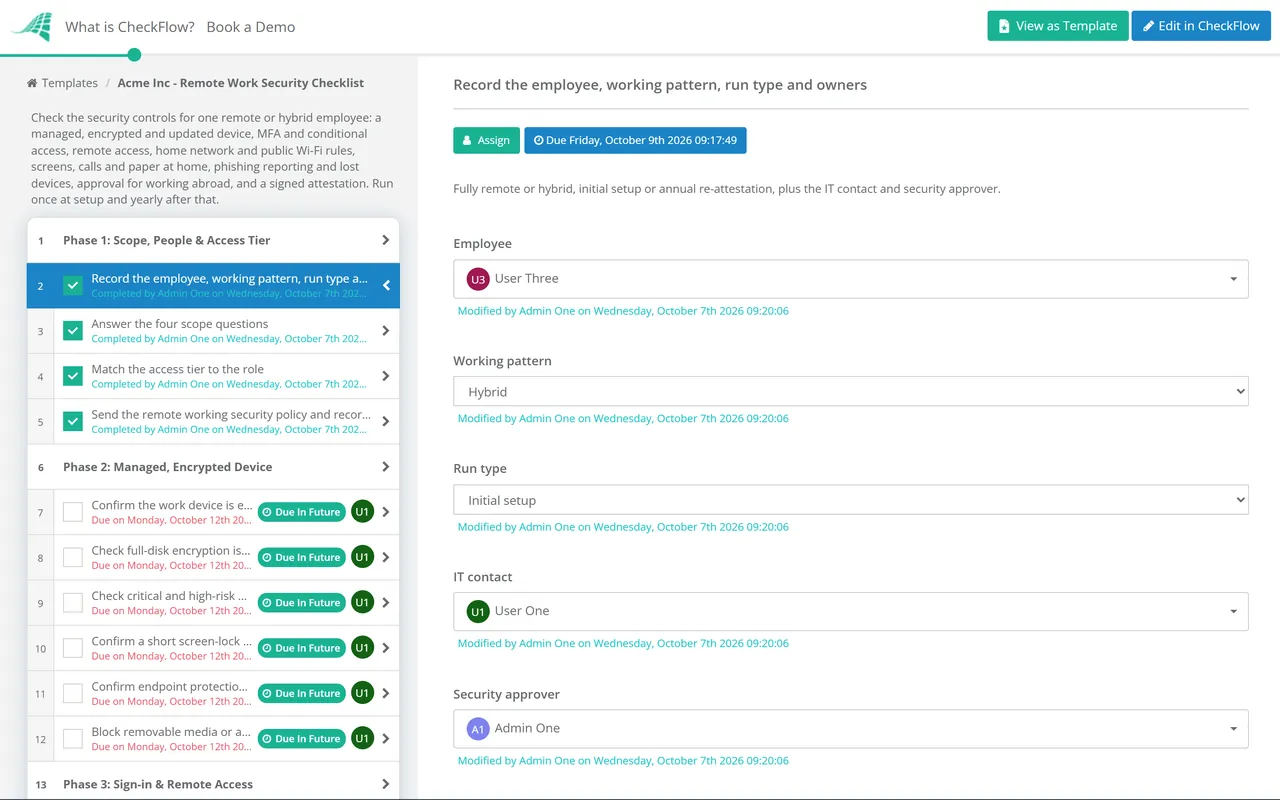
Seven phases run per employee at the start of remote or hybrid working, then yearly as a re-attestation. Scope answers on work devices, access tier, paper and travel decide which tasks appear, and the security approver signs off travel and the attestation.
The people picked on the first task are assigned the later tasks. The exceptions review appears only on an annual re-attestation.
Assigned to the IT contact. Each check is read from the management console, not taken on the employee’s word.
Phishing-resistant sign-in appears only for Elevated access, and the personal-device task only when a personal device is used for work.
Assigned to the employee, with a short guide from IT. A router the organisation did not supply is the employee’s, so these are habits, not settings IT can enforce.
The privacy filter appears only for Elevated access, and the paper tasks only when paper is handled at home.
The travel tasks appear only when work abroad is planned, and the checklist halts until the security approver records Approved or Not approved.
The security approver picked in Phase 1 signs off, and the checklist halts until they record a decision.
NIST SP 800-46 recommends tiered remote access: devices you control get the most access, personal computers a limited set, and personal phones perhaps only webmail. The checklist’s scope questions follow that idea. Treat the table as a starting point for your own policy.
| Control | Company-managed device | Personal device (BYOD) | Evidence for the attestation |
|---|---|---|---|
| What it can reach | Business apps, files and internal systems by role | Email, chat and files inside protected apps; no admin consoles | Conditional access policy and a test sign-in |
| Encryption | Full-disk, with the recovery key held centrally | Device passcode, plus app-level encryption of work data | Compliance report |
| Updates | Enforced, critical fixes within 14 days | Minimum OS version checked at sign-in | Compliance report |
| If it is lost | Remote lock, then full wipe once approved | Selective wipe of work data only | Lost-device report and wipe status |
| What IT can see | The whole managed device | Work apps or the work profile, not personal photos, messages or browsing | Privacy notice given to the employee |
| Elevated access | Allowed, with phishing-resistant sign-in | Not allowed | Access tier on the first task |
Three facts to check against your own position. NIST SP 800-46 Rev. 2, from July 2016, is still the final version; a Rev. 3 pre-draft opened for comment in 2020 and had not progressed by October 2026. Cyber Essentials v3.3, from April 2026, puts corporate and personal devices used for remote work in scope, but not a home router the organisation did not supply, so the device firewall matters. And Article 32 of the UK and EU GDPR names encryption as a security measure. A personal data breach must be reported within 72 hours unless it is unlikely to put people at risk, and encryption is the easiest way to show that it is not.
A yearly recurring schedule reopens the checklist as a re-attestation, and dynamic due dates count each phase from the start. Last year’s exceptions table is in front of the approver this year.
Dropdown answers in Phase 1 drive conditional logic. A hybrid employee with a company laptop skips the personal-device and trip tasks, while an administrator who works abroad gets the security key, privacy filter and travel approval.
Compliance reports and training records attach to their tasks, and the activity trail shows who confirmed each control and when. Template versioning keeps a record each time the policy changes.
Security works best from day one. CheckFlow’s remote employee onboarding software can open this checklist alongside a new starter’s onboarding, so the device, MFA and policy acknowledgement are done before the first login from home.
Phishing training belongs in the Security Awareness Training Checklist. When the person leaves, the Remote Employee Offboarding Checklist undoes what this one set up, from device return to removing work data from a personal phone.
Describe the process in a sentence and the AI checklist generator drafts the phases and tasks for you.
A managed, encrypted and patched device; MFA and conditional access that refuses unmanaged devices; a defined route into internal systems; home router hygiene and a public Wi-Fi rule; private screens, calls and paper; phishing awareness and a way to report a lost device; approval before working abroad; and a signed attestation with exceptions dated.
For anything still on an internal network, yes, or a zero-trust access service that does the same job per application. For cloud email and files, the stronger control is conditional access: MFA plus a check that the device is managed and compliant. On public Wi-Fi, a VPN still protects traffic an app might send in the clear.
Change the default admin password and the Wi-Fi key on the label, use WPA3 or at least WPA2, turn off WPS, keep the firmware updated and replace a router that no longer gets updates. Put smart-home gadgets on a guest network. Because the router usually belongs to the employee, the work device needs its own firewall too.
Yes, with less access. Keep work data inside protected apps or an Android work profile so it can be removed without touching personal content, check a minimum OS version at sign-in, and keep admin and bulk-data access on company devices. Tell employees what the organisation can and cannot see. Cyber Essentials counts these devices as in scope.
Report it to IT at once, using a number saved in their phone, and report a theft to the police. IT locks the device and revokes its sessions, and the data protection lead decides whether it is a reportable breach. That decision runs on a 72-hour GDPR clock, and confirmed encryption is the strongest evidence that nobody is at risk.
It should. HR checks tax and right-to-work questions, while security checks the destination, the device and the sign-in rules. UK GDPR transfer rules apply when personal data goes to a separate organisation, so an employee logging in from abroad is not usually a restricted transfer, but the security duty still applies.
14-day free trial, no card required. The Business plan is $10 per user per month after the trial. Full details at checkflow.io/pricing.
14-day free trial, no credit cardFull refund in your first 30 daysUS hosting, EU on request