Sales Readiness Checklist Template

The go-live date is set, but is the team ready? Approve the messages and prices, build the playbook, certify every rep and test the systems, then let the sales leader decide go or no-go on the evidence.

Last reviewed: November 2026

Printed from checkflow.io/templates/sales/sales-readiness-checklist

This free sales readiness checklist is for sales enablement leads, sales operations and sales leaders getting a whole team ready to sell something new: a launch, a new product line, a pricing or packaging change, or a new segment or territory. One run covers one change and one go-live date. It records what is changing and who sells it, gets the messaging, pricing, packaging and discount rules approved with who can approve exceptions, and builds the playbook: qualification, the talk track and demo, objections and competitors. Then come collateral, battlecards and demo environments, the CRM, quote templates and answers on commission and quota, training, and certification of every rep against a pass mark, with a second attempt for anyone who misses it. Customer success and support are briefed, the readiness review weighs the evidence and the sales leader gives the go or no-go before the date. The first weeks after go-live review the early deals and send feedback to product marketing.

Sales Readiness for a Change, Not for One New Rep

Sales readiness, in this template, is a gate the whole team passes before it sells something new. One run covers one change and one go-live date: what is changing, the approved messages and prices, the playbook, the systems, training and certification, and the sales leader’s go or no-go on the evidence. It is not a new rep’s ramp, and it is not the whole launch.

One new hire’s first 90 days follow the Sales Rep Onboarding Checklist and the guide Sales Onboarding Checklist: The Complete 30-60-90 Day Guide. The wider go-to-market work, from positioning to launch day, follows the Product Launch Checklist, whose sales enablement phase this template covers in detail. Ongoing skill coaching after go-live follows the Sales Coaching Checklist.

This checklist

The whole team, before a date

Asks: is every rep ready to sell this change on the go-live date, and are the prices, playbook and systems ready for them?

Covers: one launch, product line, pricing change or new territory, for every team that sells it.

Ends with: the sales leader’s go or no-go, then a review of the first deals.
The whole launch

Product Launch

Asks: is the product, the website, the press and the market ready for launch day?

Covers: positioning, competitive analysis, product sign-off, website, sales and CS enablement, content, launch day and the first 30 days. Product Launch Checklist.

What the Sales Readiness Checklist Covers

Nine phases take a sales team from the decision to sell something new to the first weeks after go-live. The first task records the go-live date, which sets every due date, and the kind of change, which adds one task: references for a launch, cross-sell rules for a new product line or territories for a new segment in Phase 2, or the move of existing customers and open quotes to the new prices at the end of Phase 3 for a pricing change. Reps who miss the certification pass mark get a second attempt. The sales leader’s go or no-go is the gate, and a no-go or a go with conditions adds the task to act on it.

  1. Phase 1

    Phase 1: Set Up the Readiness Run

    4 tasks

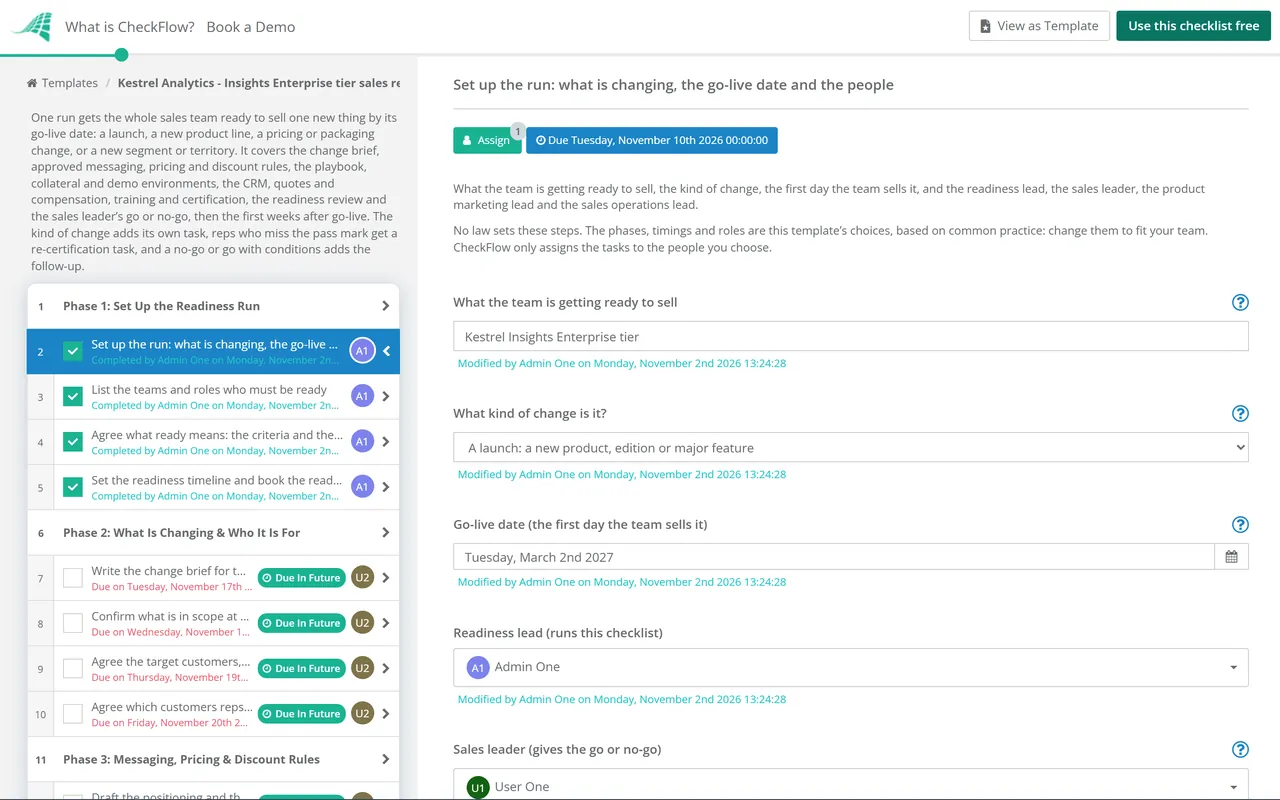
    Owned by the readiness lead. Enter the go-live date on the first task: every due date counts back from it in working days, and the last few count forward. Choose what kind of change this is, and agree what ready means before anyone writes a slide.

    • Set up the run: what is changing, the go-live date and the people — what the team is getting ready to sell, the kind of change, the first day the team sells it, and the readiness lead, the sales leader, the product marketing lead and the sales operations lead
    • List the teams and roles who must be ready — every team that will sell, support or hand off the new offer, such as account executives, SDRs, account managers, sales engineers and their managers, with the number of people in each
    • Agree what ready means: the criteria and the pass mark — the readiness criteria the go or no-go will be judged on, the certification pass mark, and what happens to a rep who misses it, agreed with the sales leader
    • Set the readiness timeline and book the readiness review — the training dates, the certification deadline and the date of the readiness review, in the calendars of everyone who must attend
  2. Phase 2

    Phase 2: What Is Changing & Who It Is For

    6 tasks

    Product marketing writes down what is new, what is in scope on the go-live date and who it is for. For a launch, a new product line or a new segment or territory, the kind of change chosen on the first task adds one task here.

    • Write the change brief for the sales team — what is new, who it is for, what it replaces or changes, what stays the same, the go-live date and who to ask
    • Confirm what is in scope at go-live and what is not — the features, plans, regions and integrations available on the go-live date, the known limitations, and what reps must not promise yet
    • Agree the target customers, buyers and first accounts — the segments and buyers to go after, the signs that an account is a fit, and the accounts each team will contact first
    • Agree which customers reps may name as references — the beta or early customers who have agreed to be named or to take a reference call, and exactly what reps may say about their results. Applies only to a launch
    • Set the cross-sell rules for existing accounts — who sells the new line to existing customers, how account managers and specialists work together, and how credit is shared. Applies only to a new product line
    • Set territories, account assignment and rules of engagement — the territories or segments, who owns which accounts, how leads are routed, and the currency, contract terms and local requirements checked with finance and legal. Applies only to a new segment or territory
  3. Phase 3

    Phase 3: Messaging, Pricing & Discount Rules

    6 tasks

    Agree what reps will say and what they can charge before the playbook is written. Record who approved each one, so the CRM, quotes and training are built from the approved versions.

    • Draft the positioning and the core messages — the problem it solves, for whom, why it is different, the proof points the team can back up, and the words to use and to avoid
    • Get the messaging approved — by the sales leader and product marketing, with any claims about results or competitors checked by whoever reviews claims in your company
    • Set the prices, packages and what each one includes — the list prices, editions or packages, what is included in each, the billing terms and any minimums
    • Write the discount rules and who can approve exceptions — the discount reps can give on their own, the bands that need approval, who approves each band, and what is never discounted
    • Get pricing, packaging and discount rules approved — by the person or group that owns pricing, with the date, so the CRM and the quote templates are built from the approved version
    • Plan how existing customers and open quotes move to the new pricing — once the prices are approved: what renewing customers pay, how long open quotes and proposals at the old prices stay valid, what customer contracts say about price changes, and who tells customers. Applies only to a pricing or packaging change
  4. Phase 4

    Phase 4: The Sales Playbook

    5 tasks

    The playbook is what reps are trained and certified on: how to qualify, the talk track and demo, the objections and the competitors. Build it from the approved messages and prices.

    • Write the qualification questions and what makes a good fit — the questions that show whether an account needs it, can buy it and when, and the signs that it is not a fit
    • Write the discovery questions, the talk track and the demo storyline — the opening, the questions to ask, a short talk track and the order of the demo, built on the approved messages
    • Answer the objections reps will hear — each likely objection with a short answer and the proof that supports it
    • Write how to position against each competitor — for each competitor the team meets: where it is stronger, where you are, the questions that show the difference, and what not to say
    • Publish the playbook where reps work — in the CRM, the content library or the sales wiki, with the link sent to every manager on the teams list
  5. Phase 5

    Phase 5: Collateral, Battlecards & Demo Environments

    4 tasks

    Everything a rep shows or sends: the deck, the one-pager, the battlecards, proposal text and a demo environment that works. Each asset goes into the place reps already look.

    • Update the pitch deck and the one-pager — with the approved messages, prices and proof points, and the old versions removed from the content library
    • Publish the battlecards — one page per competitor, built from the playbook, in the place reps look during a call
    • Update the proposal text, RFP answers and customer FAQ — the standard proposal sections, the answers library for RFPs and security questionnaires, and a customer FAQ for the new offer
    • Set up demo environments and demo data for every rep — an environment for each rep or team with the new features switched on, realistic demo data and a way to reset it, tested against the demo storyline
  6. Phase 6

    Phase 6: CRM, Quotes & Compensation

    5 tasks

    Sales operations builds the new offer into the CRM and the quote templates from the approved prices and discount rules, and answers the commission and quota questions in writing before training.

    • Add the products and price book to the CRM — the products, editions and approved prices, with the old ones closed from the go-live date where they change
    • Update the opportunity fields, stages and reports — any new fields, the stage rules for the new offer, and the reports and forecast views that show it separately
    • Build and test the quote templates and discount approvals — the quote and order form templates with the approved terms, and the approval routing for each discount band in the rules
    • Answer the commission, crediting and quota questions — whether the new offer earns commission and at what rate, who gets credit on shared or cross-sell deals, and whether quotas change, answered in writing before training
    • Test a full deal from opportunity to signed quote — in a sandbox or a test account: create the opportunity, add the products, apply a discount that needs approval, produce the quote and check it against the approved prices
  7. Phase 7

    Phase 7: Training & Certification

    4 tasks

    Train the whole team on the playbook, pricing and systems, practise, then certify each rep on the talk track and the demo against the pass mark set in Phase 1. Reps who miss it get a second attempt before the readiness review.

    • Run the training sessions — the change brief, the playbook, pricing and discount rules, the CRM and quote changes and the competitors, with a recording for anyone who misses a session
    • Run talk track and demo practice — role-plays in pairs or with managers, using the demo environments and the objections list, before anyone is certified
    • Certify each rep on the talk track and the demo — each rep gives the talk track and the demo to a manager or the readiness lead, scored against the pass mark
    • Re-certify the reps who missed the pass mark — coach each one on what they missed, give a second attempt before the readiness review, and agree with the sales leader what anyone who still misses may sell until they pass. Applies only when some reps missed the pass mark
  8. Phase 8

    Phase 8: Customer Success, Support & the Go or No-Go

    7 tasks

    Brief the teams who look after customers, check the evidence against the criteria and hold the readiness review. The sales leader’s go or no-go is the gate: nothing after it can be completed until it is recorded.

    • Brief customer success and account managers — what changes for customers, who handles upgrade or price questions, the handoff from sales, and the questions customers are likely to ask
    • Brief support and update the help content — known issues, how questions about the new offer are routed, and the help articles published before the go-live date
    • Collect the readiness evidence against the criteria — each criterion agreed in Phase 1 with its status, the evidence and the owner of anything still open
    • Hold the readiness review — the readiness lead, the sales leader, product marketing and sales operations go through the evidence, record the gaps and agree a recommendation
    • Record the sales leader’s go or no-go — go, go with conditions or no-go for the go-live date, with the reasons and any conditions, recorded by the sales leader alone
    • Act on a no-go: close the gaps and set a new date — close each gap the sales leader named, move the go-live date on the first task so every due date moves with it, hold the readiness review again, and ask the sales leader to reopen the decision and record it again. Applies only after a no-go
    • Meet the conditions before go-live — each condition the sales leader set, done and recorded, or the sales leader told in writing that it is not. Applies only after a go with conditions
  9. Phase 9

    Phase 9: Go-Live & the First Weeks

    5 tasks

    The team starts selling on the go-live date. In the first weeks the managers review the early deals, sales operations checks quotes and discounts, and what the field learns goes back to product marketing.

    • Announce go-live to the sales team — the new offer is open in the CRM, the playbook and collateral are live, and the team knows who to ask in the first weeks
    • Review the first deals — with each manager: the deals opened, how they were qualified, the objections heard, the demos given and where reps needed help
    • Check quotes and discounts against the rules — the first quotes for the right products, prices and terms, and every discount approved by the right person
    • Send field feedback to product marketing — objections not in the playbook, missing collateral, competitor moves and product gaps, with the deals they came from
    • Update the playbook and close the readiness run — the playbook, battlecards and FAQ updated from what the team learned, and the lessons recorded for the next change

Launch, New Line, Pricing Change or New Territory: What Changes

What changes with the kind of change

The first task asks what kind of change the team is getting ready for. Each kind adds one task: in Phase 2, or for a pricing change at the end of Phase 3, once the prices are approved.

Kind of change What changes for reps What to watch What the checklist adds
A launch: a new product, edition or major featureA new story, a new demo and new objections, often before many customers have used itPromising what is not in scope at go-live; naming customers who have not agreedAgree which customers reps may name as references
A new product line sold alongside what you sell nowA second thing to sell, sometimes to a different buyer in accounts the team already ownsTwo reps calling the same customer; disputes over creditSet the cross-sell rules for existing accounts
A pricing or packaging changeNew prices, editions or bundles, and conversations with customers who bought at the old onesOpen quotes at old prices; renewals; what customer contracts say about price changesPlan how existing customers and open quotes move to the new pricing
A new segment or territoryNew accounts, new buyers and sometimes a new currency, language or contractAccount ownership, lead routing, and local terms checked with finance and legalSet territories, account assignment and rules of engagement

Readiness criteria and their evidence

The criteria the go or no-go is judged on, and where the evidence sits in a run.

Readiness criterion (examples) Evidence in the checklist Owner in this template
Messaging approvedApprover and date on the messaging taskProduct marketing lead
Pricing, packaging and discount rules approvedApprover and date, and the approved fileSales operations lead
Playbook publishedThe link and the date publishedReadiness lead
Every rep certified, or re-certifiedThe certification and second-attempt tablesReadiness lead
CRM, quotes and approvals testedThe result of the end-to-end test dealSales operations lead
Commission, crediting and quota answeredThe written answers given to the teamSales operations lead
Customer success and support briefedWho was briefed, and the help articles publishedProduct marketing lead

These are examples, not a standard. No law or standard sets sales readiness criteria. Agree your own in Phase 1, with the sales leader, so the go or no-go is judged on what was agreed rather than on a feeling in the room. The owners and timings in this template are its own choices.

Why Run Sales Readiness in CheckFlow?

1

No go-live before the sales leader decides

The go or no-go is assigned to the sales leader alone, and the checklist halts there: the announcement and the first-weeks tasks cannot be completed until a decision is recorded. A no-go adds the task to close the gaps and set a new date; a go with conditions adds the task to meet them. See how approvals that halt a checklist work.

2

Certified against a pass mark, not just trained

The pass mark is agreed before training starts. Each rep’s talk track and demo scores go into the certification table, and anyone who misses the mark gets a re-certification task with a second attempt before the readiness review.

3

Every readiness item has an owner and a date

Due dates count back from the go-live date, so moving the date moves the whole plan. Product marketing, sales operations and the readiness lead each see their own tasks, overdue alerts go to the people assigned, and the Reports Grid lists every run with its answers, while Analytics shows where tasks are waiting.

CheckFlow does not replace your CRM, learning platform or content library: the price book, the courses and the battlecards stay there. CheckFlow makes sure every change gets the same steps in the same order, with an owner and a due date for each, a decision before go-live, and a record of who did what and when. See how a checklist runs.

Run the wider go-to-market work with the Product Launch Checklist and the release itself with the Feature Release Process Checklist. Tune the stages the new offer moves through with the Sales Pipeline Stages Checklist, sharpen each rep’s pitch with the Sales Pitch Checklist, and hand new customers to customer success with the Sales-to-CS Handoff Checklist. After go-live, keep improving the team with the Sales Coaching Checklist; new hires follow the Sales Rep Onboarding Checklist.

AI generator

Didn’t find what you need? Describe it.

Describe the process in a sentence and the AI checklist generator drafts the phases and tasks for you.

Frequently Asked Questions

What is sales readiness?

Sales readiness is whether a sales team can sell something new well from the day it goes on sale: the reps know the message, the prices, the discount rules and the competitors, can give the talk track and the demo, and have working systems behind them. In this template it is checked once per change, before a go-live date, and ends with the sales leader’s go or no-go.

What should a sales readiness checklist include?

The change and who sells it; approved messaging, pricing, packaging and discount rules, with who can approve exceptions; a playbook covering qualification, objections and competitors; training; certification of each rep with a pass mark and a second attempt; collateral, battlecards and demo environments; CRM, quotes and compensation answers; customer success and support briefed; a readiness review and a go or no-go; and a review of the first deals.

How is sales readiness different from sales onboarding?

Sales onboarding brings one new rep up to speed over weeks or months. Sales readiness gets the whole team ready for one change by a date. A new hire follows the Sales Rep Onboarding Checklist and the sales onboarding guide on the CheckFlow blog. This template is for the team that already sells and now has to sell something new.

How far ahead of go-live should sales readiness start?

Early enough to approve the messages and prices before the playbook is written, and to train and certify everyone before the readiness review. This template starts 80 working days before the go-live date and holds the go or no-go 5 working days before it. Those timings are its own choice: shorten them for a small pricing change and move the date if the work is not done.

How do you certify sales reps on a new product?

Agree the pass mark before training starts. Each rep then gives the talk track and the demo to a manager or the readiness lead, who scores both against the mark. This template records each score in a table, and a rep who misses the mark gets coaching and a second attempt before the readiness review. The sales leader decides what anyone still not certified may sell.

What happens if the sales team is not ready by the go-live date?

The sales leader records a no-go or a go with conditions. A no-go adds a task to close the gaps, move the go-live date on the first task, hold the review again and record the decision again. A go with conditions adds a task to meet each condition before go-live. The go-live tasks stay locked until a decision is recorded.

What do reps need before a pricing change goes live?

The approved prices and packages, the new discount rules and who approves exceptions, quote templates that use the new prices, and clear answers on renewals, open quotes and proposals at the old prices. This template adds a task for existing customers and open quotes when the change is a pricing or packaging change, and suggests checking what customer contracts say about price changes with whoever reviews contracts.

What should you check in the first weeks after a sales launch?

Review the first deals with each manager: how they were qualified, which objections came up and where reps needed help. Check that quotes used the right products and prices and that every discount was approved by the right person. Send what the field learned to product marketing, then update the playbook, battlecards and FAQ. This template schedules those checks 10 to 20 working days after go-live.

Is CheckFlow free for this template?

14-day free trial, no card required. The Business plan is $10 per user per month after the trial. Full details at checkflow.io/pricing.

Get the Whole Team Ready Before the Go-Live Date

Free trial — no credit card required.

14-day free trial, no credit cardFull refund in your first 30 daysUS hosting, EU on request