Pricing Change Rollout Checklist Template

Raise a price or change your packaging for existing customers in order: customer groups and grandfathering, a revenue model with a break-even churn, contract notice, the approver’s decision, customer notices, billing, go-live and reviews at 30, 60 and 90 days.

Last reviewed: November 2026

Printed from checkflow.io/templates/product-development-launch/pricing-change-rollout-checklist

This free price change rollout checklist is for pricing and product leads, finance, legal, billing, marketing, sales and customer success teams taking one price increase or packaging change to existing customers. Each run is one change, counted from the date the new prices take effect. It records what changes and why, pulls the facts on the customers affected, and decides which groups the new price applies to: new customers, existing customers at their next renewal, existing customers on rolling plans, or a mix, with any group that keeps its current price for a time. Finance models the revenue if every customer stays and works out the break-even churn, the extra churn that would cancel the gain. Legal reads what each kind of contract allows and sets each group’s notice deadline, with notes on the consumer rules in the UK, the EU and the US where consumers buy the plan. The approver decides before anyone is briefed or told. Sales and success are briefed with the concession rules, the notices go out and the accounts most at risk are called, billing is set up and tested, and the pricing page changes on the go-live date. It ends with reviews at 30, 60 and 90 days against the model.

The Whole Price Change, Not Only the Sales Team or One Renewal

A pricing change rollout, in this template, is one change to what existing customers pay: a price increase on the same plan, a new set of plans and limits, or both. It crosses every team that touches a customer’s bill. Finance has to know what the change is worth and how much churn it can stand, legal has to know what each contract allows and how much notice it needs, billing has to move the right customers on the right date and leave the rest alone, and sales and success have to be ready before the first notice lands.

The Sales Readiness Checklist gets the sales team ready to sell the change. Run it alongside this one for the full enablement; this template’s sales and success phase only records the briefing and the concession rules. Each renewal at the new price can run through the Customer Renewal Checklist, the monthly invoices through the Monthly Invoicing & Billing Run Checklist, an account at risk through the At-Risk Customer (Churn Prevention) Checklist, and a customer who decides to leave through the Customer Offboarding & Cancellation Checklist.

This template

One price change, across every team

Covers: the change and its reason, customer groups and grandfathering, the revenue model and break-even churn, contract and notice terms, the approval, the briefing, customer notices, billing, go-live and the 30, 60 and 90-day reviews.

Planned around: the date the new prices take effect.

Ends with: the 90-day review against the model.

The sales team

Sales Readiness

Covers: getting a whole sales team ready for a launch or pricing change: messaging, prices and discount rules, the playbook, CRM, quotes, training, certification and a go or no-go.

Use it: alongside this template for the sales enablement. Sales Readiness Checklist.

One account

Customer Renewal

Covers: one account’s renewal: the contract and usage review, health and risk, the proposal and negotiation, signature and billing.

Use it: for each renewal that moves to the new price. Customer Renewal Checklist.

What the Pricing Change Rollout Checklist Covers

Nine phases take one price change from set-up to the 90-day review. The first task records the go-live date, which sets every due date, the people involved, and whether any customers on the plan are consumers, which adds a task to check the consumer rules. The groups ticked in Phase 2 add their own tasks: the first renewals and their notice deadlines, a check that rolling-plan customers were told before their first bill at the new price, a hand-off of later renewals before go-live, and the sign-up and checkout check for new customers. Keeping a current price for some customers adds the billing set-up, their notice and the end of the period. The approval in Phase 5 halts the checklist until the approver decides; a result above the expected case at 30 days adds a task to decide what to change.

  1. Phase 1

    Phase 1: Set Up the Price Change

    4 tasks

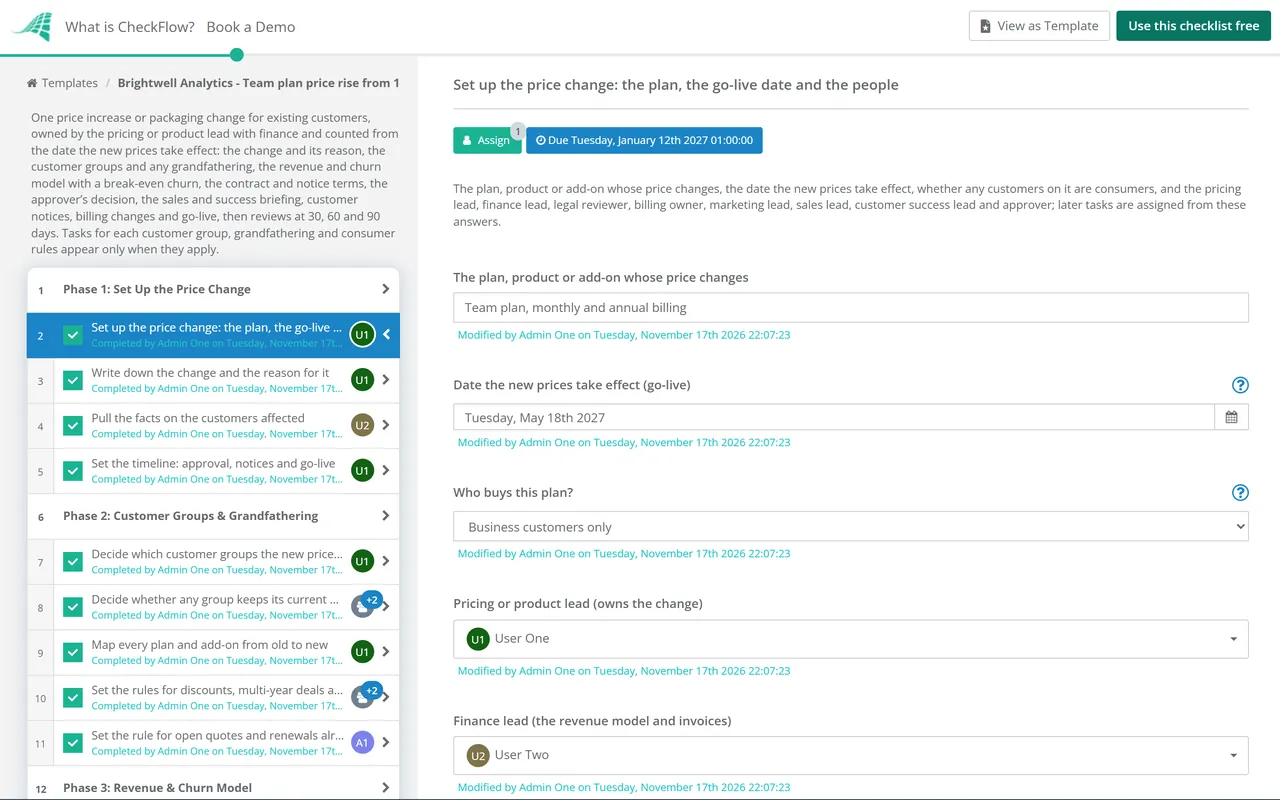
    Owned by the pricing or product lead, about 90 working days before the new prices take effect. Enter the go-live date on the first task: every due date counts from it. Write down what changes and why before anyone models or approves it, and pull the facts on the customers it affects.

    • Set up the price change: the plan, the go-live date and the people — the plan, product or add-on whose price changes, the date the new prices take effect, whether any customers on it are consumers, and the pricing lead, finance lead, legal reviewer, billing owner, marketing lead, sales lead, customer success lead and approver; later tasks are assigned from these answers
    • Write down the change and the reason for it — what changes (the price, the packaging, limits, add-ons or the billing period), from what to what in each currency, what stays the same, and the reason in a sentence a customer would accept: higher costs, more value delivered since the last change, or a plan that no longer fits how customers use it
    • Pull the facts on the customers affected — from the billing system: the number of customers and the revenue on the plan, split by billing period (monthly, annual, multi-year), currency, renewal month, discount and contract type, and whether any are on custom or legacy prices
    • Set the timeline: approval, notices and go-live — the dates this template sets from the go-live date (approval about 70 working days before, notices about 45 working days before, a reminder 10 working days before), checked against the longest notice any contract or law needs; if a group needs more notice than that, move the go-live date later now
  2. Phase 2

    Phase 2: Customer Groups & Grandfathering

    5 tasks

    The pricing lead decides who the new price applies to and when: new customers from go-live, existing customers at their next renewal, existing customers on rolling plans from a set date, or a mix. Decide whether any group keeps its current price for a time, and how every plan maps from old to new.

    • Decide which customer groups the new price applies to — new customers from the go-live date, existing customers on annual or multi-year terms at their next renewal on or after it, and existing customers on monthly or other rolling plans from the go-live date; each group you tick adds its own tasks
    • Decide whether any group keeps its current price for a time — grandfathering: which customers keep the old price (for example those who joined on a launch offer or signed in the last few months), for how long, and the date it ends; a price kept with no end date is a decision too, and should be written down
    • Map every plan and add-on from old to new — a line for each current plan, add-on and billing period with its new equivalent and new price, so no customer is left on a plan that has no place to go
    • Set the rules for discounts, multi-year deals and custom prices — whether existing discounts carry over as a percentage or a fixed amount, what happens to customers part-way through a multi-year deal, and who decides for customers on custom or legacy prices
    • Set the rule for open quotes and renewals already in negotiation — how long quotes at the current price stay valid, and whether renewals being negotiated now close at the current or the new price
  3. Phase 3

    Phase 3: Revenue & Churn Model

    5 tasks

    The finance lead models what the change is worth if every customer stays, works out the break-even churn, the extra churn that would cancel the gain, and sets the measures the team will watch after go-live. Use your own history, not industry averages.

    • Model the revenue change if every customer stays — the extra revenue for each group, month by month over the next 12 months, allowing for renewal dates, billing periods, discounts, grandfathering and currency
    • Work out the break-even churn — the share of affected revenue that could leave because of the change before it brings in less revenue than no change at all: for a price rise of p (as a fraction), with leavers paying nothing, it is p ÷ (1 + p), so a 20% rise breaks even at one sixth (about 16.7%) of that revenue leaving
    • Estimate the churn, downgrades and concessions you expect — from your own records: renewal rates by group, what happened after any earlier price change, and how many customers already ask about price; with a cautious and an expected case, and the cost of the concessions sales and success may give
    • List the accounts most at risk — accounts with low use, open problems, a recent complaint, a renewal soon or a large share of revenue, each with an owner who will call them before or as the notice lands
    • Set the measures and limits to watch after go-live — cancellations and downgrades that give price as the reason, renewal rates for each group, support tickets about the change and concessions given, each with the level that would make you act (below the break-even churn), reviewed at 30, 60 and 90 days
  4. Phase 4

    Phase 4: Contracts & Notice Terms

    6 tasks

    The legal or contracts reviewer checks what each kind of contract allows: whether the price can change mid-term or only at renewal, how much notice it needs and in what form, any cap, and any customer with a fixed price. That sets the latest date each group’s notice can go out.

    • Read what each kind of contract says about price changes — the online terms, the order form and the master agreement used for each group: whether prices can change during the term or only at renewal, the notice period and how notice must be given, any cap on increases, and any right to cancel
    • Check the consumer rules where your consumers live — where any customers on the plan are consumers: whether your price variation term is fair and clear, the notice and the right to cancel the law expects, and any state or country rule on notice of a fee change
    • Find customers with price caps, fixed prices or special terms — contracts that fix the price for a period, cap any increase, promise the best price given to others, or need the customer’s written agreement to change; list them so billing leaves them out until their terms allow
    • List the renewals in the first three months and each one’s notice deadline — every customer renewing in the first three months after go-live, with the renewal date, the notice its contract needs and the last day the notice can go out; any that cannot get the notice in time renew at the current price
    • Set the notice deadline and form for each group — for each group, the longest notice any contract or law needs, how it must be given (email to the billing contact, in-app message, letter), and the date this run sends it; the template sends notices 45 working days before go-live
    • Draft the changes to the terms, order form and price list — the changes to the published terms, the order form and any price schedule, with the date they take effect, ready to publish once the change is approved
  5. Phase 5

    Phase 5: Approval

    3 tasks

    The pricing lead puts the change, the groups, the model, the contract findings and the timeline in front of the approver, who alone decides. The checklist halts at the approval: nothing in the briefing, notices, billing or go-live phases can be completed until it is done.

    • Prepare the approval pack — the change and its reason, the groups and any grandfathering, the revenue model with the break-even churn and the expected case, the contract and notice findings, the customers left out, the concession rules proposed and the timeline
    • Not approved: rework the change, or stop it — make the changes the approver asked for (the price, the groups, the grandfathering or the timing), move the go-live date on the first task if the timeline no longer works, then ask the approver to decide again; if the change is dropped, record that here, leave the approval open and archive the checklist
    • Approve the price change — the approver alone reads the pack and decides: approved, approved with changes, or not approved; complete this task with the decision when it is approved, with or without changes
  6. Phase 6

    Phase 6: Sales & Success Briefing

    5 tasks

    Before any customer hears about the change, the people they will call are ready. This phase is short on purpose: for the full sales enablement (messaging, playbook, CRM, quotes, certification and a go or no-go), run the Sales Readiness Checklist alongside it.

    • Approved with changes: update the plan before anyone is briefed — make the approver’s changes to the prices, groups, grandfathering, model and timeline, and update the tables in earlier tasks so everyone works from the approved version
    • Set the concession rules and who can approve more — what sales and success may offer without asking (for example a move to annual billing at the annual rate, or a later start date for the new price), what needs approval and from whom, and what is never offered
    • Brief sales and account managers on the change — what changes, for whom and when, the reason, the open quote rule and the concession rules; for messaging, the playbook, CRM and quote changes and rep certification, use the Sales Readiness Checklist
    • Brief customer success and support, with the answers they will give — the questions customers will ask and the answers, saved replies, a tag for tickets about the change, the concession rules and who to pass a complaint or cancellation to
    • Plan the calls to the accounts most at risk — who calls each account on the at-risk list, when (just before or as the notice lands), and what they may offer within the concession rules
  7. Phase 7

    Phase 7: Customer Notices

    9 tasks

    The marketing lead writes a notice for each group, checked by legal and finance, and sends it by the deadline set in Phase 4. Customer success calls the at-risk accounts, logs every reply, complaint and concession, and hands later renewals to the renewal process with their notice deadlines. A reminder goes out shortly before the change.

    • Write the notice for each customer group — what changes and when, the reason, what this customer will pay, their options (annual billing, another plan, or cancelling and how), who to contact, and any period they keep their current price
    • Check the notices against the contracts and the figures — legal checks each notice against the notice plan and the contracts; finance checks every price, currency and date against the approved change
    • Send the notices to each group by its deadline — send each group’s notice in the form its contracts need, keep a copy with the date sent and the list it went to, and follow up any that bounced
    • Tell the customers who keep their current price, and until when — what they keep, the date it ends, what they will pay after it and when they will hear from you again
    • Call the accounts most at risk — each owner calls their accounts as planned, answers questions, offers only what the concession rules allow, and records the outcome
    • Log replies, complaints and concessions — every reply that needs an answer, every complaint and every concession given, with who approved it, so finance can compare them with the model
    • Check every rolling-plan customer was told before their first bill at the new price — match the list of rolling-plan customers in billing with the notice log, and send any missing notice now or keep that customer on the current price until their notice period has run
    • Hand later renewals to the renewal process at the new price — before go-live, for every customer renewing after the first three months: add the new price and the last day to send its notice to each renewal, so each notice is sent in good time
    • Send a reminder shortly before the change takes effect — a short reminder of the new price, the date and how to change plan or cancel, to every customer whose price changes on the go-live date
  8. Phase 8

    Phase 8: Billing, Price Book & Go-Live

    9 tasks

    This phase runs alongside the notice period. The billing systems owner sets up the new prices without removing the old ones, tests every case, and schedules each group to move on the right date. On the go-live date the pricing page, terms and help articles change, and the first invoices are checked.

    • Create the new prices and plans in the billing system — the new prices, plans and add-ons in every currency, added alongside the current ones (not in place of them), so existing invoices and subscriptions are untouched until each group moves
    • Set up the kept prices in billing with their end date — keep the grandfathered customers on their current price and schedule the move to the new price on the end date, or diarise it if your billing system cannot schedule it
    • Update the price book, quote templates and order forms — the new prices in the CRM price book and quote templates from the go-live date, the current ones closed for new quotes from that date, and the order form updated
    • Check invoices, tax and local currency prices — the invoice lines and plan names, tax on the new amounts, tax-inclusive prices where you show them, and local currency prices rounded the way you decided
    • Test every case in a test environment — a renewal at the new price, a monthly bill, an upgrade and a downgrade part-way through a period, a grandfathered customer, a customer with a price lock, a discount carried over, a cancellation, and an invoice in each currency
    • Schedule each group’s change and check the lists — schedule the move for each group on its date, then check the lists: every customer in scope included, every customer with special terms left out, and the totals matching the model
    • Publish the pricing page, terms and help articles — on the go-live date: the pricing page, the published terms if they change, help articles, in-app messages and anything else that shows a price; mark this not applicable if nothing public changes
    • Close the current price to new sign-ups and test checkout — new sign-ups and trial conversions get the new price from the go-live date; place a test order on each plan and currency and check the price, tax and invoice
    • Check the first invoices, payments and failed charges — a sample of the first invoices and renewals at the new price, any failed or disputed payments, and any customer billed who should have been left out, corrected at once
  9. Phase 9

    Phase 9: Reviews at 30, 60 & 90 Days

    5 tasks

    The pricing and finance leads compare what happened with the model at 30, 60 and 90 days: cancellations and downgrades giving price as the reason, renewal rates, tickets and concessions. A result above the expected case adds a task to decide what to change.

    • Review the first 30 days against the model — cancellations, downgrades and renewals for each group, tickets with the change’s tag, and concessions given, against the expected case and the break-even churn
    • Decide what to change if churn is running high — the pricing lead and the approver decide whether to keep the change as it is, widen the concessions, add or adjust a plan for the customers leaving, or change the price; any price change goes back through notice and billing as above
    • Review the first 60 days — the same measures as at 30 days, now including the first renewals, and whether any action from the 30-day review is working
    • Book the end of the kept prices and its notice — a reminder before the end of the grandfathering period, with the date the notice must go out to those customers under their contracts
    • Review the first 90 days and close the rollout — the result against the model and the break-even churn, what customers said, what to do differently next time, and the changes to this checklist

What Each Answer Adds, and the Consumer Notice Rules That Differ

What each answer on the checklist adds

Every run shows the shared tasks: the change and its reason, the plan map, the model, the contract and notice plan, the approval, the briefing, the notices and reminder, billing, go-live and the three reviews.

Answer What the checklist adds
Consumers buy the plan (first task)A task in Phase 4 to check the consumer rules where they live, with the UK, EU and US notes below
New customers, from the go-live date (Phase 2)Closing the current price to new sign-ups and a test order on each plan and currency at go-live
Existing customers at their next renewal (Phase 2)A list of the renewals in the first three months with each notice deadline, and a hand-off of later renewals to your renewal process before go-live
Existing customers on rolling plans (Phase 2)A check that every rolling-plan customer was told before their first bill at the new price
Some customers keep their current price for a time (Phase 2)The kept price set up in billing with its end date, a notice to those customers, and the end of the period booked
Approved with changes (Phase 5)A task to make the changes before anyone is briefed
Not approved (Phase 5)A rework task before the approval, which stays open until the approver decides again
Churn above the expected case or at the break-even (30-day review)A task for the pricing lead and the approver to decide what to change

Consumer rules on price changes, as read on 17 November 2026

These rules protect consumers, people buying for personal use. For business customers, the contract’s own terms on price changes and notice govern. This is a starting point, not legal advice: check the law where your customers live on the day you plan the change.

Where Rule What it means for a price change Status
UKConsumer Rights Act 2015, Part 2 and Schedule 2Schedule 2 lists terms that may be regarded as unfair, including one letting a trader increase the price without giving the consumer the right to cancel if the final price is too high (paragraph 15). The CMA’s guidance says a price variation term is more likely to be fair if it gives the reason, the level or basis, the timing and enough time to cancel before the new charge takes effectIn force since 1 October 2015; CMA guidance updated 22 July 2026
UKDigital Markets, Competition and Consumers Act 2024, Part 4, Chapter 2 (subscription contracts)Reminder notices before renewal payments must say when the payment is higher than the previous one, and by how much (Schedule 23, paragraph 33)Not yet in force. Draft regulations and draft guidance published 19 October 2026 say the rules will apply to contracts entered into on or after 1 January 2027, once Parliament approves them
EUUnfair Contract Terms Directive 93/13/EECThe Annex lists, among terms that may be regarded as unfair, one allowing a supplier to increase the price without giving the consumer the right to cancel if the final price is too high (point 1(l))In force; each member state applies it through its own law
US (California)Business and Professions Code section 17602 (automatic renewal law)Clear and conspicuous notice of a fee change, with how to cancel in a form the consumer can keep, no less than 7 and no more than 30 days before it takes effect for each consumer, including those whose price changes at a later renewal or billApplies to contracts entered into, amended or extended on or after 1 July 2025; other states may have their own automatic renewal laws, so check each state where you have consumers
US (federal)FTC Negative Option RuleThe 2024 “click-to-cancel” amendments were vacated by the Eighth Circuit on 8 July 2025. The FTC restored the earlier rule text on 12 February 2026 and asked in March 2026 whether to amend it again (comments closed 13 April 2026)Rulemaking open: check for changes on the day

Sources, read on 17 November 2026: the Consumer Rights Act 2015, Schedule 2; the CMA’s Writing a fair contract for customers; the Digital Markets, Competition and Consumers Act 2024, Part 4, Chapter 2 and Schedule 23, with the Government’s draft subscription contracts guidance; Directive 93/13/EEC; California Business and Professions Code section 17602; the Eighth Circuit’s opinion in Custom Communications, Inc. v. FTC, and the FTC’s Federal Register notices of 12 February 2026 and 13 March 2026.

Why Roll Out Price Changes in CheckFlow?

1

No notice before the approval

The approval is assigned to the approver alone, and the checklist halts there: the briefing, the notices, billing and go-live cannot be completed until the approver completes it. Not approved shows a rework task before the approval, and approved with changes shows a task to make the changes before anyone is briefed.

2

One go-live date moves the whole plan

Due dates count from the date the new prices take effect: working days before it, calendar days after it for the reviews. If the date moves, one change on the first task moves every step. Overdue alerts go to the people assigned, and the Reports Grid lists every price change in progress with its answers, while Analytics shows where rollouts slow down.

3

Only the customer groups you change

The groups you tick in Phase 2 decide which tasks appear: renewal deadlines, rolling-plan checks or the checkout test. Keeping a current price for some customers adds its own billing, notice and end-date tasks, and consumer buyers add the consumer rules check. Nothing appears that this change does not need.

CheckFlow does not change prices in your billing system, send your customer notices or read your contracts: those stay in your billing, email and contract tools. CheckFlow makes sure every price change gets the same checks in the same order, with an owner and a due date for each step, a recorded approval before any customer is told, and a record of who did what and when.

Prepare the sales team with the Sales Readiness Checklist, run each renewal through the Customer Renewal Checklist, and check the invoices with the Monthly Invoicing & Billing Run Checklist.

AI generator

Didn’t find what you need? Describe it.

Describe the process in a sentence and the AI checklist generator drafts the phases and tasks for you.

Frequently Asked Questions

What should a price change rollout checklist include?

The change and the reason for it, the customer groups it applies to and any grandfathering, a map of every plan from old to new, a revenue model with a break-even churn, what each contract allows and how much notice it needs, an approval, a briefing for sales and success with concession rules, customer notices and a reminder, billing set-up and tests, the pricing page at go-live, and reviews against the model at 30, 60 and 90 days.

How much notice should you give customers before a price increase?

As much as your contracts and the law require, and enough for customers to decide what to do. Business contracts may set their own notice period, so read them first. For consumers, some laws set the window: California’s automatic renewal law needs notice of a fee change 7 to 30 days before it takes effect for each consumer. This template sends notices 45 working days before go-live and a reminder 10 working days before, and you move the go-live date if a contract needs more.

What is grandfathering when you change prices?

Grandfathering means letting some existing customers keep their current price after the change, for a set time or indefinitely. It softens the change for loyal or recently signed customers, but every grandfathered price is one more to keep in billing and to end one day. This template asks for an end date, sets the kept price up in billing, tells those customers what they keep and until when, and books the end of the period.

How do you work out the break-even churn for a price increase?

If the price rises by p (written as a fraction) and the customers who leave pay nothing, revenue stays the same when the share of affected revenue that leaves is p ÷ (1 + p), measured against the revenue that would have stayed without the change. A 20% rise breaks even at one sixth, about 16.7%, of that revenue leaving; a 10% rise at about 9.1%. This is extra churn caused by the change, on top of your usual churn. Count downgrades at the revenue they lose.

Do UK, EU or US laws limit price increases for subscriptions?

They don’t cap the increase, but for consumers they govern how it is made. UK and EU unfair terms law treats a term letting a trader raise the price without a right to cancel as potentially unfair, and California requires notice of a fee change 7 to 30 days before it takes effect for each consumer. The UK’s subscription contracts rules are not yet in force. For business customers, the contract governs. The consumer task gives the details as read on 17 November 2026; take legal advice.

Who should approve a price change?

Whoever owns pricing decisions in your company, such as the chief executive, the chief revenue officer or a pricing committee. In this template one named approver decides, from a pack with the change, the groups, the revenue model and break-even churn, the contract findings and the timeline. The checklist halts at the approval, so no customer is briefed or told before the decision, and approved with changes adds a task to make the changes first.

How is this different from the Sales Readiness Checklist?

The Sales Readiness Checklist gets the sales team ready to sell the change. This template is the whole change across finance, legal, billing, marketing, sales and success, from the model and the contract notice to the 90-day review. Its sales and success phase is short and points to Sales Readiness for the full enablement.

What should you track after a price increase?

Cancellations and downgrades that give price as the reason, renewal rates for each group, support tickets about the change and the concessions given, each compared with the expected case and the break-even churn. This template reviews them at 30, 60 and 90 days after go-live. If churn runs above the expected case or reaches the break-even, a task appears for the pricing lead and the approver to decide what to change.

Is CheckFlow free for this template?

14-day free trial, no card required. The Business plan is $10 per user per month after the trial. Full details at checkflow.io/pricing.

Roll Out Every Price Change Through the Same Checks

Free trial — no credit card required.

14-day free trial, no credit cardFull refund in your first 30 daysUS hosting, EU on request