Feature Release Process Checklist Template

A feature that ships without a defined go/no-go checklist, a rollback plan, and a post-release monitoring period is a feature that turns its first production incident into a crisis instead of a managed response.

Continuous delivery has made software release mechanics faster than ever — but speed in deployment is only valuable when it is matched by confidence in what is being deployed. The feature that ships with an uncaught regression, without release notes that alert customer success to a changed behaviour, without a rollback plan for when the monitoring shows elevated error rates, and without the go/no-go criteria that would have caught the problem in staging — that feature ships fast and causes the kind of incident that takes hours to resolve and days to recover from in customer trust. A structured feature release process does not slow down releases — it removes the ambiguity that causes releases to fail and incidents to escalate. The checklist makes the release quality deterministic rather than dependent on whoever happens to be deploying this week. This free checklist gives engineering managers, product managers, and developers a structured framework for the full feature release lifecycle — from specification sign-off to post-release monitoring.

Use This Template Free See Live Example
No Credit Card Required

Hotfix, Minor, and Major Releases — How the Release Type Determines the Process

Hotfix

Critical bug — expedited process

When: A critical bug (P1/S1) in production that is blocking customers and requires immediate resolution outside the normal release cycle.

Process: Expedited — minimal but not zero QA; targeted testing of the fix and immediate adjacent areas; product lead aware; monitoring immediate post-deploy; rollback plan confirmed before deploy.

The urgency of a hotfix justifies an abbreviated process, not a no-process approach. The hotfix that introduces a regression while fixing the original issue is worse than the original issue.

Minor Feature / Improvement

Standard process — normal sprint cadence

When: A new feature, improvement, or non-critical bug fix released through the normal sprint cadence.

Process: Standard — specification sign-off, code review, QA testing (functional + regression smoke test), staging sign-off, release notes, deployment, monitoring.

Major Feature / Version

Full process — with marketing coordination

When: A significant new capability, major redesign, or version release that affects the product experience for a significant proportion of users.

Process: Full — all standard steps plus: early customer success and sales briefing, marketing coordination (blog post, email, in-app announcement), staged rollout or feature flag consideration, dedicated post-release monitoring period.

What the Feature Release Process Checklist Covers

This checklist covers the full release lifecycle in six phases — from specification sign-off through to post-release monitoring and closure.

Phase 1

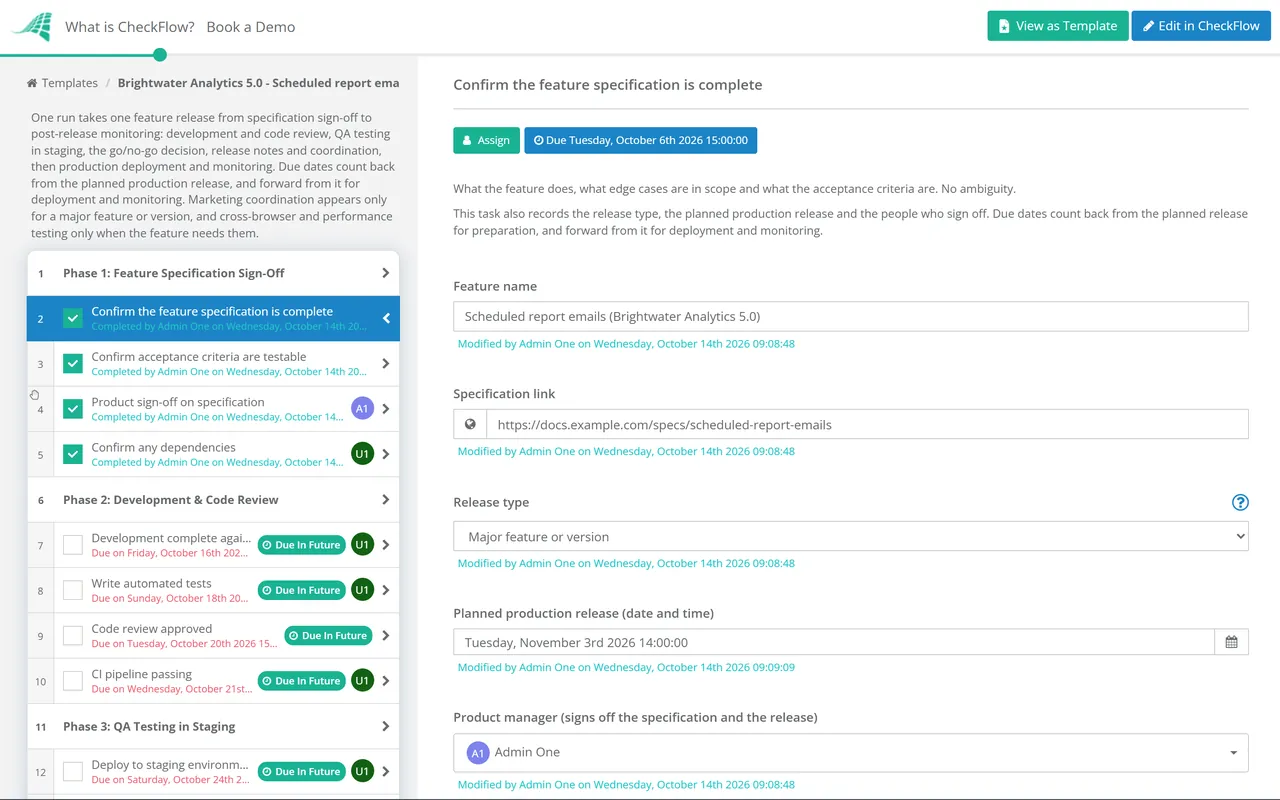
Phase 1: Feature Specification Sign-Off

  • Confirm the feature specification is complete — what the feature does, what edge cases are in scope, what the acceptance criteria are; no ambiguity
  • Confirm acceptance criteria are testable — every acceptance criterion can be verified as pass or fail; not “works well” but “returns result in under 2 seconds”
  • Product sign-off on specification — before development starts; changes to specification mid-development are a primary source of quality failure
  • Confirm any dependencies — third-party APIs, data migrations, infrastructure changes, or other features that must be complete first
Phase 2

Phase 2: Development & Code Review

  • Development complete against specification — all acceptance criteria implemented; developer confirms self-tested in local environment
  • Write automated tests — unit tests and integration tests covering the new feature; test coverage not reduced from pre-development baseline
  • Code review approved — by at least one qualified reviewer not on the feature; all review comments addressed before merge
  • CI pipeline passing — all automated tests passing; no lint errors; build successful; security scan (if applicable) clear
Phase 3

Phase 3: QA Testing in Staging

  • Deploy to staging environment — that matches production configuration as closely as possible
  • Functional testing against acceptance criteria — every criterion tested; pass/fail recorded for each
  • Edge case testing — empty states, boundary values, error paths, concurrent usage, invalid inputs
  • Regression testing — key user journeys and adjacent features tested to confirm no regressions; automated regression suite run
  • Cross-browser / cross-device testing — for UI-facing features; key supported browsers and device types verified
  • Performance testing — for features affecting performance-sensitive paths; response times within acceptable thresholds
  • Any bugs found — logged with full bug report; S1/S2 bugs block the release; S3/S4 logged for resolution in a subsequent sprint
Phase 4

Phase 4: Staging Sign-Off & Go/No-Go Decision

The go/no-go decision is a defined check — not a judgment call made differently by different people on different releases. Define the criteria once; apply them consistently.

  • Confirm all acceptance criteria pass — 100% required for go; any failing criterion blocks the release
  • Confirm no S1/S2 bugs open — no critical or high-severity bugs from this release open and unresolved
  • Confirm automated tests pass — full test suite; no known test failures accepted as “expected to fail”
  • Product sign-off — product manager confirms the feature matches the specification and is ready
  • Confirm rollback plan — if the release causes issues in production, what is the procedure? Feature flag off, revert commit, or previous build deploy? Confirmed before deploy
Phase 5

Phase 5: Release Notes & Coordination

  • Write release notes — for customer-visible features; what changed, what it does, any action required from users
  • Brief customer success and support — before the feature goes live; they should know what changed before customers ask about it
  • For major features: coordinate marketing — blog post, email announcement, in-app notification, social media; timed with the deployment
  • Confirm the deployment window — time and timezone; low-traffic period preferred for significant releases; deployment engineer confirmed available
Phase 6

Phase 6: Production Deployment & Post-Release Monitoring

  • Deploy to production — following the defined deployment procedure; the person deploying confirms each step
  • Smoke test in production — immediately post-deployment; the core user journey for the new feature manually confirmed working
  • Monitor error rates — for 30–60 minutes post-deployment; any elevation above baseline triggers investigation
  • Monitor performance metrics — response times, database query times, and any other relevant indicators; any degradation investigated
  • Confirm the deployment team is available — for the first hour post-deployment; if a rollback is needed, it needs to happen fast
  • Close the release — all monitoring confirmed normal; release notes published; team notified

What the Go/No-Go Decision Must Cover — Before Every Production Deployment

Acceptance criteria

100% of defined acceptance criteria passed in staging.

Zero S1/S2 open bugs

No critical or high-severity bugs from this release remaining unresolved.

Automated tests passing

Full CI pipeline green. No known failures accepted.

Performance within thresholds

No performance regression identified in staging testing.

Rollback plan confirmed

Specific, tested rollback procedure confirmed before any production deployment.

Deployment window and resource confirmed

Low-traffic window identified. Deployment engineer and on-call developer available for 1 hour post-deploy.

Why Use CheckFlow for Feature Releases?

1

A consistent release process regardless of who is deploying

Release quality should not depend on whether the senior engineer or the junior is deploying this sprint. CheckFlow’s feature release checklist provides every person with the same structured process — acceptance criteria check, go/no-go criteria, rollback plan, and post-deploy monitoring — ensuring that every release meets the same standard.
2

Go/No-Go decisions that are criteria-based, not judgment-based

“Is this ready to ship?” should have a defined answer — not an answer that varies based on time pressure or who is in the room. CheckFlow’s go/no-go phase requires every criterion to be explicitly checked and confirmed before the deployment task becomes available. The criteria decide the outcome.

3

A release record for every deployment

When a post-incident review asks “what was the deployment state when the incident started?” — which features shipped in the last release, what tests passed, who made the go decision and when — the answer is in CheckFlow. Every release is documented, dated, and attributable.

Feature releases should be clear of P1/P2 bugs before go/no-go. CheckFlow’s Bug Tracking & Resolution Checklist covers the bug management process that feeds into release readiness. See the Bug Tracking & Resolution Checklist →

For a full product or major version launch that includes external go-to-market coordination, CheckFlow’s Product Launch Checklist covers the broader GTM process beyond the technical deployment. See the Product Launch Checklist →

Frequently Asked Questions

What should a feature release process checklist include?

+

A feature release process checklist covers six phases: pre-development specification sign-off (acceptance criteria defined, testable, and product-approved), development and code review (development complete, automated tests written, code review approved, CI pipeline passing), QA testing in staging (functional testing against acceptance criteria, edge cases, regression testing, cross-browser/device testing, performance testing), staging sign-off and go/no-go decision (100% acceptance criteria passing, no S1/S2 open bugs, automated tests passing, product sign-off, rollback plan confirmed), release coordination (release notes, customer success briefing, marketing coordination for major features), and production deployment and monitoring (deployment, immediate smoke test, error rate monitoring, and deployment team availability).

What are go/no-go criteria for a software release?

+

Go/no-go criteria are a defined set of conditions that must all be met before a release can proceed to production. Standard criteria include: 100% of acceptance criteria passed in staging, no S1 or S2 severity bugs open from this release, full automated test suite passing (no known failures accepted), no performance regression identified in staging testing, a specific and confirmed rollback procedure, and the deployment engineer and on-call developer confirmed as available for the first hour post-deployment. Go/no-go criteria should be defined once and applied consistently to every release — not adjusted based on schedule pressure.

What should be in release notes?

+

Release notes for a customer-visible feature should contain: a brief description of what changed or was added (without technical jargon), what the feature does for the user (the benefit, not the implementation), any change in behaviour that existing users should be aware of (particularly anything that might initially appear as a bug but is actually the new design), any user action required (e.g. updating a setting, re-authorising a connection), and where to find the new feature or setting. Release notes should be published to the changelog before or simultaneously with the deployment, and customer success teams should receive them before customers do.

What is a feature flag and when should one be used?

+

A feature flag (also called a feature toggle) is a configuration setting that enables or disables a feature in production without a code deployment — the code is deployed but the feature is off by default until the flag is switched on. Feature flags are most valuable for: staged rollouts (enabling the feature for a small percentage of users first to validate before full release), A/B testing (enabling the feature for one cohort while a control group sees the old behaviour), dark launching (deploying code to production and running it silently before enabling user-facing behaviour), and safe rollback (turning the feature off instantly if issues are detected without a code revert).

Is CheckFlow free for this template?

+

14-day free trial, no card required. The Business plan is $10 per user per month after the trial. Full details at checkflow.io/pricing.

Ship Every Feature Confidently — With Criteria, Monitoring, and a Rollback Plan

Free trial — no credit card required.