Mutual Action Plan Template

Agree one dated plan with the buyer, from the evaluation to signature and the kickoff. Every step has an owner on your side, the buyer’s steps name their contact, and the order form goes out only after your deal desk approves the final terms.

Last reviewed: November 2026

Printed from checkflow.io/templates/sales/mutual-action-plan-template

This free mutual action plan template is for account executives, sales managers and deal desks working a B2B deal with a buyer who has agreed to evaluate. One run covers one deal, counted back from the target signature date. It records the buyer’s goals and the date that matters to them, maps the people on both sides (the champion, the economic buyer, security, legal and procurement), and agrees the buying process, the evaluation steps and the success criteria with the champion. Then come the evaluation, with a proof of concept where the buyer wants one, the business case and proposal, the security review and data processing terms where they apply, legal and procurement, and the deal desk’s approval of the final terms before the order form goes out. The plan ends with signature, the handover to the implementation lead and the kickoff. Every step has an owner on your side; the buyer’s steps name the buyer’s contact, and a champion invited as a Guest sees only those steps.

A Plan Both Sides Agree, From Evaluation to Signature

A mutual action plan, in this template, is the dated plan for one B2B deal that the seller and the buyer agree together. One run starts when the buyer agrees to evaluate and ends at signature and the kickoff: the buyer’s goals and their own date, the people on both sides, the evaluation and its success criteria, the business case, security, legal and procurement, the deal desk’s approval of the final terms, and the signature. Every step has an owner on the seller’s side, and the buyer’s steps name the buyer’s contact.

After signature, an enterprise rollout carries on with the Enterprise Customer Implementation Checklist, whose first phase agrees the plan for the implementation. The proposal document itself follows the Sales Proposal Checklist, and a formal tender the RFP Response Checklist. The stages every deal moves through in your CRM are the Sales Pipeline Stages Checklist, and a plan for growing an existing customer is the Account Planning Checklist.

This template

One deal, agreed with the buyer

Covers: the buyer’s goals and date, stakeholders, the evaluation and success criteria, the business case, security, legal, procurement, the approval of the final terms and signature.

Planned around: the target signature date.

Ends with: the signed order form, the kickoff and the handover to implementation.
After signature

Enterprise Customer Implementation

Covers: governance, sign-in, integrations, data migration, testing, go-live and hypercare, and any security, legal or supplier work still open at signature.

Starts: after the kickoff; its first phase agrees the implementation plan. Enterprise Customer Implementation Checklist.

Inside your team

Sales Pipeline Stages

Covers: the stages every deal moves through, the exit rules for each and pipeline hygiene.

Who sees it: your sales team, not the buyer. Sales Pipeline Stages Checklist.

What the Mutual Action Plan Template Covers

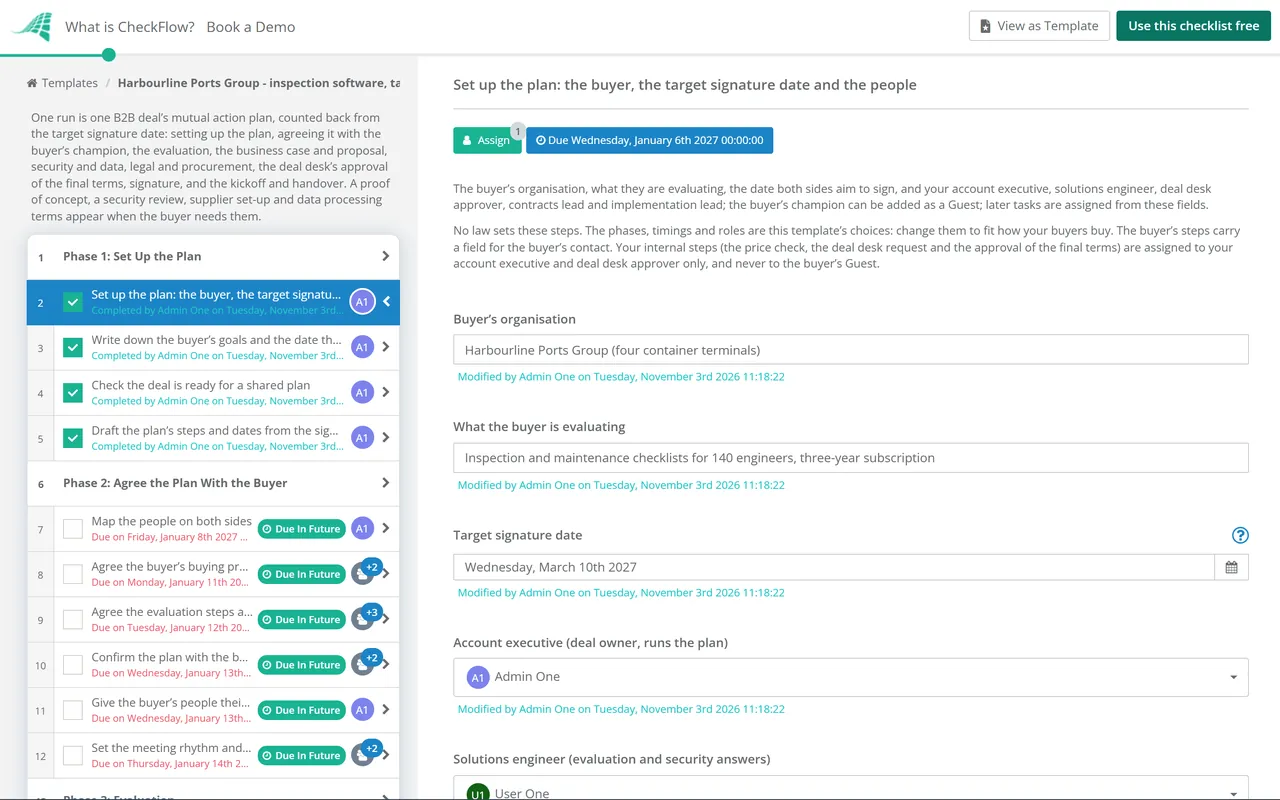
Nine phases take one deal from the buyer agreeing to evaluate to signature and the kickoff. The first task records the target signature date, which sets every due date, and the people on your side, with the buyer’s champion as an optional Guest. The champion’s answers on the buying process add the tasks for a proof of concept, a security review, supplier set-up and data processing terms. The deal desk’s approval of the final terms is the gate: Approved with conditions adds a task to meet them, and Not approved keeps the checklist halted, hides the signature and kickoff tasks and adds a task to rework the terms.

  1. Phase 1

    Phase 1: Set Up the Plan

    4 tasks

    Owned by the account executive, before the plan goes to the buyer. Enter the target signature date on the first task: every due date counts back from it in working days, and the kickoff counts forward. Write down what you know of the buyer’s goals and their own date, then draft the plan you will agree with them in Phase 2.

    • Set up the plan: the buyer, the target signature date and the people — the buyer’s organisation, what they are evaluating, the date both sides aim to sign, and your account executive, solutions engineer, deal desk approver, contracts lead and implementation lead; the buyer’s champion can be added as a Guest; later tasks are assigned from these fields
    • Write down the buyer’s goals and the date that matters to them — the problem the buyer wants to solve, the result they want, their own date (a launch, a contract ending, a budget or regulatory deadline, a new team starting) and why it matters, as you understand them before the plan is agreed
    • Check the deal is ready for a shared plan — the buyer has agreed to evaluate, you have a champion who will work through the plan with you, and the target signature date leaves time for the buyer’s security, legal and procurement steps before their own date; if it does not, say so when you share the plan
    • Draft the plan’s steps and dates from the signature date — a first draft to take to the champion: the evaluation, business case, security, legal, procurement, approval and signature steps, each with an owner on your side, the buyer’s contact where you know one, and a date counted back from the signature date; the due dates in this checklist are that draft
  2. Phase 2

    Phase 2: Agree the Plan With the Buyer

    6 tasks

    Walk through the plan with the buyer’s champion and change what they will not commit to. Their answers on the buying process add the tasks for a proof of concept, a security review, supplier set-up and data processing terms. The buyer’s steps name the buyer’s contact, and a champion invited as a Guest sees only their own steps.

    • Map the people on both sides — on the buyer’s side the champion, the economic buyer who approves the spend, the technical evaluators, security, legal, procurement and the people who will use it; on your side who works with each of them; this map is for your team, so keep it off the buyer’s tasks
    • Agree the buyer’s buying process and approvals — with the champion: who must approve the purchase and in what order, whether a proof of concept, a security review, supplier set-up or data processing terms are needed, and how long each of the buyer’s reviews takes
    • Agree the evaluation steps and success criteria — what the buyer will test, how each criterion will be judged and who judges it, written so both sides can tell at the end whether it was met
    • Confirm the plan with the buyer’s champion — walk through the buyer’s goals and their own date, then every step, owner and date, with the champion, change what they will not commit to, and record the day they agreed the plan and the target signature date; if the date moves, change it on the first task and every due date moves
    • Give the buyer’s people their steps in CheckFlow — optional: invite the champion, and anyone else on the buyer’s side who will own a step, to your CheckFlow team as Guests; choose the champion in the field on the first task, and add any other Guest to their own steps in this checklist; a Guest sees and completes only the tasks assigned to them
    • Set the meeting rhythm and the first check-in — a short call with the champion each week to go through what is due, who it is waiting on and what has moved, with the first date in both calendars
  3. Phase 3

    Phase 3: Evaluation

    7 tasks

    The buyer tests against the success criteria agreed in Phase 2. A proof of concept, where the buyer asked for one, adds its set-up, a mid-point check and the review of the results. The phase ends with the buyer’s own verdict against the criteria.

    • Hold the discovery and technical deep-dive — with the buyer’s evaluators: their current process and systems, the data and integrations involved, how users sign in, and anything that could rule you out
    • Give the tailored demo to the evaluation team — built on the buyer’s own process and the success criteria, to the people who judge them; record the questions you owe answers to
    • Set up the proof of concept — the environment, the buyer’s sample data or test accounts, who takes part on each side, the start and end dates, and how the results will be judged against the criteria
    • Hold the proof of concept mid-point check — with the buyer’s evaluators: progress against each criterion, problems found and what will be fixed before the end
    • Arrange the reference calls the buyer asks for — customers who have agreed to speak to the buyer, matched to the buyer’s size and use; ask each customer first, and arrange only the calls they have agreed to
    • Review the proof of concept results with the buyer — each criterion with its result, what the buyer’s evaluators concluded and anything still open
    • Buyer confirms the evaluation result against the criteria — the buyer’s evaluators say which criteria were met, which were not and whether they will go on to the business case; if a criterion was not met, agree with the champion what happens before moving on
  4. Phase 4

    Phase 4: Business Case & Proposal

    5 tasks

    Build the business case with the champion from the buyer’s own figures, check the price with the deal desk before it goes into the proposal, and present both to the economic buyer.

    • Gather the buyer’s figures for the business case — the current cost, time or risk the buyer wants to change, in their own numbers, from the champion; use only figures the buyer gives or agrees to
    • Check the proposed price with the deal desk — the price, any discount from your list price and any non-standard term you plan to offer, checked against your discount rules before it goes into the proposal; the deal desk approves the final terms in Phase 7
    • Draft the business case with the champion — what the buyer spends now, what changes, the cost of the purchase and when they would see the result, written in the buyer’s words for the economic buyer
    • Send the proposal — the scope, the price checked with the deal desk, the term, the start date and what happens after signature, sent to the champion and the economic buyer
    • Present to the economic buyer and confirm the budget — the business case and the proposal to the person who approves the spend; record whether the budget is confirmed, from which budget, and any approval they still need
  5. Phase 5

    Phase 5: Security, Data & Technical Fit

    5 tasks

    Answer what the buyer’s IT and security teams need. A security review and data processing terms, where the buyer needs them, add their tasks here. They run alongside the evaluation, so start them early.

    • Confirm the technical requirements — how users will sign in, the integrations and data the buyer needs, where data must be held and anything else that could stop the deal, with the buyer’s IT contact
    • Send your security pack — the documents you share with buyers, such as your security overview, any certifications or audit reports with their dates and scope, your policies and a completed standard questionnaire if you have one, under an NDA where you require one
    • Answer the buyer’s security questionnaire — with your security team: every question answered from evidence you can show, nothing promised that is not true today, and the date sent
    • Close the security review with the buyer — the buyer’s security contact’s questions and findings, what you agreed to do about each, and their sign-off or the conditions they set
    • Agree the data processing terms — where you will process personal data on the buyer’s behalf: the data, the purpose, how long, the subprocessors and any transfers, agreed with the buyer’s privacy or legal contact
  6. Phase 6

    Phase 6: Legal & Procurement

    6 tasks

    Legal and procurement run on the buyer’s timetable, so send the contract as soon as the proposal is out. Supplier set-up, where the buyer needs it, adds its task. The commercial terms agreed here go to your approval step in Phase 7.

    • Send the contract and your terms to the buyer’s legal team — your order form or agreement, your standard terms and any documents they refer to, with the contracts lead named as the contact for questions
    • Buyer’s legal team returns its comments — the buyer’s legal contact sends their changes and questions by the date agreed in the plan
    • Complete the buyer’s supplier set-up — the forms, bank details, insurance certificates, tax forms and any portal registration the buyer’s procurement team needs before it can sign with or pay a new supplier
    • Agree the legal terms — each change accepted, refused or rewritten, escalated inside your company where it is outside what the contracts lead can agree, until neither legal team has an open point
    • Agree the commercial terms with procurement — price, term, payment terms, start date and anything procurement asks for in return, with the buyer’s procurement contact
    • Confirm who signs on each side and how — the buyer’s signatory and anyone who must approve before them, your own signatory, and whether signing is electronic or on paper
  7. Phase 7

    Phase 7: Final Terms Approval

    4 tasks

    The deal desk approver checks the final terms before the order form goes to the buyer. Nothing after the approval can be completed until it is recorded. Not approved leaves the approval open, hides the signature and kickoff tasks, and adds a task before it to rework the terms. None of this phase is assigned to the buyer’s Guest.

    • Prepare the deal desk request — the final price and any discount from list, the term and payment terms, the non-standard legal terms agreed, any condition from the security review, the expected close date for your forecast, and anything promised to the buyer, including any change agreed with procurement beyond what the deal desk checked in Phase 4
    • Rework the terms after Not approved — after Not approved only: what the deal desk approver objected to, what you will take back to the buyer, and the target signature date moved on the first task if it has to; the approval task below stays open, so nothing after it can be completed; when the reworked terms are ready, the approver changes the decision and completes the approval task, and if the approval task was completed with Not approved, un-complete it first
    • Approve the final terms for signature — Approved, Approved with conditions or Not approved for the final terms going to the buyer for signature, with the reasons, recorded by the deal desk approver alone. Complete this task for Approved or Approved with conditions. For Not approved, record the decision and the reasons and leave this task open: the task above it to rework the terms appears, and the order form, signature and kickoff tasks are hidden and stay locked until a new decision is recorded and this task is completed
    • Meet the deal desk’s conditions before sending the order form — after Approved with conditions only: each condition met, with the evidence, before the order form goes to the buyer
  8. Phase 8

    Phase 8: Signature

    4 tasks

    Applies only when the final terms have not been turned down: a Not approved decision in Phase 7 hides this phase until a new decision is recorded. Once the final terms are approved, the order form goes to the buyer’s signatory. The target signature date on the first task is the day both sides aim to sign.

    • Prepare the final order form from the approved terms — the approved price, term, payment terms and start date, the agreed legal terms and any purchase order number the buyer needs on it, checked against the deal desk approval
    • Send the order form to the buyer’s signatory — through your e-signature tool or as the buyer asked, to the signatory confirmed in Phase 6, with the champion copied
    • Buyer signs the order form — the buyer’s signatory signs; if signature slips, agree the new date with the champion and change it on the first task
    • Countersign and send the signed copy — your signatory signs, the fully signed copy goes to the buyer and into your records, and the deal is closed in your CRM
  9. Phase 9

    Phase 9: Kickoff & Handover

    4 tasks

    Applies only when the final terms have not been turned down: a Not approved decision in Phase 7 hides this phase until a new decision is recorded. Signature is where this plan ends and the implementation begins. Hand over everything promised during the sale, then hold the kickoff with both teams.

    • Hand over the deal to the implementation lead — the buyer’s goals and their own date, the success criteria and results, every commitment made during the sale, the security and contract conditions, the security review outcome, the data processing terms and the supplier set-up, so the implementation can mark those steps done, and the people on both sides; the implementation plan starts from this
    • Book the kickoff with both teams — a date for the kickoff that suits the buyer’s champion, sponsor and project lead and your implementation team, with the agenda sent in advance
    • Hold the kickoff and agree the first implementation steps — introductions, the goals and the buyer’s own date, who leads the implementation on each side, its first steps and when its plan will be agreed; the implementation then carries on in its own checklist
    • Close the plan and record what you learned — what helped and what slowed the deal down, which dates moved and why, kept for the next plan

Who Owns Each Step, and When It Falls Due

The buyer’s steps and who owns them

Every step in the plan has an owner on your side. These are the steps the buyer owns: each has a field for the buyer’s contact, and the buyer’s champion, invited as a Guest, is assigned to them too. Steps that appear only when the buyer needs them are included.

Step Buyer’s contact (suggested) Owner on your side Phase
Agree the buyer’s buying process and approvalsThe championAccount executive2
Agree the evaluation steps and success criteriaThe champion or the lead evaluatorAccount executive and Solutions engineer2
Confirm the plan with the buyer’s championThe championAccount executive2
Set the meeting rhythm and the first check-inThe championAccount executive2
Set up the proof of conceptThe lead evaluatorSolutions engineer3
Hold the proof of concept mid-point checkThe lead evaluatorSolutions engineer3
Review the proof of concept results with the buyerThe lead evaluatorSolutions engineer3
Buyer confirms the evaluation result against the criteriaThe champion or the lead evaluatorAccount executive3
Gather the buyer’s figures for the business caseThe championAccount executive4
Draft the business case with the championThe championAccount executive4
Present to the economic buyer and confirm the budgetThe economic buyerAccount executive4
Confirm the technical requirementsThe IT contactSolutions engineer5
Close the security review with the buyerThe security contactSolutions engineer5
Agree the data processing termsThe privacy or legal contactContracts lead5
Buyer’s legal team returns its commentsThe legal contactContracts lead6
Complete the buyer’s supplier set-upThe procurement contactAccount executive6
Agree the commercial terms with procurementThe procurement contactAccount executive6
Confirm who signs on each side and howThe championAccount executive6
Buyer signs the order formThe signatoryAccount executive8
Book the kickoff with both teamsThe championImplementation lead9
Hold the kickoff and agree the first implementation stepsThe champion or the buyer’s project leadImplementation lead and Account executive9

The plan counted back from the signature date

The timings are this template’s choices for a deal of about nine weeks from the buyer agreeing to evaluate to signature. Change the target signature date on the first task and every due date moves with it; change the offsets in your copy of the template to fit how your buyers buy.

Milestone Due in this template Phase
Set up the plan: the buyer, the target signature date and the people45 working days before (the plan starts)1
Confirm the plan with the buyer’s champion40 working days before2
Buyer confirms the evaluation result against the criteria23 working days before3
Send the proposal22 working days before4
Send the contract and your terms to the buyer’s legal team19 working days before6
Close the security review with the buyer18 working days before5
Agree the commercial terms with procurement10 working days before6
Approve the final terms for signature6 working days before7
Send the order form to the buyer’s signatory3 working days before8
Buyer signs the order formThe target signature date8
Hold the kickoff and agree the first implementation steps8 working days after9

Why Run Your Mutual Action Plans in CheckFlow?

1

The buyer sees their steps, not your internal ones

Invite the buyer’s champion to your CheckFlow team as a Guest, which is free, and the buyer’s steps are assigned to them. A Guest sees and completes only the tasks assigned to them and can comment on them. The price check, the deal desk request and the approval of the final terms are assigned exclusively to your account executive and deal desk approver, and never to the buyer.

2

No order form before the deal desk says yes

The approval of the final terms is assigned to the deal desk approver alone, and the checklist halts there: the order form, signature and kickoff cannot be completed until a decision is recorded. Approved with conditions adds the task to meet them. Not approved keeps the checklist halted, hides the signature and kickoff tasks and adds the task to rework the terms. See how approvals that halt a checklist work.

3

One date moves the whole plan

Due dates count back from the target signature date, so when the buyer moves the date, one change on the first task moves every step. Overdue alerts go to the people assigned, including the buyer’s champion on their own steps when they are a Guest, and the Reports Grid lists every open plan with its answers, while Analytics shows where tasks are waiting.

CheckFlow does not replace your CRM, your e-signature tool or your contract system: the opportunity, the signed order form and the contract stay there. CheckFlow makes sure every deal gets the same steps in the same order, with an owner and a due date for each, a deal desk decision before the order form goes out, and a record of who did what and when. See how a checklist runs.

Answer the buyer’s security questions with the Security Questionnaire Response Checklist, review data processing terms with the Data Processing Agreement (DPA) Review Checklist and the contract with the Contract Review & Approval Checklist. After signature, hand the deal over with the Sales to Customer Success Handoff Checklist and run the rollout with the Enterprise Customer Implementation Checklist.

AI generator

Didn’t find what you need? Describe it.

Describe the process in a sentence and the AI checklist generator drafts the phases and tasks for you.

Frequently Asked Questions

What should a mutual action plan include?

The buyer’s goals and the date that matters to them, the people on both sides, the buying process and who approves, the evaluation steps and success criteria, the business case, the security review, legal and procurement, the seller’s approval of the final terms, signature and the kickoff. In this template every step has an owner on the seller’s side and a due date counted back from the target signature date, and the buyer’s steps name the buyer’s contact.

Who owns a mutual action plan, the buyer or the seller?

Both agree it, and in this template the seller keeps it. The account executive drafts the plan, walks through it with the buyer’s champion and records the day they agreed it. The champion can change any step or date they will not commit to. After that, the account executive keeps the plan up to date, and the weekly check-in with the champion goes through what is due and what has moved.

When should you share a mutual action plan with the buyer?

This template starts the plan once the buyer has agreed to evaluate and you have a champion who will work through it with you. Phase 1 is your own draft. Phase 2 is the walk-through with the champion, where the buyer’s answers on their buying process add the steps they need. Sharing it earlier, before anyone on the buyer’s side has agreed to evaluate, leaves you with dates nobody has committed to.

What is the difference between a mutual action plan and a close plan?

People use the two terms in different ways, and some use them for the same thing. This template keeps both in one checklist: the plan the buyer agrees, with their steps and dates, and your own internal steps (the price check, the deal desk request and the approval of the final terms), which are assigned exclusively to your account executive and deal desk approver and never to the buyer.

Can the buyer see the whole plan in CheckFlow?

Not as a Guest. A Guest sees and completes only the tasks assigned to them, so the buyer’s champion sees their own steps, not your internal ones or the rest of the plan. A share link is different: anyone with it can open the checklist, fill in fields and complete tasks, and only tasks assigned exclusively are left out. This template does not use a share link, so walk the champion through the full plan at the weekly check-in.

How do you keep internal notes away from the buyer?

Write them on your internal tasks only. In this template the price check, the deal desk request, the approval of the final terms and the rework after Not approved are assigned exclusively to the account executive and the deal desk approver, and never to the buyer’s Guest. The buyer’s steps are assigned to the Guest, so treat their fields and comments as something the buyer reads.

Why count the plan back from the signature date?

Because the signature date is the one both sides work towards, and the buyer’s security, legal and procurement reviews take time that only the buyer controls. Counting back shows on the first day whether those reviews fit before the buyer’s own date. In this template the plan starts 45 working days before the target signature date, and the kickoff follows 8 working days after it.

What happens if the deal desk does not approve the final terms?

The deal desk approver records Not approved and leaves the approval open. The order form, signature and kickoff tasks are hidden and stay locked, and a task appears to rework the terms: what the approver objected to, what to take back to the buyer and a new target signature date if it has to move. When the reworked terms are ready, the approver changes the decision and completes the approval.

What happens to the plan after signature?

It ends with the handover and the kickoff. The account executive hands the implementation lead the buyer’s goals, the success criteria and results, and every commitment made during the sale. The kickoff then agrees the first steps of the implementation, which carries on in its own checklist, such as the Enterprise Customer Implementation Checklist.

Is CheckFlow free for this template?

14-day free trial, no card required. The Business plan is $10 per user per month after the trial. Full details at checkflow.io/pricing.

Agree the Plan, Then Get It Signed

Free trial — no credit card required.

14-day free trial, no credit cardFull refund in your first 30 daysUS hosting, EU on request