MEDDICC Deal Qualification Checklist Template

Qualify one opportunity before the forecast call: evidence and a score for each letter of MEDDIC, MEDDICC or MEDDPICC, every gap turned into a next action, and your sales manager’s commit or not-yet decision.

Last reviewed: November 2026

Printed from checkflow.io/templates/sales/meddicc-deal-qualification-checklist

This free MEDDICC checklist is for account executives and sales managers qualifying one opportunity before a forecast call. One run covers one deal, counted back from the date of the call. The account executive records the evidence for each letter: the pain in the buyer’s words and what it costs, the metrics and the value case, the economic buyer, the champion, the decision criteria and the decision process, and, for teams that use MEDDICC or MEDDPICC, the competition and the paper process. Each letter gets a score on one scale with what would raise it, and every gap becomes a next action with an owner and a date. The sales manager reviews the evidence and decides: Commit puts the deal in the commit forecast, and Not yet keeps it out of commit with a task saying what to close first.

One Deal’s Evidence, Not the First Call or the Whole Pipeline

Deal qualification, in this template, means checking one open opportunity against every letter of the framework your team uses, owned by the account executive and reviewed by the sales manager before a forecast call. One run covers one deal: the evidence and a score per letter, the gaps turned into next actions, the deal review and a commit or not-yet decision. It ends with the deal in the commit forecast, or kept out of it with what must be closed first.

A manager’s regular deal reviews inside a rep’s one-to-ones are part of the Sales Coaching Checklist, and once the buyer agrees the steps to a decision, the Mutual Action Plan turns them into a dated plan you share with the buyer.

This checklist

One deal, qualified before the forecast

Covers: evidence and a score for each letter, the gaps turned into next actions, the sales manager’s deal review and the commit or not-yet decision.

Planned around: the forecast call’s date.

Ends with: the deal in commit, or kept out of commit with what to close.

The first call

Discovery Call

Covers: the first call with a new prospect, from research and the agenda to the notes and a qualify or disqualify decision.

Runs: once, before the deal is an opportunity. Discovery Call Checklist.

Every opportunity

Sales Pipeline Stages

Covers: the stages every opportunity moves through, with entry and exit criteria, weekly pipeline hygiene and health metrics.

Runs: across the whole pipeline. Sales Pipeline Stages Checklist.

What the MEDDICC Deal Qualification Checklist Covers

Nine phases take one opportunity from set-up to the forecast call. The first task records the forecast call’s date, which sets every due date, the version of the framework your team uses and the people. The paper process and competition tasks appear for the versions that use them, and extra tasks appear when the economic buyer has not been met or the champion does not pass the test. The sales manager’s decision is the gate: Commit shows the forecast tasks, and Not yet keeps the deal out of commit with a task saying what to close.

  1. Phase 1

    Phase 1: Set Up the Qualification

    3 tasks

    Owned by the account executive, about three weeks before the forecast call. Enter the forecast call’s date on the first task: every due date counts back from it in working days. Choose the version of the framework your team uses, and agree the scoring scale with your sales manager before you gather any evidence, so the score means the same on every deal.

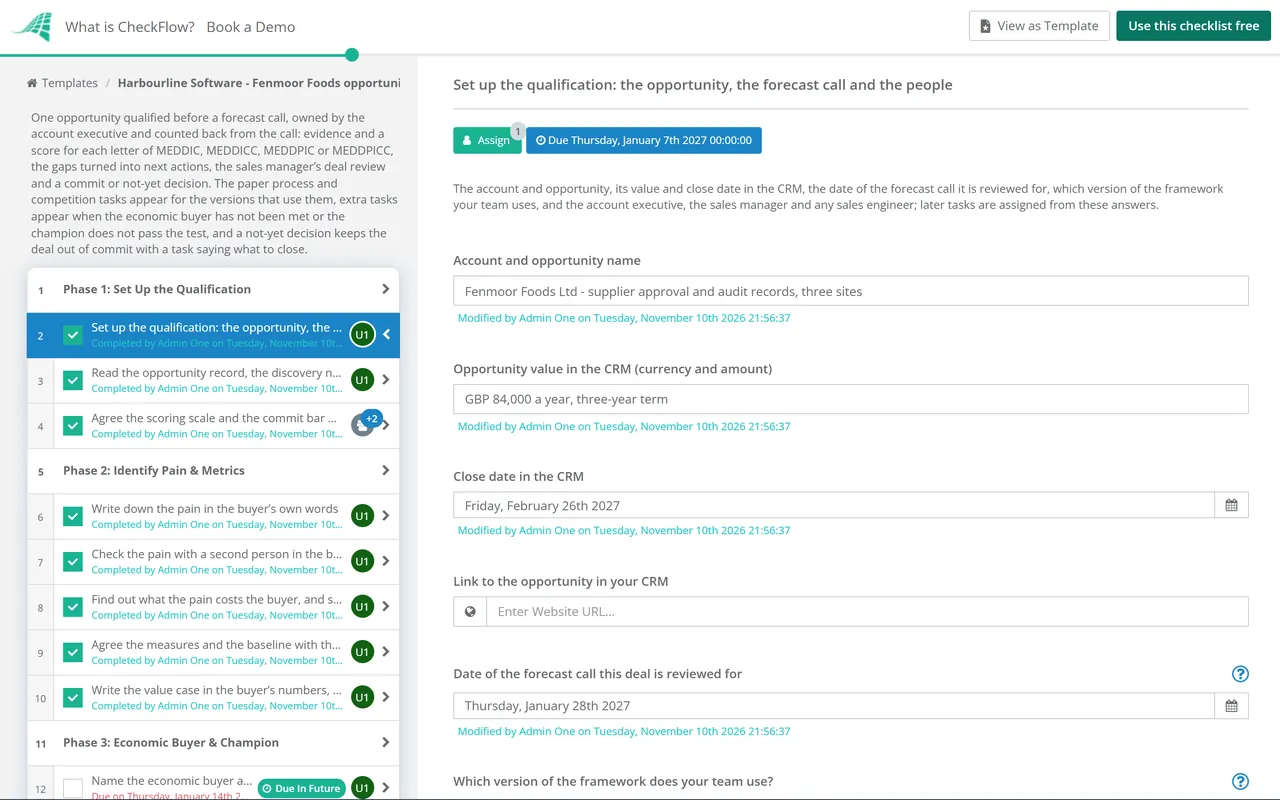
    • Set up the qualification: the opportunity, the forecast call and the people — the account and opportunity, its value and close date in the CRM, the date of the forecast call it is reviewed for, which version of the framework your team uses, and the account executive, the sales manager and any sales engineer; later tasks are assigned from these answers
    • Read the opportunity record, the discovery notes and the activity so far — go through the CRM record, the discovery call notes, emails and meetings, and note what you already know for each letter and where it came from
    • Agree the scoring scale and the commit bar with your sales manager — confirm the 0 to 3 scale this template uses for every letter and write down what your team needs to see before a deal goes into commit, such as a minimum score or letters that must be confirmed
  2. Phase 2

    Phase 2: Identify Pain & Metrics

    5 tasks

    Start with why the buyer would act at all. Write the pain in the buyer’s own words, check it with a second person, and find out what it costs them. Then agree the measures that would show the problem is solved, with a baseline the buyer recognises.

    • Write down the pain in the buyer’s own words — the business problem the buyer wants solved, who told you, when, and the words they used, kept apart from your own view of their problem
    • Check the pain with a second person in the buying group — ask someone else on the buyer’s side whether they see the same problem, so the pain does not rest on one contact
    • Find out what the pain costs the buyer, and score Identify Pain — the cost of the problem in time, money, risk or customers, who feels it, and what happens if the buyer does nothing; then score the letter
    • Agree the measures and the baseline with the buyer — the numbers the buyer will use to judge success, where each one stands today and where the figure comes from
    • Write the value case in the buyer’s numbers, and score Metrics — the target for each measure, the value of reaching it in the buyer’s own figures, and whether the buyer has seen and accepted it; then score the letter
  3. Phase 3

    Phase 3: Economic Buyer & Champion

    7 tasks

    Find the person who can say yes and release the money, and the person inside the buyer who is selling for you when you are not in the room. A name is not evidence: record whether you have met the economic buyer and what your champion has done for the deal.

    • Name the economic buyer and how you know they give the final yes — the person who gives the final yes on this purchase, often by releasing the money, their role, and who confirmed it, since the most senior person you have met may not be the one
    • Record whether you have met the economic buyer, and score Economic Buyer — whether you have met or spoken to them, what they said they care about, and whether they know the value case; then score the letter
    • Plan how to reach the economic buyer before the deal review — agree with your champion how to get time with the economic buyer, what you will bring and when, and book it if you can
    • Name your champion and what they gain if the deal goes ahead — the person inside the buyer who wants this to happen, their influence, and what they personally or their team gain from it
    • Test your champion against what they have done, and score Champion — list what they have done for the deal, such as sharing inside information, getting you a meeting or arguing your case, and score the letter on that
    • Map the rest of the buying group — everyone else who will use, judge, approve or block the purchase, their role in the decision and where they stand
    • Build your champion or find another one — ask the contact for one specific action that would show they back the deal, or find someone else with a reason to push for it
  4. Phase 4

    Phase 4: Decision Criteria & Decision Process

    4 tasks

    Write down how the buyer will judge the options and the steps they will take to decide, with names and dates. Check both with your champion. A decision process with no dates, or criteria you have not seen in writing, is a gap to close, not a score of 3.

    • List the buyer’s decision criteria — the technical, commercial and other criteria the buyer will use to choose, who set each one, and whether you have seen them in writing
    • Check where you stand on each criterion, and score Decision Criteria — the criteria you meet, the ones you meet only in part, and any you helped the buyer shape; then score the letter
    • Map the steps the buyer will take to decide — each step from now to a decision, such as an evaluation, a trial, a business case or a board meeting, with who is involved and the date, checked with your champion
    • Find the date the buyer is working to and why, and score Decision Process — the event or deadline that makes the buyer decide by a date, such as a contract ending or a project start, and whether the steps fit before it; then score the letter
  5. Phase 5

    Phase 5: Paper Process & Competition

    4 tasks

    Applies only when your team uses MEDDICC, MEDDPIC or MEDDPICC. The competition tasks show for MEDDICC and MEDDPICC; the paper process tasks show for MEDDPIC and MEDDPICC. The paper process is everything between the buyer’s decision and a signed contract; competition is every other option the buyer has, doing nothing included.

    • Map the steps from the buyer’s decision to a signed contract — procurement, legal review, security or data protection review, purchase order and signature, with who handles each step and how long each one takes at this buyer
    • Check the paper process fits before the close date, and score Paper Process — whether the steps can finish by the close date in the CRM, which documents the buyer needs from you and when; then score the letter
    • List every option the buyer is considering — other suppliers, building it themselves, another project competing for the same budget, and doing nothing
    • Write down where you stand against each option, and score Competition — why the buyer might choose each option over yours, what you are doing about it, and score the letter
  6. Phase 6

    Phase 6: Score the Deal & Close the Gaps

    5 tasks

    Bring the letters together. Every score below 3 is a gap: give each one a next action with an owner and a date, check the close date and the amount against what you now know, and send your sales manager a short summary before the deal review.

    • Turn every gap into a next action with an owner and a date — for each letter that scored below 3, the gap, the action that would close it, who does it and by when
    • Book the actions that need the buyer — agree meetings or answers with your champion or the economic buyer for the gaps only they can close
    • Check the close date and the amount against the evidence — whether the decision and paper steps can finish by the close date, and whether the amount matches what the buyer has agreed to buy; change them in the CRM if not
    • Update the CRM with the evidence, the scores and the next steps — so the deal review and the forecast call read the same record as this checklist
    • Send the deal summary and your recommendation to your sales manager — the score for each letter, the main gaps and their actions, and whether you recommend commit or not yet, a day before the review
  7. Phase 7

    Phase 7: The Sales Manager’s Deal Review

    3 tasks

    Owned by the sales manager, two working days before the forecast call. Read the evidence, test it with the account executive, and decide. The decision is the gate: nothing after it can be completed until the sales manager completes it. Commit shows the forecast tasks in Phase 8; Not yet shows Phase 9 instead and keeps the deal out of commit.

    • Read the evidence and the summary before the review — check each score against the evidence behind it and the team’s commit bar, and note the questions to ask
    • Hold the deal review with the account executive — go through the letters, ask for the evidence behind every score of 2 or 3, and agree any score that changes
    • Decide commit or not yet before the forecast call — Commit puts the deal in the commit forecast for its close date; Not yet keeps it out of commit and lists what must be closed first
  8. Phase 8

    Phase 8: Commit the Deal to the Forecast

    4 tasks

    Applies only when the sales manager decided Commit. Set the forecast category, confirm the last steps with your champion and take the deal into the forecast call. If anything slips after the call, tell your sales manager the same day.

    • Set the forecast category to commit in the CRM — with the amount and close date the sales manager agreed
    • Confirm the remaining steps to signature with your champion — that the decision and paper steps still run to the dates you recorded, and who on the buyer’s side owns each one
    • Present the deal on the forecast call — the amount, the close date, the scores and the one or two things that could still move it
    • Tell your sales manager the same day if anything slips — a new date, a missing approval or a change in the buying group, and record it here and in the CRM; mark this task not applicable once the deal is signed
  9. Phase 9

    Phase 9: Keep a Not-Yet Deal Out of Commit

    4 tasks

    Applies only when the sales manager decided Not yet. Keep the deal out of commit, work through the gaps the sales manager named, and take the deal into the forecast call as not yet, with what is missing and when you expect to close it.

    • Keep the deal out of commit in the CRM — set the forecast category your team uses for deals that are not committed, such as best case or pipeline, and move the close date if the gaps make it unrealistic
    • Close the gaps the sales manager named — each gap from the review, the action that closes it, the owner and the date, worked through before you ask for commit again
    • Present the deal as not yet on the forecast call — what is missing, the actions under way and when you expect to ask for commit
    • Book the next qualification review — the date of the next review or forecast call, so the deal is qualified again with fresh evidence

The Letters of MEDDIC, MEDDICC and MEDDPICC, and How This Template Scores Them

What each letter asks, and the evidence this checklist records

MEDDIC, MEDDICC and MEDDPICC are names for one family of sales qualification frameworks. MEDDIC has six letters, MEDDICC adds Competition, and MEDDPICC adds Paper Process as well. Some teams use MEDDPIC, which adds Paper Process without Competition. Sources differ on the I: some write Identify Pain in every version, and others write MEDDPICC’s I as Implicate the Pain, which asks you to show the buyer what the problem is costing them. The table follows the order of the acronym; the checklist takes the letters in a working order, starting with the pain and the metrics.

Letter What it asks Evidence this checklist records In
MetricsThe measurable results the buyer wants, and what they are worthToday’s figures, the targets and the value case in the buyer’s own numbersMEDDIC, MEDDICC, MEDDPICC
Economic BuyerWho gives the final yes on this purchase, often by releasing the moneyTheir name, how you know they give the final yes, and whether you have met themMEDDIC, MEDDICC, MEDDPICC
Decision CriteriaHow the buyer will judge the optionsEach criterion, who set it, whether you have seen it in writing, and where you standMEDDIC, MEDDICC, MEDDPICC
Decision ProcessThe steps the buyer will take to decideEach step with its people and date, and the date the buyer is working toMEDDIC, MEDDICC, MEDDPICC
Paper ProcessThe steps from the decision to a signed contractProcurement, legal, security review, purchase order and signature, with how long each takesMEDDPIC, MEDDPICC
Identify Pain (Implicate the Pain in some MEDDPICC sources)The business problem that makes the buyer actThe pain in the buyer’s words, checked with a second person, and what it costsMEDDIC, MEDDICC, MEDDPICC
ChampionThe person inside the buyer who sells for you when you are not thereTheir influence, what they gain and what they have already done for the dealMEDDIC, MEDDICC, MEDDPICC
CompetitionEvery other option the buyer hasOther suppliers, building it themselves, other projects for the same budget, and doing nothingMEDDICC, MEDDPICC

The scoring scale (this template’s choice)

The sources read for this page set no common scale. This template scores every letter from 0 to 3 on the strength of the evidence, so a 2 means the same on every deal. Change the labels to your team’s own if you score differently.

Score What it means Example for the economic buyer
0No evidence yetYou do not know who signs off
1One contact told you, not yet confirmedYour champion says the finance director signs off
2Confirmed by more than one contact or in writingThe procurement lead says the same, or the buyer’s approval policy shows it
3Confirmed by the economic buyer or in the buyer’s own documentYou have met the finance director, who agreed the value case

The letter names are as the frameworks’ training sites gave them on 10 November 2026; they differ on the I. CheckFlow is not connected with, or endorsed by, any company that teaches these frameworks or claims rights in their names.

Why Qualify Your Deals in CheckFlow?

1

A second view before anything goes into commit

The decision is assigned to the sales manager alone, and the checklist halts there: nothing after it can be completed until the manager decides. Commit shows the tasks to set the forecast category and present the deal; Not yet shows the tasks to keep it out of commit and close the gaps. See how approvals that halt a checklist work.

2

Only the letters your team uses

Choose MEDDIC, MEDDICC, MEDDPIC or MEDDPICC on the first task and the checklist shows the competition and paper process tasks only for the versions that use them. Extra tasks appear when you have not met the economic buyer or your champion does not pass the test, so a weak letter gets work, not just a low score.

3

Every gap has an owner and a date

Every due date counts back from the forecast call, so the evidence, the summary and the review land before the call rather than on the morning of it. The Reports Grid lists every qualification run with its progress, so a manager can see which deals are ready for review.

CheckFlow does not replace your CRM: the opportunity, its amount, close date and forecast category live there. CheckFlow makes sure every deal is qualified the same way before it is committed, with a due date for each step, the sales manager’s decision and a record of who did what and when. See how a checklist runs.

Run the first call with the Discovery Call Checklist, define the stages every opportunity moves through with the Sales Pipeline Stages Checklist and agree the steps to signature with the buyer in the Mutual Action Plan. For a key account’s wider plan, use the Account Planning Checklist.

AI generator

Didn’t find what you need? Describe it.

Describe the process in a sentence and the AI checklist generator drafts the phases and tasks for you.

Frequently Asked Questions

What should a MEDDICC checklist include?

Evidence for each letter: the pain in the buyer’s words and what it costs, the measures and value case, the economic buyer and whether you have met them, a champion who has acted for the deal, the decision criteria and the steps to a decision, and for MEDDICC and MEDDPICC the competition and the paper process. Then a score per letter, a next action for every gap, a deal review with your sales manager and a commit or not-yet decision.

What is the difference between MEDDIC, MEDDICC and MEDDPICC?

They are versions of one qualification framework. MEDDIC has six letters: Metrics, Economic Buyer, Decision Criteria, Decision Process, Identify Pain and Champion. MEDDICC adds a second C for Competition. MEDDPIC adds Paper Process, the steps from the buyer’s decision to a signed contract, and MEDDPICC adds both. Choose your team’s version on the first task and this checklist shows only the tasks it uses.

Is the I in MEDDPICC Identify Pain or Implicate the Pain?

Sources differ. Some write Identify Pain for every version, and others write MEDDPICC’s I as Implicate the Pain, which asks you to go further than naming the problem and show the buyer what it is costing them. This checklist covers both: one task records the pain in the buyer’s words and checks it with a second person, and the next records what it costs and what happens if nothing changes.

How do you score a deal against MEDDICC?

Score the evidence for each letter, not how good the deal feels. This template uses a 0 to 3 scale: 0 for no evidence, 1 when one contact has told you, 2 when it is confirmed by more than one contact or in writing, and 3 when the economic buyer or the buyer’s own document confirms it. Each score records what would raise it, and every score below 3 becomes a next action with an owner and a date.

How do you know your champion is real?

Look at what they have done, not what they have said. In this template a champion has influence with the people who decide and has already acted for the deal when you were not there: shared inside information, got you a meeting or argued your case. If your contact has not done anything yet, a task asks you to request one specific action from them or to find someone else with a reason to push for the deal.

What is the paper process in MEDDPICC?

It is everything between the buyer’s decision and a signed contract: procurement, legal review, security or data protection review, a purchase order and the signature. Each step has its own people and lead time at each buyer. This checklist maps the steps with who handles each one and how long it takes, then checks that they can finish before the close date in your CRM.

When should a deal go into commit?

When the evidence meets the commit bar your team agreed, not when the close date arrives. In this checklist the account executive recommends commit or not yet, and the sales manager decides after a deal review two working days before the forecast call. The bar, such as a minimum score or letters that must score 3, is agreed with the sales manager at the start so every deal is judged the same way.

What happens to a deal that is not ready for commit?

A Not yet decision keeps it out of commit. The account executive sets the forecast category your team uses for uncommitted deals, works through a task listing each gap with its action, owner and date, and books the next review. If every gap closes before the same forecast call, the sales manager changes the decision to Commit and completes it again, and the commit tasks show.

Does this checklist replace the qualification fields in our CRM?

No. The opportunity, its amount, close date and forecast category stay in your CRM, and one task asks the account executive to update it with the evidence, scores and next steps. The checklist adds what a CRM field rarely holds: who confirmed each letter, the next action for every gap, a due date for each step and the sales manager’s recorded decision before the forecast call.

Is CheckFlow free for this template?

14-day free trial, no card required. The Business plan is $10 per user per month after the trial. Full details at checkflow.io/pricing.

Qualify Every Deal on Evidence Before the Forecast Call

Free trial — no credit card required.

14-day free trial, no credit cardFull refund in your first 30 daysUS hosting, EU on request