MSP Sales-to-Onboarding Handoff Checklist Template

A deal is not ready for onboarding because the client signed. It is ready when the service manager has read what was sold, checked it against what was quoted and agreed the team can deliver it.

Most onboarding problems at an MSP start before the onboarding engineer is involved. The quote said 40 users and the order form says 45. The salesperson promised a four-hour onsite response that the standard agreement doesn’t include. Nobody wrote down that the incumbent provider wants 90 days’ notice, or that the finance director thinks the new firewall is free. This free MSP sales-to-onboarding handoff checklist turns the moment after signature into a gate. The salesperson or account manager verifies the signed paperwork, reconciles the quote with the contract, records every promise and attaches the discovery findings and risk flags. The PSA agreement and billing are set up, an internal handoff meeting walks the delivery team through the deal, and the service manager either accepts it or sends it back to sales with reasons. A conditional deal-review phase appears only when the deal carries non-standard terms. The last task starts client onboarding.

Use This Template Free See Live Example
No Credit Card Required

The Handoff Is the Input to Onboarding, Not the First Step of It

Our MSP Client Onboarding Checklist opens with a phase called Sales Handover & Kickoff, where the onboarding lead reviews the signed agreement, the service tier, the user and device counts and anything promised during the sale. That review only works if there is something complete to review. This checklist produces it. It runs from the day the agreement is signed to the moment the service manager accepts the deal, and its final task starts the onboarding checklist with the handoff record attached.

The two checklists have different owners on purpose. Sales owns the handoff, because only the people who ran the deal know what was said in the demo, the follow-up email and the call with the managing director. Delivery owns onboarding, because they live with the result. Putting an acceptance decision between them means a gap is found by the service manager in a meeting room, not by the client in week two.

If you sell software rather than managed services, the Sales to Customer Success Handoff Checklist covers the equivalent move to a customer success manager. The MSP version is different in kind: what changes hands is responsibility for a live IT estate, an agreement with service levels and a monthly bill built from user and device counts.

Sales handoff (this checklist)

Owned by sales, accepted by delivery

Starts: the day the agreement and order form are signed.

Produces: a reconciled deal record, a list of promises, risk flags, a PSA agreement and billing.

Ends: when the service manager accepts the deal and onboarding starts.
Client onboarding

Owned by the onboarding lead

Starts: with the accepted handoff record and a kickoff.

Produces: access, discovery, agents, documentation and a live service desk.

Ends: at the 30-day review, when the client moves to steady-state service.

What the MSP Sales Handoff Checklist Covers

Seven phases run from signature to the start of onboarding. Phase 4 appears only when the deal includes non-standard terms or custom commitments.

Phase 1

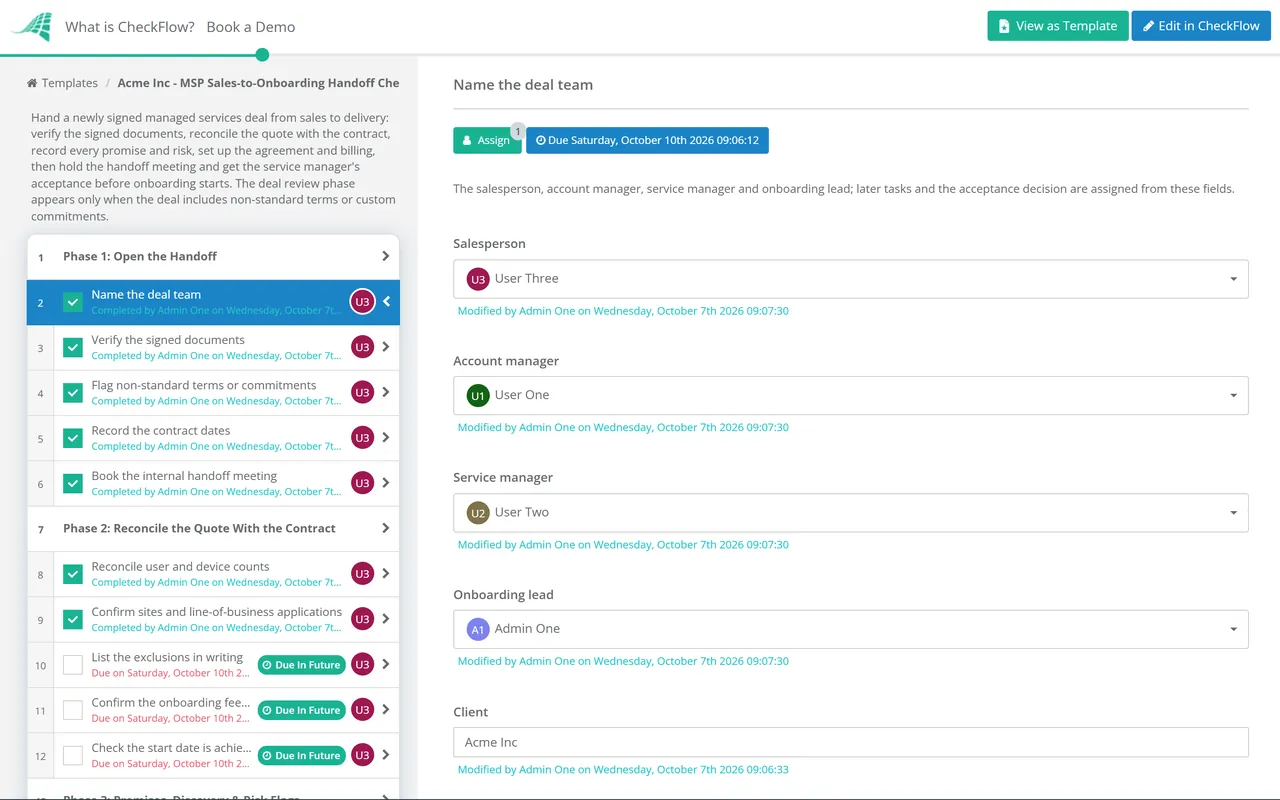
Phase 1: Open the Handoff

Start it on the day of signature, while the salesperson still remembers every conversation.

  • Name the deal team — the salesperson, account manager, service manager and onboarding lead; later tasks and the acceptance decision are assigned from these fields
  • Verify the signed documents — master services agreement, statement of work or service schedule and order form, all the final versions and signed by someone authorised to commit the client
  • Flag non-standard terms or commitments — answer Yes if anything differs from your standard agreement, price list or service catalogue
  • Record the contract dates — start date, minimum term, notice period, renewal terms and the date of the first invoice
  • Book the internal handoff meeting — within a few working days, so the client is not left waiting for someone to call
Phase 2

Phase 2: Reconcile the Quote With the Contract

Every line of the final quote is checked against the signed order form. Differences are corrected or explained before billing is set up.

  • Reconcile user and device counts — quoted, contracted and found in discovery, with any difference explained
  • Confirm sites and line-of-business applications — every site in scope, and who supports each application: the MSP, the software vendor or nobody
  • List the exclusions in writing — what the client is not buying, such as printers, the phone system, home networks or project work
  • Confirm the onboarding fee and what it covers — fixed or estimated, how it is invoiced and what remediation is priced separately
  • Check the start date is achievable — against the incumbent provider’s notice period, hardware lead times and your onboarding capacity
Phase 3

Phase 3: Promises, Discovery & Risk Flags

  • List every promise made during the sale — response times, projects, hardware, discounts, onsite days or a named engineer, wherever it was said
  • Attach the discovery findings — the network assessment report, tenant review, site notes and photographs
  • Record why the client is buying — the problem that started the conversation and the outcomes they expect in the first 90 days
  • Map the client contacts — decision-maker, day-to-day contact, finance contact and who can authorise changes and new users
  • Raise the risk flags — incumbent provider exit, compliance requirements, unsupported hardware or software, difficult stakeholders or a rushed timeline
Phase 4 — Non-Standard Deals Only

Phase 4: Deal Review

Shown only when the deal includes non-standard terms or custom commitments. Each item is reviewed with finance and the service manager before onboarding starts.

  • Review custom service levels — response or resolution targets and service hours that differ from the standard schedule, checked for deliverability
  • Review discounts and pricing exceptions — the amount, how long it lasts, who agreed it and how it will appear on the invoice
  • Review out-of-scope commitments — price it, schedule it as a project or agree with the client to withdraw it
  • Review unusual contract terms — liability caps, service credits, termination rights, data location or insurance requirements
  • Record the deal review outcome — each item accepted, accepted with a cost or to be renegotiated, with the reviewers named
Phase 5

Phase 5: Agreement & Billing Setup

  • Create the client and agreement in the PSA — company, sites, contacts, agreement type and an SLA plan that matches the signed schedule
  • Set up recurring billing — per-user and per-device lines with the contracted quantities, start date, billing cycle and any proration
  • Set up the onboarding fee invoice — upfront, staged or on go-live, as the order form says
  • Record the renewal terms — renewal date, notice period and any price review clause where the renewal process will find them
  • Order hardware and licences sold in the deal — with expected delivery dates set against the onboarding plan
Phase 6

Phase 6: Handoff Meeting & Acceptance

Onboarding does not start until the service manager has accepted the deal. A rejection goes back to sales with the reasons attached.

  • Hold the internal handoff meeting — salesperson, account manager, service manager, onboarding lead and vCIO, with the signed documents on screen
  • Answer the delivery team’s questions in writing — the salesperson closes each open question or records who will
  • Confirm the onboarding lead and capacity — a named lead and engineer, and a start date that fits the current workload
  • Approve delivery acceptance — the service manager accepts the deal, or answers Not approved and returns it to sales with the reasons
Phase 7

Phase 7: Welcome & Start Onboarding

  • Send the client welcome — from the account manager, introducing the onboarding lead and what happens in the next two weeks
  • Set expectations in writing — how to raise tickets during onboarding, when the SLA starts applying and what is not included
  • Book the client kickoff — with the decision-maker and day-to-day contact, inside the agreed start window
  • Start the MSP Client Onboarding Checklist — with this handoff record attached as its input
  • Close the handoff — the final record attached, and the salesperson’s ongoing role with the client agreed

What the Service Manager Checks Before Accepting a Deal

Acceptance should be a short, fixed test, not a judgement about the salesperson. The table lists common checks and the gap each one catches. A deal that fails any of them goes back to sales with the reason written on the task, and the onboarding start date moves rather than the standard.

Check Evidence on the handoff The gap it catches
Signed and completeAgreement, schedule and order form, final versions, signedOnboarding started on a verbal yes, or on a draft the client later changed
Counts reconciledUsers, devices and sites: quoted, contracted and discoveredBilling for 40 users while supporting 52 from the first month
Exclusions writtenA list of what the client is not buyingFree support for the phone system because nobody said it was out of scope
Promises listedEvery commitment, with where it was made and an ownerA project or response time the client remembers and delivery has never heard of
Discovery attachedAssessment report, tenant review, site notesAn onboarding estimate built on a guess about the estate
Risks flaggedIncumbent exit, compliance, unsupported kit, stakeholdersA hostile outgoing provider or an unsupported server found in week one
Billing readyPSA agreement and recurring lines that match the order formMonths of unbilled service, or an invoice the client disputes

Why exclusions matter as much as inclusions

Clients rarely read a service catalogue. They remember what they were told and assume the rest. A 2022 joint advisory on threats to MSPs, published by CISA with the UK’s NCSC and other national agencies, advised MSPs to explain clearly in the contract both the services a customer is buying and the services it is not, and advised customers to make sure the contract says whether the MSP or the customer owns each responsibility. The advisory was about security, but the principle holds for a printer or a home router too. If an exclusion is not written down at the handoff, it becomes an argument in the first month, and the service desk usually loses it.

  • Write exclusions in the client’s language, not as product codes.
  • Note who supports each excluded item instead, if anyone does.
  • Repeat the exclusions in the client welcome, so the decision-maker sees them before the first ticket.

Why Run Sales Handoffs in CheckFlow?

1

A gate that actually holds

The acceptance task is an approval assigned to the service manager. Until it is answered Approved, the welcome and onboarding tasks stay locked, and a Not approved answer records why the deal went back to sales.

2

Extra review only where it is needed

A single answer on the first phase shows or hides the deal-review phase, so standard deals move quickly and custom ones get finance and the service manager involved. Conditional logic keeps it to one template.

3

Every promise in one place

The signed documents, discovery report and list of commitments sit on the tasks as attachments and comments. Months later, when a client says they were promised something, the account manager can open the handoff and check.

The handoff is the first of the core processes in the MSP process management guide, because every later one inherits its mistakes. CheckFlow for MSPs runs it alongside onboarding, billing and reviews, and CheckFlow for client onboarding shows how the same approach works for any service business.

Discovery findings come from the IT Network Assessment Checklist, run before the proposal. Once the handoff is accepted, the MSP Client Onboarding Checklist takes over, and the billing lines set up here are checked every month by the MSP Billing Reconciliation Checklist.

Frequently Asked Questions

What is an MSP sales handoff?

+

It is the step between a signed managed services agreement and the start of client onboarding. The salesperson or account manager hands the delivery team everything they need to take the client on: the signed documents, reconciled user and device counts, exclusions, every promise made during the sale, discovery findings and known risks. In a well-run MSP it ends with the service manager formally accepting the deal before any onboarding work is scheduled.

Who should own the sales-to-onboarding handoff?

+

Sales should own producing it and delivery should own accepting it. The salesperson or account manager completes the record because they hold the knowledge, and the service manager decides whether it is complete enough to deliver. Splitting it that way stops two common failures: a salesperson who moves straight to the next deal, and an onboarding team that starts work on assumptions nobody checked.

What should happen when the service manager rejects a handoff?

+

The deal goes back to sales with the reasons written down, and the onboarding start date moves until the gaps are closed. Most rejections are quick to fix: a missing signature, counts that don’t match or an undocumented promise. If a rejection needs the client to agree a change, the account manager handles it before onboarding begins, not during. Review rejection reasons every quarter, because the same gap appearing repeatedly points to a sales process problem.

How should we handle a promise that isn’t in the contract?

+

Record it anyway, then decide. Either deliver it as stated, price it as a project, or have the account manager agree with the client in writing that it will not happen. What you should not do is leave it unrecorded, because the client will raise it and the service desk will have no context. A deal-review phase gives finance and the service manager a place to make that decision before onboarding starts.

When should the SLA start for a new MSP client?

+

Many MSPs start the full service levels at go-live, when the service desk cuts over and the agents are reporting, and offer best-efforts support while onboarding runs. Others apply the SLA from the contract start date for the systems already handed over. Either approach can work. The important thing is that the agreement states it, the welcome message repeats it and the PSA agreement measures from the same date.

Is CheckFlow free for this template?

+

14-day free trial, no card required. The Business plan is $10 per user per month after the trial. Full details at checkflow.io/pricing.

Accept Every New Client With the Whole Deal on File

Free trial — no credit card required.