
Owned by the contract or business owner
Covers: notice dates, performance, value for money and the choice to renew, renegotiate, terminate or rebid.
Ends: with a decision and, if you are leaving, the notice deadline.
Last reviewed: October 2026
No Credit Card Required
Printed from checkflow.io/templates/procurement-supply-chain/vendor-offboarding-checklist
Most vendor exits go wrong in the gaps between teams. Procurement serves notice, but IT never hears the date, the vendor keeps its badges and admin accounts, nobody asks for the data back, and accounts payable pays an invoice that arrives months later. This free vendor offboarding checklist is for procurement, vendor management and operations teams ending one vendor or supplier relationship, whether the contract is expiring, being terminated or ending by agreement. One run covers one vendor. It starts with the scope of the exit and a review of the notice, termination and exit clauses, then halts for an approval before any notice is served. After that it covers notice and the exit plan, the transition, access removal and asset recovery, data return or deletion, and the financial and record close-out. Answers on the first task add tasks for termination for cause, for a replacement vendor, an in-house takeover or a service that stops, and for vendors that process personal data.
Onboarding gives a vendor access and makes it payable. Offboarding has to undo both, usually in a hurry and often by people who weren’t there when the access was granted. The Vendor Onboarding Process Checklist and the Supplier Onboarding Checklist record what was set up. This checklist works back through it.
It is also a different job from deciding whether to stay. The Contract Renewal Reminder Checklist tracks notice dates and reaches the renew, renegotiate or terminate decision, and the Vendor Risk Assessment Checklist decides whether a vendor’s risk is acceptable. Vendor offboarding starts once you have decided to leave, and ends when nothing of the relationship is left open.
Covers: notice dates, performance, value for money and the choice to renew, renegotiate, terminate or rebid.
Ends: with a decision and, if you are leaving, the notice deadline.
Covers: notice, the transition, access removal, assets, data return or deletion, final invoices and the vendor record, with IT, finance and legal.
Ends: when every account, key, badge, data set and payment is closed, with evidence.
Covers: one employee’s accounts, devices and app access. The SaaS Access Offboarding Checklist takes it app by app.
Ends: when that person has no access left. It does not close a supplier contract.
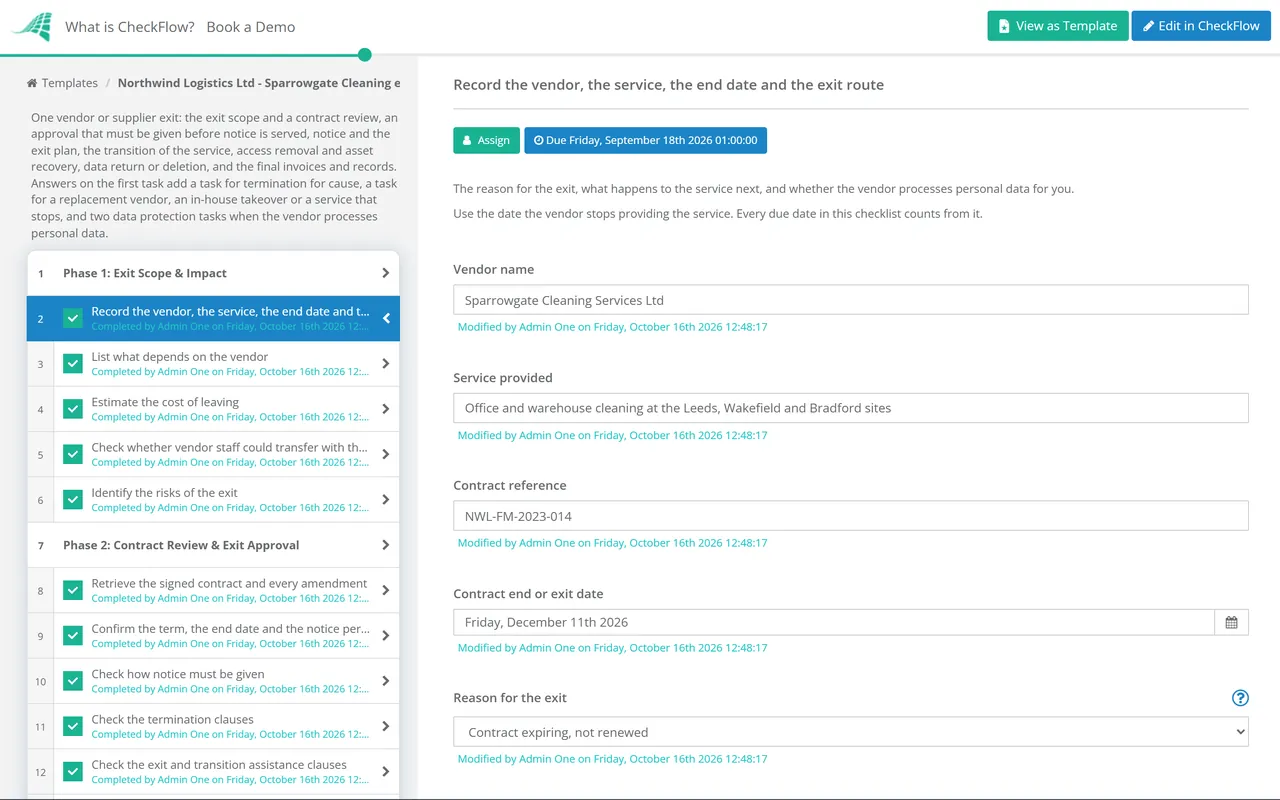
Seven phases take one vendor from the exit decision to a signed-off close. The checklist halts at the exit approval in Phase 2, and the answers on the first task add tasks in Phases 1, 2, 4 and 6.
The answers on the first task decide which tasks appear: termination for cause adds a task in Phase 2, the exit route sets the first tasks of Phase 4, and personal data adds two tasks in Phase 6.
No notice goes to the vendor until the exit approver records a decision on the last task. The checklist halts there.
The exit route on the first task shows one of the first three tasks. The rest apply to every exit.
The access tasks are assigned to the IT or security lead named on the first task. Remove access on the last service date, not weeks after it.
Two tasks appear when the vendor processes personal data for you. Under Article 28(3)(g) of the UK GDPR and the EU GDPR, the choice between return and deletion is yours as controller.
Every due date in the template counts from the contract end or exit date you enter on the first task, so the whole plan moves if the date changes. The timeline assumes a notice period of about a month. The notice period, not the end date, decides when you must start: if the contract needs three or six months’ notice, start Phase 1 earlier and move the Phase 3 due dates so the notice arrives before its deadline.
| When | What happens | Owner | Phase |
|---|---|---|---|
| 12 weeks before the end date | Scope the exit: dependencies, cost, staff transfer and risks | Procurement or vendor manager | 1 |
| 10–11 weeks before | Contract review and the exit approval | Procurement, legal and the exit approver | 2 |
| 6–7 weeks before, or earlier for a longer notice period | Notice prepared, served and acknowledged | Procurement or legal | 3 |
| 5 weeks before | Exit plan agreed, stakeholders told, new orders stopped | Procurement with the vendor | 3 |
| 1–3 weeks before | Replacement or in-house team ready, knowledge handed over, handover period run, access and data listed, return or deletion instructed, returned data checked | Business owner, IT and the privacy lead | 4, 5 and 6 |
| End date | Last service; accounts, keys and badges removed; assets recovered | IT or security lead and facilities | 4 and 5 |
| 1–2 weeks after | Activity recheck, vendor equipment removed, purchase orders closed, sub-processors confirmed | IT, facilities and procurement | 5, 6 and 7 |
| 30 days after | Final invoices reconciled, credits claimed, deletion confirmed | Finance and the privacy lead | 6 and 7 |
| 45–60 days after | Vendor blocked in the vendor master, registers updated, lessons learned, sign-off | Procurement, finance and the exit approver | 7 |
Your data has to come back or be deleted. Where the vendor processes personal data on your behalf, Article 28(3)(g) of the UK GDPR and the EU GDPR requires the processing contract to say that the processor, at the controller’s choice, deletes or returns all the personal data after the services end, and deletes existing copies unless the law requires it to keep them. Article 28(4) requires the processor to pass the same data protection obligations to any sub-processor it uses. The choice is yours, so make it in writing before the last service date and ask for written confirmation of deletion that covers the sub-processors too. If you keep a record of processing activities under Article 30, update it when the processor goes.
Staff may move with the service. In Great Britain, the Transfer of Undertakings (Protection of Employment) Regulations 2006 can apply when a service such as cleaning, security or catering moves from one contractor to another, or comes back in-house. Regulation 3(1)(b) calls this a service provision change. Among other conditions, it needs an organised grouping of employees whose principal purpose is carrying out that service for you. Where it applies, regulation 11 requires the outgoing contractor to give the new employer employee liability information at least 28 days before the transfer, unless special circumstances make that not reasonably practicable. Ask early, and take employment law advice before you assume it does or does not apply.
Banking regulators expect an exit plan too. In the US, the Interagency Guidance on Third-Party Relationships issued by the Federal Reserve, the FDIC and the OCC in June 2023 treats termination as a stage of the third-party life cycle. It lists what a banking organisation typically considers: options for transitioning the service, the capabilities, resources and time needed, termination costs and fees, data retention and destruction, system connections and access control, and joint intellectual property.
The contract review ends in an approval step assigned only to the exit approver. The checklist halts there, so notice cannot be prepared or served until the exit route, the cost and the notice date are agreed, and the decision records who approved it and when.
Three answers on the first task change what appears. Termination for cause adds the breach and cure period task, the exit route shows the replacement, in-house or stopping task and the staff transfer check, and a vendor that processes personal data adds the sub-processor and record of processing tasks. Conditional logic keeps the rest out of the way.
Due dates are set from the contract end date on the first task, before it for notice and handover and after it for the final invoices and sign-off. Access tasks go to the IT or security lead you name, and each exit sits in the Reports Grid with the evidence attached to the task it proves.
Vendor offboarding is the end of the same life cycle that onboarding starts. CheckFlow’s vendor onboarding software shows how legal, security and finance steps run in sequence at the start, and the vendor onboarding guide explains why access granted then has to be revoked one vector at a time.
For a vendor with deep system access, the Third-Party Remote Access Review Checklist finds remote connections that outlived their purpose, and the SaaS Access Offboarding Checklist covers the same app-by-app work when a person, rather than a supplier, leaves. Before you sign the replacement, the Vendor Risk Assessment Checklist and the Supplier Onboarding Checklist start the cycle again.

Vendor Onboarding Process Checklist

Vendor Oversight Checklist

Contract Renewal Reminder Checklist
Business Closure Checklist

TUPE Transfer Checklist
Describe the process in a sentence and the AI checklist generator drafts the phases and tasks for you.
It should cover the whole exit, not only the access. Start with the scope and a contract review of the notice period, termination and exit assistance clauses, then get the exit approved before notice is served. After notice, agree an exit plan, transition the service, remove every account, key and badge, recover your assets, get your data returned or deleted with written confirmation, reconcile the final invoices, close purchase orders and block the vendor in the vendor master. Finish with updated registers and a lessons-learned review.
Decide and scope the exit, review the contract, approve the exit, serve notice in the form the contract requires, agree an exit plan with the supplier, hand the service to the replacement or your own team, remove access and recover assets, deal with your data, then close the finances and the records. This checklist runs those steps as seven phases, with due dates counted from the contract end date so the order and the timing are the same for every supplier.
Earlier than the end date suggests. The notice deadline is the real starting point, because notice that arrives late can renew the contract for another term. Allow time before it for the contract review and the exit approval, and enough time after it for the vendor to hand over and for a replacement to be onboarded. For a contract with about a month’s notice, the template starts twelve weeks before the end date; start earlier for longer notice periods.
List every route in first: named and admin accounts in the identity provider, accounts in applications outside single sign-on, shared logins, API keys and integration tokens, VPN and remote support tools, and physical access such as badges, keys, fobs and alarm codes. Disable or revoke each one on the last service date, rotate any shared credentials the vendor knew, keep evidence, and check the sign-in, VPN and badge logs about a week later for anything that was missed.
It depends on the contract and on the vendor’s role. Where the vendor processes personal data on your behalf, the UK GDPR and the EU GDPR require the processing contract to say that it deletes or returns all the personal data at your choice after the service ends, and deletes existing copies unless the law requires it to keep them. Give a written instruction for each data set, check what is returned, and ask for written confirmation of deletion that covers backups and sub-processors.
It can. In Great Britain, a change of contractor, or bringing a service back in-house, can be a service provision change under the TUPE Regulations 2006, which means the staff who mainly work on your contract may transfer to the new employer. It depends on conditions such as there being an organised grouping of employees whose principal purpose is your service. Where it applies, the outgoing contractor must share employee liability information at least 28 days before the transfer. Take employment law advice early.
Onboarding sets a vendor up: documents, checks, the contract, the vendor master record and access. A vendor risk assessment decides whether the risk of using a vendor is acceptable, before contract and at each reassessment. Offboarding comes last and undoes the setup: notice, transition, access removal, data return or deletion, final payments and a blocked vendor record. Running all three in CheckFlow keeps the onboarding record beside the exit that closes it.
14-day free trial, no card required. The Business plan is $10 per user per month after the trial. Full details at checkflow.io/pricing.
14-day free trial, no credit cardFull refund in your first 30 daysUS hosting, EU on request