A cyber insurance application is now a security questionnaire, and every answer on it is a representation. If an answer turns out to be wrong, the policy may not be there when the client needs it.
Cyber insurers used to ask a handful of questions. Today’s applications, and the ransomware supplements that often come with them, ask in detail about multi-factor authentication, endpoint detection and response, backups, patching, remote access and incident response. Someone at the client signs the answers. In practice it is usually their MSP who knows whether those answers are true. This free cyber insurance readiness checklist gives MSPs and in-house IT teams a structured way to prepare for a new application or a renewal. It scopes what the policy covers, checks each control that underwriters commonly ask about, collects the evidence that proves it, and closes any gaps before the application is signed. A conditional remediation phase appears when the review finds something missing, so the client’s signature is never the first time anyone notices.
The case most often cited in the industry is Travelers v. International Control Services. In 2022, after a ransomware attack, Travelers went to court in Illinois seeking to rescind the company’s cyber policy. The application, signed by the company’s CEO, had stated that multi-factor authentication protected administrative access. Travelers said MFA was in fact in place only on the firewall, and the attackers had come in through a server that had none. The company agreed to rescission and the policy was declared void from the start, so there was no cover for the attack.
The lesson for MSPs is not that insurers look for excuses. It is that “yes” on an application has to mean yes everywhere the question covers. “We use MFA” is not the same as “MFA is enforced on every admin account, every remote access route and every mailbox”. The client signs, but the client relies on you to know the difference, and on you for the evidence that shows it.
What the application asks
“Is MFA required for all remote access?”
Tempting answer: “Yes”, because the VPN has MFA.
What it can miss: the remote support tool, a legacy remote desktop gateway or a supplier’s standing connection.
Risk: an answer that is wrong at the time of signing, and a dispute about it after a claim.

What readiness means
Every answer backed by evidence
Method: list every remote access route, then check each one.
Evidence: a conditional access or MFA report, and an external scan showing no exposed remote desktop.
Outcome: an accurate answer, with any gap either fixed before signing or disclosed and explained.
What the Cyber Insurance Readiness Checklist Covers
Seven phases take the client from renewal notice to a signed, evidenced application. Phase 6 appears only when the review finds a control that is missing or only partly in place.
Phase 1
Phase 1: Scope the Application
Start 60 to 90 days before the renewal date. Remediation takes longer than the application does.
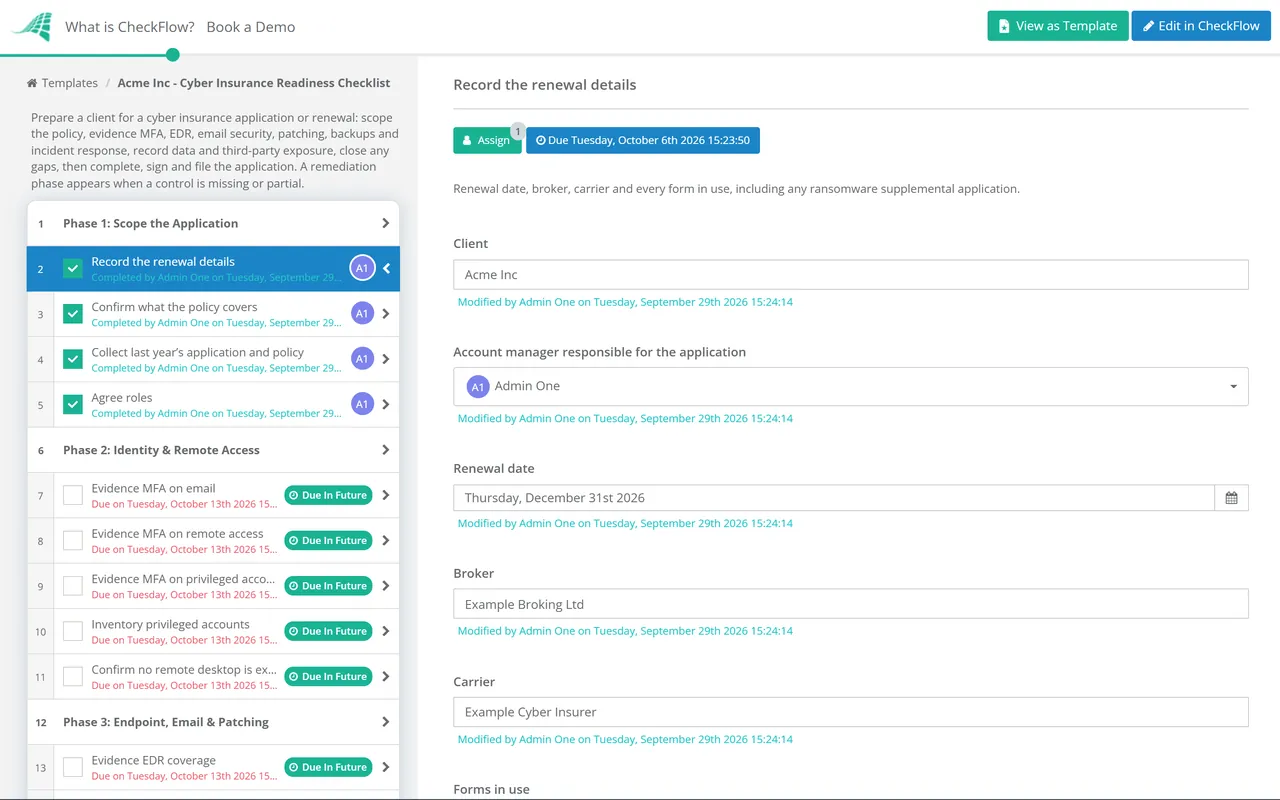
Record the renewal details — renewal date, broker, carrier and every form in use, including any ransomware supplemental application
Confirm what the policy covers — legal entities, domains, sites, cloud tenants and any subsidiaries
Collect last year’s application and policy — previous answers, conditions, exclusions and any subjectivities that had to be met
Agree roles — who at the client signs the application, and who at the MSP supplies and evidences the technical answers
Phase 2
Phase 2: Identity & Remote Access
Evidence MFA on email — an export showing MFA enforced for every mailbox, including shared and service mailboxes that allow sign-in
Evidence MFA on remote access — VPN, remote desktop gateways, remote support tools and any supplier connections
Evidence MFA on privileged accounts — domain and cloud admins, the backup console and security tool consoles
Inventory privileged accounts — named admin accounts separate from day-to-day accounts, with service accounts listed and owned
Confirm no remote desktop is exposed to the internet — an external scan of the client’s public IP addresses
Phase 3
Phase 3: Endpoint, Email & Patching
Evidence EDR coverage — agent count against the asset inventory for workstations and servers, and whether alerts are monitored around the clock
Check email security — filtering in place and the status of SPF, DKIM and DMARC for every sending domain
Evidence patching — current patch compliance and the time taken to apply critical updates
List end-of-life systems — every unsupported operating system or application, and how each one is isolated
Evidence security awareness training — completion rates and phishing simulation results for the last 12 months
Phase 4
Phase 4: Backup, Recovery & Incident Response
Evidence backup coverage — critical servers, endpoints in scope and cloud tenants, with the backup schedule
Confirm a protected backup copy — at least one copy that is offline, immutable or otherwise isolated from the production domain’s credentials
Record the latest restore test — the system restored, the date and how long it took
Review the incident response plan — current, with named contacts, and including the insurer’s breach hotline and any requirement to use its panel vendors
Record the last tabletop exercise — date, scenario and attendees, or schedule one
Phase 5
Phase 5: Data & Third-Party Exposure
Estimate sensitive records held — personal, payment and health records, since applications often ask for approximate counts
List third parties with network access — suppliers, software vendors and your own MSP tooling, with how each one connects
Confirm funds transfer controls — call-back verification for new payees and bank detail changes, if the policy covers social engineering fraud
Mark each application question — evidenced, partial or missing — so the gaps are clear before anyone signs
Phase 6 — If Gaps Found
Phase 6: Close the Gaps
Shown only when one or more controls are missing or partial. Conditional logic keeps it out of the way for a client who is already ready.
Build the remediation plan — each gap with an owner, a cost and a date that falls before the application is due
Get the client’s approval — for remediation work and budget, recorded against the plan
Tell the broker early — about any gap that won’t be closed in time, so it can be explained rather than discovered
Re-evidence each fixed control — and update the question status from missing or partial to evidenced
Phase 7
Phase 7: Complete, Sign & File
Draft answers from the evidence — where the honest answer is partial, say so and explain the compensating control, and never round up
Link each answer to its evidence — so anyone can see why each answer was given
Client signatory reviews and signs — the MSP supplies evidence but does not sign on the client’s behalf
File the submitted application and the policy — plus any warranties, conditions or subjectivities with their deadlines
Update the incident response plan — with the policy number, the breach hotline and any panel vendor requirements
Controls Underwriters Commonly Ask About, and the Evidence That Proves Them
No two carriers use the same application, and requirements change with the size of the business, the industry and the limit being bought. The controls below come up on most applications and ransomware supplements. They are the ones broker and insurer guidance most often lists as expected, though no single carrier requires all of them in the same form. Treat the table as a preparation list, not as any carrier’s underwriting criteria, and always answer the questions on the actual form in front of you.
Control
What applications commonly ask
Evidence to keep
Multi-factor authentication
Enforced for email, remote access and privileged accounts
Conditional access or MFA enforcement report; list of exceptions
Endpoint detection and response
Deployed on all endpoints and servers; whether it is monitored 24/7
Agent count against the asset inventory; MDR or SOC contract if applicable
Backups
Frequency, an offline or immutable copy, restore testing
Backup job report; restore test record
Patching and end-of-life software
How quickly critical patches are applied; unsupported systems and how they are isolated
Patch compliance report; end-of-life register
Remote access
Remote desktop exposed to the internet; VPN with MFA
External scan; remote access inventory
Email security
Filtering, sender authentication, awareness training
DMARC record; training and phishing simulation reports
Privileged access
Separate admin accounts; who has domain or global admin rights
Privileged account inventory
Incident response
A written plan; whether it has been tested
Plan with version date; tabletop exercise record
In the UK, the National Cyber Security Centre’s cyber insurance guidance suggests organisations should expect to give insurers information about their security controls, and notes that recognised certifications such as Cyber Essentials can help. UK organisations with a turnover under £20 million that certify their whole organisation to Cyber Essentials are also entitled to cyber liability cover through the scheme. The NCSC is also clear that insurance does not replace security controls: it pays for recovery, it doesn’t prevent the attack.
Why Run Cyber Insurance Readiness in CheckFlow?
1
Evidence attached to every answer
Each control is a task, and the MFA report, EDR export or restore test record is attached to the task it proves. When the broker, the carrier or a claims adjuster asks why an answer was given, the evidence and the date it was collected are already there.
2
Starts itself before every renewal
Set a recurring schedule for each client’s renewal date, less 90 days. The checklist appears with the scoping phase assigned to the account manager and the evidence phases assigned to the engineers who can produce them, with no calendar reminder to miss.
3
Gaps become a plan, not a surprise
When a control is marked missing or partial, conditional logic brings in the remediation phase, with owners and dates. The client sees the plan and approves the budget before signing, not after a claim.
Cyber insurance readiness is one of the most valuable recurring services an MSP can offer, because it connects your security stack to something the client’s finance director already cares about. See how MSPs run it alongside onboarding, monthly reviews and QBRs on the MSP process management software page.
It is a structured check, done before a cyber insurance application or renewal, that confirms each security control the insurer asks about is really in place and collects the evidence that proves it. Gaps are either fixed before the application is signed or disclosed accurately. For MSP clients it is usually run by the MSP, with the client’s signatory reviewing the result.
What security controls do cyber insurers require?
+
It varies by carrier, industry, company size and the limit being bought, so always work from the actual application. The controls that come up most often are MFA on email, remote access and privileged accounts; endpoint detection and response; backups with an offline or immutable copy and tested restores; timely patching and control of end-of-life systems; no remote desktop exposed to the internet; email security and awareness training; and a written, tested incident response plan.
What happens if an answer on the application is wrong?
+
That depends on the policy wording and the law that governs it, and it is a question for the client’s broker or lawyer. The risk is real, though. In Travelers v. International Control Services (2022), the insurer sought to rescind a cyber policy after a ransomware attack, saying the application had overstated how MFA was used. The insured agreed and the policy was declared void. Accurate answers, with the evidence behind them, are the best protection.
When should we start preparing for a renewal?
+
Sixty to ninety days before the renewal date is a practical starting point. Collecting evidence takes a few days, but closing a gap such as rolling out MFA to every remote access route, or deploying EDR to servers, can take weeks. Starting early means the client can choose between fixing the gap and disclosing it, rather than facing that choice the week the form is due.
Should the MSP complete the client’s insurance application?
+
The MSP should supply the technical answers and the evidence behind them. The client’s authorised signatory should read and sign the application, because the representations are theirs. Keep a record of what you supplied and when. It is also worth checking your own MSP agreement and professional liability cover for how they treat this kind of advice.
Does this checklist replace our broker?
+
No. The broker advises on cover, limits, carriers and policy wording, and the checklist doesn’t touch any of that. What it does is make sure the technical picture you give the broker is accurate and evidenced, which usually makes the broker’s job easier and the conversation with the underwriter shorter.
Is CheckFlow free for this template?
+
14-day free trial, no card required. The Business plan is $10 per user per month after the trial. Full details at checkflow.io/pricing.
Answer Every Question Once, With Evidence, Before the Client Signs
Free trial — no credit card required.
Do you like cookies? 🍪 We use cookies to ensure you get the best experience on our website. Learn more