A renewal is the one point in the term when scope, price and terms can all change at once. Start late and the only thing left to decide is whether to sign the same agreement again.
Many managed services agreements renew themselves. That sounds convenient until you look at what renewed: a per-user price set three years ago, before your tool costs rose; a scope that never mentioned the second site; an SLA schedule the client now quotes back at you; and security responsibilities nobody wrote down. The renewal is the moment to fix all of it, and it only works if the work starts months before the term ends. This free managed services agreement renewal checklist gives account managers, service managers and MSP owners a repeatable renewal process for every client. Starting around 120 days out, it confirms the notice dates, measures what the agreement actually earns, reviews service and scope, sets the price uplift, reviews the terms and routes the renewal pricing for internal approval before any proposal goes to the client. A conditional phase handles clients who have given notice or look likely to leave.
A Reminder Tells You the Date. A Renewal Process Decides What Happens on It.
Our Contract Renewal Reminder Checklist is written for the customer side of any contract: track the dates, decide whether to renew, renegotiate or leave, and send notice in time. An MSP is on the other side of that table. Your client may be running exactly that process on you, and the questions they ask will be about value for money, service performance and whether the terms still fit. This checklist prepares your answers before they ask.
Scope: whatever was signed, whatever you now deliver.
Terms: unchanged, including the parts that no longer fit.
Client: never asked, so never told why it is worth renewing.

Managed renewal
Reviewed, priced, approved, signed
Price: set from real margin and the uplift the agreement allows.
Scope: matched to the users, devices and services you support.
Terms: SLA, security, liability and exit reviewed.
Client: a proposal and a meeting, with a signed renewal on file.
What the Agreement Renewal Checklist Covers
Seven phases take an agreement from about 120 days before the term ends to a signed renewal and updated systems. Phase 2 appears only when the client has given notice or the account is at risk.
Phase 1
Phase 1: Open the Renewal
Open it around 120 days before the term ends, or earlier if the notice period is long. The notice deadline, not the end date, drives every other date.
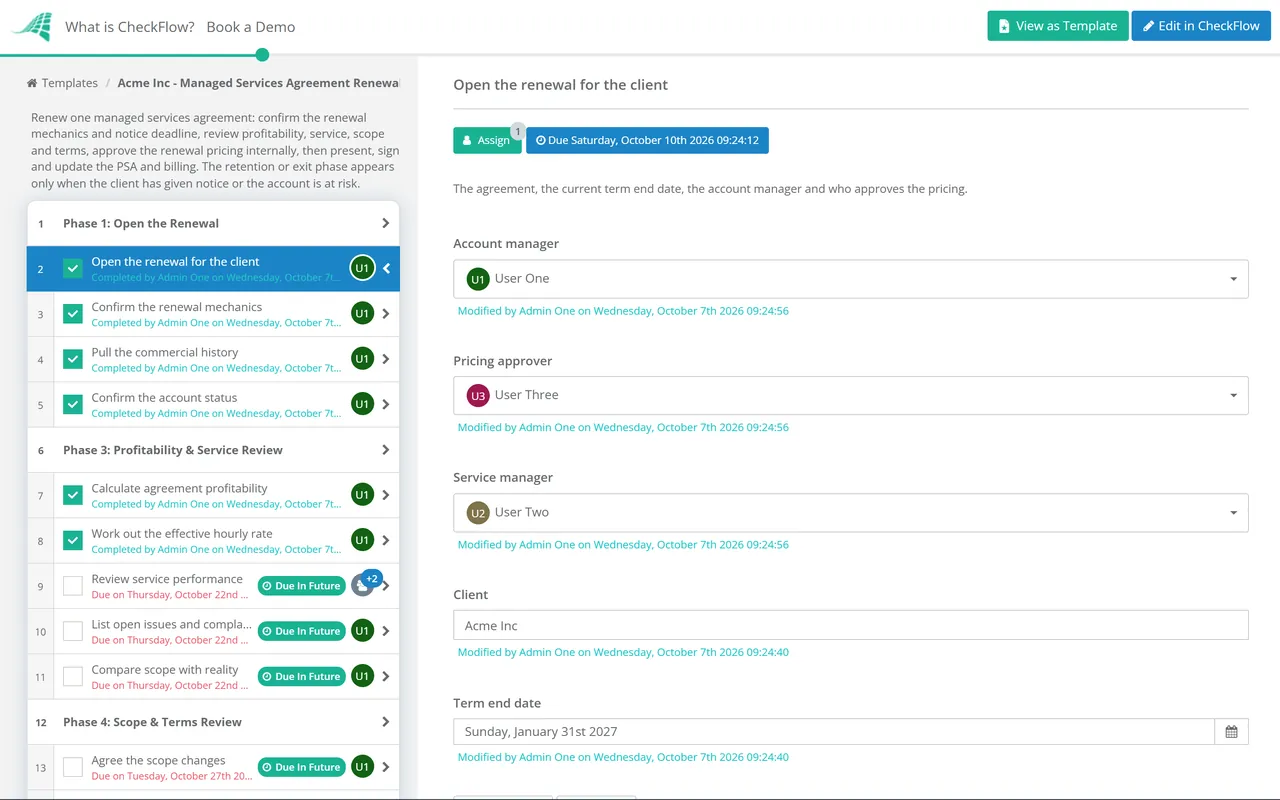
Open the renewal for the client — the agreement, the current term end date, the account manager and who approves the pricing
Confirm the renewal mechanics — auto-renewal clause, renewal term length, notice period, how notice must be given and the last date either side can give it
Pull the commercial history — current fees, uplifts applied in the term, discounts, credits issued and projects sold
Confirm the account status — whether the client has given notice or the account is at risk, from the latest health checks and QBR
Phase 2 — Notice Given or At Risk
Phase 2: Retention or Exit
Shown only when the client has given notice or the account is at risk. If the decision is to let the client go, close the renewal here and start offboarding.
Find out why — a conversation with the decision-maker, not the day-to-day contact, recorded in their words
Check the notice is valid — given in the form and within the period the agreement requires, and the date the term actually ends
Build a save plan — service fixes, scope or price changes and an executive sponsor, with what each costs you
Record the retention decision — save, renegotiate or let go, with the reasons and who decided
Start offboarding if the client is leaving — hand the account to the offboarding checklist with the confirmed end date
Phase 3
Phase 3: Profitability & Service Review
Calculate agreement profitability — the last twelve months of revenue against labour from time entries and per-seat tool and licence costs
Work out the effective hourly rate — recurring revenue less pass-through costs, divided by the hours logged against the agreement
Review service performance — SLA trend, health scores and QBR outcomes across the term
List open issues and complaints — anything unresolved that the client will raise in the renewal meeting
Compare scope with reality — users, devices, sites and services supported against what the agreement covers and bills
Phase 4
Phase 4: Scope & Terms Review
Agree the scope changes — services to add or retire, revised user and device counts and anything delivered free that should be in scope
Review the SLA schedule — targets, service hours and credits against what you can deliver and what the client now needs
Review security responsibilities — who owns MFA, patching, backups, monitoring and incident response, written into the agreement
Review liability, insurance and indemnities — caps, exclusions and whether your cover still matches the client’s size and data
Review termination and data return — notice periods, exit fees, handover obligations and how client data is returned or deleted
Phase 5
Phase 5: Pricing & Approval
Nothing goes to the client until the pricing is approved. The approver sees the margin, the uplift and the scope changes together.
Check vendor cost changes — licences, security, backup and other per-seat costs that have risen or will rise during the new term
Calculate the price uplift — using the mechanism the agreement allows, such as an index, a fixed percentage or pass-through of vendor increases
Set the renewal price and term — per-user or per-device prices, the term length and any incentive for a longer commitment
Approve the renewal pricing — the service manager or MD answers Approved or Not approved, with the margin and the proposal attached
Phase 6
Phase 6: Proposal & Signature
Prepare the renewal proposal — the term in review, scope and price changes with the reason for each, and the new terms
Hold the renewal meeting — with the decision-maker, ideally at or just after a QBR, to walk through the proposal
Record any negotiated changes — each change re-approved internally if it moves the price or the margin
Send the renewal for signature — the order form, amended schedules or new agreement, before the notice deadline
Record the signed renewal — attach the client’s signed documents and note the new term dates
Phase 7
Phase 7: Update Systems & Close
Update the PSA agreement — prices, quantities, services, SLA and the new start and end dates
Tell billing the effective date — so the new prices appear on the first invoice of the new term and not before
Update the documentation platform — the agreement, scope and any changed responsibilities
Diary the next renewal — the new notice deadline and the date to open the next renewal checklist
Hold a short internal review — what went well, what the client pushed back on and what to change in the template
The dates below are common practice for an annual or multi-year agreement with a 90-day notice period, not a rule. If your notice period is longer, move everything earlier. The aim is to have an approved proposal in front of the client before the notice deadline, while both sides still have room to negotiate.
Days before term end
What happens
Phases
120
Open the renewal, confirm the notice deadline, check account status
1, 2 if at risk
110 to 100
Profitability, service and scope review
3
100 to 95
Terms review, vendor costs, uplift and internal approval
4, 5
95 to 90
Proposal sent and renewal meeting held, before the notice deadline
6
90 to 30
Negotiation, re-approval of any changes, signature
6
30 to 0
PSA, billing and documentation updated for the new term
7
A worked effective hourly rate
Treat this as an illustration of the arithmetic, not a target. A client pays £3,600 a month for 30 users at £120 each. Per-seat licences, security and backup tools that you pass through cost you £1,050 a month. Over twelve months, time entries against the agreement total 300 hours.
Annual revenue is £43,200. Pass-through costs are £12,600, leaving £30,600 for labour and margin.
£30,600 ÷ 300 hours gives an effective hourly rate of £102.
If your target is £120 an hour, the gap is about £5,400 a year, or £15 per user per month. Some of that may come from the uplift, some from scope that should be billed, and some from fixing the repeat issues driving the hours.
The figure is only as honest as the time entries behind it: work logged to the wrong agreement, or not at all, makes a busy client look profitable. Check time logging before relying on the figure.
Four things to check before you price
Microsoft 365 prices changed on 1 July 2026. Microsoft raised several commercial suites, including Business Basic, Business Standard and Microsoft 365 E3, while Business Premium stayed at its previous price. Existing subscriptions keep their price until their next renewal, so check when each of the client’s subscriptions renews during your new term.
Read the uplift clause, not your memory of it. If it ties increases to an index, use the index it names, such as UK CPI published monthly by the Office for National Statistics or the US CPI from the Bureau of Labor Statistics, and the month it specifies.
Write security responsibilities down. The joint CISA, NCSC and partner advisory on threats to MSPs recommends that contracts transparently set out who owns each security role and responsibility. A renewal is the easiest time to add that schedule.
Watch for regulation. In the UK, the Cyber Security and Resilience Bill would bring medium and large managed service providers under regulation, with the Information Commission as regulator. It completed its Lords committee stage in September 2026 and was not yet law. Allow for it in long terms.
Why Run Agreement Renewals in CheckFlow?
1
No renewal starts late
Each renewal checklist can come from a recurring schedule set well ahead of the notice deadline, with due dates working back from the term end. The account manager sees the profitability review due weeks before the notice date, not the week after it.
2
Pricing approved before the client sees it
The proposal tasks wait until the service manager or MD answers Approved, with the margin workings attached. When a negotiation moves the price, the change goes back for approval and the record shows who agreed what.
3
At-risk clients handled on purpose
Conditional logic adds the retention phase only when a client has given notice or looks likely to leave, so the save plan and the decision are recorded rather than improvised on a phone call.
Renewals are where the lifecycle in the MSP process management guide comes full circle. CheckFlow for MSPs runs onboarding, monthly reviews, QBRs, renewals and offboarding across every client from one place.
The health scores and service figures this checklist relies on come from the Monthly Client Health Check and the SLA Performance Review. Run them through the term and the renewal review takes an hour, not a week.
When should an MSP start the agreement renewal process?
+
Around 120 days before the term ends is common practice for an agreement with a 90-day notice period, so that an approved proposal reaches the client before the notice deadline. Work back from that deadline rather than the end date. If the notice period is longer, or the client is large or at risk, start earlier. Clients scored red in the months before should go into the retention phase straight away.
Should managed services agreements auto-renew?
+
Auto-renewal protects revenue against forgotten dates, which is why many MSPs use it. It does not replace a renewal review. An agreement that renews unchanged keeps last year’s price and scope, and a client who feels trapped by a clause they had forgotten is a poor reference. If your agreements auto-renew, run the checklist anyway and use the renewal to agree changes rather than to surprise anyone.
How much should an MSP increase prices at renewal?
+
Whatever the agreement allows and the numbers justify. Start with the uplift clause: an index, a fixed percentage or pass-through of vendor increases. Then look at the effective hourly rate and vendor cost changes during the new term. Explain every increase in the proposal with the reason behind it. A clear explanation of rising licence and security costs is usually accepted far more readily than an unexplained percentage.
What if the client asks for a discount to renew?
+
Ask what they are comparing you with, then decide on the numbers. A discount on an agreement already below your target hourly rate makes a loss-making client worse. Alternatives that cost less include a longer term at the current price, a phased increase or removing a service the client does not use. Any change that moves the price or margin goes back for internal approval before you agree it.
Are multi-year managed services agreements a good idea?
+
They can be, for both sides. The client gets price certainty and you get predictable revenue and time to recover onboarding costs. The risk is cost movement during the term, so make sure the agreement allows annual uplifts or pass-through of vendor price changes. Keep an exit route for serious service failure, because clients are far more willing to sign a long term when they know they are not trapped.
Is CheckFlow free for this template?
+
14-day free trial, no card required. The Business plan is $10 per user per month after the trial. Full details at checkflow.io/pricing.
Renew Every Agreement on Purpose, Not by Default
Free trial — no credit card required.
Do you like cookies? 🍪 We use cookies to ensure you get the best experience on our website. Learn more