Is the supplier trustworthy?
Cadence: before contract, then annually by tier.
Looks at: the vendor’s controls, evidence, contract and residual risk.
Misses: the accounts, agents and rules its engineers use day to day.
No Credit Card Required
Printed from checkflow.io/templates/cybersecurity/vendor-remote-access-review-checklist
This free third-party remote access review checklist is for IT and security teams who need to know, every quarter, how outsiders can reach their systems. It covers managed service providers, software vendors with support access, contractors, and the equipment suppliers who maintain building systems, production lines or medical devices remotely. Each cycle lists every route in, gives each one an internal owner and a contract, checks for named accounts, MFA and least privilege, confirms vendor accounts are switched on only when needed, compares sessions with tickets, looks for remote access tools nobody approved, and removes what is no longer needed before a named approver signs the review off.
Vendor due diligence asks whether a supplier is trustworthy: its controls, certifications, finances and contract terms. That is the job of the Vendor Risk Assessment Checklist, and it runs before contract and then about once a year. It rarely asks how the vendor’s engineers actually connect today. Remote access drifts much faster than a contract. An engineer sets up an agent during an outage, a firewall rule is added for a one-off migration, the vendor’s staff change, and a VPN account created three years ago is still enabled for someone who left.
This is the route attackers like. The 2013 Target breach is the best-known example: attackers stole network credentials from Fazio Mechanical Services, a heating and refrigeration contractor, and used them to get onto Target’s network before reaching the payment systems. A 2014 staff analysis for the US Senate Commerce Committee identified requiring two-factor authentication for vendor access as one point where the attack could have been stopped. In 2023 CISA, NSA and MS-ISAC warned that attackers use legitimate remote monitoring and management (RMM) software to get in and stay in, and the joint Guide to Securing Remote Access Software, from CISA, the FBI, NSA, MS-ISAC and Israel’s National Cyber Directorate, followed in June 2023.
Cadence: before contract, then annually by tier.
Looks at: the vendor’s controls, evidence, contract and residual risk.
Misses: the accounts, agents and rules its engineers use day to day.
Cadence: quarterly, plus when a contract ends.
Looks at: every route in, its owner, authentication, access window, logging and use.
Output: a current route register, removed routes and a signed review.
Cadence: quarterly or half-yearly per system.
Looks at: every account and entitlement on in-scope systems.
Misses: agents, firewall rules, modems and partner admin relationships.
Run the three together. Vendor accounts found here feed the User Access Review Checklist, and vendor IP rules found here should match what the Firewall Rule Review Checklist sees on the firewall itself.
Seven phases run on a quarterly schedule, from listing every route to signing the review off. The removal phase appears only when the review finds a route to restrict or remove.
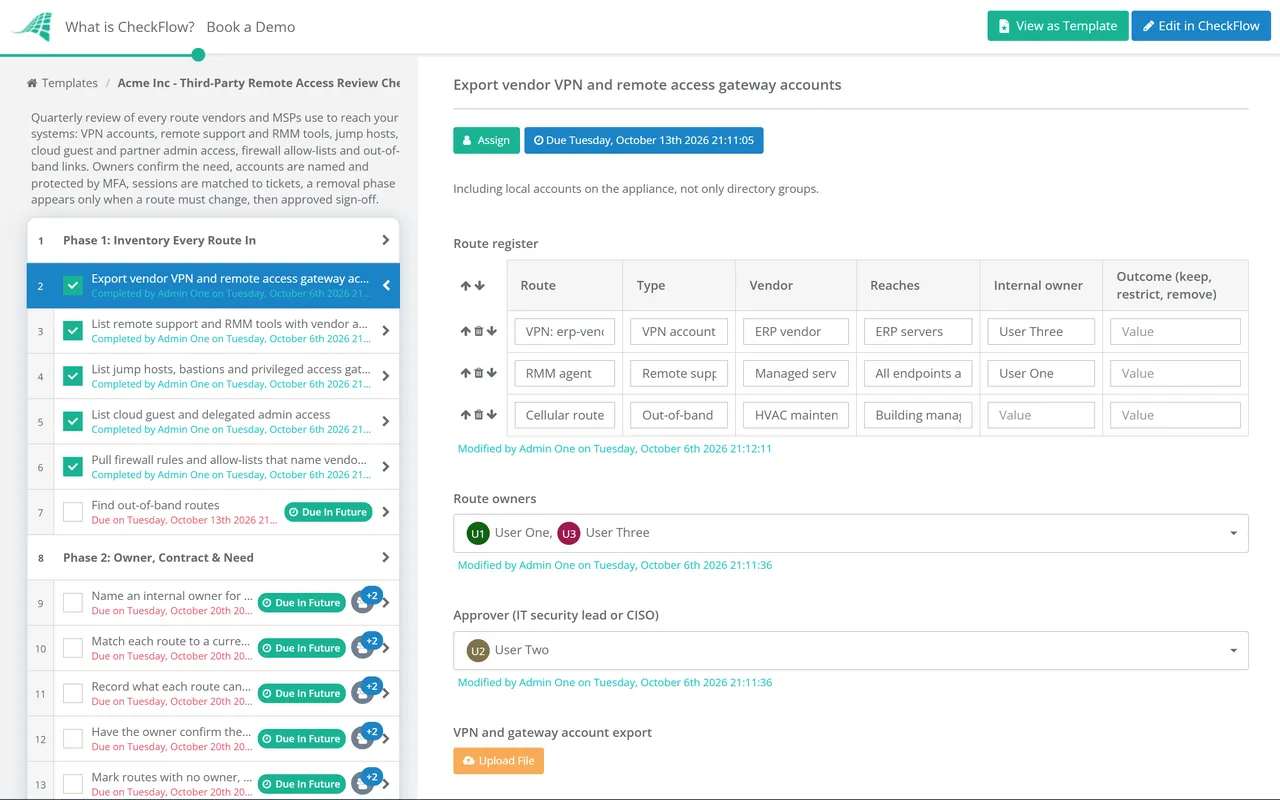
Owned by the IT security lead. Each route goes into the route register table with its type, vendor and what it reaches.
Assigned to each route’s internal owner, with the IT security lead checking the answers.
Unexplained activity found here opens a security incident.
Appears only when the last task of Phase 5 records that at least one route needs to be restricted or removed.
The sign-off task is an approval for the IT security lead or CISO. The checklist recurs quarterly.
Most frameworks treat supplier access in two places: supplier management, and access control or remote access. PCI DSS is the most specific about vendor accounts. The table names each reference and the phase whose output you would hand an assessor.
| Framework | Reference | What it expects | Evidenced in |
|---|---|---|---|
| PCI DSS v4.0.1 | 8.2.7 | Accounts used by third parties for remote access enabled only during the time needed, disabled when not in use, and monitored for unexpected activity | Phases 4 and 5 |
| PCI DSS v4.0.1 | 8.4.3 | MFA for all remote network access from outside the entity’s network that could reach or affect the cardholder data environment, including third parties | Phase 3 |
| NIST SP 800-53 Rev. 5 | AC-17, MA-4 | Each type of remote access authorised and restricted; nonlocal maintenance approved, monitored, strongly authenticated and ended when complete | Phases 1, 3 and 4 |
| NIST SP 800-53 Rev. 5 | SA-9 | External service providers meet your security requirements, with oversight and ongoing monitoring of their compliance | Phases 2 and 7 |
| ISO/IEC 27001:2022 Annex A | A.5.19–A.5.22 | Supplier security requirements agreed, ICT supply chain risk managed, and supplier services monitored and reviewed | Phases 2, 5 and 7 |
| SOC 2 (2017 TSC) | CC9.2 | Risks from vendors and business partners assessed and managed | Phases 2 and 7 |
| CIS Controls v8.1 | 15.1, 15.7, 6.4 | Inventory of service providers; providers securely decommissioned, including account deactivation; MFA for remote network access | Phases 1, 3 and 6 |
Your assessor or auditor decides what evidence is sufficient for your scope, so treat the table as a starting point, not legal or audit advice. PCI DSS 7.2.4 also requires user accounts, including third-party accounts, to be reviewed at least every six months; a quarterly cycle meets that and keeps each review small. For the full programmes, see the PCI DSS 4.0 Compliance Checklist and the ISO 27001 Compliance Checklist.
The route register lives in a table inside the checklist, and each route’s owner confirms the need by name. A route nobody will claim is visible as exactly that, rather than hidden in a firewall export.
The removal phase appears only when the review finds a route to restrict or remove, so a clean quarter stays short and a messy one cannot close until each change is evidenced.
A quarterly recurring schedule creates the next cycle automatically, with the same tasks and owners. The audit trail shows who confirmed each route and who signed the review, which is the evidence a PCI assessor or SOC 2 auditor asks for.
CheckFlow is not a remote access gateway, privileged access tool or endpoint agent; it runs the human side around them: who owns each route, who confirmed it is still needed, and proof it was removed. Use vendor onboarding software to grant vendor access the right way in the first place, with the contract, NDA and security review completed before any account is created.
Access granted when a new tool is bought belongs in the review from day one, so record it in the SaaS Procurement Security Review Checklist and add it to the route register. When a contract ends, close the vendor’s routes the same week rather than waiting for next quarter.
Describe the process in a sentence and the AI checklist generator drafts the phases and tasks for you.
It is a periodic check of every way an outside organisation can connect to your systems: VPN accounts, remote support and RMM agents, jump hosts, cloud guest and partner admin access, firewall rules for vendor addresses, and modems on equipment. For each route it confirms there is an internal owner, a current contract and a real need, that access is by named accounts with MFA, that it is switched on only when needed and logged, and that anything no longer needed is removed.
Quarterly is a common cadence, and routes should also be closed whenever a contract ends or a vendor engineer leaves. PCI DSS v4.0.1 requires user accounts, including third-party accounts, to be reviewed at least every six months, and its requirement 8.2.7 expects third-party remote access accounts to be enabled only when needed, which in practice means checking them far more often than once a year.
Requirement 8.2.7 says accounts used by third parties to access, support or maintain system components via remote access are enabled only during the time needed, disabled when not in use, and monitored for unexpected activity. Requirement 8.4.3 requires MFA for all remote network access from outside your network that could reach or affect the cardholder data environment, including access by third parties and vendors. Confirm scope with your QSA.
Start with your software inventory and endpoint management tool, and search for remote desktop and RMM products by name and publisher, on servers as well as laptops. Compare the results with your approved list. CISA’s 2023 guidance notes that attackers favour legitimate remote access tools because security software often trusts them, so an unexpected install is worth investigating rather than simply removing. Application control can then stop the tools from coming back.
They should not. A shared account means you cannot tell who did what, cannot remove one person when they leave the vendor, and usually cannot enforce MFA properly. Ask for a named account per engineer. Where an equipment supplier genuinely cannot support that yet, record a time-limited exception with compensating controls such as access only through a monitored jump host and a password changed after every session.
Granular delegated admin privileges (GDAP) is how Microsoft partners such as MSPs and resellers get admin access to a customer’s Microsoft 365 tenant. It replaced the older delegated admin model, which granted broad standing rights. Each GDAP relationship sets the roles granted and a duration of up to two years, and some can auto-extend. Customers can see and remove partner roles on the Partner relationships page of the Microsoft 365 admin centre, which makes it a quick, high-value check every quarter.
14-day free trial, no card required. The Business plan is $10 per user per month after the trial. Full details at checkflow.io/pricing.
14-day free trial, no credit cardFull refund in your first 30 daysUS hosting, EU on request