
Why and where
Trigger: a data centre exit or a hosting contract ending.
Owner: the CIO or IT director.
Output: the business case, the landing zone and the order of waves.
No Credit Card Required
Printed from checkflow.io/templates/information-technology/cloud-migration-checklist
This free cloud migration checklist takes one workload, or one wave of workloads, from discovery to the day the source is switched off. Infrastructure teams and MSPs use it for moves to AWS, Azure and Google Cloud. It covers dependency mapping, a 7 Rs decision per workload, landing zone readiness, a cost baseline that includes data transfer, wave planning, a go/no-go approval, a time-boxed rollback, hypercare and decommissioning.
Most cloud migration guides describe the programme: the business case, the landing zone, the operating model. That work is done once. What gets repeated dozens of times is moving one workload safely, and that is where detail gets lost between spreadsheets and tickets. This checklist is the runbook you open for each workload.
Trigger: a data centre exit or a hosting contract ending.
Owner: the CIO or IT director.
Output: the business case, the landing zone and the order of waves.
Trigger: a workload’s turn in the wave plan.
Owner: the migration lead, with the business owner accepting the result.
Output: a workload running in the target, tested, accepted, and its source switched off.
Trigger: a schedule, usually quarterly.
Owner: the platform or security team.
Output: findings on access, configuration and cost drift.
AWS describes large migrations in three phases: assess, mobilise and migrate, with wave planning as one of the most important mobilise activities. Microsoft’s Cloud Adoption Framework asks for a strategy decision for every workload before it moves. Both point to the same unit of work, and this checklist is built around it. Once a workload has settled, it joins the regular Cloud Security Review Checklist like everything else in the estate.
Seven phases take a workload from discovery to a switched-off source. The strategy chosen in Phase 2 decides which Phase 5 tasks appear, a go/no-go approval halts the checklist before cutover, and the decommissioning tasks appear once the owner accepts the result.
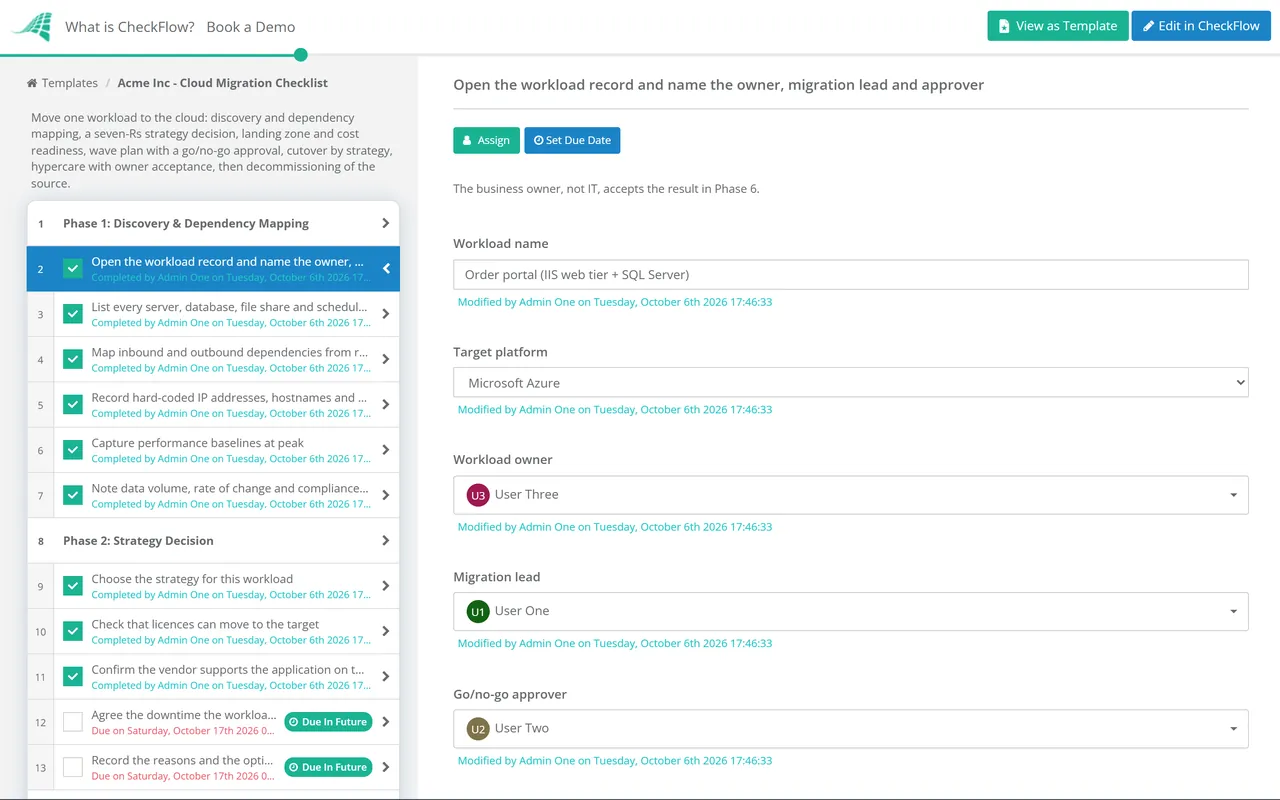
The first task names the workload owner, the migration lead and the go/no-go approver, and records the target platform.
The Migration strategy dropdown on the first task shows the matching Phase 5 tasks. Retain or Retire shows the last task instead, which records the reason and a date.
The approver named on the first task records Approved or Not approved on the last task. The checklist halts there, and nothing is cut over until they decide.
The second, third and fourth tasks appear only for the strategy chosen in Phase 2.
The acceptance result is a dropdown. Accepted shows the decommissioning tasks in Phase 7.
The decommissioning tasks appear only once the owner has accepted the workload in Phase 6.
Phase 2 records one strategy per workload. AWS Prescriptive Guidance names seven, building on the list Gartner published in 2019. Microsoft’s Cloud Adoption Framework uses eight: it has no separate Relocate, splits Refactor into Refactor, Rearchitect and Rebuild, and calls Repurchase Replace. Use whichever vocabulary your team knows; what matters is that the decision is recorded.
| Strategy | What changes | Typical method | Watch for |
|---|---|---|---|
| Rehost | Nothing in the application; servers move as they are | Block-level replication, then a short cutover | Oversized instances copied from on-premises sizing |
| Relocate | The hosting location, at hypervisor level | Moving VMs to the same platform in the cloud | Platform licences and support terms |
| Replatform | Some components, for example a self-managed database to a managed service | Database replication with change data capture | Version and feature differences in the managed service |
| Refactor | The architecture, to use cloud-native services | A release through the deployment pipeline | Scope growth; the migration becomes a development project |
| Repurchase | The product, usually to SaaS | Data export, transformation and import | Data that does not map to the new product |
| Retain | Nothing for now | None | No revisit date, so it never gets revisited |
| Retire | The workload is switched off | Decommissioning | Records that still need to be kept |
Data transfer is the cost most often missing from the Phase 3 estimate, and it runs both ways. In 2024 AWS, Microsoft and Google each started waiving internet data transfer charges for customers moving their data off their platform, on request through support or an exit notice. In the EU, the Data Act already limits switching charges, data egress included, to the provider’s direct costs, and abolishes them from 12 January 2027. Neither covers the egress a running workload generates every day, which is what the estimate has to capture.
Check the tools in your plan too. AWS Migration Hub and AWS Application Discovery Service closed to new customers on 7 November 2025, and AWS points new migrations to AWS Transform. Existing customers keep access.
The go/no-go task is assigned to the approver picked on the first task, and the checklist halts until they record Approved or Not approved. Test launch results attach to the tasks they prove, so the decision is made on evidence, not on the date in the plan.
The strategy dropdown shows replication tasks for a rehost, database tasks for a replatform and import tasks for a repurchase. A table in the wave task holds one row per workload, and a data set keeps the workload list consistent across waves.
Owner acceptance shows the decommissioning tasks, each with an assignee and a due date. The audit trail shows who approved cutover and who accepted the result, and tags keep each client’s migrations apart for MSPs.
Each cutover is a normal change, raised and closed through the IT Change Management Checklist. CheckFlow’s change management checklist software shows how approvals, halts and evidence work across IT changes.
DNS switches at cutover follow the DNS Change Checklist, and new alerts for the migrated workload are set up with the Monitoring & Alerting Setup Checklist. Moving mailboxes rather than servers? Use the Email Migration Checklist.
Server Decommissioning Checklist
Cloud Security Review Template
IT Change Management Process Template
SharePoint Migration Checklist
Database Migration Checklist
Describe the process in a sentence and the AI checklist generator drafts the phases and tasks for you.
The seven strategies AWS uses to classify each workload: Rehost (lift and shift), Relocate (move at hypervisor level), Replatform (lift and reshape), Refactor or re-architect, Repurchase (usually a move to SaaS), Retain (keep it where it is for now) and Retire (switch it off). Microsoft’s Cloud Adoption Framework uses a similar list with Rearchitect, Rebuild and Replace. The point of either list is to make a deliberate decision for every workload rather than defaulting to lift and shift.
By dependency first, then by risk. Workloads that talk to each other constantly should move together, or the latency between cloud and on-premises shows up as a performance problem. Early waves usually carry low-risk workloads, so the runbook is refined before anything critical moves.
Usually it means pointing traffic back at the source, which is why the source is powered off during cutover rather than deleted. Agree the trigger and a time-box before the window. If users have already written data to the target, rolling back also means bringing that data back, so make the call before production traffic arrives.
Data transfer into the major clouds is generally free. Leaving is different: since 2024 AWS, Azure and Google Cloud waive internet data transfer charges for customers moving their data off the platform, but you have to request it, and AWS and Azure already include the first 100 GB a month free. Day-to-day egress from a running workload is still charged, and it belongs in the cost estimate.
After hypercare, once the business owner has accepted the workload and nobody needs a rollback. Until then, keep the source powered off but intact. After acceptance, remove it: an old server left running carries cost, licences and unpatched risk.
14-day free trial, no card required. The Business plan is $10 per user per month after the trial. Full details at checkflow.io/pricing.
14-day free trial, no credit cardFull refund in your first 30 daysUS hosting, EU on request