Product Launch Event Checklist Template

The stage demo froze, a trade site ran the story an hour before the reveal, and nobody followed up the guests who asked for a trial. A launch event works when the room, the stream and the launch go out together.

Last reviewed: November 2026

Printed from checkflow.io/templates/event-planning/product-launch-event-checklist

This free product launch event checklist is for marketing, product marketing and events teams running the day a new product is shown. One run plans one event, in person, livestreamed or both, from the goals about twelve weeks before to the results review after it. It agrees the goals, the audience and the budget and ties the event to the wider launch, books the venue or the stream, and builds the guest list with the account owners. If press or analysts are coming, it agrees the embargo with each of them and prepares the press kit. It writes the run of show around the reveal, scripts the stage demo with a backup, times the reveal with the moment the launch goes public and rehearses twice. The launch owner decides go or no-go three working days before. Then come the day itself, the leads followed up by their owners, the coverage tracked and the results compared with the goals.

A Launch Event Is One Day Inside the Launch

A product launch event is the day a new product is shown to customers, partners, press and analysts, in a room, on a livestream or both. It carries its own risks: a live demo in front of an audience, journalists who have seen the news under embargo, and a reveal that has to happen at the same minute as the website, the blog and the email go live.

This checklist plans that one event, from the goals about twelve weeks before to the leads, coverage and results after it. The go-to-market plan around it belongs in the Product Launch Checklist. An online-only session with registration and a slide deck is a webinar, planned in the Webinar Setup & Promotion Checklist, and an event that is not built around a product reveal fits the Event Planning Checklist.

This checklist

One launch event

For: the day the product is shown, to an audience in a room, online or both.

Planned around: the guest and press list, the stage demo and its backup, the embargo, rehearsals, the go/no-go and the reveal timed with the launch.

Output: a reveal that lands on time, leads with owners, tracked coverage and results against the goals.
The wider launch

The go-to-market plan

For: everything a launch needs over two or three months, with or without an event.

Planned around: positioning, competitive analysis, product readiness, the website, sales enablement, content and PR, launch day and the month after.

Use: the Product Launch Checklist.

Other events

A webinar or a general event

For: an online session with registration and promotion, or an event with no product reveal.

Planned around: the platform, promotion and show rate, or the brief, venue, programme and logistics.

Use: the Webinar Setup & Promotion Checklist or the Event Planning Checklist.

What the Product Launch Event Checklist Covers

Nine phases take one launch event from the goals about twelve weeks before to the results review, and every due date counts in working days from the date of the event entered on the first task. The format chosen there shows the venue tasks, the livestream tasks or both, with a task to plan for the online audience when the event is both. Inviting press or analysts adds the embargo, the press kit, the briefings and the press tasks on the day and after it. Nothing after the launch owner’s go/no-go, three working days before, can be completed until it is recorded, and Go with conditions or No-go adds the task that follows from it.

  1. Phase 1

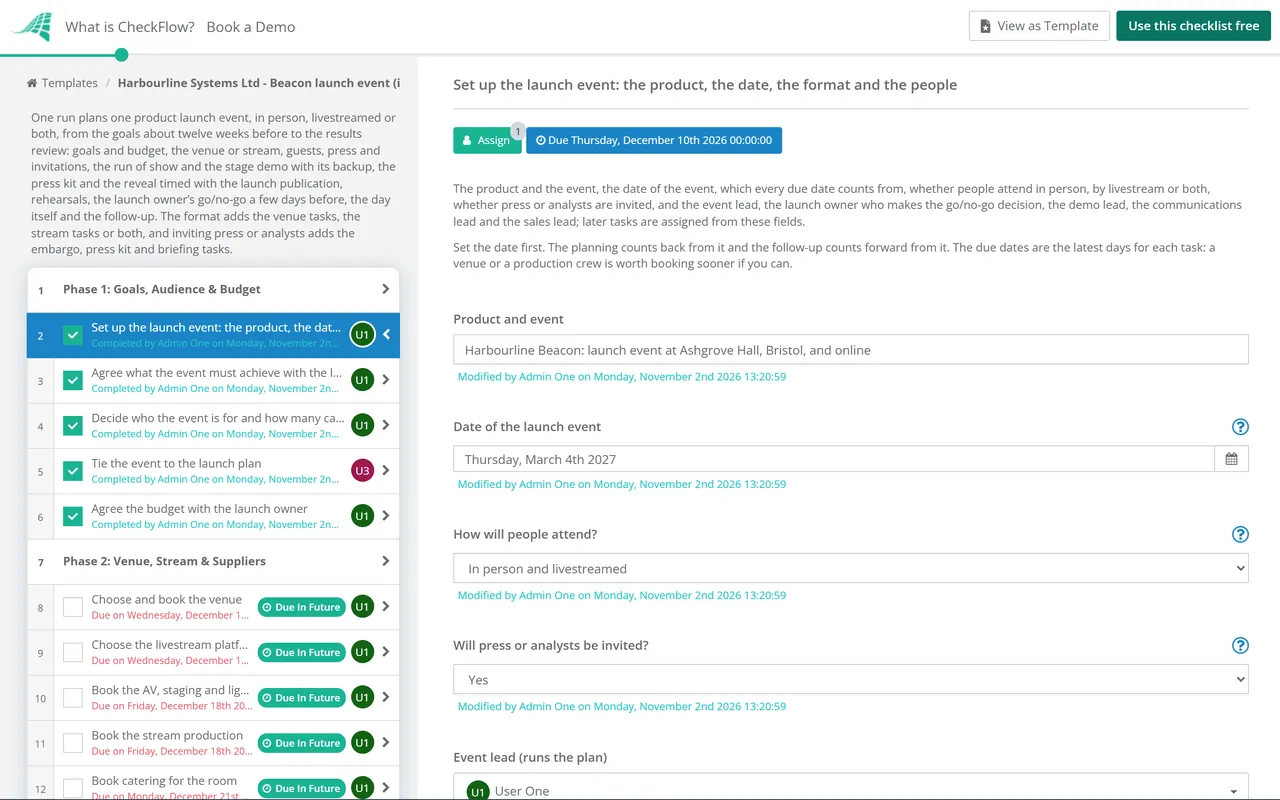
    Phase 1: Goals, Audience & Budget

    5 tasks

    Start about twelve weeks before the event. Enter the date of the event on the first task: every due date counts from it in working days. Agree what the event is for, who it is for and how it fits the wider launch, and set the budget.

    • Set up the launch event: the product, the date, the format and the people — the product and the event, the date of the event, which every due date counts from, whether people attend in person, by livestream or both, whether press or analysts are invited, and the event lead, the launch owner who makes the go/no-go decision, the demo lead, the communications lead and the sales lead; later tasks are assigned from these fields
    • Agree what the event must achieve with the launch owner — two or three goals, such as coverage in named publications, a number of qualified leads, customers who sign up for early access or partners who commit, with how each will be measured after the event
    • Decide who the event is for and how many can attend — customers, prospects, partners, press, analysts and staff, the number the room holds, the number the stream should reach, and whether guests may bring a colleague
    • Tie the event to the launch plan — the launch date and the time the launch goes public, what is announced on the day and what stays confidential, who owns the wider launch plan, and the publication steps the reveal must line up with
    • Agree the budget with the launch owner — the venue or studio, AV and staging, the stream and its crew, catering, demo kit, travel for speakers and press, printing and a contingency, from quotes where you have them
  2. Phase 2

    Phase 2: Venue, Stream & Suppliers

    5 tasks

    Book the room, the stream or both early, while the venues and crews you want are free. The answer on the first task shows the tasks this event needs.

    • Choose and book the venue — shown for an event in a room: capacity, a stage with good sightlines and screens, space for the demo stations, power and a reliable network for the demo, a quiet room for press, access, set-up times and the contract terms
    • Choose the livestream platform — shown when the event is livestreamed: where the audience watches, registration and joining links, the audience it must handle, captions, chat or questions, recording and viewing on demand, and who owns the account on the day
    • Book the AV, staging and lighting — shown for an event in a room: sound, microphones for every speaker and for questions, screens or projection that show the demo clearly, lighting, a stage manager, and a confidence monitor for the speakers
    • Book the stream production — shown when the event is livestreamed: cameras, a vision mixer, a feed from the stage screen so viewers see the demo, sound for the stream, an operator for the platform, and what happens if the connection drops
    • Book catering for the room — shown for an event in a room: drinks on arrival, food for every diet, serving times that fit the reveal and the demo stations, and the date final numbers are due
  3. Phase 3

    Phase 3: Guests, Press & Invitations

    6 tasks

    Build the guest list with the account owners and invite people with enough notice. If press or analysts are invited, agree the embargo with each of them before they see anything.

    • Build the guest list — customers, prospects and partners proposed by their account owners, each with who invites them and why, checked against the numbers for the room and the stream
    • Draw up the press and analyst list — shown when press or analysts are invited: the journalists, analysts and creators who cover your market, who contacts each one, and whether each is asked to the event, to a briefing before it or to both
    • Send a save-the-date — the date, the rough timing, in person or online, and that details will follow, without saying what will be launched
    • Send the invitations and open registration — the date, the times, the venue or the joining link, an outline of the agenda without the secret, the reply date, a link to your privacy notice, and who to tell about access or dietary needs
    • Invite press and analysts and agree the embargo — shown when press or analysts are invited: the invitation and, with each person who accepts it, the embargo in writing: what it covers, the date, time and time zone it lifts, and that embargoed material goes only to people who agreed to it
    • Chase replies and confirm numbers — a reminder to everyone who has not replied, account owners asked to follow up their own guests, and the numbers for the room and online
  4. Phase 4

    Phase 4: Run of Show, Speakers & Stage Demo

    7 tasks

    Write the run of show around the reveal, confirm who speaks and script the stage demo with a backup ready to switch to. The demo carries the most risk on the day, so it gets its own script, data and rehearsal.

    • Confirm the speakers and brief them — who speaks, for how long and on what, any customer or partner on stage and their agreement to speak, what each may say before the reveal, and travel and timings
    • Write the run of show — minute by minute from doors to close: the welcome, the keynote, the reveal, the stage demo, any customer or partner, questions and the demo stations, with every cue for slides, video, lights and the stream
    • Script the stage demo and prepare its backup — the story the demo tells, the exact steps, the data and accounts it uses, a recorded backup of the same demo, a second machine, and the cue and the person who decides to switch to the backup
    • Plan the demo stations — shown for an event in a room: how many, what each one shows, who staffs it, the devices and network, accounts that reset between guests, and how interest is captured for the sales team
    • Plan for the online audience — shown when the event is in a room and livestreamed: a host for the online audience, how their questions reach the stage, a camera on the demo screen, and what online viewers see while the room is at the demo stations
    • Finish the slides, videos and reveal assets — the keynote slides, the launch video, product images, holding slides for the stream, and every file in its final version on the presentation machine and on a backup
    • Prepare answers to the hard questions — pricing, availability, the roadmap, competitors, known limits and anything you cannot say yet, agreed with the launch owner for every speaker and the demo station staff
  5. Phase 5

    Phase 5: Press Kit, Embargo & Reveal Timing

    5 tasks

    Line up the reveal on stage with the moment the launch goes public. The press kit is ready under embargo, staff know what stays confidential and the team working the event knows its jobs.

    • Prepare the press kit — shown when press or analysts are invited: the press release, a fact sheet with pricing and availability, product images and video, speaker biographies and the press contact, each marked with the embargo date, time and time zone
    • Time the reveal with the launch publication — the minute of the reveal in the run of show, the website, blog, email and social posts set to publish at that moment, the embargo lifting at the same time, the time zone, and the one person who gives the go on the day
    • Tell staff what stays confidential until the reveal — what can and cannot be said or posted before the reveal, who may speak to press, and what to do if someone outside asks
    • Brief press and analysts under embargo — shown when press or analysts are invited: briefings before the event for the people who agreed to the embargo, the press kit sent to them only, interview slots with the speakers, and a record of who has seen what
    • Brief the team working the event — roles on the day, the run of show, the demo stations, how leads are captured and passed to sales, what is confidential until the reveal, and who to call when something goes wrong
  6. Phase 6

    Phase 6: Demo Freeze & Rehearsals

    4 tasks

    Freeze the demo, then rehearse twice: a technical rehearsal of the demo, the screens and the stream, and a full run-through with every speaker against the clock.

    • Freeze the demo build, data and accounts — the version that will be shown, reset data, accounts that will not expire on the day, updates and notifications switched off on the presentation machines, and no change after this without the demo lead
    • Test the stream end to end on a private link — shown when the event is livestreamed: the feed from the stage camera and the demo screen, sound, captions, the backup connection, the recording, and how it looks on a phone and a laptop
    • Run the technical rehearsal — the stage demo on the event’s own network and machines, the switch to the backup tried once, slides, videos, microphones and cues, and the stream where there is one
    • Hold the full run-through with every speaker — the whole run of show in order and against the clock, the reveal cue, the demo, questions and the hand-over to the demo stations, with timings cut where it runs long
  7. Phase 7

    Phase 7: Go/No-Go & Final Details

    6 tasks

    A few days before, the launch owner decides whether the event goes ahead with the reveal. Nothing after that decision can be completed until it is recorded. Then send the final details and set up.

    • Confirm the product, demo and content are ready — the product available at the reveal time, the demo through the rehearsals with the backup tested, the slides and videos final, the launch publication scheduled for the reveal, the press kit ready and the numbers confirmed, with anything still open
    • Launch owner decides go or no-go on the event — Go, Go with conditions or No-go, based on the readiness check and the rehearsals: whether the product, the demo and the content are ready for the reveal
    • Meet the conditions before the doors open — shown when the launch owner says go with conditions: each condition the launch owner set, such as a demo path cut or a feature left out of the reveal, met and confirmed to them
    • Postpone the reveal or change the event — shown on a no-go: guests, speakers, press and suppliers told, the embargo moved or released in writing, the launch publication held, and a new date or a different event agreed with the launch owner
    • Send the final details to guests — the times, the address and directions or the joining link, what to bring, and who to contact on the day
    • Set up the room and the demo stations — shown for an event in a room: the stage, screens and sound checked, the demo machines on the event network, the demo stations set up and reset, signage, check-in and the press area ready
  8. Phase 8

    Phase 8: Event Day & the Reveal

    7 tasks

    On the day the plan is in place. Guests and viewers arrive, the product is revealed on cue as the launch goes public, the demo runs, and every lead is captured with an owner.

    • Check guests in and welcome them — shown for an event in a room: names checked, badges given, press and analysts met and taken to their area, and guests who did not reply but arrive welcomed
    • Open the stream and watch it throughout — shown when the event is livestreamed: the holding slide on before the start, the stream started on time, someone watching the live picture, sound and chat, and the backup ready
    • Reveal the product on cue as the launch goes public — the go given at the agreed minute, the website, blog, email and social posts live, the embargo lifted, and a check that each one published
    • Run the stage demo, switching to the backup if needed — the demo as rehearsed, the demo lead watching, and the switch to the backup at the agreed cue if anything goes wrong
    • Look after press and analysts on the day — shown when press or analysts are invited: their seats, interviews with the speakers after the reveal, and the press kit released to everyone once the embargo lifts
    • Capture leads and interest — who visited each demo station or asked a question online, what they want next, and the account owner for each, in one list for the sales team
    • Close the event — the thank-you from the stage, the stream ended and the recording saved, guests seen off, the room cleared and the kit returned
  9. Phase 9

    Phase 9: Follow-Up, Coverage & Results

    6 tasks

    Follow up while the event is fresh: thank people, get every lead to its owner, track the coverage and compare the results with the goals set in Phase 1.

    • Send the thank-you and the recording — a thank-you to everyone who came or watched, the recording or highlights to people who registered and missed it, and the next step, such as early access or a demo
    • Follow up every lead — each lead contacted by its account owner, what they asked for sent, and the follow-up recorded in your CRM, by email only as the rules allow where each person is
    • Follow up press and analysts — shown when press or analysts are invited: answers to their questions, the images and interviews they asked for, and thanks to those who covered the launch
    • Track the coverage and mentions — articles, analyst notes, posts and video that mention the launch, with the date, the link and what they said, against the coverage goal
    • Reconcile the costs against the budget — every invoice against the agreed budget, the reason for each difference, and the actual cost
    • Review the results against the goals — each goal from Phase 1 against what happened: coverage, leads and what has become of them so far, attendance and viewing, the demo and the costs, with what to keep and change for the next launch event

Formats and Follow-Up at a Glance

In person, livestream or both: what each format adds

The format chosen on the first task decides which tasks a run shows. Everything in the last row applies to every launch event.

Part of the plan In person Livestream only Both
Venue, AV and catering (Phase 2)YesNoYes
Livestream platform and production (Phase 2)NoYesYes
Demo stations (Phase 4)YesNoYes
A plan for the online audience (Phase 4)NoNoYes
Stream test on a private link (Phase 6)NoYesYes
Room and demo station set-up (Phase 7)YesNoYes
Guest check-in on the day (Phase 8)YesNoYes
Opening and watching the stream (Phase 8)NoYesYes
Guest list, run of show, stage demo, rehearsals, go/no-go, reveal and follow-upYesYesYes

Following up guests by email, UK and US

Phase 9 has each lead followed up by its account owner. The task carries these notes, so the first email after the event follows the rules where each person is.

Topic United Kingdom United States
Marketing email to peopleNot to individuals, who include sole traders and some partnerships, without their specific consent, unless the soft opt-in applies: your own previous customers, about similar products or services, who were offered an opt-out (ICO guidance on PECR).Commercial email must say it is an advertisement unless the recipient gave prior affirmative consent (15 U.S.C. 7704).
Marketing email to businessesYou can email a company, a limited liability partnership or a government body; it is good practice to keep a list of businesses that object (ICO).The same CAN-SPAM rules apply whoever receives it.
Opting outGive individuals a simple way to opt out in every message and a valid contact address (ICO).A working opt-out and a valid physical postal address in every message; honour an opt-out within 10 business days (15 U.S.C. 7704).
Headers and subject linesDo not disguise or conceal who you are (ICO).No misleading header information and no subject line likely to mislead about the content (15 U.S.C. 7704).

Under review. The ICO says its guidance on electronic mail marketing is under review because of changes made by the Data (Use and Access) Act 2025, and may change. Elsewhere, check the rules where each person is. Embargoes, timings and the roles in this checklist are practice, not law.

Sources. ICO: Electronic mail marketing; Cornell LII: 15 U.S.C. 7704, other protection for users of commercial electronic mail. This table is not legal advice.

Why Run Launch Events in CheckFlow?

1

A plan that moves with the event date

Enter the date of the event and every task falls due a set number of working days before or after it, from the goals about twelve weeks out to the results review. If the event moves, change the date once and the plan follows. Tasks are assigned from the five people named on the first task, and overdue alerts go to whoever is assigned.

2

No reveal before the go/no-go

Three working days before the event, the launch owner reads the readiness check and the rehearsal notes and decides Go, Go with conditions or No-go. That step halts the checklist, so the set-up and the day itself cannot be completed until the decision is recorded. See how approvals that halt a checklist work.

3

Only the tasks this event needs

An event in a room adds the venue, AV, catering, demo stations and check-in. A livestream adds the platform, production and a stream test, and both adds a plan for the online audience. Press or analysts add the embargo and press tasks. The Reports Grid lists every launch event with its answers, so the next one starts from this one.

CheckFlow does not book venues, run the livestream or send invitations for you, and it does not give legal advice. It keeps the event plan in one place: who does what and by when, the go/no-go, the demo and its backup, the leads and the results. See how a running checklist works.

The wider launch runs on the Product Launch Checklist, and the press release on the Press Release Checklist. For the venue contract use the Venue Booking Process Checklist, for a budget that needs its own sign-off the Event Budget Approval Checklist, and for speakers from outside the company the Conference Speaker Coordination Checklist. A longer follow-up programme fits the Post-Event Follow-Up Checklist.

AI generator

Didn’t find what you need? Describe it.

Describe the process in a sentence and the AI checklist generator drafts the phases and tasks for you.

Frequently Asked Questions

What should a product launch event checklist include?

Goals and an audience tied to the wider launch, and a budget; the venue, the livestream or both; the guest list and, if they are coming, press and analysts invited under embargo; the run of show, the speakers and a scripted stage demo with a backup; the press kit and the reveal timed with the launch publication; a technical rehearsal and a full run-through; a go/no-go decision a few days before; the day itself; and follow-up of leads, coverage and results.

How far ahead should you plan a product launch event?

This checklist starts about twelve weeks, or 60 working days, before the event. It books the venue or the stream production in the first weeks, sends the invitations about seven and a half weeks out and holds the go/no-go three working days before. Twelve weeks is this template’s choice, not a rule: a large venue or a busy season may need longer. Every due date counts from the event date you enter, so moving the date moves the plan.

How do you run a hybrid product launch event?

Treat the online audience as guests, not as people watching the room. This template adds a host for the online audience, a way for their questions to reach the stage, a camera on the demo screen and a plan for what they see while the room is at the demo stations. The stream is tested end to end on a private link before the rehearsals, and someone watches its picture, sound and chat throughout the event.

How do you time the reveal at a launch event with the press embargo?

Pick the minute of the reveal in the run of show and make it the moment the launch goes public: the embargo lifts, and the website, blog, email and social posts publish. Agree the time and time zone in writing with everyone under embargo, schedule the publication for that minute, and name one person who gives the go on the day. If the go/no-go is a no, move or release the embargo and tell everyone who agreed to it.

What is the backup plan for a live demo at a launch event?

Script the demo, freeze the build, data and accounts about eight working days before, and prepare a recording of the same demo and a second machine. Run it on the event’s own network and machines at the technical rehearsal and try the switch to the backup once. On the day the demo lead watches and switches at an agreed cue. This template records whether the demo ran live, partly or on the backup, for the review afterwards.

Who should you invite to a product launch event?

Start from the goals. Invite customers who will use the product, prospects the sales team is working with, partners who will sell or integrate it and, if coverage is a goal, the journalists, analysts and creators who cover your market. This template builds the guest list with the account owners, so each guest has someone who invites them and follows them up, and checks the numbers against the room and the stream.

What goes in the press kit for a product launch event?

The press release, a fact sheet with pricing and availability, product images and video, biographies of the speakers and a press contact, each marked with the embargo date, time and time zone. This template sends it only to the press and analysts who agreed to the embargo, briefs them before the event and releases the kit to everyone once the embargo lifts. The Press Release Checklist covers writing and approving the release itself.

How should you follow up leads after a product launch event?

Quickly, through each lead’s account owner, with what the person asked for. By email, follow the rules where they are. In the UK, the ICO says you must not send marketing emails to individuals, including sole traders, without their specific consent unless the soft opt-in for your own customers, about similar products, applies; companies can be emailed. In the US, the CAN-SPAM Act requires an opt-out, a postal address and honest headers and subject lines, and opt-outs honoured within 10 business days.

Is CheckFlow free for this template?

14-day free trial, no card required. The Business plan is $10 per user per month after the trial. Full details at checkflow.io/pricing.

Plan Every Launch Event From Goals to Results

Free trial — no credit card required.

14-day free trial, no credit cardFull refund in your first 30 daysUS hosting, EU on request