Only 58% of webinar registrants actually attend. The gap between registered and present is a promotion and preparation problem — both of which are entirely fixable.
The webinar concept was strong, the speaker was credible, and registration numbers looked encouraging. Then 200 of the 350 people who registered did not show up. The remaining 150 experienced a rocky start because the presenter’s audio was not tested, the recording link in the follow-up email pointed to the wrong page, and the post-webinar survey was never sent. None of these outcomes were inevitable — they were the predictable product of a webinar setup that handled the content carefully and the technical and promotional elements informally. A structured webinar setup and promotion process addresses both sides simultaneously — configuring the platform, coordinating the speaker, building the promotional campaign, managing the reminder sequence, testing everything before going live, and following up systematically after. This free webinar checklist gives marketing teams, L&D teams, and virtual event managers a complete framework for every webinar, every time.
Why Most Webinars Lose Half Their Audience Between Registration and Live
Research consistently shows that only 58% of webinar registrants actually attend the live event. The gap is not primarily caused by disinterest — most people who register do so with genuine intent. The gap is caused by insufficient reminders, insufficient value communication between registration and the event date, and a competitor’s email that arrived at the wrong moment. The most effective single intervention for improving show rates is a structured, multi-touchpoint reminder sequence — not one reminder the day before, but a campaign that reinforces the value of attending at two weeks, one week, one day, and one hour before.
The technical setup failure is the second common problem. A presenter who has never tested their audio on the specific platform setup, a Q&A function that the host has not used before, a registration landing page that does not load correctly on mobile — these are all preventable with a structured technical rehearsal and QA process. The webinar that starts five minutes late because of a technical issue loses a disproportionate share of its already-arrived audience in those five minutes.
What the Webinar Setup & Promotion Checklist Covers
Phase 1
Strategy & Planning
Webinar topic and audience are defined before platform or speaker are selected. A topic that genuinely addresses a specific audience question will attract registrations that a generic topic will not.
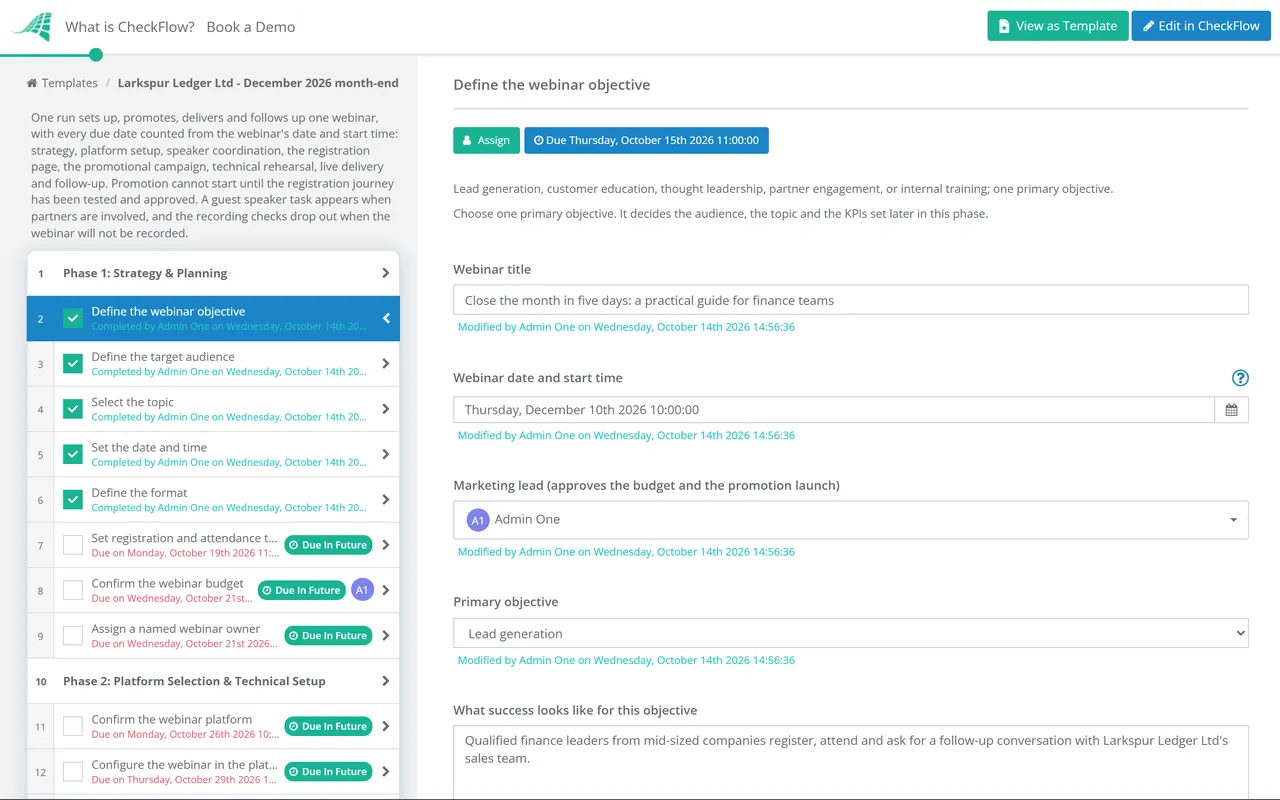
Define the webinar objective — lead generation, customer education, thought leadership, partner engagement, or internal training; one primary objective
Define the target audience — specific enough to guide topic, speaker selection, and channel strategy
Select the topic — specific enough to be compelling, broad enough to attract adequate attendance; test the title against a specific audience question
Set the date and time — for B2B audiences: Tuesday–Thursday, 10am–12pm or 2pm–4pm in the primary timezone typically produce the highest show rates
Define the format — single presenter, panel, interview, Q&A focus, demo-led, or workshop; duration (45–60 minutes is standard)
Set registration and attendance targets — KPIs against which success is measured; include both registrations and expected show rate
Confirm the webinar budget — platform costs, speaker fees if applicable, design assets, and paid promotion
Assign a named webinar owner — responsible for both technical setup and promotion delivery
Phase 2
Platform Selection & Technical Setup
Confirm the webinar platform — Zoom Webinar, Teams Live, Hopin, ON24, GoToWebinar, or other; confirm it meets all requirements (registration, recording, Q&A, polls, analytics)
Configure the webinar in the platform — title, date, time, duration, max attendees, and any attendee permissions settings
Set up the registration page in the platform — fields to collect (name, email, company, job title); confirm only essential fields to reduce registration friction
Set up the full reminder email sequence — at minimum: 1 week before, 1 day before, and 1 hour before; each reinforcing the value of attending
Configure Q&A, polls, and chat settings — confirm which features are enabled and how they will be moderated
Set up recording settings — confirm the webinar will be recorded and where the recording will be hosted post-event
Connect the platform to CRM or marketing automation — registration data flows into CRM; attendee data tagged for follow-up segments
Test the platform setup — join as a test attendee; confirm registration, confirmation email, and platform access all function correctly
Confirm the host and any co-host access — all presenting team members have the correct link and permissions
Phase 3
Speaker & Presenter Coordination
Brief the speaker on the webinar objective, audience, and format — written briefing document sent at least 3 weeks before
Confirm speaker availability and commitment — calendar blocked; backup plan identified if the speaker is unavailable
Collect speaker bio, headshot, and any promotional assets — at least 2 weeks before to allow for promotion materials
Review the speaker’s presentation draft — at least 1 week before the webinar; provide structured feedback if needed
Confirm the speaker has the correct technology setup — microphone quality, camera quality, background, and stable internet connection; recommend wired connection where possible
Schedule a technical rehearsal — 3–5 days before; the speaker runs through their presentation on the platform in a live session with the host and any technical support
Confirm any guest or partner speakers — if co-marketing, confirm their promotion schedule aligns with yours
Brief the speaker on how to promote — provide social copy and assets for LinkedIn and other relevant channels
Phase 4
Registration Landing Page & Setup
Build the webinar landing page — compelling title and description, speaker bio and photo, date/time/duration, three to five key outcomes the attendee will gain, and a simple registration form
Confirm the landing page renders correctly on mobile — a significant proportion of registrations are made from mobile devices
Add the registration link to relevant website pages — homepage banner, blog posts on related topics, and any resource library
Test the end-to-end registration journey — from landing page to registration confirmation email to calendar invite; confirm all steps work correctly
Set up UTM parameters on all registration links — to track which promotional channels are driving registrations
Add registration tracking to analytics — confirm registrations are being recorded in the analytics platform; check on launch day
Phase 5
Promotional Campaign & Registration Drive
Start promoting 3–4 weeks before the webinar. The most common promotion mistake is relying on a single channel — email alone or social alone will not reach your full potential audience.
Send the initial save-the-date email — 3–4 weeks before; to the relevant email list segments; with a clear value proposition and registration link
Send the main promotional email — 2 weeks before; with full speaker and agenda details; compelling subject line tested for open rate
Post on LinkedIn and relevant social channels — at least weekly from 3 weeks out; native content, not just link shares
Ask speakers to promote — provide them with draft copy and visuals; their network is often the highest-converting channel
Send reminder email at one week — for non-registrants on the email list; create urgency without being pushy
Consider paid promotion — LinkedIn and Google for B2B audiences; set up conversion tracking before launching any paid spend
Add webinar promotion to email signatures — of all presenting team members from 4 weeks out
Track registrations daily from campaign launch — adjust channels and messaging based on which are driving registrations
Send the day-before reminder — to all registrants; reinforce the value of attending live; provide the join link clearly
Send the day-of reminder — one hour before; short, direct, with the join link prominent
Phase 6
Pre-Webinar Technical Testing & Rehearsal
The technical rehearsal is not optional. A webinar that starts late or with audio problems loses attendees in the first five minutes who do not return.
Conduct the full technical rehearsal — 3–5 days before; the speaker runs through the full presentation in real time on the webinar platform
Test all audio — speaker microphone quality, room echo, background noise, and volume levels; recommend headset or USB microphone if built-in audio is inadequate
Test all video — camera quality, framing, lighting, and background; confirm virtual background settings if applicable
Test all slides and screen sharing — confirm slide transitions, video clips, and any screen share elements work as expected
Test Q&A and polling functions — confirm the host knows how to manage Q&A and launch polls during the live session
Test the recording function — confirm it records correctly and the output file is accessible after the session
Confirm the moderator role — who manages Q&A, monitors technical issues, and handles chat during the live session?
Prepare contingency plans — what happens if the speaker loses connection? What happens if the platform fails? Confirm the backup dial-in option and emergency contact protocols
Phase 7
Live Webinar Delivery
Start the webinar room 30 minutes early — for internal setup and speaker final check; open to attendees 10–15 minutes before start time
Open with a strong hook — the opening 60 seconds determine whether attendees stay; do not start with “just waiting for a few more people to join”
Manage time carefully — signal to the speaker with five minutes remaining; protect time for Q&A
Monitor and manage Q&A throughout — respond to written questions in real time where possible; queue questions for the Q&A segment
Monitor attendance drop-off — if there is a significant drop, note the timestamp for post-webinar analysis
Confirm the recording is running — check during the first minute that the recording indicator is active
Capture questions not answered live — for follow-up in post-webinar communications
Close with clear next steps — what do attendees do now? Where is the recording? When is the next webinar?
Phase 8
Post-Webinar Follow-Up
Send the post-webinar email within 24 hours — to all registrants (including non-attenders); with the recording link, key takeaways, and any resources referenced; include the feedback survey link
Send a separate email to non-attenders — shorter, focused on the recording; acknowledging they missed the live session
Update CRM with attendance data — who attended, duration attended, questions asked, and engagement indicators
Follow up with hot leads from Q&A and engagement — attendees who asked questions or engaged significantly during the session
Review the webinar analytics — peak attendance, drop-off timing, Q&A engagement, and poll results
Analyse survey responses — NPS, topic rating, and suggestions for future webinar topics
Repurpose the webinar content — blog post summary, social clips, lead magnet, or inclusion in a resource library
Document lessons learned — what worked, what could be improved, and any technical issues to resolve for the next webinar
Move from a single day-before reminder to a five-email sequence: two weeks before (registration drive), one week before (reminder to non-registrants and early registrant nurture), one day before (practical logistics email), morning of (quick reminder), and one hour before (final prompt). Each email should reinforce what the attendee will gain, not just remind them of the logistics.
Target impact: Show rate improvement from ~58% to ~65–70%.
Personalise the invitation
Generic “webinar invitation” emails produce generic conversion rates. Segmenting the audience and writing the invitation to the specific challenge of each segment — rather than a generic description of the topic — consistently produces higher registration and show rates. Including the speaker’s name and a brief description of their specific expertise also increases registration intent.
Target impact: 20–40% improvement in email-to-registration conversion.
Reduce the time between registration and event
A registration made eight weeks before a webinar has a much lower show rate than one made three days before. For evergreen webinar content, consider more frequent delivery (monthly rather than quarterly) with a shorter promotional window — or on-demand recordings of high-value content that can be accessed immediately after registration.
Target impact: Meaningful show rate improvement for webinars with long lead times.
Why Run Webinar Setup & Promotion in CheckFlow?
1
Coordinate setup and promotion as one connected process
Webinar success depends on technical setup and promotional campaign both being complete by launch. Treating them as separate processes produces a common failure: the landing page goes live before the platform is tested, or the speaker promotional assets are ready but there is no landing page to send people to. CheckFlow’s checklist manages both workstreams as a single, sequenced process with all dependencies visible.
2
Run every webinar from the same rigorous process
Marketing teams running monthly webinars tend to run earlier events more thoroughly than later ones — as the process becomes familiar, shortcuts appear. A technical rehearsal gets skipped. The reminder sequence is shortened. CheckFlow’s structured checklist runs the same rigorous process for every webinar, regardless of how routine the format feels to the team.
3
Build a webinar optimisation record over time
Every webinar’s registration rate, show rate, survey results, and promotion channel performance is archived in CheckFlow. Teams running quarterly webinars can identify — after three or four events — which promotional channels produce the highest registrations, which reminder email has the highest open rate, and which topics attract the most engaged audiences.
Webinar content should not live only in the webinar. CheckFlow’s Content Production Workflow Checklist covers how to repurpose webinar recordings into blog posts, social clips, and lead magnets — extending the value of every session beyond the live audience. See the Content Production Workflow Checklist →
For teams running monthly or quarterly webinar series, CheckFlow’s recurring checklist feature starts the same structured setup and promotion process automatically for each webinar — so the same rigour applies to the tenth webinar as to the first. Learn more about recurring checklists →
Eight phases: strategy and planning (objective, audience, topic, date, format, KPIs), platform setup and configuration (registration, automated emails, reminder sequence, recording, CRM integration), speaker coordination (briefing, bio collection, technical rehearsal), registration landing page (copy, mobile testing, UTM tracking), promotional campaign (email sequence, social media, speaker promotion, paid if appropriate), pre-webinar technical rehearsal (audio, video, slides, Q&A functions, contingency plans), live delivery management (opening, time management, Q&A moderation, recording monitoring), and post-webinar follow-up (email sequence, CRM update, analytics review, content repurposing).
How do you increase webinar show rates?
+
The most impactful interventions are: a multi-touchpoint reminder sequence (five emails from two weeks before to one hour before, each reinforcing value not just logistics); a segmented promotional approach that speaks to the specific challenge of each audience group rather than a generic webinar description; a shorter gap between registration and event date (shorter windows produce higher show rates); and the use of calendar integrations and magic links that make joining as frictionless as possible. Industry average show rate is around 58% of registrants; teams applying all of these consistently achieve 65–75%.
How far in advance should you start promoting a webinar?
+
Start promoting 3–4 weeks before the webinar for a typical B2B webinar with a target audience of 100–500 registrations. The promotional campaign should run continuously from launch until event day, not be concentrated in a single email. If targeting a net-new audience (people not on your email list), allow four weeks minimum to give paid promotion time to optimise. Do not launch promotion before the landing page and registration journey are fully tested and working.
Should webinars always be recorded?
+
Yes, for almost all webinar formats. Recording serves three purposes: it extends the content’s reach to registrants who could not attend live (consistently 10–20% of registrants watch the recording); it creates a repurposable content asset that can be posted, clipped, and referenced over an extended period; and it provides a reference for the presenter to improve future deliveries. Exceptions include confidential internal training sessions or events where participants are only willing to engage candidly in an unrecorded format — in both cases, the decision should be deliberate and communicated to participants before they join.
Is CheckFlow free for this template?
+
Yes — 14-day free trial, no card required. The Business plan is $10 per user per month after the trial. Full details at checkflow.io/pricing.
Run Webinars That Actually Fill the Room — and Follow Through After
Free trial — no credit card required.
Do you like cookies? 🍪 We use cookies to ensure you get the best experience on our website. Learn more