
Carrier Onboarding & Vetting Checklist Template

Check every new motor carrier the same way before its first load: the packet, FMCSA authority and records, insurance confirmed with the agent, identity and fraud checks, and an approval decision.

Last reviewed: November 2026

Printed from checkflow.io/templates/transport-logistics/carrier-onboarding-vetting-checklist

This free carrier vetting checklist is for freight brokers and shippers in the US, and the carrier relations, compliance, accounts payable and operations people who onboard a motor carrier before its first load. One run is one carrier, planned back from the date of the first load. It asks for the carrier packet and checks the profile, W-9 and signed broker-carrier agreement, with the certificate of insurance sent by the agent. It looks the carrier up on FMCSA’s records: USDOT status, operating authority, insurance and process agents on file, the MCS-150 date and the safety record. The policies are confirmed with the agent against the federal minimums and your own limits, and identity checks look for a hijacked or bought identity and signs of double brokering. The approver records the decision, then the carrier is set up from checked details, payment details are verified by call-back, the first load is watched closely, and the carrier is reviewed after a month and monitored from then on.

The Broker’s Check of a Carrier, Not the Carrier’s Own Audit

Carrier vetting is the check a freight broker or a shipper makes before it gives a motor carrier its first load: is this a real carrier, with active operating authority, insurance that is in force, a safety record you can accept, and people who are who they say they are? This checklist runs one carrier through that check, from the carrier packet to the first load and the monitoring that follows. It follows US rules: FMCSA registration, insurance filings and broker practice.

The carrier’s own side, a motor carrier auditing its driver files, hours, maintenance and insurance against FMCSA’s rules, is the DOT Compliance Audit Checklist. Qualifying one new truck driver is the Commercial Driver Onboarding Checklist. A supplier of goods or services goes through the Supplier Onboarding Checklist, and the carriers and other suppliers you already use are reviewed with the Vendor Oversight Checklist. In Great Britain, lorry operators hold goods vehicle operator licences, which GOV.UK’s Find lorry or bus operators service searches, so a UK check uses different records.

This checklist

Vetting a carrier before its first load

Who runs it: a freight broker or shipper, through its carrier relations or compliance team.

Covers: the carrier packet, FMCSA authority and records, insurance confirmed with the agent, identity and fraud checks, the approval decision, payment details verified by call-back, the first load and monitoring.

Output: an approved carrier set up from checked details, or a dated record of why it was not approved.

The carrier’s side

DOT compliance audit

Who runs it: the motor carrier itself.

Covers: its own driver qualification files, drug and alcohol programme, hours of service, maintenance, accidents and insurance.

Output: findings and corrective actions, in the DOT Compliance Audit Checklist.

One driver

Commercial driver onboarding

Who runs it: the carrier that employs the driver.

Covers: the driver qualification file, Clearinghouse query, drug test, medical certificate and road test.

Output: a driver cleared to drive, in the Commercial Driver Onboarding Checklist.

What the Carrier Onboarding & Vetting Checklist Covers

Nine phases take one carrier from the packet request to the first review. The template allows two working weeks before the first load, which suits contract lanes; for a carrier you need sooner, enter that load’s date and the same checks fall due at once, in the same order. The first task records the date of the first planned load, which sets every due date, and asks what freight the carrier will haul and how it came to you; an approach out of the blue adds a call to the number on the carrier’s FMCSA record before the packet goes out. Hazardous materials add the permit check, a factoring company adds the check of its notice of assignment, and a conditional safety rating, insurance gaps or red flags that are not explained each add the task that deals with them. The approver’s decision is the gate: nothing after it can be completed until it is recorded, Approved with conditions adds the task to meet them, and Not approved hides the set-up and first load and shows the close-out.

  1. Phase 1

    Phase 1: Set Up the Onboarding

    4 tasks

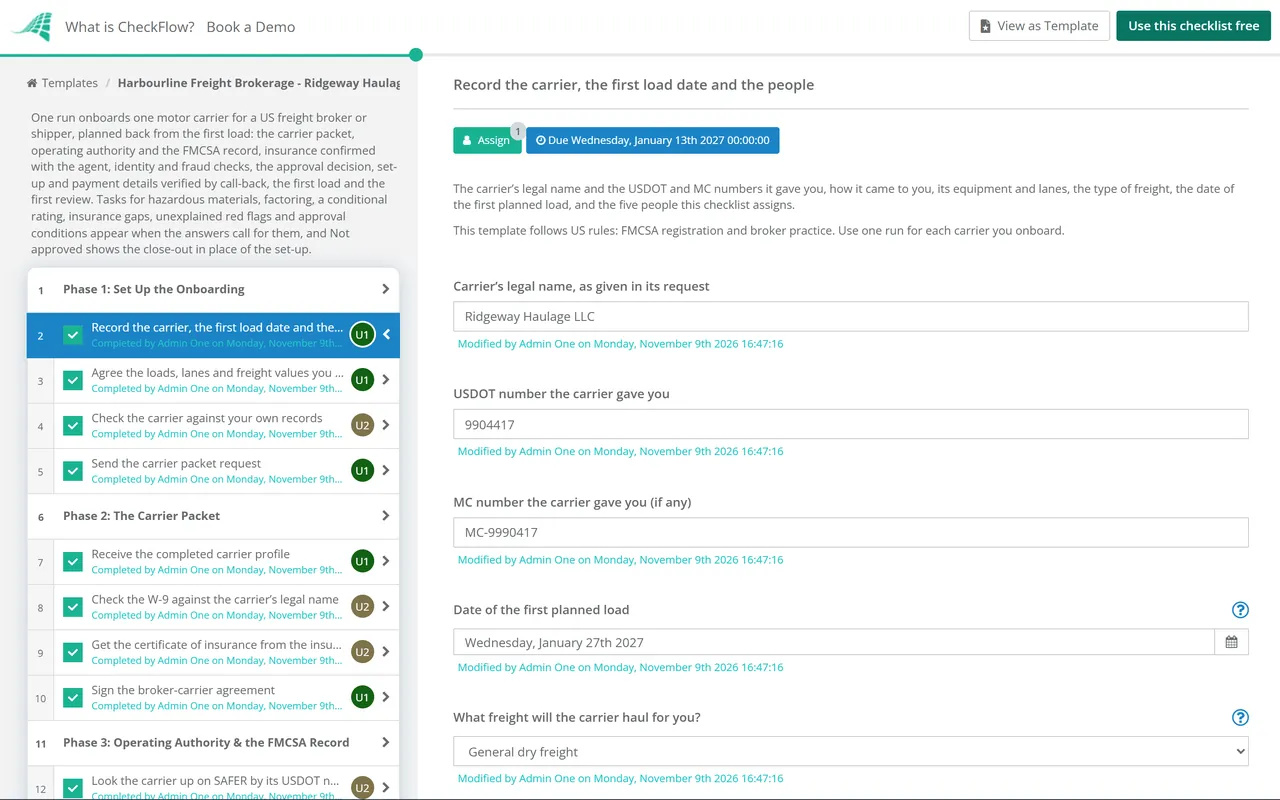
    Owned by the carrier relations lead. Enter the date of the first load you plan to give the carrier: every due date counts from it in working days, and this template allows two working weeks before it. Record the USDOT number the carrier gave you, then check it yourself against FMCSA’s records in Phase 3, never only from the carrier’s own papers.

    • Record the carrier, the first load date and the people — the carrier’s legal name and the USDOT and MC numbers it gave you, how it came to you, its equipment and lanes, the type of freight, the date of the first planned load, and the five people this checklist assigns
    • Agree the loads, lanes and freight values you plan to give the carrier — the lanes and states, loads per week, the equipment, the highest value of goods on one load and any special handling; the insurance checks in Phase 4 are made against these figures
    • Check the carrier against your own records — whether the carrier is already set up with you, was turned down or stopped before, or shares a phone number, email address, physical address or bank account with another carrier in your system
    • Send the carrier packet request — the request sent to the carrier through your onboarding portal or from your own business email, listing what to return: the carrier profile, the W-9, the signed broker-carrier agreement, and its insurance agent’s details so the certificate comes from the agent
  2. Phase 2

    Phase 2: The Carrier Packet

    5 tasks

    Collect the carrier’s own documents: the profile, the W-9 and the signed agreement. The certificate of insurance comes from the insurance agent, not the carrier. A carrier that sells its invoices to a factoring company adds the check of its notice of assignment.

    • Receive the completed carrier profile — the legal name and any trade name, the physical and mailing addresses, the main phone number and email, the owners or officers, the dispatch contact, the number of trucks and drivers, the equipment, and whether its invoices are sold to a factoring company
    • Check the W-9 against the carrier’s legal name — the IRS Form W-9 signed, with a taxpayer identification number (TIN) and a legal name that match the profile and the FMCSA record you check in Phase 3
    • Get the certificate of insurance from the insurance agent — the certificate requested from the agent or insurer the carrier names and sent to you by the agent, with your company as certificate holder; a certificate that arrives only from the carrier is still checked with the agent in Phase 4
    • Sign the broker-carrier agreement — the agreement signed by an owner or officer of the carrier, covering responsibility for the load, no re-brokering or passing loads to another carrier without your written consent, the insurance it must keep, payment terms, claims and indemnity, reviewed by whoever checks your contracts
    • Check the factoring company and its notice of assignment — factoring only: the notice of assignment signed by the carrier, naming the factoring company that payments go to, confirmed with the factoring company on a phone number you find yourself, not the one on the notice
  3. Phase 3

    Phase 3: Operating Authority & the FMCSA Record

    7 tasks

    Look the carrier up yourself on FMCSA’s public records by its USDOT number, and compare what you find with the packet: the name, address and phone, the operating authority, the insurance on file, the MCS-150 date and the safety record. FMCSA moved registration to its new system, Motus, in May 2026; SAFER and the Licensing and Insurance (L&I) search still show the public record, and Motus has a public search of its own.

    • Look the carrier up on SAFER by its USDOT number — the Company Snapshot: entity type, USDOT status, any out-of-service date, legal name, trade name, physical address and phone, compared with the carrier profile, and a copy saved with the date
    • Check the operating authority covers the freight you will give it — on the L&I carrier search: authority as a motor carrier of property (not only as a broker), active, with the date it was granted and no pending revocation; record its age against your own minimum, if you set one
    • Check the insurance and process agents on file with FMCSA — on L&I: the liability insurance filing (the insurer, the policy number and the amount on file), any pending cancellation, and the BOC-3 designation of process agents; the insurer should be the one on the certificate
    • Check the MCS-150 date and the fleet size — the MCS-150 form date and mileage on SAFER, and the power units and drivers it reports, compared with the trucks and drivers in the profile
    • Check the safety rating, inspections and crashes — the safety rating on SAFER (Satisfactory, Conditional, Unsatisfactory or none), roadside inspections and out-of-service rates for the last 24 months against the national averages SAFER shows, crashes, and the public measures on FMCSA’s Safety Measurement System (SMS)
    • Check the hazardous materials registration and any safety permit — hazardous materials only: SAFER shows the carrier hauls hazardous materials, it holds a hazardous materials safety permit where FMCSA requires one for the materials, and its liability filing meets the level for them, checked again in Phase 4
    • Review the conditional rating with the carrier — conditional rating only: the date of the rating, what FMCSA found, the carrier’s corrective actions and evidence, and whether your policy allows a carrier with a conditional rating, and on what terms
  4. Phase 4

    Phase 4: Insurance Confirmed With the Agent

    6 tasks

    A certificate of insurance shows cover on the day it was issued. Confirm with the agent or insurer, on a number you find yourself, that the policies are in force, cover this carrier and meet the federal minimum and your own limits. Gaps add the task to close them.

    • Confirm the policies with the agent or insurer — a call to the agent or insurer on a number you found yourself (the insurer’s website or your own records), confirming the policies are in force, the named insured is the carrier’s legal name, and the policy numbers and dates match the certificate
    • Check the auto liability limit and the vehicles covered — at least the federal minimum for the freight and the vehicles, and any higher limit in your agreement, and whether the policy covers any vehicle or only listed vehicles; if only listed vehicles, the trucks the carrier will use are on the list
    • Check the cargo cover against your highest load value — the cargo limit against the highest value of goods on one load from Phase 1, the deductible, and the exclusions that matter for your freight, such as theft, unattended vehicles or named commodities
    • Check the certificate holder and the other cover you require — your company named as certificate holder, and as additional insured if your agreement asks for it, and any general liability, workers’ compensation or trailer interchange cover your agreement requires
    • Record whether the cover meets your requirements — the result of the insurance checks, the policy expiry dates for monitoring, and anything short of what you require
    • Close the insurance gaps — gaps only: what was short, what the carrier and its agent changed, the new certificate from the agent and a further call to confirm it; a gap that cannot be closed is recorded for the approver
  5. Phase 5

    Phase 5: Identity & Fraud Checks

    8 tasks

    Make sure the company you are dealing with is the carrier on the FMCSA record, that the person you speak to works for it, and that it will haul your loads with its own trucks. FMCSA says a USDOT number belongs to the same legal person forever and may not be sold, transferred, rented or leased. Red flags that are not explained add the task to escalate them.

    • Call the carrier on the phone number on its FMCSA record — a call to the phone number on the FMCSA record, not the one in the email or the packet, confirming that the carrier asked to work with you and that your contact works for it
    • Check the email address, domain and contact details — the contact’s email domain and phone number against the carrier’s own website and the FMCSA record, and any sign of a look-alike domain or a recent change of email or phone on the record
    • Check the address and the people who run the carrier — the physical address is a real place the business operates from, the owners or officers match the FMCSA record and the person who signed the agreement, and the business is registered and active in its state
    • Look for signs of a bought or hijacked identity — recent changes to the carrier’s name, address, phone or email on the FMCSA record, authority that was dormant and has recently come back into use, or authority granted years ago with little or no inspection history, compared with what the carrier tells you
    • Check the trucks and drivers it will use — the trucks and trailers it will use, with unit numbers, plates and VINs where your policy asks for them, against the insurance and the fleet size on the FMCSA record, and that the drivers work for the carrier
    • Check the carrier will haul the loads itself — signs that loads could be passed to another carrier (double brokering): no trucks of its own, a dispatcher who works for several carriers, requests to send paperwork or payment to another name, or a refusal to use tracking; the agreement forbids re-brokering without your written consent
    • Record the red flags and how each was explained — every red flag found in this phase and the earlier ones, how each was checked, and whether any is still not explained
    • Escalate the red flags that are not explained — unexplained red flags only: the compliance reviewer and the approver go through them together, further checks are made, and the result is written down for the decision; a carrier that cannot explain them is not approved
  6. Phase 6

    Phase 6: Approval Decision

    3 tasks

    The compliance reviewer sums up the checks and recommends. The approver alone records Approved, Approved with conditions or Not approved, and nothing after the decision can be completed until it is recorded. Not approved hides the set-up, the first load and the review, and shows the task to close the onboarding.

    • Prepare the onboarding summary and recommendation — each check with its result, the insurance limits and expiry dates, the safety record, any red flags and how they were resolved, proposed conditions, and a recommendation to the approver
    • Record the approval decision — Approved, Approved with conditions or Not approved, with the conditions or the reasons, recorded by the approver alone
    • Tell the carrier and close the onboarding — not approved only: the carrier told it has not been approved, no loads offered, the carrier marked as not approved in your own records with the reasons kept for your use, and the file kept
  7. Phase 7

    Phase 7: Set-Up, Payment Details & Monitoring

    7 tasks

    Applies only when the carrier is approved, with or without conditions. Set the carrier up in your transportation management system (TMS) from checked details only, verify where payments go by a call-back, and set up the monitoring that keeps the checks current. Approval with conditions adds the task to meet them.

    • Set the carrier up in your TMS — the carrier record created from the checked details: legal name, USDOT and MC numbers, the checked phone and email, equipment, approved lanes, insurance limits and expiry dates, and the approval status with any conditions
    • Verify the payment details by call-back — the bank details, or the factoring company’s remittance details, received in writing and then confirmed by calling the carrier or the factoring company on a number from your own checked records, never one from the message that sent them; the account name matches the carrier or the factoring company on the notice of assignment, and a second person checks the entry
    • Set the rule for any change to payment details — a later request to change where payments go is held until it is confirmed by a call-back on the checked number and approved by a second person, requests by email alone are refused, and the carrier is told this rule
    • Meet the conditions of approval — approved with conditions only: each condition the approver set, such as limited lanes or load values, a higher limit or extra cover, or tracking on every load, recorded in the TMS and met before the first load, or the approver told in writing that it is not
    • Set up monitoring of authority, insurance and safety — changes to the carrier’s authority, insurance filings, safety rating, out-of-service orders and contact details on the FMCSA record watched, through a monitoring service or scheduled checks, with an owner for each alert
    • Diary the insurance renewal dates — each policy’s expiry date diarised, a new certificate requested from the agent before it, and no loads offered if cover lapses
    • Send the carrier your load instructions — how loads are offered and confirmed, the rate confirmation, tracking and check calls, proof of delivery, invoicing and payment terms, claims, and the contacts for each, sent to the carrier’s checked email address
  8. Phase 8

    Phase 8: The First Load

    4 tasks

    Applies only when the carrier is approved, with or without conditions. Watch the first load closely: the truck and driver that arrive should be the carrier’s own, the paperwork should match, and payment goes only to the verified account.

    • Confirm the truck and driver before the first load — the rate confirmation sent to the carrier’s checked email, and the driver’s name and the truck and trailer numbers confirmed with the carrier’s dispatcher on the checked phone number
    • Track the first load from pickup to delivery — at pickup, the truck shows the carrier’s name and USDOT number and matches the unit confirmed; tracking or check calls run to delivery, and any change of truck, driver or carrier is questioned at once
    • Record how the first load went — on-time pickup and delivery, damage or shortages, communication, paperwork, and any problem to follow up
    • Check the paperwork and pay the first invoice — the invoice in the carrier’s legal name, or from the factoring company on the notice, the signed proof of delivery and bill of lading, the agreed rate, and payment to the verified account only
  9. Phase 9

    Phase 9: First Review & Ongoing Checks

    3 tasks

    Applies only when the carrier is approved, with or without conditions. Review the carrier after its first month of loads, set when it is checked again, and file the onboarding record. In this template the review falls 20 working days after the first load.

    • Review the carrier after its first month — loads carried, service, claims, any alerts from monitoring, and whether it stays approved, has its conditions changed, or is stopped
    • Set when the carrier is checked again — the FMCSA, insurance and identity checks repeated before the next load after a set time without loads, after any monitoring alert, and at a fixed interval; this template leaves those intervals to your own policy
    • File the onboarding record — the packet, the dated copies of FMCSA’s records, the call notes, the summary and the decision kept together, for as long as your records policy says

FMCSA Records and Insurance Minimums to Check

What to check on FMCSA’s public records

Look each one up yourself by the carrier’s USDOT number in Phase 3, and keep a dated copy. FMCSA moved registration to Motus in May 2026; SAFER and L&I still show the public record.

Record Where to look What to check What the source says
USDOT number and statusSAFER Company Snapshot; the Motus public searchUSDOT status, any out-of-service date, and the legal name, address and phone against the carrier packetSAFER’s snapshot shows a company’s identification, size, commodity information and safety record, including any safety rating
Operating authority (MC number)L&I carrier searchAuthorized as a motor carrier of property, active, and the date grantedFMCSA: companies that transport federally regulated commodities owned by others for a fee in interstate commerce generally need operating authority in addition to a USDOT number
Liability insurance on fileL&I carrier searchThe insurer, the amount on file and any pending cancellation, against the certificate49 CFR 387.301T: no common or contract carrier engages in interstate commerce until its security is filed with and accepted by FMCSA
Process agents (BOC-3)L&I carrier searchA BOC-3 designation on file49 CFR 366.2T: designations are made on Form BOC-3
MCS-150 updateSAFER Company SnapshotThe form date and mileage, and the power units and drivers reported49 CFR 390.19T: filed before operations and every 24 months. FMCSA has temporarily suspended enforcement for updates due on or after 1 June 2026 during the move to Motus
Safety ratingSAFER Company SnapshotSatisfactory, Conditional, Unsatisfactory or none49 CFR 385.3 defines the ratings; under 385.13 a carrier rated Unsatisfactory is generally prohibited from operating a commercial motor vehicle
Inspections, crashes and SMSSAFER Company Snapshot; SMSOut-of-service rates for 24 months against the national averages, crashes, and the public BASIC measuresFMCSA: property carriers’ percentiles are not shown to the public, and the Crash Indicator and Hazardous Materials Compliance BASICs stay hidden
Hazardous materials safety permitSAFER Company SnapshotA permit where the materials and quantities need one49 CFR 385.403 lists the materials and quantities that need a safety permit

Federal minimum liability cover for carriers of property

The minimums in 49 CFR 387.303T and FMCSA’s insurance filing chart. Phase 4 checks the carrier’s policies against them and against your own agreement.

Carrier and freight Federal minimum liability cover Note
For-hire, non-hazardous property, vehicles of 10,001 pounds GVWR or more$750,000Your agreement may ask for more
For-hire, non-hazardous property, a fleet of vehicles under 10,001 pounds GVWR$300,000Smaller vehicles such as cargo vans
For-hire carriers of certain hazardous materials$1,000,000Oil, hazardous waste and hazardous materials not in the $5,000,000 group (49 CFR 387.303T(b)(2))
Carriers of explosives, poison gas or radioactive materials$5,000,000The materials and quantities are listed in 49 CFR 387.303T(b)(2)
Cargo cover for general freightNo federal requirementHousehold goods carriers are the exception; the cargo limit you ask for is your own requirement

Where this comes from. eCFR, title 49: section 387.303T, 387.301T, 366.2T, part 371, 385.3, 385.13, 385.403, 390.19T and 390.21T, current to 5 November 2026 (sections 387.303, 387.301, 366.2 and 390.19 themselves are suspended, and the T sections above are in force); FMCSA’s operating authority, insurance filing requirements, biennial update suspension and fraud alerts pages; the SMS public notice; SAFER; and the Federal Register notice on Motus (29 April 2026), which says the first release of Motus to all registrants does not remove MC numbers. All read on 9 November 2026. The checks, their order and the two-week timetable are this template’s choices. This is a starting point, not legal advice.

Why Vet Your Carriers in CheckFlow?

1

No load before someone approves

The approval decision is assigned to the approver alone, and the checklist halts there: the TMS set-up, the payment details and the first load cannot be completed until it is recorded. Approved with conditions adds the task to meet them before the first load, and Not approved shows the close-out in their place. See how approvals that halt a checklist work.

2

Only the checks this carrier needs

Hazardous materials add the safety permit check and a note on the higher liability levels, temperature-controlled freight adds a note on cargo cover, and a factoring company adds the check of its notice of assignment. A conditional rating, insurance gaps or red flags that are not explained each add the task that deals with them.

3

A dated record of every check

Name the carrier relations lead, the compliance reviewer, the approver, accounts payable and operations on the first task, and every step is assigned from those fields and dated from the first load. The SAFER copy, the agent’s confirmation and the call-backs stay on the tasks they came from, and the Reports Grid lists every carrier in onboarding with its answers, while Analytics shows where tasks are waiting.

CheckFlow does not look carriers up on FMCSA’s systems, call insurers or watch for changes to a carrier’s record: those checks stay with your team, FMCSA’s public tools and any monitoring service you use. CheckFlow makes sure every carrier gets the same checks in the same order, with an owner and a due date for each, a decision before the first load, and a record of who checked what and when. See how a checklist runs.

Review the broker-carrier agreement with the Contract Review & Approval Checklist, follow loads with the Shipment Tracking Workflow Checklist, assess a high-risk supplier with the Vendor Risk Assessment Checklist, and review the carriers you use over time with the Vendor Oversight Checklist.

AI generator

Didn’t find what you need? Describe it.

Describe the process in a sentence and the AI checklist generator drafts the phases and tasks for you.

Frequently Asked Questions

What should a carrier vetting checklist include?

The carrier packet (profile, W-9, signed broker-carrier agreement and a certificate of insurance from the agent), the carrier’s USDOT and operating authority checked on FMCSA’s records, the insurance and process agents on file, the MCS-150 date, the safety rating and inspection record, the insurance confirmed with the agent, identity and fraud checks, a recorded approval decision, payment details verified by call-back, and monitoring after approval. This template covers those steps for one carrier.

What is in a carrier packet?

A carrier packet is the set of documents a broker or shipper asks a new carrier for: a carrier profile with its legal name, USDOT and MC numbers, addresses, contacts, owners and equipment; an IRS Form W-9; the signed broker-carrier agreement; a certificate of insurance, best sent by the insurance agent; and, where the carrier factors its invoices, a notice of assignment. This template requests it in Phase 1 and checks each document in Phase 2.

How do you check a carrier’s operating authority?

Look the carrier up yourself by its USDOT number on FMCSA’s Licensing and Insurance (L&I) carrier search and on SAFER. Check that it is authorized as a motor carrier of property, not only as a broker, that the authority is active, when it was granted, and that its insurance and BOC-3 filings are on file. FMCSA moved registration to Motus in May 2026, and Motus has its own public search.

What insurance should a motor carrier have before you give it a load?

FMCSA’s minimum liability cover for a for-hire carrier of non-hazardous property is $750,000 for vehicles of 10,001 pounds GVWR or more and $300,000 for a fleet of lighter vehicles, with $1,000,000 or $5,000,000 for hazardous materials. There is no federal cargo requirement for general freight, so your agreement sets the cargo limit. This template confirms the policies with the agent, not only from the certificate.

How do you spot double brokering or a stolen carrier identity?

Call the carrier on the phone number on its FMCSA record, not the one in the email, and confirm your contact works for it. Look for recent changes to its name, address, phone or email on the record, dormant authority back in use, look-alike email domains, no trucks of its own, and requests to pay another name. FMCSA says USDOT numbers may not be sold, transferred, rented or leased. This template records each red flag and how it was explained.

Can a freight broker be sued for hiring an unsafe carrier?

In Montgomery v. Caribe Transport II, decided on 14 May 2026, the US Supreme Court held unanimously that a claim that a broker negligently hired a motor carrier is not preempted by the Federal Aviation Administration Authorization Act, because the Act’s safety exception saves it. Whether a broker is liable then depends on state law and the facts. Ask your lawyers what your process should cover; this template keeps a dated record of each check.

Should you use a carrier with a conditional rating or no safety rating?

That is your own policy. FMCSA defines a conditional rating as a carrier not having adequate safety management controls in place, which could lead to the problems its safety fitness standard lists, and an unrated carrier as one FMCSA has not given a rating. An unsatisfactory rating generally prohibits a carrier from operating. This template adds a task to review a conditional rating with the carrier before the decision.

How often should you re-check an approved carrier?

Keep watching for changes to its authority, insurance filings, safety rating and contact details after approval, through a monitoring service or scheduled checks, and repeat the full checks after any alert, after a long gap without loads, and at a fixed interval your policy sets. This template sets up the monitoring before the first load, diarises the insurance renewals and reviews the carrier after its first month of loads.

Is CheckFlow free for this template?

14-day free trial, no card required. The Business plan is $10 per user per month after the trial. Full details at checkflow.io/pricing.

Vet Every Carrier Before Its First Load

Free trial — no credit card required.

14-day free trial, no credit cardFull refund in your first 30 daysUS hosting, EU on request