Goods Receiving & Inspection Checklist Template

The driver has gone, the delivery note is signed as received in full, and two days later someone opens a pallet and finds the wrong part, or accounts payable pays for twelve cases when nine arrived.

Last reviewed: October 2026

This free goods receiving and inspection checklist is for goods-in teams, warehouse and stores supervisors, quality inspectors, buyers and the accounts payable staff who rely on the goods receipt. One run receives one inbound delivery against its purchase order. It covers preparing for the delivery, checking the vehicle, seal and paperwork on arrival, signing the carrier’s note for what actually arrived, counting and identifying every line, and inspecting condition and quality by sampling plan or in full. The inspector then decides to accept, quarantine or reject the delivery, and nothing after that decision can be completed until it is recorded. The receiver posts the goods receipt for the accepted quantity and puts the goods away, and the receipt goes to accounts payable for the three-way match. When the delivery is not accepted in full, a phase appears for quarantine, the supplier report, any carrier claim, the remedy and the return.

Signing for a Delivery Is Not the Same as Checking It

Goods receiving, or goods-in, is the check between a supplier’s delivery and your stock. The receiver checks the delivery against the purchase order and the delivery note, counts and identifies the goods, and the inspector decides whether to accept them. The goods receipt that comes out of it is one of the three documents accounts payable matches before the invoice is paid, so a mistake at the dock can turn into a payment for goods you never had.

This checklist runs one delivery. It starts where the purchase order approval checklist ends, applies the incoming inspection steps of the product inspection workflow checklist to the goods in front of you, and hands the receipt to the accounts payable process checklist. It does not count stock you already hold; that is the inventory audit process checklist. Each receipt also feeds the supplier performance evaluation.

At the dock

Check what arrived against what was ordered

Covers: the vehicle and seal, the delivery note against the purchase order, certificates, packaging, the count and the identity of every line.

Owned by: the goods-in receiver.

Output: a signed carrier’s note and a discrepancy log.

At inspection

Decide whether the goods are fit to use

Covers: condition and quality against the specification, by sampling plan or full inspection, and the decision to accept, quarantine or reject.

Owned by: the inspector.

Output: an inspection record and a recorded decision.

After the decision

Book it, return it and pay for the right quantity

Covers: the goods receipt, put-away, any quarantine, return or carrier claim, and the handoff to accounts payable.

Owned by: the receiver, the buyer and accounts payable.

Output: a goods receipt that matches what was accepted.

What the Goods Receiving & Inspection Checklist Covers

Eight phases take one delivery from the booking to the handoff to accounts payable. The inspection choice on the first task adds either a sampling task or a full inspection task. Nothing after the inspector’s decision can be completed until it is recorded, and the quarantine, return and claim phase appears only when the delivery is not accepted in full.

  1. Phase 1

    Phase 1: Prepare for the Delivery

    5 tasks

    Many receiving problems start before the vehicle arrives: nobody knows what is due, the purchase order is out of date, or there is nowhere to put goods that fail. Set up the receipt when the delivery is booked. The inspection question on the first task decides which inspection task appears in Phase 4.

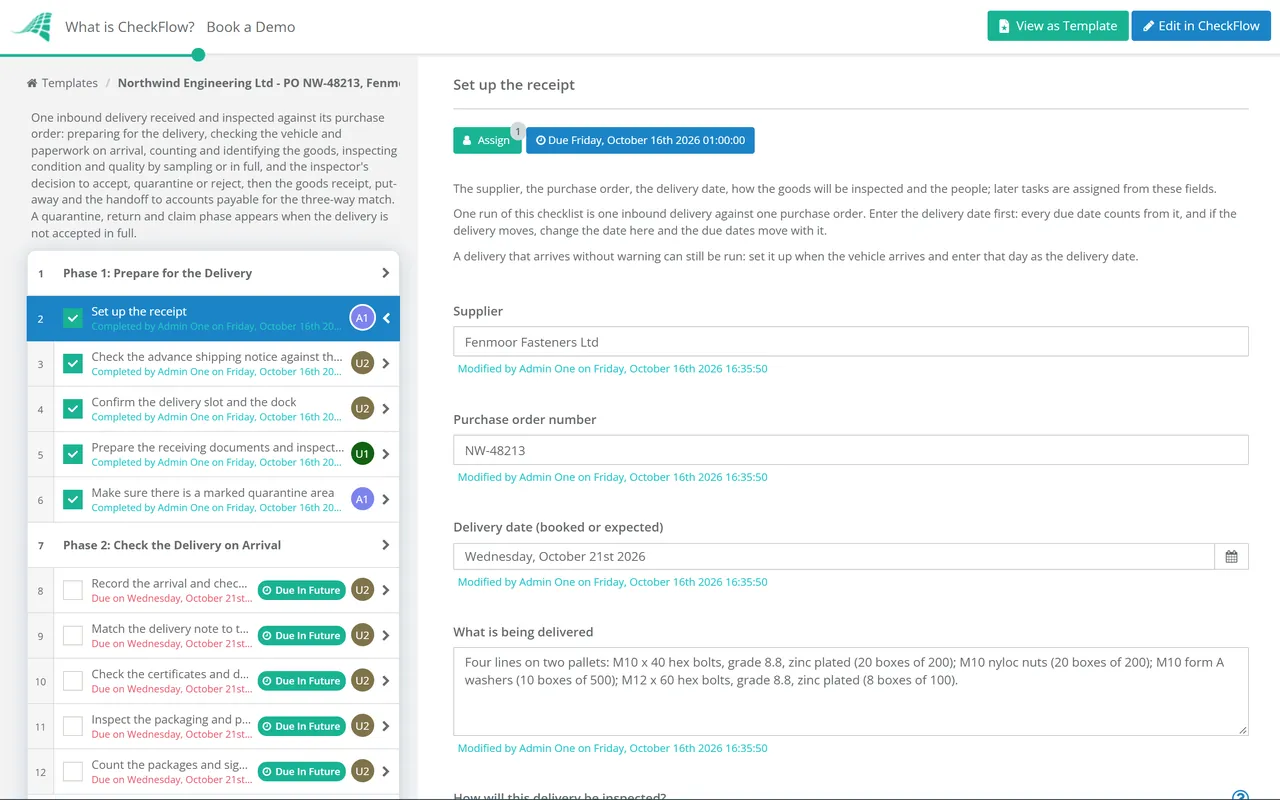
    • Set up the receipt — the supplier, the purchase order, the delivery date, how the goods will be inspected and the people; later tasks are assigned from these fields
    • Check the advance shipping notice against the open purchase order — lines, quantities, the delivery date and any part shipment the supplier has announced, so differences are raised with the buyer before the goods arrive
    • Confirm the delivery slot and the dock — the booked time, the bay, the unloading equipment and the people, so the vehicle is not turned away or left waiting
    • Prepare the receiving documents and inspection requirements — the purchase order lines, the specification, the inspection plan and the certificates the order asks for; leave the expected quantities off the count sheet if you use a blind count
    • Make sure there is a marked quarantine area — a separate, labelled space for goods on hold or rejected, with hold and reject labels to hand
  2. Phase 2

    Phase 2: Check the Delivery on Arrival

    5 tasks

    Check the vehicle and the paperwork before anything is unloaded, while the driver is still there. A shortage or damage that is not written on the carrier’s delivery note now is harder to claim for later.

    • Record the arrival and check the vehicle — the arrival time, carrier, vehicle registration and seal number against the paperwork, and the load temperature for chilled or frozen goods
    • Match the delivery note to the purchase order — supplier, purchase order number, part numbers, descriptions and quantities; goods with no valid purchase order are held, not received into stock
    • Check the certificates and documents that must come with the goods — certificates of conformity, test or analysis certificates, safety data sheets, packing lists and batch records, as the purchase order requires
    • Inspect the packaging and pallets before unloading — crushed, wet, torn or leaning loads, broken banding and tripped shock or tilt indicators; photograph anything you find
    • Count the packages and sign the carrier’s delivery note — sign for the number of packages or pallets actually received, and write any shortage or visible damage on the note before the driver leaves
  3. Phase 3

    Phase 3: Count & Identify the Goods

    5 tasks

    Count what is there, not what the paperwork says should be there. A blind count, where the receiver records the quantity without seeing the expected one, catches shortages that ticking the delivery note misses.

    • Unload to the receiving area and keep the delivery together — away from stock already held, so nothing is put away or used before it has been checked
    • Count every line — in the unit of measure on the purchase order, opening outer cases where the packing cannot be trusted
    • Confirm each item is the one ordered — part number, description, specification, size or grade, and the supplier’s code against your own
    • Check labels, batch or lot numbers, serial numbers and expiry dates — record them for traceability, and check the shelf life left against what the purchase order asks for
    • Record shortages, over-deliveries and wrong items — every difference between the purchase order, the delivery note and the count, with the quantity and a photo where it helps
  4. Phase 4

    Phase 4: Inspect Condition & Quality

    5 tasks

    Check the goods against the specification with the inspection plan for the item. A sampling plan inspects a random sample and accepts or rejects the lot from it; full inspection checks every unit. The answer on the first task decides which of the first two tasks here appears.

    • Draw the sample from across the delivery — the sample size and acceptance number from your sampling plan, picked at random from different pallets and layers, not just the top
    • Inspect every unit — record the quantity inspected and every unit that fails, so the accepted and rejected quantities are exact
    • Check the condition of the goods — damage, contamination, corrosion, moisture and signs of tampering inside the packaging
    • Check critical dimensions, functions or test results against the specification — with calibrated equipment, against the drawing, the specification or the supplier’s certificate
    • Record the inspection result — defects found by class, the quantity that passed and failed, and the inspector’s conclusion
  5. Phase 5

    Phase 5: Decide Accept, Quarantine or Reject

    4 tasks

    One person decides what happens to the delivery, using the count, the documents and the inspection result together. Nothing after the decision can be completed until it is recorded, so nothing goes into usable stock first.

    • Review the count, documents and inspection together — a delivery can pass inspection and still be short, over or missing a certificate
    • Decide whether to accept, quarantine or reject the delivery — accept in full, accept part, hold in quarantine pending a decision, or reject; record the quantities and the reason
    • Label each pallet or line with its status — accepted, on hold or rejected, so the status is clear to anyone who moves it
    • Tell the buyer and the requester the decision — what was accepted, what was not and when the rest is expected, so nobody plans on stock that is not there
  6. Phase 6

    Phase 6: Update Stock & the Goods Receipt

    4 tasks

    Book only what was accepted into usable stock. The goods receipt is one of the three documents accounts payable matches, so its quantities must be the ones you accepted, not the ones on the delivery note.

    • Post the goods receipt for the accepted quantity — against the purchase order lines, with the delivery note number, and with any quarantined quantity on a blocked status
    • Put the accepted goods away to their locations — oldest expiry first where shelf life matters, and confirm each location in the system
    • Update the purchase order for any balance still due — leave the line open for a back order, or close it short with the requester’s agreement
    • File the receiving records — the delivery note, the carrier’s note, certificates, the inspection record and photos, linked to the goods receipt
  7. Phase 7

    Phase 7: Quarantine, Return or Claim

    7 tasks

    Applies only when the delivery is not accepted in full. Keep goods on hold apart and blocked in the system until the supplier and the inspector agree what happens to them, and tell the supplier promptly, because a right to reject can be lost by waiting.

    • Move the goods to quarantine and block them in the system — labelled with the reason, physically apart from usable stock and on a blocked or quality-hold status so they cannot be picked
    • Raise a discrepancy or non-conformance report with the supplier — what is wrong, the quantity, the purchase order and delivery note numbers, photos and the inspection record
    • Claim against the carrier for damage or loss in transit — within the time limit in the carrier’s terms, with the noted delivery note and the photos
    • Agree the remedy with the supplier — a replacement, a credit note, a return, or rework or sorting at the supplier’s cost, and the date it will happen
    • Decide whether to accept any non-conforming goods under concession — the inspector’s decision to use goods as they are, with the quantity and any conditions, agreed with the requester
    • Return rejected goods to the supplier — with the supplier’s returns number, a returns note and a collection record signed by the carrier
    • Close the supplier issue — replacement received and checked with its own receipt, or the credit note received, and the report closed
  8. Phase 8

    Phase 8: Hand Off to Accounts Payable

    5 tasks

    Accounts payable pays against three documents: the purchase order, the goods receipt and the invoice. Hand over the receipt with every discrepancy and any credit agreed, so the invoice is paid for what was accepted, not for what was shipped.

    • Send the goods receipt and any discrepancies to accounts payable — the goods receipt number, the accepted quantity, the discrepancy log and any credit or replacement agreed
    • Match the invoice to the purchase order and the goods receipt — price, quantity and terms; a difference beyond your tolerance goes on hold and back to the buyer with the count record
    • Check that a credit note covers any shortage or rejection — for goods short, rejected or returned, before the invoice for them is paid
    • Record the delivery in the supplier’s performance record — on time, in full, documents correct and inspection passed, for the next supplier performance review
    • Goods-in supervisor closes the receipt — counted, inspected, decided and booked, any supplier issue closed or handed over, and accounts payable has what it needs

Receiving Discrepancies: What to Do and Who to Tell

Most receiving problems fall into a few types. The table shows what to do at the dock when you find each one, where the goods usually go, and who needs to know. Your contract with the supplier and your own procedures set the details, so treat it as a starting point and adjust it once.

Discrepancy At the dock Usual disposition Tell
Fewer packages than the carrier’s noteWrite the shortage on the carrier’s note before you signReceive what arrived; the line stays open or is closed shortBuyer and carrier
Fewer units inside the packages than the delivery noteRecord the count and photograph the opened casesReceive the counted quantity; ask for the balance or a creditBuyer and accounts payable
Over-deliveryCount the excess and set it asideAccept the ordered quantity and return the excess, or keep it only on an amended purchase orderBuyer
Wrong or substituted itemDo not put it awayHold for the buyer; accept a substitute only with an approved changeBuyer and requester
Visible damage on arrivalNote it on the carrier’s note and photograph itQuarantine or reject the damaged quantityCarrier, supplier and buyer
Damage found after unpackingStop, photograph the goods and keep the packagingQuarantine; report to the carrier and the supplier at onceCarrier, supplier and buyer
Missing certificate or documentReceive the goods to quarantine, not to stockHold until the document arrives, then inspect and decideBuyer, supplier and inspector
Fails inspectionLabel the goods and keep them apartReject and return, rework or sort, or accept under concessionInspector, buyer and supplier
Expired or short shelf lifeCheck the expiry against the purchase orderReject, or accept only with the requester’s agreementBuyer and requester
No valid purchase orderDo not receive it into stockHold until a purchase order exists, or refuse the deliveryBuyer and requester

Accepting and rejecting goods has legal effects. In the UK, the Sale of Goods Act 1979 gives a business buyer a reasonable opportunity to examine goods before it is treated as having accepted them (s.35(2)), but a buyer that keeps goods for more than a reasonable time without telling the seller it rejects them is treated as having accepted them (s.35(4)). A buyer may reject a short delivery, or accept the ordered quantity from an over-delivery and reject the rest (s.30), unless the difference is so slight that rejecting would be unreasonable (s.30(2A); in Scotland the test is whether it is material). Accepting the goods that conform does not lose the right to reject the rest (s.35A). In the US, Article 2 of the Uniform Commercial Code, as enacted in the state whose law governs the contract, gives the buyer a right to inspect before payment or acceptance (§ 2-513), lets it reject the whole, accept the whole or accept some commercial units and reject the rest (§ 2-601), and makes a rejection effective only if it is made within a reasonable time and the seller is told (§ 2-602).

Rejected goods are held for the seller. Under the UK Act a buyer that rightly refuses goods does not have to send them back unless the contract says so; telling the seller is enough (s.36). Under the UCC, a buyer that has the goods must hold them with reasonable care for long enough for the seller to remove them (§ 2-602(2)(b)). Most of these rules give way to what the contract says, and purchase order terms often say more, so read yours before you rely on this summary.

Why Run Goods Receiving in CheckFlow?

1

Nothing goes into stock before the decision

The inspector’s decision to accept, quarantine or reject is assigned to them alone, and the checklist halts there: the goods receipt, the put-away and the handoff to accounts payable cannot be completed until it is recorded. See how approvals that halt a checklist work.

2

Rejected deliveries get their own steps

Choose anything other than Accept in full and the quarantine, supplier report, carrier claim, remedy, concession and return tasks appear, each assigned and dated from the delivery date. The inspection choice adds a sampling task or a full inspection task. Change the steps or the offsets in the template designer.

3

Every delivery leaves a record

The count, the discrepancy log, the photos, the inspection result and the decision stay on the tasks they belong to, with who did each one and when. The Reports Grid shows every delivery still open, so the buyer and accounts payable can see where a receipt has got to.

CheckFlow is not a warehouse management system or an ERP. It does not hold stock levels or post goods receipts: you post the receipt in your own system and record its number on the checklist. What it does is make sure every delivery is checked the same way, with a record of who did what and when.

This template receives one delivery. Approve the order before it is placed with the Purchase Order Approval Checklist, run your inspection programme with the Product Inspection Workflow Checklist, pay the invoice with the Accounts Payable Process Checklist and review the supplier with the Supplier Performance Evaluation Checklist. Clear imported goods through customs first with the Import & Customs Compliance Checklist, and count the stock you already hold with the Inventory Audit Process Checklist.

AI generator

Didn’t find what you need? Describe it.

Describe the process in a sentence and the AI checklist generator drafts the phases and tasks for you.

Frequently Asked Questions

What should a goods receiving checklist include?

Preparation before the delivery, then the checks at the dock: the vehicle and seal, the delivery note against the purchase order, the certificates the order requires, the packaging, and a signed carrier’s note that records any shortage or damage. Next come the count, the identity of each item, batch and expiry details, a discrepancy log and the quality inspection, by sampling plan or in full. The inspector then decides to accept, quarantine or reject, and the receiver posts the goods receipt for the accepted quantity. Rejected goods need a supplier report, a remedy and perhaps a return or carrier claim.

What is a goods received note?

A goods received note (GRN), or goods receipt, is the record that goods arrived and were accepted against a purchase order. It shows the supplier, the purchase order and line numbers, the delivery note number, the date and the quantity accepted, and it is usually posted in the purchasing or ERP system, which adds the goods to stock. Accounts payable matches it with the purchase order and the supplier’s invoice before paying. Post it for the quantity you accepted, not the quantity on the delivery note, or the invoice will match goods you never had.

What is blind receiving?

Blind receiving means the receiver counts the goods without seeing the quantity expected on the purchase order or the delivery note, and records what is actually there. The count is then compared with the paperwork. It takes a little longer than ticking off a delivery note, but it stops the receiver counting to the number they expect, which is how shortages slip through. You can use it for every delivery, or only for high-value items and for suppliers with a history of short deliveries.

Should you sign the delivery note before checking the goods?

Sign for what you can check while the driver is there: the number of packages or pallets and their visible condition. Count them, look for damage, and write any shortage or damage on the carrier’s note before you sign, then photograph it. Your signature is the carrier’s record of what it handed over, so a clean signature makes a later claim for missing or damaged packages harder to support. Damage found after unpacking is concealed damage: report it to the carrier and the supplier as soon as you find it, and check the carrier’s terms for any time limit.

What is the difference between quarantine and rejection?

Quarantine is a hold. The goods are kept apart from usable stock and blocked in the system while someone decides what happens to them, for example while a missing certificate is chased or a test result is awaited. Rejection is the decision that the goods do not conform and will not be accepted: they are returned, replaced or credited, or disposed of as agreed with the supplier. Quarantined goods can end up accepted, accepted under concession or rejected. Either way, they must not be picked or used until the decision is made.

Can you reject part of a delivery?

Usually, yes. In the UK, the Sale of Goods Act 1979 lets a business buyer keep the goods that conform and reject the rest without losing the right to reject (s.35A), and accept the ordered quantity from an over-delivery while rejecting the excess (s.30(2)), unless the contract says otherwise. In the US, UCC § 2-601 lets the buyer accept any commercial unit or units and reject the rest. In both, a rejection has to be made within a reasonable time and the seller told. Record the quantities accepted and rejected, and the reason, on the day.

How does goods receiving fit into three-way matching?

Three-way matching compares the purchase order (what was ordered, at what price), the goods receipt (what was received and accepted) and the supplier’s invoice (what the supplier is charging) before the invoice is paid. Receiving supplies the middle document. If the goods receipt is posted for the delivery note quantity rather than the accepted quantity, the invoice will match and be paid for goods that were short or rejected. Send accounts payable the receipt, the discrepancy log and any credit agreed, and use the Accounts Payable Process Checklist for the match and the payment.

Is CheckFlow free for this template?

14-day free trial, no card required. The Business plan is $10 per user per month after the trial. Full details at checkflow.io/pricing.

Check Every Delivery Before It Reaches Your Stock

Free trial — no credit card required.

14-day free trial, no credit cardFull refund in your first 30 daysUS or EU hosting