Order Fulfillment Checklist Template

The wrong size goes in the box, the label belongs to yesterday’s order, or the parcel waits on the dock because nobody booked the collection. The customer finds out first, and the first you hear of it is the complaint.

Last reviewed: October 2026

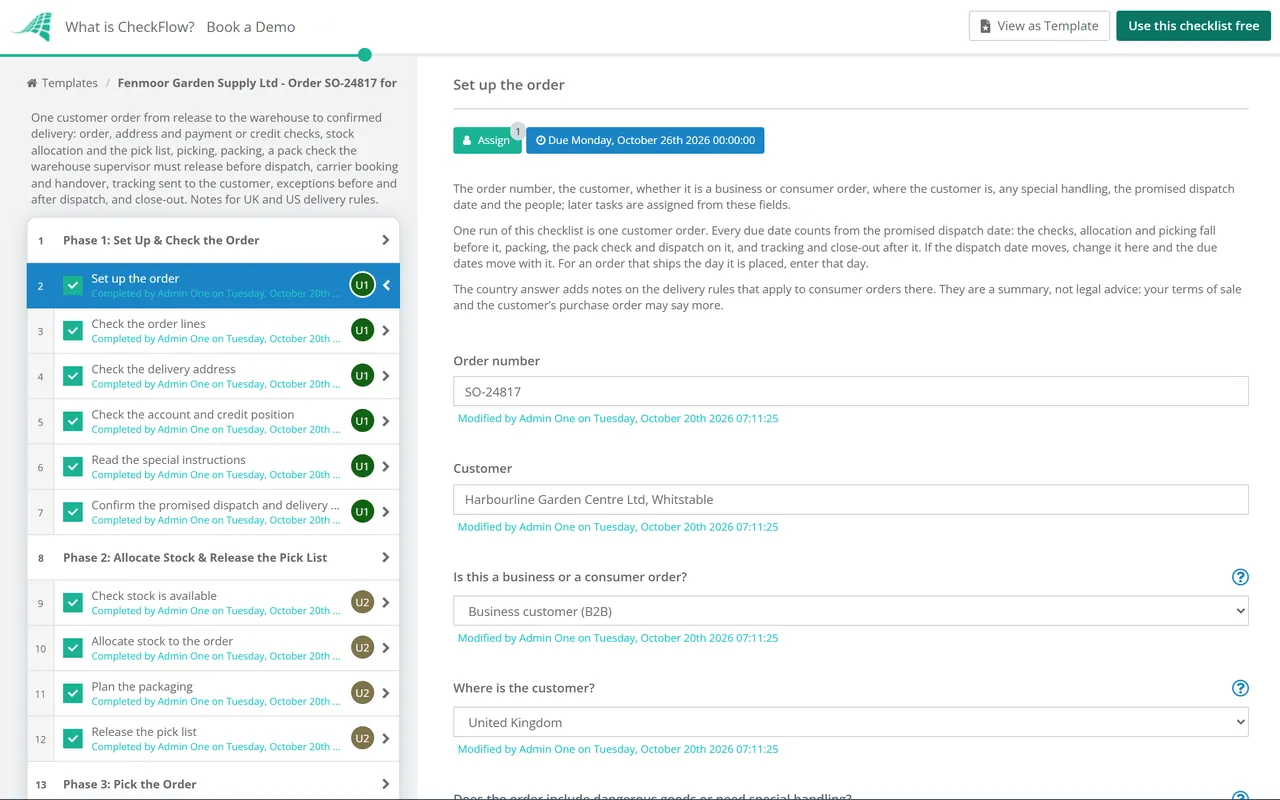
This free order fulfillment checklist is for e-commerce and B2B order teams: customer service, warehouse supervisors, pickers and packers, and whoever books the carriers. One run takes one customer order from its release to the warehouse to confirmed delivery. It checks the order lines, the delivery address, the payment or credit position and any special instructions, then allocates stock and releases the pick list. The picker picks and checks every line, and anything wrong, from a short pick to a payment problem, opens a set of exception steps before packing. After packing, the warehouse supervisor checks the items, quantities, condition, packaging, documents and labels, and nothing can be dispatched until they release the order. The carrier is booked, the parcels are handed over and the customer gets the tracking details. A failed delivery, damage, a loss or a return to sender adds its own task, and the order is closed once delivery is confirmed. Notes cover the UK and US rules on delivery and shipping times.

Order Fulfillment Covers Your Customer’s Order, Not Your Supplier’s

Order fulfillment is the work between a customer placing an order and receiving it: checking the order, picking the goods from stock, packing them, handing them to a carrier and making sure they arrive. Most orders go wrong in a few predictable places: a line picked from the wrong location, a short pick nobody mentions, a parcel packed without its paperwork, or an address the carrier cannot deliver to. A checklist puts a check at each of those places and gives every exception an owner.

This checklist runs one customer order going out, from its release to the warehouse up to and including dispatch, and then the delivery outcome. It is not the shipment tracking workflow checklist, which follows a supplier’s shipment coming in to you from the supplier’s dispatch to receipt, or the goods receiving and inspection checklist, which checks a delivery when it reaches your dock. A business customer’s credit limit is set with the customer credit approval checklist; this one only checks that the order is within it.

Customer order going out

Get the right goods to the customer

Covers: the order checks, allocation, picking, packing, the pack check, dispatch and the delivery outcome.

Owned by: customer service and the warehouse.

Output: a delivered order, confirmed and closed. This checklist.

Supplier shipment coming in

Know where a purchase is before it is late

Covers: the supplier’s dispatch, tracking in transit, delays, customs holds and receipt.

Owned by: procurement and logistics.

Output: an inbound shipment followed to receipt. The Shipment Tracking Workflow Checklist.

Delivery at your dock

Check what a supplier delivered

Covers: the count, identity and condition of goods received against the purchase order, and the decision to accept them.

Owned by: goods-in and the inspector.

Output: a goods receipt for what was accepted. The Goods Receiving & Inspection Checklist.

What the Order Fulfillment Checklist Covers

Eight phases take one order from its release to the warehouse to confirmed delivery, with due dates counted from the promised dispatch date. The order type on the first task adds a payment check for a consumer order, or a credit check and a delivery slot booking for a business one. Phase 4 appears only when an exception is recorded before packing, nothing after the warehouse supervisor’s release of the order can be completed until it is given, and the delivery outcome adds a task for a failed delivery, damage or loss, or a return to sender.

  1. Phase 1

    Phase 1: Set Up & Check the Order

    7 tasks

    Start when the order is released to the warehouse. Most fulfillment problems can be seen in the order before anyone picks it: a missing line, an address the carrier will not accept, a payment that has not gone through. The order type on the first task adds a payment check for a consumer or a credit check for a business customer.

    • Set up the order — the order number, the customer, whether it is a business or consumer order, where the customer is, any special handling, the promised dispatch date and the people; later tasks are assigned from these fields
    • Check the order lines — items, quantities, prices and the customer’s reference against what was agreed, and query anything that looks wrong before stock is touched
    • Check the delivery address — complete, in a form the carrier accepts, with a contact name and telephone number, and any access limits such as a site that cannot take a large vehicle
    • Confirm the payment has been taken — consumer orders only; the payment is authorised or captured and the order is not waiting for a fraud review
    • Check the account and credit position — business orders only; the account is open, the order is within the credit limit and terms, or finance has released it
    • Read the special instructions — delivery notes, packing requests, gift messages, labelling or paperwork the customer asked for, and pass each one to the person who must act on it
    • Confirm the promised dispatch and delivery dates — the dispatch date and delivery date the customer was given, and whether stock and the carrier’s cut-off times allow them; if not, tell the customer now and record it as an exception
  2. Phase 2

    Phase 2: Allocate Stock & Release the Pick List

    5 tasks

    Reserve the stock for this order before anyone walks to a shelf, so it cannot be picked for another one. Stock that is damaged, on hold or close to its expiry date is not available stock.

    • Check stock is available — every line in the right quantity, in a pickable location and status, not on hold or reserved for another order
    • Allocate stock to the order — by your stock rotation rule, first in first out or first expired first out for dated goods, with batch or serial numbers where you trace them
    • Plan the packaging — box or pallet size, protective materials and whether the order ships as one parcel, several parcels or a pallet
    • Confirm the special handling requirements — orders with dangerous goods or special handling only; what applies, whose instructions you are following and that the carrier and service you plan to use accept the goods
    • Release the pick list — to the picker, in pick-path order, with the lines, locations, quantities and any batch or serial numbers
  3. Phase 3

    Phase 3: Pick the Order

    5 tasks

    Check the item, not just the location. Most picking errors are a neighbouring item, the wrong size or colour variant, or the right item in the wrong quantity. Anything wrong found so far, at the order check, allocation or here, is recorded at the end of this phase.

    • Pick each line from its location — scan or check the item code and the quantity for every line, not only the location label
    • Check batch, serial and expiry details — against the allocation, and pick nothing past its use-by date or inside the customer’s minimum shelf life
    • Check the condition of the picked goods — no damaged packaging, missing parts or signs of returned stock being picked as new
    • Record any exceptions before packing — a short pick, damaged stock, an address or payment problem or a date that cannot be met; answering Yes adds the exception steps
    • Move the picked order to packing — with the pick list, in a tote or space marked with the order number, so it cannot be mixed with another order
  4. Phase 4

    Phase 4: Resolve Exceptions Before Packing

    4 tasks

    Applies only when an exception is recorded at the end of Phase 3. Decide the remedy and tell the customer before the order is packed, so the parcel, the delivery note and the invoice all match what actually ships.

    • Log each exception — the line, what is wrong, the quantity affected and the evidence, in the exceptions register
    • Decide the remedy for each exception — pick from other stock, replace damaged items, ship part now and back-order the rest, offer a substitute or cancel the line; never substitute without the customer’s agreement
    • Tell the customer before you dispatch — what has changed, the new date if there is one and their options, and record their answer
    • Update the order and the pick list — so the parcel, the packing slip and the invoice show what will actually ship, and correct the stock record
  5. Phase 5

    Phase 5: Pack the Order

    5 tasks

    Pack for the journey, not for the shelf. The packaging has to survive the carrier’s handling, and the parcel has to carry everything the customer and the carrier need.

    • Pack the items with the right protection — a box or pallet suited to the weight and fragility, enough void fill that nothing moves, and liquids sealed and bagged
    • Add the documents — the packing slip or delivery note, any invoice, certificates or returns information, and the customer’s reference where they asked for it
    • Weigh and measure each parcel — the actual weight and dimensions, because carriers price and accept parcels by them
    • Print and attach the shipping label — one per parcel, on the largest flat face, with no old labels or barcodes left showing
    • Apply the special handling marks and documents — orders with dangerous goods or special handling only; the marks, labels and transport documents the specialist rules and your carrier require, prepared by the people your procedure names
  6. Phase 6

    Phase 6: Pack Check & Release

    5 tasks

    A second person checks the packed order before it can leave. The warehouse supervisor’s release is the gate: nothing after it can be completed until it is recorded, so no parcel is booked, handed over or tracked unchecked.

    • Check the right items and quantities — every line against the order, the pick list and the packing slip, by someone other than the packer where you can
    • Check condition and packaging — goods undamaged, packaging strong enough for the journey, nothing loose and every parcel sealed
    • Check the documents and labels — the label address matches the order, the service matches what the customer paid for, and every document is in the parcel
    • Run any quality check the order needs — a function test, a sample inspection, a photograph of the packed order or the customer’s own quality requirements
    • Release the order for dispatch — the warehouse supervisor’s decision after the pack check; nothing after this task can be completed until it is recorded
  7. Phase 7

    Phase 7: Book the Carrier & Dispatch

    6 tasks

    Dispatch is the moment the parcels leave your hands. Book the service the customer paid for, count the parcels onto the vehicle and get a record of the handover, because it is your evidence of when the order shipped.

    • Book the carrier — the service the customer paid for or agreed, a collection time, and the weights and dimensions recorded at packing
    • Book a delivery slot with the customer’s goods-in — business orders only; where the customer’s site receives deliveries only against a booked slot, book one and give the carrier the reference and the customer’s purchase order number
    • Prepare the dispatch documents — the carrier’s manifest or consignment note, and the customs paperwork for an order going to another country
    • Hand the parcels to the carrier — count them onto the vehicle, get a signature or scan for the number handed over and note the time
    • Confirm dispatch in your order system — so the stock, the invoice and the order status all show that the order has shipped
    • Send the tracking details to the customer — the carrier, the tracking number or link and the expected delivery date, and for a part shipment, what follows and when
  8. Phase 8

    Phase 8: Confirm Delivery & Close the Order

    8 tasks

    The order is not done when it leaves: it is done when the customer has it. Follow the tracking until delivery, record the outcome, and the outcome adds a task for a failed delivery, damage or loss, or a return to sender.

    • Check the tracking until delivery — look for stalled scans, failed attempts, address queries or a return, and act on the same day
    • Record the delivery outcome — delivered in full, delivered with damage or a shortage, a failed delivery, lost in transit or returned to sender; anything but delivered in full adds the task to resolve it
    • Resolve the failed delivery or address problem — check the carrier’s reason, then rebook, correct the address with the customer in writing, or arrange a collection from the depot
    • Handle damage, a shortage or a loss in transit — ask for photographs and keep the packaging, put it right with the customer and claim from the carrier within its time limit
    • Deal with a return to sender — check the goods back in, find out why they came back and agree with the customer whether to reship or refund
    • Confirm the delivery with the customer — the proof of delivery, and that what arrived is what they ordered
    • Close the order — the invoice sent or the payment settled, every exception and claim closed or handed on, and the record complete
    • Note any lessons for the process — repeated exceptions for the same item, location, packaging or carrier, and the change you will make

Fulfillment Exceptions: What to Do and Who to Tell

Most fulfillment problems are one of a few types. The table shows the first step, the usual remedy and who needs to know for each. Your terms of sale, your carriers’ conditions and your own procedures set the details, so adjust it once and use it for every order.

Exception First step Usual remedy Tell
Short pick or stock not foundCheck the other locations and the stock record before calling it shortPick from other stock, ship part and back-order the rest, or offer a substituteOrder owner, then the customer
Damaged stock found at pickingSet it aside and block it in the stock systemPick a replacement; report the damaged stock for return or write-offWarehouse supervisor
Address incomplete or not accepted by the carrierHold the order before it is packedCorrect the address with the customer in writingOrder owner
Payment declined or account on credit holdDo not release the pick listRelease only when the payment is taken or finance clears the accountOrder owner and finance
Order cannot ship by the promised dateFind out the real date before telling anyoneOffer the customer the new date or cancellation, and record their answerOrder owner, then the customer
Wrong item or quantity found at the pack checkDo not release the orderRepick and repack, then check againWarehouse supervisor and the packer
Failed delivery attemptCheck the carrier’s reason the same dayRebook, correct the address or arrange a collectionShipping coordinator and the customer
Damaged or short on deliveryAsk the customer for photographs and to keep the packagingSend a replacement or the missing items, or refund; claim from the carrierOrder owner and the carrier
Lost in transitAsk the carrier to trace itReplace or refund, and claim from the carrierOrder owner and the carrier
Returned to senderCheck the goods back in and find out whyReship to a corrected address or refund, as the customer prefersOrder owner and the warehouse

Delivery and shipping times are set by law for some orders. In the UK, a sales contract with a consumer is treated as requiring delivery without undue delay and not more than 30 days after the contract is made, unless a different time or period was agreed (Consumer Rights Act 2015, section 28). If the trader misses it, the consumer can in some cases treat the contract as at an end, and must then be reimbursed without undue delay. The goods stay at the trader’s risk until the consumer, or someone they named, has them, unless the consumer arranged a carrier the trader did not offer (section 29). In the US, the FTC’s Mail, Internet, or Telephone Order Merchandise Rule (16 CFR part 435) requires a reasonable basis to expect to ship within the time stated, or within 30 days of a properly completed order when no time is stated. A seller that cannot ship in time must offer the buyer the choice to accept the delay or cancel for a prompt refund (section 435.2(b)). Some orders are outside the rule, including cash on delivery orders and orders of seeds and growing plants (section 435.3).

Your terms set the rest. The UK sections apply to sales to consumers; the US rule applies to orders placed by mail, online or by telephone, whatever the method of payment. For business orders in the UK, and wherever the contract says more, the delivery date, the risk in transit and the remedies come from your terms of sale and the customer’s purchase order. Read yours before you rely on this summary.

Why Run Order Fulfillment in CheckFlow?

1

Nothing leaves before the pack check

The warehouse supervisor’s release of the order is assigned to them alone, and the checklist halts there: the carrier booking, the handover and the tracking details cannot be completed until the items, quantities, condition, packaging, documents and labels have been checked. See how approvals that halt a checklist work.

2

Every exception gets an owner and a date

Record an exception before packing and the exception steps appear: the register, the remedy, telling the customer and updating the order. A failed delivery, damage, a loss or a return to sender adds its own task, and the order type adds the payment check, or the credit check and the delivery slot. Change the steps or the offsets in the template designer.

3

Every open order in one view

The Reports Grid shows every order still open and how far it has got, and the Tasks Grid shows each picker, packer and coordinator what is due today. The pick, the pack check, the tracking number and the proof of delivery stay on the tasks, with who did each one and when. See real-time visibility.

CheckFlow is not a warehouse management system, an order management system or a shipping platform. It does not hold stock levels or print labels: you do that in your own systems and record the references on the checklist. If you ship hundreds of small parcels a day, let your warehouse system run the routine ones and use this checklist for the orders that need care, such as business, high-value or special handling orders, and to train new staff on the standard.

This template runs one customer order. Follow a supplier’s shipment coming in with the Shipment Tracking Workflow Checklist, check deliveries at your dock with the Goods Receiving & Inspection Checklist, count the stock you pick from with the Inventory Audit Process Checklist, and set a business customer’s credit limit with the Customer Credit Approval Checklist. New pickers and packers can start with the Warehouse Employee Onboarding Checklist.

AI generator

Didn’t find what you need? Describe it.

Describe the process in a sentence and the AI checklist generator drafts the phases and tasks for you.

Frequently Asked Questions

What is order fulfillment?

Order fulfillment is the work of getting a customer’s order to them: checking the order, allocating stock, picking the items, packing them, handing them to a carrier and confirming delivery. It also covers what happens when something goes wrong, such as a short pick, a failed delivery or a return to sender. A business can do it in its own warehouse or pay a third-party logistics provider to do it, and the steps are much the same either way.

What are the steps in the order fulfillment process?

Check the order lines, the delivery address, the payment or credit and any special instructions. Allocate stock and release a pick list. Pick each line and check its batch, expiry and condition. Deal with any exception before packing. Pack with the right protection, documents and label, and have someone check the packed order before it is released. Book the carrier, hand over the parcels and send the customer the tracking details. Then follow the delivery, resolve any failure, damage, loss or return, confirm delivery and close the order.

What should a pack check include?

Five things: the right items, the right quantities, the condition of the goods, packaging that will protect them in transit, and the documents and labels. Compare every line with the order and the pick list, ideally by someone other than the packer. Check the label address against the order and the service against what the customer paid for, and make sure the packing slip, any invoice and the documents the customer asked for are in the parcel. In this template, the supervisor’s release after the pack check halts the checklist until it is given.

How should you handle a short pick?

Check the other locations and the stock record first, because a short pick is often stock in the wrong place. If the stock is not there, decide the remedy before packing: pick from other stock, ship part of the order and back-order the rest, or offer a substitute. Do not substitute an item without the customer’s agreement. Tell the customer what will arrive and when, record their answer, and update the order so the invoice and delivery note match what ships. Then correct the stock record.

What should you do when a delivery fails?

Check the carrier’s reason the same day. If the address was wrong or incomplete, correct it with the customer in writing and rebook. If nobody was there to receive it, arrange a redelivery or a collection from the carrier’s depot. If the parcel comes back to you, check the goods back in, find out why, and agree with the customer whether to reship or refund. Record the reason, because repeated failures with the same carrier, area or address format point to something you can fix.

How quickly must an online order be shipped or delivered?

It depends on what you promised and where the customer is. In the UK, a sale to a consumer with no agreed delivery time must be delivered without undue delay and not more than 30 days after the contract is made (Consumer Rights Act 2015, section 28). In the US, the FTC’s Mail, Internet, or Telephone Order Merchandise Rule requires a reasonable basis to ship within the time you state, or within 30 days of a properly completed order if you state none, and an offer to consent to the delay or cancel when you cannot. Elsewhere, check local consumer law. For business customers in the UK, the contract sets the date.

What is the difference between order fulfillment and shipment tracking?

Order fulfillment, as this template uses it, is your customer’s order going out: checking it, picking, packing, the pack check, dispatch and the delivery outcome. The Shipment Tracking Workflow Checklist follows a supplier’s shipment coming in to you, from the supplier’s dispatch to receipt at your site. Use this one when you are the seller and the other when you are the buyer. Goods coming in are checked at your dock with the Goods Receiving & Inspection Checklist.

Is CheckFlow free for this template?

14-day free trial, no card required. The Business plan is $10 per user per month after the trial. Full details at checkflow.io/pricing.

Check Every Order Before It Leaves, and Until It Arrives

Free trial — no credit card required.

14-day free trial, no credit cardFull refund in your first 30 daysUS hosting, EU on request