The pager changes hands in seconds. The context does not: the alert silenced until Thursday, the database still running on its secondary after last night’s failover, the migration booked for Saturday at 02:00.
The first bad night of a rotation is often about something the previous engineer knew and did not write down. This free on-call handover checklist gives SRE, platform, infrastructure and MSP engineering teams a routine for every rotation change, whether the pager moves weekly or follows the sun between regions. The outgoing engineer prepares a written note, both engineers talk it through, the incoming engineer proves that paging and access work, and the pager moves only when they accept it. On weekly rotation changes, a short review of the rotation that just ended sends noisy alerts, runbook gaps and repeat failures to the people who can fix them.
A Handover Has Two Sides, and Each Can Fail on Its Own
Paging tools rotate the schedule automatically, so it is easy to believe the handover happens by itself. It does not. The schedule moves the alerts. It does not move the knowledge of what is fragile this week, what is half fixed and what is about to change. That has to travel from one engineer to another, and it travels best in writing plus a short conversation.
Google’s Site Reliability Workbook lists this among the basic duties of an on-call engineer: read the handoff from the previous shift when the shift starts, and send a handoff email to the next engineer when it ends. This checklist turns that habit into named tasks for each side, with a check that the incoming engineer can actually be reached before anyone relies on them.
Outgoing engineer
Hands over what they know
Brings: the rotation log, open incidents, work left half done, silenced alerts and risky events coming up.
Common failure: a tired engineer writes “quiet week, nothing to report” while a manual fix is still holding a service together.
Done when: the note is written and every open item has an agreed owner.

Incoming engineer
Proves they are ready
Checks: a test page arrives on every method, VPN and consoles work, escalation contacts are current, runbooks open.
Common failure: the first real page at 03:00 is also the first time they discover their access expired.
Done when: they accept the handover and the paging tool routes to them.
The scope stops at the handover and the rotation around it. Running an incident, writing its postmortem and chasing its root cause each have their own process, and the handover only makes sure they have an owner. A staffed service desk’s working day is a different routine again, although the desk’s end-of-day notes are often one of the inputs here.
What the On-Call Handover Checklist Covers
Phases 1 to 4 run at every handover. Phases 5 and 6 appear on rotation changes and stay hidden on daily follow-the-sun shift handovers. The pager does not move until the incoming engineer accepts it in Phase 4.
Phase 1
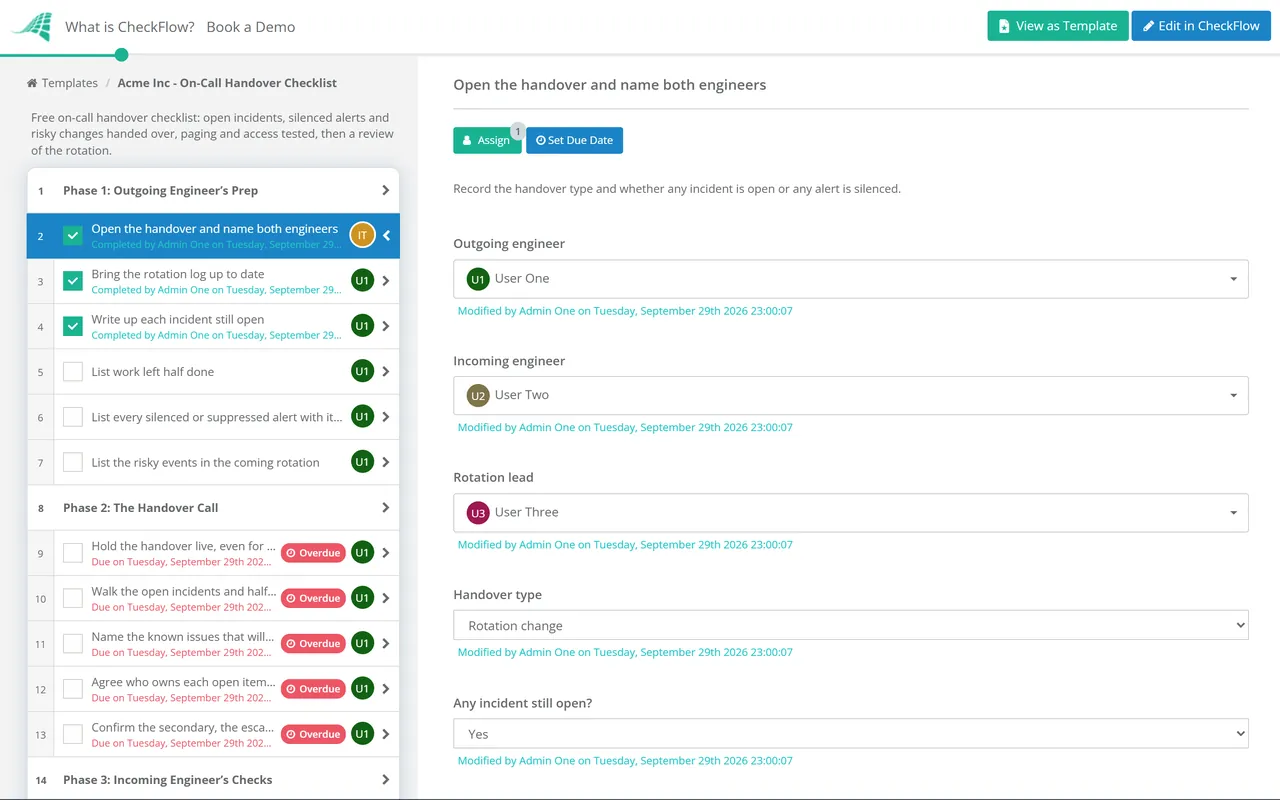
Phase 1: Outgoing Engineer’s Prep
Done by the outgoing engineer before the call. The answers on the first task hide the incident and silenced-alert tasks when there is nothing to report.
Open the handover and name both engineers — record the handover type and whether any incident is open or any alert is silenced
Bring the rotation log up to date — every page with its time, the alert, the action taken and whether it needed a human
Write up each incident still open — status, who is leading it, when the next update is due and what has been tried
List work left half done — services not failed back, manual fixes, temporary scaling and anything restarted by hand
List every silenced or suppressed alert with its expiry — a silence with no end date is a blind spot nobody chose
List the risky events in the coming rotation — deployments, migrations, supplier maintenance, certificate renewals and peak trading days
Phase 2
Phase 2: The Handover Call
Hold the handover live, even for ten minutes — the written note is the record; the conversation is where questions get asked
Walk the open incidents and half-done work first — they are the items most likely to page on the first night
Name the known issues that will page but can wait — so the incoming engineer does not lose a night to a fault already understood
Agree who owns each open item from now on — the outgoing engineer may keep a postmortem draft they started, for example
Confirm the secondary, the escalation manager and supplier contacts — names and numbers for this rotation, not last quarter’s
Phase 3
Phase 3: Incoming Engineer’s Checks
Done by the incoming engineer. The last task appears only when they are new to this rotation.
Trigger a test page and acknowledge it — on every notification method the schedule uses, such as app, SMS and voice call
Check the schedule shows you for the right hours — swaps and overrides are easy to set in the wrong time zone
Log in to the VPN, bastion hosts and the consoles you may need — including MFA and break-glass access, now rather than at 03:00
Open the runbooks for the noisiest alerts — check the links work and the steps still match the systems
Check your kit and connectivity for the whole rotation — laptop, charger, phone signal at home and any travel planned
Arrange a shadow or a named backup for the first shifts — nobody should take their first solo page on a service they have never touched
Phase 4
Phase 4: Accept the Pager
The first task is an approval assigned to the incoming engineer named on the first task. The checklist halts there, and the outgoing engineer keeps the pager, until they record their decision.
Accept the handover — the incoming engineer signs off that the note is clear and the checks passed
Confirm the paging tool now routes to the incoming engineer — send one more test if the schedule was changed by hand
Post who is primary and secondary in the team channel — with how to reach them and until when
Tell the service desk who holds the pager — so out-of-hours escalations from the desk reach the right person
Phase 5
Phase 5: Rotation Review
Appears only on rotation changes. The outgoing engineer completes it with the rotation lead, often in the weekly operations meeting.
Count the pages and incidents in the rotation that just ended — split into working hours and out of hours
Mark each page as actionable or not — a page that needed no human action is a candidate for tuning or deletion
Compare incidents per shift with your team’s limit — a rotation over the limit leaves no time for follow-up work
Record the hours spent on operational work — interrupts, tickets and incidents against the time planned for projects
Record out-of-hours time for time off in lieu or pay — under whatever your on-call policy allows
Phase 6
Phase 6: Follow-Ups
Appears only on rotation changes. The postmortem task appears only when the review records a significant incident.
Raise a ticket for each noisy or non-actionable alert — with an owner and a date to tune or remove it
Send repeat failures to problem management — the same alert three rotations running has a cause worth finding
Confirm a postmortem is booked for each significant incident — the review runs in its own template; this task only checks it exists
Fix or ticket the runbook gaps found this rotation — a step missing at 03:00 will be missing again next time
Update this handover template if something was missed — so the next handover asks the question this one forgot
A good note is short and specific. Each line below answers a question the incoming engineer would otherwise have to ask at the worst possible moment.
Item
What to write
What goes wrong without it
Open incidents
Status, lead, next update time, what has been tried
The same diagnosis is repeated from scratch
Half-done work
What was changed by hand and how to put it back
A temporary fix becomes permanent by accident
Silenced alerts
Alert, reason, owner, expiry
A real failure fires into a silence nobody remembers
Known noisy alerts
Which ones page, why, and whether they can wait
A night lost to a fault that was already understood
Coming risky events
Date, time, owner, rollback contact
A 02:00 migration pages someone who did not know it existed
Ownership
Who keeps each open item after the handover
Follow-ups fall between two engineers and neither does them
The rotation review needs a limit to compare against, and Google’s published figures are a useful reference point. The Site Reliability Engineering book’s chapter on being on call says an incident takes about six hours on average once root-cause analysis, remediation and follow-up are included, which is why it puts the ceiling at two incidents per 12-hour shift. The same chapter caps on-call work at 25% of an SRE’s time and suggests at least eight engineers for a single-site rotation, or six per site for a two-site one.
These are one company’s numbers for its own services, not a standard. They still make a sensible starting point: if your rotation regularly goes past two incidents a shift, the follow-up work is not getting done, and Phase 6 is where that shows.
Why Run On-Call Handovers in CheckFlow?
1
Starts on the rotation boundary
A recurring schedule opens the handover at your rotation time, weekly or daily for follow-the-sun, and assigns it to the on-call group. The incoming engineer’s tasks go to the person picked on the first task, so each side sees only its own work.
2
No acceptance, no handover
The acceptance task halts the checklist until the incoming engineer records a decision. If a test page fails or access is missing, they record Not approved with the reason, and the outgoing engineer stays on until it is fixed. The activity trail shows the exact time responsibility moved.
3
A log that feeds the review
Pages and silenced alerts go into tables inside the tasks, so the rotation review counts from real entries instead of memory. Conditional logic hides the review on shift handovers, and template versioning keeps a record of each question added after a handover missed something.
During working hours, the service desk runs its own routine in the IT Help Desk Daily Checklist, which ends by passing anything likely to page overnight to whoever holds the pager. CheckFlow’s recurring checklist software explains how the schedules, assignments and reminders behind both routines work.
Anything open or unusual that the incoming engineer could be paged about: incidents still running, work left half done, alerts that are silenced and when the silence ends, known noisy alerts that can wait, and risky events booked for the coming rotation. It should also confirm who owns each open item and who the secondary and escalation contacts are. The incoming engineer then checks that paging and access work before accepting.
How long should an on-call rotation be?
+
A week is a common length: long enough for continuity, short enough to limit fatigue, and it keeps handovers to one a week. What matters more is the length of each shift within it. Google’s Site Reliability Workbook recommends limiting shifts to 12 hours for rotations that get paged every day, and describes 24 hours of on-call without a break as unsustainable. Teams with engineers in several regions often split each day between them instead.
What is a follow-the-sun on-call rotation?
+
A rotation shared between teams in different time zones, so each region covers its own daytime and hands the pager to the next region as its day ends. Google’s SRE book notes that it lets teams avoid night shifts altogether. The cost is more handovers: at least one a day per region, which is why a short, consistent checklist matters more here than on a weekly rotation.
How many engineers do you need for a 24/7 on-call rotation?
+
Google’s SRE book puts the minimum at eight engineers for a single-site team and six per site for a team split across two sites, based on its cap of 25% of time spent on call, with a primary and a secondary always on call and week-long shifts. Smaller teams do run round-the-clock rotations, but each person is on call more often, and the rotation review is where you will see the cost in hours and sleep.
How many pages per on-call shift is too many?
+
Google targets a maximum of two incidents per on-call shift, because each one takes around six hours once follow-up is included. Raw page counts matter less than whether each page was actionable; the SRE book says all paging alerts should be. Count both in the rotation review, and treat any page that needed no human action as a ticket to tune or remove that alert.
Is CheckFlow free for this template?
+
14-day free trial, no card required. The Business plan is $10 per user per month after the trial. Full details at checkflow.io/pricing.
Hand Over the Context, Not Just the Pager
Free trial — no credit card required.
Do you like cookies? 🍪 We use cookies to ensure you get the best experience on our website. Learn more