IT Project Management Checklist Template

McKinsey research shows 17% of large IT projects go so badly they threaten the company’s existence. The most common cause is not technical failure. It is inadequate requirements, skipped change management, and a cutover that was never properly planned.

IT projects have a worse delivery record than almost any other category of project. Large IT implementations run on average 45% over budget, and more than half deliver less than 60% of their planned value. The patterns of failure are consistent across industries and decades: requirements gathered too quickly and validated too late, a change management plan that was a deck nobody read, user acceptance testing that was compressed under schedule pressure, a cutover that was executed without a tested rollback plan, and a go-live that was declared successful before the hypercare period revealed all the issues that UAT missed. A structured IT project management process addresses these failure modes systematically: thorough requirements capture before any build begins, an architecture review that catches design problems early, a testing programme that does not compress under schedule pressure, a change management plan that actually prepares users, and a cutover checklist that makes the most high-risk phase in any IT project as controlled as possible. This free checklist gives IT managers, project managers, and programme managers a structured framework for the full IT project lifecycle.

Use This Template Free See Live Example
No Credit Card Required

Why IT Projects Fail — and Where the Checklist Prevents Each

Inadequate requirements

The requirements that were gathered were the requirements that were easiest to collect — not the ones that were most important to get right. The gap between what the business meant and what the system delivered was discovered during UAT or, worse, after go-live.

The fix: Structured requirements workshops with all stakeholder groups; acceptance criteria defined and signed off before build begins.

Skipped change management

The system was built correctly but the users were not prepared to use it. Change management was budgeted at 5% of project cost and compressed when schedule pressure arrived. Adoption was poor; the expected benefits were not realised.

The fix: Change management planned and funded as a parallel workstream from day one; training delivered before go-live, not during it.

Compressed UAT

User acceptance testing was given 2 weeks when the plan allocated 6, because build ran long. The issues UAT would have caught appeared in production where they cost ten times more to fix.

The fix: UAT is not compressed. If build runs late, go-live moves. UAT exit criteria are non-negotiable.

Unplanned cutover

The go-live cutover was planned the week before it happened. The data migration failed. The rollback plan had not been tested and took 6 hours to execute rather than the assumed 1 hour.

The fix: Cutover planning begins at project start; cutover plan produced and rehearsed weeks before go-live; rollback plan tested, not assumed.

What the IT Project Management Checklist Covers

This checklist covers the full IT project lifecycle in eight phases — from project initiation and requirements gathering through to hypercare and post-implementation review.

Phase 1

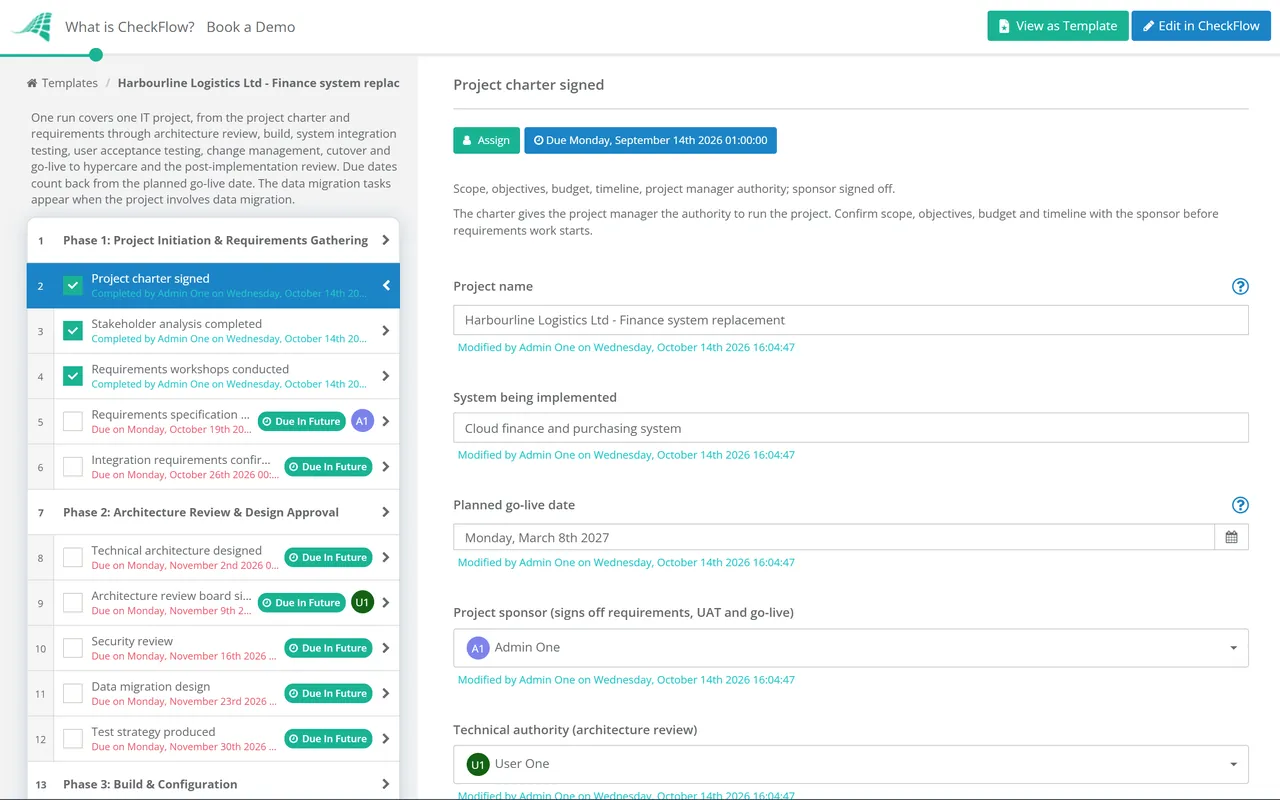
Phase 1: Project Initiation & Requirements Gathering

  • Project charter signed — scope, objectives, budget, timeline, project manager authority; sponsor signed off
  • Stakeholder analysis completed — all groups affected by the system; their requirements and their involvement in UAT
  • Requirements workshops conducted — with all key user groups; not just the system owner; functional requirements and non-functional requirements (performance, security, availability, integration)
  • Requirements specification produced and signed off — by the project sponsor and key business stakeholders; this is the scope baseline; changes after sign-off go through formal change control
  • Integration requirements confirmed — all systems the new system must connect to; API specifications, data flows, and interface requirements documented
Phase 2

Phase 2: Architecture Review & Design Approval

  • Technical architecture designed — system components, infrastructure, integration architecture, security controls, and hosting model; documented
  • Architecture review board sign-off — or equivalent technical governance; design reviewed by senior technical stakeholders before build begins; not after
  • Security review — data classification, access controls, encryption, audit logging, and compliance with relevant standards (GDPR, ISO 27001, etc.); confirmed in design, not retrofitted
  • Data migration design — for projects involving data migration; migration approach, data mapping, quality rules, and cutover data freeze design
  • Test strategy produced — confirming the testing phases (unit, integration/SIT, UAT, performance, security), the test environments, and the entry/exit criteria for each phase
Phase 3

Phase 3: Build & Configuration

  • Development or configuration follows the requirements spec — any deviation goes through change control; no informal additions
  • Unit testing complete — individual components tested by the development or configuration team
  • Build review checkpoint — mid-build review against requirements; any gaps identified and addressed before SIT entry
  • Development environment documentation — configuration decisions, customisations, and build notes documented; essential for maintenance and future change
Phase 4

Phase 4: System Integration Testing (SIT)

  • SIT test environment configured — representative of production; separate from development and UAT environments
  • SIT test scripts prepared — covering all integration points; end-to-end scenarios across system boundaries
  • SIT execution — by the technical team; all integration defects logged, resolved, and re-tested
  • SIT entry and exit criteria met — defined pass rate before SIT begins (entry) and before moving to UAT (exit); no P1/P2 defects open at exit
Phase 5

Phase 5: User Acceptance Testing (UAT)

UAT is the user’s final opportunity to confirm the system does what they need before it goes live. UAT compressed under schedule pressure moves the defect discovery from testing to production — where defects are ten times more expensive to fix. UAT is not compressed; build runs late or go-live moves.

  • UAT test environment configured — with representative test data; separate from SIT and production
  • UAT participants recruited — actual users from the stakeholder groups identified in requirements; not the project team
  • UAT test scripts prepared — based on real-world business scenarios; covering all requirements; expected results documented
  • UAT execution — by business users; defects logged; P1/P2 defects resolved and re-tested before UAT exit
  • UAT sign-off — by the business stakeholders and project sponsor; written confirmation that the system is acceptable for production deployment
Phase 6

Phase 6: Change Management & Training

Change management is the most consistently underfunded workstream in IT projects. A system that is technically perfect but whose users do not know how to use it or are resistant to using it has not delivered its intended value. Change management is not a communications task — it is a programme of preparation, training, and support.

  • Change impact assessment — which groups are affected, how significantly, and what support do they need?
  • Communication plan — stakeholders informed of the change, the timeline, and what it means for them; regularly and in language they understand
  • Training programme — role-based training designed and delivered to all user groups before go-live; not the week of go-live
  • Hypercare support plan — who will support users in the first 30 days post-go-live; additional helpdesk resource, floor-walking, and expedited issue resolution
Phase 7

Phase 7: Cutover Planning & Go-Live

  • Cutover plan produced — all go-live tasks, sequence, timing, owners, and checkpoints; produced and reviewed well in advance of go-live; not the week before
  • Rollback plan documented and tested — if the go-live fails, what is the procedure to revert to the previous state? The rollback plan must be tested, not assumed
  • Go/No-Go meeting — the day before or morning of go-live; all pre-conditions confirmed; sponsor sign-off; team briefed
  • Data migration executed and validated — before go-live; data quality checks passed; reconciliation completed
  • Go-live smoke test — immediately post-deployment; core business processes confirmed working in production; before opening to all users
Phase 8

Phase 8: Hypercare & Post-Implementation Review

  • Hypercare period — first 30 days; elevated support available; issues tracked and resolved with priority
  • Issue log maintained — all post-go-live issues logged, categorised, and resolved; P1/P2 resolved within defined SLA
  • Benefits realisation tracked — the metrics defined in the business case; are the projected benefits being realised?
  • Post-Implementation Review (PIR) — at 30–90 days post-go-live; objectives achieved vs planned, budget and timeline actuals vs plan, lessons learned documented

Why Use CheckFlow for IT Project Management?

1

A phase-gated process with defined entry and exit criteria

The IT project that moves from build to UAT before SIT is complete, or from UAT to go-live before UAT is signed off, compresses the phases that exist to catch problems early and transfers the problem-catching function to production — where it costs far more. CheckFlow’s phase entry and exit criteria make each phase gate explicit and required before the next phase begins.

2

Change management running in parallel — not added at the end

The change management workstream that begins two weeks before go-live cannot prepare users adequately. CheckFlow’s IT project checklist initiates the change impact assessment and communications planning in the requirements phase, with training delivery tracked as a parallel workstream throughout — not a pre-go-live rush.

3

A cutover checklist that leaves nothing to the morning of go-live

Go-live day for an IT project is the day with the least available time to discover what has not been done. CheckFlow’s cutover phase is a detailed, sequenced task list produced weeks before go-live — every step, every owner, every checkpoint — so the day proceeds as a rehearsed programme, not an improvised response.

IT projects generate the most complex project documentation. CheckFlow’s Project Management Documentation Checklist covers the full documentation framework for any project type. See the Project Management Documentation Checklist →

IT project investment is typically approved via a business case. CheckFlow’s Business Case Checklist covers the structured investment justification process. See the Business Case Checklist →

Frequently Asked Questions

What should an IT project management checklist include?

+

An IT project management checklist covers eight phases: initiation and requirements (project charter, stakeholder analysis, requirements workshops, signed specification, integration requirements), architecture and design (technical architecture, security review, data migration design, test strategy), build and configuration (requirements adherence, unit testing, mid-build review), system integration testing (SIT environment, test scripts, execution, P1/P2-free exit), user acceptance testing (UAT environment, business user participants, scenario-based testing, stakeholder sign-off), change management and training (change impact assessment, communications plan, role-based training, hypercare support plan), cutover and go-live (cutover plan, tested rollback plan, go/no-go meeting, data migration validation, smoke test), and hypercare and post-implementation review (30-day elevated support, benefits tracking, PIR).

What is user acceptance testing (UAT) and why is it critical?

+

User Acceptance Testing (UAT) is the testing phase in which actual business users test a system against real-world business scenarios to confirm it meets their requirements before go-live. It is the final quality gate between the build and production. UAT is critical because: it confirms the system works for the people who will actually use it (not just the technical team), it catches requirement misinterpretations that technical testing cannot find, it provides the formal business acceptance that justifies go-live, and defects found in UAT are approximately 10 times cheaper to fix than defects found in production.

What is a cutover plan in IT project management?

+

A cutover plan is the detailed, sequenced task list for transitioning from the current state to the new system at go-live. It covers: every task required to stand up the new system in production (environment configuration, data migration, integration activation), the sequence and timing of each task, the person responsible for each task, the checkpoints and approval gates during the cutover, and the rollback procedure that will be executed if the go-live fails. The cutover plan should be produced and reviewed weeks before go-live, not the week before — and the rollback plan should be rehearsed, not merely documented.

What is change management in IT project management?

+

Change management in IT projects is the structured programme of activities designed to prepare people for the changes a new system introduces to their work. It includes: change impact assessment (who is affected and how), a communications plan (keeping affected users informed of the change, the timeline, and what it means for them), resistance management (identifying and addressing stakeholder concerns), training delivery (role-based training on the new system for all user groups before go-live), and hypercare support (elevated helpdesk and floor-walking support in the first 30 days after go-live).

Is CheckFlow free for this template?

+

14-day free trial, no card required. The Business plan is $10 per user per month after the trial. Full details at checkflow.io/pricing.

Manage Every IT Project Phase From Requirements to Post-Implementation Review

Free trial — no credit card required.