IT Support Agreement Checklist Template

An IT support agreement that is vague is not an agreement — it is a source of future disputes. A well-defined SLA sets expectations, enables measurement, and gives both sides a shared language for managing service quality.

An IT support agreement that simply promises “best efforts” and “timely responses” has failed before it is signed. Without specific, measurable commitments — what response time means for a critical outage versus a low-priority request, what “resolution” means versus “workaround”, what services are in scope, and what happens when a commitment is missed — both parties will have different expectations and will both feel that the other is not meeting theirs. A well-defined IT support agreement specifies all of these things precisely: the service scope, the operating hours, the priority matrix with specific time commitments, the escalation path, the metrics that will be used to measure performance, and the review process that keeps the agreement current as circumstances change. This is the standard for MSPs managing client SLAs, for internal IT teams defining SLAs with business units, and for any organisation that needs a clear, measurable framework for the IT support relationship. This free IT support agreement checklist gives IT managers, MSP service delivery managers, and IT directors a structured framework for building, reviewing, and operating an effective IT support SLA.

Use This Template Free See Live Example
No Credit Card Required

SLA, OLA, and UC — Understanding the Full Commitment Chain

SLA — Service Level Agreement

The commitment to the customer

Definition: The external commitment made to the customer or end user — what response time, resolution time, and availability the IT support provider commits to.

Direction: IT provider → Customer.

Example: “P1 incidents affecting your organisation will be responded to within 15 minutes and resolved within 4 hours during service hours.”

Key principle: An SLA is only credible if it is backed by the internal and vendor commitments that enable it to be met.

OLA — Operational Level Agreement

The internal commitment

Definition: An internal agreement between IT teams — for example, between the service desk and the infrastructure team — that defines how internal escalations will be handled to meet the customer-facing SLA.

Direction: Internal team → Internal team.

Example: “When the service desk escalates a P1 network incident, the infrastructure team will acknowledge within 15 minutes.”

Key principle: The SLA cannot commit to a 4-hour P1 resolution if the OLA allows the infrastructure team 2 hours just to acknowledge the escalation.

UC — Underpinning Contract

The vendor commitment

Definition: A third-party vendor or supplier contract that underpins the ability to meet SLA commitments.

Direction: Vendor → IT provider.

Example: A cloud hosting provider’s SLA committing to 99.9% uptime; a hardware vendor’s next-business-day replacement commitment.

Key principle: Your SLA can never be stronger than your weakest UC. If your cloud provider commits to 99.9% uptime, you cannot promise customers 99.99%.

When drafting any SLA commitment, walk the dependency chain backwards: SLA → OLA → UC. Every commitment to the customer must be backed by an internal OLA and, where applicable, a vendor UC. The gap between a promised SLA and an undeliverable one is almost always found here.

What the IT Support Agreement Checklist Covers

This checklist covers seven phases of building, operating, and maintaining an IT support agreement — from scope definition through to annual review and amendment.

Phase 1

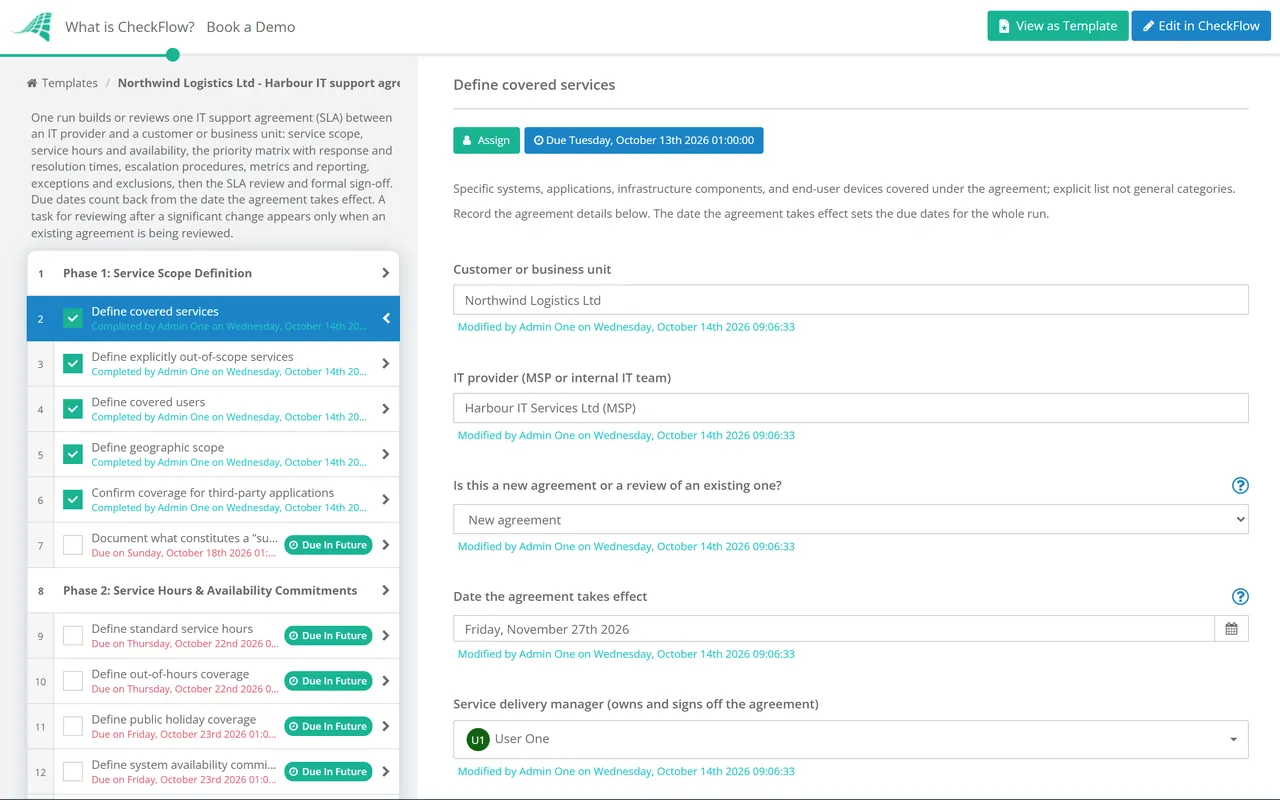
Phase 1: Service Scope Definition

The most valuable sentence in any support agreement is “Out of scope.” Clarity about what is not covered prevents scope creep, misaligned expectations, and the disputes that follow when a customer raises a request that the support team believes is out of scope.

  • Define covered services — specific systems, applications, infrastructure components, and end-user devices covered under the agreement; explicit list not general categories
  • Define explicitly out-of-scope services — what the agreement does NOT cover; personal devices, unsupported software versions, custom in-house applications without support contracts
  • Define covered users — who is eligible to raise support requests? All employees? Named contacts only? Specific locations?
  • Define geographic scope — which sites, offices, or regions are covered; remote workers; cloud-only vs on-premises
  • Confirm coverage for third-party applications — how vendor applications are handled: triage to vendor, manage on the customer’s behalf, or not supported
  • Document what constitutes a “supported configuration” — which OS versions, browsers, and application versions are supported
Phase 2

Phase 2: Service Hours & Availability Commitments

  • Define standard service hours — the hours during which full support is available; typically business hours in the customer’s time zone
  • Define out-of-hours coverage — what support is available outside standard hours? Emergency P1 only? Full coverage? How is it accessed?
  • Define public holiday coverage — which public holidays affect service hours; advance notice to customers; emergency coverage during public holidays
  • Define system availability commitments — uptime targets for managed infrastructure where applicable; how uptime is calculated and measured
  • Define planned maintenance windows — when scheduled maintenance may occur; advance notice requirements; whether maintenance windows are excluded from availability calculations
  • Define SLA clock behaviour — whether SLA timers run in business hours or calendar hours; when clocks are paused (awaiting customer response); how holidays affect targets
Phase 3

Phase 3: Priority Matrix & Response/Resolution Commitments

Specific, numeric commitments are the heart of the SLA. “As soon as possible” is not an SLA commitment. “15 minutes within service hours” is.

  • Define the priority levels — P1 through P4 with clear, unambiguous definitions of what qualifies as each priority
  • Define response time for each priority — P1: 15 minutes. P2: 1 hour. P3: 4 hours. P4: 1 business day.
  • Define resolution time for each priority — P1: 4 hours. P2: 8 hours. P3: 1 business day. P4: 3–5 business days.
  • Define how priority is determined — who assigns priority; the criteria used; what happens if customer and provider disagree on the priority level
  • Define the consequences of SLA breach — service credits, reporting obligations, or formal review trigger; SLA without consequence is advisory only
  • Confirm Tier 1/2/3 escalation timelines — how long a ticket stays at each tier before mandatory escalation; tied to resolution targets
Phase 4

Phase 4: Escalation Procedures

  • Define the technical escalation path — Tier 1 → Tier 2 → Tier 3 → Vendor; with timing for each escalation trigger
  • Define the management escalation path — when does a ticket escalate to IT management? A named escalation contact for the customer to reach
  • Define the P1 war-room protocol — how a major incident is declared and who is assembled; customer contact during a P1
  • Confirm vendor escalation contacts — who escalates to which vendor; contact details and reference numbers for each key vendor relationship
  • Define customer escalation rights — the customer’s right to escalate to senior management contacts; how to exercise this right; response commitment on management escalation
Phase 5

Phase 5: Metrics, Reporting & Transparency

  • Define the SLA metrics to be tracked — at minimum: SLA compliance rate by priority, MTTR by priority, ticket volume by category, and CSAT score
  • Define the reporting frequency — monthly service review report as standard
  • Define the report contents — what data the monthly report includes; agreed with the customer in advance; SLA performance against target, ticket volume trends, and any ongoing known issues
  • Define the service review cadence — monthly or quarterly review meeting between IT provider and customer; agenda, attendees, and follow-up process
  • Define how SLA breaches are reported — immediate notification when a P1 or P2 SLA is breached; summary of all breaches in the monthly report with root cause and corrective action
Phase 6

Phase 6: Exception Management & SLA Exclusions

  • Define exclusions from SLA calculations — incidents caused by customer actions outside the agreed scope; third-party failures outside the provider’s control; planned maintenance windows
  • Define force majeure provisions — events beyond either party’s control; natural disasters, major utility outages
  • Define customer obligations — timely response to information requests; access for remote or on-site support; compliance with security policies
  • Define the SLA clock pause policy — SLA timers are paused when awaiting information or access from the customer; the pause period is documented in the ticket
  • Document how disputed priority assignments are resolved — the process for resolving disagreement about whether a ticket was correctly prioritised
Phase 7

Phase 7: SLA Review & Ongoing Maintenance

  • Conduct an annual SLA review — are the commitments still appropriate? Has the scope changed? Are the targets achievable given current capacity?
  • Review following any significant change — infrastructure changes, new services, changes in business criticality, or significant changes in incident volume
  • Review OLAs and UCs — confirm internal and vendor commitments still support the customer-facing SLA; renegotiate if the dependency chain has weakened
  • Issue a formal SLA amendment — any changes to commitments documented formally and signed by both parties; verbal agreements to “be flexible” are not SLA amendments
  • Review SLA performance data — has the SLA been consistently met? If not, are targets realistic or does capacity need to change?

A Reference Priority Matrix for IT Support Agreements

Priority Definition Response Time Resolution Time Update Frequency
P1 — Critical Complete service outage; major security incident 15 minutes 4 hours Every 30 minutes
P2 — High Significant degradation; multiple users affected 1 hour 8 hours Every 2 hours
P3 — Medium Single user; workaround available 4 hours 1 business day On resolution
P4 — Low Service request; no immediate impact 1 business day 3–5 business days On resolution

Response and resolution targets apply within standard service hours unless out-of-hours coverage is specified. These are illustrative targets — your SLA should define targets that reflect your service model, customer expectations, and team capacity. P1 targets especially should be confirmed against OLA and UC dependencies before commitment.

Why Use CheckFlow for IT Support Agreement Management?

1

Run the SLA review process as a structured annual cycle

An IT support agreement that is never reviewed becomes progressively misaligned with reality — scopes change, infrastructure changes, and customer needs evolve. CheckFlow’s recurring checklist schedules the annual SLA review automatically, with tasks assigned to the service delivery manager, the technical team, and the customer stakeholder — ensuring the agreement is reviewed, not just renewed.
2

SLA performance monitoring embedded in the ticket process

CheckFlow’s ticket response checklist tracks response and resolution times against the priority matrix commitments. When an SLA breach occurs, it is flagged in the checklist record with a documented reason. The monthly SLA compliance report is generated from this data — not manually assembled from ticket system exports.

3

A documented, consistent service delivery record

When a customer queries SLA performance, or when a contract renewal requires evidence of service delivery quality, CheckFlow provides a complete, timestamped record of every ticket’s response and resolution time, every SLA breach and its documented cause, and every service review conducted. The evidence of a consistently managed SLA is produced as a byproduct of running the process.

The IT support agreement defines the SLA; the IT Support Template defines the operational process for delivering against it. CheckFlow’s IT Support Template covers the service desk structure, triage, escalation, and metrics that make SLA compliance achievable. See the IT Support Template →

For MSPs managing SLAs across multiple clients simultaneously, CheckFlow’s MSP Process Management page covers the multi-client process visibility that MSP service delivery requires. See CheckFlow for MSPs →

Frequently Asked Questions

What should an IT support agreement (SLA) include?

+

A comprehensive IT support SLA covers seven areas: service scope (what is covered, what is explicitly out of scope, who is covered), service hours and availability (standard and out-of-hours coverage, planned maintenance windows, uptime commitments), priority matrix and time commitments (specific numeric response and resolution targets for each priority level), escalation procedures (technical and management escalation paths, P1 war-room protocol, vendor escalation contacts), metrics and reporting (which metrics are tracked, reporting frequency and format, service review cadence), exception management and exclusions (SLA clock behaviour, customer obligations, force majeure), and SLA review and maintenance (annual review process, amendment procedure). The priority matrix with specific numeric commitments is the most critical element.

What is the difference between response time and resolution time in an SLA?

+

Response time (First Response Time, FRT) is the time between ticket creation and the first meaningful human contact from a support technician — the moment the customer knows their issue is being actively worked. Resolution time is the total time from ticket creation to confirmed resolution. Both should be defined in the SLA with specific numeric targets by priority level. Response time commitments are particularly important for customer experience — a quick acknowledgement reduces anxiety and signals that the issue is being managed, even when resolution takes time. Providing both metrics in the SLA avoids ambiguity about which one is being committed to.

What is the SLA-OLA-UC dependency chain?

+

An SLA (Service Level Agreement) commits to what the customer will receive. An OLA (Operational Level Agreement) is the internal commitment between IT teams that enables the SLA to be met — for example, how quickly the infrastructure team will respond to an escalation from the service desk. A UC (Underpinning Contract) is the vendor commitment that underpins the provider’s ability to meet its SLA — for example, a cloud hosting provider’s uptime SLA. The critical principle is that an SLA can never be stronger than the weakest link in the OLA and UC chain that backs it. Before committing to any SLA target, the provider should confirm that the OLAs and UCs in the dependency chain support it.

How often should an IT support SLA be reviewed?

+

Annual review is the minimum — sufficient for stable environments. Additional reviews should be triggered whenever the service scope changes significantly (new systems in scope, new users, or significant changes in supported complexity), when SLA performance data shows consistent breach of specific targets (indicating targets may be unrealistic for current capacity), when underlying OLAs or UCs change significantly (a vendor changing its support terms may require the SLA to be adjusted), or when the business relationship changes (contract renewal, significant change in customer size or needs). All SLA changes should be formally documented and signed by both parties.

Is CheckFlow free for this template?

+

14-day free trial, no card required. The Business plan is $10 per user per month after the trial. Full details at checkflow.io/pricing.

Define IT Support Commitments That Are Specific, Measurable, and Deliverable

Free trial — no credit card required.