Production Readiness Review Checklist Template

Review one new or changed service before it takes production traffic: its SLOs and alerts, runbooks and on-call, capacity and failure tests, security, backups and rollback. The readiness approver records the decision before launch.

Last reviewed: November 2026

Printed from checkflow.io/templates/product-development-launch/production-readiness-review-checklist

This free production readiness review checklist is for service owners, SRE and platform teams and engineering leads preparing a new or significantly changed service for production traffic. One run covers one service, counted back from the planned launch date. It scopes the review and agrees the standard, then walks through the architecture and every dependency, the SLIs, SLOs, alerts and dashboards, the runbooks and on-call rotation, capacity with a load test, failure tests and graceful degradation, security and the data the service holds, backups with a timed restore, and the deployment and rollback path. The support team gets its handover, the reviewer brings the open findings to the readiness meeting, and the readiness approver records Ready, Ready with conditions or Not ready before the launch. A follow-up review after launch checks the SLOs against real traffic.

One Service, Reviewed Once Before It Goes Live

A production readiness review, in this template, is the check one service passes once before it takes production traffic: a new service, or a significant change to one already live. Google’s SRE book describes the PRR as a review that ‘identifies the reliability needs of a service’ and a prerequisite for an SRE team taking responsibility for it (The Evolving SRE Engagement Model). Teams without a separate SRE team can run the same review with an experienced engineer from outside the team as the reviewer, as Grafana Labs does.

Each release after launch has its own checklists: the Production Deployment & Rollback Checklist for one deploy and its rollback, the Software Release Management Checklist for a versioned release and the Feature Release Process Checklist for one feature. Building the monitoring itself is the Monitoring & Alerting Setup Checklist; this template records the SLIs, SLOs, alerts and runbooks the service launches with, and links there for building the monitoring in depth. Risks across a whole business are the Operational Risk Assessment Checklist.

This template

One service, before production traffic

Covers: architecture and dependencies, SLIs, SLOs and alerts, runbooks and on-call, capacity and failure tests, security, data, backups and recovery, deployment and rollback, and the support handover.

Planned around: the planned launch date.

Ends with: the readiness decision, the launch and a follow-up review.
Each release

Production Deployment & Rollback

Covers: one release going out: the change, the checks before and after the deploy, and the rollback plan.

Runs: every time you deploy, once the service is live. Production Deployment & Rollback Checklist.

Monitoring work

Monitoring & Alerting Setup

Covers: choosing the signals, setting SLOs, writing and testing alerts and runbooks for one service.

Use it: to do the monitoring work this review checks for. Monitoring & Alerting Setup Checklist.

What the Production Readiness Review Checklist Covers

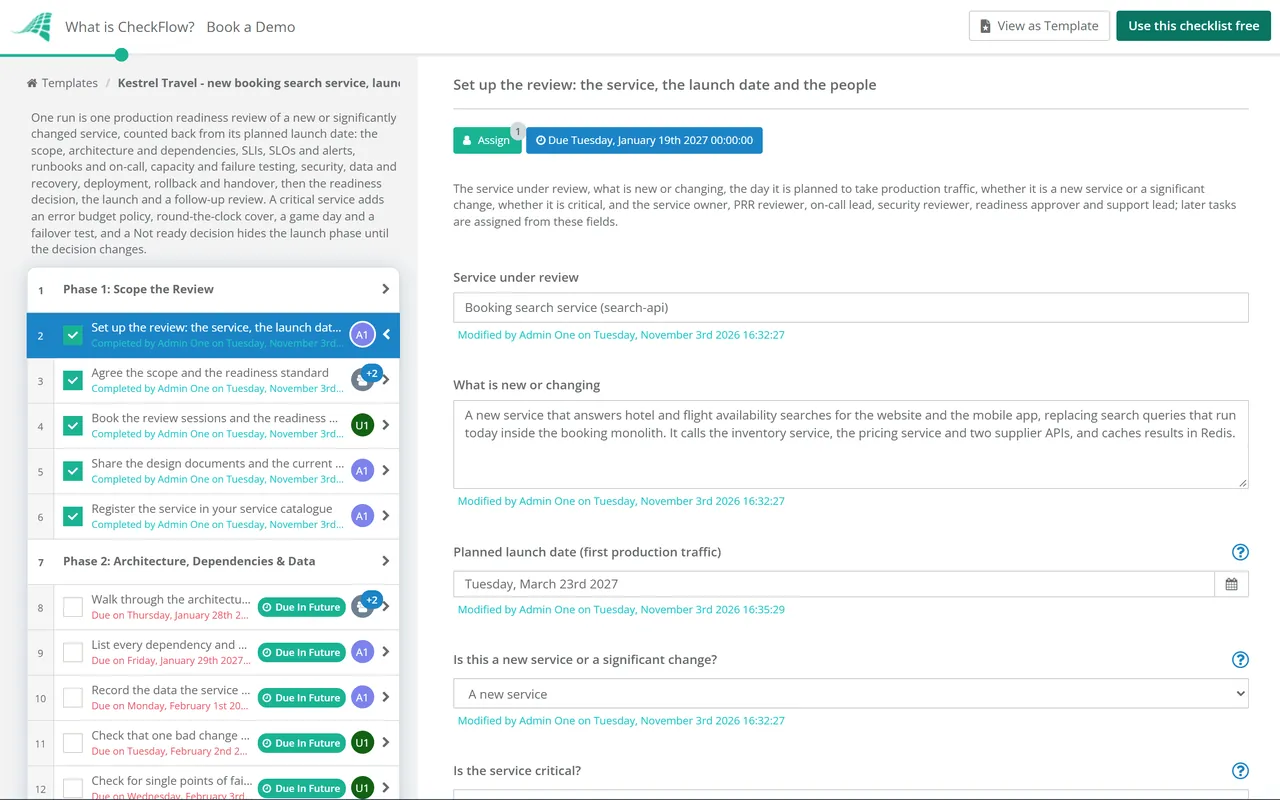
Nine phases take one service from scoping the review to the follow-up after launch. The first task records the planned launch date, which sets every due date, the people involved, and whether the service is new and critical. A critical service adds an error budget policy, round-the-clock cover, a game day and a failover test, and personal data adds a check on a data protection impact assessment. The readiness decision in Phase 8 halts the checklist until the approver decides.

  1. Phase 1

    Phase 1: Scope the Review

    6 tasks

    Owned by the service owner, with the PRR reviewer. Enter the planned launch date on the first task: every due date counts back from it in working days, and the launch and follow-up tasks count forward. Agree what the review covers and the standard the service is checked against before the analysis starts.

    • Set up the review: the service, the launch date and the people — the service under review, what is new or changing, the day it is planned to take production traffic, whether it is a new service or a significant change, whether it is critical, and the service owner, PRR reviewer, on-call lead, security reviewer, readiness approver and support lead; later tasks are assigned from these fields
    • Agree the scope and the readiness standard — what the review covers and leaves out, the standard or checklist the service is checked against, the areas that matter most for this service, and what has to be true for the readiness approver to say Ready
    • Book the review sessions and the readiness meeting — short, regular sessions between the service owner and the reviewer to work through each area, and the readiness meeting with the approver before the launch
    • Share the design documents and the current state — the design document, an architecture diagram, the code repository, existing dashboards and alerts, known gaps and the open tickets the team already has for the service
    • Register the service in your service catalogue — the service name, owning team, tier and repository, with the on-call rotation and the runbooks added once Phase 4 sets them up, so people can find who owns it once it is live
    • Review recent incidents and postmortems for the service — the incidents of the last few months, their postmortems and whether the follow-up actions were done, to see what emergency response the service has needed so far
  2. Phase 2

    Phase 2: Architecture, Dependencies & Data

    7 tasks

    The reviewer learns how the service works and where it can fail. Walk through the request flows, list every dependency and what the service does when each one is slow or down, record the data the service holds, and look for single points of failure.

    • Walk through the architecture and request flows — how a request moves through the service, where data is stored, what runs in each region or zone, and anything batch or scheduled that shares the same resources
    • List every dependency and what happens when each one fails — each service, database, queue and third party the service calls, the team that owns it, whether the service can work without it, and the timeout and retry it uses
    • Record the data the service stores and who can reach it — each data store, what it holds, how long it is kept, who can read it, and whether any of it is personal data
    • Check whether a data protection impact assessment is needed — ask your data protection lead whether the processing needs a data protection impact assessment before launch, and record the answer
    • Check that one bad change cannot break too much of the system — whether the design limits what one bad change can break: separate zones, regions or cells, and no global setting or shared component that every instance reads at once; the staged rollout itself is checked in Phase 7
    • Check for single points of failure — single instances, a single zone or region, one database without a replica, a shared credential or a manual step only one person can do
    • Check that configuration changes are versioned and reviewed — configuration and feature flags kept in version control, reviewed like code, rolled out in stages and easy to revert
  3. Phase 3

    Phase 3: SLIs, SLOs & Alerts

    6 tasks

    The service needs to show what its users experience and to wake someone up only when that is at risk. Agree the indicators and objectives, then check that errors are logged and every user-visible failure is alerted on. The Monitoring & Alerting Setup Checklist covers building the monitoring itself.

    • Define the SLIs that show what users experience — the service level indicators for the requests users care about, such as the share of successful requests and the share served fast enough, and where each one is measured
    • Set the SLOs and the error budget — a target and a time window for each SLI, the error budget that leaves, and who agreed the targets
    • Agree an error budget policy with the product owner — what the team does when the error budget is spent, such as pausing feature releases to work on reliability, and who decides
    • Check that errors reach central logging — every error and every condition that gives users a degraded response or a failure is logged where the on-call engineer can search it
    • Check that every user-visible failure is monitored and alerted — an alert for each SLO at risk, routed to the on-call rotation, with each alert tested so you know it fires
    • Check the dashboards cover every SLO — a dashboard the on-call engineer opens first, showing each SLI against its SLO, the traffic and the state of the main dependencies
  4. Phase 4

    Phase 4: Runbooks & On-Call

    5 tasks

    Owned by the on-call lead. Before launch, the people who will carry the pager need a runbook for every alert, a rotation with an escalation path, the access to act and the training to understand the service.

    • Write a runbook for every alert — what the alert means, how to check the impact, the first steps to take, how to roll back or fail over, and who to escalate to
    • Set up the on-call rotation and the escalation path — who is on call and when, the hours the rotation covers, the second level to escalate to and the owners of the main dependencies
    • Confirm round-the-clock cover for a critical service — the rotation covers every hour of every day, response times are agreed for a page, and there are enough people on it to take time off
    • Give the on-call engineers the access they need — access to the dashboards, logs, deployment tool and runbooks, and the rights to roll back, restart or scale the service, checked by someone on the rotation
    • Train the on-call engineers on the service — a design overview, a walk through the main request flows, how it runs in production and a hands-on exercise, led by the service team
  5. Phase 5

    Phase 5: Capacity & Failure Testing

    6 tasks

    Show the service holds the load expected at launch and fails safely when something it depends on does not. Forecast the load, test above it, then break dependencies on purpose in a test environment and watch what users would see.

    • Forecast the launch load and the growth after it — the traffic expected at launch and over the following months, the peak hour, and what that needs in compute, storage and connections
    • Check quotas, limits and autoscaling — cloud quotas, connection limits, rate limits on the dependencies and autoscaling settings, raised before launch where the forecast needs more
    • Run a load test at the forecast peak and above it — a test at the forecast peak and at a margin above it, recording the latency, errors and the first part to give way
    • Run failure tests on each critical dependency — in a test environment, make each dependency slow or unavailable in turn and record what the service and its users see
    • Check that the service degrades gracefully — timeouts on every call, retries with backoff and a limit, load shedding when overloaded, and a reduced service rather than a full outage where the design allows it
    • Run a game day with the on-call rotation — a planned exercise where the on-call engineers handle a simulated failure using the runbooks and dashboards, with what slowed them down written up
  6. Phase 6

    Phase 6: Security, Backups & Recovery

    6 tasks

    The security reviewer checks the service and the way it handles secrets, and the team proves the data can be restored. This template asks for a timed restore from a real backup, not only a backup that reports success.

    • Complete the security review — a threat model, authentication and authorisation on every endpoint, input handling, dependencies scanned for known vulnerabilities and network access limited to what the service needs
    • Check secrets, keys and certificates — secrets kept in a secret store and not in code or configuration, keys rotated, and certificate expiry dates watched with an alert
    • Fix or accept each security finding — each finding fixed before launch, or accepted by the security reviewer with a reason and a date to fix it
    • Set up backups for every data store — how often each store is backed up, where the copies are kept, how long they are kept and who is alerted when a backup fails
    • Restore a backup and time it — restore from a real backup into a separate environment, check the data, and record how long it took against the recovery time the service needs
    • Run a disaster recovery failover test — fail the service over to its second zone or region, measure the time to recover and the data lost, then fail back
  7. Phase 7

    Phase 7: Deployment, Rollback & Handover

    6 tasks

    Prove the way changes reach production and the way back, agree how the launch itself will run, and hand the service over to support with the documents they need.

    • Check the deployment pipeline and the staged rollout — every change goes through the pipeline with tests, reaches a small share of traffic first, and is watched before it goes further
    • Test the rollback — roll a change back in a test environment, including any database change, and record how long it took
    • Agree the launch plan and the criteria to stop it — how traffic reaches the service on launch day, in what steps, what is watched at each step, and the SLI levels that mean stop or roll back
    • Write the service overview — what the service does, who owns it, its dependencies, its SLOs, where the dashboards and runbooks are, and how to reach the team
    • Hand over to the support team — what the service does for customers, known issues and workarounds, what support can answer and how to raise an incident with the on-call engineer
    • Agree who owns what after launch — who carries the pager, who fixes bugs, who owns the SLOs, and for how long the building team stays on hand to back up the on-call engineers
  8. Phase 8

    Phase 8: Readiness Review & Decision

    4 tasks

    The reviewer brings every open finding to the readiness meeting, and the readiness approver alone records the decision. The checklist halts at the decision: nothing in the launch phase can be completed until it is done. Not ready hides the launch phase and adds a task before the decision to fix what stops the launch.

    • List the open findings with an owner and a date — every finding from the review that is still open, how serious it is, who owns it, and whether it must be fixed before launch or can wait
    • Hold the readiness review meeting — the reviewer walks the approver, the service owner, the on-call lead, security and support through each area and the open findings
    • Not ready: fix what stops the launch — fix each finding the approver named, agree a new launch date if it has to move, then ask the approver for a new decision
    • Record the readiness decision — the readiness approver decides Ready, Ready with conditions or Not ready, with the reasons and any conditions; on Not ready, leave this task open until a new decision is made
  9. Phase 9

    Phase 9: Launch & Follow-Up Review

    7 tasks

    Applies only when the readiness decision is Ready or Ready with conditions: Not ready hides this phase until the decision changes. Launch in the agreed steps, hand the pager to the rotation, then check the SLOs and alerts against real traffic and hold a follow-up review.

    • Brief the on-call engineer and support for launch day — the launch steps, the stop criteria, who is watching which dashboard and how to reach the service team during the launch
    • Launch in the agreed steps and watch the SLIs — send traffic to the service in the steps agreed, check the SLIs at each step against the stop criteria, and record any step that was paused or rolled back
    • Confirm the on-call rotation has taken over — the rotation is paging for the service, the building team knows how long it stays on hand, and the service catalogue shows the live owner
    • Check the SLOs and alerts against real traffic — compare the SLIs with the targets over the first two weeks, tune alerts that fired without a real problem or stayed quiet when there was one, and adjust the SLOs if the evidence says so
    • Close the conditions from the readiness decision — each condition the approver set, done by its owner by the date agreed, or taken back to the approver
    • Hold the follow-up review after launch — the launch, the incidents and pages since, the findings that were left until after launch, and whether the service is meeting its SLOs
    • Record what to change in the readiness standard — what this review missed or asked for without need, written back into your standard so the next review is better

What the Review Checks, and What the Decision Does

The areas a production readiness review covers

The first six rows are the aspects of a service that Google’s SRE book groups together as ‘production’ (The Evolving SRE Engagement Model), in this template’s words. The last three are this template’s additions.

Area of production What the reviewer checks Phase
Architecture and dependencies between servicesRequest flows, every dependency and what happens when it fails, single points of failure2
Instrumentation, metrics and monitoringSLIs, SLOs, central logging, alerts on user-visible failures, dashboards3
Emergency responseRunbooks, the on-call rotation and escalation, training, access, and a game day for a critical service4 and 5
Capacity planningThe load forecast, quotas and limits, a load test above the forecast peak5
Change managementVersioned configuration, the staged rollout, a tested rollback2 and 7
Performance: availability, latency and efficiencyThe SLO targets and the load test results3 and 5
The data the service holds (this template adds)Each data store, who can read it, and a data protection impact assessment check where there is personal data2
Security (this template adds)The security review, secrets, keys and certificates, and each finding fixed or accepted6
Backups and recovery (this template adds)Backups for every store, a timed restore, a failover test for a critical service6
Support handover (this template adds)The service overview, the support handover and who owns what after launch7

What each readiness decision does

The readiness approver alone completes the decision, and the checklist halts there until it is done.

Decision What happens in the checklist
ReadyThe halt is released and the launch phase can be completed.
Ready with conditionsThe launch phase is released, and a task after launch asks the service owner to close each condition by its date.
Not readyThe approver leaves the decision open. The launch phase is hidden and a task before the decision asks the service owner to fix what stops the launch and move the date if needed.

Why Run Production Readiness Reviews in CheckFlow?

1

No launch before the approver decides

The readiness decision is assigned to the readiness approver alone, and the checklist halts there: the launch tasks cannot be completed until the approver completes the decision task. Ready with conditions adds a task to close each condition after launch. Not ready hides the launch phase and adds the task to fix what stops it, before the decision, so the approver can decide again.

2

One launch date moves the whole review

Due dates count back from the planned launch date in working days, so when the date moves, one change on the first task moves every step. Overdue alerts go to the people assigned, and the Reports Grid lists every review in progress with its answers, while Analytics shows where reviews slow down.

3

Critical services get the extra checks

One answer on the first task says whether the service is critical. Critical adds an error budget policy, round-the-clock on-call cover, a game day and a disaster recovery failover test, and a non-critical service skips them. A new service adds its catalogue entry, a changed one a look at its recent incidents, and personal data adds the impact assessment check.

CheckFlow does not replace your monitoring, paging or deployment tools: the SLOs, alerts, runbooks and pipelines stay there. CheckFlow makes sure every service gets the same review in the same order, with an owner and a due date for each check, a recorded decision before launch and a record of who did what and when.

Build the monitoring with the Monitoring & Alerting Setup Checklist, test recovery with the Disaster Recovery Failover Test Checklist and the Backup Verification & Restore Test Checklist, and hand over shifts with the On-Call Handover Checklist. After launch, each release follows the Production Deployment & Rollback Checklist.

AI generator

Didn’t find what you need? Describe it.

Describe the process in a sentence and the AI checklist generator drafts the phases and tasks for you.

Frequently Asked Questions

What is a production readiness review (PRR)?

A production readiness review checks that a service is ready to run in production before a team takes responsibility for it or sends it real traffic. Google’s SRE book describes it as the usual first step when an SRE team takes on a service, and a prerequisite for that team accepting responsibility for it (The Evolving SRE Engagement Model). This template runs it once for a new or significantly changed service, before launch.

What should a production readiness review checklist include?

The service owner and tier, the architecture and its dependencies, SLIs, SLOs and alerts, dashboards, runbooks and on-call, capacity and a load test, failure tests and graceful degradation, security and the data the service holds, backups and a tested restore, the deployment and rollback path, documentation and the support handover, a recorded decision, and a review after launch. This template covers each of these in nine phases.

Who should run a production readiness review?

The team that builds the service fills in the answers, and a reviewer works through them with it. Grafana Labs describes its own PRR, where product teams often take the role of SRE teams, as a review by an experienced engineer, ‘ideally outside of the product team’ (Grafana Labs blog, 2021). In this template the service owner runs the review, the PRR reviewer leads the analysis and a readiness approver alone records the decision.

When should a production readiness review start?

Early enough to fix what it finds before launch. Google’s SRE book says a PRR ‘can be started at any point of the service lifecycle’. Its simplest model reviews services already at launch, and it notes that design changes made later come at a high cost in effort and complexity. This template starts 45 working days before the planned launch date and ends with a follow-up review 15 working days after it; change the offsets in your copy to fit your services.

How is a production readiness review different from a deployment checklist?

A production readiness review is done once for a service, before it takes production traffic, or again after a significant change. A deployment checklist runs every time a change goes out. Once the service has passed this review, each deploy follows the Production Deployment & Rollback Checklist and each versioned release the Software Release Management Checklist.

What does ‘ready with conditions’ mean?

The approver agrees the service can launch while some findings are still open, on the understanding that each is fixed by a set date. In this template the approver writes each condition with an owner and a date on the decision task, and Ready with conditions adds a task after launch for the service owner to close them. Anything that would put users at risk on launch day belongs under Not ready instead.

Do you need an SRE team to run a production readiness review?

No. Google’s PRR was written for SRE teams taking over a service, but the same review works with any experienced engineer as the reviewer. Grafana Labs, for example, built its PRR as a separate process because its product teams often run their own services. This template only needs a service owner, a reviewer, an on-call lead, a security reviewer, a support lead and an approver, and one person can hold several roles.

Is this the production readiness review used in manufacturing or defence?

No. The same name is used for a review of whether a production line, or a US defence programme, is ready to start manufacturing. This template is the software and site reliability sense: one service before it takes production traffic. For a manufacturing line or a defence acquisition programme, follow your own industry’s process instead.

What happens after the service launches?

The on-call rotation takes over the pager, and the building team stays on hand for the time agreed in Phase 7. Over the first two weeks the on-call lead checks the SLOs and alerts against real traffic. The follow-up review then looks at the launch, the pages since and the findings left until after launch, and anything the review missed goes back into your readiness standard.

Is CheckFlow free for this template?

14-day free trial, no card required. The Business plan is $10 per user per month after the trial. Full details at checkflow.io/pricing.

Review Every Service Before It Takes Production Traffic

Free trial — no credit card required.

14-day free trial, no credit cardFull refund in your first 30 daysUS hosting, EU on request