Website Security Checklist Template

Most website break-ins start with something nobody was checking: a certificate that lapsed, a plugin nobody updated, a former agency’s admin login, or a forgotten subdomain still pointing at a service you cancelled.

Last reviewed: October 2026

This free website security checklist is for the person or team who runs a website: a marketing site, a CMS site or a small web shop. One run is one quarterly security review of one website. It records what the site is built from and who manages each part, then checks HTTPS and certificates, security headers and cookie flags, software updates and hosting, admin access and multi-factor authentication, backups with a real restore test, the domain, DNS and email authentication, and the monitoring that would warn you of a problem. Answers about the site type, payments and customer logins add the matching checks. Every finding gets a severity, an owner and a fix date, and the website owner signs off the review before the next one is booked.

A Quarterly Website Review Is Not a Release Test or Monthly Maintenance

Most of what makes a website unsafe is not in its code. It sits in the settings and accounts around it: the certificate and its renewal, the headers the server sends, who can log in to the hosting panel and the registrar, whether a backup has ever been restored, and whether anyone would notice a change. These drift slowly, so a review every quarter catches them before an attacker does.

This checklist does not replace the other two kinds of website work. A test round with the Web Application Security Testing Checklist tests the application itself against the OWASP test areas before each release. The WordPress Maintenance Checklist keeps a WordPress site updated every month. This review checks the configuration and hygiene around both, whatever the site is built on, and confirms the maintenance is actually happening.

This checklist

The quarterly website security review

Asks: are the certificates, headers, accounts, backups, domain and monitoring around this site still sound?

When: every quarter, run by the person or team who runs the site and signed off by its owner.

Output: findings with owners and dates, a tested restore and a signed-off review.
Before each release

The web application security test round

Asks: does this release hold up against the OWASP test areas, as each role and through the API?

When: before every release that changes the application, in the Web Application Security Testing Checklist.

Output: retested findings and a recorded release decision.

Every month

Routine CMS maintenance

Asks: are the core, plugins and themes updated safely, and is the site fast and working?

When: every month, in the WordPress Maintenance Checklist.

Output: an updated site and a report to its owner or client.

What the Website Security Checklist Covers

Eight phases follow one quarterly security review of one website. What the site is built on decides which update check appears in Phase 4, a site that takes payments adds a check of its payment pages, and customer logins add a login check. An expiring certificate, a failed restore test or an open critical finding each add a task to fix it, and the website owner signs off the review before the next one is booked.

  1. Phase 1

    Phase 1: Scope, Inventory & Last Quarter’s Actions

    4 tasks

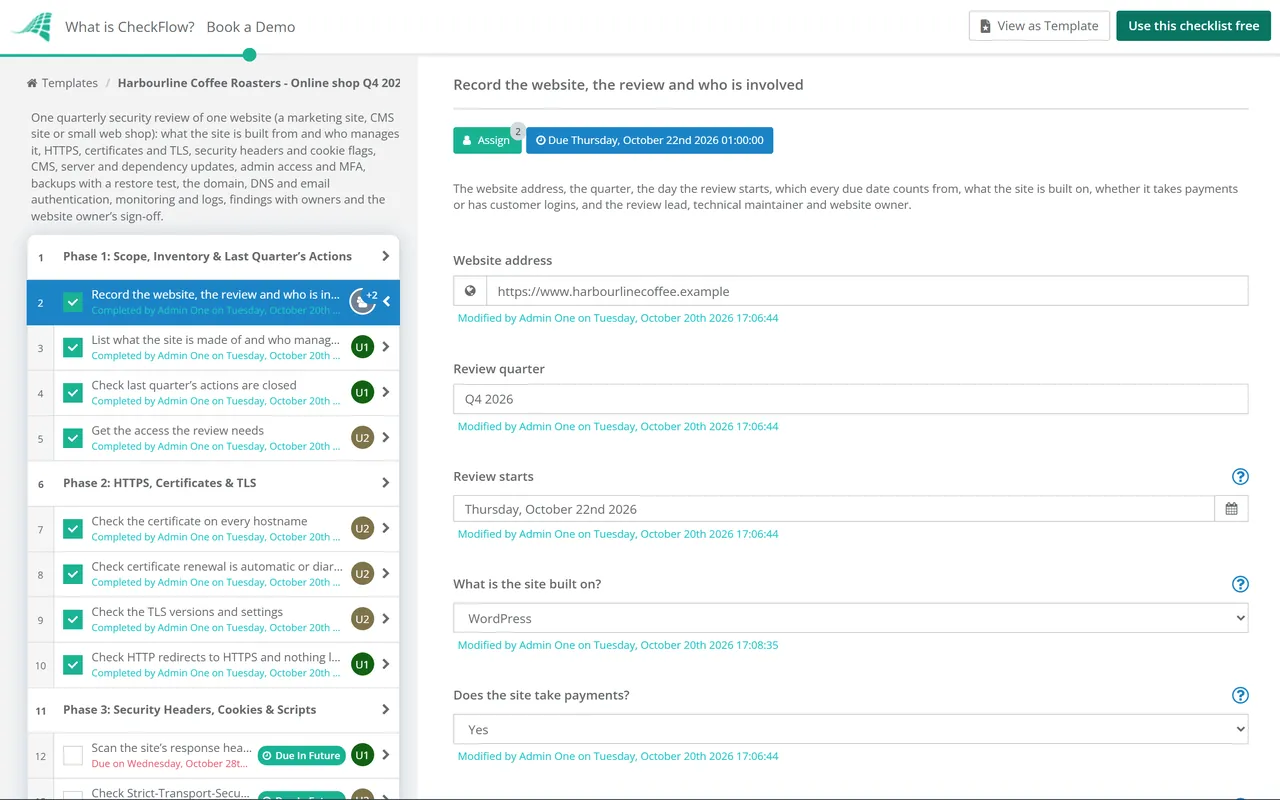
    Record the site, the people and what the site is built from before checking anything. Answer the site type, payments and logins questions first: they add the matching checks. Every due date counts from the day the review starts.

    • Record the website, the review and who is involved — the website address, the quarter, the day the review starts, which every due date counts from, what the site is built on, whether it takes payments or has customer logins, and the review lead, technical maintainer and website owner
    • List what the site is made of and who manages each part — hosting, CMS or framework, plugins or extensions, CDN, DNS host, registrar, payment provider, forms and third-party scripts, each with the company or person who manages it and the account it sits under
    • Check last quarter’s actions are closed — every finding from the last review closed with evidence, or carried forward with a reason, an owner and a new date
    • Get the access the review needs — read access to the hosting or platform panel, CMS, DNS host, registrar, CDN and monitoring for the review lead, through their own accounts rather than a shared password
  2. Phase 2

    Phase 2: HTTPS, Certificates & TLS

    5 tasks

    Check every hostname the site answers on, not only the home page. The NCSC’s TLS guidance asks for TLS 1.3, TLS 1.2 only where it is still needed, and every version of SSL and TLS 1.0 and 1.1 turned off. An expired or expiring certificate adds a task to fix it.

    • Check the certificate on every hostname — the bare domain, www and every subdomain that serves the site: trusted, covering the right names, sent with its full chain, and with its expiry date and who renews it recorded
    • Check certificate renewal is automatic or diarised — automatic renewal (ACME or the host’s own) working for every certificate, or a renewal date with an owner; CA/Browser Forum ballot SC-081 cuts the maximum lifetime of public certificates from 398 days to 47 days in steps between March 2026 and March 2029
    • Check the TLS versions and settings — TLS 1.3 turned on, TLS 1.2 only where still needed, SSL and TLS 1.0 and 1.1 turned off, and on a CDN or managed host the most restrictive policy it offers that meets this
    • Check HTTP redirects to HTTPS and nothing loads insecurely — every http:// address and the bare domain redirect permanently (301) to the HTTPS address, and no page loads scripts, images or forms over plain HTTP
    • Renew or fix the certificate — shown when a certificate is expiring, expired or broken: renew or reissue it now, install the full chain, check every hostname again and find out why renewal or monitoring did not catch it
  3. Phase 3

    Phase 3: Security Headers, Cookies & Scripts

    7 tasks

    Check the home page, a form page and the login page, because headers often differ between them. MDN and the OWASP Secure Headers Project describe each header, and the table below lists them. Try a Content-Security-Policy change in report-only mode first.

    • Scan the site’s response headers — MDN’s HTTP Observatory or a similar scanner run against the home page, a form page and the admin or customer login page, with the results saved
    • Check Strict-Transport-Security (HSTS) — sent on HTTPS responses with a max-age of at least one year (31536000 seconds); add includeSubDomains only once every subdomain works over HTTPS, and treat preload as a separate decision, because removal from the preload list takes months
    • Check the Content-Security-Policy — a policy that limits where scripts, styles, frames and form submissions can load from, includes upgrade-insecure-requests and frame-ancestors, and was tried as Content-Security-Policy-Report-Only before it was enforced
    • Check X-Content-Type-Options, frame protection and Referrer-Policy — X-Content-Type-Options: nosniff, framing blocked with the CSP frame-ancestors directive (and X-Frame-Options DENY or SAMEORIGIN for older browsers), and a Referrer-Policy of strict-origin-when-cross-origin or stricter
    • Remove headers and tags that give away versions — Server, X-Powered-By, X-AspNet-Version and generator tags that name the software and version the site runs
    • Check cookie flags — every cookie the site sets over HTTPS marked Secure, and login and session cookies also HttpOnly and SameSite=Lax or Strict
    • Check the payment pages and their scripts — shown when the site takes payments: every script on the pages that lead to payment listed and approved, the payment provider’s page or form used as the provider documents it, and the owner and date of the next PCI DSS assessment recorded
  4. Phase 4

    Phase 4: Software, Hosting & Exposed Files

    6 tasks

    Everything the site runs on should be on a version that still gets security updates. CISA’s Known Exploited Vulnerabilities catalogue lists flaws attackers are already using, so check it first. Which update task appears depends on what the site is built on.

    • Check the CMS core, plugins and themes are up to date — shown for WordPress and other CMS sites: every component on a supported version with updates applied, and plugins, extensions and themes that are not used deleted rather than only turned off
    • Check the site’s frameworks and dependencies are up to date — shown for static and custom-built sites: the frameworks, libraries and build tools in the site’s code on supported versions, with every known vulnerability the dependency scanner reports fixed or recorded
    • Check the platform’s apps, integrations and settings — shown for hosted builders and shop platforms: every installed app or integration still needed and from a known publisher, unused ones removed, and the platform’s own security settings reviewed
    • Check the server, runtime and database versions are supported — hidden for hosted builders: the operating system, web server, PHP, Node.js or other runtime and the database on versions that still get security updates, or the host’s documentation saying so
    • Check the software list against known exploited vulnerabilities — every component in the inventory compared with the CISA Known Exploited Vulnerabilities catalogue and the suppliers’ security advisories, with anything listed patched first
    • Remove old copies, test files and unused subdomains — old staging sites, backup archives, test pages, installer files and admin tools reachable from the web, and subdomains that point at services you no longer use
  5. Phase 5

    Phase 5: Admin Access, Accounts & MFA

    6 tasks

    Check every route into the site, not only the CMS login: the hosting panel, the registrar and DNS host, the CDN and the code repository can all change what visitors see. A customer login adds its own check.

    • Review every admin and editor account on the site — each one a named person who still needs it, leavers removed, and anyone who does not need admin rights moved to a lower role
    • Confirm multi-factor authentication on every admin route — CMS administrators, the hosting or platform panel, the registrar, the DNS host, the CDN, the payment provider’s dashboard and the code repository
    • Replace shared logins and passwords — no shared admin accounts; where one cannot be avoided, it sits in a password manager with a named owner and its password is changed when someone with access leaves
    • Review hosting, SFTP, SSH and database access — every account and key belongs to a current person or service, FTP is replaced by SFTP, and the database is not reachable from the internet
    • Check the admin login is protected — repeated failed logins are slowed or locked out, default usernames such as admin are gone, and admin logins are recorded
    • Check the customer login — shown when the site has customer or member logins: failed logins slowed or locked out, password reset links that expire and work once, multi-factor authentication offered, and session cookies set as in Phase 3; deeper testing belongs in a web application security test round
  6. Phase 6

    Phase 6: Backups, Restore Test, Domain & Email

    7 tasks

    A backup is only proven by a restore. The NCSC recommends at least three copies, on two devices, with one offsite, and at least one backup kept offline. A failed or partial restore adds a task to fix the backup and test it again.

    • Check the backups ran and one copy is out of reach — files and database backed up on schedule, the last good backup recorded, and at least one copy kept offsite where the site’s own credentials cannot change or delete it
    • Restore a backup to a test location — the latest backup restored to staging or a test host, the site checked page by page with its forms and logins, and the time it took recorded
    • Fix the backup and repeat the restore test — shown when the restore failed or was partial: find what was missing or broken, fix the backup job or its storage, and restore again until the site comes back complete
    • Check the domain registration and registrar account — auto-renew on with a company payment method, the expiry date recorded, the registrar lock on, two-step verification for every registrar admin, and more than one trusted person able to manage the domain
    • Check DNS records for entries left pointing elsewhere — records match the services in use, and CNAME records and delegations that point at services you no longer use are removed
    • Check SPF, DKIM and DMARC for the domain — all three published for the site’s domain and every domain it sends email from, with DMARC reports going to someone who reads them
    • Check certificate transparency logs for unexpected certificates — certificates issued for your domains this quarter compared with the ones you requested; the NCSC notes that an unexpected certificate may mean an attacker controls DNS for the domain
  7. Phase 7

    Phase 7: Monitoring, Logs & Security Contact

    4 tasks

    Monitoring turns a quiet problem into an alert that someone acts on. Each check confirms an alert was tested this quarter and reached a named person.

    • Check uptime and certificate expiry monitoring — the site, its key pages and certificate expiry monitored, with a test alert this quarter that reached a named person
    • Check change and malware detection — file-change or malware scanning on the site, alerts on changes to critical DNS records, and a look at key pages for anything unexpected such as injected links or scripts
    • Check logs are kept and reviewed — web server, CMS and hosting panel logs kept long enough to investigate an incident, stored where an attacker on the site cannot delete them, and admin logins and failures reviewed
    • Check the security contact and incident plan — a security.txt file at /.well-known/security.txt with a Contact and an Expires date still in the future, and a short plan for who acts if the site is defaced, hacked or down
  8. Phase 8

    Phase 8: Findings, Sign-off & Next Review

    6 tasks

    Log each finding with a severity, an owner and a fix date. When a critical or high finding is still open, a task appears to fix or contain it before sign-off. The website owner signs off the review, and nothing after that step can be completed until they do.

    • Log each finding with a severity, owner and fix date — every issue from Phases 2 to 7 in one table with its reference, severity (Critical, High, Medium or Low), owner, fix date and status
    • Fix or contain each critical or high finding — shown when a critical or high finding is open: fix it and check again, or contain it (take the page or feature offline, or block the route) and record who accepted the remaining risk until the fix
    • Write the review summary — what was checked, what passed, findings by severity and status, anything not checked and why, and the restore test result
    • Website owner signs off the review — Accepted, Accepted with open actions or Not accepted, based on the summary and the open findings
    • Book the next quarterly review — the next review’s start date agreed, and the review set to start on a schedule so nobody has to remember it
    • Carry open actions into the next review — every finding still open with its owner and date, and any change to this checklist or the site’s inventory

Why Run Website Security Reviews in CheckFlow?

1

The checks fit the site

The first task records what the site is built on and whether it takes payments or has customer logins, and the matching checks appear: CMS updates for WordPress and other CMS sites, frameworks and dependencies for static and custom sites, apps and settings for hosted builders, and payment page and customer login checks where they apply.

2

Every problem gets an owner

Each check records OK, Issues logged or Not checked, and asks for details when it is not OK. An expiring certificate, a failed restore test or an open critical finding adds a task to fix it, and every finding goes into one table with a severity, an owner and a fix date. Reviews in progress show on the Reports Grid.

3

Signed off every quarter

The website owner signs off the review, and nothing after that approval step can be completed until they do. Run the review on a recurring schedule so it starts every quarter without anyone having to remember it.

CheckFlow does not scan or monitor your website. Your team uses its own scanners, hosting tools and monitoring. CheckFlow makes sure each review covers the same ground, that every finding has an owner and a date, and that the owner’s sign-off is on record. Compliance checklist software shows how repeated reviews like this one are tracked.

Renew certificates with the SSL/TLS Certificate Renewal Checklist, make DNS and registrar changes with the DNS Change & Domain Renewal Checklist and move a domain to DMARC enforcement with the Email Authentication (SPF, DKIM, DMARC) Setup Checklist. Test restores across all your systems with the Backup Verification & Restore Test Checklist, and check the cookie banner and privacy notice with the Website Privacy & Cookie Compliance Checklist.

AI generator

Didn’t find what you need? Describe it.

Describe the process in a sentence and the AI checklist generator drafts the phases and tasks for you.

Frequently Asked Questions

What should a website security checklist cover?

The settings and accounts around the site as well as the site itself: HTTPS and certificates, security headers and cookie flags, updates to the CMS, plugins, server and dependencies, admin access with multi-factor authentication, backups with a restore test, the domain, DNS and email authentication, and monitoring and logs. This checklist covers all of them in one quarterly run, with findings, owners and a sign-off. Testing the application’s own features before a release belongs in a web application security test round.

How often should we review website security?

This checklist is built for a quarterly review, with routine work in between: monthly CMS maintenance, and certificate renewals as they fall due. Run an extra review after a major change, such as a new host, a redesign or a new payment provider, and after any incident. Certificates now renew more often: CA/Browser Forum ballot SC-081 cuts the maximum lifetime of public TLS certificates from 398 days to 47 days in steps between March 2026 and March 2029, so check that renewal is automatic.

Which security headers should a website send?

At least Strict-Transport-Security, a Content-Security-Policy, X-Content-Type-Options: nosniff, frame protection (the CSP frame-ancestors directive, with X-Frame-Options for older browsers) and a Referrer-Policy. Cookies should be marked Secure, and login and session cookies HttpOnly and SameSite as well. The table above says what each one does and gives a value to start from. MDN documents every header, and the OWASP Secure Headers Project publishes recommended values.

Does an A+ from a header scanner mean the site is secure?

No. The FAQ for MDN’s HTTP Observatory says there are many security considerations it cannot test, such as CMS plugins and how passwords are stored, and the current Observatory does not check TLS or certificates at all. Use a scanner for the headers and cookies in Phase 3, and work through the other phases yourself.

Which TLS versions should a website support?

The NCSC’s guidance on using TLS, updated in October 2026, recommends TLS 1.3, with TLS 1.2 only where you still need it and a plan to move to TLS 1.3. Every version of SSL, and TLS 1.0 and 1.1, should be turned off. If a CDN or managed host handles TLS for you, choose the most restrictive policy it offers that meets this. The TLSRef Server-Side TLS guidelines, which replaced Mozilla’s, give recommended settings and a configurator for common server software.

How is this different from web application security testing or a penetration test?

This review checks the configuration and hygiene around a website every quarter: certificates, headers, accounts, backups, the domain and monitoring. The Web Application Security Testing Checklist is a test round of the application’s own features against the OWASP test areas before each release, and a penetration test brings in outside testers for a fixed window. A brochure site may need only this review and routine maintenance; a site with customer accounts or its own application code benefits from all three.

Our site takes card payments. Does PCI DSS apply?

The PCI Security Standards Council says PCI DSS applies to entities that store, process or transmit cardholder data, or that could affect the security of the cardholder data environment. Ask your payment provider or acquirer which assessment applies to your site. When you answer that the site takes payments, this checklist adds a check of the scripts on the pages that lead to payment and records who owns PCI DSS compliance. The PCI DSS 4.0 Compliance Checklist covers the standard itself.

Is CheckFlow free for this template?

14-day free trial, no card required. The Business plan is $10 per user per month after the trial. Full details at checkflow.io/pricing.

Review Your Website’s Security Every Quarter

Free trial — no credit card required.

14-day free trial, no credit cardFull refund in your first 30 daysUS hosting, EU on request